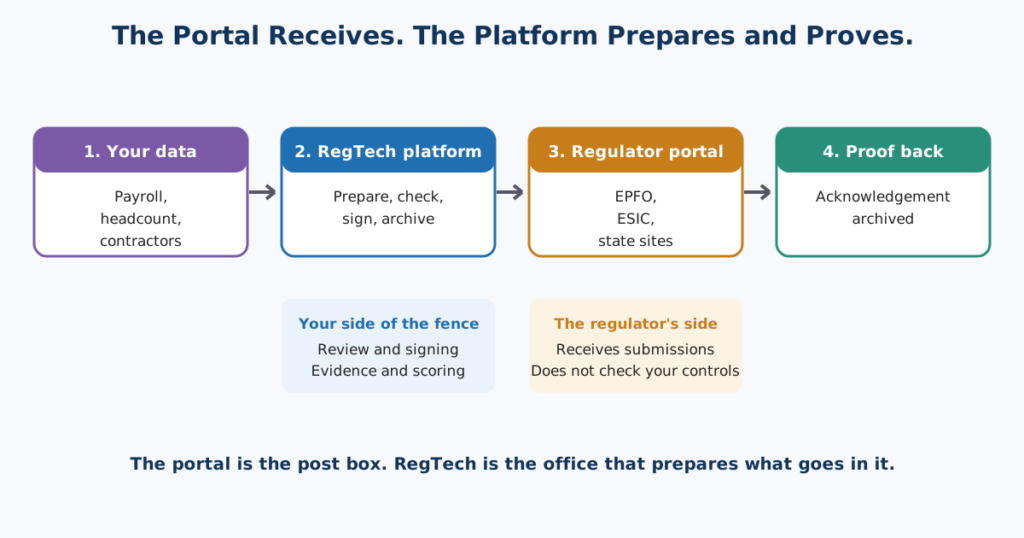
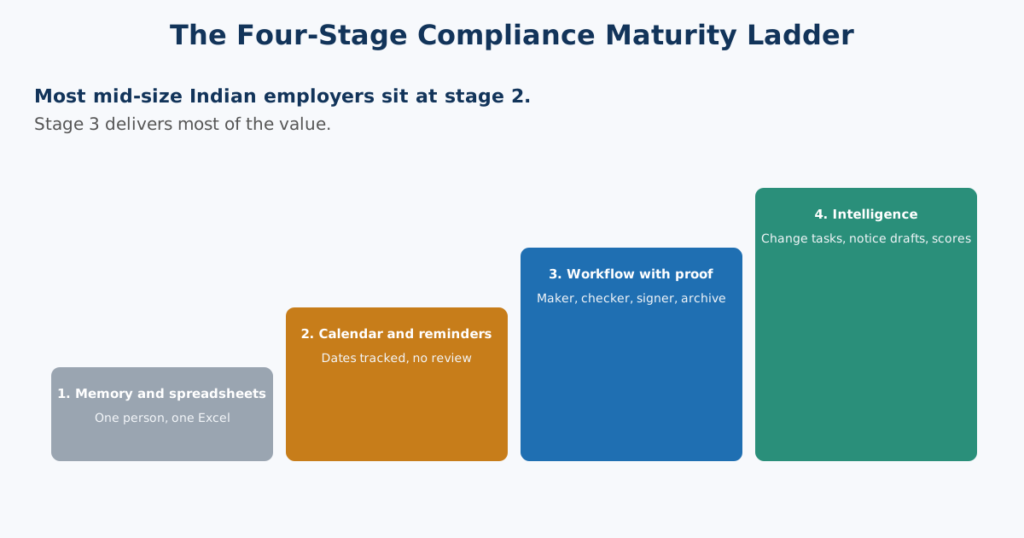
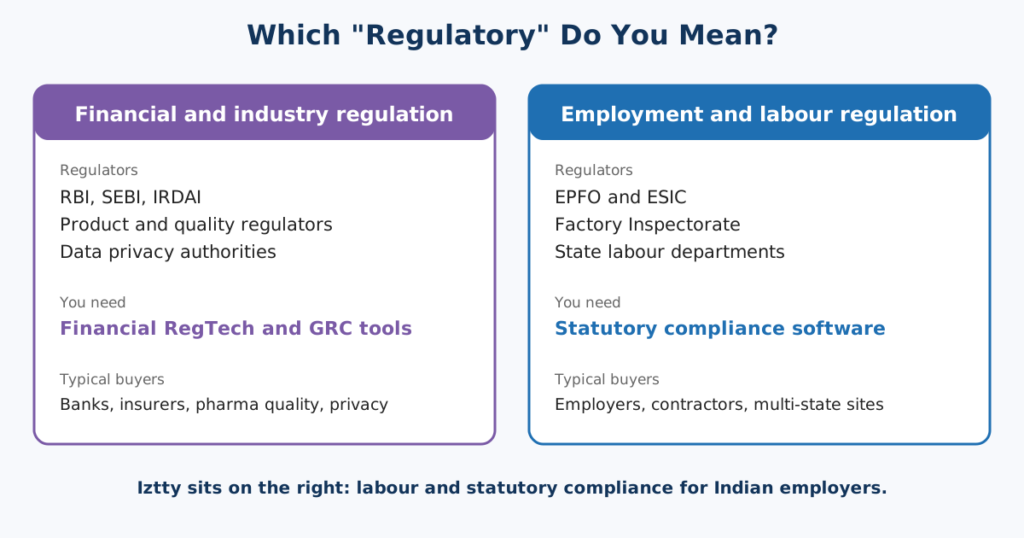
Wages Under the Labour Codes: What Counts, the 50 Percent Rule and the Payroll Impact

A payroll executive in Chennai opens a salary template on the last working day of the month. Basic pay is 30 per cent of the package. House rent allowance, conveyance and a large “special allowance” make up the rest. The template has worked for years. Then the finance head asks one question: what does this look like under the new definition of wages?

That question is now live in almost every Indian payroll room. Wages under labour codes are defined once, in the Code on Wages, 2019, and the same definition feeds provident fund, ESIC, gratuity and other calculations. This guide explains what counts as wages, what stays out, how the 50 per cent rule works, where the grey areas sit, and what it does to payroll and cost to company.

Want your salary components checked against the wage definition, state by state, before the next payroll run? Our compliance practice will review a sample with you. GET A FREE COMPLIANCE AUDIT

What Wages Mean Under the Labour Codes

The Code on Wages, 2019 defines wages in Section 2(y) as all remuneration, whether by way of salary, allowances or otherwise, payable to a person employed. The definition says wages include three things: basic pay, dearness allowance and retaining allowance, if any. It then lists items that do not form part of wages, and adds a limit on how much of the listed items you can keep outside.

Three facts frame everything else.

  • When: the four Labour Codes took effect on 21 November 2025, as announced in the PIB release on the Labour Codes.
  • Where it applies: the Ministry of Labour and Employment says in its FAQs that this single definition applies across all four Codes. You can read them on the labour.gov.in FAQs on Labour Codes (PDF).
  • Why it matters: one definition means one wage figure drives several statutory numbers. A choice made in the salary template shows up in PF, ESIC, gratuity and more.

This article is about the definition itself and its effect on pay. If you want the wider one-year status of the Codes and the state-rule position, see our review of the Labour Codes one year on.

Component by Component: What Counts and What Does Not
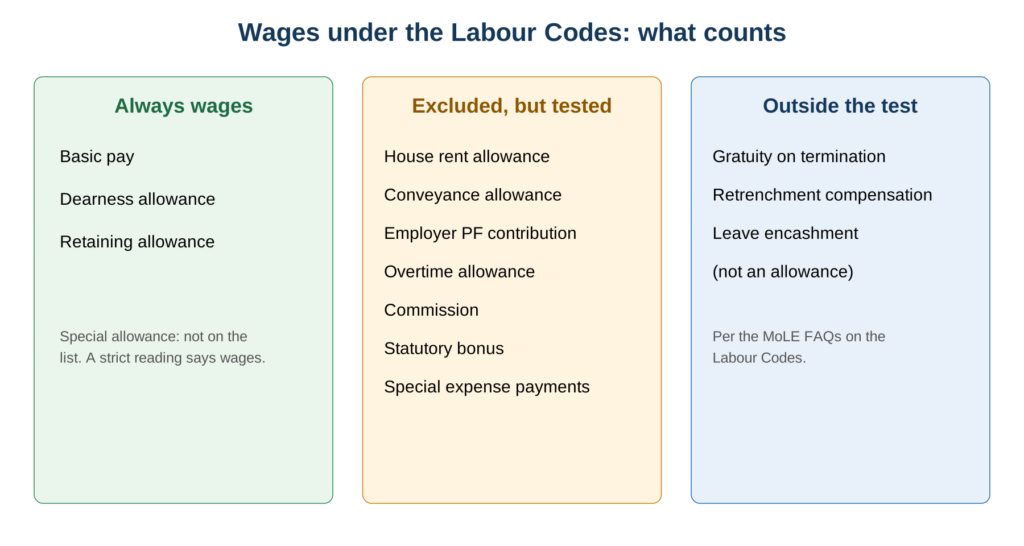
Here is how the usual pay components are treated. The “50 per cent test” column shows whether the item is counted when you check the limit in Section 3.

ComponentTreatment under Section 2(y)Counted in the 50% test?
Basic payIncluded in wagesNo (it is wages)
Dearness allowanceIncluded in wagesNo (it is wages)
Retaining allowanceIncluded in wagesNo (it is wages)
House rent allowanceExcludedYes
Conveyance allowance or travelling concession valueExcludedYes
Employer contribution to pension or provident fund, plus interestExcludedYes
Overtime allowanceExcludedYes
CommissionExcludedYes
Bonus payable under any law, where it is not part of contractual remunerationExcludedYes
Sums paid for special expenses linked to the nature of the jobExcludedYes
Value of housing, light, water, medical attendance or other amenities (as the government may exclude)ExcludedYes
Remuneration under an award, settlement or court or tribunal orderExcludedYes
Gratuity payable on terminationExcludedNo, per the MoLE FAQs
Retrenchment compensation, retirement benefits, ex gratia on terminationExcludedNo, per the MoLE FAQs
Leave encashmentMoLE says it is not part of allowancesNo
Performance incentives, ESOPs, variable pay, reimbursementsMoLE FAQs say these are not wagesNo
Special or flexible allowance that is not on the listGrey area, see Section 4Depends on the reading

Check the exact wording of each exclusion in the bare Act on India Code before you finalise a template. Clause letters differ between published copies, so the table describes the items rather than numbering them.

The 50 Percent Rule, Explained Plainly
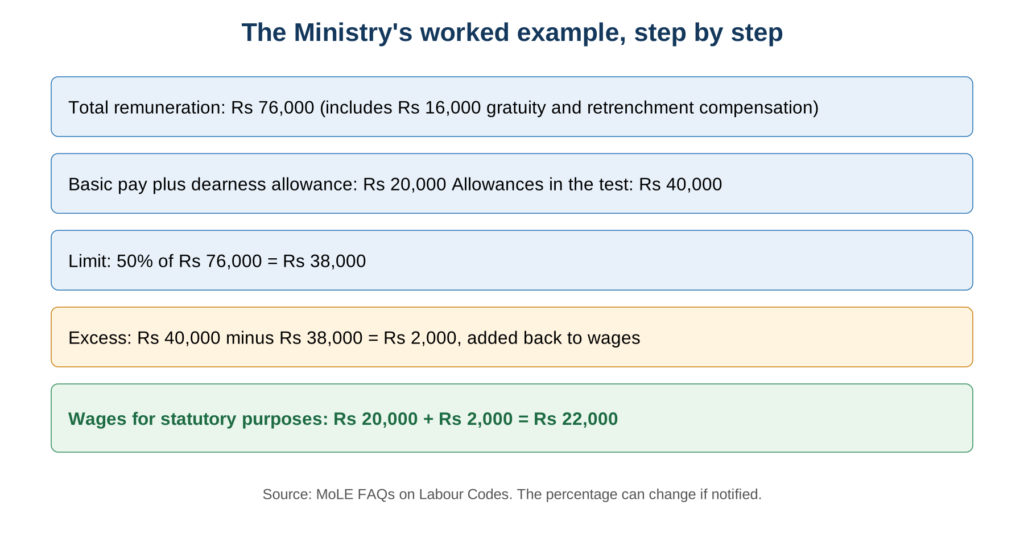
The 50 per cent rule is a limit on exclusions. It is not a requirement that basic pay be 50 per cent of the package. The MoLE FAQs put it this way: allowances other than basic pay, dearness allowance and retaining allowance are tested together, and where they exceed 50 per cent of total remuneration, or such percentage as is notified, the excess is added back and treated as wages.

The Ministry gives a worked example. Total remuneration is Rs 76,000. Basic pay plus dearness allowance is Rs 20,000. Allowances are Rs 40,000. Gratuity and retrenchment compensation of Rs 16,000 sit outside the test. Fifty per cent of Rs 76,000 is Rs 38,000. Allowances of Rs 40,000 exceed it by Rs 2,000, so wages for statutory purposes become Rs 22,000.

Three points follow from that example.

  • The denominator is total remuneration. That includes the items that sit outside the test, such as gratuity.
  • Only the excess comes back. You do not recalculate every figure. You add the amount above the limit to wages.
  • The percentage can change. The FAQ says “or such percentage as notified”. Put a review date in your calendar rather than hard-coding 50 into every formula.

Where the Grey Areas Are

This is the part most summaries skip. The definition says wages are “all remuneration”, then lists what is excluded. A strict reading is that anything not on the exclusion list is already wages. The FAQ framing, in contrast, tests allowances as a group against the limit.

That gap matters for the item almost every template carries: the special allowance, sometimes called flexible or other allowance.

  • Reading 1 (the MoLE FAQ framing): count all allowances other than basic, dearness allowance and retaining allowance in the test, and add the excess back.
  • Reading 2 (a strict reading of the exclusion list): only the listed exclusions can be kept out. A special allowance that is not on the list is wages from the first rupee.

The second reading produces a higher wage base. It is also the safer position if an inspector reads the text closely. Employers who are comfortable with Reading 1 should record why. We are not offering a legal opinion here. If special allowance is a large part of your pay, take written advice and keep it on file.

Other open points reported around the one-year mark include how managerial and supervisory staff are treated for overtime and leave encashment, how IT and ITeS allowance-heavy structures should be read, and whether the Central Government will notify a percentage other than 50. None of these is settled in the sources we reviewed.

An Illustrative Example With Numbers
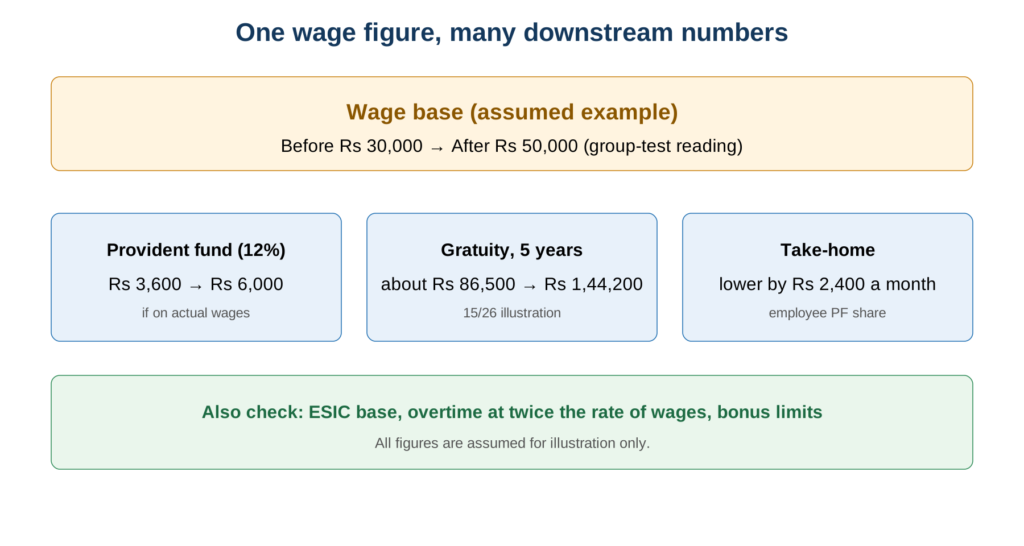
Every figure below is assumed for illustration. It is not a payroll quote or a legal calculation. Take an employee with a monthly package of Rs 1,00,000.

Component (monthly)Amount (Rs)
Basic pay30,000
House rent allowance15,000
Conveyance allowance5,000
Employer provident fund contribution (12 per cent of basic)3,600
Special allowance46,400
Total remuneration1,00,000

Under Reading 1 (MoLE FAQ framing): allowances other than basic add up to Rs 70,000. The 50 per cent limit is Rs 50,000. The excess is Rs 20,000. Wages for statutory purposes are Rs 30,000 plus Rs 20,000, which is Rs 50,000.

Under Reading 2 (strict): the listed exclusions are HRA, conveyance and the employer PF contribution, which add up to Rs 23,600. That is under 50 per cent, so they stay out. The special allowance is wages. Wages are Rs 76,400.

Now see what the wage figure does downstream, using Reading 1 for simplicity:

ItemBefore (wages Rs 30,000)After (wages Rs 50,000)
Provident fund at 12 per cent, where contribution is on actual wagesRs 3,600 each sideRs 6,000 each side
Employee take-home effectBaseLower by Rs 2,400 a month
Gratuity after 5 years, using the familiar 15/26 conventionAbout Rs 86,500About Rs 1,44,200

Two cautions. First, if your provident fund contribution is calculated only up to the statutory wage ceiling rather than on actual wages, the PF line will not move for that employee. The Cabinet approved raising that ceiling from Rs 15,000 to Rs 25,000 on 16 September 2026, as announced on the Prime Minister of India website, and the official page gives no effective date. Confirm it from the EPFO notification. Second, the Ministry’s FAQ describes gratuity as 15 days’ wages per year of service on the rate last drawn, with a ceiling of Rs 20 lakh. The 15/26 convention is an illustration. Use the formula in the Act and rules for actual payouts.

Where the Wage Figure Flows

CalculationWhat to check
Provident fundWhether contributions use actual wages or the ceiling, and from which month the new definition applies. See our EPF and ESIC compliance guide for the monthly cycle.
ESICThe MoLE FAQs state that the wage definition is in force for ESI purposes from 21 November 2025, pending rules. Check that the ESIC wage base in payroll matches.
GratuityProvision method, and fixed-term employees who become eligible after one year under the Code on Social Security, 2020.
BonusEligibility and calculation limits that depend on wages. Check the thresholds notified by your appropriate government.
OvertimeOvertime is paid at twice the normal rate of wages under Section 13 of the Code on Wages. A higher wage base raises the hourly rate.
Minimum wage testsThe single definition applies across the Codes, so test against the same figure. Check your state’s notified rates.
Leave encashmentMoLE says it is not part of allowances. Check which wage figure your leave policy uses.

The Payroll Impact: Three Ways Employers Respond

Once the wage base rises, someone pays for it. Employers generally choose one of three paths. None is risk-free, and the right one depends on your workforce, margins and what your contracts allow.

ResponseWhat happensWatch for
Keep total cost to company fixed and rebalance the splitBasic rises, allowances fall, employer cost stays flat, take-home falls slightlyEmployee communication, contract wording and any consent your documents require
Keep take-home fixed and let cost riseThe employer absorbs higher PF, gratuity and related costsBudget impact and gratuity provision; MSMEs feel this first
Phase the change by grade or joining dateNew joiners move first, existing staff laterEquity between employees and a clear written position for the legacy group

Whichever you pick, three habits protect you: model the cost by grade before announcing anything, keep the decision note signed by HR and finance, and apply the same logic in every state where you run payroll.

Running payroll in several states and unsure the same wage logic reaches every filing? See how Iztty checks it. BOOK A DEMO

Setting Up Payroll to Carry the New Definition

Most errors come from configuration, not interpretation. A short build checklist helps.

  1. Tag every component. Mark each as wages, listed exclusion, outside the test, or grey. A tag in the component master beats a note in a spreadsheet.
  2. Add the test as a formula. Compute the allowance share per employee each month and flag anyone above the limit. Keep the percentage in one setting you can change.
  3. Create separate wage bases. Keep one for PF, one for ESIC and one for gratuity, even if they match today. Rates and ceilings differ, and the rules may diverge.
  4. Date the change. Record the effective date you apply from and why. Auditors ask for the date.
  5. Reconcile to filings. Compare payroll wage totals to the ECR and ESIC contribution file for the same month.
  6. Keep the proof. Store the decision note, the component tags and the monthly test output together.

If your payroll sits in Tally, Zoho Payroll or Keka, the component tagging still needs to be done on your side. Our notes on Zoho Payroll compliance automation and Tally EPF and ESIC integration show how the compliance side connects. For the wider picture of payroll statutory duties, see payroll statutory compliance in India.

Six Mistakes We See

  • Treating 50 per cent as a target for basic pay. It is a limit on exclusions.
  • Counting gratuity inside the test. The MoLE FAQs keep gratuity and retrenchment compensation out of it.
  • Testing once and forgetting. Pay changes at every increment. Test again.
  • Using one wage figure for everything. PF ceilings and gratuity rules differ. Keep separate bases.
  • Leaving special allowance undiscussed. If it is large, a written position is cheap protection.
  • Changing payroll but not the offer letter. New letters should show components that match what payroll pays.

Where Iztty Fits

Iztty is an AI statutory compliance platform for Indian employers, built by Futurex Management Solutions Limited. For a wage-definition change, the relevant published features are:

  • Regulatory Change Intelligence: monitors gazette notifications and EPFO and ESIC circulars, and creates action tasks matched to your company profile, with human review before enforcement.
  • Maker-Checker-DSC workflow: a four-stage chain of upload and validate, review, digital signing and archive, so a changed wage base is reviewed before filing.
  • Compliance Score Meter: a live 0 to 100 per cent score by Act and by state, with Low, Medium and High bands.
  • Payroll compliance: EPF, ESIC, Professional Tax and LWF, with integrations to Tally, Zoho Payroll and Keka HR.
  • Vendor compliance: collects contractor EPF, ESIC and wage registers, which matters because contractor wages also move under the new definition.

As a representative example, a 14-factory manufacturer moved its compliance score from 61 per cent to 88 per cent in 90 days. A 40-client consultancy cut notice-response time from 5 days to 4 hours. Both are anonymised and illustrative, not named case studies. Iztty does not set your salary structure. It helps you see where wage-linked filings disagree and keep the proof. Explore the Iztty platform or the AI features.

Conclusion

Wages under labour codes come down to a simple shape. Three items are always wages. A list of items can stay out, as long as the listed allowances do not pass the 50 per cent limit or whatever percentage is notified. Everything else needs a position. That position then flows into PF, ESIC, gratuity, overtime and bonus.

The employers who handle this well do not argue about the definition for months. They tag components, run the test on real salary data, choose a response, write down why, and keep the proof. If you want a second review of your templates, CALL AN EXPERT or ask for an audit.

FAQs

Q1: What are wages under the new Labour Code?
Section 2(y) of the Code on Wages, 2019 defines wages as all remuneration, whether by way of salary, allowances or otherwise, payable to an employed person. It includes basic pay, dearness allowance and retaining allowance. It leaves out a listed set of items, such as house rent allowance, conveyance allowance, overtime allowance, commission and the employer’s provident fund contribution, subject to the 50 per cent test. The Ministry of Labour and Employment says this single definition applies across all four Codes.

Q2: What is the new Code on Wages in 2026?
The Code on Wages, 2019 is one of the four Labour Codes that took effect on 21 November 2025. It brings the Payment of Wages Act, 1936, the Minimum Wages Act, 1948, the Payment of Bonus Act, 1965 and the Equal Remuneration Act, 1976 into one Code. What is new in 2026 is the rulebook: the Centre notified the Code on Wages (Central) Rules, 2026 on 8 May 2026.

Q3: What is the 50 per cent rule?
It limits how much of the allowances and similar items you can keep outside wages. If they exceed 50 per cent of total remuneration, or such percentage as is notified, the excess is added to wages.

Q4: Are HRA and conveyance allowance part of wages?
They are on the list of exclusions, but they count towards the 50 per cent test. If the total goes past the limit, the excess is treated as wages.

Q5: Is gratuity counted in the 50 per cent test?
No. The Ministry of Labour and Employment’s FAQs keep gratuity and retrenchment compensation out of the test.

Q6: Does the new definition apply to PF and ESIC?
The Ministry says the single definition applies across all four Codes, and that it is in force for ESI purposes from 21 November 2025, pending rules. Check the EPFO and ESIC circulars for the practical start month.

Q7: What are the types of wages under the Labour Codes?
The Code on Wages works with several kinds. The floor wage is a national baseline set by the Centre, and minimum wages fixed by an appropriate government cannot go below it. Minimum wages are the legal pay floor for a given state, area, industry and skill. Overtime wages are paid at twice the normal rate of wages. Wages can also be fixed by method, as a time rate or a piece rate. Inside any pay slip, basic pay, dearness allowance and retaining allowance are always wages, while the listed exclusions are tested against the 50 per cent limit.

Q8: What is the minimum wage rate in 2026?
There is no single national rate. Minimum wages are fixed by the appropriate government, which is the Centre for central sphere employments and the state for most private employers, and they vary by state, area, industry and skill. The national floor wage has not been notified in the sources we reviewed. The Central Rules say minimum wages are fixed on a daily basis and revised twice a year, before 1 April and 1 October, using the Labour Bureau’s CPI for Industrial Workers.

The central sphere dearness allowance was revised from 1 October 2026. As one example from a secondary summary, the Area A rate for unskilled construction and maintenance work was Rs 840 a day, basic plus variable dearness allowance. Check your own state’s notification for the rate that applies to you.

Q9: What are the New Labour Codes 2026?
The four Labour Codes are the Code on Wages, 2019, the Industrial Relations Code, 2020, the Code on Social Security, 2020 and the Occupational Safety, Health and Working Conditions Code, 2020. They consolidate 29 central labour laws and took effect on 21 November 2025. The Central Rules were notified in May 2026. State Rules are still uneven, and reports in late 2026 put states with substantial coverage at somewhere between six and ten.

Q10: What are the Code on Wages (Central) Rules, 2026?
The Ministry of Labour and Employment notified them on 8 May 2026 as G.S.R. 343(E), and they came into force the same day. They apply where the Centre is the appropriate government. They provide that minimum wages are fixed daily, with hourly wages as daily wages divided by 8 and monthly wages as daily wages multiplied by 26. They also set out how the floor wage is fixed after consulting the Central Advisory Board, usually revised every five years. Most private employers also need to follow their State Rules.
Labour Codes One Year On: What Changed, What Is Still Pending, and What Employers Should Fix Now

It is the 23rd of November 2026, two days after the first anniversary of the four Labour Codes. An HR head in Pune opens her notes and finds three different answers to one question: which rules apply to her plants in Maharashtra, her warehouse in Gujarat and her sales office in Delhi? The Centre has notified its rules. Some states have notified theirs. Others have only published drafts. Payroll still runs on a salary structure designed in 2024.

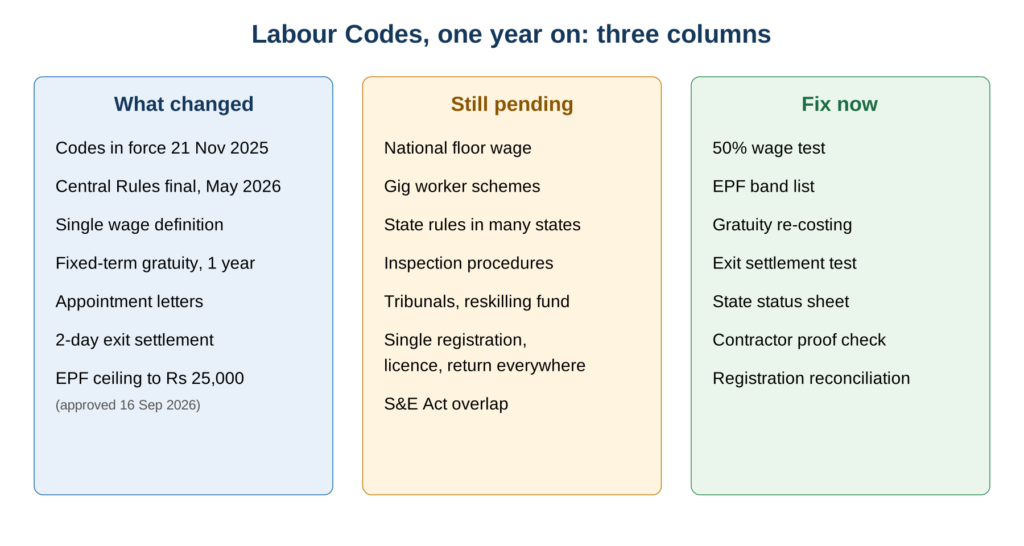
That is where most employers stand with the labour codes 2026 picture. The law is in force, the Central Rules are final, and the state layer is still uneven. This guide separates what has actually changed from what is still pending, flags where the reports disagree with each other, and ends with a ten-point list of things worth fixing in the next 30 days.

Not sure which Labour Code rules apply to each of your states and sites today? Our compliance practice can map it with you. GET A FREE COMPLIANCE AUDIT

Where the Labour Codes Stand After One Year

The four Labour Codes took effect on 21 November 2025. The Press Information Bureau announced that they consolidate 29 central labour laws into the Code on Wages, 2019, the Industrial Relations Code, 2020, the Code on Social Security, 2020 and the Occupational Safety, Health and Working Conditions Code, 2020. You can read the government’s own account in the PIB release on the implementation of the Labour Codes.

A year later, the short version is this:

  • The Codes are in force. Employers cannot wait for “full clarity” before acting. The old Acts they replaced are no longer the operating law.
  • The Central Rules are final. The Centre notified its final rules in May 2026. Those rules apply where the Centre is the “appropriate government”, such as railways, mines, ports, banking, insurance and central public sector units.
  • Most private employers sit under State Rules. This is the layer that is still patchy.
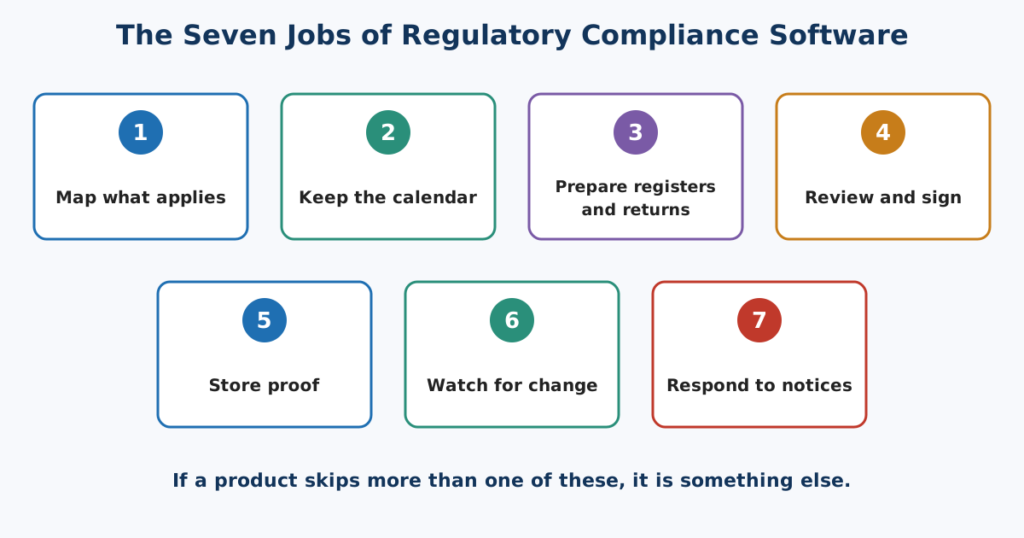
  • Several national pieces are pending. A national floor wage, gig worker schemes and some institutional bodies have not yet delivered.

If you want the month-by-month sequence of how the Codes arrived, our earlier guide on regulatory change management for Labour Code updates covers it. This article does not repeat that timeline. It asks a different question: one year in, where are we, and what should you do on Monday morning?

What Has Actually Changed for Employers

Strip away the commentary and a handful of changes touch almost every employer. These are the ones to check first.

A single wage definition

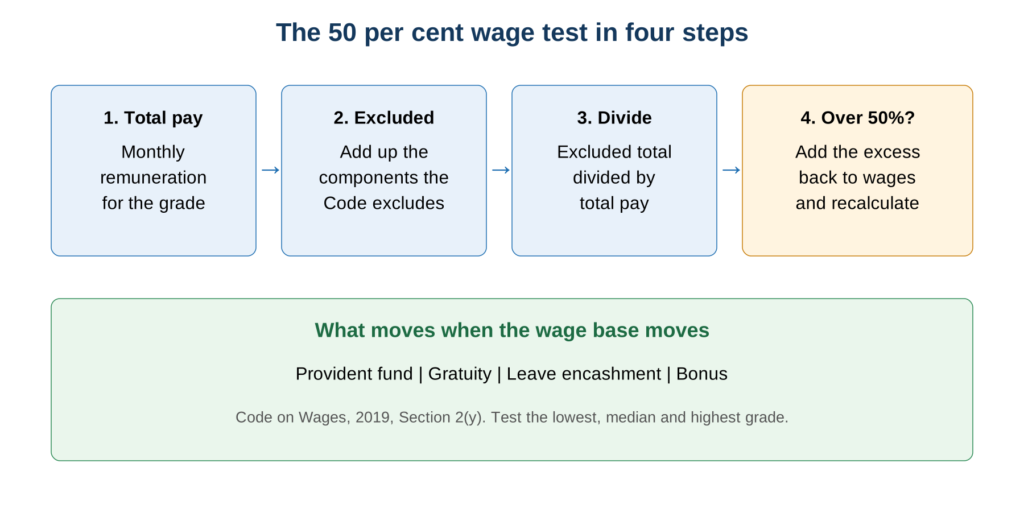
The Code on Wages, 2019 defines “wages” in Section 2(y). Certain components are excluded, but if the excluded items add up to more than 50 per cent of total remuneration, the excess is added back to wages. This is the change that sent payroll teams back to their salary structures. Basic pay, dearness allowance and retaining allowance are inside the definition. A pay structure that keeps basic pay low and parks the rest in allowances can now fail the test.

Why it matters beyond payroll: the same wage figure feeds provident fund, gratuity, leave encashment and bonus calculations. Fix it once, and several downstream numbers move with it.

Gratuity for fixed-term employees

Under the Code on Social Security, 2020, fixed-term employees become eligible for gratuity after one year of service, rather than the five years that applied to permanent staff under the old law. If you hire on fixed-term contracts, you now carry a gratuity liability that did not exist before. Business Today, reporting on the anniversary, notes that gratuity provisions took effect when the Codes became operational.

Overtime and timely payment

Section 13 of the Code on Wages sets overtime at twice the normal rate of wages. That is not new for factories, where the Factories Act already required it, but the Code extends the principle across establishments covered by it. Section 17 sets payment timelines, including settlement of dues within two working days when a worker is removed, dismissed or resigns. Check your full-and-final process against that two-day clock. Most exit processes were built around 30 to 45 days.

Appointment letters, health check-ups and women in night shifts

The Ministry of Labour has highlighted mandatory appointment letters, universal minimum wages, free annual health check-ups and permission for women to work in all sectors, including night shifts, subject to conditions. The conditions, such as consent and transport, sit in the rules, which is why state notification matters here. The Ministry’s written reply in Parliament is available as a PDF on the labour.gov.in website.

Registration, licence and return, in theory

The Codes promise a single registration, a single licence and a single return. That promise is only as good as the state portals behind it. We come back to this in Section 4.

Central Rules and State Rules: The Uneven Layer

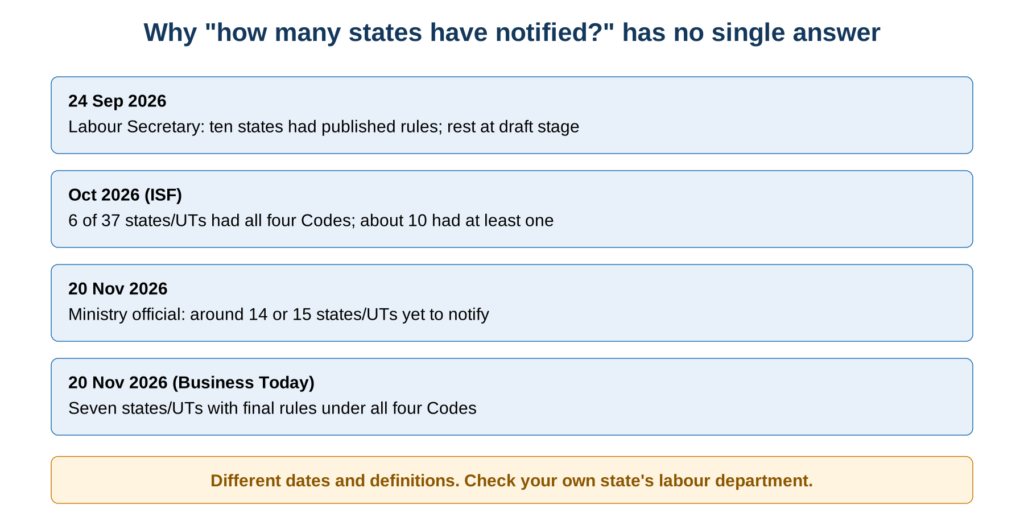
The question employers ask most is simple: have my states notified their rules? The honest answer is that the count depends on who you ask and when they counted.

Source and dateWhat it reported
Labour Secretary, as reported by Business Standard, 24 September 2026Ten states had published rules. The rest had issued drafts. The Secretary said he hoped all states and Union Territories would have rules by 31 October.
Indian Staffing Federation tracking, cited by Business Standard, 20 November 2026Six of 37 states and UTs had notified rules under all four Codes as of October. About 10 more had notified at least one Code.
Unnamed Labour Ministry official, same articleAround 14 or 15 states and UTs had not yet notified state rules.
Business Today, 20 November 2026Seven states and UTs had final rules under all four Codes. The report gave no total for the rest.

These numbers do not contradict each other as much as they appear to. One counts states with any rules, another counts states with all four Codes. One was taken in September, another in October. A fair reading is that a small group of states has finished, roughly ten have partial coverage, and a long tail has not. The 31 October target the Labour Secretary mentioned was not met everywhere.

What this means for you: do not rely on a national headline count. Find your own states on the state labour department website, check which of the four Codes each has notified, and note the date. That one-line record per state is worth more than any summary.

Where states diverge

The Indian Staffing Federation’s executive director, Suchita Dutta, told Business Standard that “divergence in timing and interpretation, not the codes’ text, is now the principal friction point.” The areas of divergence reported include working hours, overtime, inspections, conditions for women on night shifts, standing order thresholds and the interpretation of the wage definition. If you operate in three states, expect three slightly different answers to the same question.

What Is Still Pending

Reports around the anniversary agree on a core list of items that have not yet been delivered. Treat this as a watch list, not a to-do list. Most of it is for the government to act on, but each item changes something for you once it lands.

Pending itemStatus as reportedWhy an employer should care
National floor wageNot notified. The Central Advisory Board under the Code on Wages is constituted, but sources report little progress.It sets the minimum below which no state can fix its wages.
Gig and platform worker schemesA National Social Security Board was notified in October 2026. Contribution mechanisms are still being operationalised.Aggregators face a contribution of 1 to 2 per cent of annual turnover, capped at 5 per cent of amounts paid to these workers.
Single registration, licence and returnNot working fully across all states.You may still file in the old way in some states and the new way in others.
Inspection proceduresFormal standard procedures are awaited.Inspector-cum-facilitators are appointed, but how they inspect is not uniform.
Tribunals and reskilling fundNot yet fully in place.Affects retrenchment and dispute handling.
Shops and Establishments overlapUnresolved, including treatment of leave balances accrued under earlier laws.State Shops and Establishments Acts continue to run alongside the Codes.

One more item deserves a mention. Trade unions have kept the Codes in the political conversation. On 20 November 2026, unions raised them at a pre-Budget meeting with the Finance Minister, and CITU has called for repeal. Whatever one thinks of that debate, it is a reminder that the rules can still be amended. Build your processes so a rule change is a small edit, not a rebuild.

The EPF Wage Ceiling and Why Reports Differ

This is the item most likely to hit payroll in the next quarter, and the reporting on it is not consistent.

On 16 September 2026 the Union Cabinet approved raising the wage ceiling for mandatory EPFO coverage from Rs 15,000 to Rs 25,000 per month. The Prime Minister’s Office page says the change is expected to bring more than 51 lakh additional employees under mandatory coverage. You can read the announcement on the Prime Minister of India website. The same page says the Ministry of Labour and EPFO “will undertake the necessary statutory and administrative steps for implementation.” It does not give an effective date.

Some secondary reports state that coverage began on 17 September 2026. Others describe the EPF Scheme, 2026 and EPS, 2026 as notified in June 2026 and approved by EPFO’s Central Board of Trustees on 19 November 2026. Those dates have not been confirmed against a gazette notification in this review.

What to do with that uncertainty:

  • List the employees earning between Rs 15,001 and Rs 25,000. You need this list whichever date turns out to be right.
  • Read the EPFO circular, not the news. Check the EPFO website for the notification and effective date before changing contributions.
  • Decide the contribution basis. Reports indicate employers may contribute on the ceiling rather than full basic pay. That is a policy decision with take-home pay consequences, so take it to leadership with numbers.
  • Remember the 15th. Contributions through the ECR are due by the 15th of the following month, and late payment attracts interest under Section 7Q (12 per cent a year) and damages under Paragraph 32A (1 per cent a month). Our EPF and ESIC compliance guide walks through the monthly cycle.

Establishments running their own exempt PF trusts should check the transition requirements closely, since reports suggest they must formally seek continuation of exemption.

Six Grey Areas Where Employers Are Guessing

Consultants quoted in the anniversary coverage agree that several questions still lack a clear answer. If your business sits in one of these, document your reasoning today so you can show a good-faith position later.

  • IT and ITeS pay structures. Allowance-heavy salaries have not been restructured widely, and the classification of workers versus non-workers in the sector is unclear, according to a Deloitte partner quoted by Business Standard.
  • Managerial staff. How overtime and leave encashment apply to managerial employees is not settled.
  • Legacy registrations. What happens to registrations and licences issued under the repealed Acts is unclear in several states.
  • Leave balances under Shops and Establishments laws. Overlap between state Acts and the Codes is unresolved.
  • MSME cost impact. Higher wage bases push up provident fund and social security costs for small employers.
  • Contract labour thresholds. The Occupational Safety, Health and Working Conditions Code changes the threshold for contractor licensing. Confirm the number your state rules use before relying on any national summary.

A short written note for each grey area, signed off by HR and finance, is cheap. It also tells an inspector that you saw the issue and made a decision rather than ignoring it.

Running contract labour across more than one state? The principal employer carries the risk when a contractor slips. CHECK MY COMPLIANCE

What to Fix Now: A Ten-Point List

This is the practical part. Each item below is something you can start without waiting for another notification.

  1. Run the 50 per cent wage test on every salary structure. Pull a sample from each grade. If excluded allowances exceed half of total remuneration, model the new wage figure and its effect on PF, gratuity and leave encashment.
  2. List employees in the Rs 15,001 to Rs 25,000 band. Confirm the EPFO effective date and decide your contribution basis before the next ECR.
  3. Re-cost gratuity for fixed-term staff. Ask finance to provide for the one-year eligibility. Check that the provision method is consistent across entities.
  4. Shorten your exit settlement process. Test whether you can settle dues within two working days of a resignation or removal. If not, identify which step (assets, approvals, payroll cut-off) is slowing it.
  5. Issue appointment letters to everyone, not just new joiners. Check that the letters state wage components, working hours and the applicable establishment.
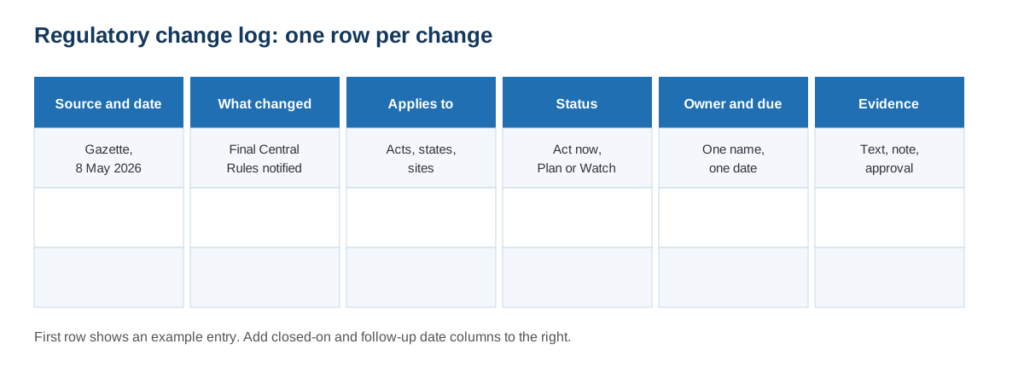
  6. Build a state-by-state status sheet. One row per state: which Codes have notified rules, the date, the source URL and who checked it. Update it monthly.
  7. Review overtime and working-hours settings in your attendance system. Match them to the state rules where each site operates, not to a single group policy.
  8. Re-check women night-shift conditions. Where you employ women on night shifts, confirm that consent and safety arrangements match the state rules.
  9. Re-verify contractor documentation. Confirm contractor licences, wage payment proof and the principal employer’s own records for every site. Our guide to CLRA compliance covers the registers and returns that carry over as evidence.
  10. Reconcile registrations. Compare the registrations on your master list against what each state portal now shows. Flag anything issued under a repealed Act without a confirmed transition.

A 30-Day Action Plan

WeekFocusOwnerOutput
Week 1State status sheet and wage test sampleCompliance lead, payrollStatus sheet; list of structures failing the 50 per cent test
Week 2EPF band list and contribution basis decisionHR, financeEmployee list; written decision note
Week 3Gratuity re-costing, exit settlement test, appointment lettersFinance, HR operationsRevised provision; letter template; settlement gap list
Week 4Contractor and registration reconciliationSite HR, complianceReconciled registration list; contractor exceptions log

Do not try to fix everything in parallel. The first two weeks carry the money. The last two carry the audit risk.

Watching Your States Without a Full-Time Analyst

Keeping a state sheet up to date sounds easy until you operate in eight states. Notifications appear in gazettes, on labour department sites and in circulars from EPFO or ESIC. Nobody owns the job, so it slides.

A workable routine looks like this:

  • Name one owner per state. A person, not a team.
  • Check on a fixed day each month. Pick the first Monday and keep it.
  • Log the source. A screenshot or URL with a date beats a memory of what someone read.
  • Translate every change into an action. “State X notified Wages Code rules” means little until it becomes “update overtime settings at the Hosur plant by the 10th.”

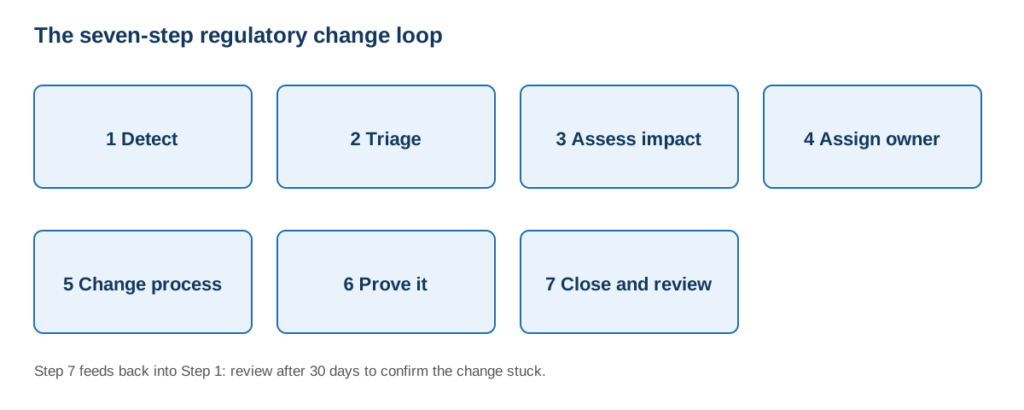
The same discipline applies to the Rs 25,000 EPF ceiling and any later change. If you want the full change-handling loop, our article on regulatory change intelligence sets out how alerts, review and action fit together.

Where Iztty Fits

Iztty is an AI statutory compliance platform for Indian employers. Applied to the Labour Code transition, a few published features are relevant:

  • Regulatory Change Intelligence: tracks regulatory updates and puts them through human review before they are enforced in your compliance calendar.
  • Compliance Score Meter: shows a 0 to 100 per cent score, broken down by Act and by state, with Low, Medium and High risk bands, so you can see which state is behind.
  • Maker-Checker-DSC workflow: a four-stage approval chain for filings, so a changed rate or ceiling is reviewed before submission.
  • Vendor compliance: keeps contractor documents and proofs visible to the principal employer.
  • Integrations: works with Tally, Zoho Payroll and Keka HR.
  • AI Notice Response: prepares responses to departmental notices in about 4 hours, against the 3 to 5 days many teams take manually.

As a representative example, a manufacturer with 14 factories moved its compliance score from 61 per cent to 88 per cent in 90 days after bringing its filings into one system. A consultancy managing 40 clients cut a recurring reporting task from 5 days to 4 hours. Both are anonymised and illustrative, not named case studies. Results depend on your starting data and how many states you cover. See the Iztty platform for the full feature set.

See your state-wise Labour Code exposure in one view. We will walk you through the platform using your own states and Acts. BOOK A DEMO

Conclusion

The labour codes 2026 story is not one of chaos. The Codes are in force, the Central Rules are final, and a few states have finished their own. What is missing is uniformity, and that gap will stay open for some months. Employers who wait for it to close will spend next year in catch-up mode.

Start with money: the wage definition, the EPF ceiling and gratuity. Then fix process: exit settlements, appointment letters, state-wise status tracking. Write down your reasoning on the grey areas. And keep one eye on the pending list, because the national floor wage and the gig worker schemes will land eventually.

If you would like a second pair of eyes on your state coverage, CALL AN EXPERT at Futurex or ask for an audit.

FAQs

Q1: When did the four Labour Codes come into force?
On 21 November 2025. The Press Information Bureau announced that the Codes consolidate 29 central labour laws.

Q2: Are the Central Rules under the Labour Codes final?
Yes. The Centre notified its final rules in May 2026. They apply where the Centre is the appropriate government. Most private employers are governed by State Rules.
Q3: How many states have notified their Labour Code rules?
Counts differ. In late 2026, reports cited six to ten states with full or substantial coverage and around 14 or 15 states and UTs yet to notify. The figure depends on the source, the date and whether all four Codes are counted. Check your own state’s labour department.

Q4: What is still pending under the Labour Codes?
Reports point to a national floor wage, gig and platform worker schemes, formal inspection procedures, tribunals, the reskilling fund and fully working single registration, licence and return systems across states.

Q5: What is the 50 per cent wage rule?
Under Section 2(y) of the Code on Wages, 2019, if allowances and other excluded components exceed 50 per cent of total remuneration, the excess is added back to wages. This raises the base for provident fund, gratuity and other calculations.

Q6: Do fixed-term employees get gratuity now?
Yes. The Code on Social Security, 2020 makes fixed-term employees eligible for gratuity after one year of service.

Q7: Has the EPF wage ceiling changed?
The Union Cabinet approved raising it from Rs 15,000 to Rs 25,000 per month on 16 September 2026. The official announcement does not give an effective date, so confirm it against the EPFO notification before changing contributions.

Q8: How fast must dues be settled when an employee leaves?
Section 17 of the Code on Wages provides for settlement within two working days of removal, dismissal, retrenchment or resignation. Check your state rules for any detail.

Q9: Do the Labour Codes replace the Shops and Establishments Acts?
Not entirely. State Shops and Establishments Acts continue, and the overlap with the Codes, including leave balances, is reported as unresolved.

Q10: What should an employer do first?
Run the wage test on salary structures, list employees in the Rs 15,001 to Rs 25,000 band, re-cost gratuity for fixed-term staff and build a state-wise status sheet. Those four steps cover the money and the rules you depend on.

Compliance Software Implementation: Data Migration and a 30-60-90 Day Go-Live Plan

It is the 12th of the month. Provident fund and ESIC contributions fall due on the 15th. A manufacturer in Coimbatore has just switched on its new compliance tool and found that 40 employees have no UAN, three plants carry the same site name spelt three ways, and the contractor list has 61 names where the gate register has 74. Nobody can file from the new system. Nobody trusts the old spreadsheet any more either.

That scene is the most common way compliance software implementation goes wrong. The software is fine. The data going into it is not, and nobody planned for the day the two meet. This guide is the plan. It covers what data actually has to move, how to clean it, how to check it, and a 30-60-90 day schedule that avoids cutting over in the worst week of the month.

Want a data-readiness check on your own employee, site and contractor records before you commit to a go-live date? Our compliance practice will run it with you. GET A FREE COMPLIANCE AUDIT

What Implementation Actually Involves

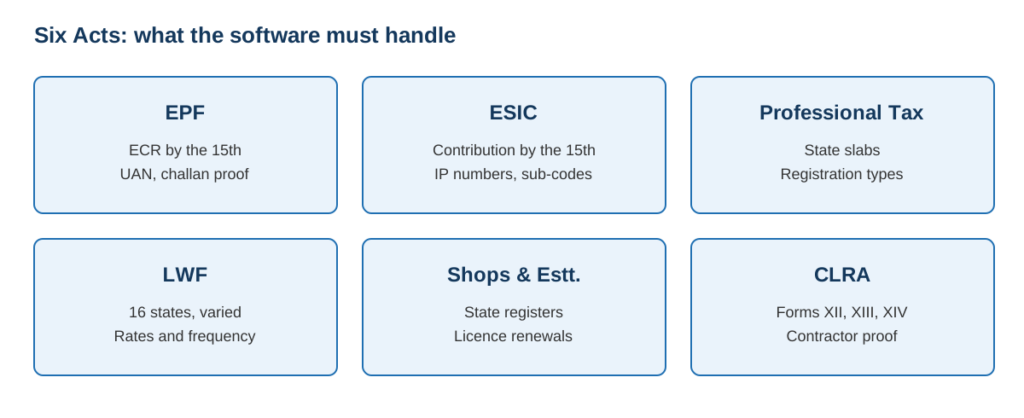
Compliance software implementation is the project that takes a tool from signed contract to a state where your team files, reviews and stores proof inside it. It has five parts: set-up (companies, sites, Acts, states), data migration, connection to payroll or accounting, user and role design, and a controlled go-live with a parallel run.

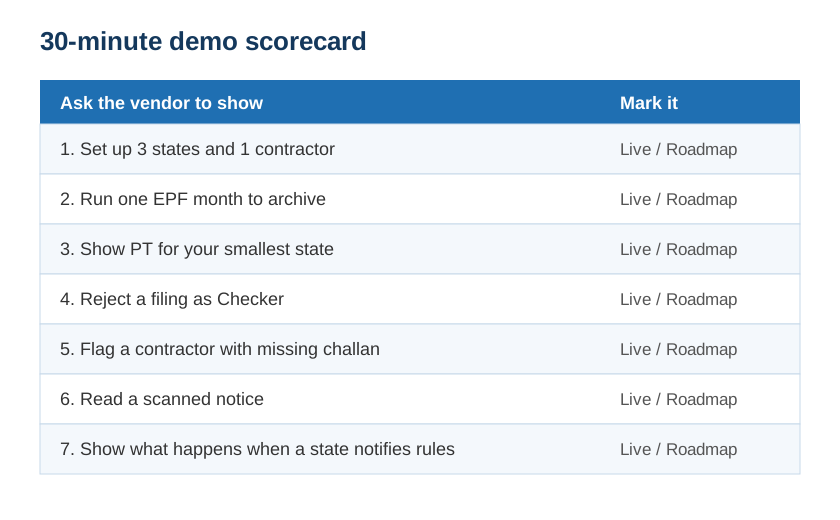
Most of the effort sits in the second part. A tool can be configured in days. Getting a clean list of employees, sites, registrations and contractors takes weeks, because that data lives in payroll exports, old registers, filing receipts and people’s heads. If you are still comparing products, see our guides to compliance software pricing and the statutory compliance software checklist. This piece starts after you have chosen.

Three Decisions Before Any Data Moves

  • Scope: Which Acts, states and sites go live first? A common mistake is trying everything at once. EPF and ESIC for all sites is often a sensible first wave; Professional Tax, LWF, Shops & Establishment and contract labour follow.
  • Pilot site: Pick one site that is typical, not your cleanest and not your messiest. It will teach you what the others will need.
  • Window: Decide the calendar slot for cutover now, using Section 7. It affects everything else.

Write the three answers on one page and get the sponsor, usually the CFO, COO or CHRO, to sign it. It sounds formal. It saves arguments in week five.

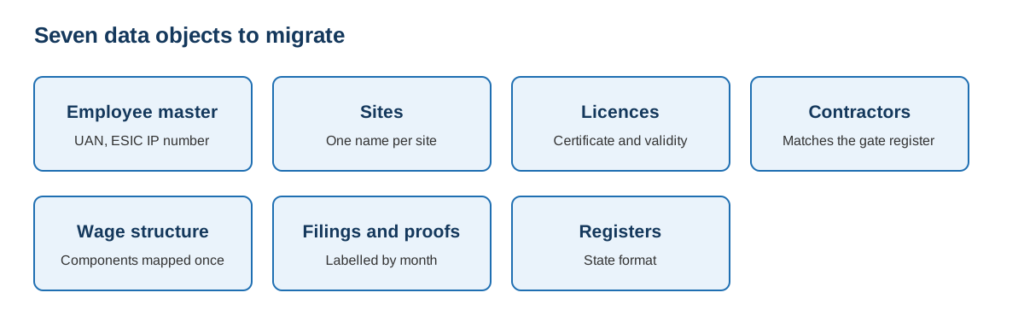
What Data Moves, and Where It Breaks

Data objectWhere it usually livesKey identifierCommon defect
Employee masterPayroll or HRMS exportEmployee ID, UAN, ESIC insured person numberMissing or duplicate UANs; wrong date of joining
Establishments and sitesRegistration certificates, filing receiptsPF code, ESIC code, state registration numbersOne site spelt several ways; wrong state tagged
Registrations and licencesFolders, emails, a renewal trackerLicence number, validity datesExpired entries; dates typed in mixed formats
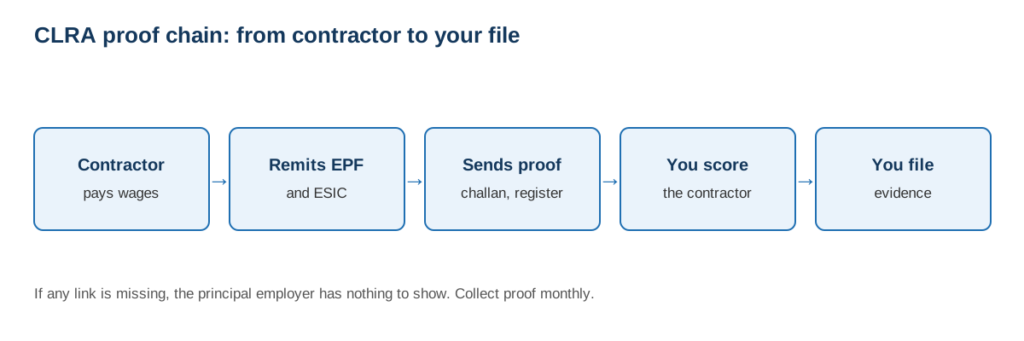
Contractors and contract workersPurchase or admin listsContractor licence, work order numberList does not match who is actually at the gate
Wage structurePayrollSalary component codesComponents that count for PF but are mapped as excluded, or the reverse
Historical filings and proofsShared drives, portal downloadsMonth and establishmentChallans without the matching ECR; unlabelled scans
RegistersExcel or paperRegister type and periodState-specific format not followed

Not everything needs to move. Ask what you will actually need at the next inspection or client audit, and migrate that first. A common rule: current employees and sites in full, the last 12 to 24 months of proofs, older records scanned into the document vault without being re-keyed.

Eight Clean-Up Rules

  1. One identifier per person. Every employee needs one employee ID and, where applicable, a UAN and an ESIC insured person number. Fix duplicates before migration. The UAN is the EPFO member identifier, and members can be checked on the EPFO portal.
  2. One name per site. Create a site master with one name, one address, one state and the registration numbers that belong to it. Everything else points to it.
  3. State on every record. Professional Tax, LWF and Shops & Establishment rules follow the state where the employee works.
  4. Dates in one format. Joining, exit, licence validity and renewal dates should all use one format. Mixed formats cause silent errors.
  5. Exits closed properly. People who left but are still active in a list inflate headcount and contributions.
  6. Salary components mapped once. Decide, with payroll, which components count for provident fund and ESIC, and keep the mapping documented.
  7. Contractor master reconciled. Tie the contractor list to work orders and to who actually enters the site. Our guide to CLRA registers and returns explains why this matters.
  8. Orphan documents labelled. A challan nobody can place is of no use as proof. Label it by establishment and month, or set it aside.

Mapping and Validation: Proving the Data Is Right

Cleaning is not the same as proving. Before anything goes live, run these tie-outs and keep the results.

  • Headcount tie-out: Count of active employees in the new system equals payroll for the same month, by site.
  • EPF tie-out: Members and wages in the new ECR draft match the last filed ECR for the same month, with differences explained one by one.
  • ESIC tie-out: Insured persons and contribution base match the last contribution file, including anyone who crossed the wage ceiling.
  • Professional Tax tie-out: Deductions by state match the last payment, slab by slab.
  • Contractor tie-out: Contractor list equals the gate register for a sample week.
  • Licence tie-out: Every licence in the tracker has a certificate attached and a validity date you can read off the document.

Record each result in a simple sheet with the date, the person who checked it and the outcome. That sheet is evidence that your data was verified, and it is what you will point to if anyone asks why numbers differed between systems.

Here is what a tie-out looks like when it finds something. Suppose the new system shows 412 active employees at the Coimbatore plant and payroll shows 405. Seven people explain the gap. Four are ex-employees whose exit date was never entered. Two joined on the 28th and appear in one system’s month-end and not the other’s. One has two employee IDs from an old rehire. None of this is dramatic, and every one of those seven would have shown up as a wrong contribution later. Write each difference down with its cause and who fixed it. A tie-out with zero differences on the first run is suspicious; a tie-out where every difference is explained is the goal.

Do the same for wages, not only headcount. If the wage base for provident fund in the new draft is a few percent off the last filed month, the cause is almost always a salary component mapped the wrong way. Find it now, with payroll in the room, rather than on the 14th.

Not sure your headcount, ECR and contractor lists will tie out? We will walk through the tie-outs with you on a sample month. BOOK A DEMO

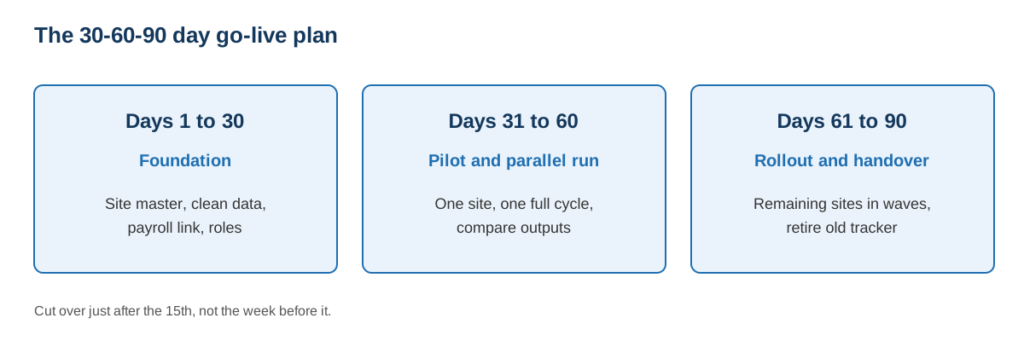
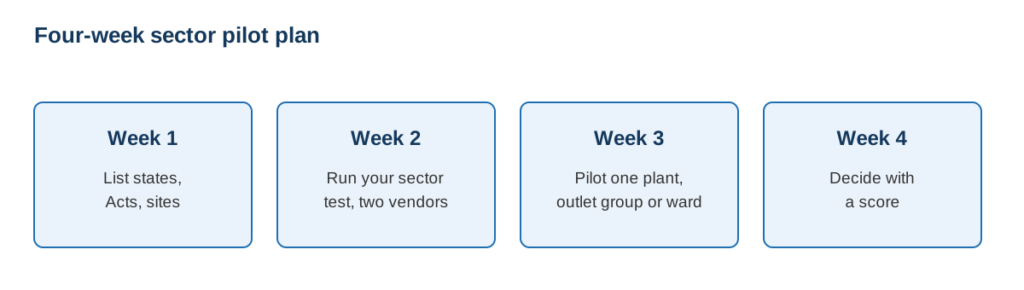
The 30-60-90 Day Plan

PhaseWhat happensOwnerExit criteria
Days 1 to 30: FoundationSign the scope page. Name the project owner and data owners. Build the site master. Clean employee and contractor data. Set up companies, states and Acts. Connect payroll. Design roles for Makers, Checkers and DSC holders.Project owner, HR, payroll, vendorSite master signed off; employee data passes headcount tie-out for the pilot site
Days 31 to 60: Pilot and parallel runGo live on the pilot site. Prepare one full monthly cycle in the new tool while the old process continues. Compare outputs. Fix mapping issues. Train Makers and Checkers.Pilot site lead, Compliance ManagerEPF and ESIC outputs match the old process or differences are explained; Checker and signing flow tested
Days 61 to 90: Rollout and handoverAdd remaining sites in waves. Move historical proofs. Retire old trackers to read-only. Hold a first review with leadership. Write down the running routine.Project owner, site leadsAll in-scope sites live; one full cycle completed in the new tool; old process retired

Inside the first 30 days, a rough week-by-week shape helps. Week one is scope, owners and the site master. Week two is employee and contractor clean-up. Week three is payroll connection and salary component mapping. Week four is the headcount and wage tie-outs for the pilot site, plus role design and DSC checks. If you reach the end of week four with open tie-out differences, that is your signal to extend the phase, not to start the pilot anyway.

The middle phase has its own rhythm. Pilot go-live happens early in the second half of the month, right after the due date. Then the parallel cycle runs through to the next due date, with a mid-cycle review to look at the draft ECR and ESIC file. The comparison happens a few days before the 15th, which gives you time to fix and re-run.

A few notes on the plan. The parallel run is the point at which most surprises appear, so protect it. Do not let the old process quietly continue after Day 90, because two systems are worse than one. And if the pilot reveals deep data problems, extend Days 1 to 30 rather than pressing on.

Choosing the Cutover Window

When you go live matters almost as much as how. Contributions for provident fund and ESIC are due by the 15th of the following month, so avoid cutting over in the days just before the 15th. The best window is usually right after the due date, in the second half of the month, which gives you two clear weeks before the next cycle.

Also check your half-yearly and annual return windows for contract labour and factory returns, and avoid cutovers that land on top of them. Look at the compliance calendar for each state you operate in.

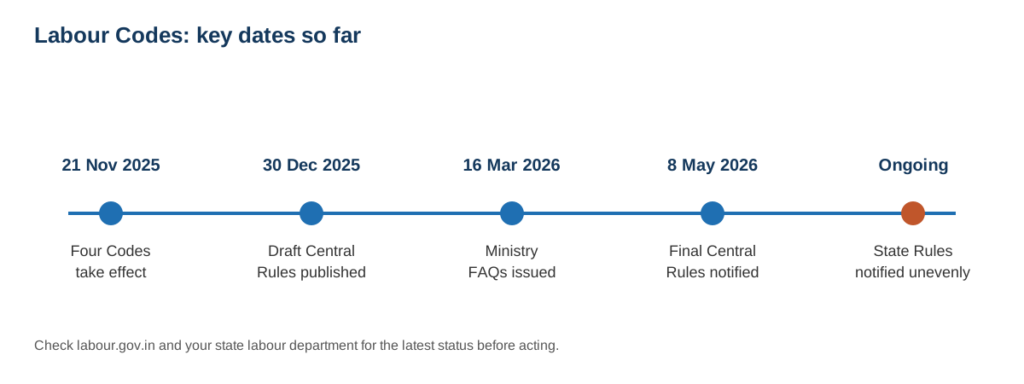
Finally, remember that the rules underneath are moving. The four Labour Codes took effect on 21 November 2025, final Central Rules followed on 8 May 2026, and State Rules are arriving unevenly. Check the Ministry’s labour.gov.in site for the current position, and ask your vendor how rule changes will be handled during your rollout. Our guide to regulatory change management explains the process.

Who Does What

  • Executive sponsor: Signs the scope page and clears blockers. Usually the CFO, COO or CHRO.
  • Project owner: Runs the plan day to day, often the Compliance Manager or Company Secretary.
  • Data owners: One per data object: HR for employees, admin for licences, purchase or admin for contractors.
  • Payroll lead: Owns the salary component mapping and the payroll connection.
  • Makers, Checkers and DSC holders: The people who will actually prepare, review and sign. Name them early and make sure they are different people. See our guide to the Maker-Checker-DSC workflow.
  • IT: Access, integration and security questions.
  • Vendor: Configuration, migration support and training. Confirm in writing what migration help is included.

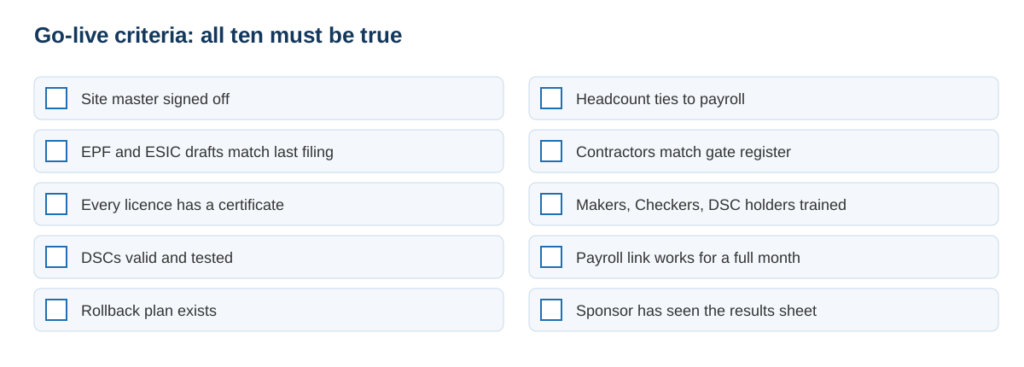
Go-Live Criteria

Do not go live because the calendar says so. Go live when these are true.

  1. Site master signed off.
  2. Employee data passes the headcount tie-out for every in-scope site.
  3. EPF and ESIC drafts match the last filed month or differences are explained.
  4. Contractor list matches the gate register for a sample week.
  5. Every licence has a certificate and a validity date.
  6. Makers, Checkers and DSC holders are named and trained.
  7. DSCs are procured, valid and tested in the signing flow.
  8. Payroll connection works for one full month.
  9. A rollback plan exists: the old process can resume for one cycle if needed.
  10. The sponsor has seen the results sheet.

Why Implementations Stall

  • Everything at once. Too many Acts and states on day one.
  • No data owner. Everyone agrees the data is messy and nobody fixes it.
  • Payroll mapping postponed. The first ECR draft comes out wrong and trust collapses.
  • Parallel run skipped. Differences appear on the due date, not before.
  • Old tracker never retired. Two sources of truth, two sets of answers.

Where Iztty Fits

Iztty is an AI-powered statutory compliance platform built by Futurex Management Solutions Limited, a New Delhi firm that has handled Indian labour compliance for clients since 2014. We agree scope, sites and states with you before anything moves, and we confirm in writing what migration and training support is included in your plan.

Here is how the published features map to the plan above:

  • Payroll connection: integrations with Tally, Zoho Payroll and Keka HR (see integrations).
  • Review and signing: a four-stage Maker-Checker-DSC workflow, ending in auto-archive to the Document Vault.
  • Contractors: vendor compliance collects EPF, ESIC and wage registers and calculates a vendor score.
  • Licences: tiered expiry alerts for factory licences and renewals.
  • Visibility: the Compliance Score Meter shows a live 0 to 100% score by Act and state, useful for judging each wave.

As an anonymised illustration, a representative 14-factory manufacturer moved its score from 61% to 88% in 90 days. That is not a named case study. See the platform page.

Conclusion

Compliance software implementation succeeds or fails on data and timing. Clean one identifier per person and one name per site. Prove the numbers with tie-outs. Pilot on one site, run one cycle in parallel and choose a window that is not the week before the 15th. Then roll out in waves and retire the old tracker.

If you would like a second pair of eyes on your readiness before you set a date, we are happy to help.

CHECK MY COMPLIANCE  |  CALL AN EXPERT

FAQs

Q1: What is compliance software implementation?
It is the project that takes compliance software from signed contract to live use: set-up, data migration, payroll connection, role design, training and a controlled go-live.

Q2: How long does compliance software implementation take?
It depends on the number of sites and states and the state of your data. A 30-60-90 day plan is a common structure: foundation, pilot with a parallel run, then rollout. Ask your vendor for a plan with named milestones.

Q3: What data do I need to migrate?
Employee master, sites and registrations, licences, contractors, wage structure, recent filings and proofs, and registers. Migrate current records in full and recent proofs first.

Q4: How do I clean employee data for compliance software?
Give each person one employee ID plus UAN and ESIC insured person number where applicable, remove duplicates, close exits, use one date format and tag the state on every record.

Q5: How do I validate migrated data?
Run tie-outs: headcount against payroll, EPF and ESIC drafts against the last filed month, Professional Tax by state, contractors against the gate register and licences against certificates. Record the results.

Q6: What is a parallel run?
It is one full monthly cycle prepared in the new tool while the old process continues, so you can compare outputs before relying on the new tool.

Q7: When is the best time to go live?
Usually just after the 15th, when provident fund and ESIC contributions fall due, which leaves two clear weeks before the next cycle. Avoid your half-yearly and annual return windows.

Q8: Do the Labour Codes affect implementation?
The four Codes took effect on 21 November 2025, with final Central Rules notified on 8 May 2026 and State Rules arriving unevenly. Ask how the tool handles rule changes during your rollout.

Q9: Who should own implementation?
An executive sponsor for decisions, a project owner such as the Compliance Manager for day-to-day work, a data owner for each data object and named Makers, Checkers and DSC holders.

Q10: Why do compliance software implementations fail?
Usually because of too wide a scope at the start, no data owner, postponed payroll mapping, a skipped parallel run or an old tracker that never retires.

Compliance Software Pricing in India: Pricing Models, Hidden Costs and Total Cost of Ownership

You search for “compliance software pricing”, open six vendor sites, and find three things. A “request a quote” button. A per-employee rate for a payroll product that is not quite what you asked about. And a listicle that ranks tools without a single rupee figure. If that was your morning, you are not missing something obvious. The category simply does not publish prices the way a stationery shop does.

There is a reason, and it is useful to you. In compliance software, the price is not a number. It is a formula, and the formula multiplies things only you know: your states, your locations, your Acts, your contractors. Once you understand the formula, you can read any quote, predict how it will behave when you grow, and build a three-year total cost of ownership. This guide shows how. We have not invented price lists. We have shown the arithmetic.

Want a quote built on your own states, sites and contractors? Our compliance practice will itemise it with you. GET A FREE COMPLIANCE AUDIT

Why the Price Is a Formula, Not a Number

Compliance software pricing in India depends on how much compliance work the software has to carry. Two companies with the same headcount can need very different amounts of it. A 500-person employer with one plant in one state and a single contractor has a handful of registers and one Professional Tax regime. A 500-person employer with 30 branches across nine states and 120 contract workers has nine rule sets, a renewal calendar per branch and monthly proof from every contractor.

Vendors price against that load, in different ways, which is why quotes do not line up. If you want a quick view of the types of product behind those quotes, read our guide to compliance software types, costs and ROI. This article goes deeper on one thing only: how the money is structured.

A short note on what we checked. A quick search of Indian HRMS and payroll vendors shows that many publish per-employee plans. We did not find published prices for specialist labour compliance platforms in the same quick check, and it was not an exhaustive review. Verify current pricing pages yourself before relying on any comparison.

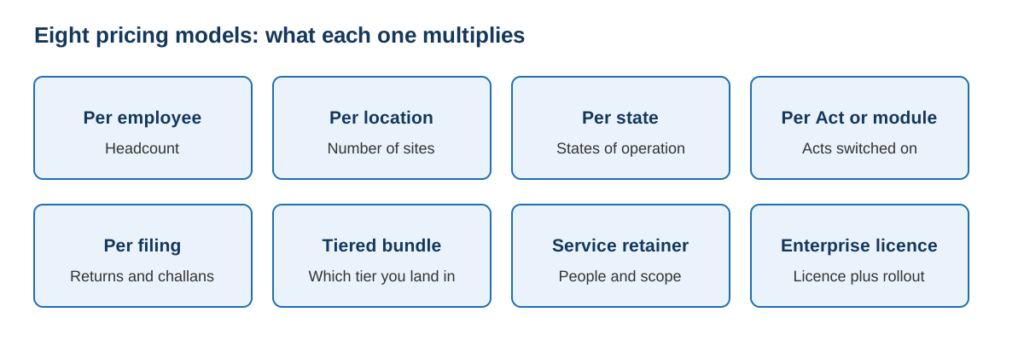
Eight Pricing Models and What Each One Multiplies

ModelWhat it multipliesLooks cheap whenGets expensive when
Per employee per monthHeadcountFew people, many sitesHeadcount grows or swings seasonally
Per location or establishmentNumber of sitesFew large sitesMany small stores or branches
Per stateStates of operationSingle-state employerYou expand across states
Per Act or moduleActs switched onYou only need EPF and ESICYou add Professional Tax, LWF, S&E, CLRA
Per filing or transactionReturns and challansFew filingsMany entities, frequent filings
Tiered bundleWhich tier you land inYou fit a tier neatlyYou sit just above a tier boundary
Service retainerPeople and scopeYou have no in-house teamScope creeps beyond the retainer
Enterprise licence plus implementationLicence, rollout and customisationYou are a large groupYou need only a fraction of the suite

Many real quotes blend two or three of these: a platform fee, plus a charge per location, plus state add-ons. Treat each blended element as its own multiplier and ask what it multiplies.

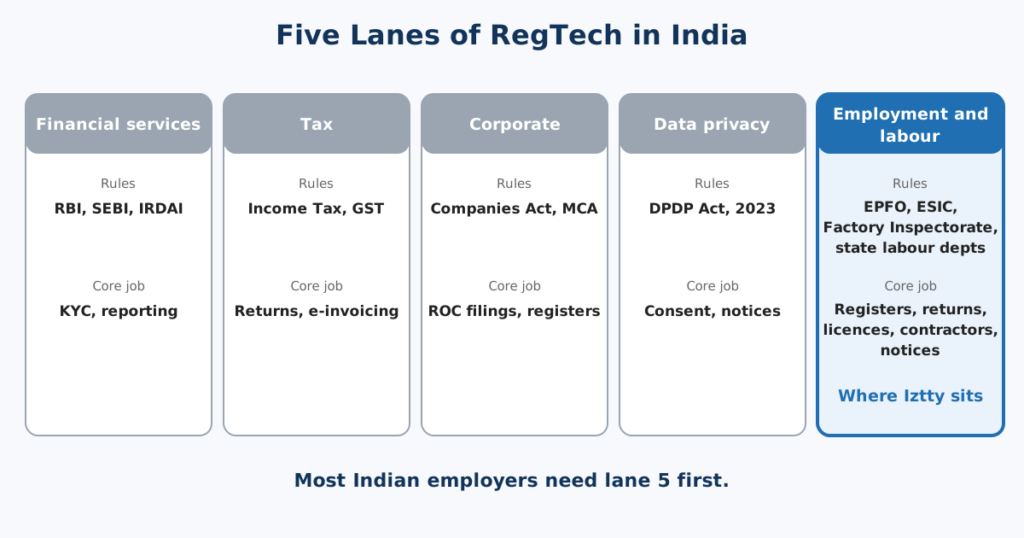
One more warning on the bottom row. Enterprise suites often bundle financial, tax and data privacy compliance with employment compliance. If your need is labour law alone, you may pay for breadth you will not use. Our guide to regulatory software solutions explains the different lanes.

How Each Model Reacts When You Grow

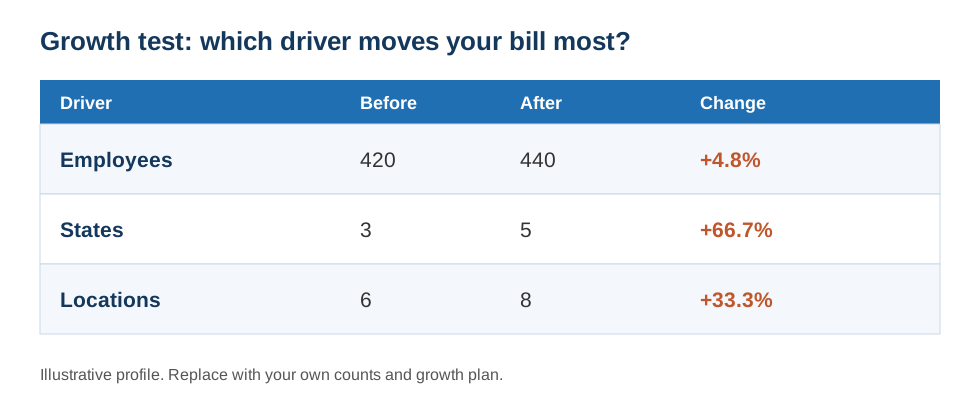
Here is a test that costs nothing. Take a standard profile: 420 employees, 3 states, 6 locations. Now imagine a year of growth: 20 more employees, 2 more states and 2 more locations. That gives 440 employees, 5 states and 8 locations. What happens to a bill that scales with each driver?

If the price scales withBeforeAfterChange in that part of the bill
Employees420440About 4.8% higher
States35About 66.7% higher
Locations68About 33.3% higher

Same company, same year, three very different outcomes. If your growth plan is hiring, a per-employee model grows gently. If your plan is new states, a per-state model punishes it. So the right question is not “which is cheapest today?” It is “which driver will grow fastest in our plan?” Then pick the model that scales with something else, or negotiate a cap.

Reading a Quote Line by Line

Take any quote and run each line through three questions: what does it multiply, what is included, and what happens at renewal?

  • Platform or licence fee: What does it cover, and is any usage limit hidden inside, such as users, locations or filings?
  • Implementation or onboarding: Is it one-time? Does it include data migration, or only setup?
  • State or location add-ons: How many are included in the base? What is the price of the next one?
  • Users and roles: Makers, Checkers and DSC holders are different people. Are they all priced as users?
  • Integrations: Is the connection to your payroll or accounting system included, or a separate project?
  • Digital Signature Certificates: Where signing is part of the workflow, DSCs are issued by licensed Certifying Authorities (see the Controller of Certifying Authorities), have a validity period and need renewal. Ask whether they are in the quote or yours to buy.
  • Services: Notice drafting, filing support and advisory hours: included, capped or chargeable by the hour?
  • Taxes: Does the figure include GST? Check the applicable rate and treatment on the CBIC GST site or with your tax adviser.
  • Renewal: What is the price after year one, and is there a cap on the uplift?

If the vendor cannot answer any of these in writing, the quote is not finished.

Building a Three-Year Total Cost of Ownership

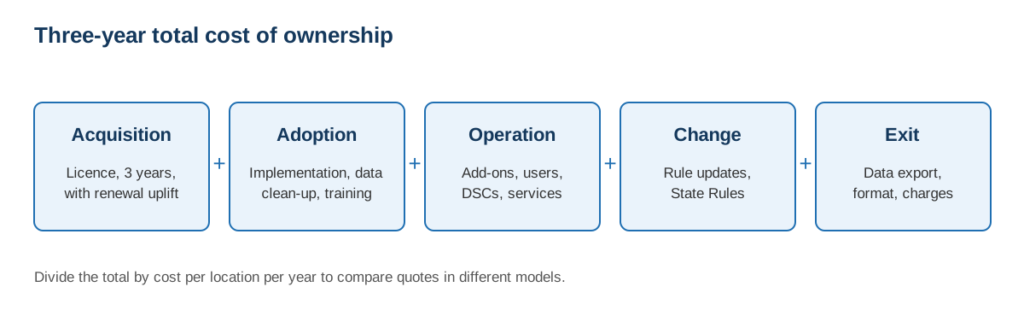
Total cost of ownership, or TCO, is everything you spend over a fixed period to own and run the tool. A workable formula for a three-year window is:

TCO = acquisition + adoption + operation + change + exit

  • Acquisition: licence or platform fees for three years, with the renewal uplift applied to years two and three.
  • Adoption: implementation, data clean-up (your team’s hours, priced at a loaded hourly cost), integration and training.
  • Operation: add-on states and locations as you grow, extra users, DSC purchase and renewal, and any recurring service fees.
  • Change: what it costs to keep the tool right as rules change. This matters more than usual now. The four Labour Codes took effect on 21 November 2025, final Central Rules followed on 8 May 2026, and State Rules are arriving unevenly. Ask whether rule updates are included or billed as change requests.
  • Exit: data export, format, and any charge for it.

Then do two things most people skip. First, compute TCO under your growth plan, not today’s footprint. Second, divide by something meaningful, such as cost per location per year or cost per 100 employees, so quotes in different models compare on one yardstick. For the benefit side of the ledger, including a worked example with its assumptions shown, see the ROI section of our cost guide linked above.

Contract Terms That Move the Price

  • Term length: Multi-year terms often lower the annual fee and make leaving costlier.
  • Minimum commitments: A floor on employees or locations that you pay even when you shrink.
  • True-up clauses: Charges adjusted upward when your counts exceed the contract at a review date.
  • Uplift caps: A ceiling on renewal increases, stated as a percentage.
  • Scope of rule updates: Whether new State Rules and Code changes are covered.
  • Service levels: Support response times, and what is credited if they are missed.
  • Data ownership and export: Your registers, proofs and logs, in a usable format, at exit.
  • Termination: Notice period and any early-exit fee.

Pricing Red Flags

  • “Unlimited” with no definition. Unlimited users, filings or locations usually has a fair-use limit somewhere. Ask where.
  • A price with no scope. If the quote does not list your states, Acts and contractors, it was written for someone else.
  • Silence on contractors. If you have contract workers and the quote never mentions collecting their proof, the work stays with you.
  • “Free” setup, expensive services. The cost moved; it did not vanish.
  • Per-filing pricing that rises with corrections. Ask what a rejected or resubmitted filing costs.
  • Pressure to sign for three years before a pilot. A confident vendor lets you test on one site first.
  • No itemised renewal. A low year one with a blank year two is a loan, not a price.

Holding a quote you are not sure about? Send it over and we will walk through it line by line, whether or not you end up buying. BOOK A DEMO

Four Company Profiles, Four Pricing Watch-Outs

ProfileDriver likely to grow fastestWatch-out
Single-state SME, 100 to 200 peopleHeadcountPer-employee tiers with a jump just above your size
Multi-state manufacturerStates and plantsState add-ons and factory register formats priced separately
Retail chain with many outletsLocationsPer-location pricing across dozens of small stores
Compliance consultancy with many clientsClient entitiesWhether multi-client accounts are priced per entity or as a bundle

These are tendencies, not rules. The only reliable test is the growth table in Section 3 using your own numbers.

What to Ask For Before You Sign

  1. A cap on renewal uplift, written as a percentage.
  2. A bundled price for the states you already plan to add within 12 months.
  3. A pilot on one site, with named milestones, before a multi-year commitment.
  4. Written confirmation that rule updates, including State Rules under the Labour Codes, are in scope.
  5. An itemised list of what is outside the quote.
  6. A data export clause in plain language.

Item five is the most useful. A vendor that tells you honestly what is outside the quote has done half your homework.

Where Iztty Fits

Iztty is an AI-powered statutory compliance platform built by Futurex Management Solutions Limited, a New Delhi firm that has handled Indian labour compliance for clients since 2014. We do not publish a price list, for the reasons in Section 1. We quote against your own profile and itemise the lines so you can compare them with any other quote.

Here is how the platform maps to the cost lines above, using published features only:

As anonymised illustrations, a representative 14-factory manufacturer moved its Compliance Score from 61% to 88% in 90 days, and a representative 40-client consultancy cut EPF and ESIC notice response from 5 days to 4 hours. They are not named case studies. Consultancies managing several clients use a separate Compliance Consultant account. See the platform page.

A Five-Day Quote Comparison

  • Day 1: Write your standard profile: locations, states, Acts, employees, contractors and users, plus your 12-month growth plan.
  • Day 2: Send the same profile to two or three vendors and ask for an itemised three-year total, with the Section 4 questions.
  • Day 3: Run the Section 3 growth test on each quote.
  • Day 4: Build each TCO using the Section 5 formula and divide by cost per location per year.
  • Day 5: Score the contract terms in Section 6 and shortlist.

To test what each tool actually does for the Acts you care about, pair this with our statutory compliance software checklist.

Conclusion

You will not find a single honest price for compliance software, because there is not one. You will find a formula, and the way to beat it is to know your own multipliers. Know what each line multiplies, test how the bill grows with your plan, and build a three-year total with the exit and rule-change costs included.

If you would like help turning a quote into a comparable total, we can do it with you.

CHECK MY COMPLIANCE  |  CALL AN EXPERT

FAQs

Q1: How much does compliance software cost in India?
There is no standard price. It depends on your locations, states, Acts, contractors, users, integrations and bundled services. Send every vendor the same profile and ask for an itemised three-year total.

Q2: What are the common pricing models for compliance software?
Per employee per month, per location, per state, per Act or module, per filing, tiered bundles, service retainers, and enterprise licences with implementation fees. Many quotes blend two or three.

Q3: Is per-employee or per-location pricing better?
Neither is better in general. Per-employee pricing grows with headcount, per-location pricing grows with sites. Pick the model that scales with the driver that will grow slowest in your plan.

Q4: What is total cost of ownership for compliance software?
It is everything you spend over a fixed period: licence fees, implementation, data clean-up, integrations, training, add-ons, DSCs, rule-change costs and exit costs. A three-year window works well.

Q5: What hidden costs should I look for in a quote?
State and location add-ons, integration work, DSC purchase and renewal, services billed by the hour, renewal uplifts, rule-update charges and data export fees.

Q6: How much does a compliance management system cost?
Use the same method. Compare the shape of the price against your growth plan and include every cost line over three years, not only the first-year fee.

Q7: Why do compliance software vendors not publish prices?
Because the price depends on your profile. A fixed list price would be wrong for most buyers. That is also a reason to insist on an itemised quote for your own profile.

Q8: Is an HRMS compliance module cheaper than a specialist platform?
It often is at the start, especially for one or two states. Check Professional Tax coverage, contract labour support and review workflows, because gaps there can create costs elsewhere.

Q9: Do the Labour Codes affect compliance software pricing?
They can. The four Codes took effect on 21 November 2025, final Central Rules were notified on 8 May 2026 and State Rules are arriving unevenly. Ask whether rule updates are included in the price or billed separately.

Q10: How can I negotiate compliance software pricing?
Ask for a cap on renewal uplift, a bundled price for planned state additions, a pilot before a multi-year commitment, written confirmation that rule updates are included and a clear data export clause.

Compliance Software: Types, Costs and ROI for Indian Employers

A CFO in Ahmedabad forwards a vendor quote to the compliance manager with one line: “Is this a lot?” The compliance manager does not know. The quote lists a platform fee, a per-location fee, a state add-on and an onboarding charge. The cheaper quote from another vendor lists none of those, and does not mention contractors at all. Which one is actually cheaper?

That confusion is why this guide exists. Compliance software in India comes in several shapes, and each one charges for different things. Comparing sticker prices across shapes is like comparing a bus ticket with a car lease. Below, you will find the main types, what drives the cost, the costs that tend to hide, and a way to work out return on investment using your own numbers. We have deliberately not invented price lists. We have shown the arithmetic so you can build yours.

Want a cost and ROI estimate for your own sites and states? Our compliance practice will size it with you before you request any quote. GET A FREE COMPLIANCE AUDIT

What Compliance Software Is, in One Paragraph

Compliance software helps an organisation meet legal obligations: it tracks what applies, reminds the right people, prepares filings and registers, routes them for review, and stores proof. In India, for employers, that mostly means labour and employment law: provident fund, ESIC, Professional Tax, Labour Welfare Fund, Shops & Establishment, the Factories Act and contract labour. Other kinds exist for financial regulation, tax and data protection, but this guide is about the employer side. For the wider background, see our guides to compliance management software and regulatory compliance software.

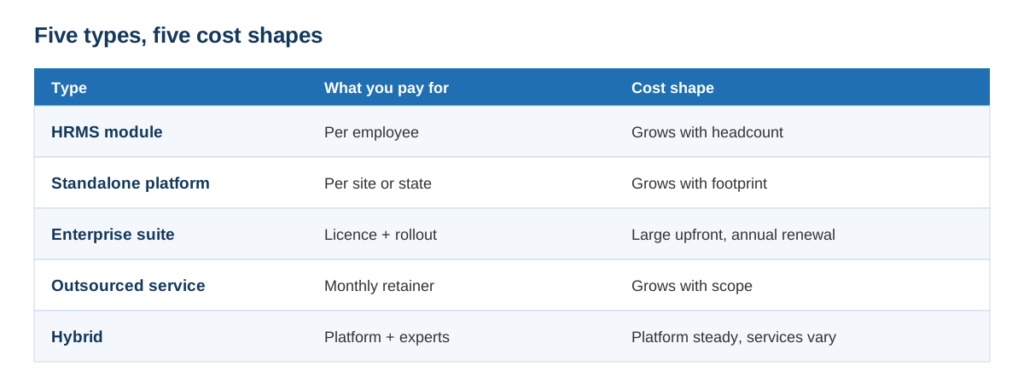
The Five Types and How Each One Charges

This is not a feature comparison; we have covered that elsewhere. Here we look at one thing only: what you actually pay for, because that is where quotes diverge.

TypeWhat you usually pay forCost shapeWhere it tends to fit
HRMS compliance moduleAn add-on or tier on your HRMS, often priced per employeeGrows with headcountOne or two states, simple payroll
Standalone statutory platformPlatform fee plus locations, states or usersGrows with sites and statesMulti-state employers, factories, contractors
Enterprise GRC or RegTech suiteLicence, implementation and often servicesLarge upfront, annual renewalLarge groups with cross-regulation needs
Outsourced compliance serviceMonthly retainer per entity or siteGrows with people and scopeEmployers with no in-house team
Hybrid: platform plus expertsPlatform fee plus advisory or filing supportPlatform steady, services varyTeams that want control with backup

The point of the table is the third column. A per-employee price looks cheap at 100 people and expensive at 2,000. A per-site price looks fair for a factory chain and punishing for a retailer with 80 small stores. Know your shape before you compare. If you are still choosing between categories, our guide to compliance management solutions maps business problems to the right type.

What Drives the Price

  • Number of locations: Plants, offices, stores, warehouses, each with its own registrations.
  • Number of states: Professional Tax, Labour Welfare Fund and Shops & Establishment rules differ state by state, and each state adds configuration.
  • Which Acts are in scope: EPF and ESIC alone cost less to run than EPF, ESIC, PT, LWF, S&E, Factories Act and contract labour together.
  • Contractors: Collecting proof from 5 contractors is not the same job as from 150.
  • Users and roles: Makers, Checkers and signatories at each site.
  • Integrations: Connecting payroll or accounting systems.
  • Services bundled in: Filing support, notice drafting, advisory hours.
  • Contract length: Multi-year terms often lower the annual price, and make exit costlier.

When you request quotes, give every vendor the same profile: the same states, sites, Acts, contractors and users. Otherwise you are comparing different questions.

Here is how these drivers interact in practice. Two employers can each have 500 people. One has a single plant in one state, mostly permanent staff and one contractor. The other has 30 small branches in nine states and 120 contract workers. The first needs a handful of registers and a clean EPF and ESIC cycle. The second needs nine sets of state rules, a registration calendar per branch and monthly proof from every contractor. Same headcount, very different bill, and very different value from the software. If a vendor quotes both on headcount alone, one of them is being quoted for the wrong thing.

Ask also how the price changes when you add a state or a location mid-year. Growth is where many contracts bite. A tool that is cheap at your current footprint and costly at the next one is not cheap.

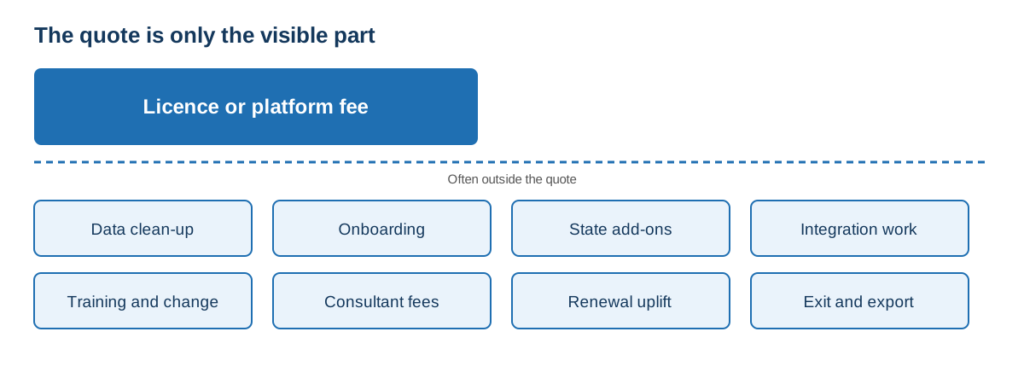
Costs That Hide Outside the Quote

  • Data clean-up: Missing UANs, duplicate employee records and inconsistent site names have to be fixed before any tool works properly. Budget your team’s hours for it.
  • Implementation and onboarding: Sometimes a separate line, sometimes absorbed. Ask.
  • State add-ons: A base price may cover a few states, with others charged extra.
  • Integration work: Payroll connections can need your IT or payroll vendor’s time.
  • Training and change: Makers and Checkers need to actually follow the new steps. That takes managers’ attention, not only a login.
  • Consultant and filing fees you keep paying: Software rarely removes advisory needs, and you should know which you will retain.
  • Renewal escalators: Check the price after year one.
  • Exit costs: Can you export all registers, proofs and logs if you leave, and in what format?

A useful habit is to ask each vendor for a three-year total cost on your profile, with these lines itemised.

The Other Side of the Ledger: What Non-Compliance Costs

You cannot judge a price without knowing what you are protecting against. Here are the exposures that are easiest to put numbers on.

  • Late provident fund payments: Interest under Section 7Q is 12% per annum, and damages under Para 32A are a flat 1% per month from 15 June 2024. Contributions fall due by the 15th of the following month on the EPFO portal. Confirm current rates against the EPFO notification before you rely on them.
  • Late ESIC contributions: Also due by the 15th on the ESIC portal, with interest on delay. Check the current rate on the ESIC site.
  • Contractor defaults: Under the Contract Labour (Regulation and Abolition) Act, 1970, the principal employer can be answerable for wages if a contractor fails to pay. This is the exposure that is hardest to price and easiest to underestimate.
  • Notices and inspections: Staff time, consultant fees and management attention, whatever the outcome.
  • Licence lapses: A factory or establishment licence expiring unnoticed can interrupt operations.

Also note that the four Labour Codes took effect on 21 November 2025, final Central Rules followed on 8 May 2026 and State Rules are arriving unevenly, so some of the rules behind these exposures are being re-papered. See the Ministry’s labour.gov.in site for the current position.

How to Work Out ROI

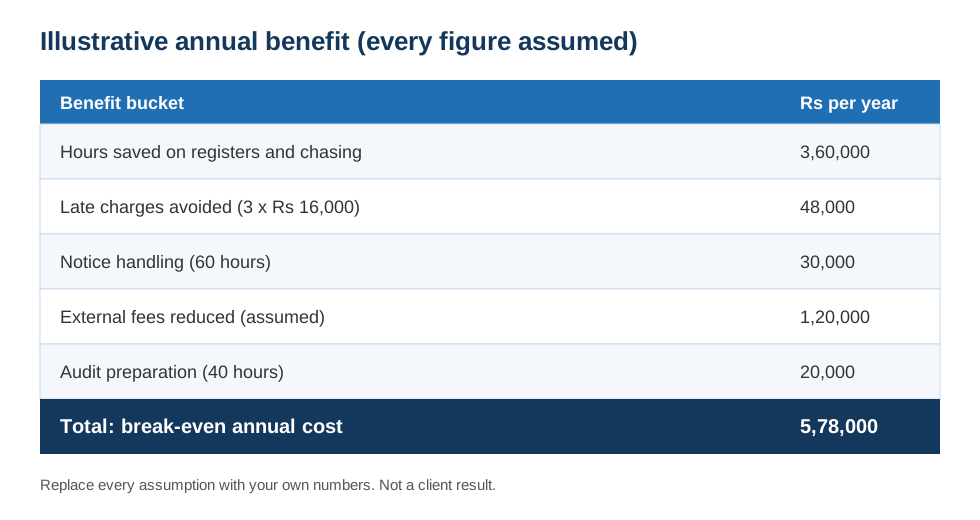
ROI is simple arithmetic: (annual benefits minus annual cost) divided by annual cost. The skill lies in being honest about benefits. We suggest five buckets, in order of how defensible they are.

  1. Hours saved: Time your team spends preparing registers, chasing proofs and building reports, multiplied by a loaded hourly cost. This is usually the largest and most reliable bucket.
  2. Late charges avoided: Count the months you were late last year and the interest and damages that applied. Be honest; if the answer is zero, put zero.
  3. Notice handling: Notices per year multiplied by the hours saved on each.
  4. External fees reduced: Ad-hoc consultant or filing charges you would no longer pay.
  5. Audit preparation time: Hours spent assembling proof for client or statutory audits.

Then add a sixth line you do not put a number on: reduced tail risk, such as a contractor default or a lapsed licence. Mention it in your business case, but keep it out of the maths. If the numbers work without it, it is a bonus.

Two cautions on the buckets. First, do not double count. If the hours you save are the same hours that would have been spent on notices, count them once. Second, ask the people who do the work, not only their managers. A compliance executive who spends two days a month on the PF and ESIC cycle will give you a number your finance team can trust, because they have no reason to inflate it.

It also helps to separate one-time effort from recurring effort. Data clean-up and onboarding are one-time costs that fall in year one. Hours saved recur every year. A three-year view therefore looks better than a one-year view, as long as you are honest about the renewal price. Many business cases stall because someone compared a three-year benefit with a one-year cost, or the other way round. Pick one window and use it for both sides.

A Worked Example With Assumptions Shown

This is an illustration, not a client result. Imagine an employer with 400 employees, two plants in two states, an office in a third, 60 contract workers and a two-person compliance team. Every figure below is an assumption you should replace with your own.

Benefit bucketAssumptionAnnual value (Rs)
Hours saved on registers, returns and chasing proofs60 hours a month at Rs 500 an hour3,60,000
Late charges avoided3 late months a year on Rs 8,00,000 of contributions; 1% damages plus 12% p.a. interest for one month is Rs 16,000 each48,000
Notice handling6 notices a year, 10 hours saved each at Rs 500 an hour30,000
External fees reducedAd-hoc consultant charges no longer needed1,20,000
Audit preparation40 hours saved at Rs 500 an hour20,000
Total annual benefit5,78,000

On these assumptions, any all-in annual cost below Rs 5.78 lakh pays for itself, and the gap is your return. If a vendor’s three-year total comes to Rs 12 lakh, that is Rs 4 lakh a year, giving a return of (5.78 minus 4.00) divided by 4.00, or roughly 45%. Change one assumption and the answer moves, which is the point: the exercise shows you which assumptions your decision depends on.

Notice what is not in the table. The contractor default, the lapsed licence and the inspection that goes badly. They are real, and they are why many employers buy even when the visible maths is modest.

When the ROI Is Weak

We would rather say this than sell you something early. The return is thin when you operate in one state, have a small team, no contractors, a single licence and one careful person who documents everything. A spreadsheet and a calendar may serve you well. It is also thin when data is in poor shape and nobody will own the tool, because software that nobody reviews adds cost without control. Revisit when you add a second state, a first contractor or a second person who touches filings.

Not sure which side of that line you are on? We will run your numbers with you, whether or not you end up buying. BOOK A DEMO

Where Iztty Fits

Iztty is an AI-powered statutory compliance platform built by Futurex Management Solutions Limited, a New Delhi firm that has handled Indian labour compliance for clients since 2014. We do not publish a price list, because the drivers in Section 3 change the number. We give a quote against your own profile and itemise what is included.

Here is how it maps to the benefit buckets above, using only published features:

As anonymised illustrations, a representative 14-factory manufacturer moved its score from 61% to 88% in 90 days, and a representative 40-client consultancy cut EPF and ESIC notice response from 5 days to 4 hours. They are not named case studies. Consultancies can use a separate Compliance Consultant account. See the platform page.

Building the Business Case in a Week

  • Day 1: List locations, states, Acts, contractors and users. This is your standard profile.
  • Day 2: Pull last year’s late months, notices and consultant invoices.
  • Day 3: Estimate hours spent each month on registers, returns and proof chasing, with the team’s own input.
  • Day 4: Send the same profile to two or three vendors and ask for a three-year itemised total.
  • Day 5: Fill the Section 7 table with your numbers and calculate break-even.

For a wider checklist of what to test, see our statutory compliance software checklist.

Conclusion

The price of compliance software is not one number, and neither is its return. Know which type you are buying, what drives the quote, which costs hide outside it and which of your own numbers decide the answer. Then ask each vendor for the same itemised three-year total.

If you would like help building that case, we can do it with you.

CHECK MY COMPLIANCE  |  CALL AN EXPERT

FAQs

Q1: What is compliance software?
Software that tracks which legal obligations apply to you, reminds the right people, prepares filings and registers, routes them for review and stores proof. For Indian employers it mainly covers labour and employment laws.

Q2: What are the types of compliance software in India?
Five common types: HRMS compliance modules, standalone statutory platforms, enterprise GRC or RegTech suites, outsourced compliance services, and hybrids that combine a platform with expert support.

Q3: How much does compliance software cost in India?
It depends on locations, states, Acts, contractors, users, integrations and bundled services. We do not quote figures in general because they would mislead. Send each vendor the same profile and ask for an itemised three-year total.

Q4: How much does a compliance management system cost?
Use the same method. Compare the shape of the price (per employee, per site or per state) against how your business grows, and include implementation, data clean-up, state add-ons and renewal terms.

Q5: What is the ROI of compliance software?
ROI is annual benefits minus annual cost, divided by annual cost. Count hours saved, late charges avoided, notice handling time, external fees reduced and audit preparation time. Treat avoided tail risk as a bonus, not a number.

Q6: What hidden costs should I watch for?
Data clean-up, implementation fees, state add-ons, integration work, training, continuing consultant fees, renewal escalators and the cost of exporting your data if you leave.

Q7: Is an HRMS compliance module cheaper?
Often at the start, particularly for one or two states. Check coverage of Professional Tax in your states, contract labour support and review workflows, because gaps there can create costs elsewhere.

Q8: How long does it take to see a return?
That depends on your data quality, number of sites and how quickly users adopt the workflow. Ask for a pilot on one site, with named milestones, before committing multi-year.

Q9: Do the Labour Codes change the cost?
The four Codes took effect on 21 November 2025, with final Central Rules notified on 8 May 2026 and State Rules arriving unevenly. Ask vendors how rule updates are handled and whether they are included in the price.

Q10: Do small businesses need compliance software?
Not always. A single-state employer with a small team and no contractors may manage with a calendar and a spreadsheet. Revisit when you add a second state, a first contractor or more people handling filings.

Regulatory Compliance Software Solutions by Industry: What Manufacturing, IT/ITES, Retail and Healthcare Each Need

A plant manager in Manesar, an HR head in a Bengaluru tech park, a store operations lead in Lucknow and an administrator at a 150-bed hospital in Nagpur all open the same kind of email in the first week of the month: “Compliance status, please.” The four answers could not be more different. One is counting overtime hours against a register. One is checking whether a night-shift cab policy matches state rules. One is chasing renewals for forty small outlets. One is trying to prove that the housekeeping contractor paid its people.

That is the problem with buying regulatory compliance software solutions as if every employer were the same. The Acts are shared, but the pain is not. This guide walks through four sectors, manufacturing, IT/ITES, retail and healthcare, and shows what each one should demand from a platform before signing. If you want the general explanation first, read our guide to regulatory compliance software. This one starts where that ends.

Want to see how your sector’s obligations map to your own sites and states? Our compliance practice will walk you through it before you shortlist anything. GET A FREE COMPLIANCE AUDIT

Why One Sector’s Checklist Fails Another

Most buying guides give you one list of features and tell you to tick them. The trouble is that the same feature matters very differently depending on how you employ people.

A factory lives and dies on registers kept at the plant, and on whether those registers agree with payroll. An IT services firm may have fewer registers but several offices, a client auditor and a night-shift policy. A retailer has a large number of small registrations, each with its own renewal date. A hospital has round-the-clock shifts, a large contractor share and a stack of licences, only some of which are labour-related.

So the question is not “which software has the most features?” It is “which features break first in my sector, and does this platform hold up there?” That shapes the rest of this guide.

The Labour Codes Layer Over All Four

Whatever your sector, one change sits on top of everything. The four Labour Codes took effect on 21 November 2025, the Central Government notified final Central Rules on 8 May 2026, and State Rules are arriving at different speeds. The Code on Occupational Safety, Health and Working Conditions now covers factories, contract labour and working conditions. The Code on Social Security covers provident fund and ESIC. State Shops & Establishment Acts continue alongside.

In practice, forms, portals and notices will mix legacy Act names with Code names for a while. Ask any vendor how its rules are dated and updated, and who reviews a change before it reaches your account. Check the Ministry’s labour.gov.in site for the current position. Our process guide to regulatory change management explains the loop. The rest of this article uses legacy Act references because that is what most registers, forms and notices still carry today. Confirm the applicable rule for your state before acting.

A quick word on who should read which part. If you are a CFO or founder, skim the “What to demand” line under each sector and the table in Section 7. If you are a compliance manager or plant HR head, the bullet lists are where the detail sits. When should you act? Usually when you add a second state, a first contractor, a second plant or a third person who touches filings. Why bother now? Because the Labour Codes are changing the paperwork underneath, and a manual process that coped last year may not cope with a mixed set of old and new forms.

Manufacturing: The Register and the Shop Floor

Think of a mid-sized auto-components maker with two plants, three shifts and about 150 contract workers across both sites. Where does compliance hurt?

  • Registers that must match reality: Muster rolls, overtime registers and leave registers under the Factories Act, 1948 and your state’s Factories Rules. Form numbers differ by state, so a tool needs your state’s format, not a national template. Our Factories Act registers checklist lists them.
  • Overtime and hours: Under the Act, overtime is paid at twice the ordinary rate (Section 59), and weekly and daily limits apply. Registers, attendance and payroll must agree, or the first inspection finds the gap. Ask whether the tool compares them.
  • Licence renewal: A factory licence and its renewal are tied to a date. A tiered alert, say 90, 60 and 30 days, is more useful than one reminder.
  • Contractors on the floor: Under the Contract Labour (Regulation and Abolition) Act, 1970, you carry responsibility if a contractor defaults on wages. That means monthly contractor EPF and ESIC proof per site. See our guide to CLRA registers and returns.
  • Plant-to-plant variation: Two plants in two states means two sets of Rules. One score per plant, not one blended number, shows where to look.

What to demand: state-specific factory registers, overtime reconciliation with payroll, licence alerts in tiers, contractor proof by plant and a per-plant score.

IT/ITES: Few Registers, Many Questions

Picture a 400-person software services company with offices in Pune, Noida and Chennai and a client who audits compliance every year. There is no factory floor, but the exposure is real.

  • Shops & Establishment registrations by city: Each office sits under its state’s Act, with its own registration, renewal period and register formats. Some states have special provisions for IT and ITES establishments on working hours or night work, so confirm per state. See our state-wise Shops & Establishment guide.
  • Professional Tax, PF and ESI in several states: The mix of Professional Tax slabs across Maharashtra, Karnataka and Tamil Nadu means payroll deductions differ by employee location.
  • Night shifts and women employees: State rules commonly attach conditions to night work. Under the new Rules, published advisory summaries point to written consent and transport. Check your state’s position.
  • Crèche and maternity obligations: The Maternity Benefit Act, 1961 requires a crèche in establishments with 50 or more employees. A tool that does not track it is not the end of the world, but you should know who does.
  • Client and investor audits: The audit asks, “Show us last quarter’s PF challan and the register.” Speed matters, so a searchable archive with the signed document is worth more than a dashboard.
  • Housekeeping and security contractors: Easy to overlook in an IT firm, and still covered by contract labour rules once headcount thresholds apply.

What to demand: multi-city Shops & Establishment handling, Professional Tax by employee location, an audit-ready archive and a clear answer on what adjacent obligations (for example, internal committee reporting) sit outside the tool.

Retail: Forty Outlets, Forty Small Deadlines

A fashion retailer has 40 stores across eight states and about 600 employees. No single store is complicated. The volume is the problem.

  • One registration per outlet: Each store needs its own Shops & Establishment registration, usually with a renewal date. At 40 outlets, that is a renewal almost every week.
  • Opening hours, weekly off and overtime: State rules differ, and festival seasons stretch hours. See our page on leave and working hours for how these interact.
  • Branch-wise ESIC and Professional Tax: Contributions are tracked per registered location and per state. A single misallocated branch can cause a short-payment notice.
  • Seasonal and part-time staff: Headcount swings change which thresholds apply and which registers need new rows.
  • Outsourced housekeeping and security: Contract workers at stores are still your concern if the contractor fails to pay. Check proof by contractor and by city.
  • Head office visibility: The regional manager needs to see which five outlets are behind, not 40 green ticks.

What to demand: a store-level registration tracker with tiered alerts, state-specific formats, branch-wise statutory tracking and a dashboard that ranks outlets by risk.

Running many outlets, plants or wards? See a multi-location view built from your own states. BOOK A DEMO

Healthcare: Shifts, Contractors and Mixed Licences

A 150-bed hospital has doctors, nurses, technicians, front desk staff and a large outsourced team for housekeeping, security, laundry and kitchen. Add a pharmacy and a diagnostic centre and the picture grows.

  • Round-the-clock shifts: Nurses on 12-hour shifts bump against daily and weekly limits in state rules. The tool should flag hours against the state’s limit, and overtime records must agree with payroll.
  • A very high contractor share: In many hospitals, a large part of the headcount sits with contractors. The same monthly proof of EPF, ESIC and wages applies. Our vendor compliance page shows the approach.
  • ESIC and EPF mix: Wage levels vary widely across roles, so coverage by employee must be right. Check how the tool handles an employee crossing the ESIC wage ceiling mid-period.
  • Licences that are not labour licences: Hospitals hold clinical, biomedical waste, fire and pharmacy approvals. Many are outside labour compliance software. Ask what the platform tracks and what stays with your administration team.
  • Pharma units: A pharmaceutical plant is a factory, so the manufacturing checklist applies.
  • Notices: Provident fund or ESIC local office notices land in a general inbox and wait. Speed of reply matters.

What to demand: shift and overtime reconciliation, contractor proof by department, clear boundaries on non-labour licences and a defined path for notices.

What Breaks First in Each Sector

SectorFirst thing to breakQuestion that exposes it
ManufacturingRegister and payroll disagree on overtimeShow me overtime hours reconciled across register and payroll
IT/ITESMulti-city registrations and client audit evidenceShow me a signed PF challan found in under a minute
RetailAn outlet’s licence expires unnoticedShow me the next 30 days of renewals across all stores
HealthcareA contractor stops remittingShow me contractors with missing proof this month

If a vendor’s demo does not touch the row for your sector, say so politely and ask for it.

Construction, staffing, logistics and mining follow the same logic with different pressure points. A construction firm has contractors that arrive and leave with each project. A staffing company deploys workers to client sites in several states and answers to principal employers. A logistics operator runs many warehouses with high attrition. A mine has its own regime that is moving into the Occupational Safety, Health and Working Conditions Code. Each deserves its own test row, and we will cover them separately rather than squeeze them in here.

Here is how this plays out in a real week. Say a retail operations lead gets a call from a state office about one outlet’s lapsed registration. In a spreadsheet, finding that store’s file takes ten minutes and a phone call. In a platform that tracks tiered alerts per outlet, the alert fired weeks ago and the renewal receipt sits next to the registration. The difference is not glamour. It is that the call becomes a two-minute reply instead of a scramble.

The same pattern holds for a plant. An inspector asks for the overtime register for the last quarter. If the register, attendance and payroll agree, the answer is a printout. If they do not, the next hour is spent explaining the difference. That gap is what the manufacturing test in the table is designed to find before an inspector does.

Five Questions to Ask Any Vendor in Your Sector

  1. Can you show our two least common states, not the biggest?
  2. Where does a second person review before anything is signed?
  3. What happens when a state notifies new rules, and who checks it?
  4. Which of our obligations does the tool not cover, in writing?
  5. How does it connect to our payroll system?

Question four is the most useful. A vendor that says “everything” is guessing.

Where Iztty Fits by Sector

Iztty is an AI-powered statutory compliance platform built by Futurex Management Solutions Limited, a New Delhi firm that has handled Indian labour compliance for clients since 2014. These are the pieces most relevant to the sectors above.

  • Manufacturing: Factories Act registers, licence renewal with tiered expiry alerts and a score by Act and state. A representative 14-factory manufacturer moved its Compliance Score from 61% to 88% in 90 days. That is an anonymised example, not a named case study.
  • IT/ITES and retail: state-specific Shops & Establishment registers, licence renewals and a multi-branch, multi-state dashboard, with payroll connections to Tally, Zoho Payroll and Keka HR.
  • Healthcare: vendor compliance collects contractor EPF, ESIC and wage registers and calculates a vendor score, supporting principal-employer liability records under CLRA.
  • Every sector: a Maker-Checker-DSC workflow with review, DSC signing and archive to the Document Vault, the Compliance Score Meter, and AI Notice Response, which averages 4 hours against 3 to 5 days manually.

See the platform page for the full picture. Consultancies serving several sectors can use the separate Compliance Consultant account.

How to Start in Your Sector

  • Week 1: list your states, Acts and sites. Mark the row from the Section 7 table that matches your sector.
  • Week 2: run that one test with two vendors, live.
  • Week 3: pilot one plant, one outlet group, one office or one department.
  • Week 4: decide with a score, not a feeling.

For a broader checklist across the main Acts, our statutory compliance software checklist goes Act by Act.

Conclusion

The right regulatory compliance software solution is the one that holds up where your sector is weakest. For a plant, that is registers and contractors. For an IT firm, evidence and multi-city registrations. For retail, volume. For a hospital, shifts and contractor proof. Test that first.

If you would like an expert to run the test against your own sites, we can do it with you.

CHECK MY COMPLIANCE  |  CALL AN EXPERT

FAQs

Q1: What are regulatory compliance software solutions?
They are platforms that map the labour and employment laws that apply to you, prepare filings and registers, route them for review and signing, track licences and deadlines and keep proof.

Q2: Does the right software differ by industry?
The core Acts overlap, but the pressure points differ. Factories need registers and overtime reconciliation, retail needs outlet-level tracking, IT needs multi-city handling and audit evidence, and hospitals need shift and contractor control.

Q3: What does a manufacturer need from compliance software?
State-specific Factories Act registers, overtime reconciliation with payroll, licence renewal alerts, contractor proof by plant and a score per plant.

Q4: Do IT and ITES companies need labour compliance software?
If you have more than one office or state, usually yes. Shops & Establishment registrations, Professional Tax, PF and ESI, and client audits create steady work even without a factory.

Q5: How should retailers track licences across many stores?
Use a tracker with one registration per outlet, tiered renewal alerts and a view that ranks stores by risk.

Q6: What about hospitals and contract staff?
Collect EPF, ESIC and wage proof from each contractor monthly and score them. The principal employer can be responsible if a contractor defaults on wages.

Q7: Do the Labour Codes change what I should buy?
The four Codes took effect on 21 November 2025, with final Central Rules notified on 8 May 2026 and State Rules arriving unevenly. Choose a platform that tracks legacy Act and Code references together and updates promptly.

Q8: Can an HRMS compliance module cover my sector?
For one state and simple payroll, often. For factories, many outlets or contractor-heavy sites, check state formats, contractor proof and review workflows.

Q9: How much does compliance software cost in India?
Pricing depends on locations, Acts, states, users and services bundled. Ask for a quote against your own profile.

Q10: What should I test in a demo for my sector?
Use the row for your sector in the table in Section 7, then ask which of your obligations the tool does not cover.

Statutory Compliance Software: What to Check for EPF, ESIC, PT, LWF, S&E and CLRA

Imagine a company with a plant near Pune, an office in Gurugram and a warehouse outside Hyderabad. Three states, three Professional Tax regimes, two Labour Welfare Fund schedules, a Shops & Establishment licence for the office, and about 80 contract workers at the plant. On the 15th, provident fund and ESIC contributions fall due. On the 31st of January, a contract labour return does. Which of those dates does your current tool know about?

That question is the whole point of this guide. Most demos of statutory compliance software show a dashboard. Very few show what happens for a specific Act: which form, which due date, which state variation, who signs, where the proof goes. So instead of a generic feature list, this checklist goes Act by Act, for EPF, ESIC, Professional Tax, Labour Welfare Fund, Shops & Establishment and the Contract Labour (Regulation and Abolition) Act, 1970. Take it into your next demo and tick things off yourself.

Want this checklist run against your own states and sites? Our compliance practice will map your Acts and show you the gaps first. GET A FREE COMPLIANCE AUDIT

What Statutory Compliance Software Should Actually Do

Statutory compliance software helps an employer meet obligations under labour and employment laws: registrations, monthly contributions, returns, registers, licences and inspections. It is not the same as payroll software, although the two must talk to each other.

Think of it as five jobs. Know which obligations apply to which site. Remind the right person on time. Prepare the filing or register. Make sure a second person checks it before it goes out. Keep proof you can produce when an officer asks. If a tool does only the second job, it is a calendar. If it does the first and the third but nobody reviews anything, you have automated your mistakes.

Who needs it? Anyone with more than one state, more than one Act, a contractor-heavy workforce or a lean compliance team. When should you look? Usually when the spreadsheet starts needing a spreadsheet to manage it. For a wider view, our EPF and ESIC compliance guide and the overview of regulatory compliance software cover the background. This piece is the buying checklist.

One Thing to Settle First: Acts, Codes and Your Forms

The four Labour Codes took effect on 21 November 2025, and the Central Government notified final Central Rules on 8 May 2026. The Code on Social Security covers provident fund and ESIC matters. The Occupational Safety, Health and Working Conditions Code covers factories and contract labour. State Rules are arriving at different speeds, and State Shops & Establishment Acts continue alongside.

What does this mean for a software buyer? Forms, portal labels, notices and inspectors’ questions will use old Act names and new Code names side by side for a while. Ask every vendor two questions. Does the tool hold both the legacy Act reference and the Code reference for each obligation? And how quickly does it update when your state notifies its rules? Treat any answer that is vague on this as a warning sign.

EPF Checklist

The Employees’ Provident Funds and Miscellaneous Provisions Act, 1952 drives the busiest monthly deadline most employers have. The contribution and the Electronic Challan cum Return (ECR) are due by the 15th of the following month on the EPFO portal.

  • ECR preparation: Can it build the ECR from payroll data, flag members with missing or unseeded UANs, and show the difference between last month’s and this month’s headcount before you upload?
  • Wage-ceiling logic: Does it handle contribution on actual wages versus the statutory ceiling, and let you see which employees are treated which way?
  • Challan and payment proof: Does the challan and bank confirmation attach to the month’s record automatically?
  • Cost of lateness: Interest under Section 7Q is 12% per annum, and damages under Para 32A are a flat 1% per month from 15 June 2024. Does the tool show the exposure when a month slips? These figures should be confirmed against the current EPFO notification before you rely on them.
  • Exits and joiners: Does it track date of exit and new UAN generation without a separate sheet?
  • Contractor workers: Can it see whether your contractors have remitted for the people working at your site? That connects to the CLRA section below.

ESIC Checklist

Under the Employees’ State Insurance Act, 1948, contributions are also due by the 15th of the following month through the ESIC portal. The scheme works in two contribution periods a year, which matters for how benefit eligibility is calculated.

  • Eligibility rules: Does it apply the wage ceiling correctly and handle the mid-period crossing, where an employee’s wages move above the ceiling during a contribution period?
  • IP number tracking: New joiners, exits and transfers between branches with different ESIC sub-codes.
  • Monthly contribution file: Preparation, validation, and a record of what was uploaded.
  • Branch and sub-code logic: Does it keep contributions separate for each registered location?
  • Notice handling: Local office notices about short payment or inspection reach someone with a deadline, not a general inbox.

Confirm the current ceiling and rates on the ESIC site at the time of your evaluation, because these are revised by notification.

Professional Tax Checklist

Professional Tax is the one where tools most often look finished and are not. It is a state levy, so slabs, registration types, due dates and return formats differ from one state to the next. Our Professional Tax guide and the PT page go into state detail.

  • State slabs by employee: Does it deduct by the slab of the state where each employee works, not where head office sits?
  • Two registrations in some states: Where a state separates employer registration from employee enrolment, does the tool track both certificates?
  • Different frequencies: Monthly in some states, quarterly or annual in others. One calendar should show them all.
  • Slab change handling: When a state revises slabs, is there a dated change record and an updated rule, not a manual reset?
  • Women, seasonal and category exemptions: Where a state grants them, can the tool apply them per employee?

Ask the vendor to show you your own two least common states. If they only demo Maharashtra and Karnataka, you have learned something.

Labour Welfare Fund Checklist

LWF applies in a limited set of states and is easy to forget precisely because it is not everywhere. Rates, frequency and who pays differ by state, and some states require a registration and a return. Details are in our LWF compliance guide and the LWF page.

  • Applicability by site: Does the system know which of your locations fall in an LWF state, and stay silent for those that do not?
  • Employee and employer share: Separate amounts, state-wise, updated when notified.
  • Frequency: Monthly, half-yearly or annual, with the right date for each state.
  • Remittance record: A dated proof of payment per state, stored with the return.
  • Unclaimed amounts: Some states have rules on unpaid or unclaimed contributions. Ask whether the tool captures them.

Shops & Establishment Checklist

There is no single Shops & Establishment Act. Each state has its own, with its own registration, renewal period, register formats and working-hour rules. This is where multi-state employers get tripped up, and where a generic tool’s “India-wide template” is least useful. See the state-wise Shops & Establishment guide for background.

  • State-validated register formats: Employee, leave, wage and overtime registers in the format your state expects, not a common template.
  • Licence and registration renewal: Tiered alerts ahead of expiry, with the certificate stored.
  • Working hours and overtime: Daily and weekly limits, with overtime records that agree with payroll. See the leave and working hours page for detail.
  • Multi-location view: Retail chains and branch offices need to see every location’s status in one place.
  • Intimation of changes: Change of address, manager or employee count where the state requires a notice.

CLRA Checklist

The Contract Labour (Regulation and Abolition) Act, 1970 (see the bare Act on India Code) makes the principal employer responsible if a contractor fails to pay wages. That is why this one belongs on a CFO’s radar, and why it deserves the most demanding checklist. Our CLRA page, vendor compliance page and the guide to CLRA registers and returns add context.

  • Registers: Form XII (Register of Contractors), Form XIII (Register of Workmen) and Form XIV (Employment Card), kept by site and by contractor.
  • Returns: The contractor’s half-yearly return in Form XXIV and the principal employer’s annual return in Form XXV (due 31 January). Verify current due dates against the Central or State Rules that apply to you.
  • Contractor proof, collected not assumed: EPF challan, ESIC challan and wage register from each contractor, month by month, with a status when something is missing.
  • A vendor score: A number per contractor, calculated from what was submitted, so you know which three to chase this week.
  • Licence tracking: Contractor licence validity linked to the work order.
  • Liability file: One place showing what you checked and when, for use if a contractor defaults.

Forms VI-A and VI-B are notices connected with the commencement and completion of contract work. They are not periodic returns, so a tool that puts VI-B on a half-yearly calendar deserves a follow-up question.

Not sure how many of your contractors have actually remitted this month? See a live vendor compliance score for your own sites. BOOK A DEMO

Features That Cut Across Every Act

Once the Act checklists are done, five cross-cutting features decide whether the tool is a system or a set of screens.

  • Maker-checker with digital signing: Preparation, review with mandatory remarks on rejection, Digital Signature Certificate signing, and automatic archive. If the same person prepares and signs, you have no control.
  • Audit trail and document vault: Who did what, when, with the file attached. Ask to see an export, not a screenshot.
  • Compliance score: A live score by Act and by state, with a clear rule for what moves it.
  • Regulatory change tracking: New circulars and amendments matched to your profile, with a person reviewing before anything changes in your account. We cover the process in our guide to regulatory change management.
  • Notice response: Reading a scanned notice, pulling out the allegation and deadline and drafting a reply with an evidence checklist.
  • Integrations: Connection with your payroll or accounting system, so data is not typed twice.
  • Role-based access: Makers, Checkers and DSC holders as distinct roles, with department-wise visibility.

Where an HRMS Module Usually Stops

Many HRMS products include a compliance module, and for a single-state company with straightforward payroll that may be enough. Here is where the gap tends to open. Treat the right-hand column as questions to ask, not claims about any particular product.

AreaTypical HRMS moduleWhat to ask about a specialist platform
EPF and ESICCalculates and generates files from payrollDoes it also check, sign and archive with proof of review?
Professional TaxSlabs for the main statesHow many states, and how are changes dated?
CLRA and contractorsOften limited or absentAre contractor proofs collected, scored and filed?
Factories and S&E registersBasic attendance-linked registersAre formats state-validated?
NoticesOut of scopeIs there a drafting workflow with evidence?
Rule changesRelease notesIs there monitoring with named review?

If your payroll lives in an HRMS you like, you do not have to replace it. The question is whether the compliance layer sits on top and reads from it.

A 30-Minute Demo Script

  1. Ask them to set up a company with three states and one contractor. Time how long that takes.
  2. Run one EPF month from payroll upload to proof archive.
  3. Show Professional Tax for your two least common states.
  4. Reject a filing as the Checker and show the remark trail.
  5. Show the contractor with a missing challan and what the system does about it.
  6. Open a scanned notice and ask what the tool extracts.
  7. Ask what happens the day a state notifies new rules.

Anything that cannot be shown live should be marked “roadmap” on your scorecard.

Where Iztty Fits

Iztty is an AI-powered statutory compliance platform built by Futurex Management Solutions Limited, a New Delhi firm that has handled Indian labour compliance for clients since 2014. Against the checklist above, it covers labour, factory, Shops & Establishment, payroll, vendor and CLRA compliance across 28+ states. A few specifics:

  • Review before filing: The Maker-Checker-DSC workflow runs four stages, from upload and validation to review, DSC signing and auto-archive to the Document Vault.
  • Payroll connection: Integrations with Tally, Zoho Payroll and Keka HR. See the integrations page.
  • Visible score: The Compliance Score Meter shows a live 0 to 100% score by Act and state with Low, Medium and High banding.
  • Notices: AI Notice Response averages 4 hours against 3 to 5 days manually.
  • Changes: Regulatory Change Intelligence turns gazette notifications and circulars into tasks for your profile, with human review before enforcement.

As an illustration, a representative 14-factory manufacturer on the platform moved its score from 61% to 88% in 90 days, and a representative 40-client consultancy cut EPF and ESIC notice responses from 5 days to 4 hours. Both are anonymised examples, not named case studies. Consultancies managing several clients can use the separate Compliance Consultant account. See the full platform and AI features.

Conclusion

A feature list that says “covers EPF, ESIC, PT, LWF, S&E and CLRA” tells you very little. Ask what happens for each Act, with your forms, in your states, and who checks before it goes out. Bring the checklist to every demo and score what you see, not what you hear.

If you would rather have an expert run it against your sites first, we can do that.

CHECK MY COMPLIANCE  |  CALL AN EXPERT

FAQs

Q1: What is statutory compliance software?
It is software that helps employers meet labour and employment law obligations such as EPF, ESIC, Professional Tax, LWF, Shops & Establishment and CLRA. It tracks what applies, prepares filings and registers, routes them for review and stores proof.

Q2: What is the difference between HRMS and compliance software?
An HRMS runs people processes such as payroll, attendance and leave. Compliance software handles the legal obligations that follow, including state variations, review, signing, proof and notices. Many HRMS products include a compliance module with narrower coverage.

Q3: Which Acts should statutory compliance software cover?
At minimum, EPF, ESIC, Professional Tax, LWF, Shops & Establishment and CLRA, plus Factories Act registers if you run a factory. Coverage should hold for every state where you have employees.

Q4: Do the Labour Codes change what software I need?
The four Codes took effect on 21 November 2025, with final Central Rules notified on 8 May 2026 and State Rules arriving unevenly. Choose a tool that tracks legacy Act and Code references together and updates quickly when your state notifies rules.

Q5: What is a maker-checker workflow and why does it matter?
One person prepares a filing and another reviews it before it is signed and submitted. It reduces errors and gives you a record of who approved what.

Q6: Can software file EPF and ESIC returns directly?
That depends on the product. Ask whether it files directly on the portals or prepares the file for upload and signing, and ask to see it done.

Q7: How does software help with CLRA compliance?
It keeps registers such as Forms XII, XIII and XIV, collects contractor challans and wage registers, scores each contractor and records your checks, which helps if a contractor defaults.

Q8: How much does statutory compliance software cost in India?
Pricing depends on the number of locations, Acts, states, users and whether services are bundled. Request a quote against your own profile and compare what is included.

Q9: Is AI useful in statutory compliance?
Yes for reading notices, matching circulars to your sites and drafting replies. A qualified person should still review before anything goes to an authority.

Q10: How long does implementation take?
It depends on the number of sites, the state of your data and your payroll integration. Ask for a plan with named milestones and a pilot on one site first.

Regulatory Change Management: How to Track Labour Code Updates Without Missing a Date

On 8 May 2026, the Central Government notified the final rules under all four Labour Codes. If you run a factory in Pune or a retail chain across four states, you may have heard about it three days later from a forwarded message. Or two weeks later from your payroll vendor. Or not until a notice arrived. That gap, between a rule changing and the person who owns the process knowing about it, is what regulatory change management exists to close.

This guide is about the process, not the news. It lays out a seven-step loop for catching a change, working out whether it touches you, assigning it, fixing the process and keeping proof. It uses the Labour Codes as the running example because they are the biggest change Indian employers have faced in decades, and they are still moving state by state.

Not sure which Labour Code changes already apply to your sites? Share your states and we will map them for you. GET A FREE COMPLIANCE AUDIT

What Regulatory Change Management Is

Regulatory change management is the routine of spotting new or amended laws, rules and circulars, deciding whether they apply to your business, assigning the work to change your processes, and keeping evidence that you did it. It is a loop, not a one-off project.

It is not the same as a compliance calendar. A calendar tells you what is due. Change management tells you that the thing on the calendar just changed: the form, the due date, the threshold or the register format. Without it, a calendar can be perfectly maintained and still wrong.

The Labour Code Timeline So Far

Here are the dates that matter. Treat the table as a snapshot and check the Ministry’s site before you act, because this is still moving.

DateWhat happenedWhy it matters to you
21 November 2025All four Labour Codes (Wages, Industrial Relations, Social Security, Occupational Safety, Health and Working Conditions) took effect, per the Government’s announcement, replacing 29 earlier central labour lawsThe law changed on this date, even where rules were not ready
30 December 2025Draft Central Rules published for commentEarly signal of what was coming
16 March 2026Ministry of Labour and Employment issued additional FAQsClarifications on how to read the provisions
8 May 2026Final Central Rules notified for all four Codes, along with Model Standing OrdersOperational detail for establishments where the Centre is the appropriate government
OngoingState Rules notified at different speedsFor most private factories and establishments, the State is the appropriate government, so your State Rules decide the day-to-day detail

One point trips up a lot of teams. The Central Rules apply where the Central Government is the appropriate government, typically railways, mines, ports, banking, insurance and central public sector undertakings. For many private employers, State Rules govern the detail. Check the status in each state where you operate on the Ministry of Labour and Employment site and your state labour department’s portal.

Also remember that state Shops & Establishment Acts have remained in force alongside the Codes, so those registers and renewals still need their own tracking.

Where Changes Come From

You cannot track what you do not watch. These are the sources worth a regular look.

SourceWhat it tells youSuggested rhythm
The Gazette of India and State GazettesNotified rules and amendments, the legal text itselfWeekly
Ministry of Labour and Employment and PIB releasesAnnouncements, FAQs, clarificationsWeekly
EPFO and ESIC circulars (see EPFO)Procedure changes on contributions, returns and portalsWeekly
State labour department noticesState Rules, wage revisions, licence and register changesWeekly, per state
Inspectors and notices you receiveWhat authorities are actually enforcingAs received
Your advisers and consultantsInterpretation, not just textMonthly

Newsletters and forwarded messages can alert you, but treat them as pointers. Always go back to the notified text before changing a process.

The Seven-Step Change Loop

Step 1: Detect

Someone is named to watch the sources above and log anything new. Not “the team”. One person, with a backup. A single missed week is how a notified amendment becomes a surprise.

Step 2: Triage

Within two working days, answer three questions. Does this apply to our Acts, states and headcount? Is it already in force or only proposed? Does it change a due date, a form, a threshold or an obligation? Mark each change as Act now, Plan, or Watch.

Step 3: Assess the impact

List the sites, registers, filings, contracts and people affected. A rule on contract labour touches your CLRA registers, vendor agreements and payment terms. A wage definition change touches payroll, gratuity and provident fund calculations.

Step 4: Assign an owner and a date

Every change that needs action gets one named owner and a due date. If it affects more than one function, name a lead and list the contributors.

Step 5: Change the process

Update the register format, the checklist, the template or the payroll rule. Where a document goes out under a signature, put it through review. A second person checks before it is signed.

Step 6: Prove it

Store the notified text, your impact note, the updated document and the approval. When an inspector asks “when did you start doing it this way?”, you should be able to answer in a minute.

Step 7: Close and review

Mark the change closed. After a month, check whether the new process is actually being followed. Many changes are implemented on paper and quietly reverted by habit.

A simple triage rule that saves arguments

Teams often stall at Step 2 because nobody wants to be the one who says “this does not apply to us”. A simple rule helps. If a change touches an Act you are registered under, in a state where you have headcount or a licence, treat it as applicable until someone senior writes down why it is not. The note takes two minutes. Without it, you cannot show later that the decision was made on purpose.

Keep the Watch status honest as well. A proposed amendment is not a law, and acting on a draft can be as costly as ignoring a final rule. Draft rules, proposed amendments and committee reports go to Watch with a review date, not into your registers.

A Worked Example: Ten Working Days After a State Notifies Rules

This is an illustration, not a client story. A company has two plants and a warehouse in one state, with about 40 contract workers at each site. The state notifies its rules under the Code on Occupational Safety, Health and Working Conditions.

DayActionOwner
1Notification spotted in the State Gazette and loggedCompliance Manager
2Triage: applies to both plants and the warehouse, already in force; marked Act nowCompliance Manager
3 to 4Impact note: registers, contractor licensing and wage slip format affectedCompliance Manager with Plant HR Heads
5Owners and dates assigned; Legal reviews contractor agreementsAdmin and Legal Manager
6 to 8Register formats and templates updated; Checker reviewsPlant HR Heads and Checker
9Contractors told about new documents and timelinesVendor compliance owner
10Evidence filed; CFO gets a one-line status; change closed with a 30-day follow-upCompliance Manager

None of this is difficult. It simply needs somebody to see the notification on Day 1.

The Change Log: What to Record

A change log is the spine of the process. One row per change, with these fields:

  • Source and date: where it was published and when you saw it.
  • What changed: a plain-English line plus a link to the notified text.
  • Applies to: Acts, states and sites.
  • Status: Act now, Plan or Watch.
  • Owner and due date.
  • Actions taken: what was updated.
  • Evidence: documents and approval.
  • Closed on, and follow-up date.

If your register of obligations carries a Code tag next to each Act, a change in a Code instantly shows you which rows to revisit. Our guide to the compliance risk register shows how.

Where Labour Code Changes Usually Hit Operations

Published advisory summaries of the Central Rules point to several areas that employers should review. Use this table as a prompt, and confirm each item against the notified text for your state before acting.

AreaWhat to review
Employee documentationAppointment letters, wage slips and registers in the prescribed content and format
Working hours and overtimeWeekly limits and overtime rate rules, and how payroll applies them
Contract labourPrincipal employer duties when a contractor defaults, contractor licensing across states, wage payment timelines
Fixed-term employeesGratuity eligibility and benefit parity
Women employees and welfareNight-work consent and transport conditions, crèche facility or allowance rules
Industrial relationsStanding orders and grievance committees

The practical point is that each row touches a different owner: payroll, plant HR, legal, vendor management. That is why a loop with named owners beats a single annual review.

Where Manual Tracking Breaks

  • Late detection. The person watching the gazette goes on leave, or the update arrives as a forwarded message with no source.
  • Wrong geography. A change is picked up for one state and never checked for the others.
  • No owner. The change is discussed in a meeting and nobody leaves with a task.
  • No proof. The process was updated but nothing shows when or by whom.
  • Drift. The new format is used for two months and then slips back to the old one.

A quick self-check for your own team. Can you say, without opening a folder, who watched the Gazette last week? Can you name the last change you closed and show the evidence? If a state notified Labour Code rules yesterday, who would hear about it first, and who would they tell? If any answer takes more than a minute, the loop has a gap, and that gap is where a missed date lives.

Each of these is fixable with discipline. With 20 sites, four Codes and a handful of states notifying at different speeds, most teams find discipline alone does not scale. That is where tooling comes in, and our guide to regulatory compliance software explains what to look for.

Where Iztty Fits

Iztty is an AI-powered statutory compliance platform built by Futurex Management Solutions Limited, a New Delhi consulting firm that has handled Indian labour compliance for clients since 2014. Here is how it maps to the loop.

  • Detect and triage: Regulatory Change Intelligence monitors gazette notifications, EPFO and ESIC circulars and state Shops & Establishment and Factories Act amendments.
  • Assign: it generates action tasks matched to your company profile, so a change relevant to your states arrives as a task, not as a headline. A person reviews each before it is enforced in your account.
  • Change the process and prove it: the Maker-Checker-DSC workflow routes updated registers through preparation, review with mandatory remarks on rejection, DSC signing and auto-archive to the Document Vault.
  • Close and monitor: the Compliance Score Meter shows a live 0 to 100% score by Act and state, so you can see whether the change has landed.
  • When a notice follows: AI Notice Response reads the notice, extracts the allegation and deadline and drafts a reply with an evidence checklist, averaging 4 hours against 3 to 5 days manually.

Unlike an HRMS module, where regulatory updates are usually a release note, or an enterprise GRC suite built around a bank’s risk team, Iztty is built for labour and statutory work and backed by consultants who have been reading these notifications for over a decade. For consultancies managing many clients, a separate Compliance Consultant account type exists.

See a Labour Code change arrive as a task for your sites. We will load your states and show the loop working end to end. BOOK A DEMO

Setting It Up in 30 Days

  • Week 1: name a change owner and backup. List every state and Act you are covered by. Bookmark your sources.
  • Week 2: build the change log. Back-fill the last six months of notable changes, starting with 21 November 2025 and 8 May 2026.
  • Week 3: triage the back-fill. Mark each Act now, Plan or Watch, and assign owners.
  • Week 4: run one change through the full loop, from detection to evidence. Set a monthly review with the CFO or CHRO.

Conclusion: Make Change Boring

The goal of regulatory change management is not to be first to read the news. It is to make sure that when a rule changes, the right person knows within days, the process is updated, and you can prove it. If that is boring and routine, you are doing it right.

If you are unsure how many of the recent changes have reached your registers, start with an audit.

CHECK MY COMPLIANCE  |  CALL AN EXPERT

FAQs

Q1: What is regulatory change management?
It is the process of spotting new or amended laws and circulars, deciding whether they apply to you, assigning action to change your processes and keeping evidence that you did. It runs as a continuous loop.

Q2: How is it different from a compliance calendar?
A calendar lists what is due and when. Change management tells you when the due date, form, threshold or format itself has changed, so the calendar stays correct.

Q3: Have the Labour Codes been implemented?
The four Labour Codes took effect on 21 November 2025, and the Central Government notified final Central Rules on 8 May 2026. State Rules are being notified at different speeds, so check each state where you operate.

Q4: Do the Central Rules or State Rules apply to my company?
It depends on who the appropriate government is. Central Rules typically apply to railways, mines, ports, banking, insurance and central public sector undertakings. For many private factories and establishments, State Rules govern the detail.

Q5: Where should I track Labour Code updates?
Start with the Gazette of India and State Gazettes, the Ministry of Labour and Employment and PIB releases, EPFO and ESIC circulars, and your state labour department. Always return to the notified text before changing a process.

Q6: How often should we review regulatory changes?
Check sources weekly, triage new items within two working days and hold a monthly review with leadership. During the Labour Code transition, weekly state checks are sensible.

Q7: Who should own regulatory change in the company?
One named person, usually the Compliance Manager or Company Secretary, with a backup. Each individual change then gets its own owner and due date.

Q8: What should a regulatory change log contain?
Source and date, what changed with a link to the notified text, who and what it applies to, status, owner and due date, actions taken, evidence, and a follow-up date.

Q9: Can software track regulatory changes automatically?
Software can monitor notifications, match them to your profile and create tasks. A person should still review before anything is enforced, because applicability and interpretation need judgement.

Q10: How much does regulatory change management software cost in India?
Pricing depends on locations, Acts, states, users and whether services are bundled. Request a quote on your own profile and compare what is included.


.

Images (3): labour-codes-timeline-2025-2026.png (after Section 2), regulatory-change-seven-step-loop.png (after Section 4), regulatory-change-log-template.png (after Section 6).

Regulatory Software Solutions: RegTech Explained for Indian Businesses

Count the logins your compliance person carries. The EPFO portal for the ECR. The ESIC portal for contributions. A state labour department site for licence renewal. Maybe a Shram Suvidha account. Then an Excel file that ties them together, and an inbox full of circulars. Somewhere in that pile sits your actual compliance. This is the gap that regulatory software solutions, the Indian end of what the world calls RegTech, are meant to close.

Most RegTech writing is about banks and anti-money-laundering. This guide is about you: an Indian employer with sites, contractors and a Labour Code transition to survive. It explains what RegTech really is, what technology sits under it, where AI helps and where it should not be trusted, and how to pick a regulatory compliance solution that fits a business your size.

Want to see how your own compliance would look inside a platform? Share your states and contractor count and we will walk you through it. GET A FREE COMPLIANCE AUDIT

What RegTech Actually Means

RegTech is short for regulatory technology: software that helps organisations meet legal and regulatory obligations faster, more accurately and with better proof. The UK’s Financial Conduct Authority helped popularise the term after a 2015 Call for Input, describing RegTech as new technologies developed to help overcome regulatory challenges in financial services.

That origin matters because it explains why so much of what you read is about banks. But the idea travelled. Anywhere there is a rulebook, a deadline and a penalty, there is a RegTech product trying to automate it. In India, one of the heaviest rulebooks sits not in banking but in employment: provident fund, ESIC, factory law, contract labour, state Shops & Establishment Acts and now the four Labour Codes.

So a plain-English definition for this guide: regulatory software solutions are tools that map the rules that apply to you, run the workflow to meet them, keep the proof and tell you when something changes.

Six Building Blocks Under the Hood

Different vendors use different jargon. Strip it away and nearly every serious product is assembled from six parts. Knowing them helps you ask better questions.

  • A regulatory knowledge base. The structured list of Acts, forms, frequencies and state variations. If this is thin or stale, nothing else matters. In labour compliance it has to cope with, say, a Form 25 Muster Roll in one state and a different format in another.
  • A rules engine. Logic that decides what applies to your company based on location, headcount and activity, and calculates due dates.
  • Workflow. Who prepares, who checks, who signs. The maker-checker-DSC workflow is this layer.
  • Document intelligence. Optical character recognition and language models that read notices, circulars and registers.
  • Integrations. Connectors to payroll and HR systems so data is not re-keyed. See Iztty’s integrations and the note on API integration.
  • Analytics and scoring. A live view of where you stand by Act and state, such as the Compliance Score Meter.

A product that is strong on only one of these (a pretty dashboard, say) is a feature, not a solution.

Five Lanes of RegTech in India

Here is something that rarely gets said. RegTech is not one market, it is several, and you almost certainly need only one or two lanes. Buying outside your lane is how companies end up with expensive tools that do not fit.

LaneTypical regulators and rulesTypical buyersCore job
Financial servicesRBI, SEBI, IRDAI; KYC and anti-money-laundering rulesBanks, NBFCs, insurers, fintechsCustomer checks, reporting, transaction monitoring
Tax and indirect taxIncome Tax Department, GST frameworkFinance and tax teamsReturns, reconciliations, e-invoicing
Corporate and secretarialCompanies Act, MCA filingsCompany Secretaries, legal teamsBoard records, ROC filings, registers
Data privacyDigital Personal Data Protection Act, 2023Legal, IT and privacy teamsConsent, notices, data requests
Employment and labour statutoryEPFO, ESIC, Factory Inspectorate, state labour departments, Labour CodesHR, plant, compliance and finance teamsRegisters, returns, licences, contractors, notices

If you are a manufacturer, retailer, logistics operator or staffing company, the fifth lane is where your day-to-day risk sits. The others may matter, but they are usually handled by finance and legal tools you already own. If you want the full category comparison within that lane, see our compliance management software guide and the companion piece on regulatory compliance software.

Portals Are the Regulator’s Tech, Not Yours

This is a distinction worth getting straight. When you log into the EPFO portal to upload an ECR, you are using the regulator’s technology. It receives your submission. It does not check whether you filed on time every month for four sites, whether the person who prepared the file is different from the person who approved it, or whether a contractor’s remittance proof is missing.

RegTech sits on your side of the fence. It helps you prepare, check, track and prove, and then hands off to the portal for submission, or integrates with it where that is supported. Think of the portal as the post box and RegTech as the office that prepares what goes in it.

What AI Does in RegTech, and What It Should Not

Every vendor now says “AI”. Here is a practical split.

What AI is genuinely good at:

  • Reading a scanned notice and pulling out the allegation, the section cited and the reply deadline.
  • Matching a new circular or amendment to the companies and sites it affects.
  • Drafting a first version of a reply or a task list from a template and your data.
  • Spotting patterns, like a contractor whose proof is slipping month on month.

What AI should not do on its own:

  • Decide how an ambiguous provision applies to your business.
  • Send a reply to a regulator without a person reading it.
  • Change your compliance obligations because a document said so, without review.

The four Labour Codes took effect on 21 November 2025, with detailed Central and State rules still being notified. That is exactly the kind of moving ground where a monitoring tool helps and a blindly automated one hurts. Iztty’s Regulatory Change Intelligence creates tasks matched to your profile but needs human review before anything is enforced, and its AI Notice Response drafts a reply that a person then reviews. That is the right shape: AI does the reading, people make the call.

The Four-Stage Maturity Ladder

Most businesses do not need the top rung on day one. Find where you are.

StageWhat it looks likeWhat breaksWhat to add
1. Memory and spreadsheetsOne person, one Excel, a few email remindersLeave, attrition, a missed renewalA shared calendar and written owners
2. Calendar and remindersDates tracked, but preparing and checking are informalWrong formats, no review, no proofWorkflow with a checker and an archive
3. Workflow with proofMaker, checker and signer; evidence storedRule changes arrive late; notices take daysChange monitoring and notice handling
4. IntelligenceChanges create tasks, notices get drafted replies, scores show exposureLittle, if people keep the review disciplineRefinement and multi-entity views

In our experience, many mid-size Indian employers sit at stage 2. They have a calendar and good intentions, but nobody reviews the work and nothing is stored in a way they can find under pressure. Moving to stage 3 delivers most of the value.

Buy, Build or Outsource

Three ways to get a regulatory compliance solution. They are not mutually exclusive.

RouteWho it suitsUpsideTrade-off
Buy a platformMulti-state employers with a compliance ownerFaster to start, maintained formats, built-in review and proofYou still need an owner and clean payroll data
Build in-houseLarge enterprises with a technology team and unusual needsFits internal systems exactlyYou must track every rule change and state format yourself, forever
Outsource to a consultantCompanies without in-house capacityExpert hands from day oneLess visibility and less control unless paired with a system

The honest answer for most companies is a mix: a platform for the daily workflow, with a consultant for judgement calls and inspections. That is the reason Iztty comes from a consulting firm. The people who built the registers by hand for clients are the ones who encoded them.

Data and Security Questions to Ask Any Vendor

Compliance tools handle employee wages, identifiers and contractor records. Before you sign, ask:

  • Where is the data hosted, and who at the vendor can see it?
  • Is access role-based, so a Maker, a Checker and a DSC holder see only what they need?
  • Is there a full audit trail of who did what and when?
  • How is a Digital Signature Certificate handled and stored?
  • Can I export my data and records if I leave?
  • How does the vendor approach obligations under the Digital Personal Data Protection Act, 2023?

A vendor that answers these in writing is worth more than one with a longer feature list.

Six Red Flags in a RegTech Pitch

  • “Fully automated, no human needed.” Compliance has judgement in it. Be wary of anything that promises otherwise.
  • “Covers all of India” with no list. Ask which states and registers, by name.
  • AI as a headline with no example. Ask them to show a real notice being read.
  • No explanation of who maintains formats and rule updates.
  • A dashboard but no evidence behind the green ticks.
  • A one-person signoff. If the same user can prepare, approve and sign, the control is gone.

Where Iztty Fits

Iztty is an AI-powered statutory compliance platform built by Futurex Management Solutions Limited, a New Delhi consulting firm that has handled Indian labour compliance for clients since 2014. In RegTech terms it is an employment-lane platform with a consulting backbone. It covers labour, factory, Shops & Establishment, payroll and CLRA compliance plus vendor compliance across 28+ states.

  • Workflow: a four-stage Maker-Checker-DSC process (upload and validate, review and approve or reject with mandatory remarks, DSC signing, auto-archive to a Document Vault), with role-based access and a multi-branch structure.
  • Intelligence: Regulatory Change Intelligence for gazette notifications, EPFO and ESIC circulars and state amendments, with human review before enforcement, plus AI Notice Response that averages 4 hours against 3 to 5 days manually.
  • Visibility: a live Compliance Score Meter (0 to 100%) by Act and state with Low, Medium and High banding, and dashboards for multi-state views.
  • Contractors: vendor compliance with contractor audits, proof collection and auto-calculated vendor scores.
  • Connectors: payroll integrations with Tally, Zoho Payroll and Keka HR.

Compared with an HRMS module, where compliance is one menu among many, or an enterprise GRC suite built for a bank’s risk team, Iztty is purpose-built for labour and statutory work. The platform overview and AI features pages show the modules. For consultancies running several clients, a separate Compliance Consultant account type exists, and one anonymised illustration published by Iztty shows a 40-client consultancy cutting EPF and ESIC notice response from 5 days to 4 hours. It is a representative outcome, not an attributed case study.

See the platform on your own sites and states. A short demo with your locations loaded is more useful than any brochure. BOOK A DEMO

Conclusion: Pick the Lane, Then the Tool

RegTech sounds like a big, abstract idea. For an Indian employer it comes down to something plain: fewer logins and spreadsheets holding your compliance together, a second pair of eyes on every filing, proof you can find when an inspector asks, and an early warning when the rules shift. Choose the lane that matches your real risk, look for review and evidence before you look at AI, and test any platform on your own data.

Not sure where you sit on the ladder? We will tell you straight.

CHECK MY COMPLIANCE  |  CALL AN EXPERT

FAQs

Q1: What is RegTech?
RegTech, or regulatory technology, is software that helps organisations meet regulatory obligations more efficiently. The term grew out of financial services, and the UK’s Financial Conduct Authority described it as technologies that help overcome regulatory challenges in that sector.

Q2: Is RegTech only for banks and financial companies?
No. It began there, but the same approach now serves tax, corporate secretarial, data privacy and employment compliance. In India, labour and statutory compliance is one of the largest non-financial areas.

Q3: What are regulatory software solutions for Indian employers?
They are platforms that map applicable labour and statutory laws, run the preparation, review and signing workflow, store proof, track regulatory changes and help respond to notices. They cover EPF, ESIC, Factories Act, Shops & Establishment, CLRA, Professional Tax and Labour Welfare Fund.

Q4: How is RegTech different from GRC software?
GRC suites cover governance, risk and compliance broadly, often for enterprise risk teams. RegTech tends to focus on meeting specific regulatory obligations. Labour-focused platforms go further by carrying state-specific registers and statutory formats.

Q5: Can AI be trusted for compliance work?
For reading notices, matching circulars and drafting first versions, yes, with review. For interpreting ambiguous law or sending a reply to a regulator, no. Look for products that keep a human review step.

Q6: Does RegTech replace compliance consultants?
No. It handles the repeatable work and proof. Judgement on interpretation, inspections and complex notices still benefits from experienced professionals, which is why many companies combine a platform with a consultant.

Q7: Should we build our own compliance system?
Only if you have a technology team and unusual needs. You would need to track every rule change and state format yourself, indefinitely. Most employers are better served by buying and configuring a maintained platform.

Q8: Is employee data safe in a RegTech platform?
It depends on the vendor. Ask where data is hosted, who can see it, whether access is role-based, whether there is an audit trail, how Digital Signature Certificates are handled and how you can export your data.

Q9: How much does a regulatory compliance solution cost in India?
Pricing depends on locations, Acts, users and contractors, and on whether services are bundled. Request a quote on your own profile and compare what is included rather than headline figures.

Q10: Do the Labour Codes change what we should look for?
Yes. The four Labour Codes took effect on 21 November 2025, with detailed rules still being notified. Choose a platform that monitors changes, matches them to your profile and lets a person review each before it applies.

Images (3): regtech-five-lanes-india.png (after Section 3), regtech-portal-vs-platform.png (after Section 4), regtech-maturity-ladder.png (after Section 6).

Regulatory Compliance Software: What It Does and Who Needs It in India

Say you run a plant in Manesar, a warehouse in Bhiwandi and a retail chain across four states. Your EPF return is due on the 15th. Your factory licence expires in March. A contractor at the warehouse has not sent remittance proof since August. And a state you operate in just changed its register format. Who is keeping track of all that? If the honest answer is “one very tired person and a spreadsheet”, you are exactly who regulatory compliance software is built for.

This guide explains what regulatory compliance software actually does in an Indian employer’s day, who genuinely needs it, and who can wait. It also clears up a naming confusion that trips up half the people searching for it.

Not sure whether you need software yet? Send us your locations and contractor count and we will tell you plainly. GET A FREE COMPLIANCE AUDIT

What Regulatory Compliance Software Is (and Which “Regulatory” You Mean)

Regulatory compliance software is a system that tracks the laws, licences and filings your business must comply with, assigns each to an owner, checks the work and keeps proof that it was done. For an Indian employer, those obligations come from the EPF and ESI schemes, the Factories Act, state Shops & Establishment Acts, the Contract Labour (Regulation and Abolition) Act, Professional Tax and Labour Welfare Fund laws, and now the four Labour Codes.

Here is the confusing bit. Search for “regulatory compliance software” and you will see tools for banks, insurers, pharma quality systems and data privacy. That is a different world. Those products manage financial regulation, product safety or privacy law. This article is about the employment and labour side: statutory compliance software for companies that employ people, use contractors and run sites across states.

Quick way to tell the two apart: if the regulator is RBI, SEBI or IRDAI, you want a financial RegTech tool. If the regulator is EPFO, ESIC, a Factory Inspectorate or a state labour department, keep reading.

The Seven Jobs It Does

Strip away the marketing and good regulatory compliance software does seven things. If a product skips more than one, it is something else.

1. Maps what applies to you

Which Acts, which forms, which states, which sites. Applicability depends on your location, headcount, activity and whether you use contractors. The software builds that list from your company profile, so nobody has to rebuild it from memory each year.

2. Keeps the calendar

EPF ECR and ESIC contributions on the 15th. The CLRA principal employer annual return (Form XXV) by 31 January. Licence renewals. State Professional Tax and Labour Welfare Fund dates that differ by state. A compliance calendar that knows your sites is the base layer.

3. Prepares the registers and returns

Muster roll, overtime register, wage registers, employment cards, in the format your state requires. This is where most manual effort sits, and where wrong formats cause findings. Our Factories Act registers checklist shows how many there are.

4. Reviews and signs before anything goes out

One person prepares, another checks, a DSC holder signs. That is the Maker-Checker-DSC pattern, and it is the control most manual processes lack. The maker-checker-DSC guide walks through it.

5. Stores proof

Approved registers, challan proof and acknowledgements, archived and searchable. When an inspector asks for last year’s register from a plant in another state, you find it in a minute, not a day.

6. Watches for changes

A new circular, a state amendment, a Code rule. The four Labour Codes took effect on 21 November 2025, with detailed rules still arriving. Regulatory change intelligence turns each change into tasks matched to your profile.

7. Helps you answer notices

When EPFO, ESIC or a labour department writes to you, the clock starts. Software that reads the notice, extracts the allegation and deadline and drafts a reply with an evidence list saves the first and slowest stretch. See AI notice response.

What It Does Not Do

A fair guide should say this out loud.

  • It does not replace judgement. Whether a contractor arrangement is genuine, or how to read an ambiguous Code provision, still needs a person with experience.
  • It does not remove accountability. The occupier, employer or principal employer stays responsible. Software gives you control and proof, not a transfer of liability.
  • It is not legal advice. Good platforms keep a human review step before any rule change is enforced in your account.
  • It will not fix bad data. If headcount, wages or contractor lists are wrong in payroll, the output will be wrong too. Garbage in, tidy-looking garbage out.

Also check one practical thing early: does the product file directly on government portals, or does it prepare, review and sign documents that you then submit? Both are legitimate. Know which one you are buying.

Who Needs It: Seven Signs

There is no single employee count where software becomes necessary, and applicability thresholds under each Act or Code differ by state, so check current thresholds on the official sources: EPFO and ESIC publish theirs. What matters is how many things you are juggling. If three or more of these sound familiar, it is time.

  • You operate in more than one state. Each state brings its own register formats, renewal cycles and Professional Tax and Labour Welfare Fund rules.
  • You use contract labour. Under the Contract Labour (Regulation and Abolition) Act, 1970, a principal employer can carry liability for specified contractor failures. Chasing proof by email does not scale.
  • You have several licences with different expiry dates. Factory licence, S&E registrations, contractor licences. One missed renewal can stop a site.
  • One person holds all the knowledge. If they resign, do you still know what is due?
  • You have received a notice in the last two years. It usually means a gap exists elsewhere too.
  • You are preparing for funding, an acquisition or a big customer audit. Diligence teams ask for evidence, not assurances.
  • You are a consultant or firm handling several client companies. Separate spreadsheets per client are a risk in themselves.

Who Needs It by Industry

The need looks different depending on what you do. This table shows the main driver in each sector and what the software has to handle.

SectorWhat drives the loadWhat the software must handle
Manufacturing and factoriesFactories Act registers and licences, overtime, contractor labour on the shop floorForm 25 Muster Roll and Form 17 Overtime Register, licence renewal alerts, per-plant scoring
Retail and shopsMany small locations under state S&E Acts, each with its own registrationState-specific formats, renewal tracking per outlet, a single view across all of them
IT and technology servicesFewer registers but multiple offices and client audits asking for proofS&E, Professional Tax, PF and ESI across cities, plus an audit-ready archive
Construction and infrastructureLarge, changing contractor workforces at project sitesContractor onboarding, CLRA registers, remittance proof, vendor scoring
Staffing and contractorsWorkers deployed at client sites in several statesPer-client and per-state compliance, quick evidence for principal employers
Healthcare and pharmaMixed workforce, shift work, licence-driven operationsRegisters, licences, and contractor compliance for support services
Logistics and warehousingMany sites, high contractor share, high attritionMulti-site tracking, contractor proof, fast register generation

6. Who Can Wait

We would rather tell you than sell you something early. You can probably hold off if you run one state, have a small team, no contractors, one licence and a person who owns compliance and documents what they do. A good spreadsheet and a calendar will do. Revisit when you add a second state, a first contractor or a second person who touches filings.

And if you are comparing categories first, our compliance management software guide sets out HRMS modules, GRC suites and specialist platforms side by side.

What Each Role Gets on Day One

RoleWhat changes in the first month
CEO, MD or founderA single view of where the business stands, without asking five people
CFOVisibility of penalty exposure and a score by site and Act
CHRO or Plant HR HeadRegisters and renewals tracked per site, fewer last-minute scrambles
Compliance Manager or CSA review and approval trail, evidence on hand, change tasks created for them
Admin and Legal ManagerNotices logged and routed, with a draft reply and evidence list
Compliance consultant or firmMultiple clients under one roof, with separate scoring per company

Five Checks Before You Shortlist

Once you know you need it, a first-pass screen saves weeks. For the deeper feature tests on alerts, scoring and escalation, use our guide to compliance risk management software. For a first screen, ask:

  1. Does it cover my Acts and states? Not “all of India” in a brochure, but the actual states and registers you use.
  2. Who keeps the formats current? If a state changes a register, who updates it and how fast?
  3. Is there a real review step? Preparing, checking and signing by different people.
  4. Can it handle contractors? Not just your own employees.
  5. Does it plug into my payroll? Re-keying data is where errors begin. Look at the integrations list.

Where Iztty Fits

Iztty is an AI-powered statutory compliance platform built by Futurex Management Solutions Limited, a New Delhi compliance consulting firm working with Indian employers since 2014. It covers labour, factory, Shops & Establishment, payroll and CLRA compliance, plus vendor compliance, across 28+ states. Here is how it lines up with the seven jobs.

  • Map and calendar: a company profile drives applicable obligations, with tiered expiry alerts for licences and a compliance calendar.
  • Prepare and review: state-validated register formats and the four-stage Maker-Checker-DSC workflow: upload and validate, review and approve or reject with mandatory remarks, DSC signing, auto-archive to a Document Vault.
  • Watch and respond: Regulatory Change Intelligence for gazette notifications, EPFO and ESIC circulars and state amendments, with human review before enforcement, and the AI Notice Response assistant averaging 4 hours against 3 to 5 days manually.
  • Contractors: the vendor compliance module collects EPF, ESIC and wage register proof and calculates vendor scores, and CLRA compliance covers Forms XII, XIII, XIV and the returns.
  • Visibility: the Compliance Score Meter gives a live 0 to 100% score by Act and state, with Low, Medium and High banding, and dashboards cover multi-branch, multi-state views. Role-based access separates makers, checkers and DSC holders.

Unlike an HRMS module that treats compliance as one more menu, or a heavy enterprise GRC suite built for banks, Iztty is built for labour and statutory work, and backed by consultants who have done this by hand for over a decade. For firms managing several client companies, a separate Compliance Consultant account type exists. One anonymised illustration published by Iztty shows a 14-factory manufacturer’s compliance score moving from 61% to 88% in 90 days. It is a representative outcome, not an attributed case study.

See it on your own states and sites. We will load a sample of your locations and show you the calendar, review flow and score. BOOK A DEMO

What a Two-Week Pilot Looks Like

  • Days 1 to 3: share your list of locations, registrations and contractors. The profile gets built and applicable obligations mapped.
  • Days 4 to 7: name owners and checkers. Load one month of payroll-linked data for one state.
  • Days 8 to 10: run one full register or return through the review and signing flow.
  • Days 11 to 14: review the first score, the open items and the gaps. Decide what to roll out next.

The point of a pilot is not to prove the software works. It is to see whether your team will actually use it. Choose one state and one filing cycle, and judge from there.

Conclusion: Start With the Question, Not the Tool

The right question is not “which regulatory compliance software is best?”. It is “what is likely to go wrong in my business, and who would catch it?”. If the honest answer depends on one person’s memory, software is worth a look. If you are not sure, start with a quick audit and let the gaps decide.

CHECK MY COMPLIANCE  |  CALL AN EXPERT

FAQs

Q1: What is regulatory compliance software?
It is software that maps the laws and licences that apply to your business, schedules filings, prepares and reviews registers and returns, stores proof and monitors changes. In an Indian employment context it covers EPF, ESIC, Factories Act, Shops & Establishment, CLRA, Professional Tax and Labour Welfare Fund.

Q2: What is the difference between regulatory and statutory compliance software?
“Regulatory” is the wider term and often points to financial or industry regulators. “Statutory” refers to obligations created by Acts, such as EPF, ESI and the Factories Act. For labour compliance in India, statutory compliance software is the closer match.

Q3: Who needs regulatory compliance software?
Employers with more than one state, contractors, several licences, or a compliance function that depends on one person. Consultants managing several client companies and businesses preparing for funding or audits also benefit.

Q4: Is an HRMS compliance module enough?
For a single-state company with simple payroll, often yes. As soon as contractors, multiple licences or several states are involved, a dedicated platform adds review controls, evidence, ranking and change monitoring that payroll tools are not designed to provide.

Q5: How much does compliance management software cost in India?
It depends on locations, Acts, users and contractors, and on whether services are bundled. Request a quote on your own profile and compare what each plan includes.

Q6: Do the Labour Codes change what I need?
Yes. The four Labour Codes took effect on 21 November 2025, with detailed rules still being notified. Choose software that monitors changes and lets a person review each before it applies to your account.

Q7: Can it handle contract labour compliance?
Look for contractor onboarding, collection of EPF, ESIC and wage register proof, vendor scoring and CLRA registers and returns. Under the CLRA, a principal employer can carry liability for specified contractor failures.

Q8: Will it file returns on the government portals for me?
Products differ. Some prepare, review and sign documents that you then submit, while others integrate with portals. Ask each vendor exactly which steps happen inside the tool.

Q9: How long does implementation take?
A focused pilot on one state and one filing cycle can run in about two weeks. A full multi-state rollout takes longer, depending on data quality and number of sites.

Q10: Is it suitable for small businesses and startups?
It can be, once you operate in more than one state, use contractors or hold several licences. A single-location business with simple needs can manage with a calendar and checklist until then.