Imagine a company with a plant near Pune, an office in Gurugram and a warehouse outside Hyderabad. Three states, three Professional Tax regimes, two Labour Welfare Fund schedules, a Shops & Establishment licence for the office, and about 80 contract workers at the plant. On the 15th, provident fund and ESIC contributions fall due. On the 31st of January, a contract labour return does. Which of those dates does your current tool know about?
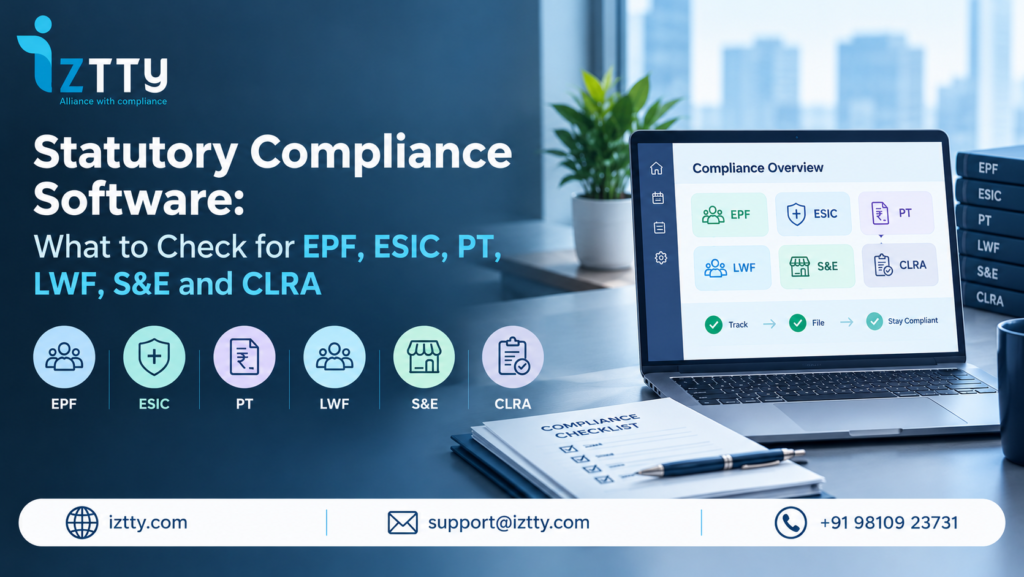
That question is the whole point of this guide. Most demos of statutory compliance software show a dashboard. Very few show what happens for a specific Act: which form, which due date, which state variation, who signs, where the proof goes. So instead of a generic feature list, this checklist goes Act by Act, for EPF, ESIC, Professional Tax, Labour Welfare Fund, Shops & Establishment and the Contract Labour (Regulation and Abolition) Act, 1970. Take it into your next demo and tick things off yourself.
Want this checklist run against your own states and sites? Our compliance practice will map your Acts and show you the gaps first. GET A FREE COMPLIANCE AUDIT
What Statutory Compliance Software Should Actually Do
Statutory compliance software helps an employer meet obligations under labour and employment laws: registrations, monthly contributions, returns, registers, licences and inspections. It is not the same as payroll software, although the two must talk to each other.
Think of it as five jobs. Know which obligations apply to which site. Remind the right person on time. Prepare the filing or register. Make sure a second person checks it before it goes out. Keep proof you can produce when an officer asks. If a tool does only the second job, it is a calendar. If it does the first and the third but nobody reviews anything, you have automated your mistakes.
Who needs it? Anyone with more than one state, more than one Act, a contractor-heavy workforce or a lean compliance team. When should you look? Usually when the spreadsheet starts needing a spreadsheet to manage it. For a wider view, our EPF and ESIC compliance guide and the overview of regulatory compliance software cover the background. This piece is the buying checklist.
One Thing to Settle First: Acts, Codes and Your Forms
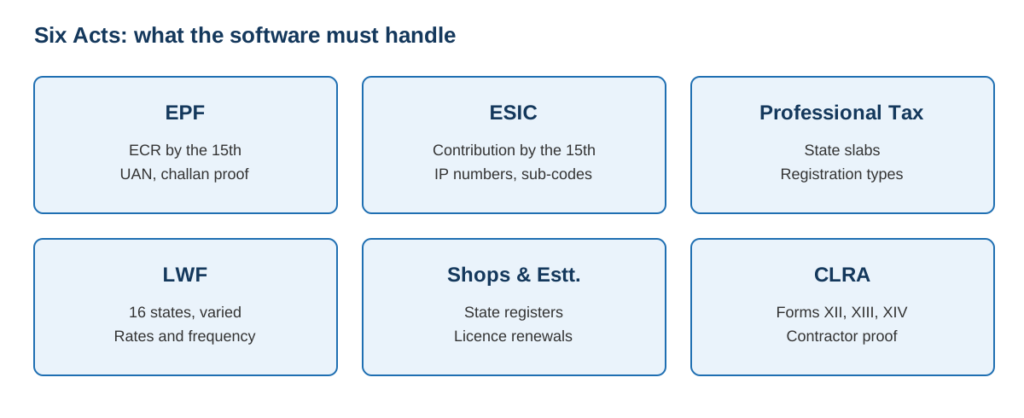
The four Labour Codes took effect on 21 November 2025, and the Central Government notified final Central Rules on 8 May 2026. The Code on Social Security covers provident fund and ESIC matters. The Occupational Safety, Health and Working Conditions Code covers factories and contract labour. State Rules are arriving at different speeds, and State Shops & Establishment Acts continue alongside.
What does this mean for a software buyer? Forms, portal labels, notices and inspectors’ questions will use old Act names and new Code names side by side for a while. Ask every vendor two questions. Does the tool hold both the legacy Act reference and the Code reference for each obligation? And how quickly does it update when your state notifies its rules? Treat any answer that is vague on this as a warning sign.
EPF Checklist
The Employees’ Provident Funds and Miscellaneous Provisions Act, 1952 drives the busiest monthly deadline most employers have. The contribution and the Electronic Challan cum Return (ECR) are due by the 15th of the following month on the EPFO portal.
- ECR preparation: Can it build the ECR from payroll data, flag members with missing or unseeded UANs, and show the difference between last month’s and this month’s headcount before you upload?
- Wage-ceiling logic: Does it handle contribution on actual wages versus the statutory ceiling, and let you see which employees are treated which way?
- Challan and payment proof: Does the challan and bank confirmation attach to the month’s record automatically?
- Cost of lateness: Interest under Section 7Q is 12% per annum, and damages under Para 32A are a flat 1% per month from 15 June 2024. Does the tool show the exposure when a month slips? These figures should be confirmed against the current EPFO notification before you rely on them.
- Exits and joiners: Does it track date of exit and new UAN generation without a separate sheet?
- Contractor workers: Can it see whether your contractors have remitted for the people working at your site? That connects to the CLRA section below.
ESIC Checklist
Under the Employees’ State Insurance Act, 1948, contributions are also due by the 15th of the following month through the ESIC portal. The scheme works in two contribution periods a year, which matters for how benefit eligibility is calculated.
- Eligibility rules: Does it apply the wage ceiling correctly and handle the mid-period crossing, where an employee’s wages move above the ceiling during a contribution period?
- IP number tracking: New joiners, exits and transfers between branches with different ESIC sub-codes.
- Monthly contribution file: Preparation, validation, and a record of what was uploaded.
- Branch and sub-code logic: Does it keep contributions separate for each registered location?
- Notice handling: Local office notices about short payment or inspection reach someone with a deadline, not a general inbox.
Confirm the current ceiling and rates on the ESIC site at the time of your evaluation, because these are revised by notification.
Professional Tax Checklist
Professional Tax is the one where tools most often look finished and are not. It is a state levy, so slabs, registration types, due dates and return formats differ from one state to the next. Our Professional Tax guide and the PT page go into state detail.
- State slabs by employee: Does it deduct by the slab of the state where each employee works, not where head office sits?
- Two registrations in some states: Where a state separates employer registration from employee enrolment, does the tool track both certificates?
- Different frequencies: Monthly in some states, quarterly or annual in others. One calendar should show them all.
- Slab change handling: When a state revises slabs, is there a dated change record and an updated rule, not a manual reset?
- Women, seasonal and category exemptions: Where a state grants them, can the tool apply them per employee?
Ask the vendor to show you your own two least common states. If they only demo Maharashtra and Karnataka, you have learned something.
Labour Welfare Fund Checklist
LWF applies in a limited set of states and is easy to forget precisely because it is not everywhere. Rates, frequency and who pays differ by state, and some states require a registration and a return. Details are in our LWF compliance guide and the LWF page.
- Applicability by site: Does the system know which of your locations fall in an LWF state, and stay silent for those that do not?
- Employee and employer share: Separate amounts, state-wise, updated when notified.
- Frequency: Monthly, half-yearly or annual, with the right date for each state.
- Remittance record: A dated proof of payment per state, stored with the return.
- Unclaimed amounts: Some states have rules on unpaid or unclaimed contributions. Ask whether the tool captures them.
Shops & Establishment Checklist
There is no single Shops & Establishment Act. Each state has its own, with its own registration, renewal period, register formats and working-hour rules. This is where multi-state employers get tripped up, and where a generic tool’s “India-wide template” is least useful. See the state-wise Shops & Establishment guide for background.
- State-validated register formats: Employee, leave, wage and overtime registers in the format your state expects, not a common template.
- Licence and registration renewal: Tiered alerts ahead of expiry, with the certificate stored.
- Working hours and overtime: Daily and weekly limits, with overtime records that agree with payroll. See the leave and working hours page for detail.
- Multi-location view: Retail chains and branch offices need to see every location’s status in one place.
- Intimation of changes: Change of address, manager or employee count where the state requires a notice.
CLRA Checklist
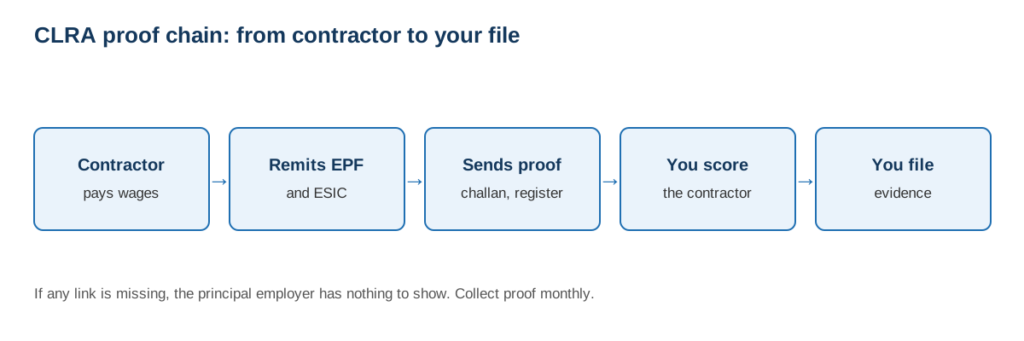
The Contract Labour (Regulation and Abolition) Act, 1970 (see the bare Act on India Code) makes the principal employer responsible if a contractor fails to pay wages. That is why this one belongs on a CFO’s radar, and why it deserves the most demanding checklist. Our CLRA page, vendor compliance page and the guide to CLRA registers and returns add context.
- Registers: Form XII (Register of Contractors), Form XIII (Register of Workmen) and Form XIV (Employment Card), kept by site and by contractor.
- Returns: The contractor’s half-yearly return in Form XXIV and the principal employer’s annual return in Form XXV (due 31 January). Verify current due dates against the Central or State Rules that apply to you.
- Contractor proof, collected not assumed: EPF challan, ESIC challan and wage register from each contractor, month by month, with a status when something is missing.
- A vendor score: A number per contractor, calculated from what was submitted, so you know which three to chase this week.
- Licence tracking: Contractor licence validity linked to the work order.
- Liability file: One place showing what you checked and when, for use if a contractor defaults.
Forms VI-A and VI-B are notices connected with the commencement and completion of contract work. They are not periodic returns, so a tool that puts VI-B on a half-yearly calendar deserves a follow-up question.
Not sure how many of your contractors have actually remitted this month? See a live vendor compliance score for your own sites. BOOK A DEMO
Features That Cut Across Every Act
Once the Act checklists are done, five cross-cutting features decide whether the tool is a system or a set of screens.
- Maker-checker with digital signing: Preparation, review with mandatory remarks on rejection, Digital Signature Certificate signing, and automatic archive. If the same person prepares and signs, you have no control.
- Audit trail and document vault: Who did what, when, with the file attached. Ask to see an export, not a screenshot.
- Compliance score: A live score by Act and by state, with a clear rule for what moves it.
- Regulatory change tracking: New circulars and amendments matched to your profile, with a person reviewing before anything changes in your account. We cover the process in our guide to regulatory change management.
- Notice response: Reading a scanned notice, pulling out the allegation and deadline and drafting a reply with an evidence checklist.
- Integrations: Connection with your payroll or accounting system, so data is not typed twice.
- Role-based access: Makers, Checkers and DSC holders as distinct roles, with department-wise visibility.
Where an HRMS Module Usually Stops
Many HRMS products include a compliance module, and for a single-state company with straightforward payroll that may be enough. Here is where the gap tends to open. Treat the right-hand column as questions to ask, not claims about any particular product.
| Area | Typical HRMS module | What to ask about a specialist platform |
|---|---|---|
| EPF and ESIC | Calculates and generates files from payroll | Does it also check, sign and archive with proof of review? |
| Professional Tax | Slabs for the main states | How many states, and how are changes dated? |
| CLRA and contractors | Often limited or absent | Are contractor proofs collected, scored and filed? |
| Factories and S&E registers | Basic attendance-linked registers | Are formats state-validated? |
| Notices | Out of scope | Is there a drafting workflow with evidence? |
| Rule changes | Release notes | Is there monitoring with named review? |
If your payroll lives in an HRMS you like, you do not have to replace it. The question is whether the compliance layer sits on top and reads from it.
A 30-Minute Demo Script
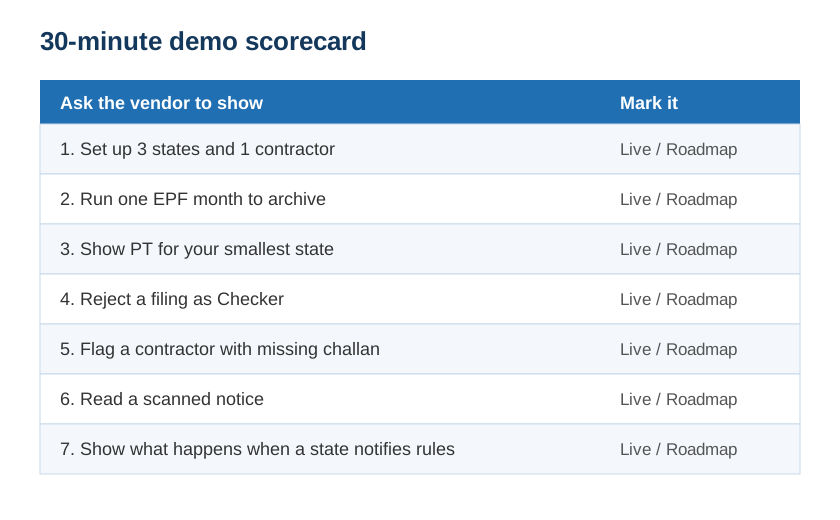
- Ask them to set up a company with three states and one contractor. Time how long that takes.
- Run one EPF month from payroll upload to proof archive.
- Show Professional Tax for your two least common states.
- Reject a filing as the Checker and show the remark trail.
- Show the contractor with a missing challan and what the system does about it.
- Open a scanned notice and ask what the tool extracts.
- Ask what happens the day a state notifies new rules.
Anything that cannot be shown live should be marked “roadmap” on your scorecard.
Where Iztty Fits
Iztty is an AI-powered statutory compliance platform built by Futurex Management Solutions Limited, a New Delhi firm that has handled Indian labour compliance for clients since 2014. Against the checklist above, it covers labour, factory, Shops & Establishment, payroll, vendor and CLRA compliance across 28+ states. A few specifics:
- Review before filing: The Maker-Checker-DSC workflow runs four stages, from upload and validation to review, DSC signing and auto-archive to the Document Vault.
- Payroll connection: Integrations with Tally, Zoho Payroll and Keka HR. See the integrations page.
- Visible score: The Compliance Score Meter shows a live 0 to 100% score by Act and state with Low, Medium and High banding.
- Notices: AI Notice Response averages 4 hours against 3 to 5 days manually.
- Changes: Regulatory Change Intelligence turns gazette notifications and circulars into tasks for your profile, with human review before enforcement.
As an illustration, a representative 14-factory manufacturer on the platform moved its score from 61% to 88% in 90 days, and a representative 40-client consultancy cut EPF and ESIC notice responses from 5 days to 4 hours. Both are anonymised examples, not named case studies. Consultancies managing several clients can use the separate Compliance Consultant account. See the full platform and AI features.
Conclusion
A feature list that says “covers EPF, ESIC, PT, LWF, S&E and CLRA” tells you very little. Ask what happens for each Act, with your forms, in your states, and who checks before it goes out. Bring the checklist to every demo and score what you see, not what you hear.
If you would rather have an expert run it against your sites first, we can do that.
CHECK MY COMPLIANCE | CALL AN EXPERT
FAQs
Q1: What is statutory compliance software?
It is software that helps employers meet labour and employment law obligations such as EPF, ESIC, Professional Tax, LWF, Shops & Establishment and CLRA. It tracks what applies, prepares filings and registers, routes them for review and stores proof.
Q2: What is the difference between HRMS and compliance software?
An HRMS runs people processes such as payroll, attendance and leave. Compliance software handles the legal obligations that follow, including state variations, review, signing, proof and notices. Many HRMS products include a compliance module with narrower coverage.
Q3: Which Acts should statutory compliance software cover?
At minimum, EPF, ESIC, Professional Tax, LWF, Shops & Establishment and CLRA, plus Factories Act registers if you run a factory. Coverage should hold for every state where you have employees.
Q4: Do the Labour Codes change what software I need?
The four Codes took effect on 21 November 2025, with final Central Rules notified on 8 May 2026 and State Rules arriving unevenly. Choose a tool that tracks legacy Act and Code references together and updates quickly when your state notifies rules.
Q5: What is a maker-checker workflow and why does it matter?
One person prepares a filing and another reviews it before it is signed and submitted. It reduces errors and gives you a record of who approved what.
Q6: Can software file EPF and ESIC returns directly?
That depends on the product. Ask whether it files directly on the portals or prepares the file for upload and signing, and ask to see it done.
Q7: How does software help with CLRA compliance?
It keeps registers such as Forms XII, XIII and XIV, collects contractor challans and wage registers, scores each contractor and records your checks, which helps if a contractor defaults.
Q8: How much does statutory compliance software cost in India?
Pricing depends on the number of locations, Acts, states, users and whether services are bundled. Request a quote against your own profile and compare what is included.
Q9: Is AI useful in statutory compliance?
Yes for reading notices, matching circulars to your sites and drafting replies. A qualified person should still review before anything goes to an authority.
Q10: How long does implementation take?
It depends on the number of sites, the state of your data and your payroll integration. Ask for a plan with named milestones and a pilot on one site first.