Ask five vendors for compliance risk management software and you will get five demos that look the same. A dashboard, a few traffic lights, a calendar. Then a notice lands on a Friday evening and you find out which of those features was real.
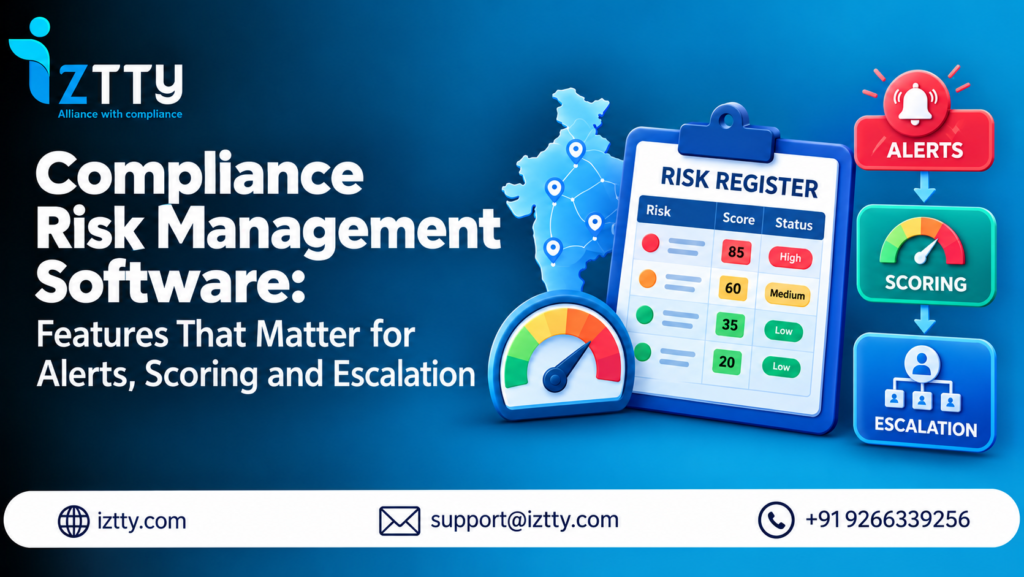
Three of them decide whether the software protects you or just records what already went wrong: alerts that reach the right person in time, a risk score you can trust and explain, and escalation that moves a problem up the chain before it becomes a penalty. This guide breaks down each one for Indian statutory compliance, covering EPF, ESIC, Factories Act, Shops & Establishment, CLRA and the rest, and ends with ten tests you can run in a live demo.
Comparing platforms right now? Bring your own state and contractor list and we will show you these three features working on your data. BOOK A DEMO
What Compliance Risk Management Software Should Actually Do
Plain filing software tells you a return was submitted. Compliance risk management software tells you which of your 100-odd obligations is most likely to go wrong next, and makes sure someone with authority knows about it.
That difference matters more in India than most places, because the exposure is personal as well as financial. Late EPF remittance attracts interest under Section 7Q and damages under Section 14B, and since 15 June 2024 the Para 32A damages rate has been a flat 1% per month of default. Under the Contract Labour (Regulation and Abolition) Act, 1970, a principal employer can be held responsible for specified contractor failures. A missed licence renewal does not cost a late fee, it stops a plant.
And the ground keeps moving. The four Labour Codes took effect on 21 November 2025, with detailed Central and State rules still being notified. Software that cannot absorb a rule change and re-rank your risks is out of date within a quarter.
If you are still deciding between categories, our compliance management software guide compares HRMS modules, GRC suites and specialist platforms. This article assumes you have narrowed the field and want to judge what is under the hood.
Why Most Compliance Reminders Get Ignored
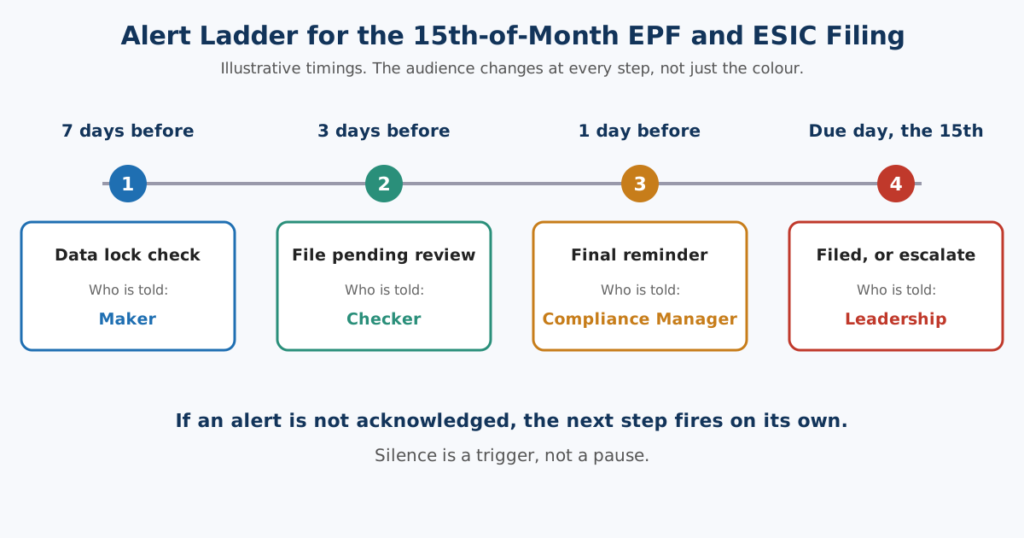
Every tool has alerts. Hardly any have good ones. The usual failure is not a missing reminder, it is a reminder that goes to the wrong person, arrives too late, looks identical to forty others and never escalates if nobody acts.
The four things a proper alert engine needs
- Tiers, not a single reminder. One notification three days before a due date is a coin toss. A ladder that starts early and tightens as the date closes gives the owner time to act while it is still cheap to fix.
- Routing to a named owner. An alert sent to “compliance@” is an alert sent to nobody. It should land with the person who owns that obligation at that site, and the person who checks their work.
- Silence as a trigger. If an alert is not acknowledged or the task not moved, that itself should fire the next step. This is where alerting turns into escalation.
- Noise control. Fifty identical red badges teach people to stop looking. Good tools group alerts by site and Act, and keep the severe ones visually different.
An illustrative alert ladder
The timings below are practitioner defaults, not statutory requirements. Set your own from your filing history, but make sure whatever you buy lets you.
| Obligation | Early warning | Working alert | Final alert |
|---|---|---|---|
| EPF ECR and ESIC contribution (due on the 15th) | 7 days before: payroll data lock check | 3 days before: file pending review | 1 day before and due day: Checker and manager |
| Factory licence renewal | 90 days before: start file | 60 and 30 days before: owner and Plant HR Head | 15 days before: leadership |
| CLRA principal employer annual return (Form XXV, 31 January) | 60 days before: contractor data request | 30 days before: contractors not responded | 10 days before: principal employer review |
| Contractor EPF and ESIC proof | Due date of proof | 7 days overdue: reminder to vendor | 15 days overdue: Compliance Manager |
Look at the last column. It changes who is told, not just how loudly. That is the pattern to demand.
One more thing about alerts: they should know about law changes
A due-date alert is only right if the due date is right. When a state amends a register format or a circular shifts a filing, your alert logic has to change with it. Regulatory change intelligence that creates tasks matched to your company profile, with a person reviewing before anything takes effect, is what keeps the alerts honest.
Scoring: What Goes Inside the Number
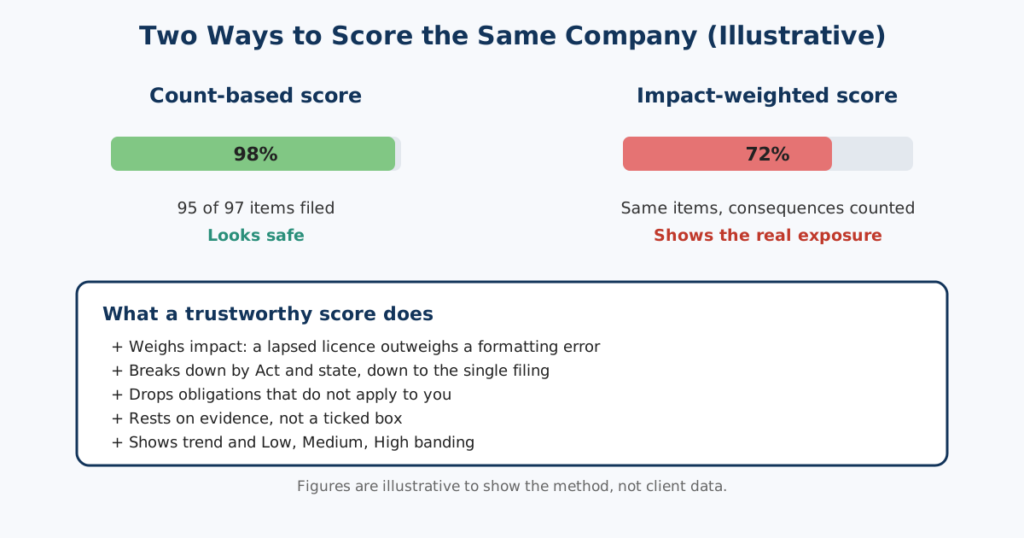
A compliance score of 84% sounds reassuring. What does it mean? If the vendor cannot explain it in two sentences, treat it as decoration.
Here is what separates a score you can run a business on from one that looks good in a slide.
- It weighs consequences, not item counts. Ninety-five filed returns and one lapsed factory licence is not “95% compliant”. Impact has to count. A score that treats a muster roll typo and a missing licence as equals will mislead you.
- It breaks down. You need act-wise and state-wise views, and a drill-down to the single row or filing that moved the number. A CFO asking “why did Gujarat drop?” should get an answer in a click, not a week.
- It does not average away the problem. If nine sites are clean and one is on fire, a blended score still looks decent. Check that the tool surfaces the worst cell as prominently as the overall figure.
- It needs proof behind it. A filing marked “done” because someone ticked a box is weaker than one backed by an approved register and an archived acknowledgement. Ask what counts as evidence.
- It handles “not applicable” properly. Many obligations depend on headcount, state or activity. If the score includes things that do not apply to you, or excludes things that do, it is wrong from day one.
- It shows direction. A score of 78 that was 90 last month is a different story from a 78 that was 60. Trend and banding (Low, Medium, High) matter as much as the number.
The live Compliance Score Meter is built around this idea: a 0 to 100% score with act-wise and state-wise breakdown and Low, Medium and High risk bands. If you want the thinking behind how to rate individual obligations before any software gets involved, see our guide to the compliance risk register.
Escalation: Who Gets Pulled In, and When
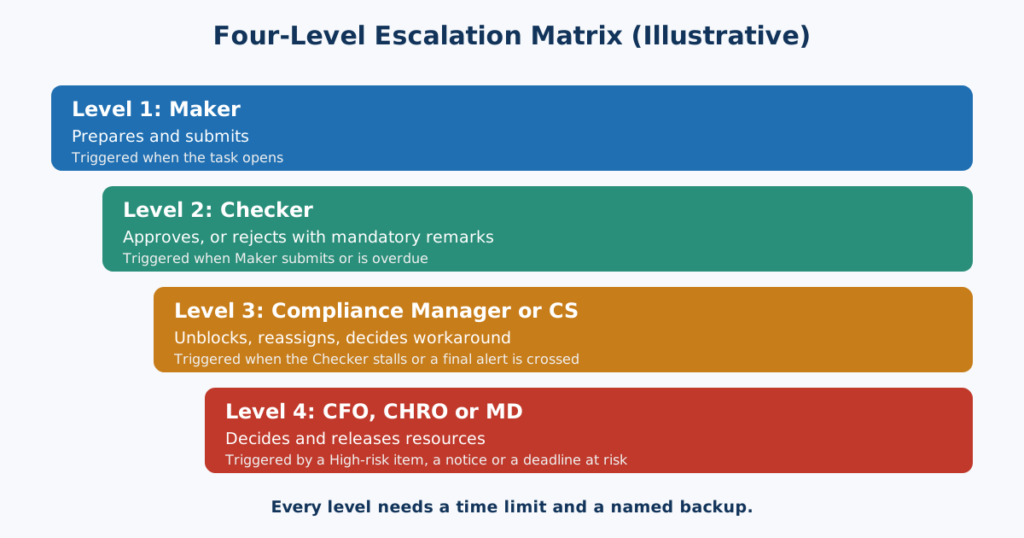
Alerts tell an owner. Escalation tells everyone else when the owner has not dealt with it. Most software is weak here, because it needs to know your organisation, not just your calendar.
A workable ladder has four rungs, and each one should be configurable.
| Level | Who | Triggered when | Expected action |
|---|---|---|---|
| 1 | Maker (prepares the register or return) | Task opens | Prepare and submit for review |
| 2 | Checker (reviews, approves or rejects with remarks) | Maker submits, or Maker is overdue | Approve, or return with mandatory remarks |
| 3 | Compliance Manager or Company Secretary | Checker stalls, or an item crosses its final alert | Reassign, unblock, decide on a workaround |
| 4 | CFO, CHRO or Managing Director | High-risk item unresolved, notice received, or deadline at risk | Decision and resources |
Four details trip people up in practice.
Leave and attrition. The person who always files the ECR will go on leave in the second week of the month. The tool needs backup assignment, and a way to see at a glance which obligations have a single point of failure.
Rejections need a reason. A Checker who sends something back with no explanation creates a loop, not a control. Mandatory remarks on rejection keep the trail clean and the fix fast.
Notices are their own escalation path. When an EPFO, ESIC or labour department notice arrives, the clock starts and nobody wants to be hunting for who handles it. The route should go straight to a named responder and a senior reviewer, with the deadline visible. Tools like AI notice response that read the notice, pull out the allegation and deadline, and draft a reply with an evidence checklist shorten that first stretch dramatically.
Contractors sit outside your org chart. You cannot escalate to a vendor’s CFO, but you can escalate your own side: reminder to the vendor, then to your Compliance Manager, then to whoever approves their payments. The vendor compliance module exists for exactly this.
Features That Look Good in Demos and Fail in Practice
A few things to be wary of.
- A beautiful dashboard with no drill-down. Pretty until someone asks “why”.
- Email-only alerts. Honestly, a mailbox full of reminders is where compliance dates go to die. Ask what happens when nobody responds.
- A fixed scoring formula you cannot see or tune. If you cannot challenge it, you cannot defend it to an auditor or a board.
- “Covers all Acts” with no state formats. A register in the wrong state format is a finding waiting to happen. Ask who maintains the formats when a state changes them.
- Filing without review. A tool that lets one person prepare, approve and sign alone has removed the control that makes the score meaningful.
- No history. If you cannot see who changed a score or status, and when, you cannot answer an inspector.
An HRMS compliance module is usually strongest on filing and weakest on the three features above, since its job is payroll. That is not a flaw, just a different job. A platform built for statutory risk puts review, ranking and escalation in the centre.
Ten Tests to Run in a Live Demo
Do not accept slides. Give the vendor your own data, or a realistic dummy set with three states and a handful of contractors, and ask them to do these live.
On alerts
- Show me the full alert ladder for the 15th-of-month EPF and ESIC filing, and who receives each step.
- Change a due date because of a notified amendment. Do the alerts follow?
- Ignore an alert on screen. What happens next, and when?
- Show me two sites with ten overdue items each. How does the tool stop me drowning?
On scoring
- Explain the score for one state in two sentences, then drill to the filing that moved it.
- Mark one factory licence as lapsed. How far does the overall score fall?
- Mark an obligation not applicable. Does the score recalculate correctly?
On escalation
- Take the Checker out of the picture. Who steps in and how fast?
- Upload a sample EPFO or ESIC notice. Show me the route, the deadline and the draft reply.
- Show me the audit trail for one rejected register: who rejected it, why, and what happened next.
A vendor that handles eight of these cleanly is worth a second meeting. One that dodges the third and the eighth is selling a calendar.
What Each Buyer Should Care About Most
| If you are | Weigh these features first | Because |
|---|---|---|
| CFO or MD | Site-by-act scoring, executive dashboard, Level 4 escalation | You need the worst exposure on one screen and a trigger that reaches you before a notice does |
| CHRO or Plant HR Head | Tiered licence and register alerts, backup assignment | Your risks are renewals, registers and contractor files across several sites |
| Compliance Manager or CS | Evidence behind scores, audit trail, maker-checker control | You answer to inspectors, auditors and the board |
| Founder of a growing MSME | Simple ladder, state-validated formats, low setup effort | You have no compliance team yet and a new state is about to be added |
| Compliance consultant or firm | Multi-client views, per-client scoring, notice handling speed | You carry the exposure for many companies at once |
How Iztty Handles Alerts, Scoring and Escalation
Iztty is an AI-powered statutory compliance platform from Futurex Management Solutions Limited, the New Delhi consulting firm that has been running Indian labour compliance for clients since 2014. Here is how its features line up with the three jobs above.
- Alerts: licence renewals use tiered expiry alerts, filings are tied to the compliance calendar, and Regulatory Change Intelligence monitors gazette notifications, EPFO and ESIC circulars and state amendments, creating tasks matched to your company profile. A person reviews each before it is enforced.
- Scoring: the Compliance Score Meter gives a live 0 to 100% score with act-wise and state-wise breakdown and Low, Medium and High banding. The vendor compliance module auto-calculates contractor scores and keeps principal-employer liability documentation.
- Escalation: the Maker-Checker-DSC workflow runs four stages: upload and validate, review and approve or reject with mandatory remarks, digital signing, then auto-archive to the Document Vault. Role-based access and department-wise permissions define who sees and approves what. The AI Notice Response assistant reads PF, ESIC, Labour, S&E and Factories Act notices and drafts a reply, averaging 4 hours against 3 to 5 days manually.
One honest note: how you configure alert timing, channels and leadership escalation depends on your setup, so ask to see your own ladder built during the demo rather than assuming. That is precisely the test in Section 6.
For firms managing several client companies, a separate Compliance Consultant account type covers multi-client work. In one anonymised illustration published by Iztty, a 40-client compliance consultancy cut EPF and ESIC notice response from 5 days to 4 hours. It is a representative outcome, not an attributed case study.
Want to see your own alert ladder, score and escalation path? We start with your registers, licences and contractor list and return a scored baseline. Get a Free Compliance Audit.
Your First 30 Days After You Buy
- Week 1: load locations, registrations and contractors. Confirm which obligations apply to which site.
- Week 2: name an owner and a Checker for every obligation. Set the alert ladders. Assign backups.
- Week 3: agree what counts as evidence for a “done”. Run the first scoring pass and read the worst five items out loud with their owners.
- Week 4: test the escalation path with a deliberate dry run. Send the first one-page score summary to leadership.
Conclusion: Buy for the Bad Day
Any compliance software looks fine when every filing goes through. The real question is what it does on the day an owner is on leave, a contractor stops paying provident fund and a notice arrives. Alerts that reach the right person early, a score that tells the truth and an escalation path that does not depend on anyone remembering are what you are paying for.
If you want to check how your current setup would hold up, we are happy to walk through it with you.
CHECK MY COMPLIANCE | BOOK A DEMO
FAQs
Q1: What is compliance risk management software?
It is software that tracks statutory obligations, ranks them by how likely and how damaging a failure would be, alerts the right owner in time and escalates unresolved items. It goes beyond filing to show which obligation is most likely to hurt you next.
Q2: What is the difference between an HRMS compliance module and compliance risk management software?
An HRMS module mainly records and files statutory returns as part of payroll. Compliance risk management software adds ranking, ownership, evidence, review workflows, contractor tracking and escalation around those filings.
Q3: Which features matter most when comparing compliance management software?
Tiered alerts routed to named owners, a score that weighs consequences and drills down, configurable escalation, maker-checker review, an audit trail, state-validated formats and regulatory change monitoring.
Q4: How should a compliance score be calculated?
It should weigh impact, not just count completed items, break down by Act and state, exclude obligations that do not apply, and rest on evidence. Ask any vendor to explain its score in two sentences.
Q5: How early should compliance alerts start?
It depends on the obligation. Monthly filings such as the EPF ECR and ESIC contribution due on the 15th benefit from a week of lead time. Licence renewals need 60 to 90 days. Set tiers from your own filing history.
Q6: What should an escalation matrix include?
A Maker, a Checker, a Compliance Manager or Company Secretary, and a senior leader, each with a trigger, a time limit and a backup. Notices and contractor failures need their own routes.
Q7: Do the Labour Codes change what I should look for in software?
Yes. The four Labour Codes took effect on 21 November 2025, with detailed rules still being notified. Choose software that monitors changes, creates tasks matched to your profile and lets a person review before anything is enforced.
Q8: Can compliance risk management software help with contractor risk?
Yes, if it collects contractor EPF, ESIC and wage register proof, scores each vendor and escalates overdue items. Under the CLRA a principal employer can carry liability for specified contractor failures.
Q9: How much does compliance management software cost in India?
Price depends on locations, Acts, users and contractors covered, and on whether services are bundled. Ask for a quote on your own profile and compare what is included, not just the headline figure.
Q10: How long does it take to implement?
Loading locations, owners and contractors and setting alert ladders is usually a matter of weeks. Plan a dry run of escalation in the first month so you know it works before you need it.