It is the 12th of the month. Provident fund and ESIC contributions fall due on the 15th. A manufacturer in Coimbatore has just switched on its new compliance tool and found that 40 employees have no UAN, three plants carry the same site name spelt three ways, and the contractor list has 61 names where the gate register has 74. Nobody can file from the new system. Nobody trusts the old spreadsheet any more either.
That scene is the most common way compliance software implementation goes wrong. The software is fine. The data going into it is not, and nobody planned for the day the two meet. This guide is the plan. It covers what data actually has to move, how to clean it, how to check it, and a 30-60-90 day schedule that avoids cutting over in the worst week of the month.
Want a data-readiness check on your own employee, site and contractor records before you commit to a go-live date? Our compliance practice will run it with you. GET A FREE COMPLIANCE AUDIT
What Implementation Actually Involves
Compliance software implementation is the project that takes a tool from signed contract to a state where your team files, reviews and stores proof inside it. It has five parts: set-up (companies, sites, Acts, states), data migration, connection to payroll or accounting, user and role design, and a controlled go-live with a parallel run.
Most of the effort sits in the second part. A tool can be configured in days. Getting a clean list of employees, sites, registrations and contractors takes weeks, because that data lives in payroll exports, old registers, filing receipts and people’s heads. If you are still comparing products, see our guides to compliance software pricing and the statutory compliance software checklist. This piece starts after you have chosen.
Three Decisions Before Any Data Moves
- Scope: Which Acts, states and sites go live first? A common mistake is trying everything at once. EPF and ESIC for all sites is often a sensible first wave; Professional Tax, LWF, Shops & Establishment and contract labour follow.
- Pilot site: Pick one site that is typical, not your cleanest and not your messiest. It will teach you what the others will need.
- Window: Decide the calendar slot for cutover now, using Section 7. It affects everything else.
Write the three answers on one page and get the sponsor, usually the CFO, COO or CHRO, to sign it. It sounds formal. It saves arguments in week five.
What Data Moves, and Where It Breaks
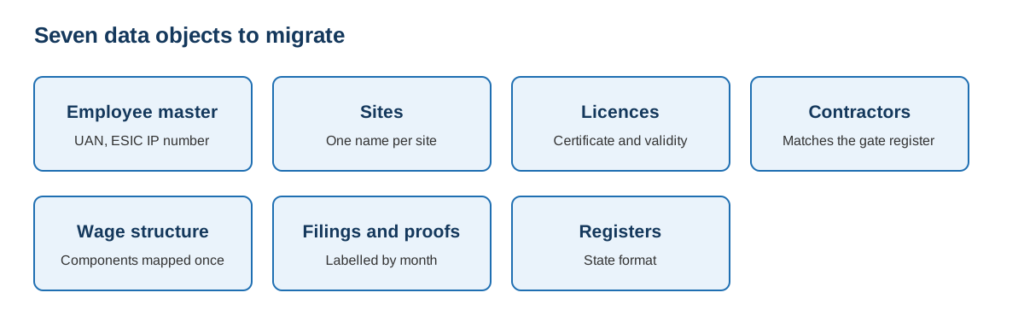
| Data object | Where it usually lives | Key identifier | Common defect |
|---|---|---|---|
| Employee master | Payroll or HRMS export | Employee ID, UAN, ESIC insured person number | Missing or duplicate UANs; wrong date of joining |
| Establishments and sites | Registration certificates, filing receipts | PF code, ESIC code, state registration numbers | One site spelt several ways; wrong state tagged |
| Registrations and licences | Folders, emails, a renewal tracker | Licence number, validity dates | Expired entries; dates typed in mixed formats |
| Contractors and contract workers | Purchase or admin lists | Contractor licence, work order number | List does not match who is actually at the gate |
| Wage structure | Payroll | Salary component codes | Components that count for PF but are mapped as excluded, or the reverse |
| Historical filings and proofs | Shared drives, portal downloads | Month and establishment | Challans without the matching ECR; unlabelled scans |
| Registers | Excel or paper | Register type and period | State-specific format not followed |
Not everything needs to move. Ask what you will actually need at the next inspection or client audit, and migrate that first. A common rule: current employees and sites in full, the last 12 to 24 months of proofs, older records scanned into the document vault without being re-keyed.
Eight Clean-Up Rules
- One identifier per person. Every employee needs one employee ID and, where applicable, a UAN and an ESIC insured person number. Fix duplicates before migration. The UAN is the EPFO member identifier, and members can be checked on the EPFO portal.
- One name per site. Create a site master with one name, one address, one state and the registration numbers that belong to it. Everything else points to it.
- State on every record. Professional Tax, LWF and Shops & Establishment rules follow the state where the employee works.
- Dates in one format. Joining, exit, licence validity and renewal dates should all use one format. Mixed formats cause silent errors.
- Exits closed properly. People who left but are still active in a list inflate headcount and contributions.
- Salary components mapped once. Decide, with payroll, which components count for provident fund and ESIC, and keep the mapping documented.
- Contractor master reconciled. Tie the contractor list to work orders and to who actually enters the site. Our guide to CLRA registers and returns explains why this matters.
- Orphan documents labelled. A challan nobody can place is of no use as proof. Label it by establishment and month, or set it aside.
Mapping and Validation: Proving the Data Is Right
Cleaning is not the same as proving. Before anything goes live, run these tie-outs and keep the results.
- Headcount tie-out: Count of active employees in the new system equals payroll for the same month, by site.
- EPF tie-out: Members and wages in the new ECR draft match the last filed ECR for the same month, with differences explained one by one.
- ESIC tie-out: Insured persons and contribution base match the last contribution file, including anyone who crossed the wage ceiling.
- Professional Tax tie-out: Deductions by state match the last payment, slab by slab.
- Contractor tie-out: Contractor list equals the gate register for a sample week.
- Licence tie-out: Every licence in the tracker has a certificate attached and a validity date you can read off the document.
Record each result in a simple sheet with the date, the person who checked it and the outcome. That sheet is evidence that your data was verified, and it is what you will point to if anyone asks why numbers differed between systems.
Here is what a tie-out looks like when it finds something. Suppose the new system shows 412 active employees at the Coimbatore plant and payroll shows 405. Seven people explain the gap. Four are ex-employees whose exit date was never entered. Two joined on the 28th and appear in one system’s month-end and not the other’s. One has two employee IDs from an old rehire. None of this is dramatic, and every one of those seven would have shown up as a wrong contribution later. Write each difference down with its cause and who fixed it. A tie-out with zero differences on the first run is suspicious; a tie-out where every difference is explained is the goal.
Do the same for wages, not only headcount. If the wage base for provident fund in the new draft is a few percent off the last filed month, the cause is almost always a salary component mapped the wrong way. Find it now, with payroll in the room, rather than on the 14th.
Not sure your headcount, ECR and contractor lists will tie out? We will walk through the tie-outs with you on a sample month. BOOK A DEMO
The 30-60-90 Day Plan
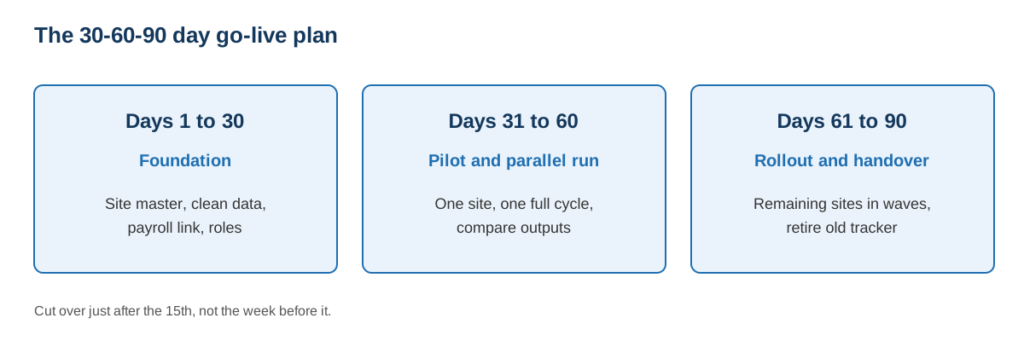
| Phase | What happens | Owner | Exit criteria |
|---|---|---|---|
| Days 1 to 30: Foundation | Sign the scope page. Name the project owner and data owners. Build the site master. Clean employee and contractor data. Set up companies, states and Acts. Connect payroll. Design roles for Makers, Checkers and DSC holders. | Project owner, HR, payroll, vendor | Site master signed off; employee data passes headcount tie-out for the pilot site |
| Days 31 to 60: Pilot and parallel run | Go live on the pilot site. Prepare one full monthly cycle in the new tool while the old process continues. Compare outputs. Fix mapping issues. Train Makers and Checkers. | Pilot site lead, Compliance Manager | EPF and ESIC outputs match the old process or differences are explained; Checker and signing flow tested |
| Days 61 to 90: Rollout and handover | Add remaining sites in waves. Move historical proofs. Retire old trackers to read-only. Hold a first review with leadership. Write down the running routine. | Project owner, site leads | All in-scope sites live; one full cycle completed in the new tool; old process retired |
Inside the first 30 days, a rough week-by-week shape helps. Week one is scope, owners and the site master. Week two is employee and contractor clean-up. Week three is payroll connection and salary component mapping. Week four is the headcount and wage tie-outs for the pilot site, plus role design and DSC checks. If you reach the end of week four with open tie-out differences, that is your signal to extend the phase, not to start the pilot anyway.
The middle phase has its own rhythm. Pilot go-live happens early in the second half of the month, right after the due date. Then the parallel cycle runs through to the next due date, with a mid-cycle review to look at the draft ECR and ESIC file. The comparison happens a few days before the 15th, which gives you time to fix and re-run.
A few notes on the plan. The parallel run is the point at which most surprises appear, so protect it. Do not let the old process quietly continue after Day 90, because two systems are worse than one. And if the pilot reveals deep data problems, extend Days 1 to 30 rather than pressing on.
Choosing the Cutover Window
When you go live matters almost as much as how. Contributions for provident fund and ESIC are due by the 15th of the following month, so avoid cutting over in the days just before the 15th. The best window is usually right after the due date, in the second half of the month, which gives you two clear weeks before the next cycle.
Also check your half-yearly and annual return windows for contract labour and factory returns, and avoid cutovers that land on top of them. Look at the compliance calendar for each state you operate in.
Finally, remember that the rules underneath are moving. The four Labour Codes took effect on 21 November 2025, final Central Rules followed on 8 May 2026, and State Rules are arriving unevenly. Check the Ministry’s labour.gov.in site for the current position, and ask your vendor how rule changes will be handled during your rollout. Our guide to regulatory change management explains the process.
Who Does What
- Executive sponsor: Signs the scope page and clears blockers. Usually the CFO, COO or CHRO.
- Project owner: Runs the plan day to day, often the Compliance Manager or Company Secretary.
- Data owners: One per data object: HR for employees, admin for licences, purchase or admin for contractors.
- Payroll lead: Owns the salary component mapping and the payroll connection.
- Makers, Checkers and DSC holders: The people who will actually prepare, review and sign. Name them early and make sure they are different people. See our guide to the Maker-Checker-DSC workflow.
- IT: Access, integration and security questions.
- Vendor: Configuration, migration support and training. Confirm in writing what migration help is included.
Go-Live Criteria
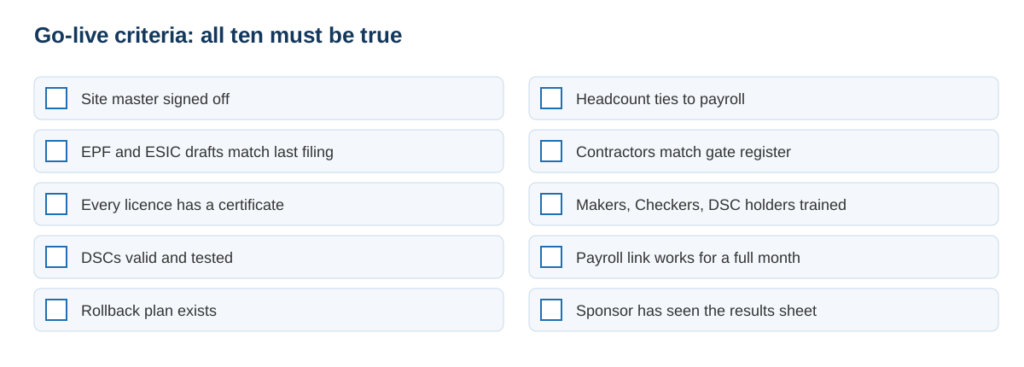
Do not go live because the calendar says so. Go live when these are true.
- Site master signed off.
- Employee data passes the headcount tie-out for every in-scope site.
- EPF and ESIC drafts match the last filed month or differences are explained.
- Contractor list matches the gate register for a sample week.
- Every licence has a certificate and a validity date.
- Makers, Checkers and DSC holders are named and trained.
- DSCs are procured, valid and tested in the signing flow.
- Payroll connection works for one full month.
- A rollback plan exists: the old process can resume for one cycle if needed.
- The sponsor has seen the results sheet.
Why Implementations Stall
- Everything at once. Too many Acts and states on day one.
- No data owner. Everyone agrees the data is messy and nobody fixes it.
- Payroll mapping postponed. The first ECR draft comes out wrong and trust collapses.
- Parallel run skipped. Differences appear on the due date, not before.
- Old tracker never retired. Two sources of truth, two sets of answers.
Where Iztty Fits
Iztty is an AI-powered statutory compliance platform built by Futurex Management Solutions Limited, a New Delhi firm that has handled Indian labour compliance for clients since 2014. We agree scope, sites and states with you before anything moves, and we confirm in writing what migration and training support is included in your plan.
Here is how the published features map to the plan above:
- Payroll connection: integrations with Tally, Zoho Payroll and Keka HR (see integrations).
- Review and signing: a four-stage Maker-Checker-DSC workflow, ending in auto-archive to the Document Vault.
- Contractors: vendor compliance collects EPF, ESIC and wage registers and calculates a vendor score.
- Licences: tiered expiry alerts for factory licences and renewals.
- Visibility: the Compliance Score Meter shows a live 0 to 100% score by Act and state, useful for judging each wave.
As an anonymised illustration, a representative 14-factory manufacturer moved its score from 61% to 88% in 90 days. That is not a named case study. See the platform page.
Conclusion
Compliance software implementation succeeds or fails on data and timing. Clean one identifier per person and one name per site. Prove the numbers with tie-outs. Pilot on one site, run one cycle in parallel and choose a window that is not the week before the 15th. Then roll out in waves and retire the old tracker.
If you would like a second pair of eyes on your readiness before you set a date, we are happy to help.
CHECK MY COMPLIANCE | CALL AN EXPERT
FAQs
Q1: What is compliance software implementation?
It is the project that takes compliance software from signed contract to live use: set-up, data migration, payroll connection, role design, training and a controlled go-live.
Q2: How long does compliance software implementation take?
It depends on the number of sites and states and the state of your data. A 30-60-90 day plan is a common structure: foundation, pilot with a parallel run, then rollout. Ask your vendor for a plan with named milestones.
Q3: What data do I need to migrate?
Employee master, sites and registrations, licences, contractors, wage structure, recent filings and proofs, and registers. Migrate current records in full and recent proofs first.
Q4: How do I clean employee data for compliance software?
Give each person one employee ID plus UAN and ESIC insured person number where applicable, remove duplicates, close exits, use one date format and tag the state on every record.
Q5: How do I validate migrated data?
Run tie-outs: headcount against payroll, EPF and ESIC drafts against the last filed month, Professional Tax by state, contractors against the gate register and licences against certificates. Record the results.
Q6: What is a parallel run?
It is one full monthly cycle prepared in the new tool while the old process continues, so you can compare outputs before relying on the new tool.
Q7: When is the best time to go live?
Usually just after the 15th, when provident fund and ESIC contributions fall due, which leaves two clear weeks before the next cycle. Avoid your half-yearly and annual return windows.
Q8: Do the Labour Codes affect implementation?
The four Codes took effect on 21 November 2025, with final Central Rules notified on 8 May 2026 and State Rules arriving unevenly. Ask how the tool handles rule changes during your rollout.
Q9: Who should own implementation?
An executive sponsor for decisions, a project owner such as the Compliance Manager for day-to-day work, a data owner for each data object and named Makers, Checkers and DSC holders.
Q10: Why do compliance software implementations fail?
Usually because of too wide a scope at the start, no data owner, postponed payroll mapping, a skipped parallel run or an old tracker that never retires.