Compliance Risk Management Software: Features That Matter for Alerts, Scoring and Escalation

Ask five vendors for compliance risk management software and you will get five demos that look the same. A dashboard, a few traffic lights, a calendar. Then a notice lands on a Friday evening and you find out which of those features was real.

Three of them decide whether the software protects you or just records what already went wrong: alerts that reach the right person in time, a risk score you can trust and explain, and escalation that moves a problem up the chain before it becomes a penalty. This guide breaks down each one for Indian statutory compliance, covering EPF, ESIC, Factories Act, Shops & Establishment, CLRA and the rest, and ends with ten tests you can run in a live demo.

Comparing platforms right now? Bring your own state and contractor list and we will show you these three features working on your data. BOOK A DEMO

What Compliance Risk Management Software Should Actually Do

Plain filing software tells you a return was submitted. Compliance risk management software tells you which of your 100-odd obligations is most likely to go wrong next, and makes sure someone with authority knows about it.

That difference matters more in India than most places, because the exposure is personal as well as financial. Late EPF remittance attracts interest under Section 7Q and damages under Section 14B, and since 15 June 2024 the Para 32A damages rate has been a flat 1% per month of default. Under the Contract Labour (Regulation and Abolition) Act, 1970, a principal employer can be held responsible for specified contractor failures. A missed licence renewal does not cost a late fee, it stops a plant.

And the ground keeps moving. The four Labour Codes took effect on 21 November 2025, with detailed Central and State rules still being notified. Software that cannot absorb a rule change and re-rank your risks is out of date within a quarter.

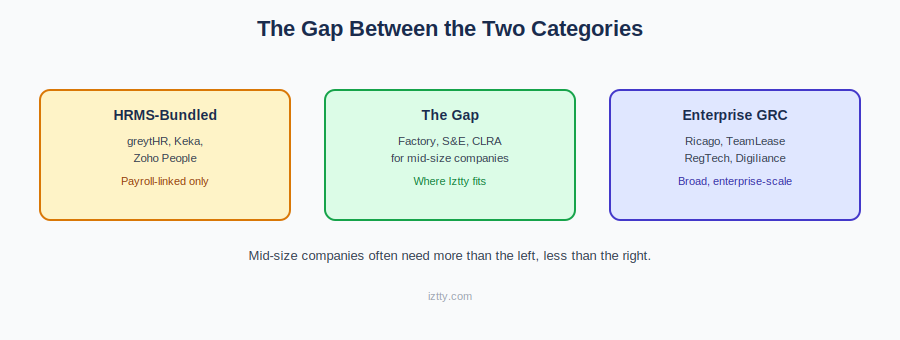
If you are still deciding between categories, our compliance management software guide compares HRMS modules, GRC suites and specialist platforms. This article assumes you have narrowed the field and want to judge what is under the hood.

Why Most Compliance Reminders Get Ignored
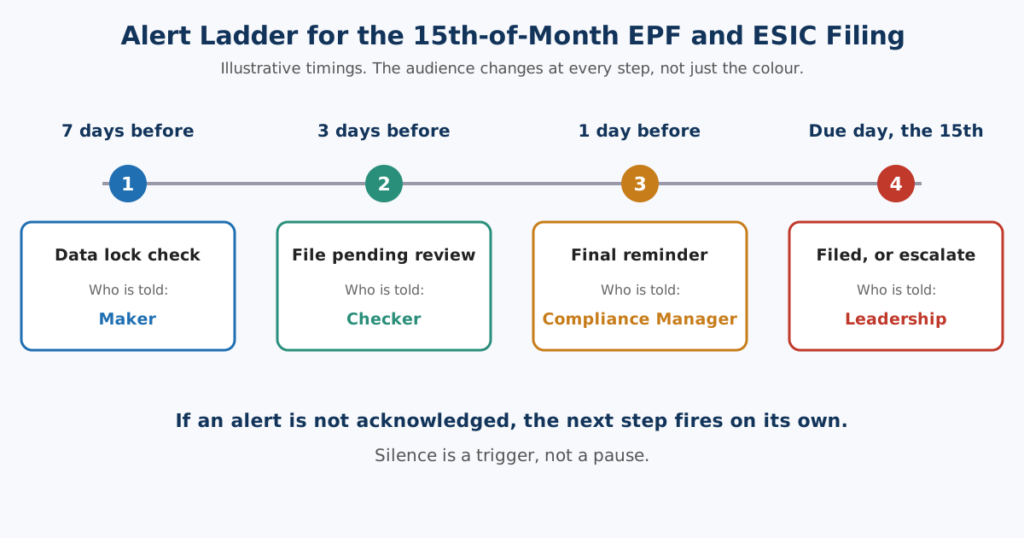
Every tool has alerts. Hardly any have good ones. The usual failure is not a missing reminder, it is a reminder that goes to the wrong person, arrives too late, looks identical to forty others and never escalates if nobody acts.

The four things a proper alert engine needs

  • Tiers, not a single reminder. One notification three days before a due date is a coin toss. A ladder that starts early and tightens as the date closes gives the owner time to act while it is still cheap to fix.
  • Routing to a named owner. An alert sent to “compliance@” is an alert sent to nobody. It should land with the person who owns that obligation at that site, and the person who checks their work.
  • Silence as a trigger. If an alert is not acknowledged or the task not moved, that itself should fire the next step. This is where alerting turns into escalation.
  • Noise control. Fifty identical red badges teach people to stop looking. Good tools group alerts by site and Act, and keep the severe ones visually different.

An illustrative alert ladder

The timings below are practitioner defaults, not statutory requirements. Set your own from your filing history, but make sure whatever you buy lets you.

ObligationEarly warningWorking alertFinal alert
EPF ECR and ESIC contribution (due on the 15th)7 days before: payroll data lock check3 days before: file pending review1 day before and due day: Checker and manager
Factory licence renewal90 days before: start file60 and 30 days before: owner and Plant HR Head15 days before: leadership
CLRA principal employer annual return (Form XXV, 31 January)60 days before: contractor data request30 days before: contractors not responded10 days before: principal employer review
Contractor EPF and ESIC proofDue date of proof7 days overdue: reminder to vendor15 days overdue: Compliance Manager

Look at the last column. It changes who is told, not just how loudly. That is the pattern to demand.

One more thing about alerts: they should know about law changes

A due-date alert is only right if the due date is right. When a state amends a register format or a circular shifts a filing, your alert logic has to change with it. Regulatory change intelligence that creates tasks matched to your company profile, with a person reviewing before anything takes effect, is what keeps the alerts honest.

Scoring: What Goes Inside the Number
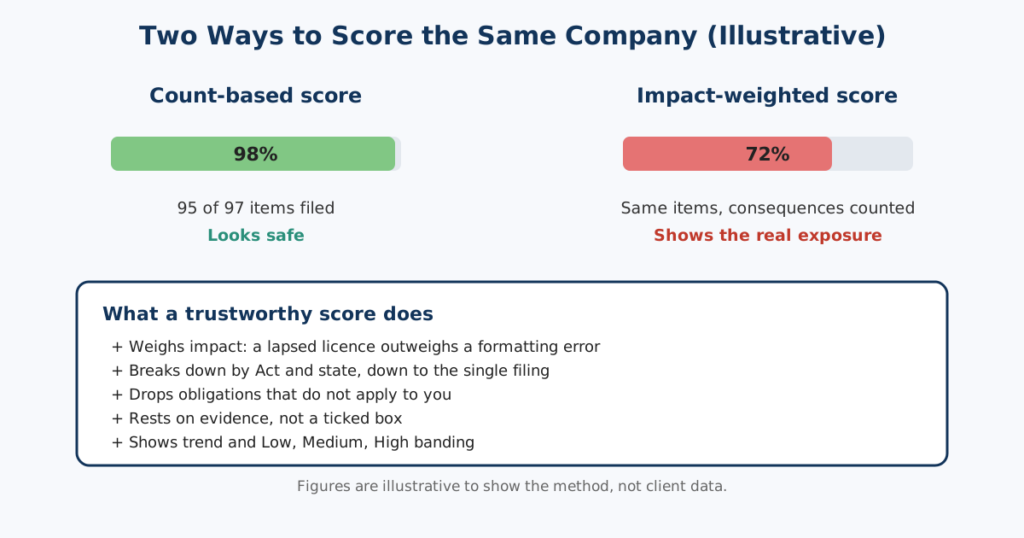
A compliance score of 84% sounds reassuring. What does it mean? If the vendor cannot explain it in two sentences, treat it as decoration.

Here is what separates a score you can run a business on from one that looks good in a slide.

  • It weighs consequences, not item counts. Ninety-five filed returns and one lapsed factory licence is not “95% compliant”. Impact has to count. A score that treats a muster roll typo and a missing licence as equals will mislead you.
  • It breaks down. You need act-wise and state-wise views, and a drill-down to the single row or filing that moved the number. A CFO asking “why did Gujarat drop?” should get an answer in a click, not a week.
  • It does not average away the problem. If nine sites are clean and one is on fire, a blended score still looks decent. Check that the tool surfaces the worst cell as prominently as the overall figure.
  • It needs proof behind it. A filing marked “done” because someone ticked a box is weaker than one backed by an approved register and an archived acknowledgement. Ask what counts as evidence.
  • It handles “not applicable” properly. Many obligations depend on headcount, state or activity. If the score includes things that do not apply to you, or excludes things that do, it is wrong from day one.
  • It shows direction. A score of 78 that was 90 last month is a different story from a 78 that was 60. Trend and banding (Low, Medium, High) matter as much as the number.

The live Compliance Score Meter is built around this idea: a 0 to 100% score with act-wise and state-wise breakdown and Low, Medium and High risk bands. If you want the thinking behind how to rate individual obligations before any software gets involved, see our guide to the compliance risk register.

Escalation: Who Gets Pulled In, and When
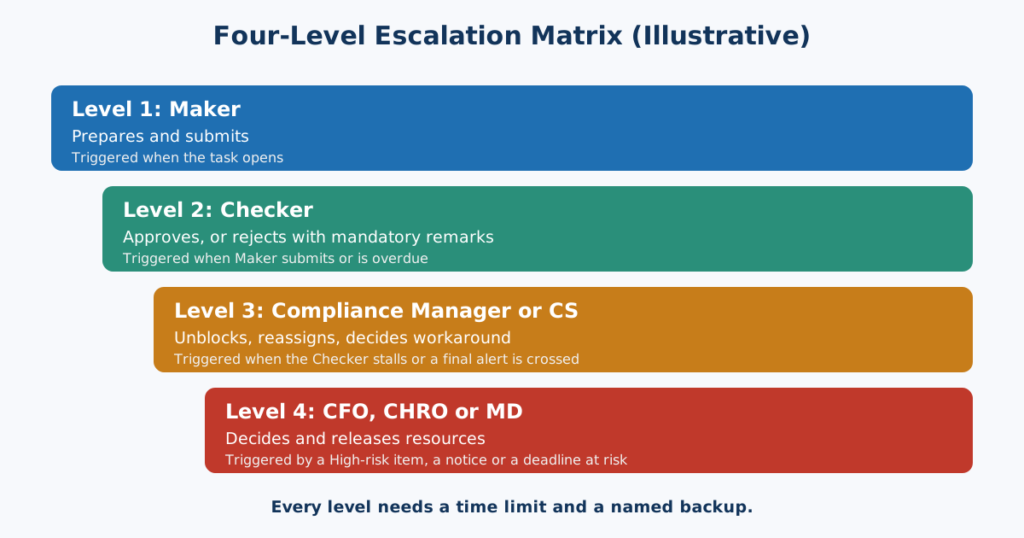
Alerts tell an owner. Escalation tells everyone else when the owner has not dealt with it. Most software is weak here, because it needs to know your organisation, not just your calendar.

A workable ladder has four rungs, and each one should be configurable.

LevelWhoTriggered whenExpected action
1Maker (prepares the register or return)Task opensPrepare and submit for review
2Checker (reviews, approves or rejects with remarks)Maker submits, or Maker is overdueApprove, or return with mandatory remarks
3Compliance Manager or Company SecretaryChecker stalls, or an item crosses its final alertReassign, unblock, decide on a workaround
4CFO, CHRO or Managing DirectorHigh-risk item unresolved, notice received, or deadline at riskDecision and resources

Four details trip people up in practice.

Leave and attrition. The person who always files the ECR will go on leave in the second week of the month. The tool needs backup assignment, and a way to see at a glance which obligations have a single point of failure.

Rejections need a reason. A Checker who sends something back with no explanation creates a loop, not a control. Mandatory remarks on rejection keep the trail clean and the fix fast.

Notices are their own escalation path. When an EPFO, ESIC or labour department notice arrives, the clock starts and nobody wants to be hunting for who handles it. The route should go straight to a named responder and a senior reviewer, with the deadline visible. Tools like AI notice response that read the notice, pull out the allegation and deadline, and draft a reply with an evidence checklist shorten that first stretch dramatically.

Contractors sit outside your org chart. You cannot escalate to a vendor’s CFO, but you can escalate your own side: reminder to the vendor, then to your Compliance Manager, then to whoever approves their payments. The vendor compliance module exists for exactly this.

Features That Look Good in Demos and Fail in Practice

A few things to be wary of.

  • A beautiful dashboard with no drill-down. Pretty until someone asks “why”.
  • Email-only alerts. Honestly, a mailbox full of reminders is where compliance dates go to die. Ask what happens when nobody responds.
  • A fixed scoring formula you cannot see or tune. If you cannot challenge it, you cannot defend it to an auditor or a board.
  • “Covers all Acts” with no state formats. A register in the wrong state format is a finding waiting to happen. Ask who maintains the formats when a state changes them.
  • Filing without review. A tool that lets one person prepare, approve and sign alone has removed the control that makes the score meaningful.
  • No history. If you cannot see who changed a score or status, and when, you cannot answer an inspector.

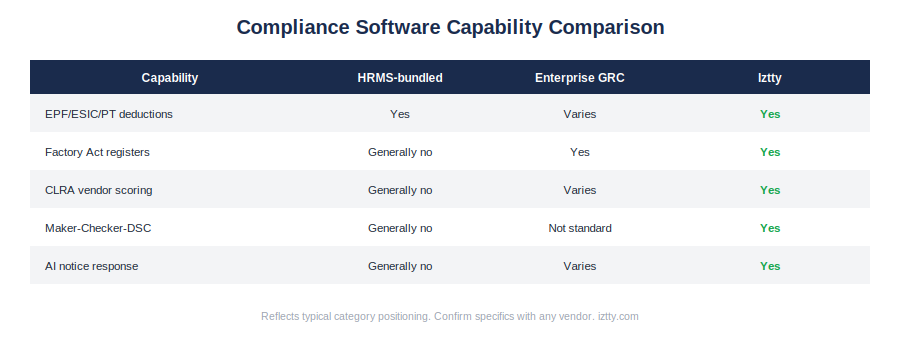
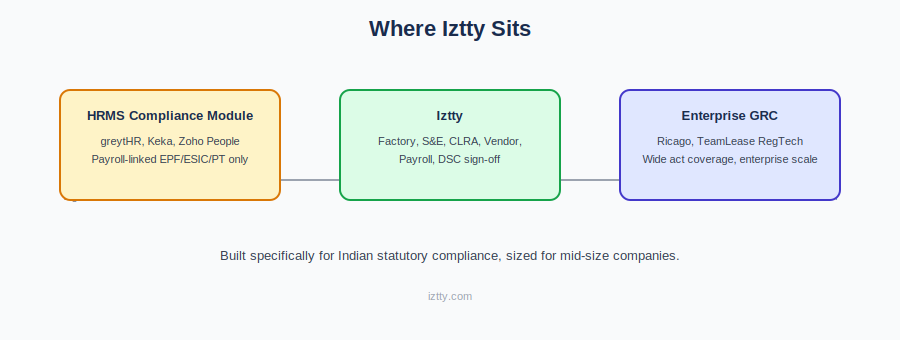
An HRMS compliance module is usually strongest on filing and weakest on the three features above, since its job is payroll. That is not a flaw, just a different job. A platform built for statutory risk puts review, ranking and escalation in the centre.

Ten Tests to Run in a Live Demo

Do not accept slides. Give the vendor your own data, or a realistic dummy set with three states and a handful of contractors, and ask them to do these live.

On alerts

  1. Show me the full alert ladder for the 15th-of-month EPF and ESIC filing, and who receives each step.
  2. Change a due date because of a notified amendment. Do the alerts follow?
  3. Ignore an alert on screen. What happens next, and when?
  4. Show me two sites with ten overdue items each. How does the tool stop me drowning?

On scoring

  1. Explain the score for one state in two sentences, then drill to the filing that moved it.
  2. Mark one factory licence as lapsed. How far does the overall score fall?
  3. Mark an obligation not applicable. Does the score recalculate correctly?

On escalation

  1. Take the Checker out of the picture. Who steps in and how fast?
  2. Upload a sample EPFO or ESIC notice. Show me the route, the deadline and the draft reply.
  3. Show me the audit trail for one rejected register: who rejected it, why, and what happened next.

A vendor that handles eight of these cleanly is worth a second meeting. One that dodges the third and the eighth is selling a calendar.

What Each Buyer Should Care About Most

If you areWeigh these features firstBecause
CFO or MDSite-by-act scoring, executive dashboard, Level 4 escalationYou need the worst exposure on one screen and a trigger that reaches you before a notice does
CHRO or Plant HR HeadTiered licence and register alerts, backup assignmentYour risks are renewals, registers and contractor files across several sites
Compliance Manager or CSEvidence behind scores, audit trail, maker-checker controlYou answer to inspectors, auditors and the board
Founder of a growing MSMESimple ladder, state-validated formats, low setup effortYou have no compliance team yet and a new state is about to be added
Compliance consultant or firmMulti-client views, per-client scoring, notice handling speedYou carry the exposure for many companies at once

How Iztty Handles Alerts, Scoring and Escalation

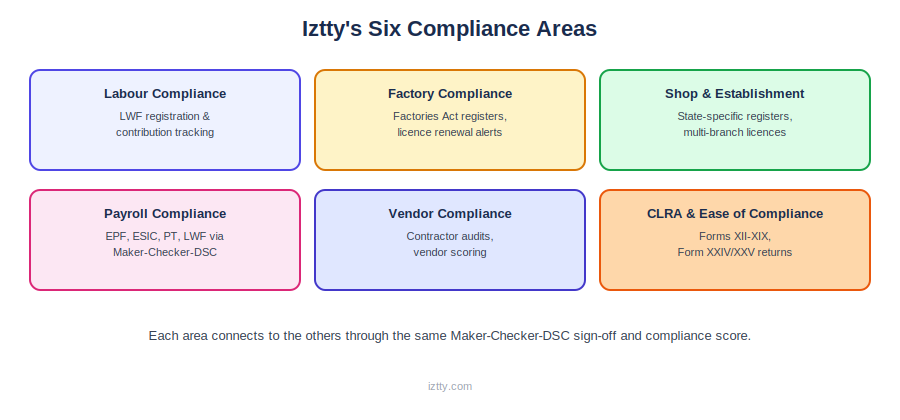
Iztty is an AI-powered statutory compliance platform from Futurex Management Solutions Limited, the New Delhi consulting firm that has been running Indian labour compliance for clients since 2014. Here is how its features line up with the three jobs above.

  • Alerts: licence renewals use tiered expiry alerts, filings are tied to the compliance calendar, and Regulatory Change Intelligence monitors gazette notifications, EPFO and ESIC circulars and state amendments, creating tasks matched to your company profile. A person reviews each before it is enforced.
  • Scoring: the Compliance Score Meter gives a live 0 to 100% score with act-wise and state-wise breakdown and Low, Medium and High banding. The vendor compliance module auto-calculates contractor scores and keeps principal-employer liability documentation.
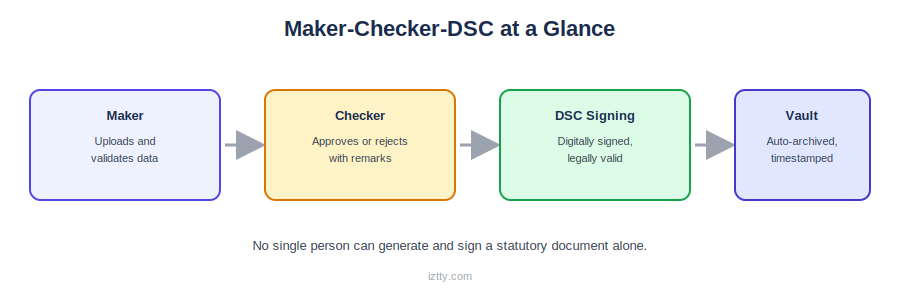
  • Escalation: the Maker-Checker-DSC workflow runs four stages: upload and validate, review and approve or reject with mandatory remarks, digital signing, then auto-archive to the Document Vault. Role-based access and department-wise permissions define who sees and approves what. The AI Notice Response assistant reads PF, ESIC, Labour, S&E and Factories Act notices and drafts a reply, averaging 4 hours against 3 to 5 days manually.

One honest note: how you configure alert timing, channels and leadership escalation depends on your setup, so ask to see your own ladder built during the demo rather than assuming. That is precisely the test in Section 6.

For firms managing several client companies, a separate Compliance Consultant account type covers multi-client work. In one anonymised illustration published by Iztty, a 40-client compliance consultancy cut EPF and ESIC notice response from 5 days to 4 hours. It is a representative outcome, not an attributed case study.

Want to see your own alert ladder, score and escalation path? We start with your registers, licences and contractor list and return a scored baseline. Get a Free Compliance Audit.

Your First 30 Days After You Buy

  • Week 1: load locations, registrations and contractors. Confirm which obligations apply to which site.
  • Week 2: name an owner and a Checker for every obligation. Set the alert ladders. Assign backups.
  • Week 3: agree what counts as evidence for a “done”. Run the first scoring pass and read the worst five items out loud with their owners.
  • Week 4: test the escalation path with a deliberate dry run. Send the first one-page score summary to leadership.

Conclusion: Buy for the Bad Day

Any compliance software looks fine when every filing goes through. The real question is what it does on the day an owner is on leave, a contractor stops paying provident fund and a notice arrives. Alerts that reach the right person early, a score that tells the truth and an escalation path that does not depend on anyone remembering are what you are paying for.

If you want to check how your current setup would hold up, we are happy to walk through it with you.

CHECK MY COMPLIANCE  |  BOOK A DEMO

FAQs

Q1: What is compliance risk management software?
It is software that tracks statutory obligations, ranks them by how likely and how damaging a failure would be, alerts the right owner in time and escalates unresolved items. It goes beyond filing to show which obligation is most likely to hurt you next.

Q2: What is the difference between an HRMS compliance module and compliance risk management software?
An HRMS module mainly records and files statutory returns as part of payroll. Compliance risk management software adds ranking, ownership, evidence, review workflows, contractor tracking and escalation around those filings.

Q3: Which features matter most when comparing compliance management software?
Tiered alerts routed to named owners, a score that weighs consequences and drills down, configurable escalation, maker-checker review, an audit trail, state-validated formats and regulatory change monitoring.

Q4: How should a compliance score be calculated?
It should weigh impact, not just count completed items, break down by Act and state, exclude obligations that do not apply, and rest on evidence. Ask any vendor to explain its score in two sentences.

Q5: How early should compliance alerts start?
It depends on the obligation. Monthly filings such as the EPF ECR and ESIC contribution due on the 15th benefit from a week of lead time. Licence renewals need 60 to 90 days. Set tiers from your own filing history.

Q6: What should an escalation matrix include?
A Maker, a Checker, a Compliance Manager or Company Secretary, and a senior leader, each with a trigger, a time limit and a backup. Notices and contractor failures need their own routes.

Q7: Do the Labour Codes change what I should look for in software?
Yes. The four Labour Codes took effect on 21 November 2025, with detailed rules still being notified. Choose software that monitors changes, creates tasks matched to your profile and lets a person review before anything is enforced.

Q8: Can compliance risk management software help with contractor risk?
Yes, if it collects contractor EPF, ESIC and wage register proof, scores each vendor and escalates overdue items. Under the CLRA a principal employer can carry liability for specified contractor failures.

Q9: How much does compliance management software cost in India?
Price depends on locations, Acts, users and contractors covered, and on whether services are bundled. Ask for a quote on your own profile and compare what is included, not just the headline figure.

Q10: How long does it take to implement?
Loading locations, owners and contractors and setting alert ladders is usually a matter of weeks. Plan a dry run of escalation in the first month so you know it works before you need it.
Compliance Risk Register: How to Score, Map and Monitor Statutory Risk in India

A compliance risk register is a living list of every statutory obligation your company carries, with a score for how likely each is to fail, how badly it would hurt, who owns it, what control protects it and which indicator warns you early. It is not a compliance calendar, which tells you what is due. It is the document that tells you which due date, licence or contractor is most likely to hurt you first.

Most Indian companies that say they have a risk register actually have a spreadsheet with a column called “risk level” filled in by whoever built it, once. This guide is about making the register itself work: the fields that matter, scoring scales you can defend to an inspector or an auditor, heat maps that show a CFO where to look, and key risk indicators (KRIs) that fire before a notice does. If you want the wider framework around the register, read our compliance management solutions guide and the companion piece on compliance risk management; this article stays with the register.

What a Compliance Risk Register Is, and What It Is Not

The register sits between three documents that people confuse with it.

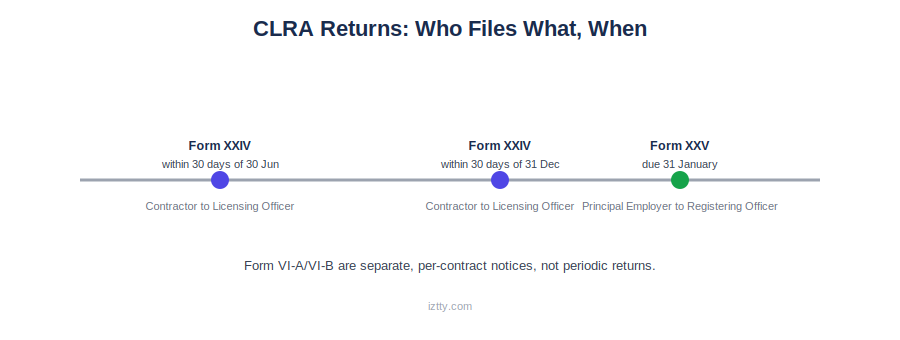
  • Compliance calendar. Lists what is due and when, such as the EPF ECR and ESIC contributions on the 15th, or the CLRA principal employer annual return (Form XXV) by 31 January. It says nothing about which item is most dangerous.
  • Audit report. A point-in-time finding. Useful, but stale the week after it is issued. Our compliance risk audit guide covers how to run one; the register is where its findings go to be tracked.
  • Compliance checklist. Yes or no per item. It cannot tell a missed internal deadline from a lapsed factory licence.

A register is the only one of the four that ranks. That ranking decides where your Compliance Manager spends Tuesday morning and what your CFO reads on the first of the month.

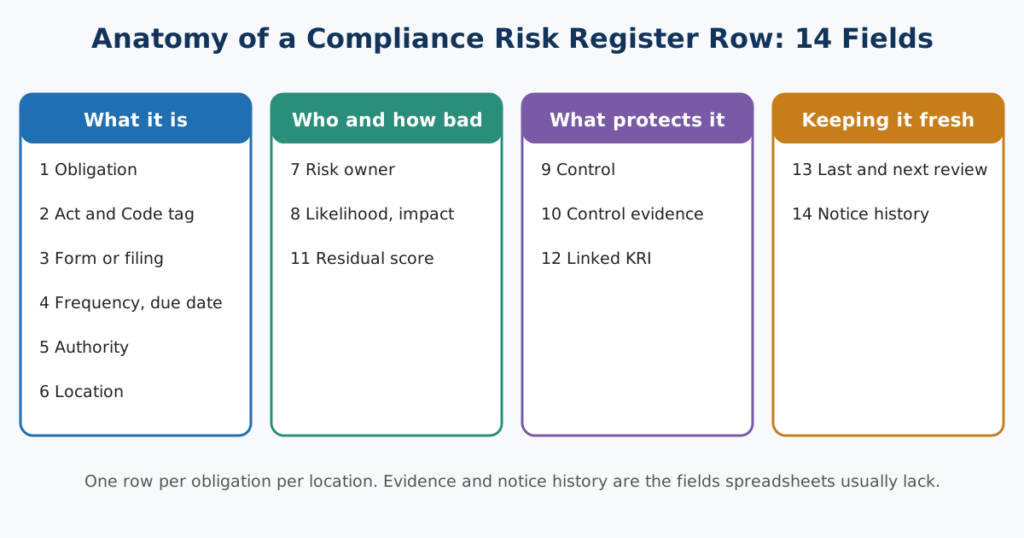
The 14 Fields Every Row Needs

One row per obligation per location. A row with fewer than these fields cannot be scored defensibly or audited later.

FieldWhat to record
ObligationPlain description, e.g. “EPF ECR and challan for Site 2”
Act and Code tagLegacy Act and the Labour Code that now subsumes it
Form or filingThe actual form, return or register name
Frequency and due dateMonthly 15th, half-yearly, annual, or event-triggered
AuthorityEPFO, ESIC, state labour department, Factory Inspectorate
LocationSite or branch, as registered
Risk ownerOne named person, not a department
Likelihood and impactInherent scores, each 1 to 5
ControlWhat actually stops the failure
Control evidenceThe artefact proving the control ran, with date
Residual scoreScores after credit for evidenced controls
Linked KRIThe indicator that warns you early
Last reviewed and next reviewTwo dates, both mandatory
Notice historyAny past notice or inspection remark on this row

Two fields do most of the work and are the ones spreadsheets usually lack. Control evidence (field 10) stops people from scoring a risk low because “we have a process”. Notice history (field 14) is the strongest predictor of the next likelihood score you will assign: a row that drew a notice last year is not a 2.

Scoring Scales Anchored in Indian Statutory Consequences

A 1 to 5 scale only works if each number means one thing to everyone who scores. The anchors below are written for Indian statutory compliance; adjust them to your company, but write your version down.

ScoreLikelihood anchorImpact anchor
1Automated control, tested, evidence in last 90 daysInternal correction only
2Manual control, two people, evidence on fileInterest or a small late fee
3Control depends on one person, or on a single data sourceInterest and damages, and a notice to answer
4Control exists on paper, one miss in the last 12 monthsProsecution exposure for the occupier, employer or officers
5No control, or repeated failuresLicence suspension, stoppage of operations or a due diligence deal-breaker

Three rules make the scale hold up in practice.

Floor the impact. If the Act carries prosecution exposure for the occupier or employer for that obligation, impact never scores below 4, whatever the money involved. Late EPF remittance attracts interest under Section 7Q at 12% per annum and damages under Section 14B and Para 32A of the EPF Scheme, which since 15 June 2024 is a flat 1% per month of default. The rupee amount can look small on one month of one site. The pattern across sites is what draws an inspector.

Score the exposure, not the effort. Renewing a factory licence is easy work and a catastrophic failure. A tedious monthly register can fail with a minor consequence. Teams that score by effort push every licence to Low.

Never let the owner score alone. Owners under-score, honestly and consistently. Have a second person challenge every row scored 2 or below on any obligation with prosecution exposure.

Inherent and Residual Score: How a Control Earns Credit

Inherent score is the risk before controls. Residual score is what remains after the controls you can prove. The gap between them tells you whether your controls are doing anything.

Take the EPF monthly ECR for a site with 600 employees. Inherent: likelihood 4 (it has been filed late twice in the last year), impact 4 (repeat default draws damages and an inspection), score 16, High. After the company introduces a payroll lock two days before the 15th and a maker-checker review of the ECR file, the residual likelihood falls to 2 and the residual score to 8, Medium.

A practitioner rule that keeps this honest: a control reduces likelihood by a maximum of two points, and only if the evidence field shows it ran in the last 90 days. A control that cannot show an artefact (a signed checker approval, a dated acknowledgement from the portal) earns no credit. If the residual score barely differs from the inherent score across your whole register, your controls are decoration. If it drops on every row, your scoring is generous.

Three Heat Maps Management Will Actually Use

The 5 by 5 grid with dots on it is the heat map everybody draws and few people act on. Three variants do more.

Risk heat map (the standard grid). Plot residual likelihood against impact. Use it for the top 10 rows only. With 100 or more rows, the grid becomes a cluster of overlapping dots that tells nobody anything.

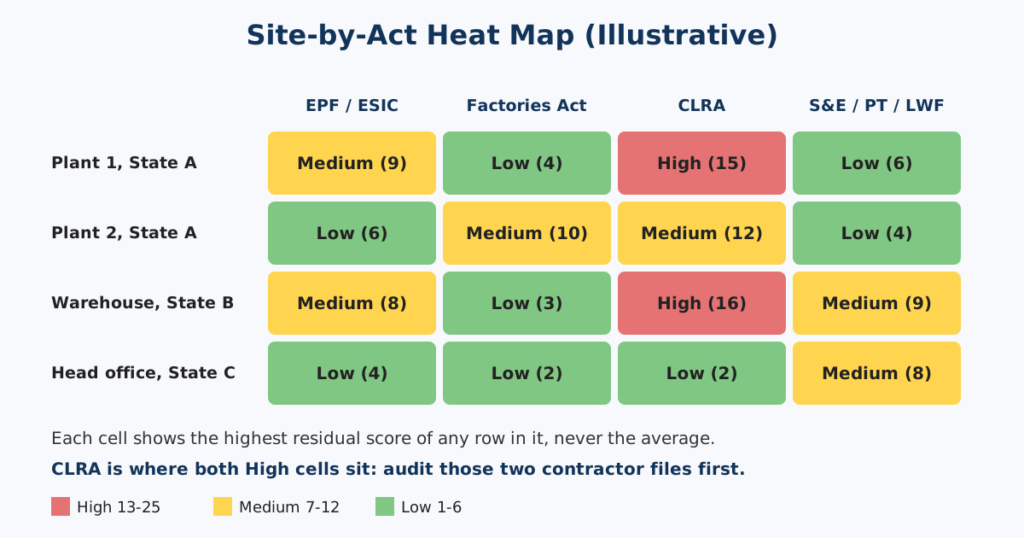
Site-by-act heat map. Rows are your locations, columns are your Acts or obligation groups, and each cell takes the highest residual score of any row in it. This one answers the CFO question “which plant is the problem?” in under ten seconds. Use the maximum, never the average. An average of one Red and nine Greens reads as Green and hides the one cell that will hurt.

Site (illustrative)EPF / ESICFactories ActCLRAS&E / PT / LWF
Plant 1, State AMedium (9)Low (4)High (15)Low (6)
Plant 2, State ALow (6)Medium (10)Medium (12)Low (4)
Warehouse, State BMedium (8)Low (3)High (16)Medium (9)
Head office, State CLow (4)Low (2)Low (2)Medium (8)

Read the table the way a CFO would: the CLRA column is where the money and the personal exposure sit. Two sites with contractor labour account for both High cells, and the next step is not “improve compliance” but “audit those two contractor files this week”. The vendor and contractor compliance guide explains why the principal employer carries that exposure under the Contract Labour (Regulation and Abolition) Act, 1970.

Trend heat map. The same site-by-act grid for three consecutive months. A cell that drifts from Medium to High across the three months deserves a conversation before it crosses the threshold. Static pictures hide drift.

A Key Risk Indicator Library With Thresholds

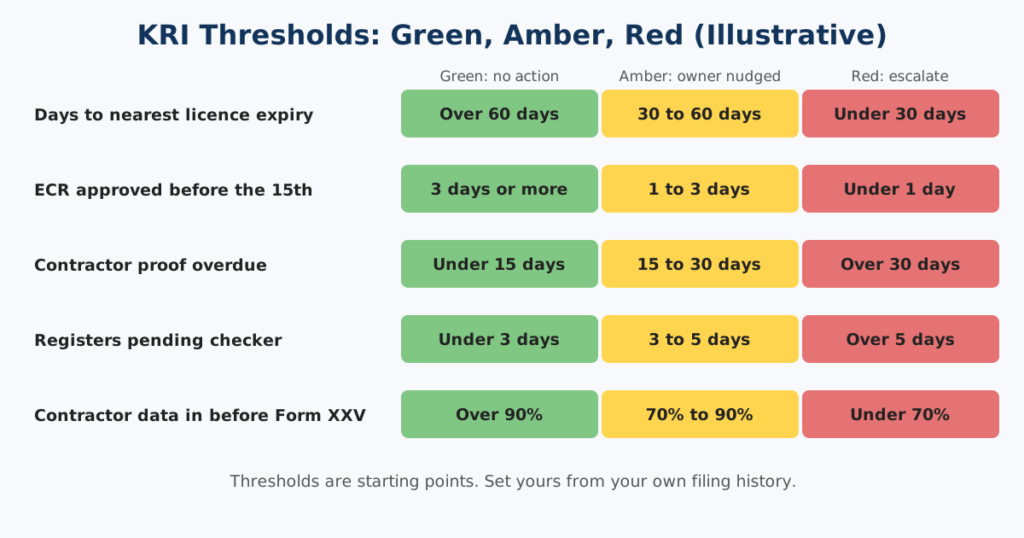
A KRI is a number you can read from your own data that moves before the failure does. A good one is leading (it falls or rises before a deadline is missed), measurable from system data without a manual count, and tied to an action. Use amber and red thresholds so owners get a nudge before they get an alarm.

RiskKRIAmberRedAction at red
EPF and ESIC filingDays between ECR file approval and the 15thUnder 3 daysUnder 1 dayPayroll lead escalates; checker backup assigned
Challan paymentChallans paid but proof not archivedAny over 3 daysAny over 7 daysArchive before next cycle opens
Licence renewalDays to nearest licence expiry, per siteUnder 60Under 30Renewal file with Plant HR Head
CLRA contractorsContractors with EPF or ESIC proof overdueOver 15 daysOver 30 daysWritten notice; payment hold review
CLRA returnsContractor data received 30 days before the 31 January Form XXVUnder 90%Under 70%Principal employer chases directly
RegistersRegisters pending checker approvalOver 3 working daysOver 5 working daysBackup checker takes over
NoticesOpen notices older than the reply windowAny at 50% of windowAny at 80% of windowEscalation Owner and counsel
Regulatory changeNotified changes with no owner assignedAny over 5 daysAny over 10 daysCompliance Manager assigns today
Headcount thresholdsSites within 10% of an applicability thresholdAnyAny within 5%Pre-register before crossing
Score qualityRows not re-scored in the last 12 monthsOver 10% of rowsOver 25%Full register re-score

The thresholds above are starting points drawn from how these obligations usually fail; set yours from your own filing history. Cap the library at 10 to 12 indicators. Past that, owners stop reading them. Every KRI must link to a register row (field 12), or it is trivia.

Keeping the Register Alive Through the Labour Codes Transition

The four Labour Codes took effect on 21 November 2025, and detailed Central and State rules are still being notified. For a register this has one practical consequence: the legal basis of many rows is moving even while the filing itself has not changed.

Tag every row with both the legacy Act and the Code that now subsumes it. The EPF Act and the ESI Act map to the Code on Social Security, 2020; the Factories Act and the CLRA map to the Occupational Safety, Health and Working Conditions Code, 2020. When a rule is notified, filter by the Code tag and you have the list of rows to re-score in a minute rather than a week. Keep the legacy reference in place until your Compliance Manager confirms the new rule is operative for that filing.

Beyond the Codes, four habits keep a register honest.

  • Re-score on triggers, not just on a calendar. A new site, a first contractor, a notice, a headcount crossing a threshold or a notified rule all warrant an immediate re-score of the affected rows.
  • Control score changes. A score is a statement to an auditor. Whoever lowers a High score should need a second person’s approval and a remark.
  • Keep history. Store the previous score with the date it changed and why. Without it, the trend heat map is impossible.
  • Close the loop on notices. Every notice adds an entry to field 14 and triggers a re-score of that row. Regulatory change tracking feeds the same loop from the other direction.

Spreadsheet or Software: Where the Register Breaks

A spreadsheet is a fair first register. Many strong ones start there, and building the first version by hand teaches you your own obligations. It breaks at predictable points.

NeedSpreadsheetCompliance software
Single owner, one stateWorks wellNot required
Several editorsOverwritten cells, no record of who changed a scoreRole-based access, change history
Control evidenceLinks to files that move or vanishEvidence attached to the row, archived
Alerts before a deadlineManual remindersTiered alerts tied to due dates
Consistent scoringDepends on the personLocked scale and required remarks
Rule changes across statesSomeone must read every gazetteMonitoring matched to your company profile
Board reportingRebuilt each monthLive dashboard
Audit trailWeak or absentBuilt in

The honest decision rule: stay on the spreadsheet while one person maintains it and the company files in one or two states. Move when a second editor appears, when you add a state, or when you can no longer answer “who changed this score and why?” in one minute. That is also the point where HRMS-bundled compliance modules and standalone statutory platforms start to differ. An HRMS compliance module generally records that a filing happened. A dedicated platform ranks and tracks the risk around it. Our compliance management software guide compares the categories in full.

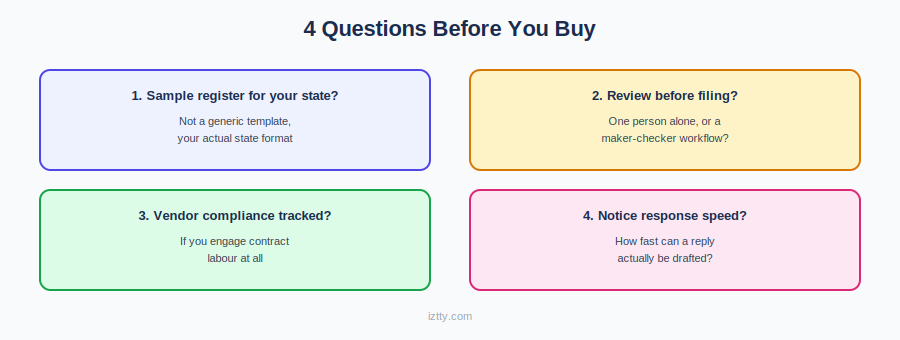
Eight Questions to Ask Before You Buy Register Software

If you are comparing compliance management software, statutory compliance software or a broader compliance management system, ask every vendor the same eight questions and ask for a live demonstration, not a slide.

  1. Can I define my own 1 to 5 scoring anchors, and does the tool lock them?
  2. Does it show inherent and residual scores separately, and does a control need evidence to earn credit?
  3. Does it produce a site-by-act view that uses the maximum score, not an average?
  4. Which Acts and states are covered natively, and who maintains register formats when a state amends them?
  5. Who can change a score, and is a second approver required?
  6. Is there a full audit trail, and can I export it for an inspection or a due diligence request?
  7. How does a notified rule change reach my register, and is a human review step built in before anything is enforced?
  8. Can the tool handle contractor and vendor data, not only my own employees?

A tool that cannot answer questions 2, 5 and 6 produces a prettier spreadsheet, not a register.

How Iztty Runs the Register

Iztty is an AI-powered statutory compliance platform built by Futurex Management Solutions Limited, whose consultants have spent more than a decade building registers for Indian employers by hand. The platform covers the fields and controls in this guide as follows.

  • The Compliance Score Meter gives a live 0 to 100% score with act-wise and state-wise breakdown and Low, Medium and High banding, which is the site-by-act view without the manual rebuild.
  • The Maker-Checker-DSC workflow routes each register or return through upload and validation, review with mandatory remarks on rejection, digital signing and auto-archive to a document vault. That produces the control evidence your residual scores depend on.
  • Regulatory Change Intelligence monitors gazette notifications, EPFO and ESIC circulars and state amendments, and creates tasks matched to your company profile. A human reviews each before anything is enforced.
  • The AI Notice Response assistant reads PF, ESIC, labour, S&E and Factories Act notices and drafts a formal reply with an evidence checklist, averaging 4 hours against 3 to 5 days manually.

For compliance consultants and statutory compliance firms: a separate Compliance Consultant account type lets one firm run registers for several client companies. In one anonymised illustration published by Iztty, a 40-client compliance consultancy cut EPF and ESIC notice response from 5 days to 4 hours. It is a representative outcome, not an attributed case study.

If you want to see your own register scored the way this guide describes, book a free compliance audit with Iztty. We start from your current registers and licences and return a scored baseline across your Acts and states.

A 10-Day Plan to Stand Up Your First Register

  1. Days 1 and 2: Pull every licence, registration and contractor list into one inventory. Confirm which locations are registered for what.
  2. Day 3: Write one row per obligation per location using the 14 fields. Leave scores blank.
  3. Day 4: Write and agree your scoring anchors. Get the CFO or CHRO to sign the impact floor for prosecution-exposure rows.
  4. Days 5 and 6: Score inherent likelihood and impact, with a second person challenging every low score on a prosecution-exposure row.
  5. Day 7: List controls and attach evidence. Score residual risk only where evidence exists.
  6. Day 8: Pick 10 KRIs, set amber and red thresholds, and link each to a row.
  7. Day 9: Build the site-by-act heat map and the top-10 grid.
  8. Day 10: Walk the top five rows with their owners and agree dates. If this is where a platform helps, request a demo and bring your draft register.

FAQs

What is a compliance risk register?
A compliance risk register is a structured list of every statutory obligation, with one row per obligation per location, recording the owner, likelihood and impact scores, controls, evidence and indicators. It ranks obligations by exposure instead of by due date.

How is a compliance risk register different from a compliance calendar?
A calendar lists what is due and when. A register scores how likely each item is to fail and how bad the consequence would be, so it tells you which item deserves attention first.

How many risks should a compliance risk register contain?
One row per obligation per location. A multi-site employer commonly reaches a hundred rows or more. The register needs ranking and filters rather than a smaller list, and the heat map should show only the top ten.

What is the difference between inherent and residual risk?
Inherent risk is the score before controls. Residual risk is the score after controls you can evidence. A control without evidence of operation in the last 90 days should earn no reduction.

How do I score a compliance risk when I have no history?
Use the anchors, not memory. Score likelihood from the strength of the control (automated, two-person, one-person, none) and impact from the consequence ladder. Treat any obligation with prosecution exposure as impact 4 or higher until proven otherwise.

What is a heat map in compliance risk management?
A heat map is a colour-coded matrix of risk scores. The standard version plots likelihood against impact. A site-by-act version, using the highest score in each cell, shows which location and which Act need attention.

Can I keep my compliance risk register in Excel?
Yes, while one person maintains it and you operate in one or two states. Move to software when multiple editors, more states or the need for a reliable audit trail make spreadsheets unsafe.

What is the difference between an HRMS compliance module and compliance software?
An HRMS compliance module records and files statutory returns as part of payroll. Dedicated statutory compliance software adds ranking, ownership, evidence, contractor tracking and regulatory change monitoring around the filings.

How much does compliance management software cost in India?
Pricing depends on the number of locations, Acts, users and contractors covered, and on whether services are bundled. Ask each vendor for a quote on your own profile, and compare what is included, rather than comparing list prices alone.

Do the Labour Codes change how I maintain my risk register?
Yes. The four Labour Codes took effect on 21 November 2025, with detailed rules still being notified. Tag each row with its legacy Act and its Code, and re-score affected rows when a rule is notified.

Images (3): compliance-risk-register-fields-anatomy.png (after Section 2), compliance-site-by-act-heat-map.png (after Section 5), compliance-kri-amber-red-thresholds.png (after Section 6).

Compliance Risk Management: A Framework for Indian Companies

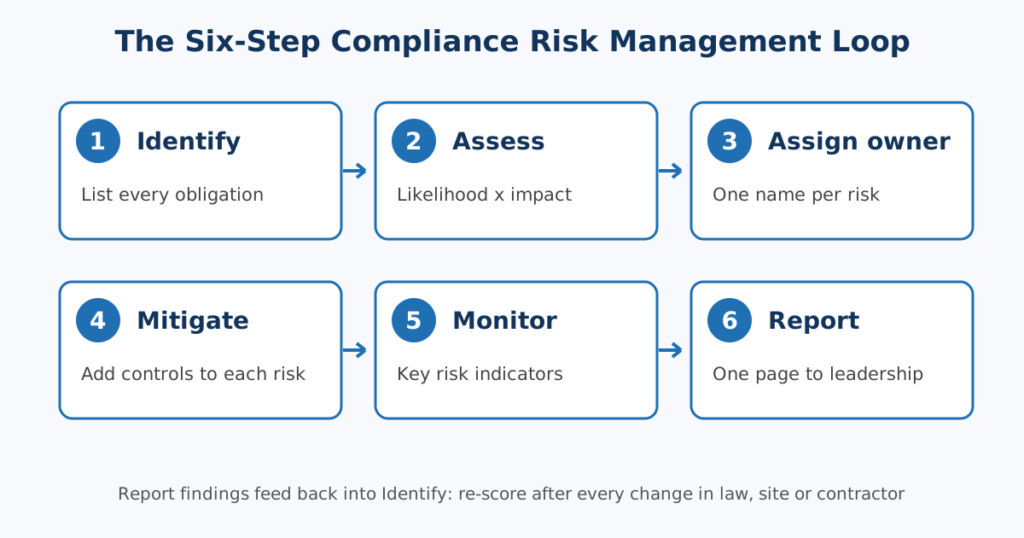
Compliance risk management is the discipline of deciding which statutory obligations could hurt your company most, how likely each is to fail, and what controls stand between a failure and a penalty, prosecution or business stoppage. It is different from compliance management, which is the day-to-day work of filing returns and maintaining registers. A company can file everything it remembers to file and still carry serious risk, because nobody ranked what could go wrong or checked whether the controls actually hold.

Most Indian companies manage this by instinct: whichever deadline is closest or whichever notice arrived last gets attention. This guide replaces instinct with a six-step framework built for Indian statutory compliance, covering EPF, ESIC, the Factories Act, Shops & Establishment Acts, CLRA, Professional Tax and Labour Welfare Fund. If you are looking for a one-time check of your current gaps, our Compliance Risk Audit guide covers that. This piece covers what comes after: the standing system that keeps risk visible and falling.

What Compliance Risk Management Covers, and What It Does Not

Compliance risk is the chance that your company fails to meet a legal obligation and suffers a consequence: interest and damages, prosecution of the occupier or officers, licence suspension, a stalled funding round or a failed due diligence. Risk management is the loop that finds those chances, ranks them, assigns them an owner, controls them and watches them over time.

It does not replace filing work. It decides where filing effort and review attention go first. A company with 40 contractors and 3 factory licences does not have the same top risks as a 12-person office in one state, and a framework makes that difference explicit instead of leaving it to whoever is loudest in the monthly meeting.

The Five Categories of Statutory Compliance Risk

Grouping risks stops the register from becoming an unreadable list of 200 items. Five categories cover nearly every statutory exposure an Indian employer faces:

  • Filing and payment risk. Late or wrong EPF ECR (due the 15th of each month), ESIC contributions, Professional Tax returns and Labour Welfare Fund deposits. Late EPF remittance attracts interest under Section 7Q and damages under Section 14B of the EPF & Miscellaneous Provisions Act, 1952.
  • Registration and licence risk. A factory licence, Shops & Establishment registration, CLRA registration or contractor licence that lapses or was never obtained for a new location.
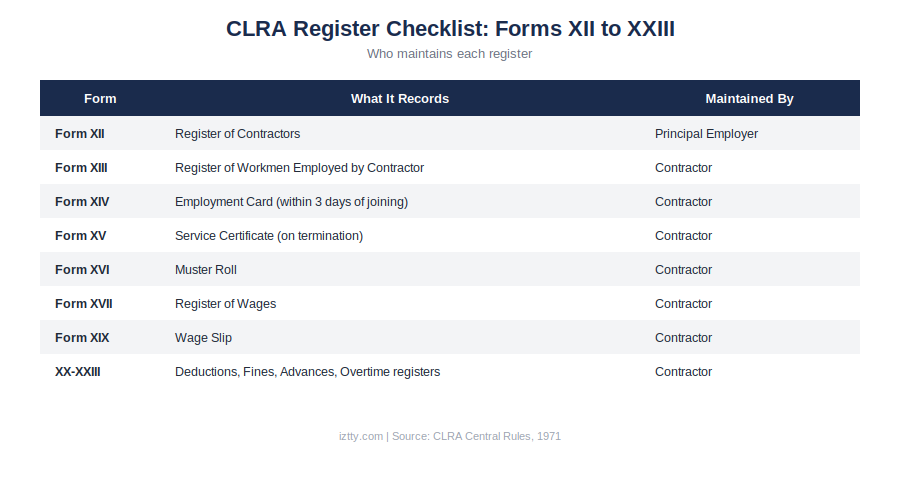
  • Record and register risk. Missing, outdated or wrongly formatted statutory registers, such as the Form 25 Muster Roll and Form 17 Overtime Register used for factory compliance, or the CLRA registers and employment cards in Forms XII to XIV.
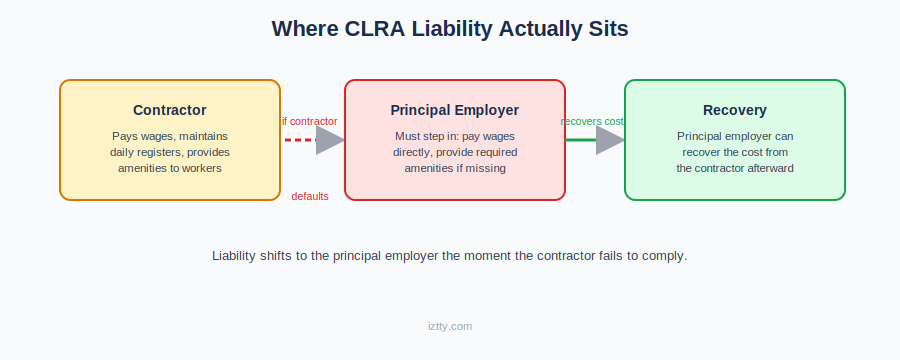
  • Third-party risk. A contractor who stops remitting EPF or ESIC. Under the Contract Labour (Regulation and Abolition) Act, 1970, the principal employer carries liability for specified contractor failures.
  • Regulatory change risk. A new notification, circular or state amendment that makes a currently correct process wrong. This category matters more now: the four Labour Codes took effect on 21 November 2025, with detailed Central and State rules still being finalised.

Step 1: Identify Every Obligation in a Register

The foundation is a risk register: one row per obligation, per location. For each row record the act, the form or filing, the frequency, the due date, the authority, the location and the current owner. A manufacturer with two states and three sites will usually land between 80 and 150 rows. That count is normal, and it is the reason a spreadsheet kept in one person’s head stops working.

Build it from three sources: your registrations and licences (what you are legally covered by), your payroll and headcount data (which thresholds you have crossed, such as ESI coverage), and your contractor list (every vendor engaged on site). Anything that triggers on an event, like a new branch or the first contract labour engagement, needs its own row with a trigger note rather than a calendar date.

Step 2: Assess Likelihood and Impact

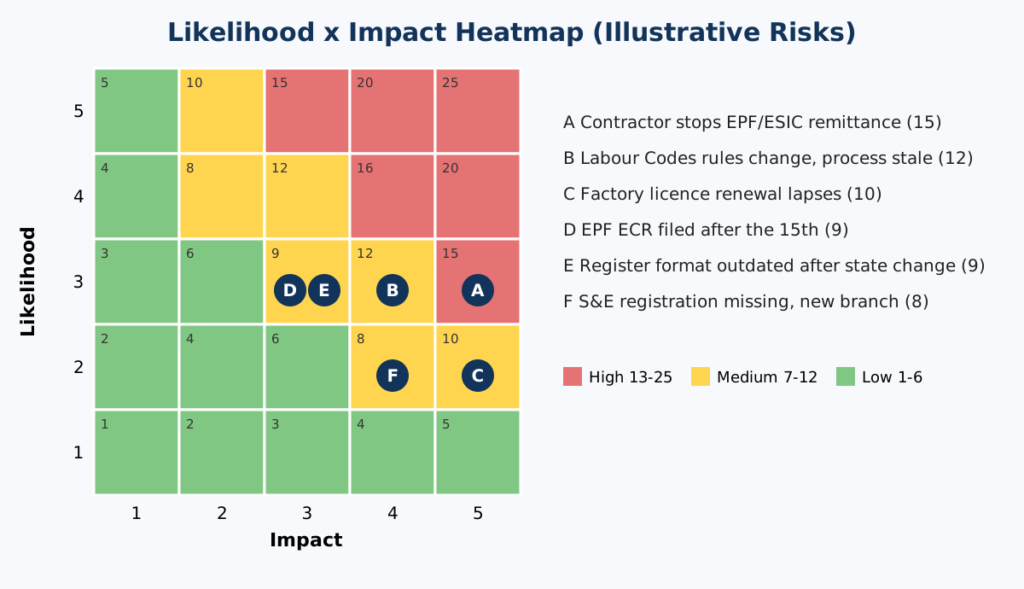
Score each register row on two scales from 1 to 5 and multiply. Likelihood asks how probable a failure is given your current process, people and data. Impact asks how bad it is if it fails: the money, the personal exposure of the occupier or officers, whether operations can continue, and whether it would surface in due diligence. The bands below are an illustrative starting point; calibrate them to your own size and appetite.

Illustrative riskLikelihood (1-5)Impact (1-5)ScoreBand
Contractor stops remitting EPF/ESIC for deployed workers3515High
Labour Codes rules change and processes are not updated3412Medium
Factory licence renewal lapses at one site2510Medium
EPF ECR filed after the 15th339Medium
Register format outdated after a state amendment339Medium
S&E registration missing for a newly opened branch248Medium

Use bands of 1 to 6 for Low, 7 to 12 for Medium and 13 to 25 for High. The table is deliberate about one thing: the highest-scoring item is not the most frequent filing. It is the third-party exposure that nobody in the company controls directly. That ordering is exactly what a calendar-driven approach misses.

Write the scale definitions down so two people score the same risk the same way. A workable version for likelihood: 1 means the control is automated and tested, 3 means a control exists but depends on one person, 5 means there is no control or the failure has already happened in the last year. For impact: 1 means an internal correction with no external consequence, 3 means interest or damages and a notice, 5 means prosecution exposure, a licence suspension, a halt to operations or a visible problem in due diligence.

Score before controls (inherent risk) and again after (residual risk). The gap between the two is the proof that your controls do something. If the residual score is the same as the inherent score, the control is decoration.

Step 3: Assign a Named Risk Owner

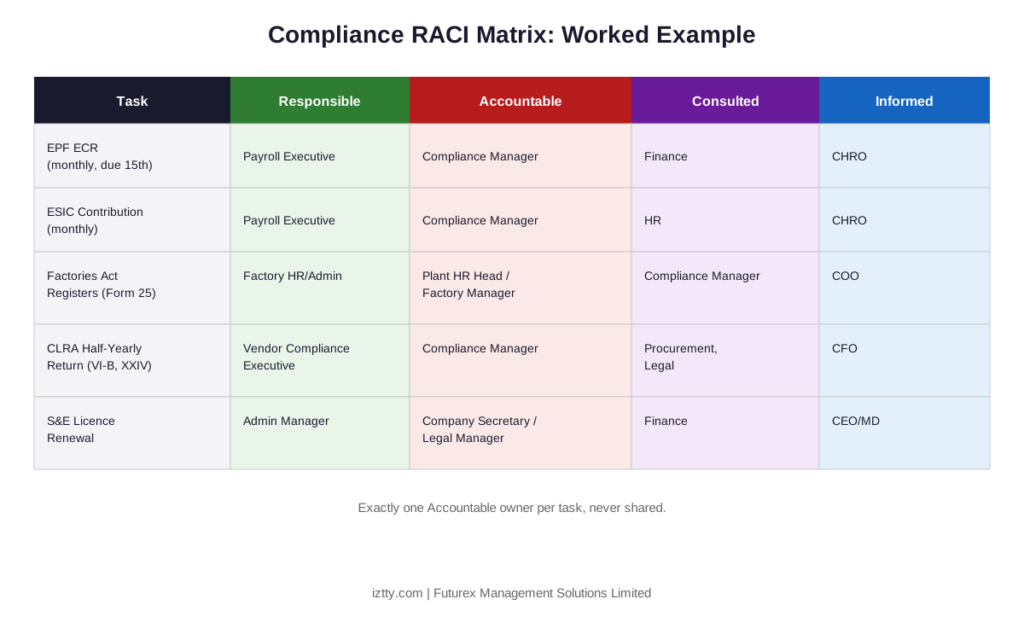
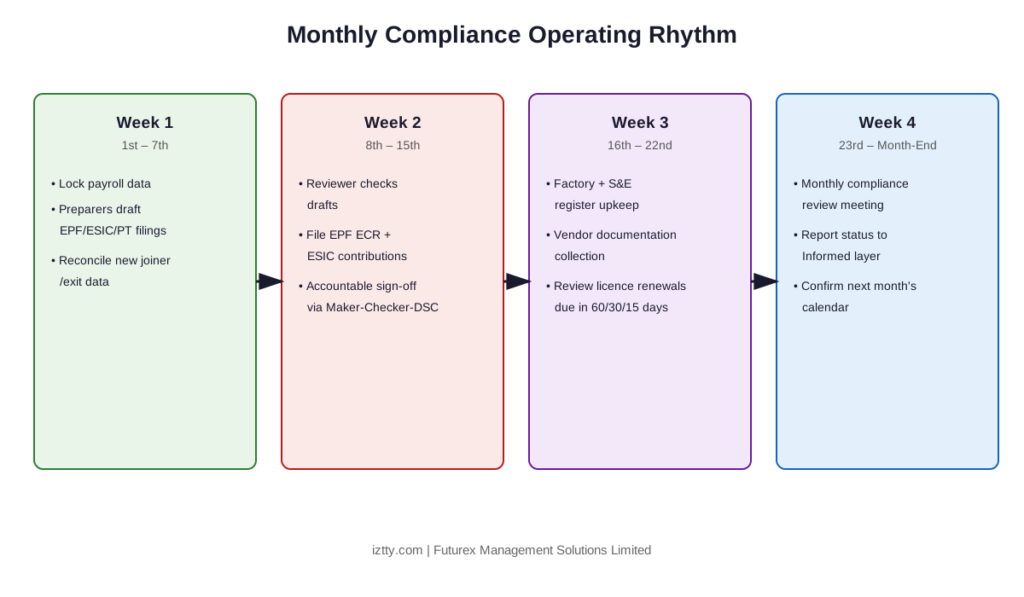
Every High and Medium risk needs one named owner who answers for it. Not a department, not a committee. If ownership is blurry, the risk is simply unmanaged. We cover how to assign Responsible, Accountable, Consulted and Informed roles task by task in Compliance Management: Roles, RACI and a Monthly Operating Rhythm. The risk register and the RACI matrix should reference each other: every register row has an Accountable name that matches the RACI.

Step 4: Put Controls Between the Risk and the Penalty

A control is anything that reduces likelihood or limits impact. Sort them into three kinds so you can see what you are missing:

  • Preventive controls stop the failure: a maker-checker review where one person prepares a return and a second approves it before a Digital Signature Certificate is applied; payroll data locked three to four working days before the EPF due date.
  • Detective controls catch a failure early: tiered alerts at 7, 3 and 1 days before a due date; a monthly check that every active contractor has submitted EPF and ESIC proof.
  • Corrective controls limit damage after a failure: a documented notice response procedure with an evidence checklist, so a reply is drafted in hours rather than days.

Most companies are heavy on corrective effort (firefighting a notice) and light on preventive and detective controls. For third-party risk specifically, the control that matters is monthly verification, with a record that you checked. The mechanics are in Vendor & Contractor Compliance: Managing Principal Employer Liability.

Step 5: Monitor With Risk Indicators

A control that is never measured decays silently. Key risk indicators (KRIs) are a short set of numbers that move before a failure does. Useful ones for Indian statutory compliance:

  • Percentage of filings submitted at least two days before the due date
  • Days remaining on the nearest licence or registration renewal, per location
  • Number of active contractors with proof overdue by more than 30 days
  • Open statutory notices and days since each was received
  • Registers pending checker approval for more than 5 working days

Set a threshold for each and decide in advance what happens when it is crossed. A KRI without a trigger action is just a chart. Iztty’s Compliance Score Meter rolls indicators like these into a single 0 to 100 score with act-wise and state-wise breakdown and Low, Medium and High banding.

8. Step 6: Report Upward in One Page

Leadership does not need 150 rows. It needs one page each month: the overall score and its trend, the top five risks by residual score, any KRI over threshold, open notices, and decisions needed. A CFO reads this for penalty exposure, a CEO for whether anything threatens operations or a transaction, and a Company Secretary for audit trail defensibility.

Keep the same layout every month so a change is visible at a glance. Also decide your risk appetite explicitly: for instance, zero tolerance for lapsed licences and contractor proof gaps, with a small tolerance for one-day internal deadline slips.

Four mistakes make frameworks fail in practice. The register is built once and never re-scored, so it describes last year’s company. Scores are set by the person who owns the risk, who has every reason to mark it low. Indicators are tracked but no action is tied to a threshold. And the framework lives in a spreadsheet owned by one person, which recreates the single point of failure it was meant to remove. Have the second line challenge scores each quarter and keep the register in a system with an edit history.

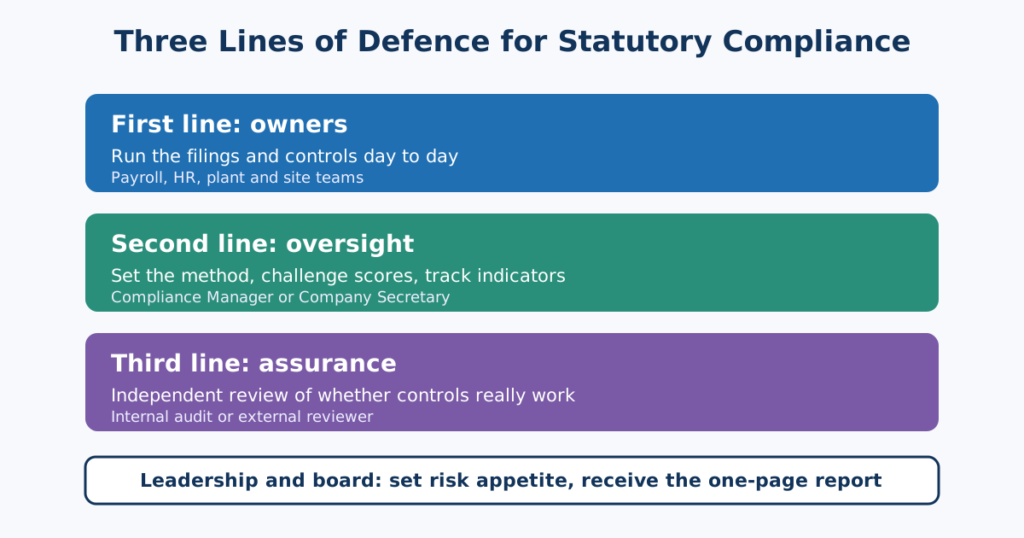
Three Lines of Defence for a Mid-Size Company

The three-lines model sounds like a bank concept, but it maps cleanly onto an Indian employer:

  • First line: the people who do the work and own the controls, such as payroll executives, plant HR and factory admin, vendor coordinators.
  • Second line: the Compliance Manager or Company Secretary who sets the framework, reviews the register, challenges scores and watches the indicators.
  • Third line: independent assurance, such as an internal auditor or an external compliance review that tests whether the first two lines work as described.

In a smaller company one person may hold both first and second line roles. That is the point at which independent review matters most, because nobody is checking the checker. Our guidance on in-house, outsourced and hybrid compliance staffing covers who can fill the third line when you cannot afford a dedicated function.

A Worked Example: A Multi-Factory Manufacturer

Iztty’s published, anonymised outcome for a 14-factory manufacturer is useful as an illustration of the loop working. The company’s compliance score moved from 61% to 88% in 90 days. The pattern behind a move like that is rarely mysterious: the register exposed which factories carried the most licence and register risk, owners were named, maker-checker review replaced single-person filing, and indicators showed which sites were slipping before a deadline passed.

This is an anonymised representative outcome, not an attributed case study, and results depend on starting position.

The lesson for your own framework is the sequence. Rank first, assign second, control third, measure fourth. Companies that start by buying a tool before ranking their risks tend to automate their existing blind spots.

Where a Platform Fits in the Framework

A framework needs data it cannot get from memory. Iztty maps to each step: the obligation register is built from your acts, states and locations; the Compliance Score Meter gives the scored, banded view; the maker-checker-DSC workflow is the preventive control with an audit trail; vendor compliance audits and auto-calculated vendor scores cover third-party risk; and Regulatory Change Intelligence monitors gazette notifications and EPFO and ESIC circulars, turning them into action tasks matched to your company profile, with human review before enforcement.

The AI Notice Response Assistant is the corrective control: it reads a notice, extracts allegations and deadlines and drafts a reply with an evidence checklist, averaging 4 hours against 3 to 5 days manually. For a side-by-side look at tool categories, see Compliance Management Solutions.

Getting Started This Month

  1. List every act, form and licence by location into a register (aim for a first draft in a week, not a perfect one).
  2. Score each row for likelihood and impact, before controls.
  3. Name an owner for every High and Medium row and match it to your RACI.
  4. Pick five indicators with thresholds and a trigger action each.
  5. Build the one-page monthly report and review it at the same meeting every month.
  6. Re-score after any change: a new state, a new contractor, a licence renewal, or a Labour Codes rule notification.

If you would rather start from a pre-built register mapped to your states and acts, book a free compliance audit with Iztty. It produces a scored baseline you can use as the first version of this framework.

FAQs

What is compliance risk management?
It is the ongoing process of identifying legal obligations, scoring the likelihood and impact of failing each one, assigning owners, applying controls and monitoring indicators, so effort goes to the biggest exposures first.

How is compliance risk management different from compliance management?
Compliance management is doing the work: filings, registers, renewals. Compliance risk management decides which of that work carries the most exposure and checks whether the controls around it actually hold.

What are the main compliance risks for an Indian employer?
Late or wrong filings under EPF, ESIC, Professional Tax and Labour Welfare Fund; lapsed licences and registrations; missing or outdated registers; contractor non-compliance that falls back on the principal employer under the CLRA; and regulatory change such as the Labour Codes.

How do I score a compliance risk?
Rate likelihood from 1 to 5 and impact from 1 to 5, then multiply. Score before controls and after to show what your controls achieve. Calibrate the bands to your own size and tolerance.

What is a compliance risk register?
A structured list with one row per obligation per location, recording the act, filing, due date, authority, owner, scores and controls. It is the single source for ranking and reporting.

How often should a compliance risk assessment be refreshed?
Review the top risks and indicators monthly, re-score the full register at least annually, and re-score immediately after a trigger such as a new location, a first contractor engagement or a notified rule change.

Who should own compliance risk in a company?
Each risk needs one named owner. Overall framework ownership usually sits with the Compliance Manager or Company Secretary, with the CFO or CHRO accountable for leadership reporting.

What are key risk indicators for statutory compliance?
Examples include the share of filings made two days early, days to the nearest licence expiry, contractors with proof overdue, open notices and registers awaiting approval. Each needs a threshold and a defined response.

Do the Labour Codes change compliance risk?
Yes. All four Labour Codes took effect on 21 November 2025, with detailed Central and State rules still being finalised, so regulatory change risk is elevated and should be tracked as its own register category.

Can software run a compliance risk framework?
Software supplies the register, scoring, alerts, review workflow and audit trail, which are hard to sustain manually across states. The decisions about risk appetite, ownership and what to do about a High risk remain human.

Compliance Management Services: In-House, Outsourced or Hybrid, and What to Ask a Provider

At some point, every growing Indian company faces the same staffing question: do we hire someone to own statutory compliance full-time, do we retain an outsourced compliance services provider, or do we run some combination of both? This is a resourcing decision, not a software decision, and it’s a different question from which tool you use. A company can have excellent compliance software and still have nobody with the bandwidth or expertise to act on what it surfaces.

This guide covers the three staffing models, what each one actually costs in practice, and the specific questions to ask before signing with any compliance services provider.

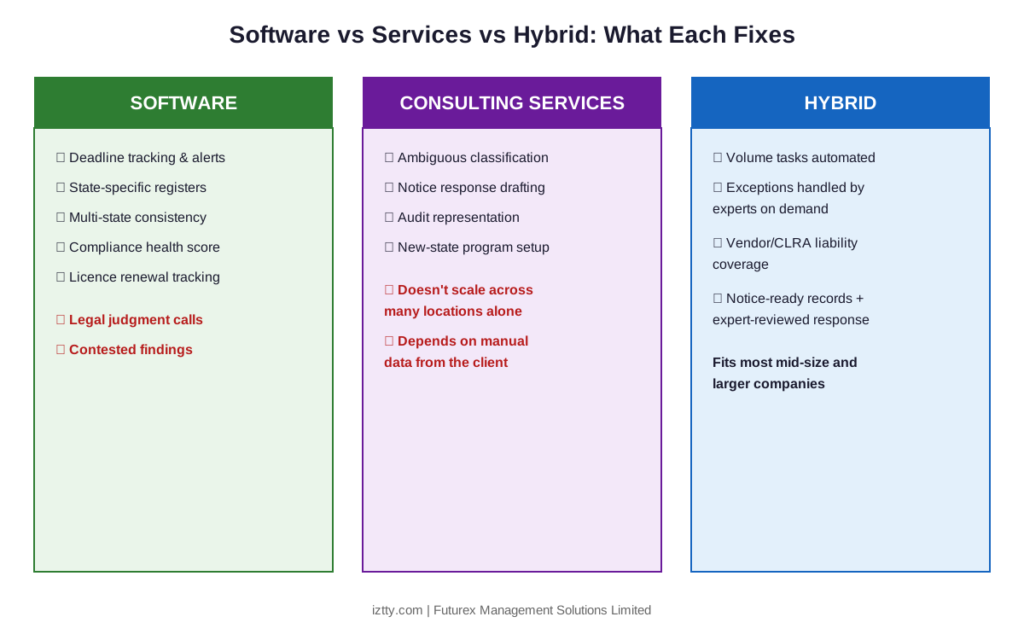
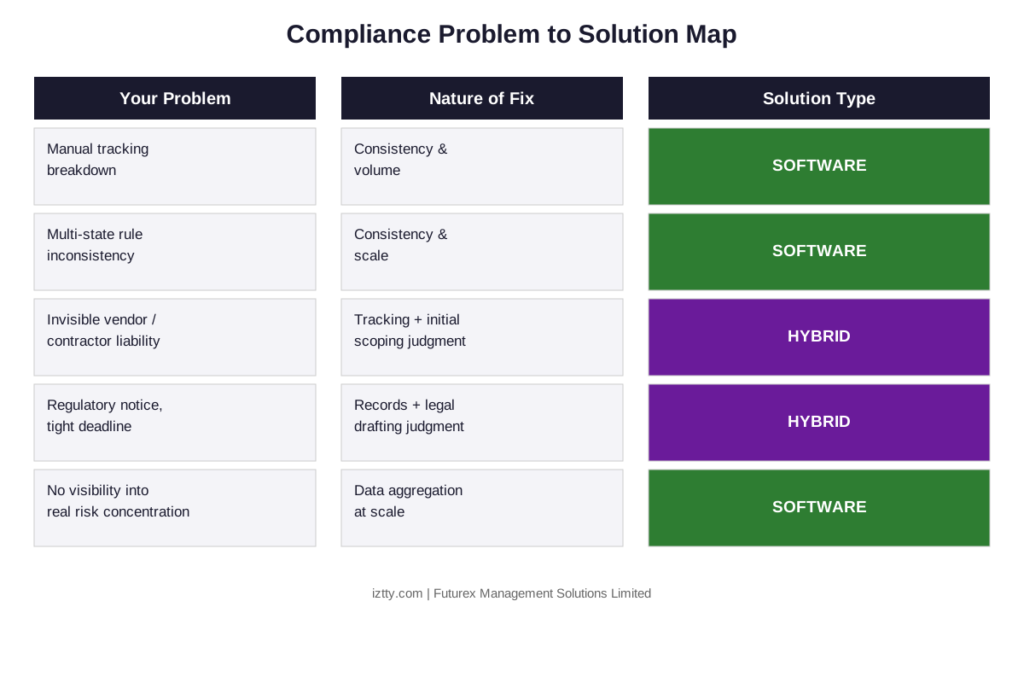
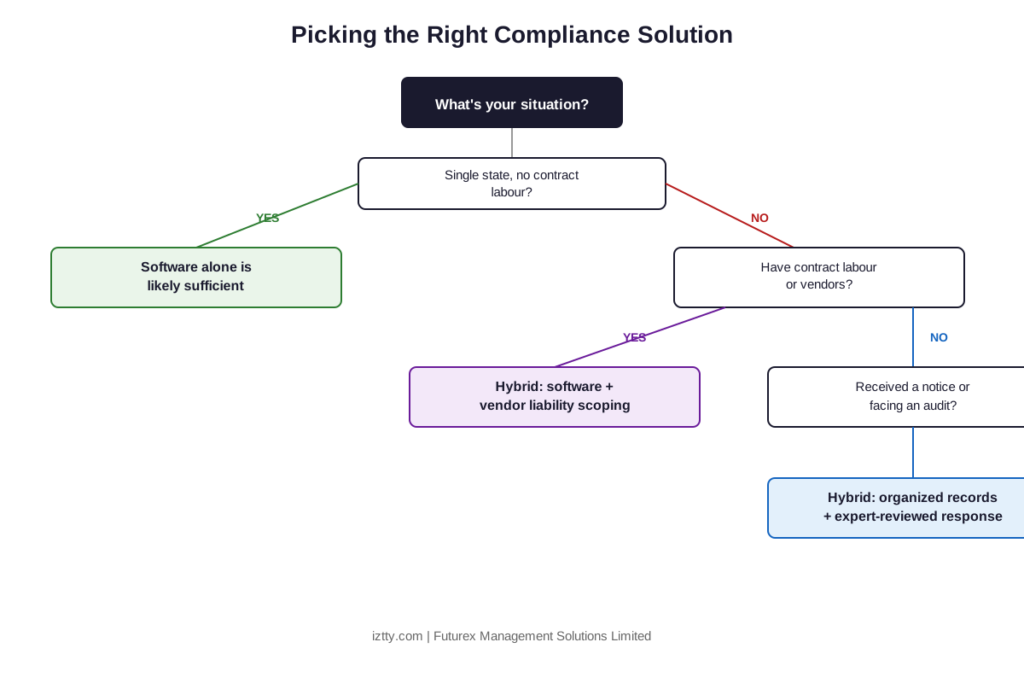
If you’re deciding between software, consulting, or a hybrid approach to solving a specific compliance problem, like manual tracking breakdown or vendor liability exposure, see Compliance Management Solutions: Which Approach Actually Solves Your Problem. This guide is about a different decision entirely: who on your team, or outside it, actually does the compliance work day to day.

What “Compliance Management Services” Actually Covers

Compliance management services typically span filing preparation (EPF ECR, ESIC contributions, Professional Tax returns), statutory register maintenance (Factories Act, Shops & Establishment), CLRA vendor documentation review, licence renewal tracking, notice response drafting, and periodic audit support. Some providers offer the full scope; many specialize in a subset, payroll-linked filings only, or labour law advisory without day-to-day register upkeep. Knowing which of these your company actually needs is the first step before evaluating who should do it.

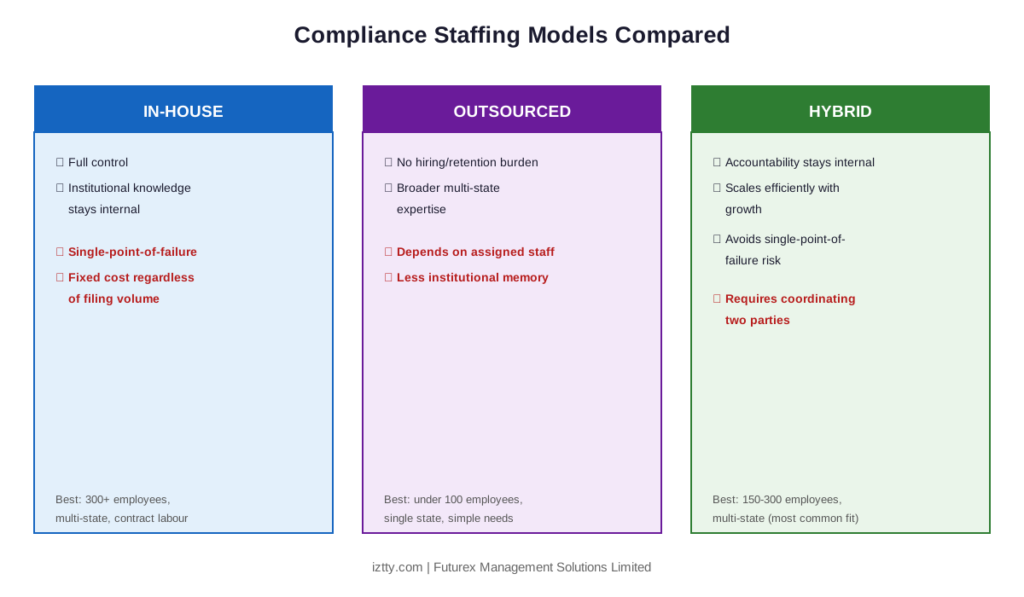
1. Model 1: In-House Compliance Team

Hiring a dedicated Compliance Manager, or building out a small team with a Compliance Executive reporting to them, gives you direct control and institutional knowledge that stays with the company. It works best when you have enough recurring volume, typically 100+ employees, multiple states, or active contract labour, to justify a full-time role. The risk is the single-point-of-failure problem: a one or two person in-house team concentrates all the institutional knowledge in very few people, and losing either one creates a real gap until a replacement is fully ramped up.

2. Model 2: Outsourced Compliance Services

An outsourced provider, typically a compliance consulting firm or statutory compliance specialist, handles filings and registers on a retainer basis, usually priced per employee or per location per month. This avoids the hiring and retention problem entirely and brings broader expertise across states and acts than most single in-house hires have. The tradeoff is responsiveness and institutional memory: an external provider juggling multiple clients may not flag an emerging issue as quickly as someone embedded in your operations, and the relationship’s quality depends heavily on which individual at the provider is actually assigned to your account.

3. Model 3: Hybrid Staffing

Most mid-size and larger companies eventually land here: a single in-house Compliance Manager or Admin & Legal Manager owns the relationship and reviews outputs, while an outsourced provider or platform handles the volume work, filing preparation, register generation, multi-state rule tracking. This model keeps accountability internal (there’s always a named person who signs off) while avoiding the cost of building a full internal team for every specialization. It’s also the model that scales most naturally: the in-house role can expand as the company grows, while the outsourced or automated layer absorbs the increasing filing volume without proportional headcount growth.

Cost Comparison: In-House vs. Outsourced vs. Hybrid

Exact figures vary by city, seniority, and scope, so treat this as a structural comparison rather than a quote.

An in-house Compliance Manager’s fully loaded cost (salary, benefits, training) is a fixed monthly expense regardless of filing volume that month.

An outsourced retainer typically scales with employee count and location count, which means costs rise predictably as you grow but also means you’re paying for capacity you might not fully use in a quiet month.

A hybrid model’s cost sits between the two, a smaller in-house salary plus a lighter-scope retainer or platform subscription, and is often the most cost-efficient per filing once a company crosses roughly 150 to 200 employees or two states, since neither a single in-house hire nor a full outsourced retainer alone matches that volume efficiently.

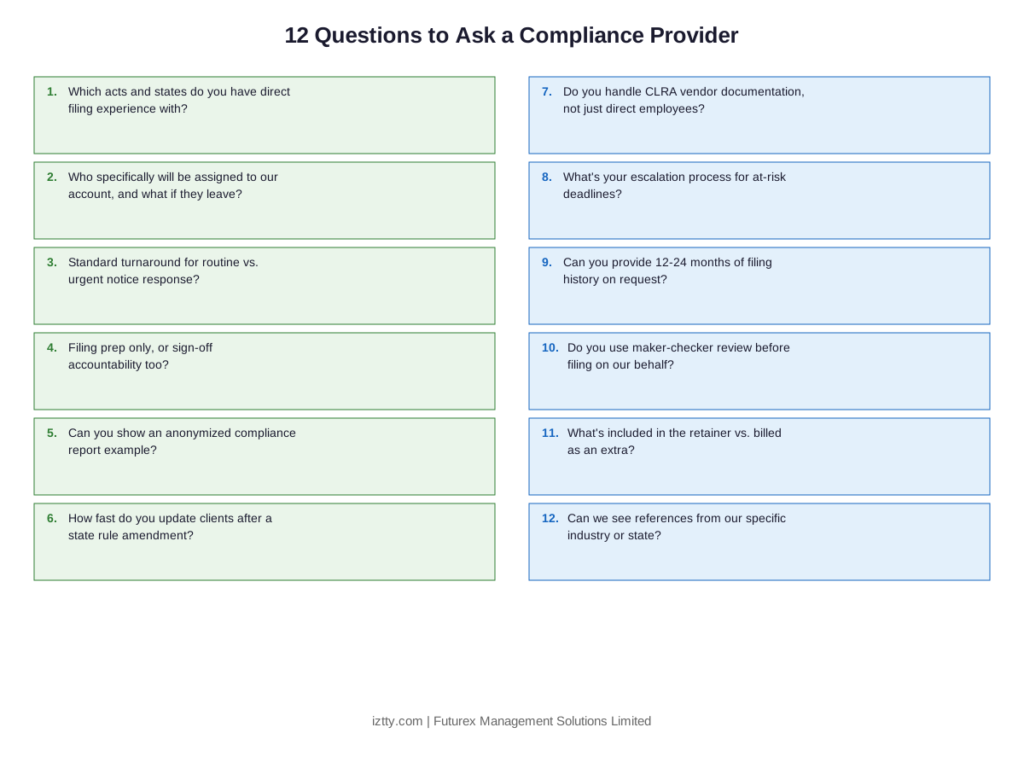
The 12 Questions to Ask Before Hiring a Compliance Services Provider

Whether you’re evaluating an outsourced provider or the compliance arm of a hybrid setup, ask these directly rather than relying on a sales pitch:

  1. Which specific acts and states do you have direct, current filing experience with, not just general labour law knowledge?
  2. Who specifically will be assigned to our account, and what happens if that person leaves the firm?
  3. What is your standard turnaround time for a routine EPF/ESIC filing versus an urgent notice response?
  4. Do you prepare filings only, or do you also hold sign-off accountability if something is filed incorrectly?
  5. Can you show an anonymized example of a compliance health report or filing summary you’ve produced for another client?
  6. What happens if a state amends a Shops & Establishment rule mid-year, how quickly do you typically update affected clients?
  7. Do you handle CLRA vendor documentation review, or only our own direct-employee filings?
  8. What’s your process if a filing deadline is at risk due to incomplete data from our side, do you escalate, or wait?
  9. Can you provide 12 to 24 months of filing history on request within a defined timeframe, for due diligence purposes?
  10. Do you use a maker-checker review process internally before anything is filed on our behalf?
  11. What’s included in your standard retainer versus billed as an extra, especially notice response and audit support?
  12. Can we see references from clients in our specific industry or state, not just general testimonials?

Red Flags When Evaluating a Provider

Watch for a provider who can’t name the specific forms relevant to your business (if they’re vague about Form 25 versus Form VI-B, they likely haven’t handled your specific compliance profile before), who won’t commit to a specific turnaround time in writing, who can’t explain their internal review process before filing on your behalf, or who positions themselves purely as a document-filing service with no proactive alerting for upcoming deadlines or regulatory changes. A provider who treats every client’s compliance needs as identical, rather than asking detailed questions about your specific states, acts, and contractor relationships, is more likely delivering template-based service than a genuinely tailored one.

Every Model Still Needs a System of Record

Regardless of which staffing model you choose, someone, in-house, outsourced, or both, needs a single, current source of truth for filing status, register versions, and documentation, rather than relying on email threads and individual memory. This is true whether you build it in-house or your outsourced provider brings their own. A provider who files on your behalf but leaves you with no independent visibility into what’s been filed and when creates its own risk, since you lose the ability to verify their work or respond quickly if they become unavailable.

How Iztty Supports Each Staffing Model

For an in-house team, Iztty’s maker-checker-DSC workflow and compliance calendar give a small team the structure a larger team would otherwise need to build manually. For companies working with an outsourced provider, the platform gives you independent visibility into filing status regardless of who’s doing the filing, so you’re never solely dependent on the provider’s own records. And for compliance consulting firms themselves managing multiple client companies, Iztty offers a dedicated Compliance Consultant account type, letting a provider manage several clients’ filing calendars, registers, and sign-off chains from one dashboard while keeping each client’s data and DSC-holder access properly separated.

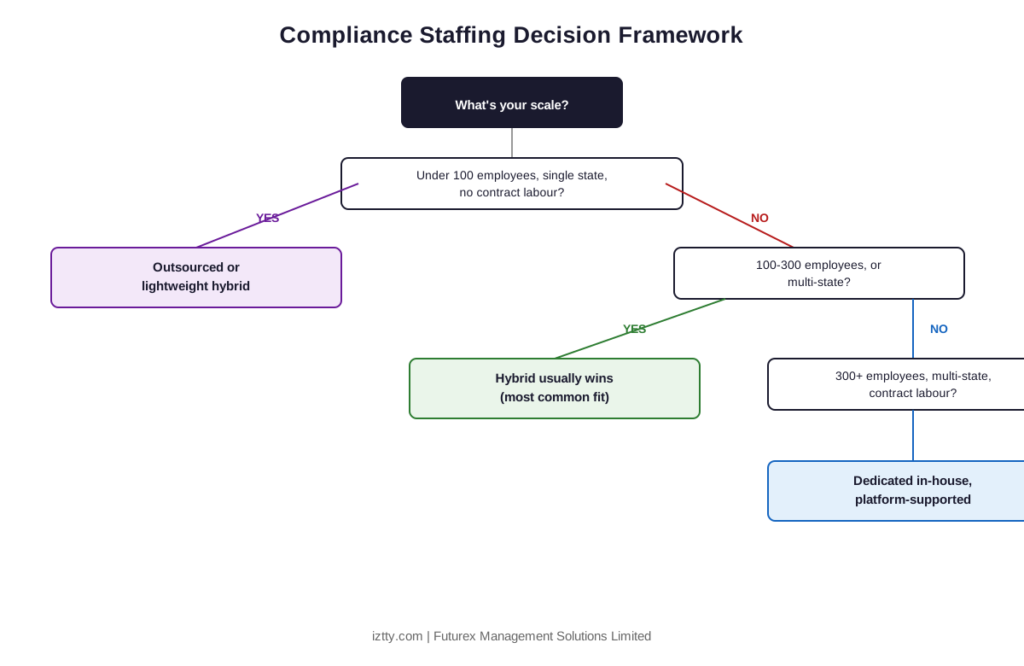
Making the Decision: A Practical Framework

  • Under 100 employees, single state, no contract labour: outsourced services or a lightweight hybrid typically costs less than a dedicated in-house hire.
  • 100 to 300 employees, or multi-state: hybrid usually wins, an in-house owner with outsourced or platform-driven volume support.
  • 300+ employees, multiple states, active contract labour: a dedicated in-house compliance function, often supported by a platform and selective outsourced specialist support for notice response or audits, becomes worth the investment.
  • Compliance consulting firms managing multiple clients: a platform built for multi-client management, not a generic single-company tool, is the structural requirement regardless of your own firm’s size.

If you want this mapped to your specific states, headcount, and current setup, book a free compliance audit with Iztty, which includes a review of whether your current staffing model matches your actual filing volume and risk exposure.

FAQs

What’s the difference between compliance management services and compliance management software?
Services refers to who does the work, in-house staff, an outsourced provider, or both. Software is the tool used to do that work. The two decisions are related but separate; you need both, regardless of which staffing model you choose.

At what company size does outsourcing compliance usually make sense?
Under roughly 100 employees with straightforward, single-state obligations, outsourcing or a lightweight hybrid typically costs less than a dedicated in-house hire, since the filing volume doesn’t yet justify a full-time role.

Can a compliance services provider be held liable for filing errors?
Contractual liability varies by agreement, but statutory liability for the underlying compliance generally stays with the company, which is why asking about the provider’s internal review process (Question 10 above) matters regardless of what the contract says about their own liability.

How many clients does a typical outsourced compliance provider manage at once?
This varies widely by firm size and specialization. Ask directly rather than assuming, since a provider managing too many accounts per staff member may struggle with responsiveness during your most time-sensitive filings.

Is a hybrid staffing model more expensive than choosing one model fully?
Not necessarily. For companies in the 150 to 300 employee, multi-state range, hybrid is often the most cost-efficient per filing, since it avoids both the underutilized capacity of a full outsourced retainer and the fixed cost of a larger in-house team.

What should be in a compliance services contract or SLA?
Specific turnaround times for routine and urgent filings, clearly defined scope (which acts, states, and filing types are included versus billed separately), an escalation process for data delays, and a commitment to provide filing history on request within a defined timeframe.

Do compliance consulting firms need different tools than individual companies?
Yes, a firm managing multiple client companies needs multi-client account architecture with separated data and DSC-holder access per client, which a single-company compliance platform typically isn’t built to handle.

How do the Labour Codes 2026 transition affect the choice between in-house and outsourced compliance services?
Since all four Labour Codes became effective 21 November 2025 with detailed Central and State rules still being finalized, providers who proactively track regulatory change are more valuable during this transition period than during a stable regulatory period, which is worth weighing specifically when evaluating a provider right now.

Can we switch from outsourced to in-house, or vice versa, without disruption?
Yes, provided the outgoing party (whether a departing employee or an outsourced provider) hands over complete, organized filing history and documentation, which is exactly why Question 9 in the provider checklist above matters regardless of which direction you’re switching.

Should the compliance services provider be the same firm that built our compliance software?
Not necessarily, though a combined offering, like Iztty’s platform backed by Futurex’s own consulting practice, can reduce coordination overhead since the technology and the expert judgment layer are already working from the same data rather than two separate systems.

Compliance Management Tools: Trackers vs Calendars vs Platforms

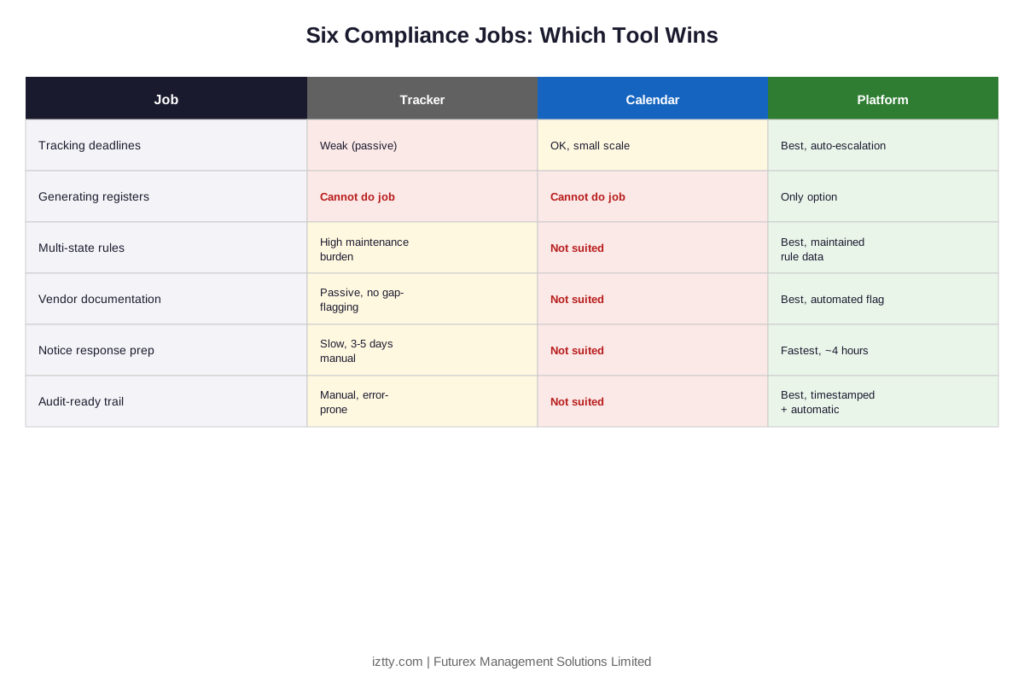
“Compliance management tools” is a search phrase that returns three genuinely different kinds of products, and most comparisons never separate them. A Google Calendar reminder for the EPF due date is a compliance management tool. A shared spreadsheet tracking Shops & Establishment renewals across branches is a compliance management tool. So is a dedicated platform that generates state-specific Factories Act registers automatically. Comparing these by price or features misses the actual question, which tool does the specific job you need done, because a calendar reminder and a register-generation engine aren’t competing products, they’re solving different problems entirely.

This guide breaks Indian statutory compliance down into six concrete jobs and shows which category of tool, simple tracker, calendar/reminder system, or dedicated platform, actually gets each one done, so you’re matching the tool to the job rather than buying based on category hype. If you want a head-to-head comparison of specific software vendors instead, see our Compliance Management Software: A Buyer’s Guide. This piece works at the tool-category level, one step before you’re comparing named products.

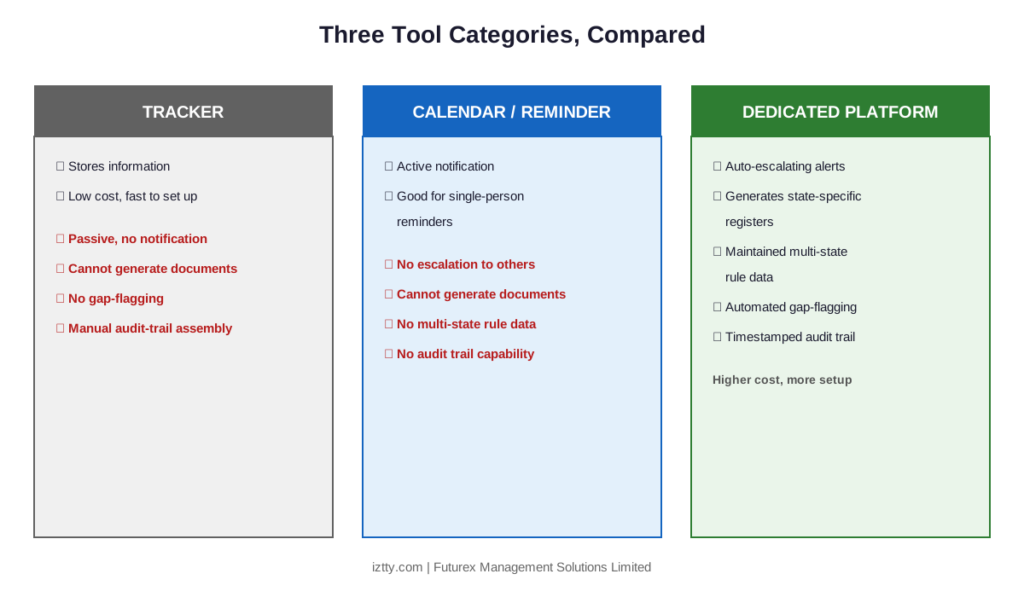
The Three Tool Categories, Defined Honestly

Trackers (spreadsheets, shared sheets, basic databases) store information: due dates, renewal status, documents collected. They don’t do anything on their own, they’re only as current as the last person who updated them, and they have no built-in way to flag that an update is overdue.

Calendars and reminder systems (Google Calendar, Outlook reminders, task management apps like Asana or Trello configured for compliance) add a notification layer on top of dates. They’re good at telling you something is due. They do nothing to help you actually prepare the filing, generate the correct register format, or verify a vendor’s documentation.

Dedicated compliance platforms combine data storage, automated alerts, document generation in the correct statutory format, and often a review/sign-off workflow. They cost more and take longer to set up than the first two categories, which is exactly why many companies default to trackers and calendars long after they’ve outgrown them.

Job 1: Tracking Filing Deadlines

A shared spreadsheet with due dates works for this job at small scale, provided someone checks it regularly, which is the actual failure point: a spreadsheet doesn’t notify anyone, it just sits there. A calendar app with recurring reminders closes that gap for a single person, but breaks down the moment the task needs to transfer to someone else, when the owner is on leave, or when a reminder gets dismissed without the EPF ECR filing actually being completed.

A dedicated platform wins this job once you have more than a handful of recurring filings, because it escalates to a second person automatically if the first doesn’t act, which neither a spreadsheet nor a personal calendar does on its own.

Job 2: Generating State-Specific Registers and Returns

This is where trackers and calendars both fail completely, neither one generates a document. A Factories Act Form 25 Muster Roll or Form 17 Overtime Register has to be produced in a specific, state-validated format, and a spreadsheet template someone built in-house drifts out of date the moment a state amends its format, often without anyone noticing until an inspector flags it. This job genuinely requires a platform with state-specific register templates built in and maintained, which is a structural requirement, not a nice-to-have.

Job 3: Managing Multi-State Rule Differences

A company operating in Maharashtra, Karnataka, and Tamil Nadu is managing three different Shops & Establishment renewal cycles, three different Professional Tax slabs, and potentially three different Labour Welfare Fund contribution rates. A spreadsheet can list all of this, but keeping it current across three states’ independent amendment schedules is a maintenance burden most internal teams underestimate until something slips. A platform with state-specific rule data built in and actively maintained is the only category that scales past two or three states without a dedicated full-time tracker.

Job 4: Vendor and Contractor Documentation

Collecting monthly EPF/ESIC proof from every active contractor, required under the Contract Labour (Regulation and Abolition) Act, 1970 to document that a company has been actively verifying contractor compliance, is a recurring collection-and-verification task. A spreadsheet can log what’s been collected, but it won’t flag a contractor who’s gone quiet for two months unless someone actively checks it weekly. A platform with automated contractor documentation tracking and a compliance score surfaces this gap without anyone having to remember to look. We cover the liability mechanism this job protects against in Vendor & Contractor Compliance: Managing Principal Employer (PE) Liability.

Job 5: Responding to a Regulatory Notice

None of the three tool categories can draft a legal response for you, this job always needs human judgment. But the tool matters for the preparation speed: with a spreadsheet, pulling together the relevant filing history and supporting documentation for a notice period typically takes 3 to 5 days of manual reconstruction. A platform that already has that history organized and retrievable, and that can extract the specific allegation from a scanned notice, can compress that preparation window to a few hours, leaving more of the actual response deadline for legal review rather than document hunting.

Job 6: Maintaining an Audit-Ready Trail

Due diligence requests and EPFO/ESIC reviews commonly ask for 12 to 24 months of organized filing history. A spreadsheet-and-folder system can technically hold this, but assembling it on request, confirming which version of which register was actually the one filed, is slow and error-prone without a system that timestamps and archives each filing automatically. A maker-checker-DSC workflow, where a document is prepared, reviewed, digitally signed, and archived as one linked process, is specifically what makes this job fast rather than a multi-day scramble.

Which Tool Wins for Each Job: The Comparison

  • Tracking deadlines: Platform (at scale); Calendar (single person, low volume); Tracker (weakest, no active notification)
  • Generating state-specific registers: Platform only; Tracker and Calendar cannot do this job at all
  • Multi-state rule management: Platform (built-in, maintained rule data); Tracker (possible but high maintenance burden); Calendar (not suited to this job)
  • Vendor/contractor documentation: Platform (automated gap-flagging); Tracker (functional but passive); Calendar (not suited to this job)
  • Notice response preparation: Platform (fastest document retrieval); Tracker (slow manual reconstruction); Calendar (not suited to this job)
  • Audit-ready trail: Platform (automated, timestamped); Tracker (manual assembly, error-prone); Calendar (not suited to this job)

The pattern is consistent: trackers and calendars remain genuinely useful for the single job of personal reminders at very small scale, but every job involving document generation, multi-state consistency, or a defensible audit trail needs a dedicated platform, there’s no tracker-based workaround that holds up once a company crosses a handful of states, filings, or contractors.

Where Iztty Fits

Iztty is built around exactly this job breakdown rather than being a single generic “compliance software” feature set. Deadline tracking and escalation, state-specific register generation for Factories Act and Shops & Establishment obligations, multi-state rule data, CLRA vendor documentation tracking, and a maker-checker-DSC workflow for audit-ready sign-off are each a distinct module, built because each is a distinct job, not bundled as one undifferentiated feature. The AI Notice Response Assistant specifically targets Job 5, cutting notice preparation from the typical 3 to 5 days down to roughly 4 hours of review time by extracting the allegation and drafting a response directly from existing filing history.

A Practical Decision Framework

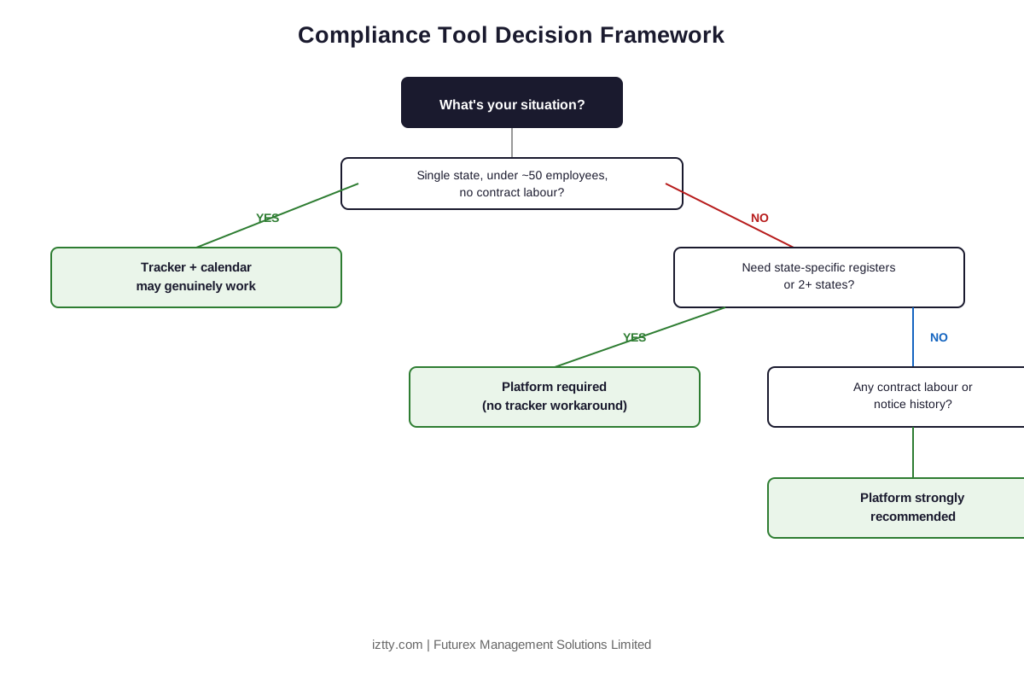
Match your situation to the right tool rather than defaulting to whatever you already have:

  • Single state, under roughly 50 employees, no contract labour: a well-maintained tracker with calendar reminders can genuinely work, provided someone owns checking it weekly.
  • Any state-specific register requirement (Factories Act, S&E): you need a platform, there is no tracker-based substitute for generating a compliant document.
  • Two or more states: a platform’s maintained rule data starts paying for itself once manual upkeep across states becomes a part-time job for someone.
  • Any contract labour engagement: a platform’s automated vendor documentation tracking closes a liability gap a spreadsheet structurally can’t catch proactively.
  • Have received a notice, or are preparing for funding-round due diligence: an organized, platform-based filing history is the difference between hours and days of preparation.

If you want this mapped to your specific states, acts, and current tool setup, book a free compliance audit with Iztty, which includes a review of what your current tools are and aren’t covering.

FAQs

Is a spreadsheet enough for compliance management?
For deadline tracking alone, at very small single-state scale, it can work if someone actively checks it. It cannot generate state-specific registers or flag vendor documentation gaps on its own, regardless of company size.

What’s the difference between a compliance calendar and compliance management software?
A calendar tells you something is due. Compliance management software additionally generates the required documents in the correct format, tracks multi-state rules, and often includes a review and sign-off workflow, a calendar does none of this.

Can Google Calendar or Outlook reminders replace dedicated compliance software?
Only for the single job of personal deadline reminders. They have no mechanism for document generation, multi-person escalation, or audit trail archiving, which are the jobs that actually cause compliance failures at scale.

When should a company move from a tracker to a dedicated platform?
Typically when any of these appear: a second state of operation, the first contract labour engagement, a Factories Act register requirement, or the first time assembling filing history for due diligence or a notice takes more than a day.

Do compliance management tools generate statutory registers automatically?
Dedicated platforms do, in state-specific formats for acts like the Factories Act 1948 and state Shops & Establishment Acts. Trackers and calendar tools cannot generate statutory documents.

How much does a dedicated compliance management platform cost compared to a spreadsheet?
A spreadsheet has no direct cost but carries hidden labour cost in manual upkeep and the risk cost of gaps going unnoticed. Platform pricing typically scales with employee count and states covered; request a quote mapped to your specific scale for an accurate comparison.

Does a compliance management tool help with CLRA contractor compliance?
A tracker can log what’s been collected from contractors, but only a platform with automated gap-flagging reliably surfaces a contractor who’s stopped submitting EPF/ESIC proof before it becomes a liability exposure.

What is a Maker-Checker-DSC workflow and why does it matter for tool selection?
It’s a review process where one person prepares a document, a second reviews and approves it, and the approved version is digitally signed before archiving. It matters for tool selection because it’s the mechanism that makes an audit trail defensible, something no spreadsheet or calendar tool provides.

Can I use a mix of tools, a spreadsheet for some things and a platform for others?
Yes, this is common during a transition, but it reintroduces the core risk a platform solves: inconsistent visibility, since a gap in the spreadsheet-tracked portion won’t surface in the platform’s dashboard. Most companies consolidate once the mixed-tool gap causes a visible problem.

How do I know which job is actually causing my current compliance pain?
Ask where the most recent near-miss happened: a missed deadline points to the tracking job, a wrong register format points to the generation job, a vendor liability surprise points to the documentation job. The job that’s failing tells you which tool category you’re actually missing.

Compliance Management Roles and Responsibilities: RACI Guide

Ask five people at a 200-employee company who is responsible for the EPF ECR filing, and you will often get five different answers. HR says payroll handles it. Payroll says it’s a finance sign-off. Finance says HR owns the data. The admin manager thought the new compliance software handled it automatically. Nobody is lying, and nobody is being lazy, the role was simply never written down anywhere a person could check it.

This is the single most common cause of missed filings, not ignorance of the law, not lack of tools, but an undefined RACI (Responsible, Accountable, Consulted, Informed) for who does what, who signs off, and who gets told when something goes wrong. This guide sets out the actual roles involved in Indian statutory compliance, how to build a working RACI matrix for them, and the monthly operating rhythm that keeps the whole thing running without depending on one person’s memory.

Why Compliance Management Fails Where Ownership Is Undefined

Most compliance breakdowns are not knowledge failures. The compliance manager usually knows the EPF ECR is due on the 15th. What fails is the handoff: payroll finalizes data late, nobody flags that as a compliance-affecting delay rather than a payroll delay, and the filing slips because no single person was accountable for catching it in time.

A RACI matrix exists to close exactly this gap. It assigns, for every recurring compliance task, who does the work (Responsible), who is answerable if it fails (Accountable), who must be consulted before it’s finalized, and who simply needs to be informed once it’s done. Without this written down, “the team handles it” quietly becomes “nobody specifically owns it,” and that’s the condition under which filings slip.

What a Compliance RACI Matrix Actually Maps

A compliance RACI matrix is not an org chart. It’s a task-by-task assignment table, built around your actual recurring statutory obligations, not job titles. The same person can be Responsible for one task and merely Consulted on another. The matrix answers four questions for every task on your compliance calendar:

  • Responsible: who actually prepares the filing, register, or return
  • Accountable: who signs off and is answerable if it’s wrong or late (there should be exactly one Accountable person per task, never more)
  • Consulted: who needs to review or provide input before it’s finalized (often a second department, like finance confirming a wage figure)
  • Informed: who needs to know it happened, without being involved in producing it (often leadership, for visibility)

The Five Core Roles in Indian Statutory Compliance

Across most Indian companies, regardless of size, the same five functional roles recur in statutory compliance, even when the same individual wears more than one hat:

1. The Preparer (usually HR or Payroll Executive). Pulls the underlying data, drafts the filing or register, and is the first point of error-catching.

2. The Reviewer (usually a Compliance Manager or Senior HR). Checks the preparer’s work against the applicable act’s requirements before it moves forward. This is the Consulted role in most RACI structures.

3. The Accountable Sign-Off (usually a Compliance Manager, Company Secretary, or CHRO depending on company size). The person whose name is effectively on the filing. In a maker-checker-DSC workflow, this is the person holding the Digital Signature Certificate.

4. The Escalation Owner (usually CFO or COO). Gets involved only when something goes wrong, a missed deadline, a notice, a flagged discrepancy, not for routine filings. This role exists specifically so escalation doesn’t default to “whoever happens to notice.”

5. The Informed Executive (usually CEO/Managing Director). Doesn’t touch the task but needs visibility into overall compliance health, typically through a dashboard or periodic summary rather than individual filings.

Building Your RACI Matrix, Act by Act

A single company-wide RACI is too generic to be useful. Build it per statutory obligation. A representative example for a mid-size manufacturer:

EPF ECR (monthly, due 15th): Responsible: Payroll Executive. Accountable: Compliance Manager. Consulted: Finance (wage data confirmation). Informed: CHRO.

ESIC contribution (monthly): Responsible: Payroll Executive. Accountable: Compliance Manager. Consulted: HR (employee coverage changes). Informed: CHRO.

Factories Act registers, e.g. Form 25 Muster Roll (ongoing, state-specific format): Responsible: Factory HR/Admin. Accountable: Plant HR Head or Factory Manager. Consulted: Compliance Manager (format correctness). Informed: COO.

CLRA half-yearly return, Form VI-B and Form XXIV (due 31 July and 31 January): Responsible: Vendor Compliance Executive. Accountable: Compliance Manager. Consulted: Procurement (vendor contract terms) and Legal. Informed: CFO (liability exposure).

Shops & Establishment licence renewal (annual or multi-year, state-specific): Responsible: Admin Manager. Accountable: Company Secretary or Legal Manager. Consulted: Finance (renewal fee budgeting). Informed: CEO/MD.

Notice the pattern: Responsible shifts by function (payroll vs. factory admin vs. vendor team), but Accountable consistently sits with whoever holds sign-off authority for that category, usually the Compliance Manager, with escalation-worthy items (CLRA liability, licence renewals) also informing the CFO or CEO directly.

The Monthly Compliance Operating Rhythm

A RACI matrix tells you who. An operating rhythm tells you when, and it’s what actually prevents the matrix from becoming a document nobody looks at after the first month. A working monthly rhythm looks like this:

Week 1 (1st to 7th): Prior month’s payroll data locked. Preparers begin drafting EPF/ESIC/PT filings. Any new joiner or exit data reconciled against UAN and ESIC registration status.

Week 2 (8th to 15th): Reviewer checks drafts. EPF ECR and ESIC contributions filed by the 15th (EPF) and 15th/21st (ESIC, depending on the specific contribution cycle). Accountable sign-off applied via maker-checker-DSC before submission.

Week 3 (16th to 22nd): Register upkeep window, factory registers, S&E registers, vendor documentation collection for the current month. This is also when licence renewal dates 60/30/15 days out get reviewed and flagged if any are approaching.

Week 4 (23rd to month-end): Monthly compliance review meeting, Accountable owners report status to the Informed layer (CHRO, COO, CFO), any flagged gaps get an owner and a target date, and the following month’s calendar is confirmed before it starts.

This rhythm doesn’t need to be elaborate. It needs to be the same four windows, every month, so that a filing slipping isn’t discovered reactively but shows up as a gap in a review that was always going to happen regardless.

Where Maker-Checker-DSC Sign-Off Fits the Rhythm

The RACI’s Responsible and Accountable roles map directly onto a maker-checker-DSC workflow: the Preparer is the maker, the Accountable sign-off holder is the checker, and the Digital Signature Certificate step is what formally closes the task, converting an internal draft into a filed, legally binding document with a clear audit trail of who approved what and when. This is the operational mechanism that makes a RACI matrix enforceable rather than aspirational, since the system itself won’t let a filing go out without the Accountable person’s review, regardless of deadline pressure. See how Iztty’s Maker-Checker-DSC workflow engine applies this structure directly to the filing process.

What Breaks When Roles Are Left Undefined

Three patterns repeat across companies that haven’t formalized this:

The “everyone assumed someone else had it” filing gap. A task with no clearly Accountable person gets treated by three different people as someone else’s job, and the actual filing happens late or not at all, discovered only when a notice arrives.

The single point of failure. One person, usually the original compliance hire, becomes the de facto owner of everything by default, and when they leave or take extended leave, institutional knowledge about which state has which quirk leaves with them.

The escalation that never reaches leadership. Without a defined Informed layer, a compliance gap can sit at the HR or payroll level for months without the CFO or CEO ever knowing it existed, which is precisely the kind of gap that surfaces during funding-round due diligence rather than internally.

How This Changes at Multi-State and Multi-Vendor Scale

A single-location RACI matrix doesn’t scale by simply copying it across branches. Each state introduces its own Shops & Establishment, Professional Tax, and Labour Welfare Fund requirements, which means the Responsible role for register upkeep needs to sit with someone who actually understands that state’s specific rules, not a central HR team applying one state’s process everywhere. Multi-state companies typically add a state-level Compliance Coordinator role, Responsible for that state’s filings, reporting up to a central Compliance Manager who holds overall Accountability.

Vendor and contract labour adds a parallel structure entirely: the Vendor Compliance Executive role (Responsible for collecting and verifying contractor EPF/ESIC documentation monthly) typically doesn’t exist at all in companies before their first contractor engagement, which is exactly why principal employer liability under the Contract Labour (Regulation and Abolition) Act, 1970 so often goes unmanaged until it’s already a problem. We cover this specific liability mechanism in full in Vendor & Contractor Compliance: Managing Principal Employer (PE) Liability.

RACI for Compliance Consultants Managing Multiple Clients

For a statutory compliance consulting firm managing several client companies, the RACI structure adds a layer: the consultant’s own team is Responsible for preparing filings across multiple client accounts, but Accountable sign-off still legally belongs to each client’s own authorized signatory. This is a distinct operational challenge, keeping dozens of clients’ filing calendars, role assignments, and sign-off chains separate and auditable within a single team, which is why Iztty offers a dedicated Compliance Consultant account type built for firms managing multiple client companies from one dashboard, with per-client RACI and DSC-holder separation rather than a single shared workflow.

A Practical Starting Checklist

To build your own RACI and operating rhythm starting this month:

  • List every recurring statutory obligation your company actually has, not a generic template, specific to your states and acts
  • For each one, name the Responsible, Accountable, Consulted, and Informed person by role, not just department
  • Confirm exactly one Accountable person per task, never shared accountability
  • Set the four-window monthly rhythm (data lock, filing, register upkeep, review) and put the review meeting on a recurring calendar invite
  • Identify your single points of failure, any task where only one person knows how to do it, and begin documenting or cross-training against that risk

If you’d rather see this mapped against your specific states, acts, and team structure rather than building it from scratch, book a free compliance audit with Iztty, which includes a RACI and calendar review as part of the baseline assessment.

FAQs

What is a RACI matrix in compliance management?
It’s a task-by-task table assigning who is Responsible (does the work), Accountable (signs off and answers for it), Consulted (reviews before finalization), and Informed (notified after) for each recurring statutory obligation.

Who should be Accountable for EPF and ESIC filings?
Typically the Compliance Manager or equivalent senior HR role, since they hold sign-off authority. There should be exactly one Accountable person per filing, never a shared or ambiguous accountability.

How is a RACI matrix different from an org chart?
An org chart shows reporting lines. A RACI matrix shows task-level accountability, and the same person can carry different RACI roles across different compliance tasks depending on their expertise, regardless of their position in the org chart.

Do small companies need a formal RACI matrix?
Even a 20-person single-state company benefits from writing down who owns each filing, since the “everyone assumes someone else has it” gap happens at small scale too, often because there’s no dedicated compliance hire at all.

How does a monthly operating rhythm prevent missed filings?
By building in a recurring review window (typically the last week of the month) where every task’s status gets checked against the RACI, a gap surfaces during a scheduled review rather than being discovered only when a deadline is already missed.

What happens when the Accountable person for a task leaves the company?
This is exactly the single-point-of-failure risk a documented RACI is meant to prevent. If the role and its requirements are written down rather than held only in one person’s memory, a successor can take over the Accountable role without a compliance gap opening up during the transition.

Where does Maker-Checker-DSC fit into a RACI structure?
It operationalizes it. The maker role maps to Responsible, the checker role maps to Accountable, and the Digital Signature Certificate step formally closes the task, creating an audit trail that shows the RACI was actually followed, not just documented on paper.

Does the RACI change for multi-state operations?
Yes, most multi-state companies add a state-level Compliance Coordinator role, Responsible for that specific state’s filings, since Shops & Establishment, Professional Tax, and Labour Welfare Fund rules differ by state and a single centralized Responsible owner can’t realistically track all of them accurately.

How does vendor and contract labour compliance fit the RACI model?
It typically needs its own dedicated role, a Vendor Compliance Executive, Responsible for monthly collection and verification of contractor EPF/ESIC documentation, since principal employer liability under the CLRA exists independent of whether this role has been formally assigned.

Can a compliance platform replace the need for a RACI matrix?
No, a platform enforces and automates the RACI, flagging gaps, routing sign-offs, maintaining audit trails, but the underlying decision of who is Responsible and who is Accountable for each task is a human organizational decision the company still has to make first.

How often should a RACI matrix be reviewed and updated?
At minimum annually, and immediately after any structural change: a new state of operation, a new contractor engagement, a role change, or crossing a statutory coverage threshold such as ESI Act applicability.

Compliance Management Solutions: Which Approach Actually Solves Your Problem

“Compliance management solutions” is a phrase that gets searched by people with very different problems. A 60-employee single-state company typing it into Google is usually trying to stop missing EPF deadlines. A 400-employee manufacturer typing the same phrase is usually trying to find out why its contractor’s non-payment of minimum wages just became its own legal liability. Both will land on lists of software. Neither will necessarily find the thing that fixes their actual problem, because the solution that fixes manual tracking breakdown is not the same solution that fixes invisible contractor liability.

This guide works backward from the problem instead of forward from a product category. If you already want a side-by-side look at compliance management software specifically, including a comparison table across HRMS-bundled tools, enterprise GRC platforms, and dedicated platforms like Iztty, read our Compliance Management Software: A Buyer’s Guide for Indian Businesses, which covers that ground in depth. This piece is deliberately organized differently: by the problem you’re actually having, and which category of solution, software, consulting services, or a hybrid of both, is built to solve it.

What People Actually Mean by “Compliance Management Solutions”

Searched as a phrase, “compliance management solutions” covers everything from a single SaaS dashboard to a full outsourced compliance retainer with a consulting firm. That breadth is the reason generic answers rarely help: the term describes an outcome (your statutory obligations are met, documented, and defensible), not a specific mechanism for getting there.

In practice, almost every business asking this question is dealing with one or more of five concrete problems, each of which points toward a different kind of fix. The rest of this guide walks through each one.

1. Problem: Manual Tracking Breaks Down

This is the most common starting point. A spreadsheet-and-calendar-reminder system works until it doesn’t, usually around the point a company crosses 50 to 80 employees, adds a second location, or the one person who “owns” the compliance calendar goes on leave during a filing week. The EPF ECR gets filed two days late not because anyone forgot the due date, but because payroll data wasn’t finalized in time and nothing flagged the dependency as a compliance risk rather than a payroll delay.

What actually fixes this: automation of the calendar-to-filing chain itself, not a better spreadsheet template. A system that locks payroll data, auto-populates the EPF/ESIC return, and escalates to a second person if the first doesn’t act within a set window removes the single point of failure that manual tracking always has. This is a problem software is well-suited to solve on its own; it rarely needs a consulting engagement.

2. Problem: Multi-State Rule Inconsistency

A company operating in Maharashtra, Karnataka, and Tamil Nadu is not running “one compliance program,” it is running three, because Shops & Establishment registration validity, renewal cycles, Professional Tax slabs, and Labour Welfare Fund contribution rates are all set independently by each state government. A process built around one state’s rules silently produces errors the moment it’s applied to another, often without anyone noticing until a renewal deadline is missed in the state nobody was watching closely.

What actually fixes this: a system that encodes state-specific rules natively, so the renewal date, form, and contribution rate shown for a Karnataka branch is never the Maharashtra default applied incorrectly. This is a case where software alone solves most of the problem, provided the underlying state rule data is kept current, since state governments amend these rules without much advance notice.

3. Problem: Invisible Vendor and Contractor Liability

This is the problem most companies don’t know they have until it surfaces. Under the Contract Labour (Regulation and Abolition) Act, 1970, the principal employer carries liability if a contractor fails to pay minimum wages or remit EPF/ESIC for the contracted workforce, regardless of whether that contractor’s payroll ever touches the principal employer’s own systems. A company can have flawless internal payroll compliance and still be exposed because its security or housekeeping vendor’s EPF challans haven’t been collected in three months.

We cover this specific liability mechanism in detail, including which CLRA forms and registers apply and how exposure actually gets triggered, in Vendor & Contractor Compliance: Managing Principal Employer (PE) Liability.

What actually fixes this: visibility into a vendor’s compliance status that the principal employer doesn’t currently have, which means collecting and verifying contractor EPF/ESIC proof monthly, not annually. Software can automate the collection and flagging; a consulting engagement is often what’s needed first to establish exactly which vendors and worksites are in scope and to set up the verification process correctly. This is frequently a hybrid problem.

4. Problem: A Regulatory Notice With No Time to Respond

An EPFO or ESIC notice typically gives a company a narrow window, often 15 to 30 days, to respond with a documented explanation and supporting evidence. Companies without an organized filing history spend most of that window just reconstructing what happened, rather than drafting the actual response.

What actually fixes this: having the underlying records (filing history, challans, registers) already organized and retrievable before a notice arrives, which is a software/record-keeping problem, combined with the judgment to draft an adequate legal response, which is where consulting expertise matters. A platform that extracts the allegation from the notice and pre-populates a draft response from existing records can compress a multi-day task into a few hours of review, but someone still needs to review it.

5. Problem: No Visibility Into Where the Real Risk Sits

Many companies that are “mostly compliant” have no way to say which act, which state, or which location carries the highest actual risk right now. Without that view, compliance effort gets spent reactively, on whatever surfaced most recently, rather than on the gap that’s actually most likely to cause a problem.

What actually fixes this: a consolidated, weighted view of compliance status across every applicable act and location, commonly delivered as a compliance health score built from filing timeliness, register completeness, licence validity, and vendor documentation completeness. We walk through how to build this view manually, and what it should surface, in Compliance Risk Audit: How to Identify Gaps Before an Inspection. This is almost always a software capability, since it requires aggregating data no single person is tracking by hand.

Software vs. Consulting Services vs. Hybrid: What Each One Actually Fixes

Laid out directly:

  • Pure software fixes problems that are fundamentally about scale and consistency: manual tracking breakdown, multi-state rule drift, lack of a consolidated risk view. It does not fix problems that require legal judgment, such as how to classify an ambiguous worker category or how to respond to a contested inspection finding.
  • Pure consulting services fix problems that require interpretation and representation: drafting a defensible response to a notice, advising on a genuinely ambiguous classification question, representing the company in an inspection. Consulting-only engagements typically don’t scale well across dozens of locations without software underneath them, because the underlying data collection is still manual.
  • A hybrid approach fixes the problems most mid-size and larger companies actually have: software handles the volume (tracking, filing, documentation, alerts) while consulting judgment handles the exceptions (ambiguous cases, notice responses, audit representation). Most companies outgrow pure software or pure consulting separately before they realize they needed both together.

How Iztty Approaches These Five Problems

Iztty is built as a hybrid by design, not by accident. The platform automates the parts of compliance that are fundamentally about scale and consistency: statutory calendar and filing automation, state-specific Shops & Establishment and Factories Act register generation, a live compliance health score across acts and locations, and CLRA vendor documentation tracking. That covers four of the five problems above directly as a software capability.

For the fifth, judgment-dependent situations like a contested notice or an ambiguous classification, Iztty is backed by Futurex Management Solutions Limited’s compliance practice, built on over a decade of hands-on labour law consulting, rather than leaving that gap for the company to fill separately. The What Is Iztty overview covers the platform’s full feature set, including the maker-checker-DSC workflow that applies a second layer of review before any statutory document is filed.

How to Pick the Right Solution for Your Situation

Match your situation to the problem list above rather than starting from a product category:

  • If your core issue is deadlines and register upkeep across one or two states, with no contract labour, a well-built software layer alone is likely sufficient.
  • If you engage contract labour through vendors, you have a liability exposure that software should surface but that may need a short consulting engagement to scope correctly the first time.
  • If you’ve received a notice, or are preparing for an audit, a hybrid approach, organized records plus legal judgment on the response, is the only combination that actually closes that window safely.
  • If you genuinely don’t know where your risk sits across acts and states, start with a compliance health score rather than guessing which act to shore up first.

If you want this mapped to your specific states, acts, and vendor relationships rather than worked out in the abstract, book a free compliance audit with Iztty.

FAQs

Is “compliance management software” the same as “compliance management solutions”?
Not quite. Software is one category of solution. “Solutions” is the broader term that also includes consulting services and hybrid approaches, which matters because some compliance problems, particularly those involving legal judgment, aren’t solved by software alone.

My company is small. Do I need a full compliance management solution?
If you’re single-state with under roughly 50 employees and no contract labour, a lighter software layer focused on calendar automation is usually enough. The need for a fuller solution typically appears once you add a second state or engage contractors.

Can I use a hybrid approach without committing to a large enterprise platform?
Yes. Several platforms, including Iztty, offer a software core with access to compliance expertise built in, rather than requiring a separate, large consulting retainer on top of a separate software purchase.

How does a compliance health score help me choose a solution?
It tells you where your actual risk concentration is, acts, states, or vendors, before you decide what kind of fix to invest in. Without it, companies often address the most visible problem rather than the highest-risk one.

Is outsourcing compliance to a consulting firm safer than software?
Not inherently. A consulting-only arrangement still depends on the data you give them being accurate and current. Software with embedded expert access typically produces a more current, more complete record than a periodic consulting relationship.

How do I know if my current approach is actually working?
Ask whether you can produce, right now, a complete and current filing history, register set, and vendor compliance record for every location without needing days to assemble it. If not, your current approach has a visibility gap regardless of whether it’s manual, software-based, or consulting-based.

What’s the risk of choosing a solution based on category instead of my actual problem?
You end up paying for capability you don’t need while the actual gap, often vendor liability or multi-state inconsistency, stays unaddressed, because those problems don’t announce themselves the way a missed single-state deadline does.

Do the Labour Codes change which solution I need?
They affect the underlying compliance requirements rather than the category of solution. As of the Codes’ effective date of 21 November 2025, with detailed Central and State rules still being finalized, a solution that tracks regulatory changes on an ongoing basis matters more than ever, since the obligations themselves are in a transition period. See the official PIB press release for the current status.

Can a hybrid solution scale down as well as up?
Yes, in practice most hybrid platforms let you use more or less of the consulting layer depending on how many judgment-dependent situations you’re actually facing in a given period, rather than charging a fixed consulting retainer regardless of need.

What makes Iztty’s approach different from a pure software vendor or a pure consulting firm?
Iztty combines automated, state-specific compliance tracking with Futurex’s decade of hands-on labour compliance consulting built into the same platform, so the judgment-dependent problems (notice responses, ambiguous classification, audit representation) aren’t left as a separate, unsolved gap after the software is implemented.


Compliance Management Software: A Buyer’s Guide for Indian Businesses

What Is Compliance Management Software, and What Should It Actually Do?

Compliance management software automates the registers, returns, and filings a business is legally required to maintain under India’s labour, factory, and tax laws, EPF under the EPF & MP Act, 1952, ESIC under the ESI Act, 1948, Factories Act 1948 registers, Shops & Establishment licences, and CLRA vendor documentation.

Done properly, it should do four specific things: generate the correct state-specific register or return format automatically, track every filing and licence deadline with advance alerts, route each document through a review step before it becomes a legal filing, and give a single, real-time view of risk exposure across every act and state a business operates in.

Most “compliance software” in the Indian market does some of this, not all of it. Knowing which part a given tool actually covers, versus which part it merely claims to cover, is the single most useful filter when evaluating options.

This distinction matters more than it sounds, because the search results for “compliance management software” are dominated by two different kinds of content: product pages from platforms built for one slice of the problem, and listicles comparing tools that are themselves mostly payroll or HRMS products with a compliance label attached. Neither tells you, directly, whether a specific tool covers factory registers, CLRA vendor liability, or a reviewed sign-off workflow, the three areas where coverage gaps actually cost companies during an inspection.

Want a direct read on what you actually need? Book a Free Compliance Audit.


Who Needs Dedicated Compliance Management Software vs. an HRMS Module?

A single-state company with no factory operations and no contract labour can often get by on the compliance module bundled into its HRMS, since the core need is accurate EPF, ESIC, and Professional Tax deductions on payroll. The calculation changes once any of three things happen: the company is covered under the Factories Act and needs state-specific registers (Form 25, Form 5, Form 17), it operates in more than one state with different S&E and Professional Tax rules, or it engages contract labour and carries principal employer liability under CLRA.

At that point, dedicated compliance management software stops being a nice-to-have and starts being the only realistic way to avoid gaps.


The Two Categories of Compliance Software in India, and the Gap Between Them

Almost every option in this market falls into one of two camps. The first is HRMS-bundled compliance, platforms like greytHR, Keka, Zoho People, and similar tools reviewed in roundups comparing HROne, Darwinbox, RazorpayX Payroll, Zimyo, PeopleStrong, ADP India, and Ramco HR, where compliance is one module alongside payroll, attendance, and leave.

The second is enterprise GRC and labour-law specialist platforms, firms like Ricago, which positions itself around tracking 1,500+ Acts and 35,000+ compliance obligations from one dashboard, or TeamLease RegTech’s RegTrack, a digital compliance management system the company describes as used across 3,300+ entities, or Digiliance’s cloud-based labour law compliance platform.

What almost none of this content addresses directly is the gap between the two camps: a mid-size manufacturer or multi-branch retailer that needs real factory, S&E, and CLRA coverage, but doesn’t need, or can’t justify the cost and complexity of, a full enterprise GRC deployment built for organizations tracking obligations across many sectors. This is the specific space a platform like Iztty is built to occupy.

It’s also worth naming the confusion this creates for buyers directly: round-ups that mix outsourced HR compliance services with software products, or that bundle labour compliance as one line item among payroll, attendance, and leave features, make it genuinely hard to tell whether a given tool was built to solve statutory compliance as its primary problem, or added compliance as a feature to an existing payroll product. The fastest way to tell the difference is to ask what happens for the specific obligations outside payroll, factory registers, licence renewals, vendor audits, since that’s where the two categories diverge sharply.


What Should You Look For in a Compliance Management System?

  • Act coverage that matches your actual exposure, not just EPF/ESIC/PT, but Factories Act, S&E, and CLRA if any of those apply to you
  • State-specific register generation that updates when a state amends its format, rather than a static template
  • A genuine review-and-sign-off workflow before any statutory document is filed, not a single-person upload-and-submit process
  • Vendor and contract labour tracking, if you engage contractors, since this is where principal employer liability concentrates
  • Integration with your existing payroll or HRMS tool, rather than requiring a full system replacement
  • A live, weighted risk score, not just a document repository you have to manually review to assess exposure

For the detail behind two of these specifically, see our guides on CLRA registers and returns and managing principal employer liability.


How Does Iztty Compare to Other Compliance Management Software in India?

CapabilityHRMS-bundled (greytHR, Keka, etc.)Enterprise GRC (Ricago, TeamLease RegTech, Digiliance)Iztty
EPF/ESIC/PT payroll deductionsYesVariesYes
Factory Act state-specific registersGenerally noYes, as part of broad act coverageYes
CLRA vendor compliance scoringGenerally noVaries by platformYes
Maker-Checker-DSC digital signingGenerally noNot standard across the categoryYes
AI-assisted notice responseGenerally noVariesYes (approx. 4 hrs vs. 3-5 days manual)
Built by a compliance consultancy, not software-onlyNoVariesYes (10+ years, Futurex Management Solutions)

This comparison reflects each category’s typical positioning rather than every individual product’s exact feature set, since offerings do vary within each camp; confirm specifics directly with any vendor you’re evaluating, including us.

See the full platform in a live walkthrough: Explore Iztty’s platform.


What Does Compliance Management Software Actually Cost in India?

Pricing in this category typically scales with three variables: employee count, number of states and branches, and which modules are needed (payroll-only compliance costs less than a full stack including Factory, S&E, and CLRA vendor compliance). Enterprise GRC platforms built for organizations tracking obligations across many sectors tend to price at the higher end, reflecting their broader scope.

HRMS-bundled compliance is often included or low-cost as an add-on, but covers a narrower slice of actual obligations. A dedicated platform scoped specifically for Indian statutory, labour, and vendor compliance, without enterprise-wide GRC overhead, typically sits in between.

The only way to get an accurate number for your specific situation is a direct conversation scoped to your employee count, states, and which modules you actually need.

Get a scoped quote for your company: Book a Free Compliance Audit.


How Do You Evaluate a Compliance Management Tool Before Buying?

Run a short test before committing to any vendor, Iztty included: ask them to generate a sample register for your specific state and act (not a generic template), ask whether a filing can be submitted by one person alone or requires review, ask how vendor and CLRA compliance is tracked if you engage contract labour, and ask what happens when a labour notice arrives, specifically, how fast a response can realistically be drafted. The answers to these four questions tend to separate genuine statutory compliance coverage from a payroll tool with a compliance label attached.


What Makes Iztty’s Approach Different?

Three things, specifically. The Maker-Checker-DSC workflow means no single person can generate and legally sign a statutory document alone, every filing has a dated, auditable review trail. The AI Notice Response Assistant reads an EPF, ESIC, Labour, S&E, or Factories Act notice, extracts the specific allegation and deadline, and drafts a formal reply with an evidence checklist, cutting response time from the typical 3 to 5 days down to roughly 4 hours.

And the platform itself was built by Futurex Management Solutions Limited, a compliance consultancy that ran manual labour, factory, and payroll engagements for roughly a decade before automating the process, not a software team building compliance features from regulatory text alone. For the detail behind this history, see our full platform overview.

See these three differentiators in a live demo: Explore AI Features.


How Do You Get Started?

The typical starting point is a Free Compliance Audit, a state-and-act-wise review of your current exposure, followed by a walkthrough of whichever modules apply to your specific operations. This also happens to be the fastest way to directly compare Iztty against whatever else you’re evaluating, since you’ll be looking at your own data, not a generic demo dataset.

Ready to compare directly against your own compliance picture? Book a Free Compliance Audit with Iztty.


FAQs

1. What is compliance management software?
Software that automates the tracking, generation, and filing of statutory registers, returns, and contributions required under labour, factory, and tax laws, replacing manual tracking across spreadsheets and reminders.

2. What is the difference between HRMS and compliance management software?
An HRMS manages payroll, attendance, and leave with compliance as one feature focused on payroll deductions; dedicated compliance management software additionally covers factory registers, licence renewals, vendor audits, and digital sign-off workflows that most HRMS platforms don’t handle natively.

3. What does compliance management software cost in India?
Pricing depends on employee count, number of states and branches, and which modules are required; request a quote scoped to your specific situation rather than relying on a generic published price.

4. Is compliance management software only for large enterprises?
No, mid-size manufacturers and multi-branch businesses with 50 to 100+ employees commonly need it once they cross a state, factory, or vendor-compliance threshold, well below enterprise scale.

5. What are the best compliance management software options in India?
Options generally fall into HRMS-bundled platforms (payroll-focused) and enterprise GRC specialists (broad act coverage, enterprise scale), with a smaller set of platforms, including Iztty, built specifically for mid-size Indian statutory, labour, and vendor compliance without enterprise GRC overhead.

6. Does compliance management software cover the Labour Codes 2026 transition?
The four Labour Codes are formally in effect since 21 November 2025, though detailed Central and State rules are still being finalized per the Ministry of Labour & Employment. A good compliance platform should track both current Act obligations and update as new rules are notified, rather than assuming either the old or new framework exclusively.

7. Can compliance management software integrate with my existing payroll system?
Platforms like Iztty are built to integrate with existing tools such as Tally, Zoho Payroll, and Keka HR, so compliance runs alongside your current payroll data rather than requiring a replacement.

8. What is a compliance score or compliance health score?
A live, weighted measure of your statutory compliance risk, built from inputs like filing timeliness, documentation completeness, and licence validity, broken down act-wise and state-wise with risk banding.

9. Does compliance management software handle vendor and contract labour compliance?
This varies significantly by platform; dedicated vendor and contract labour compliance software (as opposed to a generic HRMS compliance module) typically runs digital contractor audits and tracks principal-employer liability documentation under CLRA.

10. How do I choose between compliance management systems?
Map your actual obligations (which acts and states apply to you) against what each system actually covers, test it with a real sample register or filing for your specific state, and confirm pricing scoped to your company size before committing.


For the full statutory compliance picture, see our pillar guide on Statutory Compliance Management in India, and our guides on Shop & Establishment Act registration, CLRA registers and returns, managing principal employer liability, payroll statutory compliance, and running a compliance risk audit. Browse more on our compliance blogs.

Image Placement (3 images, provided separately)

  1. compliance-software-two-categories-gap.png – Alt: “The two categories of compliance software in India, HRMS-bundled and enterprise GRC, and the gap between them” – insert after Section 3.
  2. compliance-software-comparison-table.png – Alt: “Comparison of HRMS, enterprise GRC, and Iztty across key compliance management capabilities” – insert after Section 5.
  3. compliance-software-evaluation-checklist.png – Alt: “Four questions to ask before buying compliance management software” – insert after Section 7.

What Is Iztty? The AI-Powered Statutory Compliance Platform for Indian Businesses

What Is Iztty?

Iztty is an AI-powered statutory compliance management platform built for Indian businesses, automating Labour, Factory, Shops & Establishment, Payroll, Vendor, and CLRA compliance across all 28+ Indian states. It’s developed and operated by Futurex Management Solutions Limited, a New Delhi-based compliance consulting firm founded in 2014, which means the platform was built by people who ran manual compliance operations for a decade before automating them, not a software team that later added compliance as a feature.

The short version: if your company files EPF/ESIC contributions, maintains Factories Act registers, renews Shops & Establishment licences, or engages contract labour through vendors, Iztty is built to handle the registers, returns, alerts, and audit trail that come with each of those obligations, on one platform rather than several disconnected spreadsheets and reminders.

Want to see this against your own compliance stack? Book a Free Compliance Audit.


Who Is Iztty Actually Built For?

Iztty is used across a specific set of roles, each of whom needs a different view of the same underlying data:

  • CEOs, Founders, and COOs who need to know their overall compliance risk exposure without reading individual registers.
  • CFOs who need to see financial and penalty exposure tied to filing deadlines and licence renewals.
  • CHROs and Plant HR Heads who own the day-to-day accuracy of labour, factory, and payroll registers.
  • Compliance Managers and Company Secretaries who need act-wise, state-wise detail and a defensible audit trail.
  • Compliance Consultants and statutory compliance firms managing multiple client companies, for whom Iztty offers a separate Compliance Consultant account type built for multi-client oversight.

This range matters because a platform built only for a Compliance Manager’s level of detail is unusable for a CFO who wants a five-second risk read, and a platform built only for executive dashboards is useless to the person who actually has to file Form 25 correctly.


What Compliance Areas Does Iztty Cover?

Iztty is organized around six functional areas, not a generic “compliance” catch-all:

AreaWhat It Covers
Labour ComplianceLWF registration, monthly/biannual contribution tracking, state-specific LWF rate automation across the 16 LWF-applicable states
Factory ComplianceFactories Act 1948 registration, licence renewal with tiered expiry alerts, statutory registers (Form 25, Form 5, Form 17), half-yearly and annual returns
Shop & Establishment ComplianceState-specific S&E register formats, employee/leave/overtime registers, licence renewals across multi-location retail and office footprints
Payroll ComplianceEPF (ECR, 15th-of-month challans), ESIC, Professional Tax (state-wise slabs), and LWF, run through Maker-Checker-DSC and integrated with Tally, Zoho Payroll, and Keka HR
Vendor ComplianceDigital contractor audits, EPF/ESIC/wage register collection, auto-calculated vendor compliance scores, and principal-employer liability documentation under CLRA
CLRA & Ease of ComplianceForms XII, XIII, XIV, XIX, and the periodic returns (Form XXIV half-yearly, Form XXV annual), DSC-signed

Each of these connects to the other. A vendor’s CLRA licence status feeds into the vendor compliance score; a factory’s registration status feeds into the Factory Compliance module’s alerting; and every filing across all six areas can route through the same Maker-Checker-DSC sign-off before it becomes a legal document. For the full detail behind any one of these, see our guides on Shop & Establishment Act registration, CLRA registers and returns, and managing principal employer liability.


How Is Iztty Different From an HRMS Compliance Module?

An HRMS like greytHR, Keka, or Zoho People bundles a compliance module alongside payroll, attendance, and leave, built primarily to get EPF, ESIC, and Professional Tax deductions correct on the payslip. That’s a real and useful function, but it generally stops there. It doesn’t generate Factories Act registers in state-specific formats, doesn’t track CLRA vendor documentation, and doesn’t route statutory filings through a maker-checker-DSC sign-off before they’re legally submitted.

Iztty is built to integrate with your existing HRMS or payroll tool rather than replace it, handling the compliance layer, registers, licences, vendor audits, digital signing, that most HRMS platforms were never designed to cover.


How Is Iztty Different From an Enterprise GRC Platform?

On the other end of the market, enterprise GRC platforms track a very wide universe of obligations across large organizations, often built for compliance teams with significant internal headcount dedicated to the function. These platforms can be comprehensive, but also heavier and costlier to onboard for a mid-size manufacturer, a multi-branch retailer, or a growing staffing company that needs specific factory, S&E, and CLRA workflows without a full enterprise GRC deployment.

Iztty sits deliberately in between: purpose-built for Indian statutory compliance specifically, not a broad GRC framework retrofitted for labour law, and priced and structured for companies that need real coverage without enterprise-scale complexity.

See where Iztty fits for your specific size and footprint: Talk to a compliance specialist.


What Is the Maker-Checker-DSC Workflow?

This is one of Iztty’s core differentiators, and something neither the HRMS camp nor most GRC platforms do natively. Every statutory register or return moves through four stages: a Maker uploads or generates the document and validates the underlying data, a Checker (typically a more senior reviewer) approves or rejects it with mandatory remarks on rejection, the approved document is digitally signed using a Digital Signature Certificate, and the signed document is auto-archived to a document vault with a timestamped audit trail.

This means no single person can generate and legally sign a statutory filing alone, and if an inspector or auditor ever asks “who reviewed this, and when,” the answer is already documented rather than reconstructed from memory.


What Does the AI Notice Response Assistant Actually Do?

When an EPF, ESIC, Labour, S&E, or Factories Act notice arrives, the manual process, reading it, identifying the specific allegation and cited section, pulling the relevant registers, and drafting a formal reply, commonly takes a compliance team 3 to 5 days. Iztty’s AI Notice Response Assistant reads the notice (using OCR for scanned documents), extracts the specific allegation, section, and deadline, and drafts a complete formal reply along with an evidence checklist, compressing that process to roughly 4 hours of review and sign-off time.

See this in action: Explore Iztty’s AI Features.


How Does the Compliance Score Meter Work?

The Compliance Score Meter gives a live, 0 to 100 percent score, broken down act-wise and state-wise, with Low, Medium, and High risk banding. It’s built from actual weighted inputs, filing timeliness, register completeness, licence validity, and (where applicable) vendor documentation completeness, rather than a single pass/fail flag. This gives a CHRO or CFO an early-warning view of exposure, rather than a picture that only becomes clear during an annual audit.


Who Is Actually Behind Iztty?

Iztty is developed and operated by Futurex Management Solutions Limited (CIN: U74999DL2014PLC269550), a New Delhi-based compliance consulting firm founded in 2014. This history matters because Futurex ran hands-on labour, factory, and payroll compliance engagements for clients for a decade before building Iztty, which shapes the product differently than a platform built by a general software team guessing at compliance workflows from the outside. The underlying regulatory logic, register formats, and escalation workflows in Iztty came from real client engagements, not a generic compliance framework applied to India after the fact.


What Do Results Look Like in Practice?

Iztty publishes anonymized, aggregate outcome metrics rather than named client case studies. Two representative examples: a 14-factory manufacturer’s compliance score improved from 61% to 88% within 90 days of onboarding, and a 40-client compliance consultancy cut its average EPF/ESIC notice response time from 5 days to 4 hours using the AI Notice Response Assistant. These are illustrative proof points from real, anonymized engagements, not projections.


How Do You Get Started?

The typical starting point is a Free Compliance Audit, a state-and-act-wise review of your current exposure across whichever of the six areas apply to your business, followed by a walkthrough of the specific modules relevant to your operations (Vendor Compliance, CLRA, Factory registers, or all of them, depending on your footprint).

Ready to see your own exposure mapped out? Book a Free Compliance Audit with Iztty.


FAQs

1. What is Iztty?
Iztty is an AI-powered statutory compliance management platform that automates Labour, Factory, Shops & Establishment, Payroll, Vendor, and CLRA compliance for Indian businesses across all 28+ states.

2. Who owns and operates Iztty?
Iztty is developed and operated by Futurex Management Solutions Limited, a New Delhi-based compliance consulting firm founded in 2014.

3. Is Iztty an HRMS?
No, Iztty is a dedicated statutory compliance platform, not an HRMS. It’s built to integrate with your existing HRMS or payroll tool (Tally, Zoho Payroll, Keka) rather than replace it.

4. What makes Iztty different from other compliance software in India?
Iztty combines a Maker-Checker-DSC digital signing workflow, an AI Notice Response Assistant, a live Compliance Score Meter, and state-validated register formats in one system, backed by over a decade of hands-on Futurex compliance consulting expertise rather than software built without that operational background.

5. Does Iztty handle contract labour and vendor compliance?
Yes, through its Vendor Compliance module, which runs digital contractor audits, auto-calculates vendor compliance scores, and documents principal-employer liability under CLRA.

6. Can Iztty be used by a compliance consulting firm managing multiple clients?
Yes, Iztty offers a separate Compliance Consultant account type built specifically for firms managing statutory compliance across multiple client companies.

7. Does Iztty replace the need for a compliance team?
No, it’s built to make an existing compliance team’s work faster and more auditable, generating the right forms, tracking deadlines, and maintaining the sign-off trail, while judgment calls and escalation decisions still involve human review.

8. How does Iztty stay current with regulatory changes like the Labour Codes?
Iztty’s Regulatory Change Intelligence monitors gazette notifications and EPFO/ESIC circulars, and updates register templates and action tasks as rules are notified, with human review before any automated action is enforced.

9. What industries does Iztty serve?
Manufacturing and Factories, Retail and Shops, IT and Technology Services, Construction and Infrastructure, Mining, Staffing and Contractors, Healthcare and Pharma, and Logistics and Warehousing, among others.

10. How do I see if Iztty fits my company’s compliance needs?
The most direct way is a Free Compliance Audit, which maps your current exposure against Iztty’s coverage before you commit to anything.


For the full statutory compliance picture, see our pillar guide on Statutory Compliance Management in India, plus our guides on Shop & Establishment Act registration, CLRA registers and returns, and managing principal employer liability. Browse more on our compliance blogs.

Suggested Internal Linking Placement

  • In the pillar guide, the introduction or “Choosing a Statutory Compliance Platform” section should link to this blog as the canonical “what is Iztty” reference for readers who reach the pillar cold.
  • In the Shop & Establishment cluster blog and the CLRA cluster blog, the closing “next step” paragraph in each can link here for readers who want the full platform picture rather than just that one module.
  • In the Vendor & PE Liability blog, the “How Automation Changes the Vendor Audit Cycle” section can link here as the broader platform context behind the Vendor Compliance module.
  • On iztty.com/about/ and iztty.com/platform/, this blog is a natural landing link from any external mention of the brand (guest posts, press, backlinks) before sending traffic into a specific product page.

Schema Recommendation

Organization schema (tied to Futurex Management Solutions Limited, CIN: U74999DL2014PLC269550) alongside FAQPage schema for the FAQ section and Article schema for the full post.

Image Placement (3 images, provided separately)

  1. iztty-six-compliance-areas.png — Alt: “The six compliance areas Iztty covers: Labour, Factory, S&E, Payroll, Vendor, CLRA” — insert after Section 3.
  2. iztty-vs-hrms-vs-grc-positioning.png — Alt: “Where Iztty sits between HRMS compliance modules and enterprise GRC platforms” — insert after Section 5.
  3. iztty-maker-checker-dsc-overview.png — Alt: “Iztty’s Maker-Checker-DSC four-stage workflow overview” — insert after Section 6.

CLRA Compliance: Contract Labour Registers and Returns Explained

This article on CLRA Compliance is part of our compliance cluster. See the full picture in our pillar guide, Statutory Compliance Management in India: The Complete Guide.

What CLRA Actually Regulates

The Contract Labour (Regulation and Abolition) Act, 1970 governs any establishment that engages workers through a contractor rather than employing them directly, security guards, housekeeping staff, production-line contract workers, or third-party staffing arrangements. The Act exists to make sure contract labour gets the same basic protections as direct employees: timely wages, proper working conditions, and a documented, inspectable employment record, and to fix accountability on the establishment that ultimately benefits from the work, not just the contractor who technically employs the workers.

For the current statutory text, refer to the Contract Labour (Regulation and Abolition) Act, 1970 on India Code and the accompanying Central Rules, 1971, which prescribe the exact register and return formats covered below.


Who Needs to Register: Principal Employer vs. Contractor

CLRA creates two separate obligations that are frequently confused:

  • The principal employer (your company, if you’re engaging contract labour) must obtain registration of the establishment under Section 7 of the Act.
  • The contractor (the staffing agency or labour supplier) must separately obtain a licence under Section 12, valid for 12 months and renewable via Form VII at least 30 days before expiry.

Both obligations are triggered at the same threshold: an establishment or contractor that employs, or employed, 20 or more workmen as contract labour on any day in the preceding 12 months. Some states have amended this threshold through their own notifications, so confirm the current applicable number for your state before assuming 20 is universal.

Not sure which side of this obligation applies to you? Book a Free Compliance Audit and get a clear read on your registration status.


When Registration, Licensing, and Notices Are Required

Beyond the one-time registration and licence, CLRA requires ongoing, per-contract notifications that are easy to miss because they’re not calendar-based, they’re triggered by events:

  • Form VI-A, the contractor’s notice of commencement or completion of contract work, filed with the relevant authority when a specific contract starts or ends.
  • Form VI-B, the corresponding notice filed by the principal employer for the same commencement or completion event.
  • Form XIV, the employment card, which the contractor must issue to each worker within 3 days of employment, not at the end of the month or the end of the contract.
  • Form XV, the service certificate, issued by the contractor on termination of a worker’s employment for any reason.

This is precisely why CLRA compliance breaks down in practice: it’s not one annual filing, it’s a set of obligations triggered by specific events (a new contract starting, a worker joining or leaving) that need to be tracked as they happen, not reconstructed later from memory.


The Complete CLRA Register Checklist: Forms XII Through XXIII

FormWhat It RecordsMaintained By
Form XIIRegister of Contractors, every contractor engaged, nature of work, period, and maximum workmen employedPrincipal Employer
Form XIIIRegister of Workmen Employed by ContractorContractor
Form XIVEmployment Card, issued to each worker within 3 days of employmentContractor
Form XVService Certificate, issued on terminationContractor
Form XVIMuster RollContractor
Form XVIIRegister of WagesContractor
Form XVIIIRegister of Wages-cum-Muster Roll (combined format, where used)Contractor
Form XIXWage Slip, issued at least a day before wage disbursement where the wage period is a week or moreContractor
Form XXRegister of Deductions for Damage or LossContractor
Form XXIRegister of FinesContractor
Form XXIIRegister of AdvancesContractor
Form XXIIIRegister of OvertimeContractor

A frequent inspection failure isn’t the absence of these registers altogether, it’s inconsistency between them. A contractor’s payroll may show one headcount while the Form XVI muster roll shows another, because the muster roll wasn’t updated in real time as workers rotated on and off site. Our Factories Act registers checklist covers a similar register-consistency problem on the factory side.


How to File the CLRA Returns: Form XXIV and Form XXV

Beyond the ongoing registers, two periodic returns are mandatory:

  • Form XXIV, the half-yearly return filed by the contractor to the Licensing Officer, due within 30 days of the close of each half-year (30 June and 31 December), meaning by roughly end of July and end of January.
  • Form XXV, the annual return filed by the principal employer to the Registering Officer, due by 31 January.

Both returns are increasingly tracked through the Ministry of Labour and Employment’s Shram Suvidha Portal, which means a missed or inconsistent filing is now a digital, cross-referenceable record rather than a paper file that might not surface again until an active inspection.

See how these returns get tracked and filed: Explore Iztty’s CLRA & Ease of Compliance module.


Where Liability Actually Sits: Principal Employer Responsibility

This is the part of CLRA that catches companies off guard: if a contractor fails to pay wages on time, or fails to provide amenities like rest rooms, drinking water, or first aid required under the Act, the principal employer is legally required to provide these directly and can recover the cost from the contractor afterward. In practice, this means the principal employer cannot treat contractor compliance as the contractor’s problem alone; it is a documented, ongoing obligation to verify.

This is why vendor documentation, monthly proof of EPF, ESIC, and minimum wage payment for every active contractor, matters as much as your own direct payroll compliance. Our pillar guide covers this in more detail under multi-state compliance management.


Why CLRA Compliance Fails: The Gaps Inspectors Actually Find

  • Form VI-A/VI-B not filed per contract. Teams remember the initial registration but forget that every new or renewed contract needs its own commencement notice.
  • Employment cards issued late, or not at all. Form XIV is meant to be issued within 3 days of employment; in practice, it’s often batched monthly, which is technically non-compliant.
  • Muster roll and payroll headcount mismatch. The contractor’s actual payroll and the Form XVI muster roll drift apart when workers are added or removed without an update.
  • Form XXIV filed, but not cross-checked against the principal employer’s Form XXV. Since these are filed by two different parties, inconsistencies between them are one of the first things an inspector or the Shram Suvidha system’s digital cross-referencing flags.

How a Digital Vendor Audit Trail Closes These Gaps

A digital vendor compliance process addresses each of the failure points above directly: it prompts for a Form VI-A/VI-B filing the moment a new contract is logged, tracks employment card issuance against the 3-day window per worker, reconciles contractor-submitted muster rolls against payroll data monthly, and cross-checks Form XXIV and Form XXV figures before either is filed, catching a mismatch before an inspector does. This also feeds directly into a live compliance score, so a CHRO or Compliance Manager can see vendor-side risk without waiting for the next audit cycle.

See vendor compliance automation in action: Explore Vendor Compliance features.


When CLRA Does Not Apply: Exemptions

CLRA does not apply to establishments where the work performed is of an intermittent or casual nature, or where the establishment has not carried out any work for more than 21 days in the preceding 12 months. Certain seasonal work performed for 60 days or fewer in a year, and establishments within Special Economic Zones under specific state notifications, may also fall outside the Act’s direct applicability. These exemptions are narrowly interpreted in practice, so treat them as exceptions to verify with a compliance professional rather than a default assumption for infrequent contractor use.


Penalties for Non-Compliance

Operating without the required registration or contractor licence, or failing to maintain the registers listed above, exposes both the principal employer and the contractor to penalties under the Act, including fines and, for repeated or serious violations, imprisonment provisions under the relevant sections. Beyond the direct penalty, an establishment without a clean CLRA record faces a genuine practical cost: this is exactly the documentation set requested during funding due diligence, government tender eligibility checks, and enterprise vendor onboarding.


Manual Tracking vs. a CLRA Compliance Platform

For a company with one or two small contractor relationships, manual tracking, a shared folder of monthly challans and a checklist, is workable. It stops being workable once a business is managing multiple contractors across multiple sites, because at that point, tracking event-triggered filings (a new contract starting, a worker joining) alongside calendar-based ones (Form XXIV, Form XXV) manually becomes a dedicated, error-prone task rather than an occasional admin item.

A platform’s real value here is treating CLRA as the event-driven compliance workflow it actually is, not a static checklist, prompting the right form at the right trigger, and maintaining the audit trail a principal employer needs to demonstrate it verified contractor compliance, not just assumed it. Our Maker-Checker-DSC workflow guide covers how the same review-before-sign principle applies to CLRA returns as it does to other statutory filings.

Check your current CLRA compliance status: Get a Free Compliance Audit.


FAQs

1. What is the threshold for CLRA to apply?
An establishment or contractor employing 20 or more workmen as contract labour on any day in the preceding 12 months, though some states have amended this threshold, so confirm the current number for your state.

2. Is Form VI-B a periodic return?
No, Form VI-B is a notice filed by the principal employer for the commencement or completion of a specific contract, not a recurring calendar filing. The actual periodic returns are Form XXIV (half-yearly, filed by the contractor) and Form XXV (annual, filed by the principal employer).

3. Who is responsible for maintaining CLRA registers, the principal employer or the contractor?
Most day-to-day registers (muster roll, wage register, overtime register) are maintained by the contractor, while the principal employer maintains the Register of Contractors (Form XII) and carries backup liability if the contractor fails to comply.

4. What happens if a contractor doesn’t pay minimum wages to contract workers?
The principal employer can be held liable to ensure payment and may need to pay the workers directly, recovering the amount from the contractor afterward.

5. How often must the employment card (Form XIV) be issued?
Within 3 days of a worker’s employment, and it must be kept updated with any change in particulars.

6. What is the difference between Form XXIV and Form XXV?
Form XXIV is the contractor’s half-yearly return to the Licensing Officer; Form XXV is the principal employer’s annual return to the Registering Officer, due by 31 January.

7. Does CLRA apply to security guards and housekeeping staff hired through an agency?
Yes, if the numerical threshold is met, contract labour engaged for security, housekeeping, or similar support functions falls under CLRA regardless of the nature of the work.

8. Can a company be penalised if the contractor, not the company itself, fails to comply?
Yes, the principal employer carries independent liability for verifying and, in some circumstances, directly ensuring contractor compliance, which is why documented vendor audits matter.

9. Is CLRA registration a one-time process?
The principal employer’s registration is generally ongoing once granted, but the contractor’s licence is valid for 12 months and must be renewed via Form VII at least 30 days before expiry.

10. Can CLRA compliance be tracked on the same platform as EPF/ESIC and Factories Act compliance?
Yes, and doing so is generally more reliable than tracking it separately, since CLRA liability is directly connected to a company’s broader statutory risk profile, covered in our complete statutory compliance guide.


For the full compliance picture, see our pillar guide on Statutory Compliance Management in India and our guide to Shop & Establishment Act state-wise registration. Browse more on our compliance blogs.

Suggested Placement of This Blog in Existing Content

  • In the pillar guide, Section 7 (“Vendor and Contract Labour Compliance Under CLRA”) should link its “Form VI-B and Form XXIV” reference to this blog for the full register/return breakdown, and its corrected explanation.
  • In the Shop & Establishment cluster blog, add a link from the closing section to this blog for readers whose S&E-registered establishment also engages contract labour.
  • In iztty.com/vendor-compliance/ and iztty.com/clra-compliance/, this blog is a natural “learn more” link for visitors who land on the product page before understanding the underlying obligation.

Schema Recommendation

FAQPage schema for the FAQ section; Article schema for the full post; BreadcrumbList reflecting Pillar > Cluster hierarchy.

Image Placement (3 images, provided separately)

  1. clra-register-checklist-forms.png — Alt: “CLRA register checklist showing Forms XII to XXIII and who maintains each” — insert after Section 4.
  2. clra-returns-timeline.png — Alt: “CLRA Form XXIV and Form XXV filing timeline for contractor and principal employer” — insert after Section 5.
  3. clra-liability-flow-principal-employer.png — Alt: “Diagram showing where CLRA liability sits between contractor and principal employer” — insert after Section 6.