It is the 13th of the month in a Faridabad auto-parts plant. The payroll is frozen, the bank approval is booked for the 14th, and the HR executive uploads the EPF file one last time. The portal throws back an error file with 23 rows highlighted. Nine are “UAN not linked to your establishment”. Four are EPS wages above the limit. The rest are date problems from employees who left in the spring.
That is the usual shape of EPF ECR filing trouble. The file itself is simple. The mistakes live in the data behind it, and since the revamped ECR began with the September 2025 wage month, the portal checks a good deal of that data before it lets you pay. This guide walks through EPF ECR filing step by step, explains the challan and payment, and lists the errors that get returns rejected, with the fix for each.
Want your employee master and last three ECRs checked for the errors in this guide? Our compliance practice will review a sample with you before the next 15th. GET A FREE COMPLIANCE AUDIT
What an ECR Is and What Changed With the Revamped System
ECR stands for Electronic Challan cum Return. One upload does two jobs. It is the monthly return that tells EPFO who worked, what they earned and what was contributed. It is also the basis of the challan you pay against. Contributions are due by the 15th of the following month, so the November wage month is due by 15 December.
Three facts frame the process today.
- The revamped ECR applies from the September 2025 wage month. EPFO’s own page lists its main features: return filing separated from payment, system validations to block incorrect ECRs, damages and interest calculated alongside the return, and revisions allowed under certain conditions. The file format is unchanged. See the EPFO page on the revamped ECR.
- The rollout was staggered. The Ministry of Labour and Employment extended the filing date for the September 2025 wage month to 22 October 2025, as its PIB release of 13 October 2025 records, and described sequential return validation as one of the new features.
- The core file logic is UAN-based. EPFO’s ECR 2.0 introduction (PDF) explains the structure: member identifiers, a return part and a remittance part. That document predates the revamp, so read it for the field logic and the EPFO page above for the current flow.
If you want the wider monthly EPF and ESIC cycle, our EPF and ESIC compliance guide covers it. If a deposit has already slipped past the 15th, see our guide to EPF damages and interest. This article is about getting the file right the first time.
Before You Upload: Six Checks
Most rejected returns are decided before the file is generated. Run these checks on the payroll output first.
- Every active employee has a valid UAN linked to your establishment code. A valid-looking number alone is not enough.
- Joining and exit dates are in the member record. The date of joining must be on or before the wage month and the date of exit on or after it.
- Wage components reconcile. Gross wages, EPF wages, EPS wages and EDLI wages must follow each other in that order of size, as Section 6 explains.
- Zero-wage employees are flagged. An employee on rolls with no pay for the whole month needs the right NCP treatment.
- Arrears are separated. Arrears go in their own file, not inside the monthly one.
- Earlier months are filed. Under the revamped system, a later month cannot be filed while an earlier one is pending.
EPF ECR Filing Step by Step
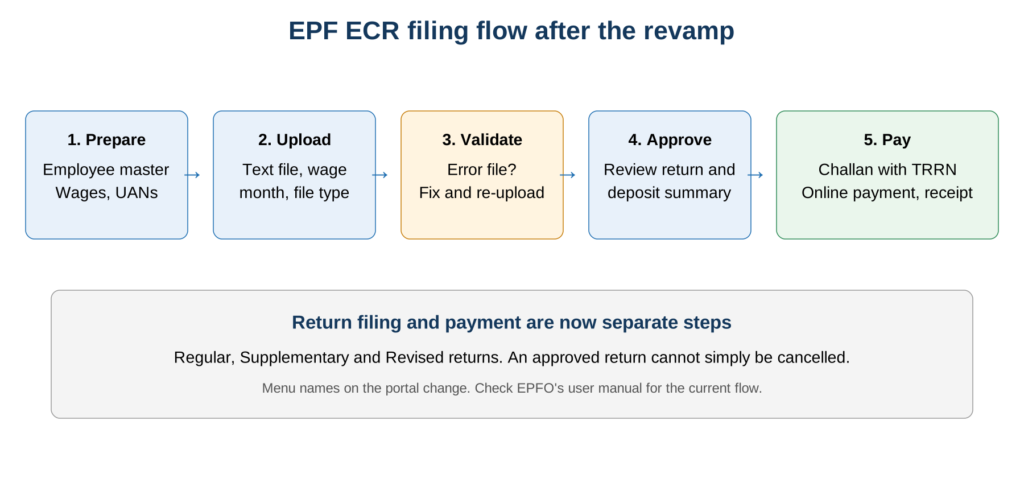
The steps below follow EPFO’s documents and published coverage of the revamped system. Menu labels on the portal change from time to time, so treat the names as a guide.
- Prepare the data. Pull the active-employee list, UANs, names, dates and wage figures from payroll. Reconcile headcount to the previous month and explain every change.
- Generate the text file. Produce the ECR text file in EPFO’s prescribed format from your payroll system or the portal’s utility. The format did not change with the revamp. Wage and amount fields cannot carry decimals.
- Log in to the Unified Employer Portal. Use the authorised user’s credentials for the establishment.
- Select the wage month and file type. Choose the month, and whether the file is the monthly ECR or an arrear file. The default contribution rate is 12 per cent. A 10 per cent rate needs a stated reason, such as the categories EPFO lists (for example fewer than 20 employees or a sick establishment).
- Upload and let validation run. If the file fails, the system produces an error file. Download it, fix the rows in your source data, regenerate and upload again.
- Review the statement and approve the return. After validation passes, review the summary. Once approved, a return cannot simply be cancelled.
- Check the Due Deposit Balance Summary. It shows what is payable, including any interest and damages the system has calculated for a late return.
- Generate the challan with a TRRN. The TRRN, the Temporary Return Reference Number, ties the payment to the return.
- Pay online and download the receipt. Online payment is mandatory under a notification of 5 May 2015, with offline payment only by permission of the PF office. Keep the receipt with the approved return and the reconciliation.
Regular, Supplementary and Revised Returns
The revamped system keeps three return types. Choosing the wrong one is a quiet source of errors.
| Return type | Use it for | Watch for |
|---|---|---|
| Regular | The standard monthly return for all active members | Missing employees. Filing needs earlier months to be filed first |
| Supplementary | Adding employees missed from the Regular return | Do not upload a second Regular return for the same month |
| Revised | Correcting wages or contributions in an earlier return | Downward revisions are allowed only where payment has not been made for that UAN in that month. Upward revisions are more flexible |
These rules come from published coverage of EPFO’s FAQs on the revamped system, not from the FAQs themselves. Check the user manual and FAQ links on the EPFO page before relying on the exact conditions.
The Challan, TRRN and Payment
EPFO’s ECR 2.0 document describes how a challan is put together. After the return is approved, you enter the EDLI contribution, the EPF and EDLI administration or inspection charges, and the employee counts. The challan then shows amounts by account head, with EPF charges in Account 2 and EDLI charges in Account 22. The uploaded ECR does not lapse. If you cannot pay today, the return stays and you can pay later through the payment link, though a late payment attracts damages and interest.
Three things that surprise first-time filers
- A TRRN is not proof of accuracy. It confirms the return was accepted and payment processed. The portal checks that the file is well-formed and passes its rules, not that your payroll was right.
- Challans from the old system are not valid. Coverage of the revamp says challans generated under the legacy system must be regenerated.
- The system calculates interest and damages for you. They appear before you generate the challan, and you may pay damages then or later depending on the case. See our EPF damages guide for the Section 7Q and Section 14B arithmetic.
Filing for several establishments or client companies? See how Iztty reviews each filing before the 15th. BOOK A DEMO
Field Rules the Portal Checks
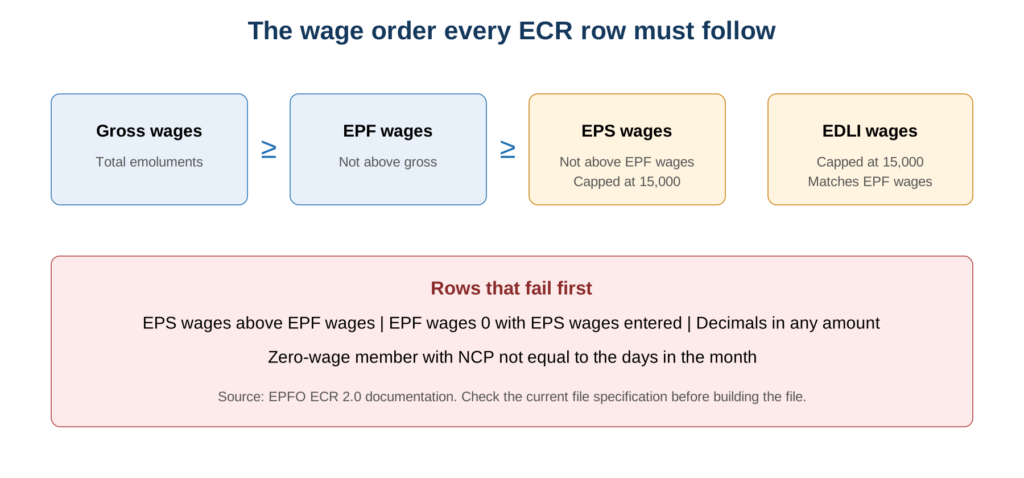
This table collects the rules from EPFO’s ECR 2.0 documentation. Run them as formulas in your payroll output before you upload.
| Rule | What it means in practice |
|---|---|
| No decimals | Round wages and contributions to whole rupees before the file is built |
| EPF wages cannot exceed gross wages | Check employees with deductions or negative adjustments |
| EPS wages cannot exceed EPF wages | If EPF wages are 0, EPS wages cannot be entered |
| EPS wages capped at 15,000 where applicable | Check the cap before building the file |
| EDLI wages cannot exceed 15,000 | It should match EPF wages up to 15,000, unless the member or establishment is exempt |
| EPS contribution about 8.33 per cent of EPS wages | A contribution above the limit fails validation |
| EE share cannot exceed gross wages | Applies to deductions that look high against low pay |
| NCP days are whole numbers | For a zero-wage month, NCP equals the days in the month, and all wage fields are 0 |
| UAN valid and linked to your establishment | Date of joining on or before the wage month, date of exit on or after it |
| Name is for display | Remittances are credited to the UAN even if the name differs |
The last line is worth remembering. Teams often spend an afternoon fixing name spellings when the portal would have credited the contribution against the UAN anyway. Fix names for tidiness, but do not hold a filing for them.
The Errors That Get Returns Rejected, and the Fix
| What the portal says or does | Likely cause | Fix |
|---|---|---|
| UAN not linked to your establishment | The member was never linked, or an exit is already marked and you are paying for later months | Check the member’s date of exit. Correct the exit if wrong, or remove the row if the person has left |
| Invalid UAN or duplicate entry | Typing error, or one UAN appearing twice in the file | Validate UANs against the master and remove duplicates before upload |
| Date of joining or exit missing or not updated | Member record incomplete or out of date | Update the dates. Some date corrections need a joint declaration by employer and employee |
| EPS wages exceed EPF wages, or exceed the cap | Wage components built in the wrong order | Recalculate EPS wages from EPF wages and apply the 15,000 cap |
| EPS contribution flagged for a member | Member joined after 1 September 2014 with wages above 15,000, or is beyond age 58 without a deferred pension flag | Set EPS wages to 0 and EDLI wages equal to EPF wages up to 15,000 where the rules apply |
| Contribution below the statutory rate | 12 per cent not applied, or a 10 per cent rate without a reason | Apply the right rate or record the permitted reason |
| Decimals in an amount field | Payroll exports paise | Round to whole rupees in the export |
| Zero wages with positive contribution, or wrong NCP days | A zero-pay employee left in the contribution run | Set all wage fields to 0 and NCP to the days in the month |
| Return blocked because an earlier month is pending | Sequential validation | File and pay the earlier month first |
| Exempt establishment error | Exemption flag wrongly set | Contact the Regional Office to correct the flag. Exempt establishments still declare EPF wages |
| File fails to load | Wrong delimiter, extra or missing columns, or encoding problems | Rebuild the file in the prescribed format and save as plain text |
The pattern is clear. Almost every error is a data-hygiene issue in the employee master, not a filing skill. That is why the cheapest fix is a monthly employee-master review, ten minutes per site, before payroll closes.
Correcting a Return After Approval
- Do not try to cancel an approved return. It cannot simply be cancelled.
- Missing employee? File a Supplementary return.
- Wrong wages or contributions? File a Revised return, subject to the upward and downward rules in Section 4.
- Wrong date? Update the member record, and check whether a joint declaration is needed.
- Pay the difference and keep the revised acknowledgment with the original.
Keep the reason for each correction in a log. It becomes useful evidence if an officer later asks why a month needed revision.
The Wage Ceiling Question
This is the point on which current sources disagree, so handle it with care. The statutory wage ceiling for contributions has been Rs 15,000 a month. The Union Cabinet approved raising it to Rs 25,000 on 16 September 2026, as the announcement on the Prime Minister of India website records, and it gives no effective date. Some commentary says the higher ceiling already applies from mid-September. Another says the Rs 15,000 ceiling was re-notified on 29 May 2026 and the higher figure is still pending. We could not settle this from a primary notification.
What to do with that:
- Do not change your file logic until EPFO’s notification and the portal validation both say so. The portal’s checks use the ceiling it is currently configured for.
- List employees earning between Rs 15,001 and Rs 25,000. You will need that list the day the ceiling changes.
- Test one file in a sandbox month if your payroll tool gives you that option, rather than discovering the rule on the 14th.
A Ten-Day Countdown to the 15th
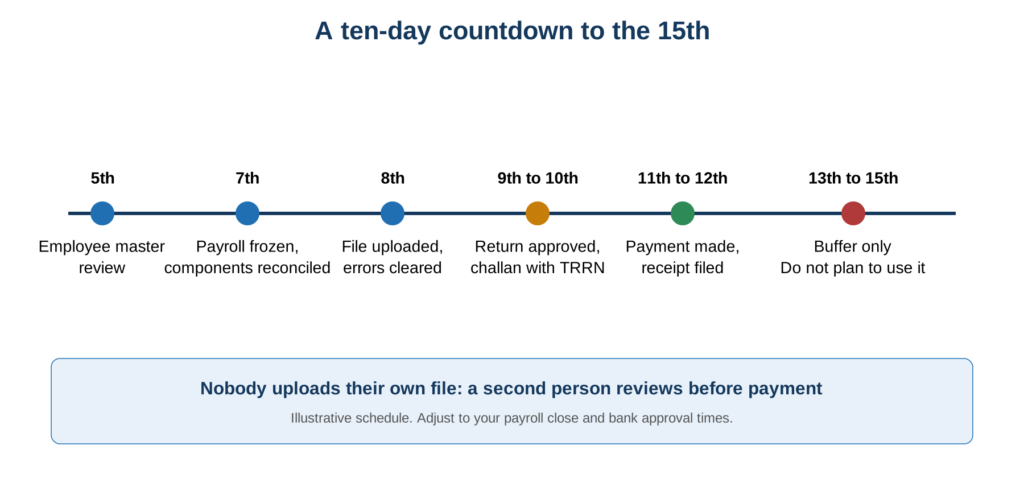
| Day | Step | Owner |
|---|---|---|
| 5th | Employee master review: joiners, leavers, UAN status, dates | HR operations |
| 7th | Payroll frozen; wage components reconciled | Payroll |
| 8th | ECR file built and uploaded; error file cleared | Compliance executive |
| 9th | Return reviewed and approved; Due Deposit Balance Summary checked | Compliance manager |
| 10th | Challan generated with TRRN; bank approval requested | Finance |
| 11th to 12th | Payment made; receipt downloaded and filed | Finance |
| 13th to 15th | Buffer only. Do not plan to use it | All |
A single compliance calendar that shows all of these dates for every state beats five separate spreadsheets.
Where Iztty Fits
Iztty is an AI statutory compliance platform for Indian employers, built by Futurex Management Solutions Limited. For ECR filing, the relevant published features are:
- Payroll compliance: EPF on the 15th-of-month cycle, with ESIC, Professional Tax and LWF, and integrations with Tally, Zoho Payroll and Keka HR. See our notes on Tally EPF and ESIC integration and Zoho Payroll compliance automation.
- Maker-Checker-DSC workflow: a four-stage chain of upload and validate, review or reject with mandatory remarks, digital signing and archive, so a return is reviewed before it is filed. Our Maker-Checker-DSC guide explains the stages.
- Compliance Score Meter: a live 0 to 100 per cent score by Act and by state, with Low, Medium and High bands.
- Regulatory Change Intelligence: monitors EPFO circulars and gazette notifications, with human review before enforcement, which matters while the ceiling and Scheme details settle.
- AI Notice Response: drafts replies to PF notices with an evidence checklist, in about 4 hours against the 3 to 5 days many teams take manually.
As a representative example, a 14-factory manufacturer moved its compliance score from 61 per cent to 88 per cent in 90 days, and a 40-client consultancy cut notice-response time from 5 days to 4 hours. Both are anonymised and illustrative, not named case studies. Iztty does not change the EPFO rules or waive any charge. It helps you review the data and the filing before the 15th and keep the proof. See the provident fund compliance page or the Iztty platform.
Conclusion
EPF ECR filing is a short process sitting on top of a long list of data checks. The upload takes minutes. The work is in the UANs, the dates, the wage order and the NCP days. Since the revamp, the portal catches more of those errors for you, but it still cannot tell you that your payroll was right.
Three habits solve most of it: a monthly employee-master review, formulas that test the field rules before upload, and a countdown that finishes on the 12th. And keep one eye on the wage ceiling until EPFO’s notification settles it.
If you would like a second pair of eyes on your last few returns, CALL AN EXPERT at Futurex or ask for an audit.
FAQs
Q1: What is EPF ECR filing?
ECR stands for Electronic Challan cum Return. It is the monthly file an employer uploads to the EPFO Unified Employer Portal showing each member’s UAN, wages, contributions and NCP days. It works as both the return and the basis of the challan you pay against.
Q2: What is the due date for ECR filing?
Contributions are due by the 15th of the month following the wage month. The November wage month is due by 15 December. Late payment attracts interest under Section 7Q and damages under Section 14B.
Q3: What changed in the revamped ECR?
It applies from the September 2025 wage month. EPFO lists separation of return filing from payment, system validations to block incorrect ECRs, damages and interest calculated alongside the return, and revisions under certain conditions. The ECR file format is unchanged.
Q4: What is a TRRN?
TRRN stands for Temporary Return Reference Number. It is generated with the challan and links your payment to the approved return. It confirms the return was accepted and payment processed, not that your figures were correct.
Q5: What are the types of ECR return?
Regular for the standard monthly return, Supplementary to add employees missed from the Regular return, and Revised to correct wages or contributions. An approved return cannot simply be cancelled.
Q6: Why does the portal reject my ECR?
The most common reasons are a UAN not linked to the establishment, invalid or duplicate UANs, missing joining or exit dates, EPS wages above EPF wages or above the cap, decimals in amount fields, wrong NCP days, and an earlier month still pending.
Q7: What are NCP days?
NCP days are the days in the month for which the employee was not paid. They must be whole numbers. For an employee on rolls with no wages for the whole month, NCP equals the days in the month and all wage fields are 0.
Q8: Can I correct an ECR after approval?
Yes, through a Revised or Supplementary return, not by cancelling. Downward revisions are allowed only where payment has not been made for that UAN in that month, according to published coverage of EPFO’s FAQs. Check the user manual for the exact conditions.
Q9: Is online payment of EPF mandatory?
Yes. EPFO’s ECR documentation says online payment is mandatory under a notification dated 5 May 2015, with offline payment only by permission of the PF office.
Q10: What is the EPF wage ceiling for ECR filing?
The statutory ceiling has been Rs 15,000 a month. The Cabinet approved raising it to Rs 25,000 on 16 September 2026, but sources differ on whether it already applies. Confirm against the EPFO notification and the portal validation before changing your file logic.