Compliance Management Tools: Trackers vs Calendars vs Platforms

“Compliance management tools” is a search phrase that returns three genuinely different kinds of products, and most comparisons never separate them. A Google Calendar reminder for the EPF due date is a compliance management tool. A shared spreadsheet tracking Shops & Establishment renewals across branches is a compliance management tool. So is a dedicated platform that generates state-specific Factories Act registers automatically. Comparing these by price or features misses the actual question, which tool does the specific job you need done, because a calendar reminder and a register-generation engine aren’t competing products, they’re solving different problems entirely.

This guide breaks Indian statutory compliance down into six concrete jobs and shows which category of tool, simple tracker, calendar/reminder system, or dedicated platform, actually gets each one done, so you’re matching the tool to the job rather than buying based on category hype. If you want a head-to-head comparison of specific software vendors instead, see our Compliance Management Software: A Buyer’s Guide. This piece works at the tool-category level, one step before you’re comparing named products.

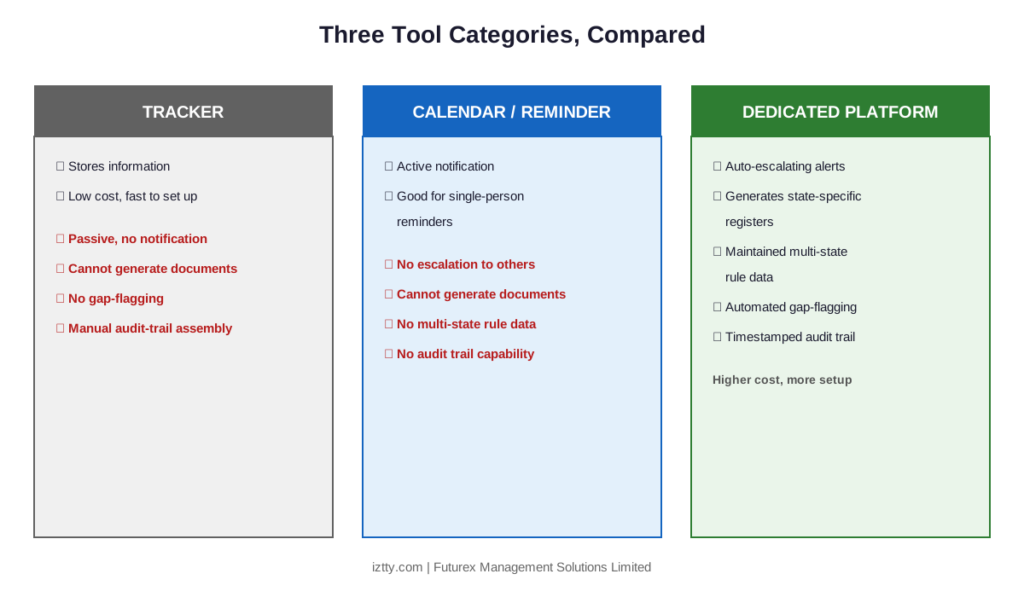
The Three Tool Categories, Defined Honestly

Trackers (spreadsheets, shared sheets, basic databases) store information: due dates, renewal status, documents collected. They don’t do anything on their own, they’re only as current as the last person who updated them, and they have no built-in way to flag that an update is overdue.

Calendars and reminder systems (Google Calendar, Outlook reminders, task management apps like Asana or Trello configured for compliance) add a notification layer on top of dates. They’re good at telling you something is due. They do nothing to help you actually prepare the filing, generate the correct register format, or verify a vendor’s documentation.

Dedicated compliance platforms combine data storage, automated alerts, document generation in the correct statutory format, and often a review/sign-off workflow. They cost more and take longer to set up than the first two categories, which is exactly why many companies default to trackers and calendars long after they’ve outgrown them.
Job 1: Tracking Filing Deadlines

A shared spreadsheet with due dates works for this job at small scale, provided someone checks it regularly, which is the actual failure point: a spreadsheet doesn’t notify anyone, it just sits there. A calendar app with recurring reminders closes that gap for a single person, but breaks down the moment the task needs to transfer to someone else, when the owner is on leave, or when a reminder gets dismissed without the EPF ECR filing actually being completed.

A dedicated platform wins this job once you have more than a handful of recurring filings, because it escalates to a second person automatically if the first doesn’t act, which neither a spreadsheet nor a personal calendar does on its own.

Job 2: Generating State-Specific Registers and Returns

This is where trackers and calendars both fail completely, neither one generates a document. A Factories Act Form 25 Muster Roll or Form 17 Overtime Register has to be produced in a specific, state-validated format, and a spreadsheet template someone built in-house drifts out of date the moment a state amends its format, often without anyone noticing until an inspector flags it. This job genuinely requires a platform with state-specific register templates built in and maintained, which is a structural requirement, not a nice-to-have.

Job 3: Managing Multi-State Rule Differences

A company operating in Maharashtra, Karnataka, and Tamil Nadu is managing three different Shops & Establishment renewal cycles, three different Professional Tax slabs, and potentially three different Labour Welfare Fund contribution rates. A spreadsheet can list all of this, but keeping it current across three states’ independent amendment schedules is a maintenance burden most internal teams underestimate until something slips. A platform with state-specific rule data built in and actively maintained is the only category that scales past two or three states without a dedicated full-time tracker.

Job 4: Vendor and Contractor Documentation

Collecting monthly EPF/ESIC proof from every active contractor, required under the Contract Labour (Regulation and Abolition) Act, 1970 to document that a company has been actively verifying contractor compliance, is a recurring collection-and-verification task. A spreadsheet can log what’s been collected, but it won’t flag a contractor who’s gone quiet for two months unless someone actively checks it weekly. A platform with automated contractor documentation tracking and a compliance score surfaces this gap without anyone having to remember to look. We cover the liability mechanism this job protects against in Vendor & Contractor Compliance: Managing Principal Employer (PE) Liability.

Job 5: Responding to a Regulatory Notice

None of the three tool categories can draft a legal response for you, this job always needs human judgment. But the tool matters for the preparation speed: with a spreadsheet, pulling together the relevant filing history and supporting documentation for a notice period typically takes 3 to 5 days of manual reconstruction. A platform that already has that history organized and retrievable, and that can extract the specific allegation from a scanned notice, can compress that preparation window to a few hours, leaving more of the actual response deadline for legal review rather than document hunting.

Job 6: Maintaining an Audit-Ready Trail

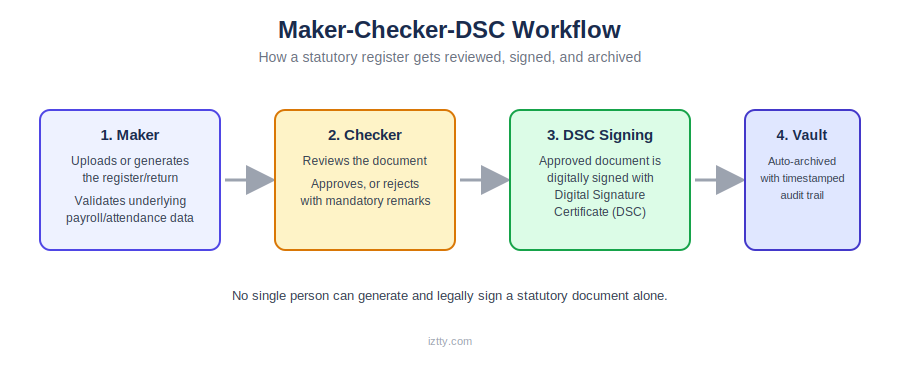
Due diligence requests and EPFO/ESIC reviews commonly ask for 12 to 24 months of organized filing history. A spreadsheet-and-folder system can technically hold this, but assembling it on request, confirming which version of which register was actually the one filed, is slow and error-prone without a system that timestamps and archives each filing automatically. A maker-checker-DSC workflow, where a document is prepared, reviewed, digitally signed, and archived as one linked process, is specifically what makes this job fast rather than a multi-day scramble.

Which Tool Wins for Each Job: The Comparison
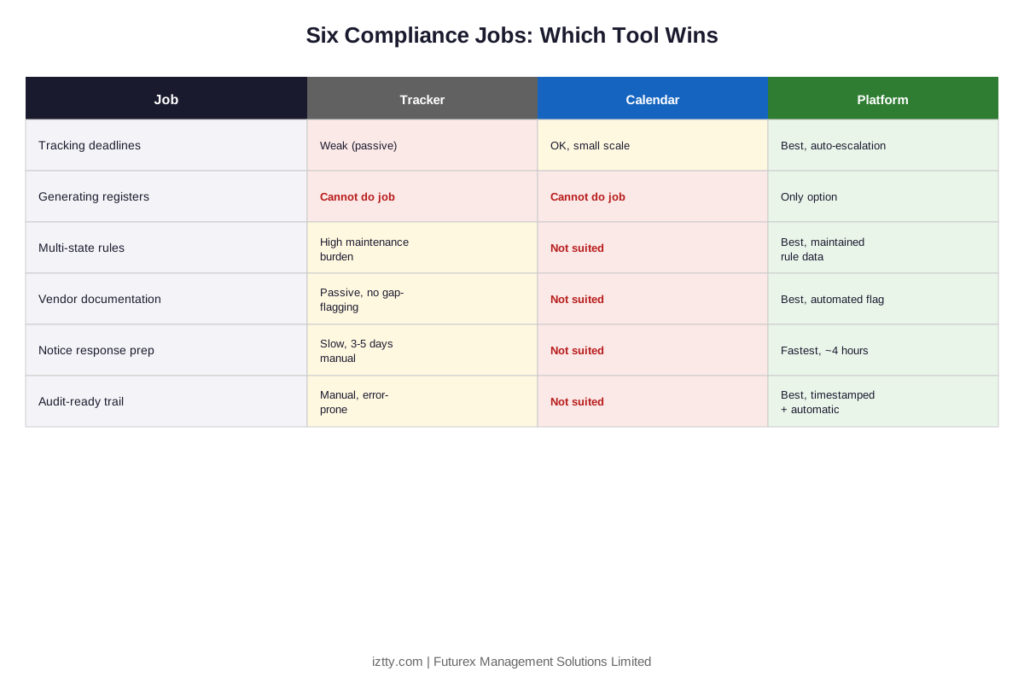
  • Tracking deadlines: Platform (at scale); Calendar (single person, low volume); Tracker (weakest, no active notification)
  • Generating state-specific registers: Platform only; Tracker and Calendar cannot do this job at all
  • Multi-state rule management: Platform (built-in, maintained rule data); Tracker (possible but high maintenance burden); Calendar (not suited to this job)
  • Vendor/contractor documentation: Platform (automated gap-flagging); Tracker (functional but passive); Calendar (not suited to this job)
  • Notice response preparation: Platform (fastest document retrieval); Tracker (slow manual reconstruction); Calendar (not suited to this job)
  • Audit-ready trail: Platform (automated, timestamped); Tracker (manual assembly, error-prone); Calendar (not suited to this job)

The pattern is consistent: trackers and calendars remain genuinely useful for the single job of personal reminders at very small scale, but every job involving document generation, multi-state consistency, or a defensible audit trail needs a dedicated platform, there’s no tracker-based workaround that holds up once a company crosses a handful of states, filings, or contractors.

Where Iztty Fits

Iztty is built around exactly this job breakdown rather than being a single generic “compliance software” feature set. Deadline tracking and escalation, state-specific register generation for Factories Act and Shops & Establishment obligations, multi-state rule data, CLRA vendor documentation tracking, and a maker-checker-DSC workflow for audit-ready sign-off are each a distinct module, built because each is a distinct job, not bundled as one undifferentiated feature. The AI Notice Response Assistant specifically targets Job 5, cutting notice preparation from the typical 3 to 5 days down to roughly 4 hours of review time by extracting the allegation and drafting a response directly from existing filing history.

A Practical Decision Framework
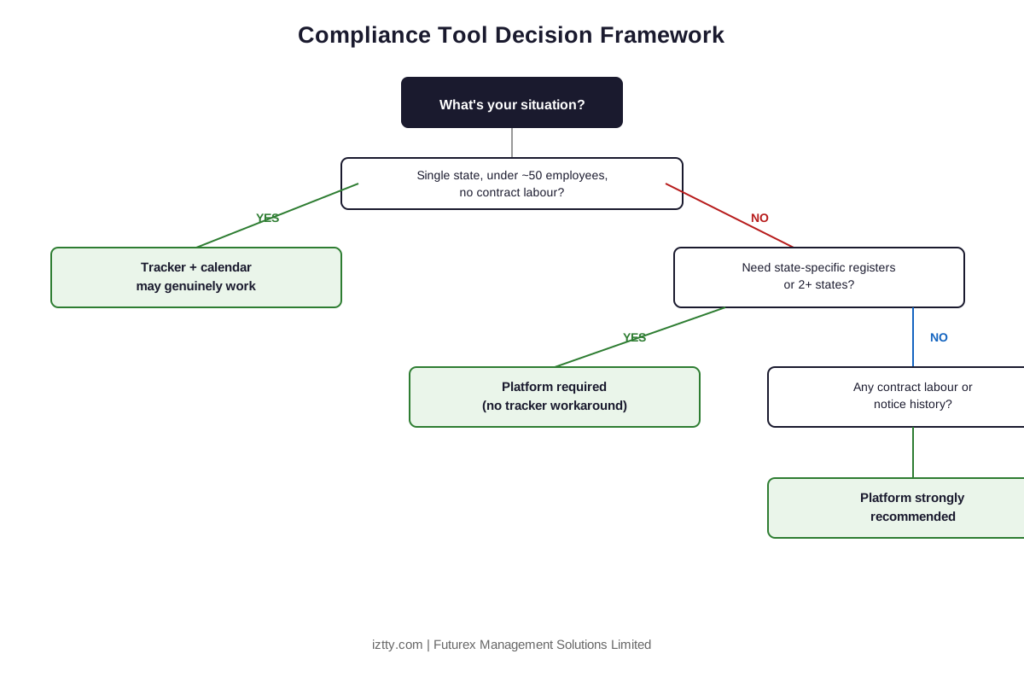
Match your situation to the right tool rather than defaulting to whatever you already have:

  • Single state, under roughly 50 employees, no contract labour: a well-maintained tracker with calendar reminders can genuinely work, provided someone owns checking it weekly.
  • Any state-specific register requirement (Factories Act, S&E): you need a platform, there is no tracker-based substitute for generating a compliant document.
  • Two or more states: a platform’s maintained rule data starts paying for itself once manual upkeep across states becomes a part-time job for someone.
  • Any contract labour engagement: a platform’s automated vendor documentation tracking closes a liability gap a spreadsheet structurally can’t catch proactively.
  • Have received a notice, or are preparing for funding-round due diligence: an organized, platform-based filing history is the difference between hours and days of preparation.

If you want this mapped to your specific states, acts, and current tool setup, book a free compliance audit with Iztty, which includes a review of what your current tools are and aren’t covering.

FAQs

Is a spreadsheet enough for compliance management?
For deadline tracking alone, at very small single-state scale, it can work if someone actively checks it. It cannot generate state-specific registers or flag vendor documentation gaps on its own, regardless of company size.

What’s the difference between a compliance calendar and compliance management software?
A calendar tells you something is due. Compliance management software additionally generates the required documents in the correct format, tracks multi-state rules, and often includes a review and sign-off workflow, a calendar does none of this.

Can Google Calendar or Outlook reminders replace dedicated compliance software?
Only for the single job of personal deadline reminders. They have no mechanism for document generation, multi-person escalation, or audit trail archiving, which are the jobs that actually cause compliance failures at scale.

When should a company move from a tracker to a dedicated platform?
Typically when any of these appear: a second state of operation, the first contract labour engagement, a Factories Act register requirement, or the first time assembling filing history for due diligence or a notice takes more than a day.

Do compliance management tools generate statutory registers automatically?
Dedicated platforms do, in state-specific formats for acts like the Factories Act 1948 and state Shops & Establishment Acts. Trackers and calendar tools cannot generate statutory documents.

How much does a dedicated compliance management platform cost compared to a spreadsheet?
A spreadsheet has no direct cost but carries hidden labour cost in manual upkeep and the risk cost of gaps going unnoticed. Platform pricing typically scales with employee count and states covered; request a quote mapped to your specific scale for an accurate comparison.

Does a compliance management tool help with CLRA contractor compliance?
A tracker can log what’s been collected from contractors, but only a platform with automated gap-flagging reliably surfaces a contractor who’s stopped submitting EPF/ESIC proof before it becomes a liability exposure.

What is a Maker-Checker-DSC workflow and why does it matter for tool selection?
It’s a review process where one person prepares a document, a second reviews and approves it, and the approved version is digitally signed before archiving. It matters for tool selection because it’s the mechanism that makes an audit trail defensible, something no spreadsheet or calendar tool provides.

Can I use a mix of tools, a spreadsheet for some things and a platform for others?
Yes, this is common during a transition, but it reintroduces the core risk a platform solves: inconsistent visibility, since a gap in the spreadsheet-tracked portion won’t surface in the platform’s dashboard. Most companies consolidate once the mixed-tool gap causes a visible problem.

How do I know which job is actually causing my current compliance pain?
Ask where the most recent near-miss happened: a missed deadline points to the tracking job, a wrong register format points to the generation job, a vendor liability surprise points to the documentation job. The job that’s failing tells you which tool category you’re actually missing.
Compliance Management Solutions: Which Approach Actually Solves Your Problem

“Compliance management solutions” is a phrase that gets searched by people with very different problems. A 60-employee single-state company typing it into Google is usually trying to stop missing EPF deadlines. A 400-employee manufacturer typing the same phrase is usually trying to find out why its contractor’s non-payment of minimum wages just became its own legal liability. Both will land on lists of software. Neither will necessarily find the thing that fixes their actual problem, because the solution that fixes manual tracking breakdown is not the same solution that fixes invisible contractor liability.

This guide works backward from the problem instead of forward from a product category. If you already want a side-by-side look at compliance management software specifically, including a comparison table across HRMS-bundled tools, enterprise GRC platforms, and dedicated platforms like Iztty, read our Compliance Management Software: A Buyer’s Guide for Indian Businesses, which covers that ground in depth. This piece is deliberately organized differently: by the problem you’re actually having, and which category of solution, software, consulting services, or a hybrid of both, is built to solve it.

What People Actually Mean by “Compliance Management Solutions”

Searched as a phrase, “compliance management solutions” covers everything from a single SaaS dashboard to a full outsourced compliance retainer with a consulting firm. That breadth is the reason generic answers rarely help: the term describes an outcome (your statutory obligations are met, documented, and defensible), not a specific mechanism for getting there.

In practice, almost every business asking this question is dealing with one or more of five concrete problems, each of which points toward a different kind of fix. The rest of this guide walks through each one.

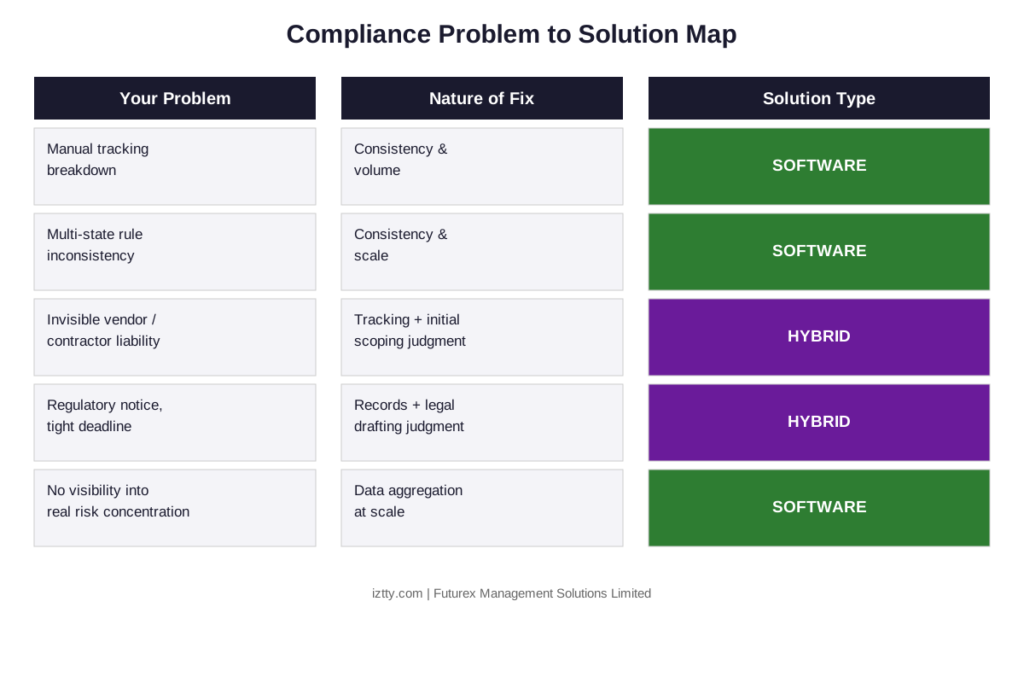
1. Problem: Manual Tracking Breaks Down

This is the most common starting point. A spreadsheet-and-calendar-reminder system works until it doesn’t, usually around the point a company crosses 50 to 80 employees, adds a second location, or the one person who “owns” the compliance calendar goes on leave during a filing week. The EPF ECR gets filed two days late not because anyone forgot the due date, but because payroll data wasn’t finalized in time and nothing flagged the dependency as a compliance risk rather than a payroll delay.

What actually fixes this: automation of the calendar-to-filing chain itself, not a better spreadsheet template. A system that locks payroll data, auto-populates the EPF/ESIC return, and escalates to a second person if the first doesn’t act within a set window removes the single point of failure that manual tracking always has. This is a problem software is well-suited to solve on its own; it rarely needs a consulting engagement.

2. Problem: Multi-State Rule Inconsistency

A company operating in Maharashtra, Karnataka, and Tamil Nadu is not running “one compliance program,” it is running three, because Shops & Establishment registration validity, renewal cycles, Professional Tax slabs, and Labour Welfare Fund contribution rates are all set independently by each state government. A process built around one state’s rules silently produces errors the moment it’s applied to another, often without anyone noticing until a renewal deadline is missed in the state nobody was watching closely.

What actually fixes this: a system that encodes state-specific rules natively, so the renewal date, form, and contribution rate shown for a Karnataka branch is never the Maharashtra default applied incorrectly. This is a case where software alone solves most of the problem, provided the underlying state rule data is kept current, since state governments amend these rules without much advance notice.

3. Problem: Invisible Vendor and Contractor Liability

This is the problem most companies don’t know they have until it surfaces. Under the Contract Labour (Regulation and Abolition) Act, 1970, the principal employer carries liability if a contractor fails to pay minimum wages or remit EPF/ESIC for the contracted workforce, regardless of whether that contractor’s payroll ever touches the principal employer’s own systems. A company can have flawless internal payroll compliance and still be exposed because its security or housekeeping vendor’s EPF challans haven’t been collected in three months.

We cover this specific liability mechanism in detail, including which CLRA forms and registers apply and how exposure actually gets triggered, in Vendor & Contractor Compliance: Managing Principal Employer (PE) Liability.

What actually fixes this: visibility into a vendor’s compliance status that the principal employer doesn’t currently have, which means collecting and verifying contractor EPF/ESIC proof monthly, not annually. Software can automate the collection and flagging; a consulting engagement is often what’s needed first to establish exactly which vendors and worksites are in scope and to set up the verification process correctly. This is frequently a hybrid problem.

4. Problem: A Regulatory Notice With No Time to Respond

An EPFO or ESIC notice typically gives a company a narrow window, often 15 to 30 days, to respond with a documented explanation and supporting evidence. Companies without an organized filing history spend most of that window just reconstructing what happened, rather than drafting the actual response.

What actually fixes this: having the underlying records (filing history, challans, registers) already organized and retrievable before a notice arrives, which is a software/record-keeping problem, combined with the judgment to draft an adequate legal response, which is where consulting expertise matters. A platform that extracts the allegation from the notice and pre-populates a draft response from existing records can compress a multi-day task into a few hours of review, but someone still needs to review it.

5. Problem: No Visibility Into Where the Real Risk Sits

Many companies that are “mostly compliant” have no way to say which act, which state, or which location carries the highest actual risk right now. Without that view, compliance effort gets spent reactively, on whatever surfaced most recently, rather than on the gap that’s actually most likely to cause a problem.

What actually fixes this: a consolidated, weighted view of compliance status across every applicable act and location, commonly delivered as a compliance health score built from filing timeliness, register completeness, licence validity, and vendor documentation completeness. We walk through how to build this view manually, and what it should surface, in Compliance Risk Audit: How to Identify Gaps Before an Inspection. This is almost always a software capability, since it requires aggregating data no single person is tracking by hand.

Software vs. Consulting Services vs. Hybrid: What Each One Actually Fixes

Laid out directly:

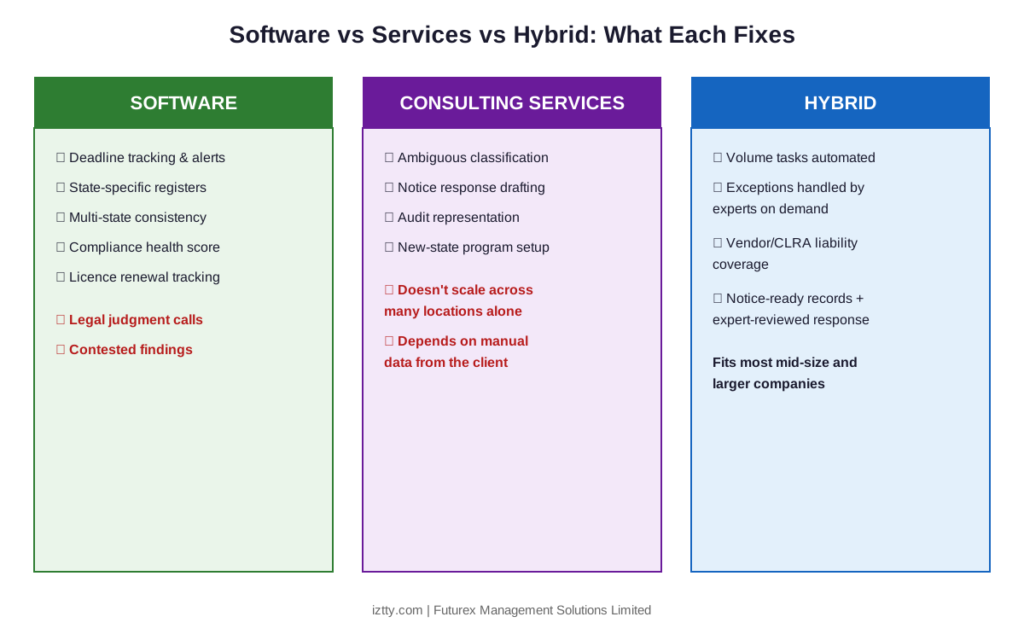
  • Pure software fixes problems that are fundamentally about scale and consistency: manual tracking breakdown, multi-state rule drift, lack of a consolidated risk view. It does not fix problems that require legal judgment, such as how to classify an ambiguous worker category or how to respond to a contested inspection finding.
  • Pure consulting services fix problems that require interpretation and representation: drafting a defensible response to a notice, advising on a genuinely ambiguous classification question, representing the company in an inspection. Consulting-only engagements typically don’t scale well across dozens of locations without software underneath them, because the underlying data collection is still manual.
  • A hybrid approach fixes the problems most mid-size and larger companies actually have: software handles the volume (tracking, filing, documentation, alerts) while consulting judgment handles the exceptions (ambiguous cases, notice responses, audit representation). Most companies outgrow pure software or pure consulting separately before they realize they needed both together.

How Iztty Approaches These Five Problems

Iztty is built as a hybrid by design, not by accident. The platform automates the parts of compliance that are fundamentally about scale and consistency: statutory calendar and filing automation, state-specific Shops & Establishment and Factories Act register generation, a live compliance health score across acts and locations, and CLRA vendor documentation tracking. That covers four of the five problems above directly as a software capability.

For the fifth, judgment-dependent situations like a contested notice or an ambiguous classification, Iztty is backed by Futurex Management Solutions Limited’s compliance practice, built on over a decade of hands-on labour law consulting, rather than leaving that gap for the company to fill separately. The What Is Iztty overview covers the platform’s full feature set, including the maker-checker-DSC workflow that applies a second layer of review before any statutory document is filed.

How to Pick the Right Solution for Your Situation

Match your situation to the problem list above rather than starting from a product category:

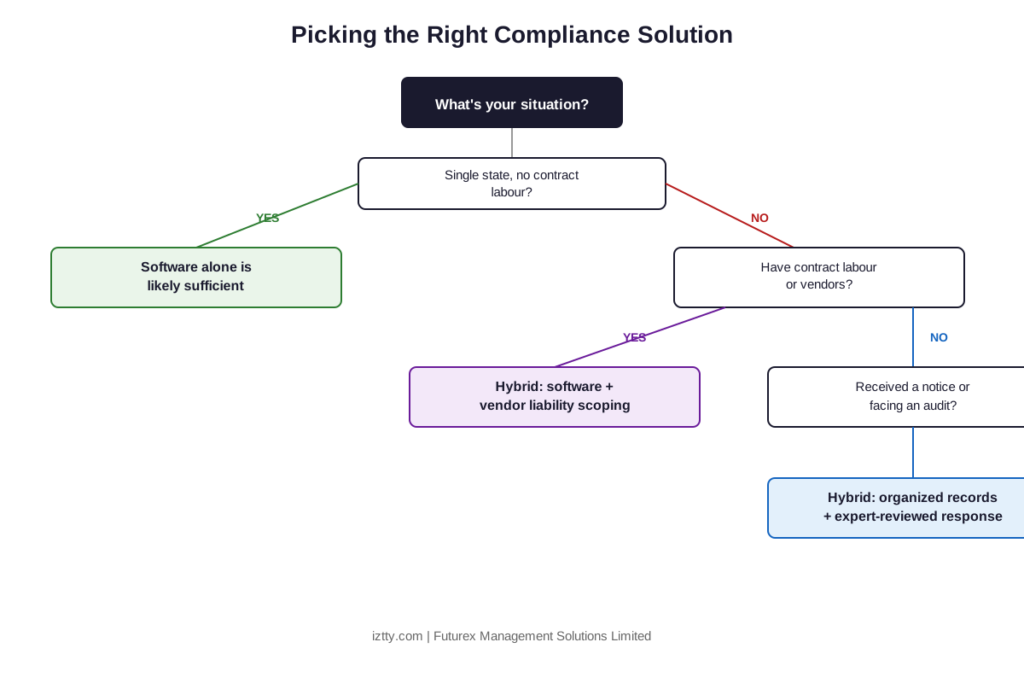
  • If your core issue is deadlines and register upkeep across one or two states, with no contract labour, a well-built software layer alone is likely sufficient.
  • If you engage contract labour through vendors, you have a liability exposure that software should surface but that may need a short consulting engagement to scope correctly the first time.
  • If you’ve received a notice, or are preparing for an audit, a hybrid approach, organized records plus legal judgment on the response, is the only combination that actually closes that window safely.
  • If you genuinely don’t know where your risk sits across acts and states, start with a compliance health score rather than guessing which act to shore up first.

If you want this mapped to your specific states, acts, and vendor relationships rather than worked out in the abstract, book a free compliance audit with Iztty.

FAQs

Is “compliance management software” the same as “compliance management solutions”?
Not quite. Software is one category of solution. “Solutions” is the broader term that also includes consulting services and hybrid approaches, which matters because some compliance problems, particularly those involving legal judgment, aren’t solved by software alone.

My company is small. Do I need a full compliance management solution?
If you’re single-state with under roughly 50 employees and no contract labour, a lighter software layer focused on calendar automation is usually enough. The need for a fuller solution typically appears once you add a second state or engage contractors.

Can I use a hybrid approach without committing to a large enterprise platform?
Yes. Several platforms, including Iztty, offer a software core with access to compliance expertise built in, rather than requiring a separate, large consulting retainer on top of a separate software purchase.

How does a compliance health score help me choose a solution?
It tells you where your actual risk concentration is, acts, states, or vendors, before you decide what kind of fix to invest in. Without it, companies often address the most visible problem rather than the highest-risk one.

Is outsourcing compliance to a consulting firm safer than software?
Not inherently. A consulting-only arrangement still depends on the data you give them being accurate and current. Software with embedded expert access typically produces a more current, more complete record than a periodic consulting relationship.

How do I know if my current approach is actually working?
Ask whether you can produce, right now, a complete and current filing history, register set, and vendor compliance record for every location without needing days to assemble it. If not, your current approach has a visibility gap regardless of whether it’s manual, software-based, or consulting-based.

What’s the risk of choosing a solution based on category instead of my actual problem?
You end up paying for capability you don’t need while the actual gap, often vendor liability or multi-state inconsistency, stays unaddressed, because those problems don’t announce themselves the way a missed single-state deadline does.

Do the Labour Codes change which solution I need?
They affect the underlying compliance requirements rather than the category of solution. As of the Codes’ effective date of 21 November 2025, with detailed Central and State rules still being finalized, a solution that tracks regulatory changes on an ongoing basis matters more than ever, since the obligations themselves are in a transition period. See the official PIB press release for the current status.

Can a hybrid solution scale down as well as up?
Yes, in practice most hybrid platforms let you use more or less of the consulting layer depending on how many judgment-dependent situations you’re actually facing in a given period, rather than charging a fixed consulting retainer regardless of need.

What makes Iztty’s approach different from a pure software vendor or a pure consulting firm?
Iztty combines automated, state-specific compliance tracking with Futurex’s decade of hands-on labour compliance consulting built into the same platform, so the judgment-dependent problems (notice responses, ambiguous classification, audit representation) aren’t left as a separate, unsolved gap after the software is implemented.


What Is Iztty? The AI-Powered Statutory Compliance Platform for Indian Businesses

What Is Iztty?

Iztty is an AI-powered statutory compliance management platform built for Indian businesses, automating Labour, Factory, Shops & Establishment, Payroll, Vendor, and CLRA compliance across all 28+ Indian states. It’s developed and operated by Futurex Management Solutions Limited, a New Delhi-based compliance consulting firm founded in 2014, which means the platform was built by people who ran manual compliance operations for a decade before automating them, not a software team that later added compliance as a feature.

The short version: if your company files EPF/ESIC contributions, maintains Factories Act registers, renews Shops & Establishment licences, or engages contract labour through vendors, Iztty is built to handle the registers, returns, alerts, and audit trail that come with each of those obligations, on one platform rather than several disconnected spreadsheets and reminders.

Want to see this against your own compliance stack? Book a Free Compliance Audit.


Who Is Iztty Actually Built For?

Iztty is used across a specific set of roles, each of whom needs a different view of the same underlying data:

  • CEOs, Founders, and COOs who need to know their overall compliance risk exposure without reading individual registers.
  • CFOs who need to see financial and penalty exposure tied to filing deadlines and licence renewals.
  • CHROs and Plant HR Heads who own the day-to-day accuracy of labour, factory, and payroll registers.
  • Compliance Managers and Company Secretaries who need act-wise, state-wise detail and a defensible audit trail.
  • Compliance Consultants and statutory compliance firms managing multiple client companies, for whom Iztty offers a separate Compliance Consultant account type built for multi-client oversight.

This range matters because a platform built only for a Compliance Manager’s level of detail is unusable for a CFO who wants a five-second risk read, and a platform built only for executive dashboards is useless to the person who actually has to file Form 25 correctly.


What Compliance Areas Does Iztty Cover?

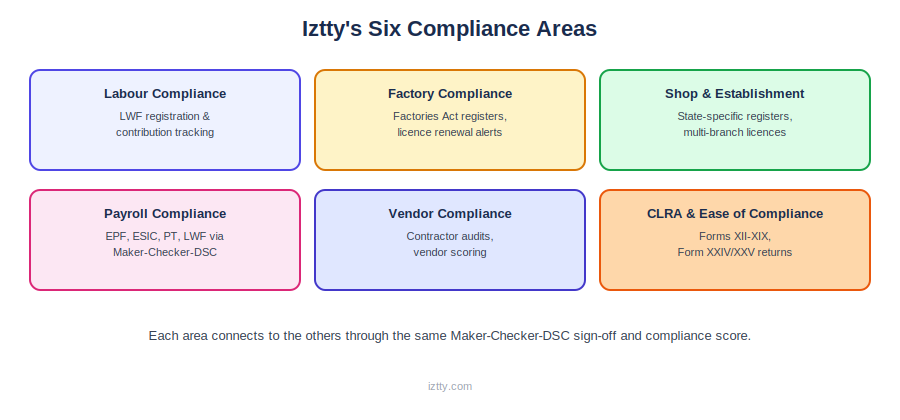
Iztty is organized around six functional areas, not a generic “compliance” catch-all:

AreaWhat It Covers
Labour ComplianceLWF registration, monthly/biannual contribution tracking, state-specific LWF rate automation across the 16 LWF-applicable states
Factory ComplianceFactories Act 1948 registration, licence renewal with tiered expiry alerts, statutory registers (Form 25, Form 5, Form 17), half-yearly and annual returns
Shop & Establishment ComplianceState-specific S&E register formats, employee/leave/overtime registers, licence renewals across multi-location retail and office footprints
Payroll ComplianceEPF (ECR, 15th-of-month challans), ESIC, Professional Tax (state-wise slabs), and LWF, run through Maker-Checker-DSC and integrated with Tally, Zoho Payroll, and Keka HR
Vendor ComplianceDigital contractor audits, EPF/ESIC/wage register collection, auto-calculated vendor compliance scores, and principal-employer liability documentation under CLRA
CLRA & Ease of ComplianceForms XII, XIII, XIV, XIX, and the periodic returns (Form XXIV half-yearly, Form XXV annual), DSC-signed

Each of these connects to the other. A vendor’s CLRA licence status feeds into the vendor compliance score; a factory’s registration status feeds into the Factory Compliance module’s alerting; and every filing across all six areas can route through the same Maker-Checker-DSC sign-off before it becomes a legal document. For the full detail behind any one of these, see our guides on Shop & Establishment Act registration, CLRA registers and returns, and managing principal employer liability.


How Is Iztty Different From an HRMS Compliance Module?

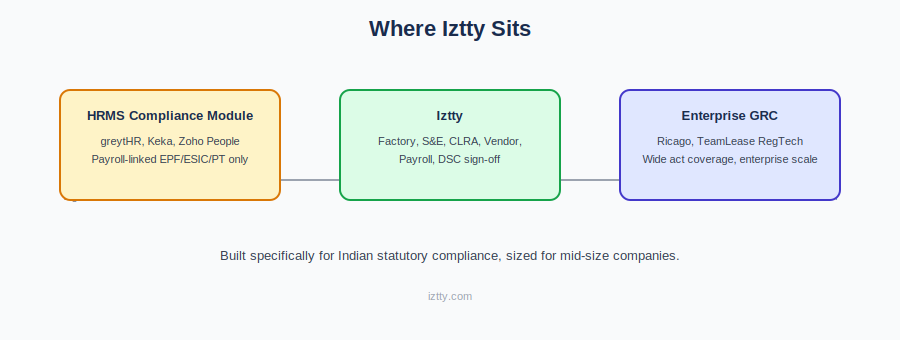
An HRMS like greytHR, Keka, or Zoho People bundles a compliance module alongside payroll, attendance, and leave, built primarily to get EPF, ESIC, and Professional Tax deductions correct on the payslip. That’s a real and useful function, but it generally stops there. It doesn’t generate Factories Act registers in state-specific formats, doesn’t track CLRA vendor documentation, and doesn’t route statutory filings through a maker-checker-DSC sign-off before they’re legally submitted.

Iztty is built to integrate with your existing HRMS or payroll tool rather than replace it, handling the compliance layer, registers, licences, vendor audits, digital signing, that most HRMS platforms were never designed to cover.


How Is Iztty Different From an Enterprise GRC Platform?

On the other end of the market, enterprise GRC platforms track a very wide universe of obligations across large organizations, often built for compliance teams with significant internal headcount dedicated to the function. These platforms can be comprehensive, but also heavier and costlier to onboard for a mid-size manufacturer, a multi-branch retailer, or a growing staffing company that needs specific factory, S&E, and CLRA workflows without a full enterprise GRC deployment.

Iztty sits deliberately in between: purpose-built for Indian statutory compliance specifically, not a broad GRC framework retrofitted for labour law, and priced and structured for companies that need real coverage without enterprise-scale complexity.

See where Iztty fits for your specific size and footprint: Talk to a compliance specialist.


What Is the Maker-Checker-DSC Workflow?

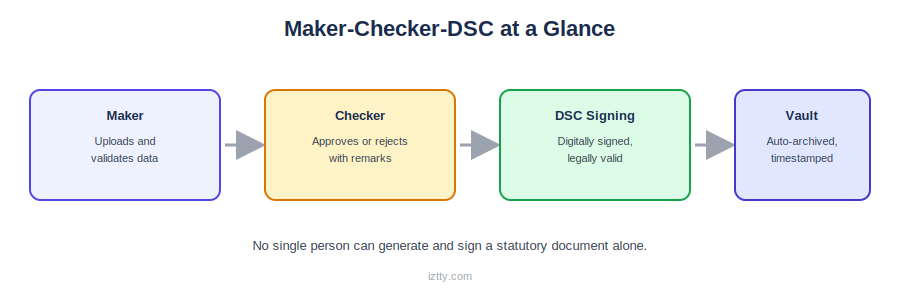
This is one of Iztty’s core differentiators, and something neither the HRMS camp nor most GRC platforms do natively. Every statutory register or return moves through four stages: a Maker uploads or generates the document and validates the underlying data, a Checker (typically a more senior reviewer) approves or rejects it with mandatory remarks on rejection, the approved document is digitally signed using a Digital Signature Certificate, and the signed document is auto-archived to a document vault with a timestamped audit trail.

This means no single person can generate and legally sign a statutory filing alone, and if an inspector or auditor ever asks “who reviewed this, and when,” the answer is already documented rather than reconstructed from memory.


What Does the AI Notice Response Assistant Actually Do?

When an EPF, ESIC, Labour, S&E, or Factories Act notice arrives, the manual process, reading it, identifying the specific allegation and cited section, pulling the relevant registers, and drafting a formal reply, commonly takes a compliance team 3 to 5 days. Iztty’s AI Notice Response Assistant reads the notice (using OCR for scanned documents), extracts the specific allegation, section, and deadline, and drafts a complete formal reply along with an evidence checklist, compressing that process to roughly 4 hours of review and sign-off time.

See this in action: Explore Iztty’s AI Features.


How Does the Compliance Score Meter Work?

The Compliance Score Meter gives a live, 0 to 100 percent score, broken down act-wise and state-wise, with Low, Medium, and High risk banding. It’s built from actual weighted inputs, filing timeliness, register completeness, licence validity, and (where applicable) vendor documentation completeness, rather than a single pass/fail flag. This gives a CHRO or CFO an early-warning view of exposure, rather than a picture that only becomes clear during an annual audit.


Who Is Actually Behind Iztty?

Iztty is developed and operated by Futurex Management Solutions Limited (CIN: U74999DL2014PLC269550), a New Delhi-based compliance consulting firm founded in 2014. This history matters because Futurex ran hands-on labour, factory, and payroll compliance engagements for clients for a decade before building Iztty, which shapes the product differently than a platform built by a general software team guessing at compliance workflows from the outside. The underlying regulatory logic, register formats, and escalation workflows in Iztty came from real client engagements, not a generic compliance framework applied to India after the fact.


What Do Results Look Like in Practice?

Iztty publishes anonymized, aggregate outcome metrics rather than named client case studies. Two representative examples: a 14-factory manufacturer’s compliance score improved from 61% to 88% within 90 days of onboarding, and a 40-client compliance consultancy cut its average EPF/ESIC notice response time from 5 days to 4 hours using the AI Notice Response Assistant. These are illustrative proof points from real, anonymized engagements, not projections.


How Do You Get Started?

The typical starting point is a Free Compliance Audit, a state-and-act-wise review of your current exposure across whichever of the six areas apply to your business, followed by a walkthrough of the specific modules relevant to your operations (Vendor Compliance, CLRA, Factory registers, or all of them, depending on your footprint).

Ready to see your own exposure mapped out? Book a Free Compliance Audit with Iztty.


FAQs

1. What is Iztty?
Iztty is an AI-powered statutory compliance management platform that automates Labour, Factory, Shops & Establishment, Payroll, Vendor, and CLRA compliance for Indian businesses across all 28+ states.

2. Who owns and operates Iztty?
Iztty is developed and operated by Futurex Management Solutions Limited, a New Delhi-based compliance consulting firm founded in 2014.

3. Is Iztty an HRMS?
No, Iztty is a dedicated statutory compliance platform, not an HRMS. It’s built to integrate with your existing HRMS or payroll tool (Tally, Zoho Payroll, Keka) rather than replace it.

4. What makes Iztty different from other compliance software in India?
Iztty combines a Maker-Checker-DSC digital signing workflow, an AI Notice Response Assistant, a live Compliance Score Meter, and state-validated register formats in one system, backed by over a decade of hands-on Futurex compliance consulting expertise rather than software built without that operational background.

5. Does Iztty handle contract labour and vendor compliance?
Yes, through its Vendor Compliance module, which runs digital contractor audits, auto-calculates vendor compliance scores, and documents principal-employer liability under CLRA.

6. Can Iztty be used by a compliance consulting firm managing multiple clients?
Yes, Iztty offers a separate Compliance Consultant account type built specifically for firms managing statutory compliance across multiple client companies.

7. Does Iztty replace the need for a compliance team?
No, it’s built to make an existing compliance team’s work faster and more auditable, generating the right forms, tracking deadlines, and maintaining the sign-off trail, while judgment calls and escalation decisions still involve human review.

8. How does Iztty stay current with regulatory changes like the Labour Codes?
Iztty’s Regulatory Change Intelligence monitors gazette notifications and EPFO/ESIC circulars, and updates register templates and action tasks as rules are notified, with human review before any automated action is enforced.

9. What industries does Iztty serve?
Manufacturing and Factories, Retail and Shops, IT and Technology Services, Construction and Infrastructure, Mining, Staffing and Contractors, Healthcare and Pharma, and Logistics and Warehousing, among others.

10. How do I see if Iztty fits my company’s compliance needs?
The most direct way is a Free Compliance Audit, which maps your current exposure against Iztty’s coverage before you commit to anything.


For the full statutory compliance picture, see our pillar guide on Statutory Compliance Management in India, plus our guides on Shop & Establishment Act registration, CLRA registers and returns, and managing principal employer liability. Browse more on our compliance blogs.

Suggested Internal Linking Placement

  • In the pillar guide, the introduction or “Choosing a Statutory Compliance Platform” section should link to this blog as the canonical “what is Iztty” reference for readers who reach the pillar cold.
  • In the Shop & Establishment cluster blog and the CLRA cluster blog, the closing “next step” paragraph in each can link here for readers who want the full platform picture rather than just that one module.
  • In the Vendor & PE Liability blog, the “How Automation Changes the Vendor Audit Cycle” section can link here as the broader platform context behind the Vendor Compliance module.
  • On iztty.com/about/ and iztty.com/platform/, this blog is a natural landing link from any external mention of the brand (guest posts, press, backlinks) before sending traffic into a specific product page.

Schema Recommendation

Organization schema (tied to Futurex Management Solutions Limited, CIN: U74999DL2014PLC269550) alongside FAQPage schema for the FAQ section and Article schema for the full post.

Image Placement (3 images, provided separately)

  1. iztty-six-compliance-areas.png — Alt: “The six compliance areas Iztty covers: Labour, Factory, S&E, Payroll, Vendor, CLRA” — insert after Section 3.
  2. iztty-vs-hrms-vs-grc-positioning.png — Alt: “Where Iztty sits between HRMS compliance modules and enterprise GRC platforms” — insert after Section 5.
  3. iztty-maker-checker-dsc-overview.png — Alt: “Iztty’s Maker-Checker-DSC four-stage workflow overview” — insert after Section 6.

Vendor & Contractor Compliance: Managing Principal Employer (PE) Liability

This blog on Vendor and Contractor Compliance is part of our compliance cluster. See the pillar guide, Statutory Compliance Management in India, and the related guide on CLRA Compliance: Contract Labour Registers and Returns Explained for the legal mechanics behind the liability discussed here.


What Is Principal Employer Liability, and Why Does It Extend Beyond Your Own Payroll?

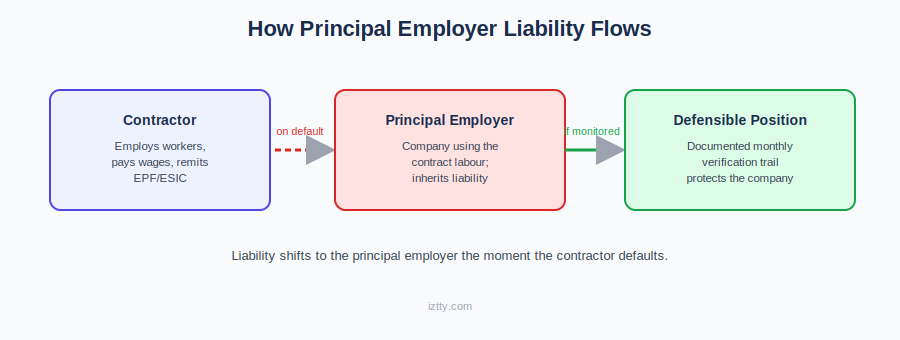
Principal employer (PE) liability is the legal exposure a company carries for a contractor’s statutory failures, wage defaults, missing EPF or ESIC remittance, or unmet welfare obligations, under the Contract Labour (Regulation and Abolition) Act, 1970. It exists whether or not the company actively monitors the contractor, which is precisely why “the vendor handles their own compliance” is not a defensible position once a labour inspection or an EPFO notice arrives.

The full legal basis, including which forms establish this liability and how it shifts back to the contractor, is covered in our CLRA compliance guide. This piece is about the operational side: how a company actually runs vendor oversight so that liability never becomes a live problem in the first place. Tracking this manually is exactly the gap Iztty’s dedicated CLRA compliance software is built to close, since it treats registration, licensing, and vendor documentation as one continuous obligation rather than a set of annual filings.

Not sure how exposed you currently are? Book a Free Compliance Audit and get a vendor-by-vendor risk read.


How Do You Structure a Vendor Onboarding Compliance Check?

Onboarding is the point where most vendor compliance programs either get built correctly or get skipped entirely under commercial pressure to start the engagement quickly. A functional onboarding check confirms four things before the first worker is deployed: the contractor holds a current CLRA licence valid for the relevant state and workforce size, the contractor has an active EPF and ESIC establishment code, the commercial contract explicitly names the wage rate against the current state minimum wage notification, and a named point of contact exists for monthly document submission.

Skipping this step doesn’t save meaningful time. It just moves the same verification work to a later date, usually the date an inspector or auditor asks for it, when the cost of catching a gap is far higher than the cost of preventing one.


What Should You Verify From a Contractor Every Month?

Annual or onboarding-only checks miss the failures that actually happen, which occur mid-contract, not at the start. A working monthly verification cycle covers:

  • The contractor’s EPF Electronic Challan cum Return (ECR) and payment challan for the month
  • ESIC contribution proof for the same period
  • An updated muster roll reflecting actual daily headcount, not a static figure carried over from the previous month
  • Wage register entries consistent with the current state minimum wage rate

A contractor who was fully compliant at onboarding can fall behind within two or three months if their own cash flow tightens, and this is exactly the pattern that goes unnoticed without a monthly check built into the relationship, rather than a courtesy request sent when someone remembers.


How Does a Vendor and Contractor Compliance Score Actually Get Calculated?

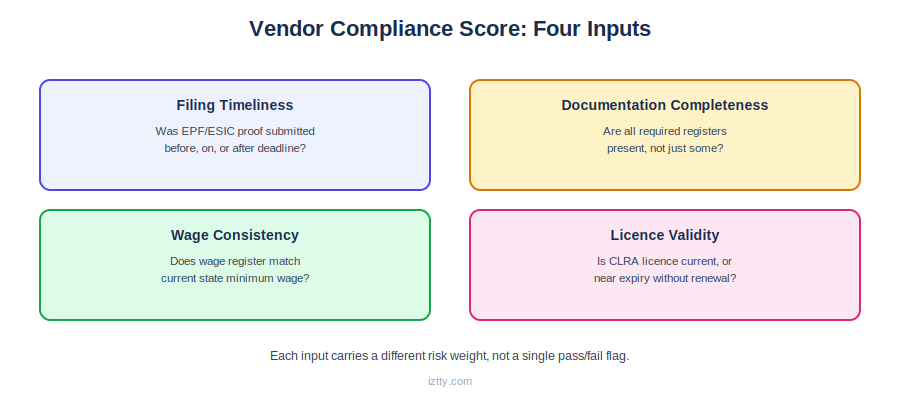
A useful vendor compliance health score isn’t a single pass/fail flag. It weighs distinct inputs that each carry different risk implications: filing timeliness (was this month’s EPF/ESIC proof submitted before, on, or after the internal deadline), documentation completeness (are all required registers present, not just the ones the vendor chose to send), wage consistency (does the wage register match the current minimum wage notification for that state), and licence validity (is the contractor’s CLRA licence current, or within 30 days of expiry without a renewal filed).

Weighting these separately matters because a vendor who is one day late on a filing carries a very different risk profile than a vendor whose licence lapsed two months ago without anyone noticing. Our Compliance Score Meter guide covers how this scoring model works at the company level; the same logic applies at the individual vendor level.


What Happens When a Vendor’s Compliance Score Drops?

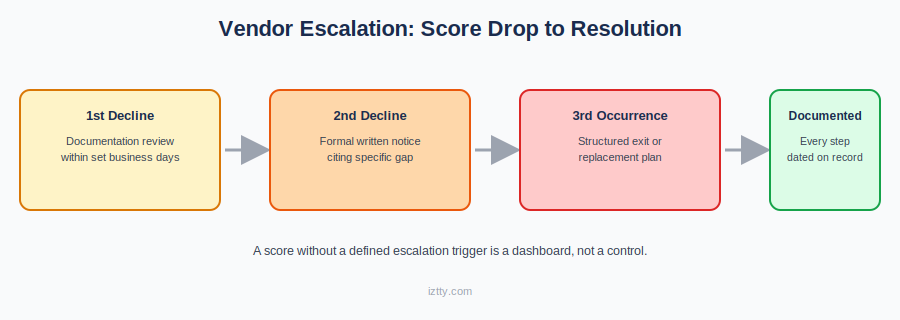
A scoring system is only useful if a low score triggers a defined action, not just a red indicator on a dashboard nobody checks. A working escalation path looks like this: a score drop below a set threshold flags the vendor for a documentation review within a set number of business days, a second consecutive month of decline triggers a formal notice to the contractor citing the specific gap, and a third occurrence without correction moves the relationship to a structured exit or replacement plan, initiated before the gap becomes a liability event, not after.

Without this defined escalation path, a compliance score becomes a reporting exercise rather than a risk control, which defeats the reason for tracking it at all.


How Do You Manage PE Liability Across Multiple Vendors and States?

Managing PE liability across several vendors and states is, at its core, a multi-state compliance management problem, not a vendor-relationship problem. A company running contract labour through six vendors across four states is managing 24 separate compliance relationships, each with its own state minimum wage notification, its own CLRA licensing authority, and its own monthly submission cadence. Treating this as one undifferentiated “vendor compliance” task is how gaps get missed; a Delhi-based security vendor’s minimum wage obligation has nothing to do with a Karnataka-based housekeeping vendor’s ESIC filing deadline, and a single shared spreadsheet rarely captures both accurately for long.

A consolidated view still matters at the leadership level, a CHRO or COO needs to see aggregate vendor risk without reviewing 24 individual files, but the underlying tracking has to stay state-specific and vendor-specific to be accurate. This mirrors the same structural challenge covered in our pillar guide’s section on multi-state compliance management.

Managing this across several vendors and states manually? Talk to our compliance team about consolidating it into one view.


What Documentation Actually Protects You If a Contractor Defaults?

If a contractor stops paying wages or EPF and the principal employer has to step in, the documentation that actually matters afterward isn’t the original commercial contract, it’s the monthly verification trail showing the company was actively checking compliance throughout the relationship, not discovering the default alongside everyone else. This includes dated copies of every monthly EPF/ESIC submission requested and received, a documented escalation history if the vendor’s score had already been declining, and a record of when the company first flagged the issue relative to when it was resolved.

This distinction, between a company that was monitoring and one that wasn’t, is frequently what separates a defensible liability position from an indefensible one during an inspection or a legal dispute.


Why Do Most Vendor Compliance Programs Fail in Practice?

Most vendor compliance programs are designed around collection, get the documents in a folder, rather than verification, confirm the documents are actually correct and current. A folder full of PDFs that nobody cross-checks against the current minimum wage notification or the actual on-site headcount provides no real protection; it only feels like protection until an inspector asks a specific question the folder can’t answer. This is precisely the gap Iztty’s statutory compliance automation India is meant to close, treating verification as an ongoing system function rather than a document-collection habit.

The second common failure is treating vendor compliance as an annual audit event rather than a monthly operating rhythm. By the time an annual audit surfaces a gap, it has typically existed for months, which is the exact period during which the principal employer’s liability was live and unmanaged.


How Does Automation Change the Vendor Audit Cycle?

The shift automation makes isn’t replacing human judgment on compliance decisions, it’s removing the dependency on someone remembering to chase 24 vendors individually every month. A platform-driven cycle sends the document request automatically on a fixed date, flags a non-submission within days rather than at the next scheduled review, cross-checks submitted wage data against the current state minimum wage rate without manual lookup, and rolls every vendor’s status into the same score used at the company level.

This is the core promise of Iztty’s AI compliance management India tools purpose-built as vendor and contract labour compliance software, rather than a generic HRMS retrofitted to do a job it wasn’t designed for. This is the specific gap our Vendor Compliance module is built to close, alongside the Maker-Checker-DSC review process for the internal sign-off before any escalation decision is finalized.


FAQs

1. Who qualifies as a “principal employer” under labour law?
The company or establishment that engages contract labour through a contractor and benefits from that work, regardless of whether the workers are on the company’s own payroll.

2. Is the principal employer liable even if the contract states the vendor is solely responsible for compliance?
Yes, a commercial contract clause allocating compliance responsibility to the vendor does not override the statutory liability the principal employer carries under CLRA.

3. How often should vendor compliance documents be collected?
Monthly, at minimum, since contractor compliance can lapse mid-contract even when the vendor was fully compliant at onboarding.

4. What’s the difference between a vendor compliance score and a company compliance score?
A company compliance score aggregates the organization’s own statutory filings and registers; a vendor compliance score tracks a specific contractor’s filing timeliness, documentation completeness, and licence validity, and typically feeds into the company-level score as one input.

5. Can a company terminate a vendor relationship for compliance failures without breaching the commercial contract?
This depends on the termination clauses in the specific commercial agreement; compliance failures are commonly written in as grounds for termination, but confirm this against your actual contract language rather than assuming it by default.

6. Does PE liability apply to staffing agencies supplying white-collar contract staff, or only blue-collar labour?
CLRA applies based on the numerical threshold of contract labour engaged, not the nature of the work, so white-collar contract staffing above the applicable threshold falls under the same obligations.

7. What’s the fastest way to check current vendor compliance exposure?
Run a documentation completeness check against the last three months of EPF/ESIC proof, muster rolls, and licence validity for every active vendor, rather than waiting for the next scheduled audit.

8. Can multiple vendors be managed on one compliance dashboard?
Yes, and doing so is generally more reliable than tracking vendors individually across separate files, provided the underlying data stays state-specific and vendor-specific rather than blended into a single aggregate figure.

9. What happens if a vendor’s CLRA licence expires mid-contract?
Engaging contract labour through an unlicensed contractor exposes the principal employer to liability, so licence expiry should trigger an immediate hold on new deployments until renewal is confirmed.

10. Is vendor compliance different from statutory compliance for direct employees?
Yes, direct employee compliance (EPF, ESIC, PT for your own payroll) is the company’s own statutory obligation, while vendor compliance is a verification obligation for a third party’s statutory compliance, with liability that shifts to the principal employer if the vendor fails.


See how ongoing vendor verification actually runs on a live platform. Book a Free Compliance Audit with Iztty.

For related reading, see our pillar guide on Statutory Compliance Management in India, our guide on CLRA registers and returns, and our Shop & Establishment Act state-wise registration guide. Browse more on our compliance blogs.

CLRA Compliance: Contract Labour Registers and Returns Explained

This article on CLRA Compliance is part of our compliance cluster. See the full picture in our pillar guide, Statutory Compliance Management in India: The Complete Guide.

What CLRA Actually Regulates

The Contract Labour (Regulation and Abolition) Act, 1970 governs any establishment that engages workers through a contractor rather than employing them directly, security guards, housekeeping staff, production-line contract workers, or third-party staffing arrangements. The Act exists to make sure contract labour gets the same basic protections as direct employees: timely wages, proper working conditions, and a documented, inspectable employment record, and to fix accountability on the establishment that ultimately benefits from the work, not just the contractor who technically employs the workers.

For the current statutory text, refer to the Contract Labour (Regulation and Abolition) Act, 1970 on India Code and the accompanying Central Rules, 1971, which prescribe the exact register and return formats covered below.


Who Needs to Register: Principal Employer vs. Contractor

CLRA creates two separate obligations that are frequently confused:

  • The principal employer (your company, if you’re engaging contract labour) must obtain registration of the establishment under Section 7 of the Act.
  • The contractor (the staffing agency or labour supplier) must separately obtain a licence under Section 12, valid for 12 months and renewable via Form VII at least 30 days before expiry.

Both obligations are triggered at the same threshold: an establishment or contractor that employs, or employed, 20 or more workmen as contract labour on any day in the preceding 12 months. Some states have amended this threshold through their own notifications, so confirm the current applicable number for your state before assuming 20 is universal.

Not sure which side of this obligation applies to you? Book a Free Compliance Audit and get a clear read on your registration status.


When Registration, Licensing, and Notices Are Required

Beyond the one-time registration and licence, CLRA requires ongoing, per-contract notifications that are easy to miss because they’re not calendar-based, they’re triggered by events:

  • Form VI-A, the contractor’s notice of commencement or completion of contract work, filed with the relevant authority when a specific contract starts or ends.
  • Form VI-B, the corresponding notice filed by the principal employer for the same commencement or completion event.
  • Form XIV, the employment card, which the contractor must issue to each worker within 3 days of employment, not at the end of the month or the end of the contract.
  • Form XV, the service certificate, issued by the contractor on termination of a worker’s employment for any reason.

This is precisely why CLRA compliance breaks down in practice: it’s not one annual filing, it’s a set of obligations triggered by specific events (a new contract starting, a worker joining or leaving) that need to be tracked as they happen, not reconstructed later from memory.


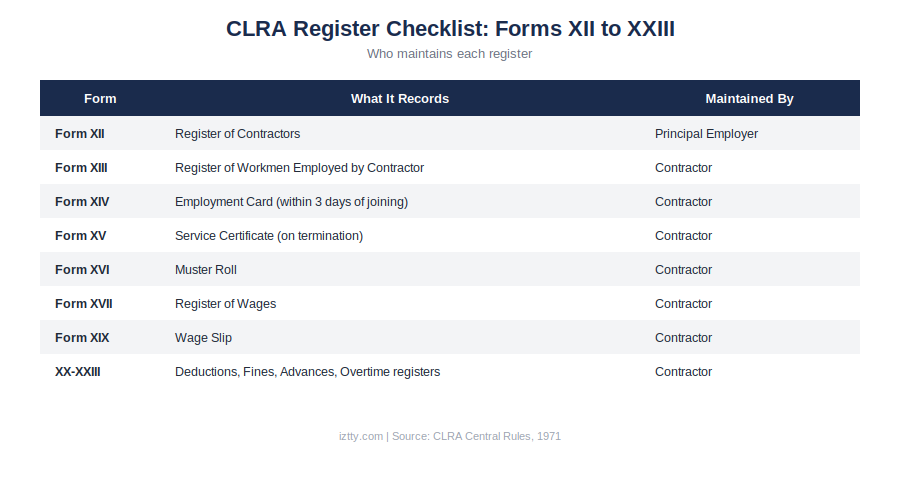
The Complete CLRA Register Checklist: Forms XII Through XXIII

FormWhat It RecordsMaintained By
Form XIIRegister of Contractors, every contractor engaged, nature of work, period, and maximum workmen employedPrincipal Employer
Form XIIIRegister of Workmen Employed by ContractorContractor
Form XIVEmployment Card, issued to each worker within 3 days of employmentContractor
Form XVService Certificate, issued on terminationContractor
Form XVIMuster RollContractor
Form XVIIRegister of WagesContractor
Form XVIIIRegister of Wages-cum-Muster Roll (combined format, where used)Contractor
Form XIXWage Slip, issued at least a day before wage disbursement where the wage period is a week or moreContractor
Form XXRegister of Deductions for Damage or LossContractor
Form XXIRegister of FinesContractor
Form XXIIRegister of AdvancesContractor
Form XXIIIRegister of OvertimeContractor

A frequent inspection failure isn’t the absence of these registers altogether, it’s inconsistency between them. A contractor’s payroll may show one headcount while the Form XVI muster roll shows another, because the muster roll wasn’t updated in real time as workers rotated on and off site. Our Factories Act registers checklist covers a similar register-consistency problem on the factory side.


How to File the CLRA Returns: Form XXIV and Form XXV

Beyond the ongoing registers, two periodic returns are mandatory:

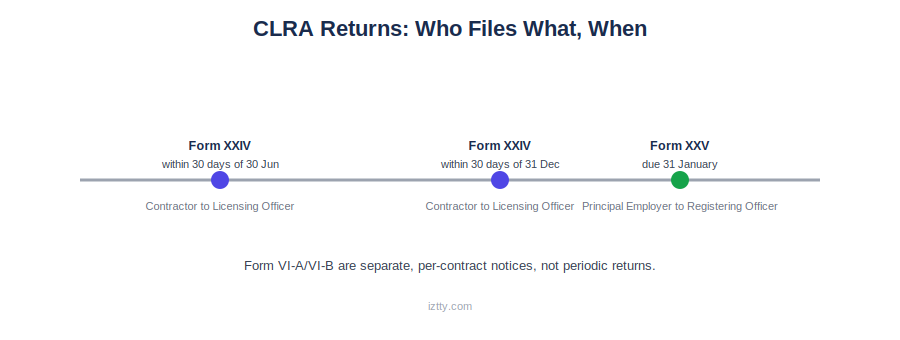
  • Form XXIV, the half-yearly return filed by the contractor to the Licensing Officer, due within 30 days of the close of each half-year (30 June and 31 December), meaning by roughly end of July and end of January.
  • Form XXV, the annual return filed by the principal employer to the Registering Officer, due by 31 January.

Both returns are increasingly tracked through the Ministry of Labour and Employment’s Shram Suvidha Portal, which means a missed or inconsistent filing is now a digital, cross-referenceable record rather than a paper file that might not surface again until an active inspection.

See how these returns get tracked and filed: Explore Iztty’s CLRA & Ease of Compliance module.


Where Liability Actually Sits: Principal Employer Responsibility

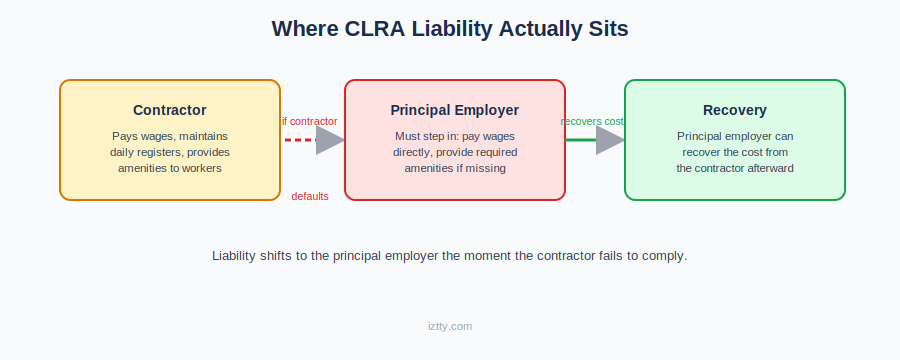
This is the part of CLRA that catches companies off guard: if a contractor fails to pay wages on time, or fails to provide amenities like rest rooms, drinking water, or first aid required under the Act, the principal employer is legally required to provide these directly and can recover the cost from the contractor afterward. In practice, this means the principal employer cannot treat contractor compliance as the contractor’s problem alone; it is a documented, ongoing obligation to verify.

This is why vendor documentation, monthly proof of EPF, ESIC, and minimum wage payment for every active contractor, matters as much as your own direct payroll compliance. Our pillar guide covers this in more detail under multi-state compliance management.


Why CLRA Compliance Fails: The Gaps Inspectors Actually Find

  • Form VI-A/VI-B not filed per contract. Teams remember the initial registration but forget that every new or renewed contract needs its own commencement notice.
  • Employment cards issued late, or not at all. Form XIV is meant to be issued within 3 days of employment; in practice, it’s often batched monthly, which is technically non-compliant.
  • Muster roll and payroll headcount mismatch. The contractor’s actual payroll and the Form XVI muster roll drift apart when workers are added or removed without an update.
  • Form XXIV filed, but not cross-checked against the principal employer’s Form XXV. Since these are filed by two different parties, inconsistencies between them are one of the first things an inspector or the Shram Suvidha system’s digital cross-referencing flags.

How a Digital Vendor Audit Trail Closes These Gaps

A digital vendor compliance process addresses each of the failure points above directly: it prompts for a Form VI-A/VI-B filing the moment a new contract is logged, tracks employment card issuance against the 3-day window per worker, reconciles contractor-submitted muster rolls against payroll data monthly, and cross-checks Form XXIV and Form XXV figures before either is filed, catching a mismatch before an inspector does. This also feeds directly into a live compliance score, so a CHRO or Compliance Manager can see vendor-side risk without waiting for the next audit cycle.

See vendor compliance automation in action: Explore Vendor Compliance features.


When CLRA Does Not Apply: Exemptions

CLRA does not apply to establishments where the work performed is of an intermittent or casual nature, or where the establishment has not carried out any work for more than 21 days in the preceding 12 months. Certain seasonal work performed for 60 days or fewer in a year, and establishments within Special Economic Zones under specific state notifications, may also fall outside the Act’s direct applicability. These exemptions are narrowly interpreted in practice, so treat them as exceptions to verify with a compliance professional rather than a default assumption for infrequent contractor use.


Penalties for Non-Compliance

Operating without the required registration or contractor licence, or failing to maintain the registers listed above, exposes both the principal employer and the contractor to penalties under the Act, including fines and, for repeated or serious violations, imprisonment provisions under the relevant sections. Beyond the direct penalty, an establishment without a clean CLRA record faces a genuine practical cost: this is exactly the documentation set requested during funding due diligence, government tender eligibility checks, and enterprise vendor onboarding.


Manual Tracking vs. a CLRA Compliance Platform

For a company with one or two small contractor relationships, manual tracking, a shared folder of monthly challans and a checklist, is workable. It stops being workable once a business is managing multiple contractors across multiple sites, because at that point, tracking event-triggered filings (a new contract starting, a worker joining) alongside calendar-based ones (Form XXIV, Form XXV) manually becomes a dedicated, error-prone task rather than an occasional admin item.

A platform’s real value here is treating CLRA as the event-driven compliance workflow it actually is, not a static checklist, prompting the right form at the right trigger, and maintaining the audit trail a principal employer needs to demonstrate it verified contractor compliance, not just assumed it. Our Maker-Checker-DSC workflow guide covers how the same review-before-sign principle applies to CLRA returns as it does to other statutory filings.

Check your current CLRA compliance status: Get a Free Compliance Audit.


FAQs

1. What is the threshold for CLRA to apply?
An establishment or contractor employing 20 or more workmen as contract labour on any day in the preceding 12 months, though some states have amended this threshold, so confirm the current number for your state.

2. Is Form VI-B a periodic return?
No, Form VI-B is a notice filed by the principal employer for the commencement or completion of a specific contract, not a recurring calendar filing. The actual periodic returns are Form XXIV (half-yearly, filed by the contractor) and Form XXV (annual, filed by the principal employer).

3. Who is responsible for maintaining CLRA registers, the principal employer or the contractor?
Most day-to-day registers (muster roll, wage register, overtime register) are maintained by the contractor, while the principal employer maintains the Register of Contractors (Form XII) and carries backup liability if the contractor fails to comply.

4. What happens if a contractor doesn’t pay minimum wages to contract workers?
The principal employer can be held liable to ensure payment and may need to pay the workers directly, recovering the amount from the contractor afterward.

5. How often must the employment card (Form XIV) be issued?
Within 3 days of a worker’s employment, and it must be kept updated with any change in particulars.

6. What is the difference between Form XXIV and Form XXV?
Form XXIV is the contractor’s half-yearly return to the Licensing Officer; Form XXV is the principal employer’s annual return to the Registering Officer, due by 31 January.

7. Does CLRA apply to security guards and housekeeping staff hired through an agency?
Yes, if the numerical threshold is met, contract labour engaged for security, housekeeping, or similar support functions falls under CLRA regardless of the nature of the work.

8. Can a company be penalised if the contractor, not the company itself, fails to comply?
Yes, the principal employer carries independent liability for verifying and, in some circumstances, directly ensuring contractor compliance, which is why documented vendor audits matter.

9. Is CLRA registration a one-time process?
The principal employer’s registration is generally ongoing once granted, but the contractor’s licence is valid for 12 months and must be renewed via Form VII at least 30 days before expiry.

10. Can CLRA compliance be tracked on the same platform as EPF/ESIC and Factories Act compliance?
Yes, and doing so is generally more reliable than tracking it separately, since CLRA liability is directly connected to a company’s broader statutory risk profile, covered in our complete statutory compliance guide.


For the full compliance picture, see our pillar guide on Statutory Compliance Management in India and our guide to Shop & Establishment Act state-wise registration. Browse more on our compliance blogs.

Suggested Placement of This Blog in Existing Content

  • In the pillar guide, Section 7 (“Vendor and Contract Labour Compliance Under CLRA”) should link its “Form VI-B and Form XXIV” reference to this blog for the full register/return breakdown, and its corrected explanation.
  • In the Shop & Establishment cluster blog, add a link from the closing section to this blog for readers whose S&E-registered establishment also engages contract labour.
  • In iztty.com/vendor-compliance/ and iztty.com/clra-compliance/, this blog is a natural “learn more” link for visitors who land on the product page before understanding the underlying obligation.

Schema Recommendation

FAQPage schema for the FAQ section; Article schema for the full post; BreadcrumbList reflecting Pillar > Cluster hierarchy.

Image Placement (3 images, provided separately)

  1. clra-register-checklist-forms.png — Alt: “CLRA register checklist showing Forms XII to XXIII and who maintains each” — insert after Section 4.
  2. clra-returns-timeline.png — Alt: “CLRA Form XXIV and Form XXV filing timeline for contractor and principal employer” — insert after Section 5.
  3. clra-liability-flow-principal-employer.png — Alt: “Diagram showing where CLRA liability sits between contractor and principal employer” — insert after Section 6.

Shop & Establishment Act Compliance: State-wise Registration Guide (2026)

This article is part of our compliance cluster. For the full statutory compliance picture across EPF, ESIC, Factories Act, and CLRA, see our pillar guide: Statutory Compliance Management in India: The Complete Guide.


What the Shop & Establishment Act Compliance Actually Regulates

The Shops and Establishments Act is a state subject, meaning every Indian state and union territory has its own version of the law, its own registration form, and its own renewal cycle. There is no single central “Shops Act.” What’s common across states is the subject matter: working hours, rest intervals, weekly holidays, opening and closing hours, employment of young persons and women, maintenance of registers for wages and leave, and the registration of the establishment itself with the local labour or municipal authority.

This is the compliance obligation that applies to almost every commercial establishment in India, retail stores, offices, IT companies, restaurants, and warehouses, regardless of whether they are also covered under the Factories Act 1948. If you run a shop, office, or commercial establishment (as opposed to a manufacturing unit that falls under the Factories Act), S&E registration is typically your first statutory obligation, not an optional one.

Not sure if your business falls under S&E or Factories Act, or both? Book a Free Compliance Audit and get a clear answer mapped to your specific operations.


Who Needs to Register: Applicability Thresholds by State

Applicability thresholds (the employee count above which registration becomes mandatory, or the point at which additional obligations like a welfare officer kick in) are not uniform. Some states require registration regardless of employee count once a commercial establishment is operational; others set a minimum headcount. Because these thresholds are amended by individual state governments from time to time, the safest approach is to confirm the current threshold with your state’s labour department or the relevant state Shops and Establishments Act notification before assuming a number from an old reference.

What is consistent across states: registration is triggered by opening the establishment for business, not by reaching a specific employee count in most states, which means many businesses register far earlier than they expect, often within 30 to 90 days of commencing operations depending on the state’s specified window.


State-wise Registration Process: Documents, Timelines, and Fees

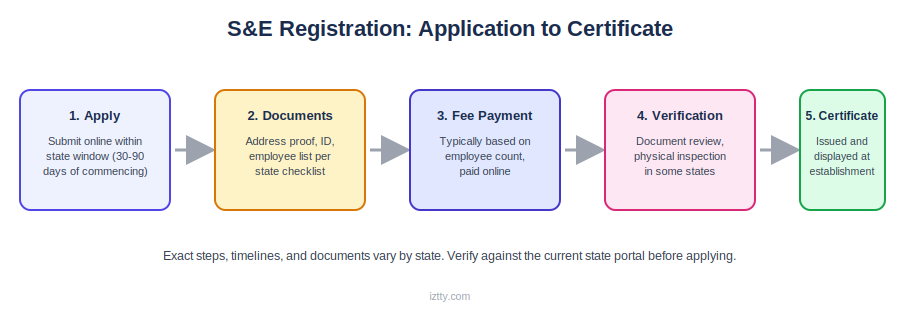
While the exact portal and form numbers vary, the registration process follows a broadly similar structure across most states:

  1. Application submission, typically online through the state labour department’s portal, within the state-specified window from commencement of business (commonly 30 to 90 days).
  2. Supporting documents, generally including proof of establishment address (rent agreement or property documents), identity proof of the employer, a list of employees with basic details, and in some states, a photograph of the establishment’s signboard.
  3. Fee payment, calculated in most states based on the number of employees, payable online at the time of application.
  4. Verification and approval, which can involve a physical inspection in some states and a purely document-based review in others.
  5. Certificate issuance, after which the certificate must typically be displayed prominently at the establishment.

Because document requirements and portals change with state government IT modernisation drives, verify the exact current list from the relevant state labour department website before submitting, rather than relying on a document checklist from a previous filing cycle.

Skip the manual document chase: See how Iztty tracks S&E registration and renewal status across every branch.


State-wise Comparison: Major States at a Glance

StateGoverning ActRegistration TriggerTypical Renewal Cycle
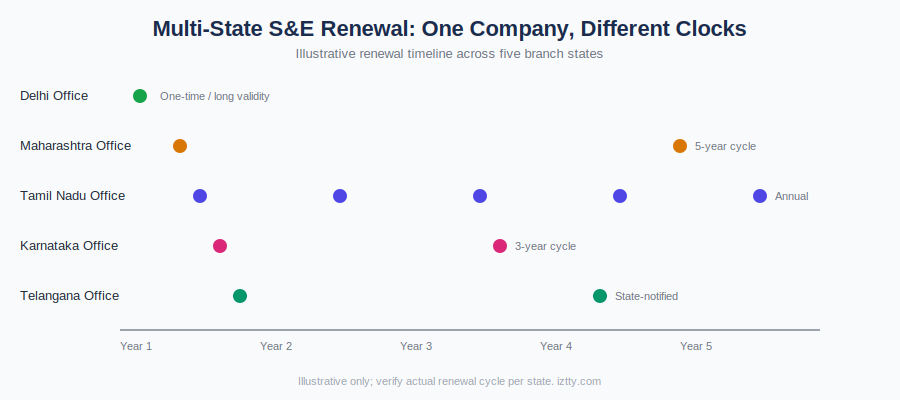
MaharashtraMaharashtra Shops and Establishments (Regulation of Employment and Conditions of Service) Act, 2017Commencement of business1, 3, 5, or 10 years (business’s choice at registration)
KarnatakaKarnataka Shops and Commercial Establishments Act, 1961Commencement of businessMulti-year validity, state-notified
Delhi (NCT)Delhi Shops and Establishments Act, 1954Commencement of businessregistration certificate is valid for 5 years and must be renewed before expiry
Tamil NaduTamil Nadu Shops and Establishments Act, 1947Commencement of businessAnnual or multi-year, state-notified
TelanganaTelangana Shops and Establishments Act, 1988Commencement of businessState-notified renewal cycle
GujaratGujarat Shops and Establishments (Regulation of Employment and Conditions of Service) Act, 2019Commencement of businessState-notified renewal cycle
Uttar PradeshUttar Pradesh Shops and Commercial Establishments Act, 1962Commencement of businessState-notified renewal cycle
West BengalWest Bengal Shops and Establishments Act, 1963Commencement of businessState-notified renewal cycle

Note: Several states have moved toward longer validity periods or one-time registration as part of ease-of-doing-business reforms in recent years. Renewal periodicity and fee slabs should always be verified against the current state notification, since these are exactly the kind of details that change without much national press coverage.

Get your multi-state renewal calendar built for you: See our compliance calendar in action.


Renewal Cycles and Why They Differ by State

Unlike EPF or ESIC, where the compliance cycle is monthly and identical nationwide, S&E renewal cycles are set independently by each state, ranging from annual renewal to multi-year validity periods of 5 or 10 years in states that have modernised their registration frameworks. This is precisely why a multi-branch retailer or IT company operating in six states cannot manage S&E renewals on a single calendar reminder; each state licence has its own expiry date, and missing one doesn’t just risk a fine, it can affect the legal standing of the establishment to operate at that specific location.

A Plant HR Head or Admin & Legal Manager tracking this manually across multiple branches typically resorts to a shared spreadsheet with expiry dates, which works until a renewal date is entered incorrectly or a state amendment shifts a validity period retroactively, both of which happen more often than compliance teams expect.


Common Registration Mistakes That Delay Approval

  • Address mismatch. The registered address on the application doesn’t match the rent agreement or utility bill exactly, causing a rejection or a request for resubmission.
  • Wrong establishment category. Classifying an IT services office incorrectly as a “shop” versus “commercial establishment” (the categories carry different obligations in some states) leads to processing delays.
  • Missing employee declaration updates. Many states require the registered employee count to be kept current; failing to update it after headcount changes can flag the registration during a later inspection.
  • Applying under the wrong state Act for a remote or hybrid workforce. Companies with employees working from a registered office in one state but operating client-facing work in another sometimes register incorrectly, which surfaces later during a labour department query.

What Happens If You Operate Without S&E Registration

Operating a commercial establishment without valid S&E registration exposes the business to penalties under the relevant state Act, which can include fines and, in some states, the ability of the labour department to direct closure of operations until registration is completed. Beyond the direct penalty, an unregistered establishment typically cannot produce the S&E certificate that banks, landlords, government tenders, and increasingly, enterprise customers during vendor onboarding, ask for as a basic proof of legal operation.

This is also one of the first documents requested during funding due diligence for startups, since an investor’s legal team will check whether the company is operating from a properly registered establishment in every state it claims to have a presence in.


S&E Compliance for Multi-State and Multi-Branch Businesses

For a retail chain, IT services company, or logistics provider with branches across states, S&E compliance is not one registration but as many registrations as there are physical locations, each with its own renewal date, its own register format for leave and wages, and its own local labour department point of contact. A CHRO or COO overseeing this across, say, eight states needs visibility into all eight without relying on eight separate branch teams to self-report status accurately.

This is where a consolidated dashboard view, the same principle covered in our pillar guide’s section on multi-state compliance management, becomes operationally necessary rather than a nice-to-have.

See multi-branch S&E tracking live: Book a Demo.


How S&E Registration Connects to Your Other Statutory Obligations

S&E registration is often the first domino. Many states link Professional Tax registration and Labour Welfare Fund applicability to the existence of a valid S&E certificate, since it establishes the legal existence of the establishment at that address. If your S&E registration lapses or was never obtained for a specific branch, it can create downstream complications for Professional Tax filings and LWF contributions tied to that location.

This is why S&E compliance shouldn’t be tracked in isolation from your broader statutory calendar covering Professional Tax and Labour Welfare Fund obligations.


Manual Filing vs. a Compliance Platform: What Actually Saves Time

For a single-location business, manual S&E registration and renewal is entirely manageable with a calendar reminder and a folder of documents. The calculation changes once a business crosses three or four states, because at that point, tracking renewal dates, document formats, and category classifications correctly for each state becomes a dedicated task, not a five-minute admin job.

A dedicated platform’s value here isn’t “digitising a PDF,” it’s maintaining the correct, current register and renewal format per state (since these change with state amendments), sending tiered alerts before each state’s specific renewal date, and giving a CHRO or COO one dashboard instead of eight branch-level spreadsheets.

Check your current S&E status across every branch: Get a Free Compliance Audit.


FAQs

1. Is Shops and Establishment registration mandatory for all businesses in India?
Yes, in most states, any commercial establishment, including shops, offices, and IT companies, is required to register under the applicable state Shops and Establishments Act, generally within a specified window after commencing business.

2. Is there a central Shops and Establishment Act for all of India?
No, it is a state subject, so each state and union territory has its own Act, registration process, and renewal cycle, which is why requirements differ significantly between, for example, Maharashtra and Tamil Nadu.

3. How long does S&E registration take to process?
This varies by state and depends on whether physical inspection is required; some states process purely online applications within a few working days, while others take longer if verification is needed.

4. Does S&E registration need to be renewed every year?
Not always. Some states have moved to multi-year validity periods (3, 5, or even 10 years) as part of ease-of-doing-business reforms, while others retain annual renewal. Confirm the current cycle for your specific state.

5. What documents are needed for Shops and Establishment registration?
Commonly required documents include proof of establishment address, employer identity proof, and employee details, though the exact list varies by state and should be confirmed against the current state labour department checklist.

6. What is the penalty for not registering under the Shops and Establishment Act?
Penalties vary by state and can include fines and, in some cases, the labour department’s ability to restrict operations until registration is completed.

7. Does a company need separate S&E registration for each branch office?
Yes, registration is typically required for each physical establishment location, since the Act applies at the establishment level, not at the company level.

8. Is S&E registration different from Factories Act registration?
Yes, the Factories Act 1948 applies to manufacturing units meeting specific worker and power-usage thresholds, while the Shops and Establishments Act applies to commercial establishments like offices, shops, and retail outlets. A business could need one, the other, or neither, depending on its operations.

9. Can Shops and Establishment compliance be managed through an HRMS?
Most HRMS platforms don’t natively generate state-specific S&E registers or track multi-state renewal dates; this is typically handled better by a dedicated statutory compliance platform, as covered in our complete statutory compliance guide.

10. How much does Shops and Establishment registration cost?
Fees are typically calculated based on employee count and vary by state; confirm the current fee slab with your state’s labour department portal at the time of application.


For the full picture across EPF, ESIC, Factories Act, and CLRA compliance, read our pillar guide: Statutory Compliance Management in India: The Complete Guide. Browse more on our compliance blogs.

Statutory Compliance Management in India: The Complete Guide (2026)

Statutory compliance management is a critical part of running any business in India, especially as organisations grow across multiple states, locations, and workforce categories. From EPF and ESIC filings to factory registers, labour licences, Professional Tax, and contract labour obligations, employers must manage multiple laws, deadlines, and documentation requirements simultaneously. A structured compliance management approach helps businesses stay ahead of these obligations, reduce regulatory risk, and maintain accurate records for audits, inspections, and due diligence.

What Statutory Compliance Actually Means for an Indian Employer

Statutory compliance, in practice, is not one obligation. It is a stack of overlapping obligations under separate central and state legislations, each with its own registers, forms, due dates, and penalty structure. A 200-employee manufacturing unit in Maharashtra with a warehouse in Karnataka is simultaneously subject to the Factories Act 1948, the Maharashtra Shops and Establishments Act, the Karnataka Shops and Commercial Establishments Act, the EPF & MP Act 1952, the ESI Act 1948, state Professional Tax rules, the Labour Welfare Fund Act (where applicable), and the Contract Labour (Regulation and Abolition) Act 1970 if any contractors are engaged on site.

Each of these carries its own filing calendar. EPF contributions and the Electronic Challan cum Return (ECR) are due by the 15th of every month. ESIC contributions follow a similar monthly cycle. CLRA half-yearly returns (Form XXIV) are due by 31 July and 31 January. Factory licence renewals typically run on an annual cycle but vary by state. Missing any one of these does not just risk a penalty; it creates a documented lapse that surfaces during audits, funding due diligence, or a labour department inspection.

This is the operational reality “compliance” refers to: dozens of acts, hundreds of registers and forms, and a filing calendar that never actually pauses. Our compliance calendar maps every one of these deadlines against your specific states so nothing gets tracked from memory.

See how this maps to your business: Book a Free Compliance Audit with Iztty and get a state-and-act-wise exposure report before your next filing deadline.


The Compliance Stack: Every Act, Register, and Filing You’re Responsible For

Here is what the stack actually looks like, broken down by function rather than by act name, since most compliance failures happen at the functional gaps.

FunctionGoverning LawKey Registers/FormsTypical Frequency
Provident FundEPF & MP Act, 1952ECR, Form 5A, Form 12AMonthly
ESIESI Act, 1948Monthly contribution, Form 6Monthly
Professional TaxState-specific PT ActsState PT returnMonthly/Annual (state-wise)
Labour Welfare FundState LWF Acts (16 applicable states)LWF contribution registerHalf-yearly/Annual (state-wise)
Factory RegistersFactories Act, 1948Form 25 (Muster Roll), Form 5 (Register of Accidents), Form 17 (Overtime)Ongoing/Half-yearly returns
Shops & EstablishmentState S&E ActsEmployee register, leave register, licence renewalAnnual renewal
Contract LabourCLRA Act, 1970Form XII, Form XIII, Form XIV, Form XIX; Form VI-B and Form XXIV returnsHalf-yearly (31 Jul/31 Jan)

A recurring failure point is treating this as a single “labour compliance” checklist rather than as separate, act-specific obligations that each need their own register format, since the Factories Act register format for a Karnataka unit is not the same as the S&E register format required for the same company’s Delhi office. Iztty’s platform generates each of these registers pre-mapped to the correct state format.

Get your own act-wise register mapping: See the full platform coverage.


Why Spreadsheets and Manual Tracking Break Down Past 50 Employees

Below roughly 50 employees and a single state of operation, a well-maintained spreadsheet and a diligent HR admin can genuinely keep up. The moment either of two things happens, that model breaks: a second state gets added, or contract labour gets engaged through a vendor.

A second state means a second set of S&E rules, a possibly different LWF applicability and rate, and a different Professional Tax slab. A vendor relationship means the principal employer now carries liability under CLRA for the contractor’s EPF, ESIC, and minimum wage compliance, even though the contractor’s payroll sits outside the company’s own HR system. Our vendor compliance module exists specifically to close this gap.

Three specific failure patterns show up repeatedly in manual setups:

  • Register format drift. Someone downloads a Form 25 template once and keeps reusing it, missing state amendments to the format.
  • Silent licence expiry. Factory and S&E licences renew annually, but there is no automatic 60/30/15-day alert, so renewal happens reactively, often after a lapse.
  • Vendor documentation gaps. Contractor EPF/ESIC challans are collected inconsistently, so when a labour inspector asks for proof of contractor compliance, the documentation trail has holes the principal employer is legally responsible for.

Run a live check on your own setup: Book a Demo and see where your current process has these exact gaps.


Statutory Compliance Management Software vs. HRMS Compliance Modules: The Real Difference

This is the comparison almost no vendor writes about honestly, because most vendors sit on one side of it.

HRMS platforms like greytHR, Keka, Zoho People, and similar tools bundle a compliance module alongside payroll, attendance, and leave. This works well for standard, single-state EPF/ESIC/PT payroll deductions. It generally does not extend to factory registers under the Factories Act, CLRA vendor audits, or DSC-based sign-off workflows, because those were never the HRMS’s core design problem.

On the other side, enterprise GRC and labour-law specialist platforms are built for the compliance function itself, often tracking obligations across a very wide act universe, but tend to be heavier and costlier to onboard for a mid-size manufacturer or a multi-branch retailer.

A genuinely useful way to decide: if your compliance need is “make sure EPF/ESIC/PT deduct correctly every payroll cycle,” an HRMS module may be sufficient. If your compliance need includes factory registers, CLRA vendor liability, DSC-signed statutory documents, or multi-state licence tracking, you need a dedicated statutory compliance platform, not a payroll add-on. Iztty is built to integrate with your existing payroll or HRMS tool (Tally, Zoho Payroll, Keka) rather than replace it, using our Provident Fund and Professional Tax modules alongside your current payroll data.

See where Iztty fits for your specific mix: Talk to a compliance specialist.


What Statutory Compliance Automation Should Actually Do

Compliance automation, done properly, should do four specific things, not just “digitise” a spreadsheet.

  1. Generate the correct register format automatically, matched to the applicable state and act, so a Form 25 for Gujarat and a Form 25 for Tamil Nadu are not the same static template.
  2. Track licence and filing due dates with tiered alerts, not a single reminder on the due date itself, using a live compliance calendar.
  3. Route every statutory document through review before it is legally signed, so a register or return does not go out the door without a second set of eyes.
  4. Surface risk in a single view, so a CFO or CHRO can see, state-by-state and act-by-act, where exposure currently sits, rather than assembling that picture manually before every audit.

This is the actual test for any “automation” claim in this space: can it generate the right form for the right state on its own, and can it show you your risk exposure without a manual pull-together exercise.

See this in a live environment: Explore Iztty’s AI Features.


Maker-Checker-DSC: The Workflow Most Platforms Skip

This is one of the most underdiscussed gaps in the Indian compliance software market. Most platforms let one person upload a register or generate a return and call it done. That is a single point of failure, both operationally and legally, since a statutory register with an error in it is still a legal document once filed.

A Maker-Checker-DSC workflow adds three checkpoints before anything is final:

  • Maker stage: The compliance executive uploads or generates the register/return and validates the underlying data (headcount, wages, attendance).
  • Checker stage: A second, more senior reviewer (often the Compliance Manager or CHRO) approves or rejects the document, with mandatory remarks on rejection so the maker knows exactly what to fix.
  • DSC stage: Once approved, the document is digitally signed using a Digital Signature Certificate, giving it the same legal standing as a wet-ink signature, then auto-archived to a document vault with a timestamped audit trail.

For a Compliance Manager or Company Secretary, this workflow is the difference between “we filed it” and “we can prove exactly who reviewed and signed it, and when,” which is precisely what a labour inspector or auditor asks for.

See the Maker-Checker-DSC workflow in action: Request a walkthrough.


Vendor and Contract Labour Compliance Under CLRA

If your organisation engages contract labour, either directly on-site or through a staffing vendor, the Contract Labour (Regulation and Abolition) Act 1970 makes the principal employer liable if the contractor fails to pay wages or remit EPF/ESIC for the contracted workforce. This liability does not disappear because the contractor’s payroll runs on a separate system.

Practically, this means the principal employer needs to collect, verify, and archive, on an ongoing basis:

  • The contractor’s EPF ECR and challan for the relevant month
  • ESIC contribution proof for the same period
  • Minimum wage compliance evidence for the contracted staff
  • Form XII (licence), Form XIII (register of workmen), Form XIV (employment card), and Form XIX (register of wages)
  • The half-yearly Form VI-B and Form XXIV returns, due 31 July and 31 January

A digital vendor compliance audit trail replaces the manual chase of emailing contractors for documents every month, auto-calculates a vendor compliance score based on documentation completeness and timeliness, and gives the principal employer a defensible liability record if a dispute or inspection arises. This is exactly what our Labour Compliance Services team at Futurex has handled for over a decade before it became a product feature.

Automate your contractor audit trail: See Vendor Compliance features or explore CLRA & Ease of Compliance.


Multi-State, Multi-Branch Compliance Management

Every state amendment to the S&E Act, every state’s differing LWF rate and periodicity, and every state’s Professional Tax slab structure means a company operating in five states is not running one compliance process five times. It is running five distinct, occasionally diverging processes that need to be visible in one consolidated view for leadership, while remaining accurate at the branch level for the person actually filing.

A functional multi-state compliance setup needs:

  • State-wise register formats that update automatically when a state amends its rules
  • Branch-level ownership (a Plant HR Head sees their factory’s obligations; the CHRO sees all locations)
  • A consolidated, real-time dashboard so a CFO or COO does not need a state-by-state status update meeting before every board review
  • Role-based access so the Maker at one branch cannot approve their own filing (see the Maker-Checker-DSC section above)

See multi-branch dashboards live: Book a Demo.


Handling an EPF/ESIC/Labour Department Notice

A notice from EPFO, ESIC, or a state Labour Department typically gives a narrow window, often 7 to 15 days, to respond with a formal reply and supporting evidence. The manual process (reading the notice, identifying the specific allegation and section cited, pulling the relevant registers and challans, and drafting a legally coherent reply) commonly takes a compliance team 3 to 5 days, which eats most of the response window before the reply is even reviewed internally.

An AI-assisted notice response workflow reads the notice (via OCR where it is a scanned document), extracts the specific allegation, the cited section, and the deadline, then drafts a formal reply along with a checklist of the exact evidence documents needed to support it. This compresses a 3-to-5-day manual process down to roughly 4 hours of review and sign-off time, which matters when the difference between an adequate reply and a rushed one can affect the outcome.

See the AI Notice Response Assistant: Explore AI Features.


How to Calculate Your Compliance Health Score

A useful compliance score is not a vague “green/yellow/red” label. It needs to be built from actual, weighted inputs:

  • Filing timeliness (were EPF/ESIC/PT/LWF filings made before the due date, on the due date, or late)
  • Register completeness (are all statutorily required registers present and current for each applicable act)
  • Licence validity (are factory and S&E licences current, or approaching/past expiry)
  • Vendor documentation completeness (for CLRA-covered contract labour)
  • Notice/inspection history (open notices or unresolved inspection findings weighted as higher risk)

A live score, broken down act-wise and state-wise with Low/Medium/High risk banding, gives a CHRO or CFO a genuine early-warning system rather than discovering exposure only during an audit or a funding round’s due diligence.

Check your current score: Get your Free Compliance Audit.


The Labour Codes 2026 Transition: What Changes for Compliance Software

India’s four Labour Codes (Wages, Industrial Relations, Social Security, and Occupational Safety, Health and Working Conditions) consolidate 29 existing central labour laws. As implementation rules are notified and states align their own rules, definitions such as “wages” for PF/gratuity calculation purposes, thresholds for applicability, and registration/licensing procedures are subject to change during the transition period.

For a compliance platform, this means the underlying rule engine and register templates need to be updated centrally as central and state rules are notified, rather than each company having to re-build its own templates. Because implementation timelines and specific provisions continue to be clarified by the Ministry of Labour & Employment, verify current applicability against the official Ministry of Labour & Employment portal and India Code before treating any single date as final, and treat platform vendor claims about “Labour Codes readiness” as something to verify against their actual update cadence, not just marketing copy.

Ask how Iztty handles Labour Code rule updates: Talk to us.


Choosing a Statutory Compliance Platform: A Practical Checklist

Use this before signing with any vendor, including Iztty:

  • Does it cover the specific acts relevant to you (Factories Act, S&E, CLRA), not just EPF/ESIC/PT payroll deductions?
  • Does it generate state-specific register formats automatically, and update them when states amend rules?
  • Does it support a Maker-Checker-DSC workflow, so no single person can generate and sign a statutory document alone?
  • Does it give you a real vendor/contractor compliance audit trail if you use contract labour?
  • Does it integrate with your existing payroll/HRMS (Tally, Zoho Payroll, Keka, etc.) rather than requiring a full system replacement?
  • Can you see a live, act-wise and state-wise compliance score, not just a document repository?
  • Who built it: a software company that added compliance as a feature, or a compliance consultancy that built the software to solve its own consulting practice’s problem?

Run this checklist against Iztty directly: Book a Free Compliance Audit.


Frequently Asked Questions

1. What is the difference between HRMS and compliance software?
An HRMS manages payroll, attendance, and leave, with EPF/ESIC/PT deduction as one feature. Dedicated compliance software like Iztty additionally manages factory registers, CLRA vendor audits, licence renewals, and DSC-signed statutory documents, which most HRMS platforms do not cover natively.

2. What is statutory compliance in HR?
It refers to an employer’s legal obligations under labour, factory, shops and establishment, social security (EPF/ESIC), and tax laws, including registration, contribution, record-keeping, and periodic filing requirements.

3. What is a statutory compliance checklist in India?
It typically covers EPF/ESIC registration and monthly contributions, Professional Tax and LWF filings, Factories Act or S&E Act registers and licence renewals, and CLRA compliance where contract labour is engaged, each tracked against its own due date.

4. What is the best HRMS for compliance in India?
The right choice depends on whether your need is payroll-linked deductions (where an HRMS module may suffice) or full statutory coverage including factory registers and CLRA (where a dedicated platform like Iztty is built for the requirement).

5. How much does compliance management software cost in India?
Pricing typically depends on employee count, number of states/branches, and whether vendor/CLRA compliance is included; most platforms price per employee per month with tiered enterprise plans for multi-state operations.

6. Are the Labour Codes 2026 already applicable?
Implementation is progressing in phases as central and state rules are notified. Confirm current applicability directly via the Ministry of Labour & Employment rather than relying on a fixed date, since timelines have shifted before.

7. What happens if a company misses an EPF or ESIC filing deadline?
Late EPF/ESIC filings attract interest and penalty under the respective Acts, in addition to creating a compliance gap that surfaces during inspections or audits.

8. Who is liable for a contractor’s EPF/ESIC compliance under CLRA?
The principal employer carries liability if a licensed contractor fails to remit EPF/ESIC or pay minimum wages to the contracted workforce, which is why documented vendor compliance audits matter.

9. What is a Maker-Checker-DSC workflow?
It is a three-stage review process where one person prepares a statutory document, a second person reviews and approves it, and the final version is digitally signed using a DSC before being archived, creating an auditable approval trail.

10. Can compliance software integrate with existing payroll tools like Tally or Keka?
Yes, platforms like Iztty are designed to integrate with existing payroll and HRMS tools such as Tally, Zoho Payroll, and Keka HR, so compliance sits alongside existing payroll data rather than replacing it.


Explore more on our compliance blogs or check our full FAQ library.

The Compliance Platform Built for India’s Technology Businesses

India’s technology sector does not run on a nine-to-five clock, and its compliance obligations do not either. A SaaS company onboarding its fiftieth employee this quarter is simultaneously tracking PF contributions, TDS deadlines, POSH committee renewals, and a Shops and Establishments registration in a state it entered only six months ago. A compliance platform for technology businesses exists precisely because this juggling act has outgrown spreadsheets, shared drives, and institutional memory.

Technology companies grow faster than most other businesses, and their compliance footprint grows with them. A ten-person product team becomes a hundred-person company across three states within eighteen months. Each new office, each new hire, each new state of operation adds its own web of statutory filings, registrations, and renewal dates. When compliance tracking hasn’t kept pace with that growth, the risk isn’t hypothetical. It shows up as a missed PF deposit deadline, a lapsed professional tax registration, or a labour law notice nobody saw coming because it was buried in someone’s inbox.

This article looks at why manual compliance management is breaking down for Indian technology businesses, what a unified compliance platform actually does, and how founders, CFOs, HR heads, and compliance officers can evaluate one for their organisation.

Why Spreadsheets and Manual Compliance No Longer Work

Most technology companies start their compliance journey with a spreadsheet. Someone maintains a list of due dates. A folder on Google Drive holds registration certificates. Reminders live in a shared calendar or, more often, in someone’s memory.

This works when a company has ten employees and one office. It stops working the moment complexity enters the picture.

Compliance complexity grows non-linearly with company size. A company operating in two states doesn’t just double its Shops and Establishments obligations. It also takes on state-specific labour welfare fund contributions, professional tax slabs that differ by state, and separate inspector jurisdictions. Add a subsidiary, a contractor workforce, or an ESOP pool, and the compliance surface area expands again.

Manual tracking fails in predictable ways:

  • No single source of truth. Compliance data is scattered across spreadsheets, emails, and individual employees’ knowledge, so nobody has a complete picture at any given moment.
  • Reactive, not proactive, deadline management. Reminders depend on someone remembering to set them, and reminders set six months ago rarely account for a rule change announced last week.
  • No audit trail. When a regulator or auditor asks who approved a filing and when, manual systems often cannot produce a clean, timestamped answer.
  • Knowledge walks out the door. When the one person who “owns compliance in their head” leaves the company, so does a large part of the institutional memory.
  • Limited visibility for leadership. Founders and CFOs typically only hear about compliance when something has already gone wrong.

Key takeaway: Spreadsheets can record compliance tasks, but they cannot manage compliance risk. As a technology business scales across states, entities, and headcount, manual tracking becomes a liability rather than a safeguard.

What Is a Unified Compliance Platform?

A unified compliance platform is software that centralises every statutory, labour, tax, and governance obligation a business has, and turns each obligation into a tracked, assigned, and auditable task. Instead of compliance living in someone’s head or across a dozen files, it lives in one system that every relevant stakeholder can see.

For a technology business specifically, this means the platform understands the compliance calendar of a SaaS company, an IT services firm, or a FinTech differently from how it understands a manufacturing unit. Technology companies typically have distributed remote teams, contractor-heavy workforces, multi-state operations from day one, and fast headcount growth. A compliance platform for technology businesses is built around that reality rather than retrofitted from a generic industrial compliance tool.

At its core, a unified compliance platform does four things:

  1. Centralises obligations every applicable law, registration, filing, and renewal in one dashboard, mapped to the business’s actual footprint.
  2. Automates the calendar deadlines are generated automatically based on entity type, location, and headcount, not manually re-entered every year.
  3. Assigns accountability every task has an owner, a due date, and a status, so nothing depends on informal reminders.
  4. Creates an audit trail every action, approval, and document upload is timestamped and retrievable when a regulator or auditor asks for it.

Key Takeaway

A unified compliance platform replaces fragmented, person-dependent compliance tracking with a structured, auditable system that scales alongside the business. It turns compliance from a background worry into a visible, manageable operational function.

The Core Capabilities of a Modern Compliance Platform

Not all compliance software is built the same way. The capabilities below are what separate a genuinely useful platform from a digital filing cabinet.

Compliance Dashboard

A compliance dashboard gives leadership a real-time view of the organisation’s compliance health: how many tasks are due this week, how many are overdue, which entities or locations carry the most risk, and how compliance status is trending month over month.

For a CFO or founder, this single view answers the question that used to require three follow-up emails: “Are we compliant right now?” A well-designed dashboard also introduces a compliance score, a single number that reflects overall statutory health across payroll, labour law, tax, and corporate filings, so leadership can track improvement or decline over time without reading a full report.

Automated Compliance Calendar

An automated compliance calendar generates due dates based on the applicable laws for each state, entity, and registration a company holds, rather than relying on someone to manually track and re-enter them every financial year.

For example, PF and ESIC contributions, professional tax payments, and TDS deposits each follow their own monthly or quarterly cycle. A compliance calendar built for technology businesses accounts for multi-state operations from the outset, since a company with employees in Karnataka, Maharashtra, and Delhi is managing three different professional tax regimes simultaneously.

Task Management and Workflow Automation

Every compliance obligation becomes a task with an owner, a due date, supporting documents, and a status. Instead of compliance living as a vague responsibility, it becomes a visible, trackable unit of work, the same way engineering teams track sprints or sales teams track pipeline stages.

This matters most during scaling events. When a company opens a new office or crosses a headcount threshold that triggers new applicability (such as the 20-employee threshold for PF registration), task management ensures the resulting new obligations are captured immediately rather than discovered months later during an audit.

Maker-Checker Workflows

A maker-checker workflow requires that any compliance filing or payment prepared by one person is reviewed and approved by another before it is submitted. This is standard practice in finance and is equally important in compliance, where a single incorrect filing can trigger penalties or scrutiny.

For technology businesses handling payroll compliance, tax deposits, or statutory filings, maker-checker workflows create a built-in control: no single individual can prepare and submit a filing unchecked. This reduces error rates and gives auditors clear evidence of internal controls, which matters for companies pursuing SOC 2 or ISO 27001 certification.

AI-Powered Compliance Assistance

AI-powered compliance assistance uses automation to flag anomalies, answer plain-language compliance questions, summarise regulatory updates, and pre-fill routine filings based on existing payroll and HR data.

For an HR head managing statutory compliance without a dedicated legal team, an AI assistant that can explain “why is this employee’s PF contribution flagged” in plain language, or surface which upcoming deadlines carry the highest penalty risk, meaningfully reduces the expertise burden. It does not replace human judgment on complex matters, but it removes the friction of researching routine questions from scratch every time.

Document Repository

A centralised document repository stores registration certificates, filing acknowledgements, licences, and compliance correspondence in one searchable location, tagged by entity, location, and compliance category.

When an auditor, investor during due diligence, or regulator requests a specific document, the difference between finding it in ten seconds and searching through email threads for two days is not a minor convenience. It is often the difference between a smooth audit and a stressful one.

Payroll Compliance

Payroll compliance covers PF, ESIC, professional tax, TDS on salaries, and gratuity, all of which must be calculated correctly and deposited on time every month. For technology companies with distributed teams and frequent hiring, payroll compliance errors compound quickly because each new employee adds new calculations and new deadlines.

A platform that integrates payroll compliance directly with statutory filing removes the manual reconciliation step where numbers are recalculated separately in payroll software and then re-entered into compliance filings, a process that is both slow and error-prone.

Labour Law Compliance

Labour law compliance spans the Shops and Establishments Act, POSH Act requirements, contract labour regulations, minimum wages, and the evolving Code on Wages and other labour codes issued under the Ministry of Labour & Employment. Technology companies with contractor-heavy models or gig-adjacent roles need to track applicability carefully, since misclassification or missed renewals carry real regulatory exposure.

A platform built for technology businesses maps labour law applicability automatically based on employee count, location, and workforce structure, rather than requiring the compliance team to research and re-verify applicability every time the company grows.

Audit Readiness

Audit readiness means being able to produce accurate, complete compliance records at any moment, not just during a scheduled audit window. This matters for statutory audits, but increasingly also for investor due diligence, SOC 2 assessments, and ISO 27001 certification, all of which technology companies pursue as they mature.

A platform with continuous audit readiness eliminates the annual scramble to reconstruct a year’s worth of filings and approvals from scattered records. Every filing, approval, and document is already timestamped, attributed, and retrievable.

Analytics and Compliance Reporting

Compliance analytics turn raw filing data into trends: which locations have the highest compliance risk, which categories of obligation see the most delays, and how the organisation’s overall compliance score has moved over the past year. Compliance reporting packages this into board-ready summaries that a CFO or compliance officer can present without building a report from scratch every quarter.

Key Takeaway

Each capability solves a specific, recurring pain point. Together, they turn compliance from a collection of disconnected manual tasks into a single, governed operational system with accountability built in at every step.

How AI and Automation Improve Compliance Accuracy and Decision-Making

Automation does not just save time. It changes the nature of compliance risk in three specific ways.

It removes repetitive human error. Calculating PF, ESIC, and professional tax manually for a growing headcount introduces the same kind of small, cumulative errors that spreadsheets are notoriously prone to. Automated calculation engines apply the same rule consistently across every employee and every cycle.

It surfaces risk before it becomes a penalty. An automation engine can flag that a Shops and Establishments renewal is due in 30 days, or that a new hire in a state without an existing registration has triggered a new applicability requirement, well before the deadline arrives rather than after it’s missed.

It gives leadership decision-quality data. When compliance status is automatically tracked and scored, a CFO can make informed calls about resourcing the compliance function, and a founder can answer investor due diligence questions about statutory health without a scramble.

None of this replaces the judgment of a qualified compliance professional. What automation does is make sure that judgment is applied to genuinely complex decisions rather than consumed by routine data entry and manual deadline tracking.

Practical Examples Across Technology Business Types

SaaS companies typically have small, high-skill teams distributed across two or three cities. Their compliance risk is concentrated in payroll accuracy and multi-state professional tax management, since a ten-person engineering team split across Bengaluru and Pune is already managing two separate professional tax regimes.

IT services firms often run larger, project-based workforces with higher attrition and frequent onboarding cycles. For them, labour law compliance and PF/ESIC accuracy at scale matter most, since a missed registration or incorrect contribution for even a handful of employees among hundreds can trigger disproportionate scrutiny.

Startups in their early growth phase frequently cross compliance thresholds without realising it. Crossing 20 employees triggers PF applicability; opening an office in a new state triggers a fresh Shops and Establishments registration. A compliance platform that automatically flags threshold crossings prevents the common startup mistake of discovering a missed registration only when a regulator asks for it.

FinTech organisations carry an additional layer of regulatory sensitivity given data protection obligations under the DPDP Act and expectations around information security frameworks like ISO 27001 or SOC 2. For them, audit readiness and a clean document trail are not optional extras but core requirements for maintaining partnerships with banks and payment networks.

Enterprise technology businesses with multiple subsidiaries and thousands of employees need consolidated visibility across entities. A single compliance dashboard that rolls up status across every subsidiary and state is often the only realistic way for a group CFO to maintain oversight.

Manual Compliance vs. Unified Compliance Platform

AspectManual Compliance (Spreadsheets/Email)Unified Compliance Platform
Deadline trackingManually entered, easy to missAutomatically generated and scheduled
Source of truthScattered across files and inboxesCentralised dashboard
AccountabilityInformal, hard to traceAssigned owners with audit trail
Approval processAd hoc, often single-personStructured maker-checker workflow
Document accessSearch through folders and emailsCentralised, searchable repository
Multi-state visibilityRequires manual reconciliationConsolidated real-time view
Audit preparationReactive scramble before deadlinesContinuous audit readiness
Leadership visibilityLimited, reported only when issues ariseReal-time compliance score and reporting

Generic Compliance Tools vs. Technology-Focused Compliance Platforms

AspectGeneric Compliance ToolsTechnology-Focused Compliance Platforms
Industry designBuilt for traditional, single-location businessesBuilt around distributed, multi-state, fast-growing teams
Growth handlingStatic rule sets that need manual updatesApplicability rules that adapt as headcount and locations change
Workforce modelAssumes primarily on-roll, single-office staffAccounts for contractors, remote hires, and ESOP-heavy structures
IntegrationLimited or no payroll/HRMS integrationDesigned to integrate with payroll and HR systems technology companies already use
AI assistanceOften absent or bolted onBuilt-in AI support for plain-language queries and anomaly detection
Certification supportNot typically aligned to SOC 2/ISO 27001 needsStructured audit trails that support certification and due diligence

How to Choose the Right Compliance Platform

  1. Map your actual compliance footprint first. List every state, entity, and employee category your business operates across before evaluating any platform, so you can judge coverage against your real needs rather than a generic feature list.
  2. Check applicability intelligence. Ask whether the platform automatically updates obligations as you cross headcount thresholds or enter new states, or whether that mapping is left to you.
  3. Evaluate workflow and approval controls. Confirm the platform supports maker-checker approval and assigns clear task ownership, not just reminder notifications.
  4. Test the AI assistance with real questions. Ask it a specific compliance question relevant to your business and judge whether the answer is accurate and genuinely useful, not generic.
  5. Review audit trail depth. Ask to see how the platform documents an approval history, since this is what your auditors, investors, or regulators will eventually request.
  6. Assess integration with payroll and HR systems. A platform that requires manual re-entry of payroll data defeats much of the purpose of automation.
  7. Ask about data security posture. Given the sensitivity of payroll and employee data, confirm the vendor’s security certifications and data handling practices, particularly around DPDP Act compliance.
  8. Request a live demo with your own data scenario. A platform that looks good in a generic sales demo should also perform well when tested against your company’s actual compliance complexity.

Key Takeaway

Choosing a compliance platform is not a checkbox exercise. The right evaluation focuses on how well the platform understands your specific compliance footprint, not how many features appear on its homepage.

Where Iztty Fits

Platforms like Iztty are built specifically around this brief: a compliance dashboard with a live compliance score, an automated compliance calendar mapped to multi-state applicability, maker-checker workflows for every filing, AI-powered compliance assistance for day-to-day questions, and a centralised document repository designed for the audit and due diligence demands technology companies increasingly face. Rather than adapting a generic compliance tool to a technology company’s needs, the goal is to start from how technology businesses actually operate and build the platform around that.

Frequently Asked Questions

What is a compliance platform for technology businesses? It is software that centralises statutory, payroll, and labour law obligations for technology companies into one system, automating deadline tracking, approvals, and documentation so nothing depends on manual memory or scattered spreadsheets.

Why can’t Indian technology companies rely on spreadsheets for compliance? Spreadsheets don’t scale with multi-state operations, headcount growth, or changing regulations. They lack audit trails, automated reminders, and real-time visibility, which makes them risky once a company grows beyond a single location or a small team.

What compliance obligations do Indian technology companies typically face? Common obligations include PF and ESIC registration and contributions, professional tax, TDS on salaries, Shops and Establishments registration, POSH Act compliance, and state-specific labour welfare requirements, alongside corporate filings under the Companies Act.

How does AI improve compliance management? AI flags upcoming deadlines and anomalies automatically, answers plain-language compliance questions, and reduces manual data entry, which lowers error rates and gives leadership earlier visibility into potential compliance risk.

Is a compliance platform only useful for large enterprises? No. Startups often benefit the most, since they cross regulatory thresholds like PF applicability or new-state registration requirements quickly, often without realising it, and a platform catches these transitions automatically.

How does a maker-checker workflow help compliance accuracy? It requires a second person to review and approve any filing before submission, which catches errors before they become penalties and gives auditors clear evidence of internal controls.

Does a compliance platform help with SOC 2 or ISO 27001 readiness? Yes. A platform that maintains continuous, timestamped audit trails for every compliance action makes it significantly easier to demonstrate the internal controls that SOC 2 and ISO 27001 assessments require.

What should a technology company look for when choosing a compliance platform? Look for applicability intelligence that adapts as the company grows, maker-checker approval workflows, integration with existing payroll and HR systems, genuine AI assistance, and a strong, exportable audit trail.

Conclusion

Compliance in a technology business is not a once-a-year filing exercise. It is a continuous, evolving obligation that grows with every new hire, every new office, and every new state of operation. Manual tracking through spreadsheets and inboxes made sense when the compliance footprint was small. It does not make sense once a company is managing payroll compliance, labour law obligations, and statutory filings across multiple states and entities at once.

A unified compliance platform for technology businesses replaces that fragmented approach with a single, governed system: a live compliance dashboard, an automated compliance calendar, maker-checker approval workflows, AI-powered assistance, and an audit trail that holds up under scrutiny from regulators, auditors, and investors alike.

If your compliance function still depends on someone remembering a due date or searching an inbox for a filing acknowledgement, it may be time to evaluate a platform built specifically for how technology businesses operate. Book a demo with Iztty to see how a unified compliance platform can map to your organisation’s actual footprint and reduce the operational risk that manual tracking leaves behind.

Why IT Companies Need a Unified Compliance Platform

IT companies in India today are not just managing code, clients, and delivery timelines. They are also managing an ever growing list of statutory obligations that touch every state they operate in, every employee they hire, and every vendor they work with. Provident fund, ESIC, professional tax, labour welfare fund, shops and establishment registrations, gratuity, POSH compliance, contract labour rules, and a dozen state specific filings all sit quietly in the background until a deadline is missed or an inspector shows up unannounced.

For most IT companies, compliance is still handled the old fashioned way. A spreadsheet here, an email reminder there, a consultant who sends a WhatsApp message before a due date, and an HR or finance team that is stretched too thin to double check every filing. This works, until it does not. One missed EPF deposit, one delayed professional tax payment, or one incomplete register during an inspection can turn into penalties, reputational damage, or worse, a compliance notice that derails leadership’s attention for weeks.

This is exactly why more IT companies, from fast growing startups to large enterprises with offices across multiple states, are moving towards a unified compliance platform for IT companies. A single system that brings statutory compliance, payroll compliance, document management, audits, and governance under one dashboard, monitored continuously and, increasingly, assisted by AI.

This guide walks through why compliance has become so complex for IT companies, what goes wrong when it is managed with disconnected tools, and how a unified compliance platform changes the picture. Along the way, you will find practical checklists, comparison tables, an implementation roadmap, and answers to the questions compliance officers and CIOs ask most often.

What Is a Unified Compliance Platform?

A unified compliance platform is a single software system that consolidates statutory compliance, payroll compliance, labour law tracking, document management, and audit readiness into one connected environment, replacing the spreadsheets, emails, and disconnected tools that most companies rely on today.

Instead of HR tracking PF and ESIC in one spreadsheet, finance tracking professional tax in another, and legal maintaining registers in a physical file, everything lives in one system. Every task has an owner, every deadline has a reminder, every filing has a proof of compliance attached to it, and every stakeholder, from the compliance executive to the CEO, can see the same real time picture.

Business impact: Instead of chasing updates across departments before an audit, a compliance head can open one dashboard and know exactly what is filed, what is pending, and what is at risk.

Example: An IT company with offices in Delhi, Bengaluru, and Pune no longer needs three separate trackers for three different sets of state labour law requirements. One platform tracks all three, flags state specific deadlines, and keeps documentation centralized.

Key takeaway: A unified compliance platform is not just software that stores compliance data. It is the operational backbone that keeps statutory obligations visible, accountable, and audit ready at all times.

Why Compliance Is Becoming More Complex for IT Companies

IT companies face a level of compliance complexity that many other industries do not, largely because of how their workforce is structured and how quickly it changes.

Multi-state operations. Most IT companies do not operate out of a single city anymore. A company headquartered in Noida might have delivery teams in Bengaluru, a support office in Pune, and remote employees scattered across several other states. Each state has its own shops and establishment rules, professional tax slabs, and labour welfare fund contribution schedules. Tracking this manually across states multiplies the chances of something being missed.

Remote and hybrid workforce. The shift to remote and hybrid work has made it harder to determine which state’s labour laws apply to an employee, especially when someone relocates without informing HR promptly. This directly affects professional tax, shops and establishment registration, and welfare fund contributions.

Frequent labour law updates. Central and state labour departments issue notifications and amendments through the year. Wage ceilings, contribution rates, and procedural requirements change, and IT companies without a dedicated compliance monitoring system often find out about these changes after a deadline has already passed.

Payroll compliance. Every payroll cycle touches EPF, ESIC, TDS, professional tax, and gratuity accounting. A single payroll error can cascade into an EPF mismatch or an ESIC contribution gap that takes months to correct.

Contractor and vendor compliance. IT companies frequently engage contractors, consultants, and staffing vendors. Ensuring that these third parties are compliant with labour laws, and that the company is not exposed to principal employer liability under contract labour regulations, adds another layer of oversight.

Documentation. Registers, licenses, returns, and challans need to be stored, organized, and retrievable instantly during an inspection or audit. Scattered folders and email attachments make this nearly impossible to manage at scale.

Internal audits. Periodic internal compliance audits are meant to catch issues before regulators do. Without a system that tracks compliance history in one place, internal audits become time consuming exercises in data collection rather than actual risk assessment.

Business impact: Each of these factors on its own is manageable. Combined, they create a compliance environment that is nearly impossible to track accurately using manual methods.

Key takeaway: Compliance complexity in IT companies is not a future risk. It is a present day operational reality that grows with every new state office, every new hire, and every new regulatory update.

Problems with Managing Compliance Using Multiple Tools

Many IT companies still rely on a patchwork of spreadsheets, emails, physical files, and disconnected software modules to manage compliance. This approach creates problems that compound over time.

Spreadsheet dependency. Spreadsheets are static. They do not send alerts, they do not update themselves when a rule changes, and they break the moment a formula is edited incorrectly or a column is deleted by mistake.

Manual tracking. When compliance tasks are tracked manually, they depend entirely on someone remembering to check the tracker, update it, and follow up. This works fine until that person is on leave, changes roles, or simply misses an entry during a busy week.

Missed deadlines. Without automated reminders tied to actual statutory calendars, deadlines slip. A missed EPF or ESIC deposit deadline attracts interest and penalties, and repeated defaults can trigger closer regulatory scrutiny.

Department silos. HR tracks payroll compliance, finance tracks tax filings, and legal tracks registrations, often without visibility into each other’s work. This siloed structure means no one person has a complete picture of the company’s overall compliance status.

Higher compliance risk. When information is fragmented, risks go unnoticed until they surface as penalties, notices, or failed audits. By then, the cost of fixing the issue is far higher than the cost of preventing it.

Poor audit readiness. When a labour inspector or auditor asks for documentation, teams relying on scattered tools often spend days pulling together records instead of hours. This delay itself can raise red flags.

Data duplication. The same employee data, the same compliance status, and the same documents often get re-entered across multiple spreadsheets and systems, increasing the chance of inconsistencies.

Lack of accountability. Without a system that assigns clear ownership to every compliance task, it becomes difficult to know who was responsible when something was missed, which makes it harder to fix the underlying process.

Business impact: Fragmented compliance management does not just increase the risk of penalties. It consumes hours of skilled employee time on manual reconciliation that could be spent on higher value work.

Key takeaway: The problem is rarely a lack of effort from HR or compliance teams. It is the absence of a connected system that gives everyone the same real time visibility.

Benefits of a Unified Compliance Platform for IT Companies

A unified compliance platform addresses these gaps directly by bringing every compliance function into one connected environment. Here is what that looks like in practice.

Centralized Compliance Dashboard

Every statutory obligation, from EPF and ESIC to professional tax and shops and establishment renewals, is visible on a single dashboard. Compliance officers no longer need to open five different files to understand where the company stands.

Example: A compliance head logging in on a Monday morning can immediately see which filings are due that week across every state the company operates in, without asking anyone for an update.

Real-Time Compliance Tracking

Instead of periodic manual checks, a unified platform tracks compliance status continuously. As soon as a filing is completed or a document is uploaded, the status updates automatically across the system.

Automated Reminders

Deadlines tied to EPF, ESIC, professional tax, labour welfare fund, and other statutory filings trigger automatic reminders well in advance, reducing dependency on someone manually checking a calendar.

Payroll Integration

When compliance and payroll are connected, contributions calculated during payroll processing flow directly into compliance tracking, reducing the manual reconciliation that often causes EPF and ESIC mismatches.

Document Repository

Licenses, registers, returns, and proof of filings are stored in one secure, searchable repository. During an inspection or audit, the required document can be retrieved in seconds rather than searched for across folders and inboxes.

Maker-Checker Workflow

A maker-checker workflow ensures that every compliance filing or update goes through a review step before it is finalized, reducing the chance of errors reaching statutory authorities unchecked. This is especially valuable for high stakes filings like PF returns and ESIC contributions.

AI-Powered Compliance Assistance

AI-powered features can flag anomalies, such as a sudden drop in PF contributions or a missing filing pattern, before they become a larger issue. This does not replace human judgment but gives compliance teams an early warning system.

Audit Readiness

Because documentation and filing history are centralized and organized, the company is essentially audit ready at all times, rather than scrambling to prepare only when an audit is announced.

Risk Visibility

Leadership gets a clear view of compliance risk across the organization, whether that risk is concentrated in a particular state, a particular business unit, or a particular type of filing.

Management Reporting

Instead of compiling manual reports before board meetings or leadership reviews, compliance status can be exported or presented directly from the platform, saving significant preparation time.

Role-Based Access

Sensitive compliance data is protected through role-based access, ensuring that HR, finance, legal, and leadership each see only what is relevant to their role, while maintaining a single source of truth.

Multi-Location Compliance

For companies with offices across multiple states, the platform tracks state specific rules separately while still rolling up into one consolidated company-wide view.

Compliance Analytics

Trends in filing timeliness, penalty history, and task completion rates give compliance leaders the data they need to identify weak points in their process and act on them proactively.

Key takeaway: A unified compliance platform turns compliance from a reactive, deadline-driven scramble into a proactive, continuously monitored function.

How AI Is Transforming Compliance Management

AI is changing compliance management from a purely reactive function into one that can anticipate problems before they occur.

Predictive compliance. By analyzing historical filing patterns, AI can flag which filings are at higher risk of delay based on past behavior, allowing teams to act before a deadline is missed.

Regulatory monitoring. AI-assisted systems can track updates from labour departments and regulatory bodies far faster than a team manually checking government websites and notifications.

Risk detection. Anomalies such as inconsistent contribution amounts, missing documentation, or unusual patterns in filings can be flagged automatically for review.

Smart recommendations. Based on a company’s compliance history, an AI compliance assistant can recommend which tasks need attention first, helping compliance teams prioritize their time.

Compliance automation. Routine, repetitive tasks such as generating standard reports or populating filing templates can be automated, freeing compliance teams to focus on judgment-driven work.

Human review. AI should support, not replace, human decision-making in compliance. The most effective platforms use AI to surface information and flag risks, while final approval and filing decisions remain with qualified compliance professionals through maker-checker workflows.

Audit trails. Every AI-flagged issue and every action taken in response is logged, creating a defensible audit trail that shows the company acted diligently, which matters significantly during regulatory scrutiny.

Business impact: AI does not eliminate the need for compliance expertise. It multiplies the effectiveness of the compliance team already in place by helping them focus on what matters most.

Key takeaway: The future of compliance management is not AI replacing compliance officers. It is AI giving compliance officers the visibility and lead time they need to act before issues escalate.

Essential Features Every IT Company Should Look For

When evaluating a compliance management system, IT companies should look beyond basic filing reminders. Here is a practical checklist.

FeatureWhy It Matters
Centralized compliance dashboardGives a single, real-time view of compliance status across the organization
Multi-state compliance coverageTracks state specific labour law requirements without manual duplication
Payroll compliance integrationReduces reconciliation errors between payroll and statutory filings
Automated deadline remindersPrevents missed filings due to human oversight
Document repository with version controlEnsures audit-ready documentation is always accessible
Maker-checker approval workflowAdds a review layer before filings are finalized
AI-powered anomaly detectionFlags irregularities before they become compliance failures
Role-based access controlProtects sensitive data while enabling collaboration
Compliance analytics and reportingSupports data-driven decision-making for leadership
Audit trail and history logsDemonstrates due diligence during inspections or audits
Vendor and contractor compliance trackingReduces principal employer liability risk
Scalability across company sizeSupports growth from startup to enterprise without switching systems

Unified Compliance Platform vs Traditional Compliance Management

ParameterTraditional Compliance ManagementUnified Compliance Platform
Data storageScattered across spreadsheets, emails, physical filesCentralized in one secure system
Deadline trackingManual, dependent on individual follow-upAutomated reminders tied to statutory calendars
VisibilitySiloed across departmentsReal-time, organization-wide dashboard
Audit preparationTime consuming manual compilationDocumentation ready on demand
Error detectionIdentified after the fact, often during auditsFlagged proactively through monitoring and AI
AccountabilityUnclear ownership across teamsClear task ownership with maker-checker workflow
Multi-state handlingSeparate tracking for each stateConsolidated tracking with state specific rules
ScalabilityBecomes harder to manage as the company growsScales with company size and complexity
Reporting for leadershipManually compiled before every reviewAvailable instantly from the platform

Common Mistakes IT Companies Make

Even companies that recognize the importance of compliance often fall into avoidable traps.

  • Treating compliance as a once-a-month task. Compliance is not something to review only before a filing deadline. It requires ongoing attention, especially with frequent regulatory updates.
  • Relying on a single person’s institutional knowledge. When compliance processes exist only in one person’s head or inbox, the company is exposed the moment that person is unavailable or leaves.
  • Ignoring contractor and vendor compliance. Many IT companies focus only on direct employees while overlooking the compliance status of contractors and staffing vendors, which can still create liability for the principal employer.
  • Underestimating multi-state complexity. Assuming that rules from the headquarters state apply uniformly across all office locations is a common and costly mistake.
  • Delaying documentation. Filing a return without immediately archiving the corresponding proof of filing creates gaps that surface only during an audit.
  • Skipping internal audits. Waiting for a regulatory audit to discover compliance gaps means finding out about problems at the worst possible time.
  • Choosing point solutions over integrated systems. Adding separate tools for payroll, document storage, and task tracking without integration recreates the same silos that manual processes already suffer from.

Implementation Roadmap

Adopting a unified compliance platform works best as a structured, phased process rather than an overnight switch.

  1. Assess current compliance status. Map every statutory obligation across all office locations, and identify existing gaps, pending filings, and manual processes currently in use.
  2. Define ownership and workflows. Assign clear owners for each compliance category and design the maker-checker approval structure before migrating data.
  3. Migrate and organize documentation. Move existing registers, licenses, and filing history into the platform’s document repository, tagged and categorized for easy retrieval.
  4. Integrate payroll data. Connect payroll processing with the compliance module so that PF, ESIC, and professional tax contributions flow through without manual re-entry.
  5. Configure state-specific rules. Set up compliance calendars and rule sets for every state the company operates in, including welfare fund and shops and establishment requirements.
  6. Train the compliance and HR teams. Ensure that everyone responsible for compliance tasks understands how to use the dashboard, respond to alerts, and complete the approval workflow.
  7. Run a parallel period. Operate the new system alongside existing manual processes for one or two filing cycles to validate accuracy before fully retiring spreadsheets.
  8. Review and optimize. Use early analytics to identify bottlenecks in the workflow and adjust ownership, reminders, or processes accordingly.

How to Measure ROI

The return on investment from a unified compliance platform shows up across several measurable indicators.

  • Reduction in penalties. Fewer missed deadlines directly translate into fewer interest charges and statutory penalties.
  • Time saved. Hours previously spent on manual reconciliation and report compilation are freed up for higher value compliance and strategic work.
  • Audit readiness. The time required to prepare for an internal or external audit drops significantly when documentation is centralized.
  • Compliance score. Many platforms provide a compliance health score, giving leadership a simple metric to track improvement over time.
  • Task completion rate. Tracking how many compliance tasks are completed on time versus delayed highlights process improvements.
  • Reporting efficiency. The time taken to generate compliance reports for leadership or board reviews shrinks from days to minutes.
  • Management visibility. Leadership gains ongoing visibility into compliance status rather than relying on periodic updates from individual teams.

Key takeaway: ROI from a unified compliance platform is not limited to avoided penalties. It includes the operational time and organizational confidence gained from having compliance under continuous control.

Frequently Asked Questions

What is a unified compliance platform for IT companies? It is a single software system that consolidates statutory compliance, payroll compliance, document management, and audit tracking for IT companies into one connected dashboard, replacing fragmented spreadsheets and manual processes across departments.

Why do IT companies need compliance automation? IT companies often operate across multiple states with a fast-changing workforce. Compliance automation reduces the risk of missed deadlines, minimizes manual errors, and ensures statutory filings stay accurate as the company scales.

How does a compliance dashboard help HR and finance teams? A compliance dashboard gives HR and finance teams a shared, real-time view of compliance status, removing the need to cross-check separate spreadsheets and reducing the chances of duplicated or conflicting data.

Can a unified compliance platform handle multi-state labour law compliance? Yes. A well-built platform tracks state specific requirements such as professional tax slabs, shops and establishment rules, and labour welfare fund schedules separately while consolidating them into one company-wide view.

What is the role of AI in compliance management? AI supports compliance teams by flagging anomalies, predicting filing risks based on historical data, and monitoring regulatory updates faster than manual tracking, while final decisions remain with human compliance professionals.

How does a maker-checker workflow improve compliance accuracy? A maker-checker workflow requires every compliance filing or update to be reviewed and approved by a second person before it is finalized, reducing the risk of errors reaching statutory authorities.

Is a unified compliance platform suitable for startups as well as large enterprises? Yes. Startups benefit from building compliant processes early, while mid-size and large enterprises benefit from consolidating complex, multi-location compliance functions that have outgrown manual tracking.

How does payroll integration reduce compliance risk? When payroll and compliance are integrated, contribution amounts for PF, ESIC, and professional tax are calculated once and flow directly into compliance tracking, eliminating manual reconciliation errors between the two functions.

What documents should be stored in a compliance document repository? Statutory registers, licenses, returns, challans, proof of filings, and audit reports should all be stored centrally, with version control and easy retrieval for use during inspections or internal reviews.

How does a unified compliance platform improve audit readiness? Because documentation and filing history are centralized and continuously updated, the company can retrieve any required record within minutes, significantly reducing the time and stress involved in audit preparation.

What is compliance risk visibility and why does it matter? Compliance risk visibility refers to leadership’s ability to see where compliance gaps exist across the organization in real time, allowing issues to be addressed before they escalate into penalties or regulatory action.

How long does it take to implement a unified compliance platform? Implementation timelines vary based on company size and the number of locations involved, but a phased rollout, including assessment, data migration, payroll integration, and team training, typically spans a few weeks to a couple of months.

Conclusion

Compliance is no longer something IT companies can manage on the side, through scattered spreadsheets and last-minute reminders. As operations expand across states, workforces become more distributed, and labour law updates arrive more frequently, the cost of fragmented compliance management only grows, in penalties, in wasted time, and in the risk of losing leadership’s trust during an audit.

A unified compliance platform brings statutory compliance, payroll compliance, documentation, and audit readiness into one connected, continuously monitored system, supported by AI where it adds real value and backed by human review where it matters most. For CIOs, CTOs, HR heads, compliance officers, and finance leaders, this is not just a technology upgrade. It is a shift towards compliance that is proactive rather than reactive, visible rather than fragmented, and audit ready every single day, not just before an inspection.

If your compliance process still depends on spreadsheets, scattered reminders, and institutional memory, it may be time for a change. Book a demo of IZTTY’s unified compliance platform and see how your organization’s compliance function can move from reactive to proactive, all from one dashboard.

Why Generic AI Isn’t Enough for Indian Statutory Compliance (And What Businesses Need Instead)

Introduction

More HR teams are opening ChatGPT or Gemini before they open a compliance checklist. It feels faster. Ask a question, get an answer, move on.

But statutory compliance in India doesn’t work like a general knowledge query. A compliance officer who asks a generic AI tool about PF contribution rules for a Maharashtra factory and a Karnataka warehouse may get two answers that sound confident and still miss the state-specific detail that actually matters during an inspection.

This is the gap a proper AI compliance platform India businesses can rely on is built to close. Generic AI models are trained on broad public data. They don’t track live filing deadlines, they don’t map state amendments, and they don’t hold an audit trail an inspector can review. Compliance software built specifically for Indian labour law does all three.

This article looks at where generic AI tools genuinely help, where they fall short for statutory compliance, and what a purpose-built platform like IZTTY adds instead.

What Is Generic AI?

Generic AI refers to large language models such as ChatGPT, Gemini, or Copilot. These tools are trained on massive datasets scraped from the internet up to a certain cutoff date.

They’re excellent at:

  • Drafting emails and policy summaries
  • Explaining general legal concepts
  • Answering broad “what is” questions
  • Brainstorming HR communication

They are not built to:

  • Track live regulatory changes across 28+ states
  • Store compliance documents with version history
  • Route approvals through a maker-checker chain
  • Send deadline-based alerts tied to a specific establishment

A generic AI tool has no memory of your PF registration number, your Shops & Establishment renewal date, or which state amendment applies to your Pune branch versus your Chennai branch. It answers from patterns in its training data, not from your compliance calendar.

Understanding Indian Statutory Compliance

Indian statutory compliance isn’t one law. It’s a layered structure of central acts, state-specific rules, and establishment-level obligations that shift depending on headcount, industry, and location.

A typical mid-sized employer in India tracks obligations under:

  • Provident Fund (PF) monthly contributions and returns under the EPF Act
  • ESIC employee state insurance for eligible wage bands
  • Shops & Establishments Act state-specific registration and renewal
  • Factories Act applicable to manufacturing units, with state amendments
  • Contract Labour (Regulation & Abolition) Act (CLRA) for businesses using contract workforce
  • Professional Tax state-wise slabs and due dates
  • Labour Welfare Fund contribution cycles that vary by state

Each of these carries its own return format, due date, and documentation requirement. A business with offices in three states isn’t managing one compliance calendar. It’s managing three, each with different rules for the same broad obligation.

Multi-state complexity is where most manual tracking breaks down. A spreadsheet built for one state’s Professional Tax slab doesn’t automatically update when a neighbouring state changes its threshold. Someone has to catch that change, confirm it, and update every affected record by hand.

Why Generic AI Falls Short

This is where the difference between a chatbot and a compliance management software becomes clear. Generic AI tools face structural limitations that no amount of clever prompting fixes.

No real-time compliance updates. A language model’s knowledge is frozen at its training cutoff. It cannot tell you about a labour welfare fund notification issued last month.

No state-wise law mapping. Ask a generic AI about “PF compliance” and it gives a general answer. It won’t automatically flag that your Telangana unit and your Gujarat unit face different inspection triggers.

Hallucinated legal information. Language models sometimes generate confident, well-formatted answers that are simply wrong. In HR and payroll, an incorrect due date or a misquoted section number isn’t a minor error. It’s a missed filing.

No workflow approvals. Compliance filings usually need a preparer and a reviewer before submission. A chatbot has no concept of who prepared a return and who approved it.

No audit trail. When a labour inspector asks for proof that a return was filed on time, “I asked ChatGPT” is not documentation. Regulators expect timestamped records.

No compliance reminders. A generic AI tool won’t proactively tell you that your ESIC return is due in five days. You have to remember to ask, which defeats the purpose.

No document repository. Registration certificates, licence renewals, and inspection reports need a searchable, secure home. A chat window isn’t that.

These aren’t small gaps. Together, they explain why so many teams that experiment with generic AI for compliance quietly go back to manual tracking, or start looking for statutory compliance software built for this exact problem.

Real Risks of Depending on Generic AI

Relying on a general-purpose AI tool for statutory work carries risks that compound over time, especially for businesses managing compliance across multiple states or a large contract workforce.

AspectGeneric AICompliance Platform
Regulatory updatesFrozen at training cutoffTracked and mapped to your establishments
State-wise mappingNot built inStructured by state and establishment
Deadline alertsNone, unless manually askedAutomated, calendar-based
Audit trailNot availableTimestamped, inspection-ready
Approval workflowNoneMaker-checker built in
Document storageNot designed for thisCentralised repository
Legal accuracyCan hallucinate detailsStructured against compliance rules
Task ownershipNo assignment featureTask assignment to specific owners

A missed PF deadline, a lapsed Shops & Establishment renewal, or an incomplete CLRA licence during an inspection isn’t hypothetical. These are the everyday failure points HR and compliance teams describe when they explain why they moved off spreadsheets and generic tools in the first place.

Features Businesses Actually Need

A platform built for Indian statutory compliance needs to do more than answer questions. It needs to run the compliance process end to end. Here’s what that looks like in practice.

✔ Compliance Dashboard A single view of what’s due, what’s overdue, and what’s completed across every registered establishment. Instead of checking five spreadsheets, a compliance officer opens one dashboard.

✔ Document Repository Registration certificates, licences, and challans stored centrally with version control, so the latest PF challan or Factory Act licence is always the one that’s retrieved.

✔ Compliance Calendar A calendar mapped to actual statutory due dates, not generic reminders. It reflects state-specific timelines for PF, ESIC, Professional Tax, and Labour Welfare Fund filings.

✔ Maker Checker Workflow One person prepares a filing, another reviews and approves it. This maker checker workflow creates accountability and reduces the chance of an error going out unchecked.

✔ Automated Alerts Deadline-based compliance alerts sent ahead of due dates, so nothing depends on someone remembering to check.

✔ Audit Trail A timestamped record of who did what and when, ready to present during a labour inspection or internal audit.

✔ Task Assignment Specific filings assigned to specific team members, with visibility into who owns each obligation.

✔ Multi-state Compliance Rules mapped separately for each state where the business operates, instead of one generic template applied everywhere.

✔ AI Assistance AI used to summarise regulatory changes, flag anomalies in filings, and support the compliance team, without replacing the structured workflow underneath it.

How IZTTY Solves These Problems

IZTTY, built by Futurex Management Solutions, brings these features together as an AI compliance platform India businesses can plug into their existing HR and payroll processes.

Instead of a chat window that forgets your context between sessions, IZTTY holds a compliance dashboard tied to each registered establishment. A factory owner running units in two states sees both compliance calendars side by side, not merged into one generic list.

The platform’s document repository keeps PF codes, ESIC registrations, and Shops & Establishment licences in one searchable place, so a renewal deadline doesn’t get missed because a certificate was buried in someone’s email.

Its maker checker workflow means a payroll executive can prepare a Professional Tax return while a compliance manager reviews it before submission. Neither step depends on memory or manual follow-up.

Where AI genuinely helps is in surfacing regulatory changes and flagging inconsistencies, such as a filing pattern that doesn’t match a previous cycle. That AI layer supports the compliance workflow. It doesn’t replace the audit trail, the document storage, or the approval chain that make a filing defensible during an inspection.

This combination, structured compliance workflow automation plus targeted AI assistance, is what separates a platform like IZTTY from asking a general-purpose chatbot the same question twice and hoping the answers match.

Benefits of Using an AI Compliance Platform

Businesses that move from manual tracking or generic AI tools to a dedicated platform typically notice a few consistent improvements:

  • Fewer missed filing deadlines across PF, ESIC, and state-specific returns
  • Better visibility into compliance status across multiple locations
  • Faster retrieval of documents during labour inspections
  • Clear ownership of each compliance task through assignment features
  • Reduced manual effort in tracking state-wise rule changes
  • Stronger audit readiness with a timestamped activity record
  • Easier onboarding for new HR or compliance team members

None of this guarantees zero risk. What it does is help reduce compliance risk and improve compliance visibility, which is a realistic and measurable goal for most Indian businesses juggling multi-state operations.

Frequently Asked Questions

1. What is an AI compliance platform, and how is it different from ChatGPT? An AI compliance platform is software built specifically to track statutory obligations like PF, ESIC, and state-specific labour laws. Unlike ChatGPT, it stores your compliance data, sends deadline alerts, and maintains an audit trail. It uses AI to support the process, not to replace structured recordkeeping.

2. Can generic AI tools like ChatGPT handle Indian statutory compliance? Generic AI tools can explain compliance concepts in general terms, but they can’t track live deadlines, store documents, or maintain an audit trail. Their knowledge is frozen at a training cutoff, so recent regulatory changes may not be reflected in their answers.

3. What does statutory compliance software actually track? It typically tracks PF and ESIC filings, Shops & Establishment renewals, Professional Tax due dates, Labour Welfare Fund contributions, and CLRA licences, mapped to each state and establishment where a business operates.

4. Is compliance automation only useful for large enterprises? No. MSMEs and startups often face the same statutory obligations as larger companies, sometimes with fewer dedicated compliance staff. Automation helps smaller teams keep up without hiring a large in-house compliance department.

5. What is a maker-checker workflow in compliance software? It’s a two-step approval process where one person prepares a filing and a second person reviews and approves it before submission. This reduces the chance of an error reaching a regulator unchecked.

6. How does multi-state compliance tracking work? A compliance platform maps rules separately for each state where a business has a registered establishment, since due dates and slab rates for things like Professional Tax vary by state.

7. Does an AI compliance platform replace a compliance consultant? No. It supports the compliance function by organising deadlines, documents, and approvals. Businesses with complex regulatory questions should still consult a qualified compliance professional or legal advisor.

8. What happens if a statutory filing is missed? Consequences vary by law and state, and can include penalties or scrutiny during inspections. A compliance platform helps reduce this risk through automated alerts, though it cannot guarantee zero missed filings on its own.

9. Can compliance software help during a labour inspection? Yes. A centralised document repository and audit trail make it faster to produce registration certificates, past filings, and approval records when an inspector requests them.

10. What industries need statutory compliance tracking the most? Manufacturing units under the Factories Act, businesses using contract labour under CLRA, and any employer with staff across multiple states typically face the most complex compliance tracking needs.

Conclusion

Generic AI tools are useful for a lot of HR and business writing. Statutory compliance isn’t one of those areas where a general-purpose chatbot can safely stand in for a structured system.

Indian compliance runs on live deadlines, state-specific rules, documented approvals, and audit trails that regulators expect to see. A compliance dashboard, a document repository, and a maker checker workflow aren’t features a chat window can offer. They need software built for the job.

If your team is still piecing together compliance status from spreadsheets, emails, and one-off AI queries, it may be worth seeing what a dedicated AI compliance platform India businesses are adopting can do differently. Explore IZTTY to see how compliance dashboards, automated alerts, and audit-ready records can fit into your existing HR and payroll workflow.