Table of Contents
- 1. What is labour law compliance software? (Quick answer)
- 2. Why this category exists – and why buyers get confused
- 3. The 12 core capabilities checklist
- 4. How labour law compliance software actually works
- 5. The three types of labour law compliance software (and which one you need)
- 6. How to evaluate and choose labour law compliance software
- 7. Implementation roadmap: a 5-phase rollout plan
- 8. The ROI framework: calculating cost of non-compliance vs. cost of software
- 9. Multi-state and multi-branch rollout considerations
- 10. What a successful rollout looks like
- 11. Glossary
- 12. Future-proofing for the Labour Codes transition
- 13. Common implementation mistakes
- 14. FAQs
What is labour law compliance software? (Quick answer)
Labour law compliance software is a system of record that automates and documents an employer’s statutory obligations under Indian labour, factory, and contract-labour law – including EPF, ESIC, Professional Tax, Labour Welfare Fund, Factories Act registers, Shops & Establishment Act renewals, and CLRA contractor/vendor compliance – with a defensible, digitally signed audit trail for each filing. It differs from payroll software, which automates the salary calculation underneath these obligations but does not typically manage the register-level and licence-level documentation a labour inspector or regulator will ask for.
At a glance
| Question | Short answer |
|---|---|
| Who needs it? | Any employer with a factory, contract labour, or a multi-state footprint – payroll-only tools don’t cover these. |
| What does it replace? | Manual/spreadsheet tracking of statutory registers, licences, and contractor compliance – not your existing payroll/HRMS, which it typically integrates with. |
| What’s the core output? | State-correct, digitally signed statutory registers and filings, plus a live compliance score showing where you stand. |
Why this category exists – and why buyers get confused
India does not have one labour law – it has a fragmented set of central and state statutes (the Factories Act 1948, the Contract Labour (Regulation & Abolition) Act 1970, the EPF & MP Act 1952, the ESI Act 1948, and 28+ separate state Shops & Establishment Acts), each with its own registers, forms, and renewal cycles, now transitioning toward four consolidated Labour Codes. Software built to handle this well has to solve a fundamentally different problem than payroll software: it has to model an establishment and its registers, not just an employee and their salary.
That’s why “labour law compliance software” gets used loosely across the market to describe three genuinely different things: a payroll platform’s compliance add-on, a specialist statutory compliance platform, and a broad enterprise GRC tool. This guide focuses on how to evaluate, buy, and implement the specialist category – the one built specifically around labour, factory, and contract-labour compliance – because that’s the category most manufacturers, retailers, staffing firms, and multi-state employers actually need once they outgrow a payroll-only tool.
How to use this guide depending on your role
This guide is long because the buying decision genuinely involves several different stakeholders with different questions. If you’re short on time, here’s where to focus:
- If you’re a founder or CEO deciding whether this is worth pursuing at all: read Sections 1, 2, and 8 (definition, why this matters, and the ROI framework) – that’s enough to decide whether to greenlight a formal evaluation.
- If you’re a CFO building the business case: Section 8 (ROI framework) and the KPI list are built specifically for this conversation.
- If you’re a Compliance Manager or Plant HR Head running the evaluation: Sections 3, 6, and 7 (capabilities checklist, evaluation framework, and implementation roadmap) are the working sections you’ll return to repeatedly.
- If you’re a Compliance Consultant evaluating this for your own client-facing practice: pay particular attention to the multi-tenant and role-based access considerations woven through Sections 6 and 9.
- If you’re a Company Secretary or Admin & Legal Manager focused on defensibility: Section 4 (how registers get signed) and the data security subsection under Section 9 are where the legal-defensibility questions get answered directly.
Signs your current approach is already failing
Before assuming you need new software at all, it’s worth recognising the specific symptoms that indicate your current spreadsheet-or-payroll-only approach has already broken down, rather than treating this as a hypothetical future risk:
- You’ve had to scramble to reconstruct a register in the days before a scheduled or surprise inspection, rather than being able to produce it immediately
- Nobody can say with confidence when a specific contractor’s CLRA licence expires without checking multiple email threads or asking the contractor directly
- Your compliance calendar exists primarily in one person’s head or one person’s spreadsheet, and you’ve never tested what happens if that person is unavailable when a deadline hits
- You’ve discovered a lapsed S&E registration or factory licence only after opening a new location’s mail, not through an internal tracking process
- A labour department or EPFO/ESIC notice took several days to respond to because records had to be manually gathered across systems
If two or more of these are true, the cost of continuing the current approach is very likely already higher than the cost of a properly implemented platform – even before factoring in penalty exposure.
Build in-house, hire a consultant, or buy software?
There are genuinely three paths, not two, and it’s worth being explicit about the trade-offs before assuming software is automatically the right answer:
| Approach | Where it works | Where it breaks down |
|---|---|---|
| Build in-house (spreadsheets + internal compliance staff) | Single location, single state, no contract labour, low headcount | Doesn’t scale past a handful of locations; entirely dependent on institutional memory of specific staff |
| Outsource to a compliance consultancy (service-only, no platform) | Organisations that want compliance fully handled externally and don’t want to manage a tool | You still need visibility into your own risk posture; a service-only relationship without a shared platform can create a black box where you only find out about a problem when the consultancy tells you |
| Buy a specialist platform (with or without an advisory relationship alongside it) | Multi-location, multi-state, any contract labour, any factory registration | Requires genuine implementation effort – it is not a plug-and-play fix without the gap audit and rollout discipline described below |
In practice, the strongest setups combine the third option with ongoing advisory input for ambiguous regulatory interpretation – which is precisely why platforms built by compliance consultancies themselves, rather than software-only vendors, tend to handle edge cases better.
The 12 core capabilities checklist
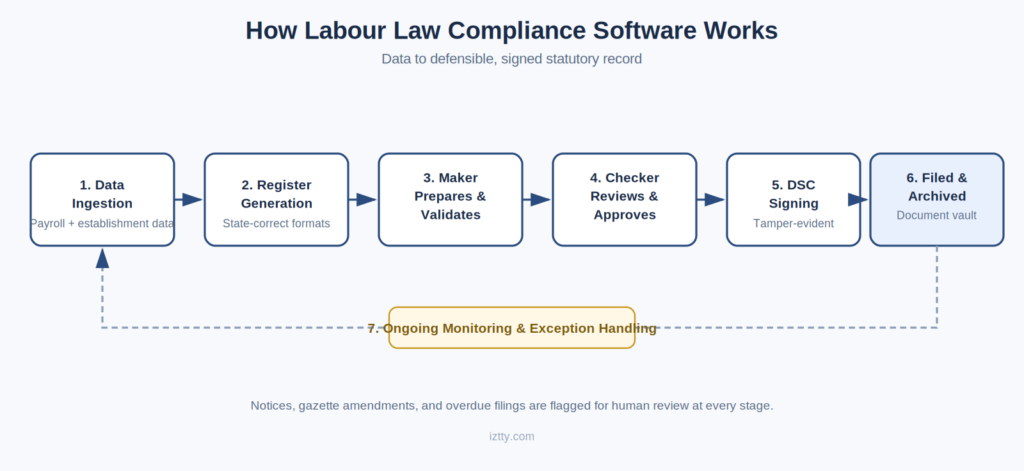
Use this as a literal checklist against any vendor’s feature list – not as a wishlist, but as the minimum bar for something to genuinely qualify as labour law compliance software rather than a payroll add-on:
- Labour Compliance Management – LWF registration and contribution tracking, with state-specific rate automation across every LWF-applicable state (roughly 16 states apply LWF, each with different rates and periodicity).
- Factory Compliance Management – Factories Act 1948 registration, licence renewal with expiry alerts, and the statutory registers a factory inspector will ask for (commonly the register of adult workers, the overtime register, and the leave-with-wages register).
- Shop & Establishment Compliance – state-specific S&E register formats and licence renewals, tracked across every location, not just headquarters.
- Payroll Compliance Management – EPF (ECR filing by the 15th of the following month), ESIC, Professional Tax, and LWF, ideally integrating with your existing payroll/HRMS rather than replacing it.
- Vendor/Contractor Compliance Audit – digital audits of contractor EPF/ESIC/wage registers, with an auto-calculated compliance score per vendor and documentation supporting principal-employer due diligence under CLRA.
- CLRA & Contract Labour Compliance – contractor licence tracking and the half-yearly return (commonly Form XXIV, due within 30 days of the close of each half-year) alongside the principal employer’s annual return.
- Maker-Checker-DSC Workflow – a governance layer where one person prepares a register, a second independently approves or rejects it, and the final version is signed with a Digital Signature Certificate before archiving.
- AI-Assisted Notice Response – automated reading of PF/ESIC/Labour/Factories Act notices, extraction of the allegation and deadline, and a drafted reply with a supporting evidence checklist.
- Regulatory Change Intelligence – monitoring of gazette notifications and state amendments, with matched action items for human review (never auto-enforcement without a human check).
- Compliance Score / Health Score – a live, act-wise and state-wise score with risk banding, built from actual register/filing status rather than self-reported task completion.
- Dashboards & Reporting – a consolidated multi-branch, multi-state view for executives, alongside location-level detail for plant HR heads and compliance managers.
- Role-Based, Multi-Branch Access – distinct Maker, Checker, and DSC-holder roles, scalable across every state and branch you operate in.
How labour law compliance software actually works
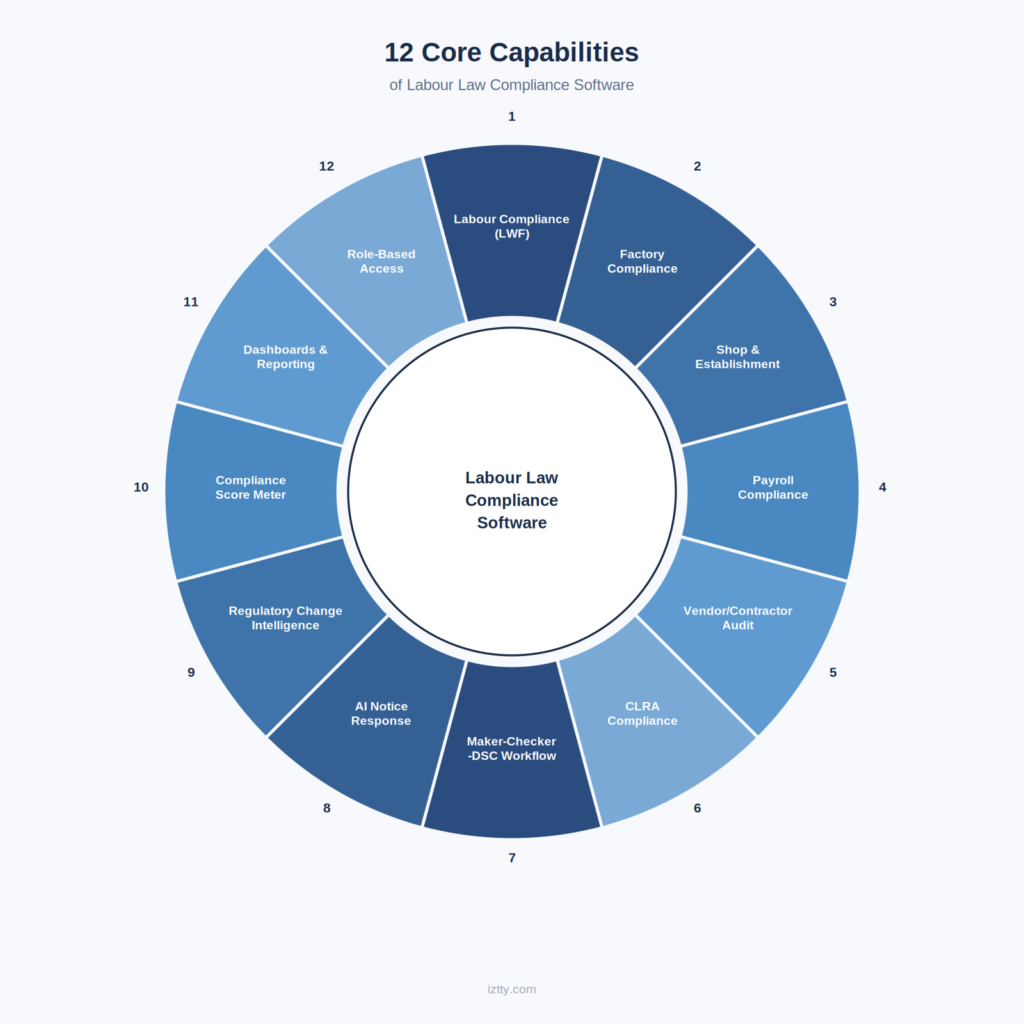
Stripped of marketing language, the underlying workflow in a well-built platform looks like this:
- Data ingestion: employee, salary, and establishment data flows in from your existing HRMS/payroll system (via integration or file import) alongside establishment-level data – factory licences, S&E registrations, contractor details – entered or migrated once.
- Register generation: the platform generates the actual statutory register formats – Factories Act forms, S&E state formats, CLRA forms – populated from that data, rather than requiring manual re-entry into a separate document.
- Maker-Checker review: a designated preparer validates the generated register; a designated checker independently reviews it and either approves or rejects it with a documented reason.
- DSC signing: the approved register or filing is signed using a Digital Signature Certificate, creating a legally recognisable, tamper-evident record.
- Filing and archiving: the signed document is filed with the relevant authority where the process supports it, and archived in a document vault with full version history.
- Ongoing monitoring: licence expiry dates, contractor compliance scores, and upcoming deadlines are tracked continuously, surfaced through a compliance score and dashboard rather than requiring manual calendar-checking.
- Exception handling: when a notice, gazette amendment, or overdue filing appears, it’s flagged for human review – AI assists with drafting and extraction, but the compliance manager or consultant makes the final call.
What integration with your existing payroll/HRMS actually involves
In practice, integration happens one of two ways: an API connection that syncs employee and salary data on a defined schedule (typically daily or on every payroll run), or a structured file import (commonly CSV or Excel templates matched to the platform’s data schema) run manually or on a set cadence by the compliance team. The API route is preferable for larger, multi-location organisations where manual file handling across branches becomes its own operational burden; the file-import route is often perfectly adequate for smaller, single-location setups. Either way, the payroll/HRMS system should remain the system of record for salary data – the compliance platform consumes that data to generate registers and filings, rather than duplicating or overriding it.
A worked example: why fragmentation is the real problem
Consider a mid-size company with a factory in Maharashtra, a warehouse in Haryana, and retail outlets in Karnataka and Tamil Nadu, using two staffing vendors for warehouse and security staff. Without a consolidated platform, this company is realistically maintaining: one Factories Act register set for the Maharashtra factory (state-specific format), separate S&E registrations and registers for Haryana, Karnataka, and Tamil Nadu (three different state formats), two separate CLRA contractor relationships to track and audit, and the standard EPF/ESIC/PT/LWF payroll-statutory layer across all locations – each with its own renewal cycle, its own signing authority, and its own risk if missed.
That’s not four compliance tasks; it’s closer to fifteen to twenty distinct, recurring obligations, each capable of independently triggering a penalty, an inspection finding, or a CLRA liability event. This is the concrete version of the “fragmentation” this entire category of software exists to solve.
The three types of labour law compliance software (and which one you need)
At a high level, the market splits into three categories: HRMS platforms with a bundled payroll-statutory module, specialist statutory compliance platforms built around registers and contractor compliance, and enterprise GRC platforms covering compliance far beyond labour law. If you’re still deciding which category fits your organisation, our dedicated comparison guide walks through the decision framework in detail – this guide assumes you’ve identified that you need the specialist category and focuses on how to evaluate and implement it well.
A quick way to sanity-check which category actually fits before you start a formal evaluation: if your primary exposure is EPF/ESIC/PT/LWF only (no factory, no contract labour, single state), start with your existing HRMS vendor and ask what their compliance module actually covers before assuming you need anything else.
If you have any factory registration, any contract labour, or any multi-state footprint, go straight to evaluating specialist platforms – an HRMS upgrade conversation will not resolve that gap. If your compliance obligations extend meaningfully beyond labour law (environmental, sector-specific, corporate governance) alongside labour compliance, an enterprise GRC platform’s broader scope may be worth the trade-off in labour-specific depth.
Typical implementation timelines by company profile
| Company profile | Realistic timeline to full go-live |
|---|---|
| Single office, single state, no factory, no contract labour | 3–4 weeks (largely configuration and training; minimal register migration) |
| Single factory, single state, some contract labour | 6–8 weeks (includes a full parallel-run cycle) |
| Multi-factory or multi-state retail, 3–5 locations | 10–14 weeks (staggered state-by-state go-live) |
| Enterprise, 10+ locations across multiple states, significant contract labour | 4–6 months (phased rollout, dedicated compliance owners per region) |
How to evaluate and choose labour law compliance software
A structured evaluation beats a feature-list comparison. Score prospective vendors against these dimensions:
| Evaluation dimension | What to actually ask |
|---|---|
| Register authenticity | Can they show your actual state’s Factories Act or S&E register format, populated with sample data – not a generic mockup? |
| State coverage | Which states are natively supported today, and what’s the process (and cost) to add a new state you expand into? |
| Signing workflow | Is Maker-Checker-DSC built into the core platform, or is signing still a manual, off-platform step? |
| Vendor/contractor compliance | Is CLRA vendor auditing a native module, or a manual checklist bolted onto a generic task tracker? |
| Notice response | Can you see an actual AI-drafted notice reply, not just a description of the feature? |
| Integration | Does it integrate with your existing payroll/HRMS (Tally, Zoho Payroll, Keka, etc.) or does it require duplicate data entry? |
| Consultant/advisory backing | Is the platform backed by people who’ve actually run labour/factory compliance audits, or is it software-only with no compliance expertise behind it? |
| Pricing structure | Per-employee, per-branch, or flat platform fee – and is vendor auditing/CLRA coverage included or a separate add-on? |
| Data migration | What’s included to migrate your existing registers and licence data, and how long does that typically take? |
| References | Can they connect you with an existing customer in a similar industry/state footprint for a reference call? |
Evaluation questions by persona
Different stakeholders in the buying process are, reasonably, optimising for different things. A shortlist that satisfies only one persona’s concerns tends to stall at the next approval stage:
- CFO: What’s the total cost of ownership including per-state expansion, and what’s the quantifiable penalty exposure this removes? (See the ROI framework below.)
- CHRO / Compliance Manager: Does this actually reduce the manual register-keeping workload, or does it just add another system to update alongside the old process?
- Plant HR Head / Factory Manager: Can I, at my specific factory, produce a correct register within the hour without calling head office?
- Company Secretary / Legal: Is the DSC signing process legally defensible, and is the audit trail something we could rely on in a dispute?
- Compliance Consultant managing multiple clients: Does the platform support multi-tenant, role-segregated access across client accounts from one login?
A 20-question RFP bank
For a formal evaluation, these questions – grouped by category – surface the gaps a demo alone won’t reveal:
Coverage: Which states do you natively support today? Which Acts are covered beyond EPF/ESIC/PT/LWF? Do you support Factories Act, S&E, and CLRA registers specifically, or only payroll-statutory filings? What’s your process and timeline to add a new state?
Workflow & governance: Is Maker-Checker built into the core workflow? Do you support DSC-based signing natively, and which DSC providers are supported? What’s your document retention and archiving policy, and for how long are records retained?
Vendor/contractor compliance: Can the platform audit a contractor’s EPF/ESIC/wage registers directly, or only track that an audit happened elsewhere? How is a vendor compliance score calculated, and how often does it refresh?
AI features: How does the notice-response feature work end to end – what does it read, what does it draft, and what requires human sign-off? How does regulatory change intelligence distinguish a proposed amendment from an enacted one?
Integration & data: Which payroll/HRMS systems do you integrate with today? What’s involved in migrating our existing registers and licence data? Where is our data hosted, and what access controls exist for DSC keys and sensitive documents?
Commercial: What’s included in the base price versus billed as an add-on? What does onboarding/implementation cost separately from the subscription? Can you provide a reference customer in our industry and state footprint? What’s the contract term and exit process if we choose to leave?
Implementation roadmap: a 5-phase rollout plan
Based on how compliance-technology rollouts typically succeed or stall, a realistic implementation follows five phases:
Phase 1 – Compliance gap audit (Weeks 1–2)
Before configuring anything, map every location, every applicable Act (Factories Act, S&E, CLRA, EPF, ESIC), every contractor, and the current status of each register and licence. This is the same exercise described in our comparison guide’s “30-minute gap-check” – done thoroughly, at scale, as the foundation for implementation, not a quick sanity check.
Phase 2 – Data migration and configuration (Weeks 2–5)
Migrate existing employee, payroll, establishment, and contractor data. Configure state-specific register formats for every location, and set up role-based access (who is a Maker, who is a Checker, who holds the DSC) for each branch.
Phase 3 – Parallel run (Weeks 5–8)
Run the new platform alongside your existing manual/spreadsheet process for one full filing cycle (typically one month, to capture at least one EPF/ESIC cycle) before fully cutting over – this catches configuration errors before they become live filing errors.
Phase 4 – Training and go-live (Weeks 8–10)
Train Makers, Checkers, and DSC holders at every location – not just the central compliance team – since a multi-branch rollout fails if only headquarters knows how to use the system. Go live with the new platform as the system of record.
Phase 5 – Monitoring and optimisation (Ongoing)
Review the compliance score monthly, use it to prioritise which state or Act needs attention, and revisit vendor/contractor scores quarterly as part of vendor management, not just at contract renewal.
Change management: getting buy-in from branch and plant teams
The most common reason a technically sound implementation underperforms isn’t the software – it’s that branch and plant-level staff experience it as “one more system to update” rather than a replacement for their existing manual process.
Three things materially improve adoption: involving at least one plant HR head or branch compliance owner in Phase 1 (the gap audit) so the rollout reflects real local pain points rather than a headquarters-only view; explicitly retiring the old spreadsheet or manual process at go-live rather than letting it run in parallel indefinitely “just in case”; and tying the compliance score’s local (branch/factory-level) view to something the local team already reports on, so it feels like better visibility into their own work rather than a new surveillance layer imposed from above.
Budget planning: what to actually allocate
Beyond the subscription line, realistic budget planning should separately account for: one-time implementation and data migration cost (often quoted separately from the subscription), any per-state configuration cost if expanding beyond the initial rollout states, internal staff time for the gap audit and parallel run (this is real cost even though it doesn’t appear on a vendor invoice), and DSC procurement/renewal cost for each designated signing authority if your organisation doesn’t already hold sufficient DSCs.
Underestimating the internal staff-time component is the most common budgeting gap – the gap audit in particular is not something a vendor can complete without significant input from your own compliance and HR teams.
Vendor red flags worth walking away from
- Inability or reluctance to show a populated, state-correct register format during the sales process – a real platform should be able to demonstrate this without a lengthy custom-build promise.
- Pricing that bundles “unlimited states” without clarifying whether that means genuinely native register formats for each state or a generic template applied everywhere.
- No clear answer on DSC key custody and access control when asked directly.
- A sales process that can’t connect you with any existing customer for a reference call, in a market where several vendors do publish or can arrange this.
- Vague or evasive answers about what happens to your data and DSC-signed records if you switch vendors later.
A note on the current competitive landscape
India’s labour law compliance software market currently splits along the lines described in Section 5: HRMS platforms with a payroll-statutory add-on, enterprise GRC platforms tracking compliance broadly across many regulatory domains, and specialist platforms built specifically around labour, factory, and CLRA registers.
Very few vendors write the comparison between these three categories head-on for buyers – most market themselves within their own category rather than helping a buyer figure out which category they actually need first. That gap is exactly why Sections 5 and 6 of this guide exist as a standalone decision aid, independent of any specific vendor’s pitch.
The ROI framework: calculating cost of non-compliance vs. cost of software
Rather than treating this as a soft “risk reduction” argument, build the comparison on two concrete columns:
| Cost of non-compliance (illustrative exposure) | Cost of the software |
|---|---|
| EPF late payment: 5–25% p.a. damages under Section 14B, plus 12% p.a. interest under Section 7Q, on the unpaid amount, compounding for every month of delay | Recurring subscription cost, typically scoped by employee count and branch count |
| Factories Act general penalty (Section 92): imprisonment up to 2 years or fine up to ₹1 lakh per contravention, per person (occupier and manager separately), plus ₹1,000/day for continuing contraventions | One-time implementation/migration cost |
| Staff time currently spent manually reconciling registers, chasing contractors for documents, and preparing for inspections – often underestimated because it’s spread across several people’s time rather than tracked as one line item | Reduced staff time on manual register-keeping, redirected to higher-value compliance analysis |
| Notice response time: several working days manually, per notice, across potentially dozens of notices a year for a multi-state employer | AI-assisted notice response reducing turnaround from days to hours, per notice |
| Reputational and operational cost of a failed inspection or contract dispute where records can’t be produced on demand | Not directly quantifiable, but the highest-leverage line in the comparison for board-level buy-in |
The honest way to present this internally: the software cost is fixed and predictable; the cost of non-compliance is variable, compounding, and – critically – attaches personally to named individuals (the occupier, the manager, the principal employer) under several of these provisions, not just to the company as an abstract entity. That personal-liability detail is often the single most persuasive line in a CFO or board conversation.
KPIs to track after go-live
Set these as standing agenda items in your monthly compliance review, so ROI is measured on an ongoing basis rather than argued once at purchase time and never revisited:
- Compliance score trend: month-over-month movement, and specifically which act or state is dragging the overall number down.
- Notice response time: average turnaround from receipt to filed reply, tracked per notice, to confirm the AI-assisted workflow is actually delivering the time savings it was bought for.
- Filing timeliness: percentage of EPF/ESIC/PT/LWF filings made before the deadline versus late, and the same for CLRA half-yearly and annual returns.
- Vendor compliance scores: tracked per contractor, with a defined escalation trigger (for example, a score drop below a set threshold triggers a documented follow-up, not just a dashboard flag nobody acts on).
- Licence/registration expiry lead time: how many days before expiry each renewal was actually completed – a consistently short lead time suggests the alert system isn’t being acted on early enough, even if nothing has lapsed yet.
- Audit readiness time: how long it actually takes to produce a complete register set on request, tested periodically with an internal spot-check rather than only finding out during a real inspection.
Multi-state and multi-branch rollout considerations
A single-state rollout and a multi-state rollout are different projects, not the same project done more times. Beyond the state-specific register formats already discussed, plan for: staggered go-live by state (don’t cut over five states simultaneously in Phase 4 – sequence them so early issues surface on a smaller footprint first), a designated compliance owner per state or region rather than one central person covering all branches, and a consolidated dashboard view that lets a CFO or compliance head see a national compliance score while each plant HR head or branch manager only sees and manages their own location’s detail.
Two details that catch multi-state rollouts specifically off guard: first, LWF applicability and rates differ meaningfully across the roughly 16 states where it applies – a single national LWF configuration will be wrong for at least some of your states, so this needs state-by-state setup, not a template. Second, state amendments to the Factories Act and S&E Act happen independently of the central Labour Codes timeline – a state can amend its own S&E register requirements at any time, unrelated to when it notifies its OSH Code rules, so regulatory change monitoring needs to track both layers separately for each state.
Data security and DSC key management
Because this category handles Digital Signature Certificates and sensitive employee/wage data across every branch, security questions belong in the same evaluation conversation as compliance coverage, not as an afterthought:
- Where is DSC key material stored, and who has access to it is signing authority restricted to designated DSC holders with logged, auditable usage?
- What access controls exist between branches – can a plant HR head at one factory see another factory’s wage data, or is access genuinely segregated by role and location?
- What’s the data residency and hosting arrangement, and does it meet your organisation’s internal data-handling policy, particularly for wage and employee personal data?
- What’s the incident response process if a data breach or unauthorised access is suspected?
These aren’t hypothetical concerns – Factories Act registers, S&E registers, and CLRA vendor audits all involve personal wage and employment data at scale across every location a company operates in, which makes access control and DSC governance a genuine part of the compliance posture itself, not a separate IT conversation.
What a successful rollout looks like: anonymized outcomes
Representative, anonymized outcome patterns from actual rollouts (published without identifying client details, used here as illustrative proof points rather than attributed case studies):
- A 14-factory manufacturer moved its live compliance score from 61% to 88% within 90 days of go-live – the improvement came primarily from closing gaps in Factories Act register currency across factories that had previously been tracked inconsistently by individual plant HR teams.
- A 40-client compliance consultancy cut EPF/ESIC notice response time from roughly 5 days to about 4 hours per notice using AI-assisted notice drafting – a change that compounded into materially more service capacity across their entire client book, not just faster response for one client.
- A retail chain operating across multiple states consolidated previously fragmented, branch-by-branch S&E tracking into a single dashboard view, closing several lapsed renewal risks that had gone undetected under the prior branch-managed approach.
- A construction sector principal contractor used vendor compliance auditing to formalise contractor licence and wage-register checks that had previously been informal and inconsistent across sites – directly addressing the CLRA principal-employer exposure discussed throughout this guide.
The common thread across all four: the biggest measurable improvement came from consolidating previously fragmented, person-dependent tracking into one system – not from any single feature in isolation.
Glossary
- ECR: Electronic Challan-cum-Return – the monthly EPF filing and payment mechanism, due by the 15th of the following month.
- DSC: Digital Signature Certificate – a legally recognised digital signature used to sign statutory filings and registers.
- LWF: Labour Welfare Fund – a state-administered welfare contribution applicable in roughly 16 states, each with its own rate and periodicity.
- S&E: Shops & Establishment Act – state-specific legislation governing registers and licensing for commercial establishments.
- CLRA: Contract Labour (Regulation & Abolition) Act, 1970 – governs contract labour engagement and principal-employer obligations.
- Principal employer: the entity engaging a contractor to supply labour, carrying statutory obligations under CLRA independent of the contractor’s own obligations.
- Maker-Checker: a two-person governance control where one person prepares a record and a second independently reviews and approves it.
- Compliance score: a consolidated, typically 0–100% metric reflecting how current an organisation’s statutory obligations are, ideally broken down act-wise and state-wise.
- OSH Code: the Occupational Safety, Health and Working Conditions Code, 2020 – the Labour Code that will eventually absorb the Factories Act and CLRA once state rules are notified.
- Shram Suvidha portal: the central government’s combined-return online filing platform covering several central labour laws.
Future-proofing for the Labour Codes transition
India’s four Labour Codes came into effect on 21 November 2025, with Central Rules notified in May 2026. State-level rules remain a rolling, state-by-state process – some states have notified final rules, many remain at the draft stage as of mid-2026. Until a given state notifies its rules, the transitional position generally requires continued compliance with the existing Acts (Factories Act, S&E Act, CLRA, EPF Act, ESI Act) alongside already-operative Code provisions such as the Code on Wages’ 50% rule (basic pay plus dearness allowance must equal at least 50% of total remuneration, directly affecting PF and gratuity calculations).
When evaluating software today, ask specifically how the vendor handles this two-layer reality: does the platform track both the legacy register requirements and the incoming Code-based obligations, and does it clearly flag which layer applies in which state at any given time? A platform that only reflects one layer will eventually be wrong for part of your compliance calendar as states transition at different speeds.
What the four Codes will eventually consolidate
For context on where this is heading: the Code on Wages, 2019 consolidates the Payment of Wages Act, Minimum Wages Act, Payment of Bonus Act, and Equal Remuneration Act. The Industrial Relations Code, 2020 consolidates the Trade Unions Act, Industrial Employment (Standing Orders) Act, and Industrial Disputes Act. The Code on Social Security, 2020 consolidates the EPF Act, ESI Act, Maternity Benefit Act, and Payment of Gratuity Act, among others, and extends coverage frameworks toward gig and platform workers.
The Occupational Safety, Health and Working Conditions Code, 2020 consolidates the Factories Act, the CLRA, and the Inter-State Migrant Workmen Act – meaning the register-level obligations discussed throughout this guide will eventually live inside the OSH Code framework, once state rules complete that transition.
Software procured today should be evaluated on whether the vendor has a stated roadmap for absorbing OSH Code-based register formats as they’re notified state by state – not just on how well it handles the current Factories Act and CLRA requirements. Ask directly: “when Maharashtra (or your specific state) notifies its OSH Code rules, what changes on our end, and how much notice will we get before it takes effect?”
Common implementation mistakes
- Treating it as an IT project instead of a compliance project. The compliance team, not IT, should own the gap audit and the register configuration – IT should support data integration, not drive requirements.
- Skipping the parallel run. Cutting over immediately without a parallel cycle means the first real-world configuration errors show up in a live statutory filing, not a test one.
- Training only headquarters. A multi-branch platform that only the central team knows how to use collapses back into “send it to head office to handle” – which defeats the purpose of decentralised, role-based compliance ownership.
- Ignoring vendor/contractor onboarding. Migrating your own company’s data without also onboarding your contractors into the vendor compliance module leaves the CLRA exposure – often the largest single risk area – outside the new system.
- Choosing on price before checking register authenticity. A cheaper platform that can’t actually produce your state’s correct Factories Act register format isn’t cheaper – it just moves the cost to the moment an inspector finds the gap.
Implementation notes by sector
The five-phase roadmap above holds across industries, but the emphasis shifts by sector:
- Manufacturing: Phase 1 (gap audit) is the longest phase here, because Factories Act register history across multiple factories needs careful reconciliation before migration.
- Retail: Phase 2 (configuration) is the heaviest lift, since each new state requires its own S&E register configuration – sequence expansion states deliberately rather than configuring all at once.
- Staffing & Contractors: Vendor/contractor onboarding (flagged as a common mistake above) is not optional here – it is effectively Phase 2 for this sector, since the business’s core exposure is the CLRA relationship itself.
- Construction: High workforce turnover means Phase 5 (ongoing monitoring) matters more than a one-time rollout – the register data changes fast enough that monthly review cadence should be non-negotiable.
- IT/Technology Services: Often the fastest implementation, since Factories Act and CLRA exposure is typically minimal – but don’t skip Phase 1 entirely, since multi-city office expansion still triggers new S&E registrations that are easy to miss.
FAQs
Is labour law compliance software mandatory in India?
No specific law mandates the use of software – the underlying registers, filings, and licences are mandatory, and can technically be maintained manually. In practice, manual maintenance becomes unreliable past a small number of locations or contractors, which is why software adoption is a practical necessity rather than a legal one for most multi-location or multi-vendor employers.
How is labour law compliance software different from an HRMS?
An HRMS is built around payroll and employee records, with compliance limited to EPF/ESIC/PT/LWF calculations. Labour law compliance software is built around the establishment and its statutory registers – Factories Act, S&E, and CLRA – which an HRMS does not natively manage. See our dedicated comparison guide for the full breakdown.
Can labour law compliance software integrate with my existing payroll system?
Most specialist platforms are designed to integrate with common payroll/HRMS tools (Tally, Zoho Payroll, Keka, and similar) via API or structured file import, so payroll remains the system of record for salary while the compliance platform handles registers, licences, and vendor auditing.
How long does implementation typically take?
For a single-state, single-location rollout, 6–8 weeks including a parallel run is a reasonable estimate. Multi-state, multi-factory rollouts typically take longer, both because of state-specific configuration and because a staggered go-live by state is safer than a simultaneous national cutover.
What happens to our existing paper/spreadsheet registers during migration?
A proper migration digitises and imports existing register data as the historical record, rather than starting the digital register from zero – this preserves continuity for any register that might be reviewed retrospectively during an inspection or audit.
Do we still need a compliance consultant if we have compliance software?
Software automates the mechanical work – register generation, filing reminders, notice drafting – but doesn’t replace human judgement on ambiguous regulatory questions, especially during the current Labour Codes transition where interpretation genuinely varies by state and evolves as rules are notified. Many organisations run software alongside an advisory relationship rather than choosing one or the other.
How is a compliance score different from a simple checklist?
A checklist tells you what tasks are marked complete. A compliance score, done well, is derived from actual register and filing status – licence expiry dates, filing history, contractor audit results – and is broken down act-wise and state-wise with a risk banding, giving a more accurate and more actionable picture than self-reported task completion.
What’s the biggest hidden cost in labour law compliance today?
Contract labour and vendor compliance is the most commonly underestimated exposure – principal employers frequently assume a contractor’s compliance is the contractor’s problem, when CLRA can attach liability to the principal employer if the contractor defaults. This is also the area least likely to be covered by a payroll-only tool.
Should a growing startup buy this now, or wait until we’re bigger?
The right trigger isn’t headcount – it’s whether you’ve crossed any of the underlying thresholds: engaging any contract labour, operating in more than one state, or opening any factory/manufacturing premises. Crossing any of these creates real statutory obligations regardless of overall company size, and waiting for “bigger” often means the gap has already existed for some time before anyone notices.
How do I get a free assessment of where we currently stand?
A structured compliance audit against your specific state and Act exposure – not a generic checklist – is the fastest way to see the real gap. Book a free compliance audit to get this mapped for your organisation specifically.
Is there a free or open-source option for labour law compliance in India?
Generic open-source GRC or task-tracking tools exist, but none provide India-specific, state-validated statutory register formats out of the box – building and maintaining accurate Factories Act, S&E, and CLRA formats across 28+ states is itself a significant, ongoing compliance research effort, which is why this category is dominated by specialist commercial platforms rather than open-source projects.
What happens if we switch vendors later – is our data portable?
This should be a specific commercial-evaluation question (see the RFP bank above) rather than an assumption – ask explicitly what export formats are available for your historical registers and filings, and whether DSC-signed documents remain independently verifiable outside the platform after you leave.
How often should we re-run the compliance gap audit after go-live?
At minimum annually, and immediately after any material change – a new factory, a new state, a new large contractor relationship, or a significant Labour Codes state notification – rather than treating the original Phase 1 audit as a one-time exercise.
Does this help with filings on the government’s Shram Suvidha portal?
The Shram Suvidha portal is the government’s own combined-return filing platform covering several central labour laws. Good compliance software should generate the underlying register and filing data in a format ready for whichever government portal a given filing actually requires (Shram Suvidha, the EPFO Unified Portal, or ESIC’s portal, depending on the filing type), but ask any vendor directly whether they support a direct integration or whether your team still needs to manually transfer the final data – this varies meaningfully by vendor and by filing type.
Can one compliance manager realistically run this across multiple states alone?
With the right platform, one central compliance manager can meaningfully oversee multi-state compliance – reviewing a consolidated dashboard, prioritising by risk score, and delegating Maker/Checker tasks to local staff – but they shouldn’t be the sole point of failure for every state’s register preparation. The role-based, multi-branch architecture described earlier exists specifically so local staff can prepare and the central manager can review, rather than one person doing everything themselves.
What internal roles do we need to run this well?
At minimum: a designated Maker (prepares registers/filings) and Checker (reviews and approves) per location or region, at least one DSC holder authorised to sign, and a central compliance owner who monitors the overall compliance score and coordinates across locations. Smaller organisations can combine some of these roles across fewer people; larger, multi-state organisations typically need this structure replicated per region.
Related reading: For the full HRMS-vs-specialist-platform decision framework, see our companion guide. For CLRA-specific vendor compliance detail, see iztty.com/clra-compliance. For the platform’s AI-assisted notice response capability in detail, see iztty.com/ai-features.
Sources checked
Regulatory facts in this guide were checked against: the Ministry of Labour and Employment (labour.gov.in), EPFO (epfindia.gov.in), ESIC (esic.gov.in), and bare Act text via India Code (indiacode.nic.in), current as of August 2026. State-level Labour Codes rule notification status changes on a rolling basis — verify current status for your specific operating states before relying on any deadline in this guide.
About this guide
This guide was developed from a practitioner standpoint, drawing on Futurex Management Solutions’ 10+ years of hands-on labour, factory, and CLRA compliance consulting work across manufacturing, retail, staffing, and construction clients in India, alongside the platform architecture and anonymized outcome data of Iztty. Every regulatory figure, form reference, and deadline cited above was checked against primary sources (bare Act text via India Code, EPFO, ESIC, and the Ministry of Labour and Employment) rather than secondary summaries, and is dated to August 2026 – because Labour Codes state-level notification is an actively moving target, readers should re-verify any specific deadline against current state notifications before relying on it for a compliance decision.
A final word: software is necessary, not sufficient
It’s worth closing on a point that’s easy to lose in a buying guide this detailed: no platform, however well built, removes the need for a human compliance owner who understands your specific state and sector exposure. What good labour law compliance software does is make that person’s job tractable at scale – turning sixty scattered, easy-to-miss obligations across multiple states, factories, and vendors into one visible, prioritised, defensible system of record. The organisations that get the most value from this category treat the software as infrastructure for a compliance function they’re already investing in, not as a substitute for having one.