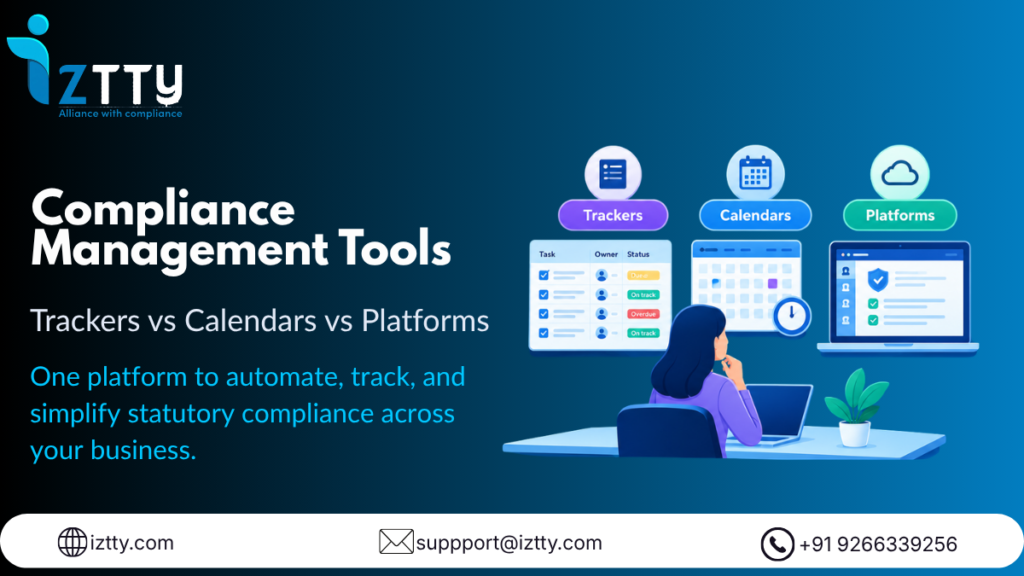
“Compliance management tools” is a search phrase that returns three genuinely different kinds of products, and most comparisons never separate them. A Google Calendar reminder for the EPF due date is a compliance management tool. A shared spreadsheet tracking Shops & Establishment renewals across branches is a compliance management tool. So is a dedicated platform that generates state-specific Factories Act registers automatically. Comparing these by price or features misses the actual question, which tool does the specific job you need done, because a calendar reminder and a register-generation engine aren’t competing products, they’re solving different problems entirely.
This guide breaks Indian statutory compliance down into six concrete jobs and shows which category of tool, simple tracker, calendar/reminder system, or dedicated platform, actually gets each one done, so you’re matching the tool to the job rather than buying based on category hype. If you want a head-to-head comparison of specific software vendors instead, see our Compliance Management Software: A Buyer’s Guide. This piece works at the tool-category level, one step before you’re comparing named products.
The Three Tool Categories, Defined Honestly
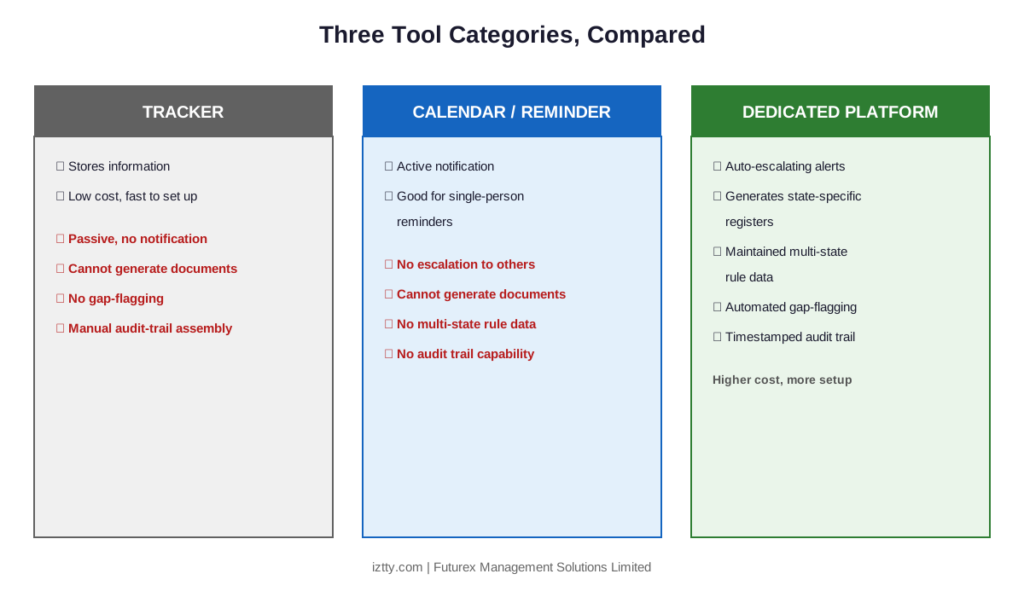
Trackers (spreadsheets, shared sheets, basic databases) store information: due dates, renewal status, documents collected. They don’t do anything on their own, they’re only as current as the last person who updated them, and they have no built-in way to flag that an update is overdue.
Calendars and reminder systems (Google Calendar, Outlook reminders, task management apps like Asana or Trello configured for compliance) add a notification layer on top of dates. They’re good at telling you something is due. They do nothing to help you actually prepare the filing, generate the correct register format, or verify a vendor’s documentation.
Dedicated compliance platforms combine data storage, automated alerts, document generation in the correct statutory format, and often a review/sign-off workflow. They cost more and take longer to set up than the first two categories, which is exactly why many companies default to trackers and calendars long after they’ve outgrown them.
Job 1: Tracking Filing Deadlines
A shared spreadsheet with due dates works for this job at small scale, provided someone checks it regularly, which is the actual failure point: a spreadsheet doesn’t notify anyone, it just sits there. A calendar app with recurring reminders closes that gap for a single person, but breaks down the moment the task needs to transfer to someone else, when the owner is on leave, or when a reminder gets dismissed without the EPF ECR filing actually being completed.
A dedicated platform wins this job once you have more than a handful of recurring filings, because it escalates to a second person automatically if the first doesn’t act, which neither a spreadsheet nor a personal calendar does on its own.
Job 2: Generating State-Specific Registers and Returns
This is where trackers and calendars both fail completely, neither one generates a document. A Factories Act Form 25 Muster Roll or Form 17 Overtime Register has to be produced in a specific, state-validated format, and a spreadsheet template someone built in-house drifts out of date the moment a state amends its format, often without anyone noticing until an inspector flags it. This job genuinely requires a platform with state-specific register templates built in and maintained, which is a structural requirement, not a nice-to-have.
Job 3: Managing Multi-State Rule Differences
A company operating in Maharashtra, Karnataka, and Tamil Nadu is managing three different Shops & Establishment renewal cycles, three different Professional Tax slabs, and potentially three different Labour Welfare Fund contribution rates. A spreadsheet can list all of this, but keeping it current across three states’ independent amendment schedules is a maintenance burden most internal teams underestimate until something slips. A platform with state-specific rule data built in and actively maintained is the only category that scales past two or three states without a dedicated full-time tracker.
Job 4: Vendor and Contractor Documentation
Collecting monthly EPF/ESIC proof from every active contractor, required under the Contract Labour (Regulation and Abolition) Act, 1970 to document that a company has been actively verifying contractor compliance, is a recurring collection-and-verification task. A spreadsheet can log what’s been collected, but it won’t flag a contractor who’s gone quiet for two months unless someone actively checks it weekly. A platform with automated contractor documentation tracking and a compliance score surfaces this gap without anyone having to remember to look. We cover the liability mechanism this job protects against in Vendor & Contractor Compliance: Managing Principal Employer (PE) Liability.
Job 5: Responding to a Regulatory Notice
None of the three tool categories can draft a legal response for you, this job always needs human judgment. But the tool matters for the preparation speed: with a spreadsheet, pulling together the relevant filing history and supporting documentation for a notice period typically takes 3 to 5 days of manual reconstruction. A platform that already has that history organized and retrievable, and that can extract the specific allegation from a scanned notice, can compress that preparation window to a few hours, leaving more of the actual response deadline for legal review rather than document hunting.
Job 6: Maintaining an Audit-Ready Trail
Due diligence requests and EPFO/ESIC reviews commonly ask for 12 to 24 months of organized filing history. A spreadsheet-and-folder system can technically hold this, but assembling it on request, confirming which version of which register was actually the one filed, is slow and error-prone without a system that timestamps and archives each filing automatically. A maker-checker-DSC workflow, where a document is prepared, reviewed, digitally signed, and archived as one linked process, is specifically what makes this job fast rather than a multi-day scramble.
Which Tool Wins for Each Job: The Comparison
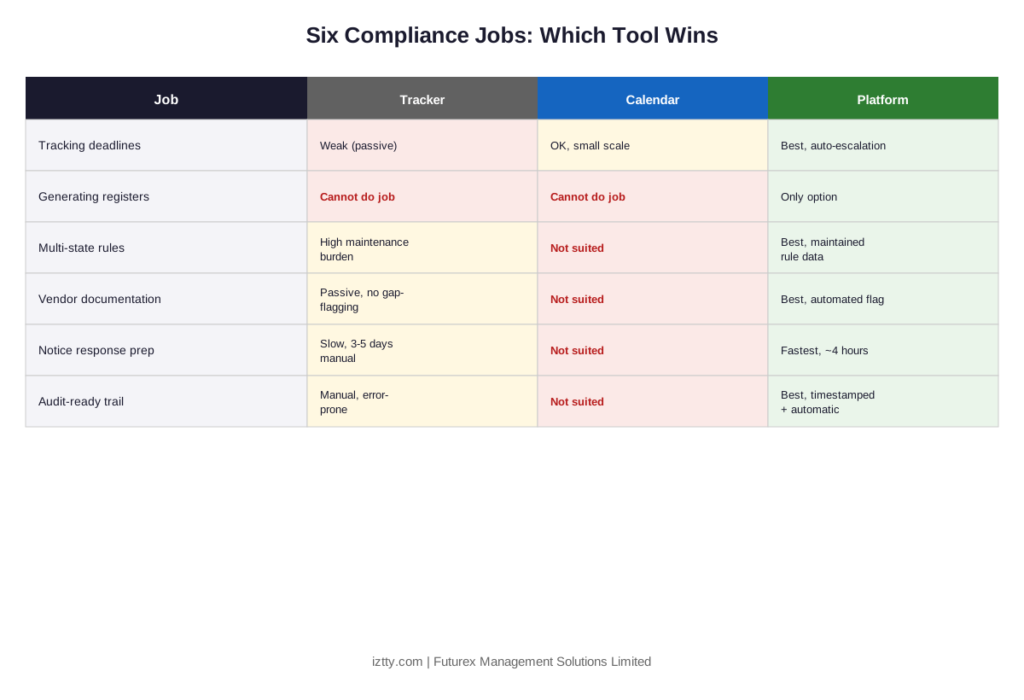
- Tracking deadlines: Platform (at scale); Calendar (single person, low volume); Tracker (weakest, no active notification)
- Generating state-specific registers: Platform only; Tracker and Calendar cannot do this job at all
- Multi-state rule management: Platform (built-in, maintained rule data); Tracker (possible but high maintenance burden); Calendar (not suited to this job)
- Vendor/contractor documentation: Platform (automated gap-flagging); Tracker (functional but passive); Calendar (not suited to this job)
- Notice response preparation: Platform (fastest document retrieval); Tracker (slow manual reconstruction); Calendar (not suited to this job)
- Audit-ready trail: Platform (automated, timestamped); Tracker (manual assembly, error-prone); Calendar (not suited to this job)
The pattern is consistent: trackers and calendars remain genuinely useful for the single job of personal reminders at very small scale, but every job involving document generation, multi-state consistency, or a defensible audit trail needs a dedicated platform, there’s no tracker-based workaround that holds up once a company crosses a handful of states, filings, or contractors.
Where Iztty Fits
Iztty is built around exactly this job breakdown rather than being a single generic “compliance software” feature set. Deadline tracking and escalation, state-specific register generation for Factories Act and Shops & Establishment obligations, multi-state rule data, CLRA vendor documentation tracking, and a maker-checker-DSC workflow for audit-ready sign-off are each a distinct module, built because each is a distinct job, not bundled as one undifferentiated feature. The AI Notice Response Assistant specifically targets Job 5, cutting notice preparation from the typical 3 to 5 days down to roughly 4 hours of review time by extracting the allegation and drafting a response directly from existing filing history.
A Practical Decision Framework
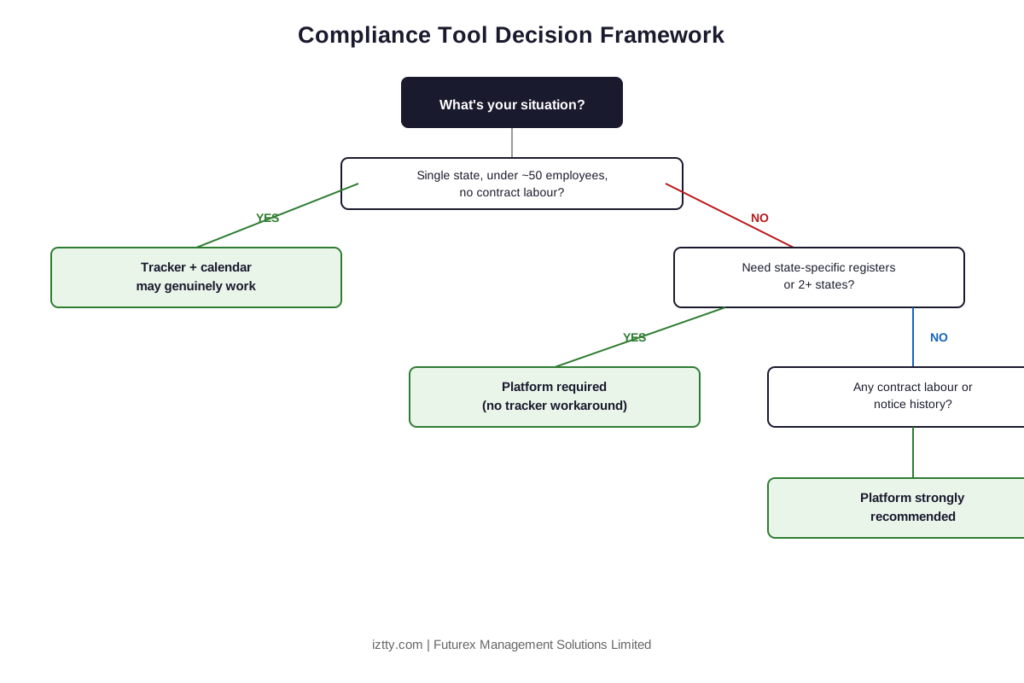
Match your situation to the right tool rather than defaulting to whatever you already have:
- Single state, under roughly 50 employees, no contract labour: a well-maintained tracker with calendar reminders can genuinely work, provided someone owns checking it weekly.
- Any state-specific register requirement (Factories Act, S&E): you need a platform, there is no tracker-based substitute for generating a compliant document.
- Two or more states: a platform’s maintained rule data starts paying for itself once manual upkeep across states becomes a part-time job for someone.
- Any contract labour engagement: a platform’s automated vendor documentation tracking closes a liability gap a spreadsheet structurally can’t catch proactively.
- Have received a notice, or are preparing for funding-round due diligence: an organized, platform-based filing history is the difference between hours and days of preparation.
If you want this mapped to your specific states, acts, and current tool setup, book a free compliance audit with Iztty, which includes a review of what your current tools are and aren’t covering.
FAQs
Is a spreadsheet enough for compliance management?
For deadline tracking alone, at very small single-state scale, it can work if someone actively checks it. It cannot generate state-specific registers or flag vendor documentation gaps on its own, regardless of company size.
What’s the difference between a compliance calendar and compliance management software?
A calendar tells you something is due. Compliance management software additionally generates the required documents in the correct format, tracks multi-state rules, and often includes a review and sign-off workflow, a calendar does none of this.
Can Google Calendar or Outlook reminders replace dedicated compliance software?
Only for the single job of personal deadline reminders. They have no mechanism for document generation, multi-person escalation, or audit trail archiving, which are the jobs that actually cause compliance failures at scale.
When should a company move from a tracker to a dedicated platform?
Typically when any of these appear: a second state of operation, the first contract labour engagement, a Factories Act register requirement, or the first time assembling filing history for due diligence or a notice takes more than a day.
Do compliance management tools generate statutory registers automatically?
Dedicated platforms do, in state-specific formats for acts like the Factories Act 1948 and state Shops & Establishment Acts. Trackers and calendar tools cannot generate statutory documents.
How much does a dedicated compliance management platform cost compared to a spreadsheet?
A spreadsheet has no direct cost but carries hidden labour cost in manual upkeep and the risk cost of gaps going unnoticed. Platform pricing typically scales with employee count and states covered; request a quote mapped to your specific scale for an accurate comparison.
Does a compliance management tool help with CLRA contractor compliance?
A tracker can log what’s been collected from contractors, but only a platform with automated gap-flagging reliably surfaces a contractor who’s stopped submitting EPF/ESIC proof before it becomes a liability exposure.
What is a Maker-Checker-DSC workflow and why does it matter for tool selection?
It’s a review process where one person prepares a document, a second reviews and approves it, and the approved version is digitally signed before archiving. It matters for tool selection because it’s the mechanism that makes an audit trail defensible, something no spreadsheet or calendar tool provides.
Can I use a mix of tools, a spreadsheet for some things and a platform for others?
Yes, this is common during a transition, but it reintroduces the core risk a platform solves: inconsistent visibility, since a gap in the spreadsheet-tracked portion won’t surface in the platform’s dashboard. Most companies consolidate once the mixed-tool gap causes a visible problem.
How do I know which job is actually causing my current compliance pain?
Ask where the most recent near-miss happened: a missed deadline points to the tracking job, a wrong register format points to the generation job, a vendor liability surprise points to the documentation job. The job that’s failing tells you which tool category you’re actually missing.