Compliance Management Software: A Buyer’s Guide for Indian Businesses
What Is Compliance Management Software, and What Should It Actually Do?
Compliance management software automates the registers, returns, and filings a business is legally required to maintain under India’s labour, factory, and tax laws, EPF under the EPF & MP Act, 1952, ESIC under the ESI Act, 1948, Factories Act 1948 registers, Shops & Establishment licences, and CLRA vendor documentation.
Done properly, it should do four specific things: generate the correct state-specific register or return format automatically, track every filing and licence deadline with advance alerts, route each document through a review step before it becomes a legal filing, and give a single, real-time view of risk exposure across every act and state a business operates in.
Most “compliance software” in the Indian market does some of this, not all of it. Knowing which part a given tool actually covers, versus which part it merely claims to cover, is the single most useful filter when evaluating options.
This distinction matters more than it sounds, because the search results for “compliance management software” are dominated by two different kinds of content: product pages from platforms built for one slice of the problem, and listicles comparing tools that are themselves mostly payroll or HRMS products with a compliance label attached. Neither tells you, directly, whether a specific tool covers factory registers, CLRA vendor liability, or a reviewed sign-off workflow, the three areas where coverage gaps actually cost companies during an inspection.
Who Needs Dedicated Compliance Management Software vs. an HRMS Module?
A single-state company with no factory operations and no contract labour can often get by on the compliance module bundled into its HRMS, since the core need is accurate EPF, ESIC, and Professional Tax deductions on payroll. The calculation changes once any of three things happen: the company is covered under the Factories Act and needs state-specific registers (Form 25, Form 5, Form 17), it operates in more than one state with different S&E and Professional Tax rules, or it engages contract labour and carries principal employer liability under CLRA.
At that point, dedicated compliance management software stops being a nice-to-have and starts being the only realistic way to avoid gaps.
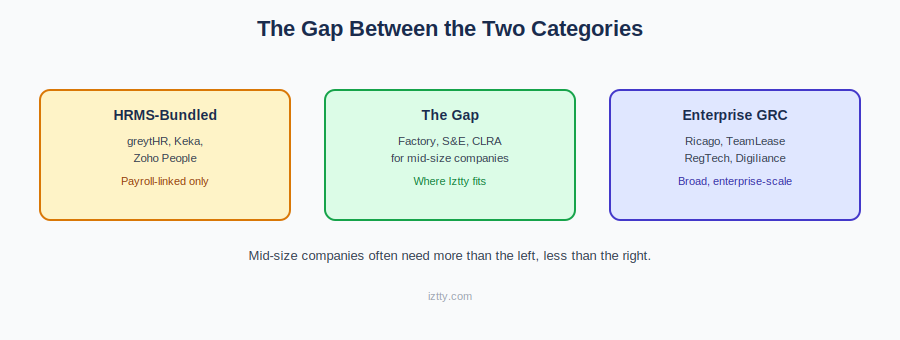
The Two Categories of Compliance Software in India, and the Gap Between Them
Almost every option in this market falls into one of two camps. The first is HRMS-bundled compliance, platforms like greytHR, Keka, Zoho People, and similar tools reviewed in roundups comparing HROne, Darwinbox, RazorpayX Payroll, Zimyo, PeopleStrong, ADP India, and Ramco HR, where compliance is one module alongside payroll, attendance, and leave.
The second is enterprise GRC and labour-law specialist platforms, firms like Ricago, which positions itself around tracking 1,500+ Acts and 35,000+ compliance obligations from one dashboard, or TeamLease RegTech’s RegTrack, a digital compliance management system the company describes as used across 3,300+ entities, or Digiliance’s cloud-based labour law compliance platform.
What almost none of this content addresses directly is the gap between the two camps: a mid-size manufacturer or multi-branch retailer that needs real factory, S&E, and CLRA coverage, but doesn’t need, or can’t justify the cost and complexity of, a full enterprise GRC deployment built for organizations tracking obligations across many sectors. This is the specific space a platform like Iztty is built to occupy.
It’s also worth naming the confusion this creates for buyers directly: round-ups that mix outsourced HR compliance services with software products, or that bundle labour compliance as one line item among payroll, attendance, and leave features, make it genuinely hard to tell whether a given tool was built to solve statutory compliance as its primary problem, or added compliance as a feature to an existing payroll product. The fastest way to tell the difference is to ask what happens for the specific obligations outside payroll, factory registers, licence renewals, vendor audits, since that’s where the two categories diverge sharply.
What Should You Look For in a Compliance Management System?
Act coverage that matches your actual exposure, not just EPF/ESIC/PT, but Factories Act, S&E, and CLRA if any of those apply to you
State-specific register generation that updates when a state amends its format, rather than a static template
A genuine review-and-sign-off workflow before any statutory document is filed, not a single-person upload-and-submit process
Vendor and contract labour tracking, if you engage contractors, since this is where principal employer liability concentrates
Integration with your existing payroll or HRMS tool, rather than requiring a full system replacement
A live, weighted risk score, not just a document repository you have to manually review to assess exposure
Built by a compliance consultancy, not software-only
No
Varies
Yes (10+ years, Futurex Management Solutions)
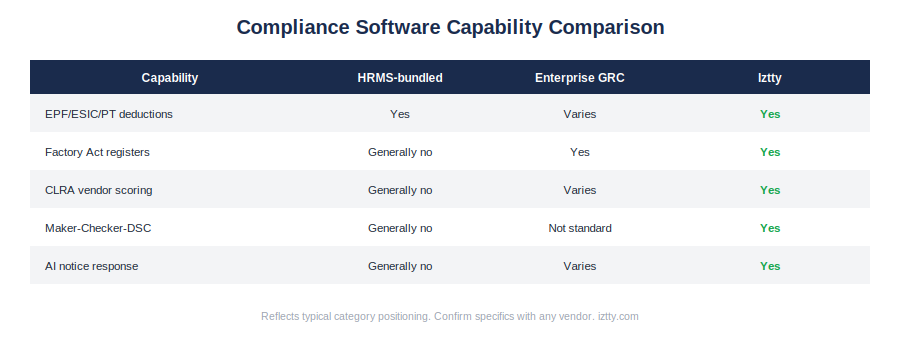
This comparison reflects each category’s typical positioning rather than every individual product’s exact feature set, since offerings do vary within each camp; confirm specifics directly with any vendor you’re evaluating, including us.
What Does Compliance Management Software Actually Cost in India?
Pricing in this category typically scales with three variables: employee count, number of states and branches, and which modules are needed (payroll-only compliance costs less than a full stack including Factory, S&E, and CLRA vendor compliance). Enterprise GRC platforms built for organizations tracking obligations across many sectors tend to price at the higher end, reflecting their broader scope.
HRMS-bundled compliance is often included or low-cost as an add-on, but covers a narrower slice of actual obligations. A dedicated platform scoped specifically for Indian statutory, labour, and vendor compliance, without enterprise-wide GRC overhead, typically sits in between.
The only way to get an accurate number for your specific situation is a direct conversation scoped to your employee count, states, and which modules you actually need.
How Do You Evaluate a Compliance Management Tool Before Buying?
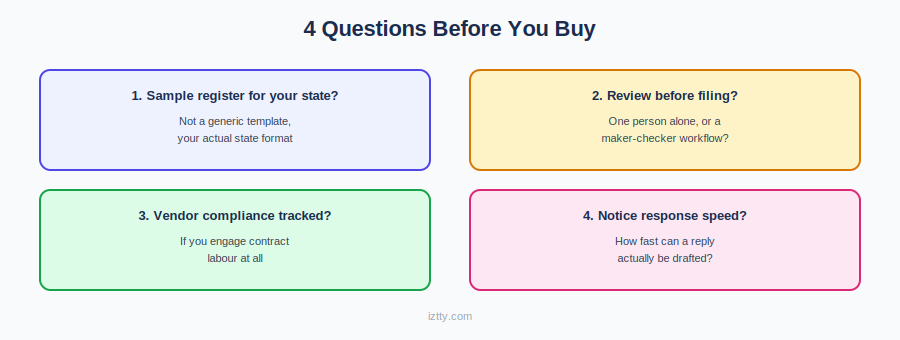
Run a short test before committing to any vendor, Iztty included: ask them to generate a sample register for your specific state and act (not a generic template), ask whether a filing can be submitted by one person alone or requires review, ask how vendor and CLRA compliance is tracked if you engage contract labour, and ask what happens when a labour notice arrives, specifically, how fast a response can realistically be drafted. The answers to these four questions tend to separate genuine statutory compliance coverage from a payroll tool with a compliance label attached.
What Makes Iztty’s Approach Different?
Three things, specifically. The Maker-Checker-DSC workflow means no single person can generate and legally sign a statutory document alone, every filing has a dated, auditable review trail. The AI Notice Response Assistant reads an EPF, ESIC, Labour, S&E, or Factories Act notice, extracts the specific allegation and deadline, and drafts a formal reply with an evidence checklist, cutting response time from the typical 3 to 5 days down to roughly 4 hours.
And the platform itself was built by Futurex Management Solutions Limited, a compliance consultancy that ran manual labour, factory, and payroll engagements for roughly a decade before automating the process, not a software team building compliance features from regulatory text alone. For the detail behind this history, see our full platform overview.
The typical starting point is a Free Compliance Audit, a state-and-act-wise review of your current exposure, followed by a walkthrough of whichever modules apply to your specific operations. This also happens to be the fastest way to directly compare Iztty against whatever else you’re evaluating, since you’ll be looking at your own data, not a generic demo dataset.
1. What is compliance management software? Software that automates the tracking, generation, and filing of statutory registers, returns, and contributions required under labour, factory, and tax laws, replacing manual tracking across spreadsheets and reminders.
2. What is the difference between HRMS and compliance management software? An HRMS manages payroll, attendance, and leave with compliance as one feature focused on payroll deductions; dedicated compliance management software additionally covers factory registers, licence renewals, vendor audits, and digital sign-off workflows that most HRMS platforms don’t handle natively.
3. What does compliance management software cost in India? Pricing depends on employee count, number of states and branches, and which modules are required; request a quote scoped to your specific situation rather than relying on a generic published price.
4. Is compliance management software only for large enterprises? No, mid-size manufacturers and multi-branch businesses with 50 to 100+ employees commonly need it once they cross a state, factory, or vendor-compliance threshold, well below enterprise scale.
5. What are the best compliance management software options in India? Options generally fall into HRMS-bundled platforms (payroll-focused) and enterprise GRC specialists (broad act coverage, enterprise scale), with a smaller set of platforms, including Iztty, built specifically for mid-size Indian statutory, labour, and vendor compliance without enterprise GRC overhead.
6. Does compliance management software cover the Labour Codes 2026 transition? The four Labour Codes are formally in effect since 21 November 2025, though detailed Central and State rules are still being finalized per the Ministry of Labour & Employment. A good compliance platform should track both current Act obligations and update as new rules are notified, rather than assuming either the old or new framework exclusively.
7. Can compliance management software integrate with my existing payroll system? Platforms like Iztty are built to integrate with existing tools such as Tally, Zoho Payroll, and Keka HR, so compliance runs alongside your current payroll data rather than requiring a replacement.
8. What is a compliance score or compliance health score? A live, weighted measure of your statutory compliance risk, built from inputs like filing timeliness, documentation completeness, and licence validity, broken down act-wise and state-wise with risk banding.
9. Does compliance management software handle vendor and contract labour compliance? This varies significantly by platform; dedicated vendor and contract labour compliance software (as opposed to a generic HRMS compliance module) typically runs digital contractor audits and tracks principal-employer liability documentation under CLRA.
10. How do I choose between compliance management systems? Map your actual obligations (which acts and states apply to you) against what each system actually covers, test it with a real sample register or filing for your specific state, and confirm pricing scoped to your company size before committing.
compliance-software-two-categories-gap.png – Alt: “The two categories of compliance software in India, HRMS-bundled and enterprise GRC, and the gap between them” – insert after Section 3.
compliance-software-comparison-table.png – Alt: “Comparison of HRMS, enterprise GRC, and Iztty across key compliance management capabilities” – insert after Section 5.
compliance-software-evaluation-checklist.png – Alt: “Four questions to ask before buying compliance management software” – insert after Section 7.
Payroll Statutory Compliance in India: A Complete Guide
What Counts as “Payroll Statutory Compliance” in India?
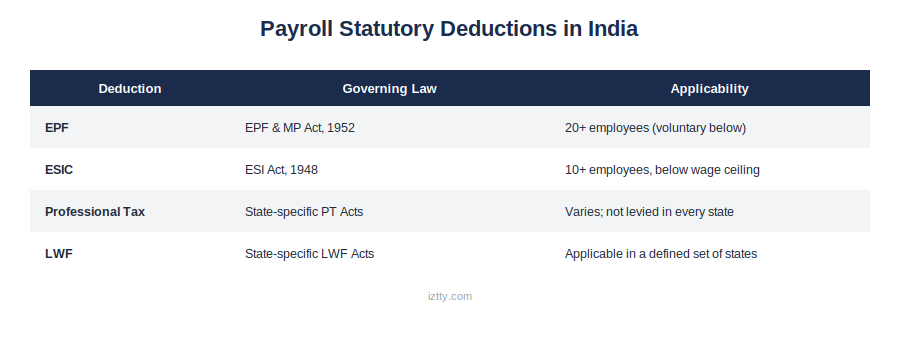
Payroll statutory compliance covers every deduction, contribution, and filing tied directly to running payroll each month: Provident Fund under the EPF & Miscellaneous Provisions Act, 1952, Employees’ State Insurance under the ESI Act, 1948, state-specific Professional Tax, and Labour Welfare Fund contributions in the states where it applies.
It’s a narrower slice than the full statutory compliance picture, it doesn’t cover factory registers or CLRA vendor documentation, but it’s the slice that touches every single payroll cycle, every month, for every employee.
Since 21 November 2025, this sits alongside a bigger structural shift: the four Labour Codes, including the Code on Wages, 2019, are now formally in effect, per the Ministry of Labour & Employment’s own notification, even though detailed Central and State rules are still being finalized. Existing EPF, ESIC, and PT frameworks continue to apply during this transition, which is what this guide covers in practical detail.
Payroll compliance also carries a different kind of scrutiny than annual filings like a factory licence renewal. Because EPF and ESIC filings happen every single month, for every employee, a single recurring error, a wrong wage base, a missed new joiner, a delayed remittance, compounds across pay cycles in a way an annual filing mistake doesn’t.
A one-time factory register error is a single finding; a payroll calculation error that’s been running for six months is six months of underpayment or under-contribution, discovered all at once.
Who Is Responsible for Payroll Compliance Inside a Company?
In most companies, this splits three ways in practice, even when it isn’t written down that way. Payroll or Finance runs the monthly calculation and deduction. HR or the Compliance Manager owns filing the actual returns, the EPF ECR, the ESIC contribution, the PT payment, on time. And the CFO or CHRO owns the consequence: if a filing is late, the penalty and the audit trail gap are theirs to answer for, regardless of which team missed the deadline.
A Compliance Consultant managing payroll compliance for multiple client companies faces the same three-way split multiplied across every client, which is the exact use case behind Iztty’s separate Compliance Consultant account type.
Which Statutory Deductions Actually Apply to Indian Payroll?
Establishments with 10+ employees (most states), employees below the notified wage ceiling
Professional Tax
State-specific PT Acts
Varies by state; not levied in every state
Labour Welfare Fund
State LWF Acts
Applicable in a defined set of states, not all; rate and periodicity vary by state
Each of these has its own contribution rate, its own wage ceiling or slab structure, and its own filing cadence, which is exactly why a single “payroll compliance” checklist that doesn’t separate these out by state tends to miss the state-specific variations. For the S&E-linked side of this (since several states tie PT registration to a valid S&E certificate), see our state-wise S&E registration guide.
When Are These Payroll Filings Actually Due Each Month?
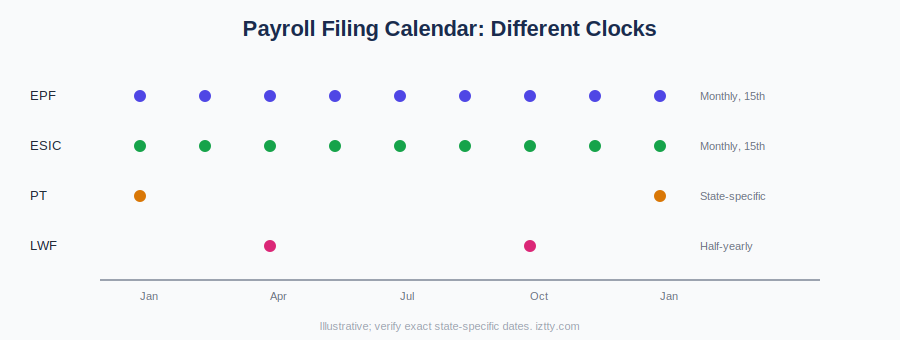
The EPF Electronic Challan cum Return (ECR) and the corresponding contribution are due by the 15th of the following month. ESIC contributions follow a similar monthly cycle, also due by the 15th. Professional Tax due dates vary by state, some are monthly, some are annual depending on the state’s own slab structure. LWF contributions are typically half-yearly or annual, again state-specific.
This mismatch in cadence, monthly for EPF/ESIC, variable for PT and LWF, is precisely why a single shared calendar reminder across all four often fails: a reminder tuned to the 15th-of-the-month EPF deadline doesn’t help with an LWF contribution due only twice a year in a completely different window.
Where Does Payroll Compliance Actually Break Down Across States?
A company running payroll for employees across five states isn’t running one PT calculation five times, it’s running five different PT slab structures, since PT is a state subject with no uniform national rate. The same applies to LWF, some states levy it, some don’t, and among those that do, the rate and periodicity differ. A payroll team that copies last state’s PT logic into a new state’s payroll run, without verifying that state’s specific slab, is a common and avoidable source of under- or over-deduction.
This is the same structural challenge covered in our pillar guide’s section on multi-state compliance management: the underlying math has to stay state-specific even when the payroll run itself is centralized.
A concrete version of this: a company running payroll centrally from Bengaluru for employees in Karnataka, Maharashtra, and Delhi needs three separate PT calculations applied correctly within the same payroll cycle, plus a check on whether LWF applies in each of those states and at what rate.
A payroll system that applies one state’s logic uniformly across all three, because that’s how the template was originally built, will get at least one of them wrong, and the error won’t surface until a state PT department cross-checks the filing against actual headcount.
Managing payroll compliance across multiple states manually?Talk to our compliance team about consolidating it into one view.
Why Does the Definition of “Wages” Matter Right Now?
The Code on Wages, 2019, one of the four Labour Codes now in effect, introduces a standardized definition of “wages” for calculating benefits like Provident Fund, Gratuity, and overtime, replacing the varying definitions currently used across different Acts.
Under the current transition, existing definitions continue to apply until the detailed rules are notified, but this is a genuine forward-looking risk for payroll teams: once the standardized definition takes effect, the base on which EPF and other contributions are calculated could shift, potentially changing the employer’s contribution cost.
Verify the current position directly against the Ministry of Labour & Employment’s published guidance before making any payroll structuring decision based on an assumption about this definition.
How Is Payroll Compliance Different From What Your HRMS Already Does?
Most HRMS platforms, greytHR, Keka, Zoho People, calculate the deduction correctly and generate the payslip. What they typically don’t do natively: route the EPF/ESIC/PT filing through a formal review-and-sign-off step before submission, maintain a state-validated register format for LWF where required, or flag a filing as at-risk before the deadline rather than after it’s missed.
This is the gap between “payroll software that calculates deductions” and “compliance software that manages the filing lifecycle,” and it’s a distinction almost none of the HRMS-bundled compliance modules or the generic listicle content comparing them actually draws out explicitly.
The practical test: ask whether your current system would catch a wrong PT slab applied to a Delhi-based employee before the filing goes out, or only after the state department flags it. If the answer is “only after,” the payroll calculation is working correctly but the compliance layer around it isn’t.
How Do You Build an Audit-Ready Payroll Compliance Trail?
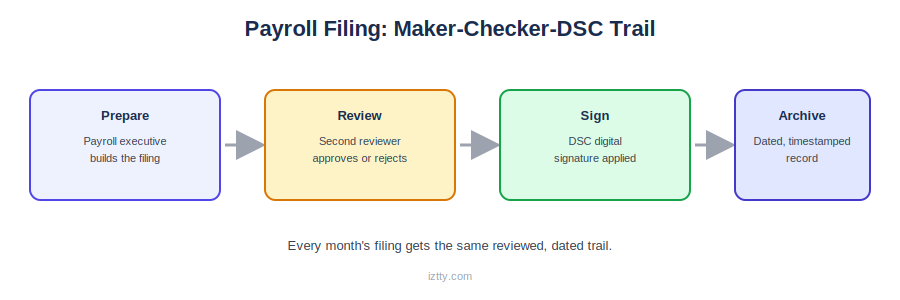
The documentation that actually protects a company during an EPFO or ESIC inspection isn’t just the filed return, it’s proof of the review that happened before filing. A Maker-Checker-DSC workflow creates this automatically: the payroll executive prepares the filing, a second reviewer approves it, and the approved version is digitally signed and archived with a timestamp, so there’s a dated record of who reviewed what, and when, for every single month’s filing. Our Maker-Checker-DSC workflow guide covers this process in detail.
How Does Automation Change Monthly Payroll Compliance?
A manual payroll compliance process depends on someone tracking four separate deadlines (EPF, ESIC, PT, LWF) across every state a company operates in, every single month, without missing one. This is exactly the kind of repetitive tracking statutory compliance automation India platforms are built to remove.
An AI compliance management India tool can generate the correct state-specific PT and LWF filing automatically, flag a filing at seven, three, and one day before the deadline rather than after, and route every one through the same Maker-Checker-DSC sign-off, rolling the result into the same compliance health score used for factory, S&E, and CLRA compliance. This is what our Provident Fund and Professional Tax modules, integrated with Tally, Zoho Payroll, and Keka HR, are built to do.
FAQs
1. What is payroll statutory compliance? The deductions, contributions, and filings tied directly to running payroll each month, primarily EPF, ESIC, Professional Tax, and Labour Welfare Fund, governed by their respective central and state Acts.
2. What is the EPF contribution due date? The Electronic Challan cum Return (ECR) and corresponding contribution are due by the 15th of the following month.
3. Does every state levy Professional Tax? No, PT is a state subject and not every state levies it; where it applies, the slab structure and due dates vary by state.
4. Is Labour Welfare Fund applicable everywhere in India? No, LWF applies only in a defined set of states, and among those, the rate and filing periodicity differ.
5. Does an HRMS handle all of this automatically? Most HRMS platforms calculate the deduction and generate the payslip correctly, but typically don’t provide a formal review-and-sign-off workflow or state-validated register formats for LWF, which is a separate compliance layer.
6. Are the Labour Codes already affecting payroll deductions? The four Labour Codes are formally in effect since 21 November 2025, but detailed Central and State rules, including the standardized wage definition’s practical application, are still being finalized. Current EPF, ESIC, and PT frameworks continue to apply during this transition.
7. What happens if an EPF or ESIC filing is late? Late remittance attracts interest and, in some cases, penal damages under the respective Act, in addition to creating a documented compliance gap that surfaces during future audits or inspections.
8. Can payroll compliance be managed across multiple states from one system? Yes, though the underlying PT and LWF calculations need to stay state-specific, since a centralized payroll run still has to apply each state’s own rates correctly.
9. What documentation should be kept for a payroll compliance audit? At minimum, the last several months of EPF/ESIC challans, PT payment proof, and a dated record of who reviewed and approved each filing before submission.
10. How is payroll statutory compliance different from CLRA or vendor compliance? Payroll compliance covers your own direct employees’ deductions and filings; CLRA and vendor compliance covers your liability for a contractor’s workforce, a distinct obligation covered in our guide on managing principal employer liability.
Compliance Risk Audit: How to Identify Gaps Before an Inspection
What Is a Compliance Risk Audit, and Why Not Wait for an Inspector to Run One?
A compliance risk audit is a structured, internal review of every statutory obligation your company carries, EPF, ESIC, Professional Tax, Factories Act registers, Shops & Establishment licences, and CLRA vendor documentation, run before a regulator asks for it, not in response to a notice. The distinction matters because an inspector’s review and your own audit are looking for the same gaps, but only one of them gives you time to fix what’s found before it becomes a finding on record.
Since 21 November 2025, this landscape has an added layer: the four Labour Codes, including the Code on Wages and the Occupational Safety, Health and Working Conditions Code, are now formally in effect, even though the detailed Central and State rules under them are still being finalized. During this transition, existing Act provisions continue to apply, so a risk audit run today still checks against the Factories Act, CLRA, and EPF/ESIC frameworks you already know, while also flagging which of your policies will need revisiting once the Labour Code rules are notified.
In practice, this splits across three roles, and treating it as one person’s job is a common reason audits stall. The Compliance Manager or Company Secretary owns the act-wise register review, checking that Form 25 muster rolls, CLRA registers, and EPF/ESIC challans are current and consistent with each other. The Plant HR Head or Factory Manager owns the on-ground reality check, confirming the muster roll actually matches who is on site, not just what payroll says. The CHRO or CFO owns the risk prioritization step, deciding which gaps get fixed first based on penalty exposure and inspection likelihood.
A Compliance Consultant managing this across multiple client companies faces the same three-role split multiplied by every client, which is exactly the scenario Iztty’s separate Compliance Consultant account type is built for.
Where Do Most Compliance Gaps Actually Hide?
Gaps rarely show up where companies expect them. The obvious filings, this month’s EPF ECR, this month’s ESIC contribution, tend to be current because they’re tied to payroll processing that happens regardless. The gaps concentrate in the obligations that don’t have a payroll trigger attached:
Factory or Shops & Establishment licence renewals, which run on their own calendar disconnected from payroll
Vendor and contractor documentation, since a contractor’s compliance doesn’t automatically surface in your own systems
Register consistency, where the muster roll, wage register, and actual headcount drift apart over months without anyone cross-checking them
Event-triggered CLRA filings, like the commencement notice for a new contract, which are easy to forget because they aren’t calendar-based
This is the same pattern covered in our guide on CLRA registers and returns: the failures that matter are rarely the ones with a fixed monthly deadline. A useful internal test: for every obligation your company carries, ask whether missing it would trigger an automatic alert somewhere in your process, or whether it depends entirely on a person remembering. Anything in the second category is where a gap audit should start.
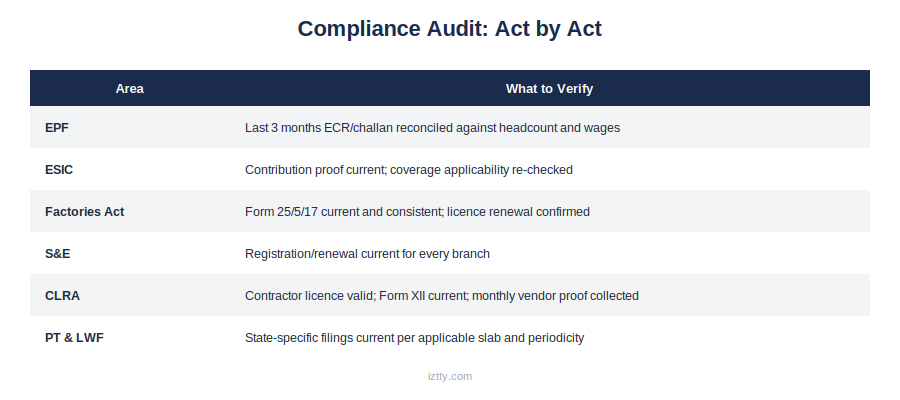
What Should a Pre-Inspection Audit Check, Act by Act?
An annual audit is better than none, but it means any gap that opens up in month two of the year runs undetected for up to ten months. A monthly reconciliation cycle for the fast-moving items, EPF/ESIC filings, vendor documentation, register consistency, combined with a quarterly deeper review of licence renewals and CLRA event-based filings, catches problems while they’re still small enough to fix quietly rather than explain to an inspector.
The specific trigger points worth adding an audit around: onboarding a new vendor, opening a branch in a new state, and any headcount change that shifts you across an applicability threshold (ESIC coverage, CLRA’s 20-workmen threshold, Factories Act power-usage or headcount criteria).
How Do You Score and Prioritize the Gaps You Find?
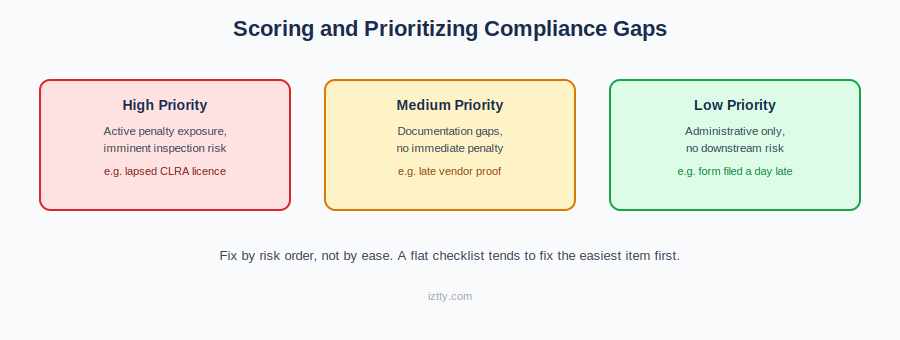
Not every gap carries the same risk. A useful way to prioritize: weight each finding by filing timeliness (how overdue is it), documentation completeness (is something missing entirely, or just late), and penalty exposure (does this specific Act carry meaningful fines or imprisonment provisions for the gap found). This is the same logic behind a live compliance health score: a single missed filing from yesterday is a different risk category than a factory licence that lapsed two months ago unnoticed.
In practice, this means building a short prioritized list rather than a flat one: gaps with active penalty exposure and imminent inspection risk go first, gaps that are purely administrative (a form filed a day late with no downstream consequence) go last. A compliance team working from an unprioritized checklist of forty items tends to fix whichever one is easiest, not whichever one matters most.
What Does a Labour Inspector Actually Look at First?
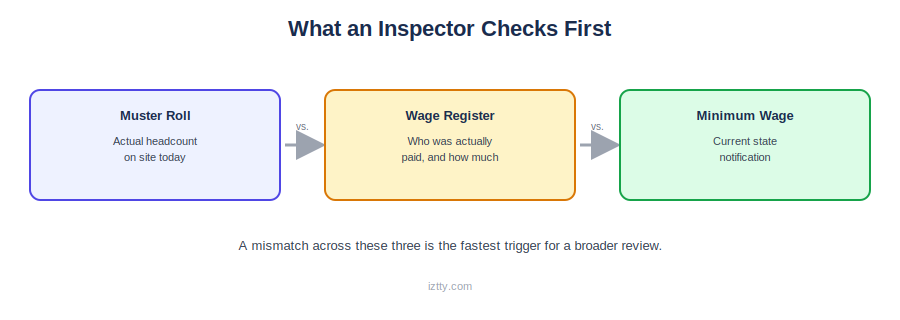
In practice, inspectors tend to start with the documents that are quickest to cross-check for internal consistency: the muster roll against the wage register, the wage register against the current state minimum wage notification, and (where contract labour is present) the contractor’s registers against the principal employer’s own Form XII. A mismatch here is the fastest way to trigger a broader review, since it signals the underlying records aren’t being actively verified, not just that one document is late.
How Do You Fix a Gap Without Creating a Paper Trail of Non-Compliance?
This is a common concern, and the honest answer is that a documented, timely correction is a materially better position than an undocumented one, not a liability in itself. Backdating a register to hide when a gap existed is falsification and carries its own penalty exposure under most of these Acts. The defensible approach is the opposite: date the correction accurately, note when the gap was found and how it was resolved, and let that documented timeline demonstrate active monitoring rather than obscure it. This is exactly the kind of record a Maker-Checker-DSC workflow creates automatically, since every correction is dated and signed off, not quietly edited.
Want this audit trail built into your process rather than reconstructed after the fact?Talk to our compliance team.
How Does Automation Change a Manual Audit Cycle?
A manual audit depends on someone remembering to pull every register, cross-check every figure, and flag every renewal date, across every state and every vendor, on a recurring basis. This is exactly the kind of repetitive, high-stakes checking that statutory compliance automation India tools are built to remove from a compliance team’s plate. An AI compliance management India platform can run the cross-checks (muster roll versus wage register, contractor documentation versus CLRA licence status) continuously rather than in a periodic sweep, and roll every finding into the same compliance health score used at the leadership level. This is the specific problem our platform and AI features are built to address.
FAQs
1. What is a statutory compliance audit checklist? A structured list of every statutory obligation, EPF, ESIC, Factories Act, S&E, CLRA, checked for current, consistent documentation before an inspector or regulator asks for it.
2. How often should a compliance risk audit be run? Monthly for fast-moving items like EPF/ESIC filings and vendor documentation, quarterly for licence renewals and deeper register review, and immediately around triggers like a new branch or a headcount threshold change.
3. What’s the difference between a compliance audit and a compliance score? An audit is the review process itself; a compliance score is the resulting output, a weighted, ongoing measure of risk that updates as filings and documentation change, rather than a one-time snapshot.
4. Are the Labour Codes 2026 relevant to a current compliance audit? Yes, the four Labour Codes are formally in effect since 21 November 2025, though detailed Central and State rules are still being finalized. A current audit should still check against existing Act provisions, which remain in force during this transition, while flagging policies that will need revisiting once the Labour Code rules are notified.
5. What’s the fastest way to check current compliance exposure? Run a documentation completeness check against the last three months of EPF/ESIC proof, muster rolls, and licence validity, rather than waiting for the next scheduled annual audit.
6. Does a documented, late correction look worse than no correction at all? No, a dated, documented correction demonstrates active monitoring and is generally viewed far more favourably than an undocumented gap discovered by an inspector.
7. Can one compliance audit cover multiple states? Yes, though the underlying checks need to stay state-specific, since minimum wage rates, S&E renewal cycles, and CLRA licensing authorities differ by state even when the audit itself is run centrally. This is the same principle covered in our pillar guide’s section on multi-state compliance management.
8. Does an HRMS compliance module cover this kind of audit? Generally not fully; an HRMS compliance module focuses on payroll-linked deductions, while a compliance risk audit needs to cover factory registers, CLRA vendor documentation, and licence renewals that fall outside standard HRMS coverage.
9. What should a company do immediately after finding a compliance gap? Document when it was found, correct it with an accurate current date, and record the corrective action taken, rather than delaying the fix or attempting to backdate the correction.
10. Can vendor and contract labour compliance software help with this audit? Yes, since contractor documentation is one of the most common places gaps hide, dedicated vendor and contract labour compliance software can automate the monthly collection and cross-checking that a manual audit often misses.
In the pillar guide, the “Choosing a Statutory Compliance Platform” section should link the phrase “compliance audit” to this blog for the full pre-inspection checklist.
In the CLRA cluster blog, the “Why CLRA Compliance Fails” section can link here as the broader audit framework this specific failure pattern fits into.
In the S&E cluster blog and the Vendor/PE Liability blog, the closing “next step” sections can link here for readers ready to move from a single-topic guide to a full audit.
On iztty.com/compliance-calendar/, this blog is a natural companion link, since the calendar answers “when is it due” and this blog answers “how do I check if I’m actually compliant.”
Schema Recommendation
FAQPage schema for the FAQ section; Article schema for the full post; BreadcrumbList reflecting Pillar > Cluster hierarchy.
Image Placement (3 images, provided separately)
compliance-audit-act-by-act-checklist.png – Alt: “Act-by-act compliance audit checklist covering EPF, ESIC, Factories Act, S&E, and CLRA” – insert after Section 4.
compliance-gap-scoring-priority.png – Alt: “How to score and prioritize compliance gaps by risk exposure” – insert after Section 6.
inspector-first-checks-flow.png – Alt: “What a labour inspector checks first: muster roll, wage register, minimum wage consistency” – insert after Section 7.
The Types of Labour Law Compliance Software in India (and Which One You Actually Need)
Part of our Labour Law Compliance Software cluster – see the complete buying, implementation & ROI guide for the full picture. This piece goes deep on one question that guide deliberately left for a dedicated page: which category of tool do you actually need?
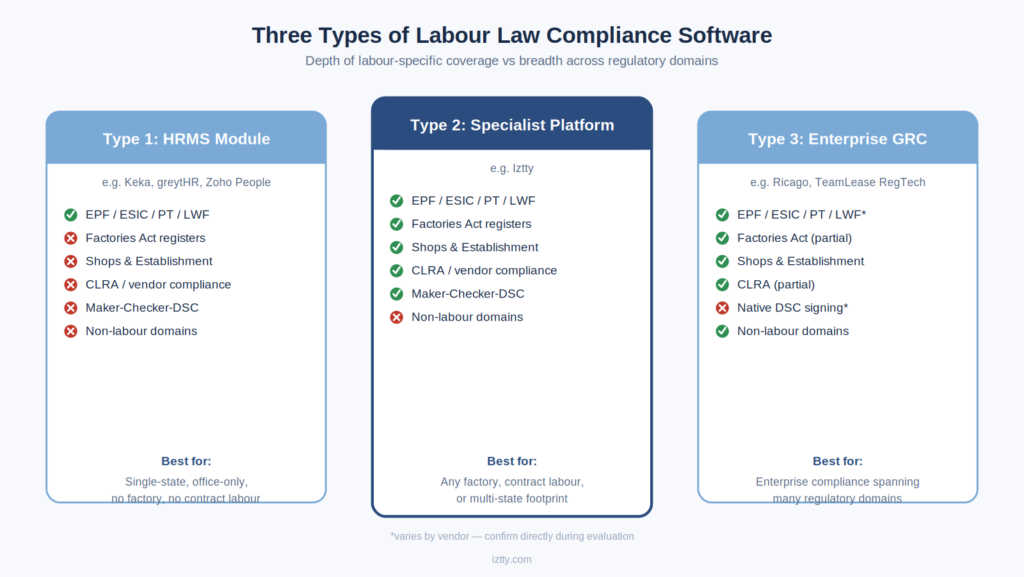
Three genuinely different types of Labour law compliance software in India: an HRMS with a bundled payroll-statutory module (covers EPF/ESIC/PT/LWF only), a specialist statutory compliance platform (covers Factories Act, Shops & Establishment, CLRA, and payroll-statutory together), and an enterprise GRC platform (covers labour compliance as one category among 1,000+ regulatory obligations spanning many domains).
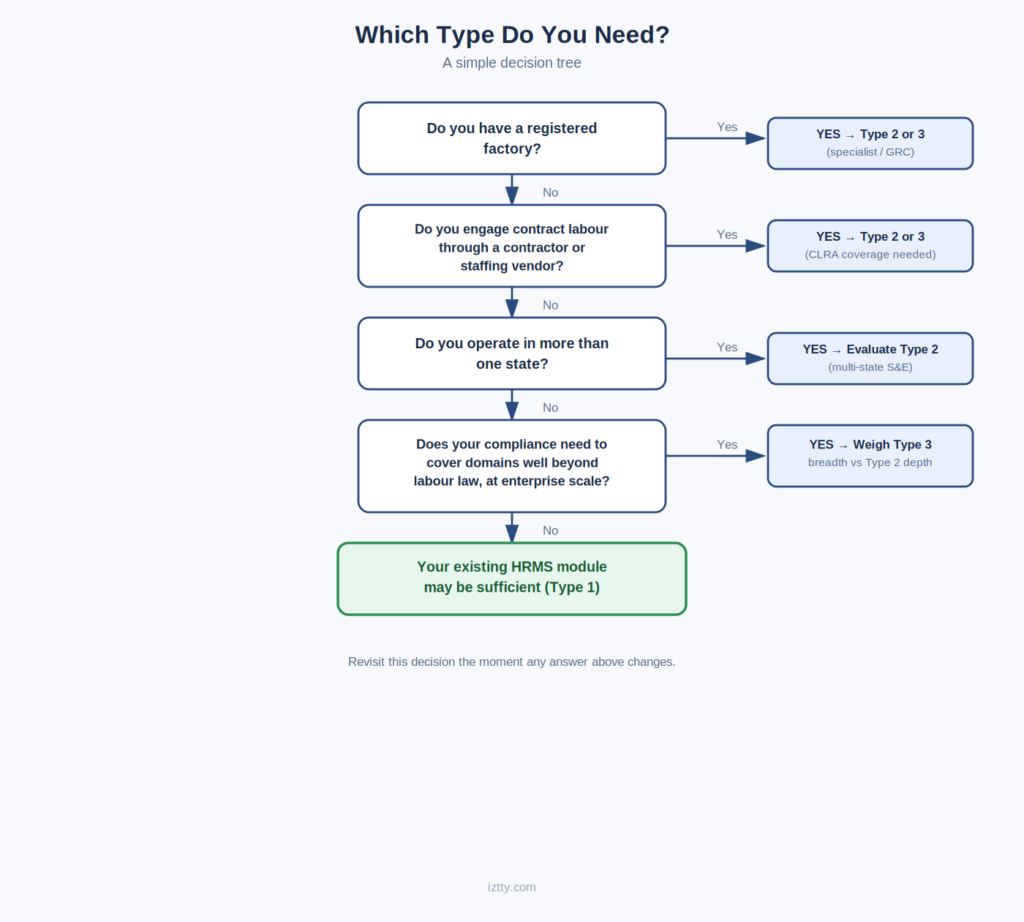
The right choice depends on three yes/no questions: do you have a factory, do you use contract labour, and do you operate in more than one state. Answer yes to any of them, and an HRMS module alone is very likely insufficient – see the decision tree below for the full logic.
Why “labour law compliance software” gets used as if it were one thing
Search results, vendor marketing, and even internal procurement conversations routinely treat “labour law compliance software” as a single, comparable product category – the same way “CRM software” or “accounting software” are shopped for on a shared feature checklist. The comparison breaks down here because the three types described in this article aren’t competing implementations of the same idea; they’re built around three different core objects (the payroll transaction, the establishment and its registers, and the enterprise-wide regulatory obligation) that only partially overlap.
A buyer who shops across all three types using one feature checklist will consistently either overpay for breadth they don’t need or underbuy on depth they do need – which is exactly the confusion this article exists to resolve before you request a single demo.
Type 1 – HRMS with a bundled payroll-statutory module
This is what you get when “compliance” is a feature inside a broader HR/payroll suite – Keka, greytHR, Zoho People, Darwinbox, HROne-reviewed platforms, RazorpayX Payroll, and similar tools all fall here. The compliance feature is, specifically, the payroll-statutory layer: EPF ECR generation, ESIC contribution and challan filing, Professional Tax deduction against state slabs, and Labour Welfare Fund contribution where applicable.
What it’s genuinely good at: automating a real, recurring, well-defined calculation – payroll deductions and their corresponding government challans – tightly integrated with the same system that already holds your salary data.
What it structurally cannot do: maintain Factories Act registers, track Shops & Establishment renewals across states, audit a contractor’s CLRA compliance, or provide a Maker-Checker-DSC signing workflow – because none of these were part of the product’s original design brief. The core data object in an HRMS is “employee + salary,” not “establishment + register.”
Signs you’ve outgrown Type 1: you’ve opened a factory or warehouse requiring registration, you’ve engaged your first contractor or staffing vendor for any function, or you’ve expanded into a second state and discovered your HRMS has no view of that state’s Shops & Establishment renewal cycle at all.
Best fit: single-state, office-only businesses with no factory registration and no contract labour, where payroll-statutory compliance genuinely is the full extent of the obligation.
Type 2 – Specialist statutory compliance platform
This category – where Iztty, Ricago’s more labour-focused modules, TeamLease RegTech, and Digiliance compete – is built around the establishment and its registers, not the payroll transaction. It handles Factories Act registration and register-keeping (commonly the register of adult workers, overtime register, and leave-with-wages register), state-specific Shops & Establishment registers and renewals, CLRA contractor licensing and returns, vendor/contractor compliance auditing, and the payroll-statutory layer as well – all within one system, ideally with a Maker-Checker-DSC signing workflow that makes every register defensible, not just stored.
What it’s genuinely good at: the full breadth of labour, factory, and contract-labour compliance specifically – deep coverage in a focused domain, built by people who understand the actual forms and section numbers involved, rather than a generic compliance framework applied to labour law after the fact.
What to watch for: not every platform marketed in this category has equally deep state coverage or equally native signing workflows – ask to see your specific state’s register format populated with sample data before assuming coverage (see the evaluation checklist in the pillar guide).
Best fit: any organisation with a factory, any contract labour, or any multi-state footprint – which, in practice, describes most manufacturers, multi-location retailers, staffing firms, and construction companies.
What separates a genuine specialist platform from one that just claims the category
Not every tool that markets itself as “statutory compliance software” delivers equally on this category’s promise. Three checks separate the genuine article from a payroll module with extra marketing language: can it produce your specific state’s Factories Act or S&E register format, populated with real data, on request; does it support DSC-based signing natively rather than as a manual off-platform step; and does it treat vendor/contractor compliance as a first-class module with auto-scoring, rather than a static checklist item. A platform that clears all three is doing the category’s actual job.
Type 3 – Enterprise GRC platform
Platforms like Ricago (at the broader end) and similar enterprise governance, risk, and compliance tools track labour compliance as one category among a much wider scope – often 1,000+ Acts spanning environmental regulation, sector-specific licensing, corporate governance, and more, alongside labour law.
What it’s genuinely good at: giving a large enterprise a single pane of glass across regulatory domains that have nothing to do with labour law – useful when your compliance function is centralised and covers far more than HR-adjacent obligations.
What tends to be shallower: the labour-specific depth – Maker-Checker-DSC signing built natively into the workflow, and vendor/contractor compliance auditing with auto-scoring, are less consistently native features in this category compared to a labour-focused specialist platform, because labour compliance is one slice of a much broader product scope rather than the core design brief.
Best fit: large enterprises whose compliance obligations extend meaningfully beyond labour law – where the value of one consolidated dashboard across many regulatory domains outweighs losing some labour-specific depth.
A note on the “1,000+ Acts” positioning
Several enterprise GRC platforms market breadth in terms of the sheer number of Acts and obligations tracked – a genuinely different value proposition from a labour-focused specialist platform’s depth-first approach. Neither positioning is “better” in the abstract; the right question is whether your compliance function’s actual scope matches the breadth-first or depth-first model.
A company whose compliance risk is overwhelmingly concentrated in labour, factory, and contract-labour law gets more practical value from depth; a company managing labour compliance as one line item within a much larger enterprise risk function gets more value from breadth.
The fourth option nobody markets: outsourced compliance service
Worth naming explicitly because it’s a genuine alternative to buying any software at all: engaging a compliance consultancy to handle filings, registers, and audits on your behalf, without you operating a platform yourself. This isn’t “no solution” – for organisations that want compliance fully handled externally, it’s a legitimate path.
The trade-off: visibility. A pure service relationship, without a shared platform or dashboard, can create a black box where you only learn about a risk when the consultancy tells you – which is precisely why the strongest setups often combine a specialist platform (Type 2) with an advisory relationship layered on top, rather than choosing outsourcing instead of software entirely.
Side-by-side comparison
HRMS module
Specialist platform
Enterprise GRC
Outsourced service
Payroll-statutory (EPF/ESIC/PT/LWF)
Strong – core feature
Strong
Tracked, sometimes not processed end-to-end
Handled by the consultancy
Factories Act registers
None
Strong
Tracked as a task, not always a native register
Handled, but visibility depends on the consultancy’s reporting
S&E Act, multi-state
None
Strong
Usually covered
Handled externally
CLRA / vendor compliance
None
Strong – often a dedicated module
Varies by vendor
Handled externally
Maker-Checker-DSC signing
Rare
Common in this category
Rare – often manual, off-platform
N/A – no platform
Breadth beyond labour law
None
None (by design – labour-focused)
Very broad
Depends on consultancy scope
You retain direct visibility
Yes, for payroll only
Yes, across full labour scope
Yes, across broad scope
Only what’s reported to you
Typical buyer
Small, single-state, office-only
Manufacturer, multi-state retailer, staffing firm, construction
Large enterprise, multi-domain compliance function
Any size, wants compliance fully off their plate
Coverage matrix: what each type actually handles
Capability
HRMS module
Specialist platform
Enterprise GRC
EPF ECR / ESIC challan filing
Full
Full
Partial
Factories Act Form 25/5/17-style registers
None
Full
Partial
S&E state-specific registers
None
Full
Full
CLRA contractor licence tracking
None
Full
Partial
Vendor compliance auto-scoring
None
Full
Partial
DSC-based signing
Rare
Full
Partial
AI-assisted notice response
None
Available in leading platforms
Varies
Non-labour regulatory domains
None
None
Full
“Partial” above means the capability is often tracked as a generic task or checklist item rather than a purpose-built register or workflow – worth confirming directly with any vendor rather than assuming from a feature list.
Decision tree: which type do you need?
Do you operate any factory registered under the Factories Act? If yes → you need a specialist platform (Type 2) or enterprise GRC (Type 3), not an HRMS module alone.
If no factory – do you engage any contract labour through a contractor or staffing vendor? If yes → you need Type 2 or Type 3 for CLRA and vendor compliance coverage.
If no factory and no contract labour – do you operate in more than one state? If yes → you at minimum need multi-state S&E tracking, which an HRMS module doesn’t provide; evaluate Type 2.
If none of the above apply – single state, no factory, no contract labour – your HRMS’s payroll-statutory module may genuinely be sufficient. Revisit this decision if any of these three facts change.
Separately – does your compliance function need to cover regulatory domains well beyond labour law (environmental, sector-specific, corporate governance) at enterprise scale? If yes, weigh Type 3’s breadth against Type 2’s labour-specific depth for your specific mix of obligations.
Cost models compared
Pricing structures differ meaningfully by type, which makes headline price comparisons misleading without checking the model underneath:
HRMS module: typically bundled into a broader per-employee HR/payroll subscription – the compliance feature itself is rarely priced separately, which is part of why buyers underestimate its narrow scope.
Specialist platform: usually priced per-employee and/or per-branch, with vendor/contractor compliance auditing sometimes included and sometimes a separate add-on – always confirm which before comparing quotes.
Enterprise GRC: typically enterprise-licensed, often with implementation and configuration costs that scale with the breadth of regulatory domains covered, not just headcount.
Outsourced service: usually a recurring retainer or per-filing fee structure, with cost driven by the number of locations and filings rather than software licensing.
A worked example
Consider two companies, both roughly 200 employees. Company A is a single-office IT services company in one city – its entire statutory obligation is EPF, ESIC, PT, and LWF, so its existing HRMS subscription (already paid for payroll) covers this at effectively no additional compliance cost. Company B is a three-factory manufacturer in Maharashtra, Gujarat, and Tamil Nadu using two staffing vendors for warehouse labour – its HRMS module handles the same EPF/ESIC/PT/LWF layer, but leaves entirely uncovered: three states’ worth of Factories Act registers, S&E-adjacent factory licensing, and two vendor relationships carrying CLRA principal-employer exposure.
Company B’s realistic comparison isn’t “HRMS module cost vs specialist platform cost” – it’s “specialist platform cost vs the uninsured exposure of Section 92 penalties, CLRA liability, and unrecoverable staff time spent reconstructing registers manually.” Same headcount, structurally different compliance category.
Migration paths: how companies typically move between types
The most common trajectory: a company starts on an HRMS module because it’s the default that came with payroll, discovers the gap when it opens its first factory or engages its first significant contract-labour vendor, and migrates to a specialist platform at that point – usually triggered by a specific event (an inspection, a new factory, a state expansion) rather than a proactive review. Less commonly, a large enterprise that outgrows a specialist platform’s narrower scope moves to an enterprise GRC platform once its compliance obligations expand well beyond labour law.
Migrating from an outsourced service to an in-house platform typically happens when a company wants more direct visibility than a service-only relationship provides, often while keeping the advisory relationship in place alongside the new platform.
How each type handles the ongoing Labour Codes transition
Worth factoring into the type decision itself: India’s four Labour Codes came into effect on 21 November 2025 with Central Rules notified in May 2026, but state rules remain a rolling, uneven process – meaning every organisation is currently operating under a two-layer reality (existing Acts plus incoming Code provisions) regardless of which type of software it uses. HRMS modules tend to update payroll-statutory calculations (like the Code on Wages’ 50% rule) relatively quickly, since that’s squarely inside their core scope.
Specialist platforms carry more responsibility here because they also have to track which register-level obligations (Factories Act, S&E, CLRA) are transitioning to OSH Code equivalents state by state – ask any Type 2 vendor directly how they’re handling this two-layer tracking, since it’s a genuine differentiator between platforms in this category, not a solved problem industry-wide.
Recommendation by persona
CEO/Founder of a small, single-state, office-only business: start with your existing HRMS’s compliance module – don’t over-buy before you need to.
CFO at a multi-state or multi-factory company: the ROI case for a specialist platform is usually clear once penalty exposure and staff time are quantified – see the pillar guide’s ROI framework.
Compliance Manager or Plant HR Head: a specialist platform is almost always the right working tool if you’re personally responsible for producing registers on demand.
Company Secretary / Legal: prioritise whichever type offers genuine DSC-based signing and audit-trail defensibility – this is a specialist-platform strength more consistently than an enterprise GRC one.
Compliance Consultant managing multiple clients: a specialist platform with multi-tenant, role-segregated access scales your practice far better than manually managing each client’s compliance in spreadsheets or a generic GRC tool not built for multi-client use.
COO overseeing multi-location operations: your priority is the consolidated dashboard view across branches – weigh Type 2’s labour-specific depth against Type 3’s breadth based on whether operational risk (labour) or enterprise risk (broader regulatory) dominates your actual incident history.
CHRO balancing HR strategy with compliance ownership: resist the temptation to let the HRMS vendor’s “compliance module” checkbox close this evaluation – the HRMS decision and the statutory compliance decision are separable, and treating them as one purchase is the single most common source of the coverage gap this article exists to close.
Recommendation by sector
Manufacturing, Construction, and Mining almost always need Type 2 given near-universal Factories Act and CLRA exposure. Retail and Staffing/Contractors need Type 2 specifically for multi-state S&E and CLRA vendor auditing respectively. IT/Technology Services is the sector most likely to be genuinely served by an HRMS module alone, provided it stays single-state with no contract labour. Healthcare/Pharma and Logistics/Warehousing typically combine enough factory, S&E, and contract-labour exposure to warrant Type 2 as well.
Why type confusion is worse in some sectors than others
Retail and Healthcare are where type confusion causes the most missed compliance, because neither sector “feels” like a Factories Act business, so buyers reasonably default to their HRMS’s compliance module and never revisit the assumption. A retail chain sees itself as a merchandising and customer-experience business, not a regulated establishment – but every outlet still needs Shops & Establishment registration and registers, and the multi-state version of that obligation is exactly what an HRMS module can’t handle. Manufacturing and Construction rarely have this confusion, precisely because factory and contract-labour obligations are visible and well understood in those sectors from day one – the risk there is less about *which type* to buy and more about *implementing it thoroughly* across every location.
Where a specialist platform like Iztty fits
Within Type 2, Iztty’s specific differentiators are worth naming directly: Maker-Checker-DSC digital signing built into the core workflow (a capability neither the HRMS camp nor most enterprise GRC platforms handle natively), an AI Notice Response Assistant that has cut EPF/ESIC notice turnaround from roughly 3–5 days to about 4 hours in representative deployments, a live Compliance Score Meter with act-wise and state-wise breakdown, and — distinct from software-only competitors — a platform built by Futurex Management Solutions, a compliance consultancy with over a decade of hands-on labour, factory, and CLRA advisory experience. Dedicated modules for vendor compliance and CLRA compliance, alongside a consolidated compliance calendar, round out the coverage described throughout this piece.
FAQs
Is a specialist statutory compliance platform the same as an HRMS?
No. An HRMS is built around payroll and employee records, with compliance limited to EPF/ESIC/PT/LWF. A specialist platform is built around the establishment and its statutory registers — Factories Act, S&E, and CLRA — which an HRMS doesn’t natively manage.
Can I use an HRMS and a specialist platform together?
Yes, and this is the common setup for multi-location employers — the HRMS remains the system of record for payroll, while the specialist platform (often integrated via API or file import) handles registers, licences, and vendor auditing.
Which type of software is cheapest?
An HRMS module is usually the cheapest on a standalone basis because the compliance feature is bundled into a broader payroll subscription you likely already pay for — but it’s only “cheaper” if its narrower scope genuinely matches your obligations; otherwise the real cost shows up as penalty exposure rather than a software line item.
Do enterprise GRC platforms cover labour law as well as specialist platforms?
Often less deeply on labour-specific workflows like Maker-Checker-DSC signing and CLRA vendor auditing, because labour compliance is one category among many in a GRC platform’s scope rather than its core design focus. Enterprise GRC platforms win on breadth across regulatory domains beyond labour law, not on labour-specific depth.
What if my company is growing quickly and might need a different type next year?
Ask any vendor directly about migration support and data portability before committing — a company on Type 1 (HRMS module) that expects to open a factory or expand to a new state within a year should factor in the near-term likelihood of a Type 2 migration during vendor selection, not treat it as a distant hypothetical.
Is there a hybrid option that combines specialist software with human advisory support?
Yes — many organisations run a specialist platform (Type 2) alongside an ongoing advisory relationship with a compliance consultancy, particularly useful for ambiguous regulatory interpretation during the current Labour Codes transition, where judgment calls still matter alongside automation.
How do I know if my current HRMS’s compliance module is actually a Type 1 or something closer to Type 2?
Check directly against the coverage matrix above — ask the vendor specifically whether they support Factories Act registers, S&E state formats, and CLRA contractor tracking, not just EPF/ESIC/PT/LWF. Marketing language alone (“full statutory compliance”) is not a reliable indicator of which type you’re actually looking at.
Does company size determine which type I need?
Less than you’d think — the decision tree above is driven by factory registration, contract labour use, and multi-state operations, not headcount. A 50-person manufacturer with one factory has more Type 2 justification than a 500-person single-office IT company with none of those three factors.
Which type provides the best audit trail for a labour inspection?
A specialist platform with native Maker-Checker-DSC signing typically provides the strongest, most immediately producible audit trail for register-level obligations specifically, because that governance workflow is usually purpose-built rather than a generic document-approval feature repurposed for compliance.
Should a compliance consultancy managing multiple clients choose a different type than a single company would?
Yes — a consultancy needs multi-tenant, role-segregated access across client accounts, which is a distinct evaluation criterion beyond the three-type framework above; not every Type 2 platform supports this well, so confirm it explicitly if you manage compliance for multiple client companies.
Sources checked
Regulatory facts referenced above were checked against the Ministry of Labour and Employment (labour.gov.in), EPFO (epfindia.gov.in), ESIC (esic.gov.in), and bare Act text via India Code (indiacode.nic.in), current as of August 2026.
Related reading: For the full implementation roadmap and ROI framework, see the pillar guide. For the detailed HRMS-vs-specialist-platform decision walkthrough, see our companion comparison guide.
Labour Law Compliance Software: The Complete India Buying, Implementation & ROI Guide (2026)
What is labour law compliance software? (Quick answer)
Labour law compliance software is a system of record that automates and documents an employer’s statutory obligations under Indian labour, factory, and contract-labour law – including EPF, ESIC, Professional Tax, Labour Welfare Fund, Factories Act registers, Shops & Establishment Act renewals, and CLRA contractor/vendor compliance – with a defensible, digitally signed audit trail for each filing. It differs from payroll software, which automates the salary calculation underneath these obligations but does not typically manage the register-level and licence-level documentation a labour inspector or regulator will ask for.
At a glance
Question
Short answer
Who needs it?
Any employer with a factory, contract labour, or a multi-state footprint – payroll-only tools don’t cover these.
What does it replace?
Manual/spreadsheet tracking of statutory registers, licences, and contractor compliance – not your existing payroll/HRMS, which it typically integrates with.
What’s the core output?
State-correct, digitally signed statutory registers and filings, plus a live compliance score showing where you stand.
Why this category exists – and why buyers get confused
India does not have one labour law – it has a fragmented set of central and state statutes (the Factories Act 1948, the Contract Labour (Regulation & Abolition) Act 1970, the EPF & MP Act 1952, the ESI Act 1948, and 28+ separate state Shops & Establishment Acts), each with its own registers, forms, and renewal cycles, now transitioning toward four consolidated Labour Codes. Software built to handle this well has to solve a fundamentally different problem than payroll software: it has to model an establishment and its registers, not just an employee and their salary.
That’s why “labour law compliance software” gets used loosely across the market to describe three genuinely different things: a payroll platform’s compliance add-on, a specialist statutory compliance platform, and a broad enterprise GRC tool. This guide focuses on how to evaluate, buy, and implement the specialist category – the one built specifically around labour, factory, and contract-labour compliance – because that’s the category most manufacturers, retailers, staffing firms, and multi-state employers actually need once they outgrow a payroll-only tool.
How to use this guide depending on your role
This guide is long because the buying decision genuinely involves several different stakeholders with different questions. If you’re short on time, here’s where to focus:
If you’re a founder or CEO deciding whether this is worth pursuing at all: read Sections 1, 2, and 8 (definition, why this matters, and the ROI framework) – that’s enough to decide whether to greenlight a formal evaluation.
If you’re a CFO building the business case: Section 8 (ROI framework) and the KPI list are built specifically for this conversation.
If you’re a Compliance Manager or Plant HR Head running the evaluation: Sections 3, 6, and 7 (capabilities checklist, evaluation framework, and implementation roadmap) are the working sections you’ll return to repeatedly.
If you’re a Compliance Consultant evaluating this for your own client-facing practice: pay particular attention to the multi-tenant and role-based access considerations woven through Sections 6 and 9.
If you’re a Company Secretary or Admin & Legal Manager focused on defensibility: Section 4 (how registers get signed) and the data security subsection under Section 9 are where the legal-defensibility questions get answered directly.
Signs your current approach is already failing
Before assuming you need new software at all, it’s worth recognising the specific symptoms that indicate your current spreadsheet-or-payroll-only approach has already broken down, rather than treating this as a hypothetical future risk:
You’ve had to scramble to reconstruct a register in the days before a scheduled or surprise inspection, rather than being able to produce it immediately
Nobody can say with confidence when a specific contractor’s CLRA licence expires without checking multiple email threads or asking the contractor directly
Your compliance calendar exists primarily in one person’s head or one person’s spreadsheet, and you’ve never tested what happens if that person is unavailable when a deadline hits
You’ve discovered a lapsed S&E registration or factory licence only after opening a new location’s mail, not through an internal tracking process
A labour department or EPFO/ESIC notice took several days to respond to because records had to be manually gathered across systems
If two or more of these are true, the cost of continuing the current approach is very likely already higher than the cost of a properly implemented platform – even before factoring in penalty exposure.
Build in-house, hire a consultant, or buy software?
There are genuinely three paths, not two, and it’s worth being explicit about the trade-offs before assuming software is automatically the right answer:
Single location, single state, no contract labour, low headcount
Doesn’t scale past a handful of locations; entirely dependent on institutional memory of specific staff
Outsource to a compliance consultancy (service-only, no platform)
Organisations that want compliance fully handled externally and don’t want to manage a tool
You still need visibility into your own risk posture; a service-only relationship without a shared platform can create a black box where you only find out about a problem when the consultancy tells you
Buy a specialist platform (with or without an advisory relationship alongside it)
Multi-location, multi-state, any contract labour, any factory registration
Requires genuine implementation effort – it is not a plug-and-play fix without the gap audit and rollout discipline described below
In practice, the strongest setups combine the third option with ongoing advisory input for ambiguous regulatory interpretation – which is precisely why platforms built by compliance consultancies themselves, rather than software-only vendors, tend to handle edge cases better.
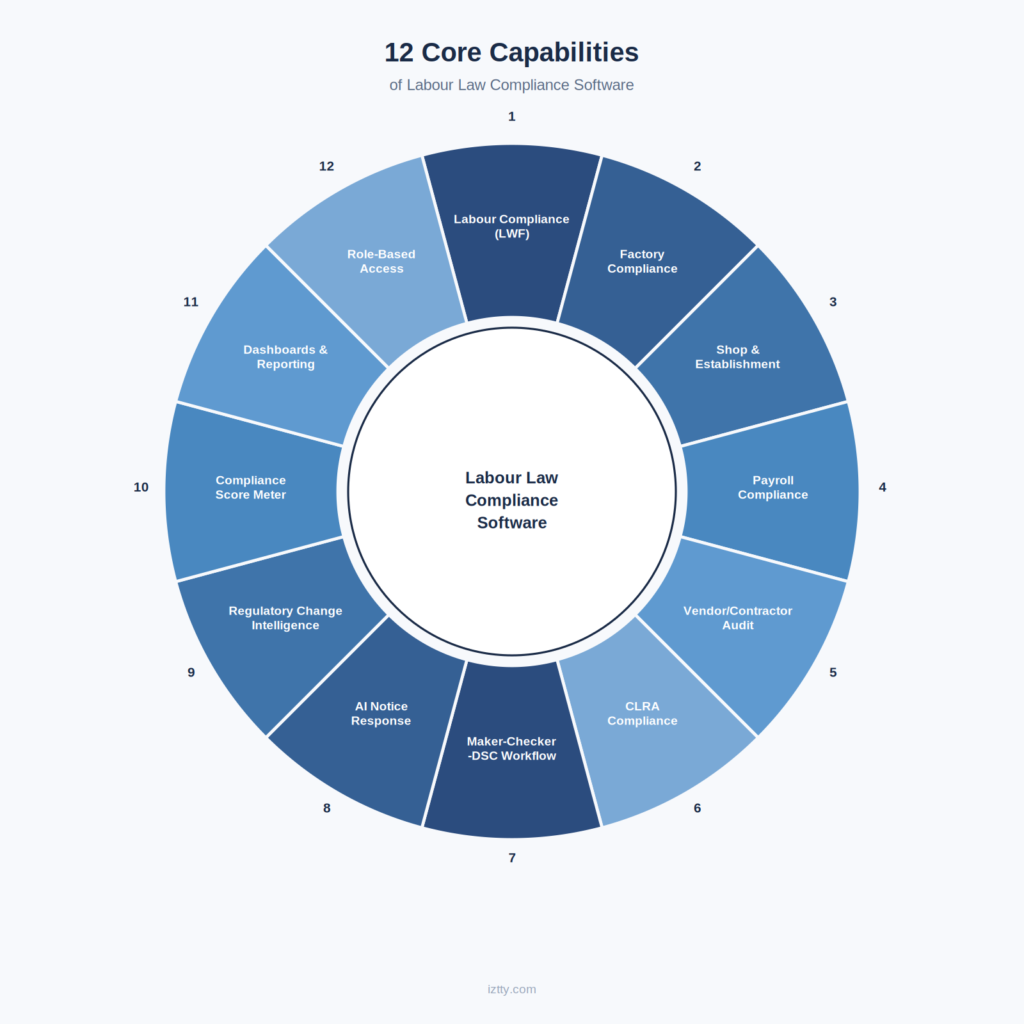
The 12 core capabilities checklist
Use this as a literal checklist against any vendor’s feature list – not as a wishlist, but as the minimum bar for something to genuinely qualify as labour law compliance software rather than a payroll add-on:
Labour Compliance Management – LWF registration and contribution tracking, with state-specific rate automation across every LWF-applicable state (roughly 16 states apply LWF, each with different rates and periodicity).
Factory Compliance Management – Factories Act 1948 registration, licence renewal with expiry alerts, and the statutory registers a factory inspector will ask for (commonly the register of adult workers, the overtime register, and the leave-with-wages register).
Shop & Establishment Compliance – state-specific S&E register formats and licence renewals, tracked across every location, not just headquarters.
Payroll Compliance Management – EPF (ECR filing by the 15th of the following month), ESIC, Professional Tax, and LWF, ideally integrating with your existing payroll/HRMS rather than replacing it.
Vendor/Contractor Compliance Audit – digital audits of contractor EPF/ESIC/wage registers, with an auto-calculated compliance score per vendor and documentation supporting principal-employer due diligence under CLRA.
CLRA & Contract Labour Compliance – contractor licence tracking and the half-yearly return (commonly Form XXIV, due within 30 days of the close of each half-year) alongside the principal employer’s annual return.
Maker-Checker-DSC Workflow – a governance layer where one person prepares a register, a second independently approves or rejects it, and the final version is signed with a Digital Signature Certificate before archiving.
AI-Assisted Notice Response – automated reading of PF/ESIC/Labour/Factories Act notices, extraction of the allegation and deadline, and a drafted reply with a supporting evidence checklist.
Regulatory Change Intelligence – monitoring of gazette notifications and state amendments, with matched action items for human review (never auto-enforcement without a human check).
Compliance Score / Health Score – a live, act-wise and state-wise score with risk banding, built from actual register/filing status rather than self-reported task completion.
Dashboards & Reporting – a consolidated multi-branch, multi-state view for executives, alongside location-level detail for plant HR heads and compliance managers.
Role-Based, Multi-Branch Access – distinct Maker, Checker, and DSC-holder roles, scalable across every state and branch you operate in.
How labour law compliance software actually works
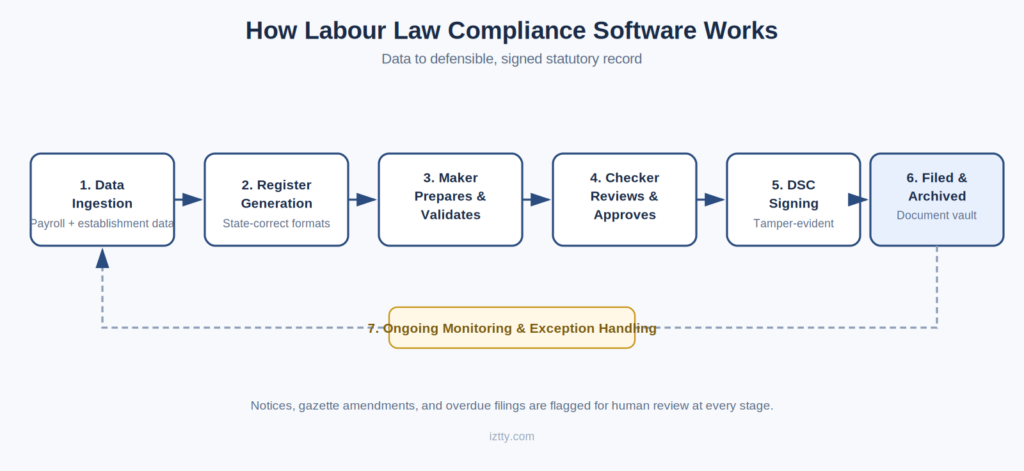
Stripped of marketing language, the underlying workflow in a well-built platform looks like this:
Data ingestion: employee, salary, and establishment data flows in from your existing HRMS/payroll system (via integration or file import) alongside establishment-level data – factory licences, S&E registrations, contractor details – entered or migrated once.
Register generation: the platform generates the actual statutory register formats – Factories Act forms, S&E state formats, CLRA forms – populated from that data, rather than requiring manual re-entry into a separate document.
Maker-Checker review: a designated preparer validates the generated register; a designated checker independently reviews it and either approves or rejects it with a documented reason.
DSC signing: the approved register or filing is signed using a Digital Signature Certificate, creating a legally recognisable, tamper-evident record.
Filing and archiving: the signed document is filed with the relevant authority where the process supports it, and archived in a document vault with full version history.
Ongoing monitoring: licence expiry dates, contractor compliance scores, and upcoming deadlines are tracked continuously, surfaced through a compliance score and dashboard rather than requiring manual calendar-checking.
Exception handling: when a notice, gazette amendment, or overdue filing appears, it’s flagged for human review – AI assists with drafting and extraction, but the compliance manager or consultant makes the final call.
What integration with your existing payroll/HRMS actually involves
In practice, integration happens one of two ways: an API connection that syncs employee and salary data on a defined schedule (typically daily or on every payroll run), or a structured file import (commonly CSV or Excel templates matched to the platform’s data schema) run manually or on a set cadence by the compliance team. The API route is preferable for larger, multi-location organisations where manual file handling across branches becomes its own operational burden; the file-import route is often perfectly adequate for smaller, single-location setups. Either way, the payroll/HRMS system should remain the system of record for salary data – the compliance platform consumes that data to generate registers and filings, rather than duplicating or overriding it.
A worked example: why fragmentation is the real problem
Consider a mid-size company with a factory in Maharashtra, a warehouse in Haryana, and retail outlets in Karnataka and Tamil Nadu, using two staffing vendors for warehouse and security staff. Without a consolidated platform, this company is realistically maintaining: one Factories Act register set for the Maharashtra factory (state-specific format), separate S&E registrations and registers for Haryana, Karnataka, and Tamil Nadu (three different state formats), two separate CLRA contractor relationships to track and audit, and the standard EPF/ESIC/PT/LWF payroll-statutory layer across all locations – each with its own renewal cycle, its own signing authority, and its own risk if missed.
That’s not four compliance tasks; it’s closer to fifteen to twenty distinct, recurring obligations, each capable of independently triggering a penalty, an inspection finding, or a CLRA liability event. This is the concrete version of the “fragmentation” this entire category of software exists to solve.
The three types of labour law compliance software (and which one you need)
At a high level, the market splits into three categories: HRMS platforms with a bundled payroll-statutory module, specialist statutory compliance platforms built around registers and contractor compliance, and enterprise GRC platforms covering compliance far beyond labour law. If you’re still deciding which category fits your organisation, our dedicated comparison guide walks through the decision framework in detail – this guide assumes you’ve identified that you need the specialist category and focuses on how to evaluate and implement it well.
A quick way to sanity-check which category actually fits before you start a formal evaluation: if your primary exposure is EPF/ESIC/PT/LWF only (no factory, no contract labour, single state), start with your existing HRMS vendor and ask what their compliance module actually covers before assuming you need anything else.
If you have any factory registration, any contract labour, or any multi-state footprint, go straight to evaluating specialist platforms – an HRMS upgrade conversation will not resolve that gap. If your compliance obligations extend meaningfully beyond labour law (environmental, sector-specific, corporate governance) alongside labour compliance, an enterprise GRC platform’s broader scope may be worth the trade-off in labour-specific depth.
Typical implementation timelines by company profile
Company profile
Realistic timeline to full go-live
Single office, single state, no factory, no contract labour
3–4 weeks (largely configuration and training; minimal register migration)
Single factory, single state, some contract labour
6–8 weeks (includes a full parallel-run cycle)
Multi-factory or multi-state retail, 3–5 locations
10–14 weeks (staggered state-by-state go-live)
Enterprise, 10+ locations across multiple states, significant contract labour
4–6 months (phased rollout, dedicated compliance owners per region)
How to evaluate and choose labour law compliance software
A structured evaluation beats a feature-list comparison. Score prospective vendors against these dimensions:
Evaluation dimension
What to actually ask
Register authenticity
Can they show your actual state’s Factories Act or S&E register format, populated with sample data – not a generic mockup?
State coverage
Which states are natively supported today, and what’s the process (and cost) to add a new state you expand into?
Signing workflow
Is Maker-Checker-DSC built into the core platform, or is signing still a manual, off-platform step?
Vendor/contractor compliance
Is CLRA vendor auditing a native module, or a manual checklist bolted onto a generic task tracker?
Notice response
Can you see an actual AI-drafted notice reply, not just a description of the feature?
Integration
Does it integrate with your existing payroll/HRMS (Tally, Zoho Payroll, Keka, etc.) or does it require duplicate data entry?
Consultant/advisory backing
Is the platform backed by people who’ve actually run labour/factory compliance audits, or is it software-only with no compliance expertise behind it?
Pricing structure
Per-employee, per-branch, or flat platform fee – and is vendor auditing/CLRA coverage included or a separate add-on?
Data migration
What’s included to migrate your existing registers and licence data, and how long does that typically take?
References
Can they connect you with an existing customer in a similar industry/state footprint for a reference call?
Evaluation questions by persona
Different stakeholders in the buying process are, reasonably, optimising for different things. A shortlist that satisfies only one persona’s concerns tends to stall at the next approval stage:
CFO: What’s the total cost of ownership including per-state expansion, and what’s the quantifiable penalty exposure this removes? (See the ROI framework below.)
CHRO / Compliance Manager: Does this actually reduce the manual register-keeping workload, or does it just add another system to update alongside the old process?
Plant HR Head / Factory Manager: Can I, at my specific factory, produce a correct register within the hour without calling head office?
Company Secretary / Legal: Is the DSC signing process legally defensible, and is the audit trail something we could rely on in a dispute?
Compliance Consultant managing multiple clients: Does the platform support multi-tenant, role-segregated access across client accounts from one login?
A 20-question RFP bank
For a formal evaluation, these questions – grouped by category – surface the gaps a demo alone won’t reveal:
Coverage: Which states do you natively support today? Which Acts are covered beyond EPF/ESIC/PT/LWF? Do you support Factories Act, S&E, and CLRA registers specifically, or only payroll-statutory filings? What’s your process and timeline to add a new state?
Workflow & governance: Is Maker-Checker built into the core workflow? Do you support DSC-based signing natively, and which DSC providers are supported? What’s your document retention and archiving policy, and for how long are records retained?
Vendor/contractor compliance: Can the platform audit a contractor’s EPF/ESIC/wage registers directly, or only track that an audit happened elsewhere? How is a vendor compliance score calculated, and how often does it refresh?
AI features: How does the notice-response feature work end to end – what does it read, what does it draft, and what requires human sign-off? How does regulatory change intelligence distinguish a proposed amendment from an enacted one?
Integration & data: Which payroll/HRMS systems do you integrate with today? What’s involved in migrating our existing registers and licence data? Where is our data hosted, and what access controls exist for DSC keys and sensitive documents?
Commercial: What’s included in the base price versus billed as an add-on? What does onboarding/implementation cost separately from the subscription? Can you provide a reference customer in our industry and state footprint? What’s the contract term and exit process if we choose to leave?
Implementation roadmap: a 5-phase rollout plan
Based on how compliance-technology rollouts typically succeed or stall, a realistic implementation follows five phases:
Phase 1 – Compliance gap audit (Weeks 1–2)
Before configuring anything, map every location, every applicable Act (Factories Act, S&E, CLRA, EPF, ESIC), every contractor, and the current status of each register and licence. This is the same exercise described in our comparison guide’s “30-minute gap-check” – done thoroughly, at scale, as the foundation for implementation, not a quick sanity check.
Phase 2 – Data migration and configuration (Weeks 2–5)
Migrate existing employee, payroll, establishment, and contractor data. Configure state-specific register formats for every location, and set up role-based access (who is a Maker, who is a Checker, who holds the DSC) for each branch.
Phase 3 – Parallel run (Weeks 5–8)
Run the new platform alongside your existing manual/spreadsheet process for one full filing cycle (typically one month, to capture at least one EPF/ESIC cycle) before fully cutting over – this catches configuration errors before they become live filing errors.
Phase 4 – Training and go-live (Weeks 8–10)
Train Makers, Checkers, and DSC holders at every location – not just the central compliance team – since a multi-branch rollout fails if only headquarters knows how to use the system. Go live with the new platform as the system of record.
Phase 5 – Monitoring and optimisation (Ongoing)
Review the compliance score monthly, use it to prioritise which state or Act needs attention, and revisit vendor/contractor scores quarterly as part of vendor management, not just at contract renewal.
Change management: getting buy-in from branch and plant teams
The most common reason a technically sound implementation underperforms isn’t the software – it’s that branch and plant-level staff experience it as “one more system to update” rather than a replacement for their existing manual process.
Three things materially improve adoption: involving at least one plant HR head or branch compliance owner in Phase 1 (the gap audit) so the rollout reflects real local pain points rather than a headquarters-only view; explicitly retiring the old spreadsheet or manual process at go-live rather than letting it run in parallel indefinitely “just in case”; and tying the compliance score’s local (branch/factory-level) view to something the local team already reports on, so it feels like better visibility into their own work rather than a new surveillance layer imposed from above.
Budget planning: what to actually allocate
Beyond the subscription line, realistic budget planning should separately account for: one-time implementation and data migration cost (often quoted separately from the subscription), any per-state configuration cost if expanding beyond the initial rollout states, internal staff time for the gap audit and parallel run (this is real cost even though it doesn’t appear on a vendor invoice), and DSC procurement/renewal cost for each designated signing authority if your organisation doesn’t already hold sufficient DSCs.
Underestimating the internal staff-time component is the most common budgeting gap – the gap audit in particular is not something a vendor can complete without significant input from your own compliance and HR teams.
Vendor red flags worth walking away from
Inability or reluctance to show a populated, state-correct register format during the sales process – a real platform should be able to demonstrate this without a lengthy custom-build promise.
Pricing that bundles “unlimited states” without clarifying whether that means genuinely native register formats for each state or a generic template applied everywhere.
No clear answer on DSC key custody and access control when asked directly.
A sales process that can’t connect you with any existing customer for a reference call, in a market where several vendors do publish or can arrange this.
Vague or evasive answers about what happens to your data and DSC-signed records if you switch vendors later.
A note on the current competitive landscape
India’s labour law compliance software market currently splits along the lines described in Section 5: HRMS platforms with a payroll-statutory add-on, enterprise GRC platforms tracking compliance broadly across many regulatory domains, and specialist platforms built specifically around labour, factory, and CLRA registers.
Very few vendors write the comparison between these three categories head-on for buyers – most market themselves within their own category rather than helping a buyer figure out which category they actually need first. That gap is exactly why Sections 5 and 6 of this guide exist as a standalone decision aid, independent of any specific vendor’s pitch.
The ROI framework: calculating cost of non-compliance vs. cost of software
Rather than treating this as a soft “risk reduction” argument, build the comparison on two concrete columns:
Cost of non-compliance (illustrative exposure)
Cost of the software
EPF late payment: 5–25% p.a. damages under Section 14B, plus 12% p.a. interest under Section 7Q, on the unpaid amount, compounding for every month of delay
Recurring subscription cost, typically scoped by employee count and branch count
Factories Act general penalty (Section 92): imprisonment up to 2 years or fine up to ₹1 lakh per contravention, per person (occupier and manager separately), plus ₹1,000/day for continuing contraventions
One-time implementation/migration cost
Staff time currently spent manually reconciling registers, chasing contractors for documents, and preparing for inspections – often underestimated because it’s spread across several people’s time rather than tracked as one line item
Reduced staff time on manual register-keeping, redirected to higher-value compliance analysis
Notice response time: several working days manually, per notice, across potentially dozens of notices a year for a multi-state employer
AI-assisted notice response reducing turnaround from days to hours, per notice
Reputational and operational cost of a failed inspection or contract dispute where records can’t be produced on demand
Not directly quantifiable, but the highest-leverage line in the comparison for board-level buy-in
The honest way to present this internally: the software cost is fixed and predictable; the cost of non-compliance is variable, compounding, and – critically – attaches personally to named individuals (the occupier, the manager, the principal employer) under several of these provisions, not just to the company as an abstract entity. That personal-liability detail is often the single most persuasive line in a CFO or board conversation.
KPIs to track after go-live
Set these as standing agenda items in your monthly compliance review, so ROI is measured on an ongoing basis rather than argued once at purchase time and never revisited:
Compliance score trend: month-over-month movement, and specifically which act or state is dragging the overall number down.
Notice response time: average turnaround from receipt to filed reply, tracked per notice, to confirm the AI-assisted workflow is actually delivering the time savings it was bought for.
Filing timeliness: percentage of EPF/ESIC/PT/LWF filings made before the deadline versus late, and the same for CLRA half-yearly and annual returns.
Vendor compliance scores: tracked per contractor, with a defined escalation trigger (for example, a score drop below a set threshold triggers a documented follow-up, not just a dashboard flag nobody acts on).
Licence/registration expiry lead time: how many days before expiry each renewal was actually completed – a consistently short lead time suggests the alert system isn’t being acted on early enough, even if nothing has lapsed yet.
Audit readiness time: how long it actually takes to produce a complete register set on request, tested periodically with an internal spot-check rather than only finding out during a real inspection.
Multi-state and multi-branch rollout considerations
A single-state rollout and a multi-state rollout are different projects, not the same project done more times. Beyond the state-specific register formats already discussed, plan for: staggered go-live by state (don’t cut over five states simultaneously in Phase 4 – sequence them so early issues surface on a smaller footprint first), a designated compliance owner per state or region rather than one central person covering all branches, and a consolidated dashboard view that lets a CFO or compliance head see a national compliance score while each plant HR head or branch manager only sees and manages their own location’s detail.
Two details that catch multi-state rollouts specifically off guard: first, LWF applicability and rates differ meaningfully across the roughly 16 states where it applies – a single national LWF configuration will be wrong for at least some of your states, so this needs state-by-state setup, not a template. Second, state amendments to the Factories Act and S&E Act happen independently of the central Labour Codes timeline – a state can amend its own S&E register requirements at any time, unrelated to when it notifies its OSH Code rules, so regulatory change monitoring needs to track both layers separately for each state.
Data security and DSC key management
Because this category handles Digital Signature Certificates and sensitive employee/wage data across every branch, security questions belong in the same evaluation conversation as compliance coverage, not as an afterthought:
Where is DSC key material stored, and who has access to it is signing authority restricted to designated DSC holders with logged, auditable usage?
What access controls exist between branches – can a plant HR head at one factory see another factory’s wage data, or is access genuinely segregated by role and location?
What’s the data residency and hosting arrangement, and does it meet your organisation’s internal data-handling policy, particularly for wage and employee personal data?
What’s the incident response process if a data breach or unauthorised access is suspected?
These aren’t hypothetical concerns – Factories Act registers, S&E registers, and CLRA vendor audits all involve personal wage and employment data at scale across every location a company operates in, which makes access control and DSC governance a genuine part of the compliance posture itself, not a separate IT conversation.
What a successful rollout looks like: anonymized outcomes
Representative, anonymized outcome patterns from actual rollouts (published without identifying client details, used here as illustrative proof points rather than attributed case studies):
A 14-factory manufacturer moved its live compliance score from 61% to 88% within 90 days of go-live – the improvement came primarily from closing gaps in Factories Act register currency across factories that had previously been tracked inconsistently by individual plant HR teams.
A 40-client compliance consultancy cut EPF/ESIC notice response time from roughly 5 days to about 4 hours per notice using AI-assisted notice drafting – a change that compounded into materially more service capacity across their entire client book, not just faster response for one client.
A retail chain operating across multiple states consolidated previously fragmented, branch-by-branch S&E tracking into a single dashboard view, closing several lapsed renewal risks that had gone undetected under the prior branch-managed approach.
A construction sector principal contractor used vendor compliance auditing to formalise contractor licence and wage-register checks that had previously been informal and inconsistent across sites – directly addressing the CLRA principal-employer exposure discussed throughout this guide.
The common thread across all four: the biggest measurable improvement came from consolidating previously fragmented, person-dependent tracking into one system – not from any single feature in isolation.
Glossary
ECR: Electronic Challan-cum-Return – the monthly EPF filing and payment mechanism, due by the 15th of the following month.
DSC: Digital Signature Certificate – a legally recognised digital signature used to sign statutory filings and registers.
LWF: Labour Welfare Fund – a state-administered welfare contribution applicable in roughly 16 states, each with its own rate and periodicity.
S&E: Shops & Establishment Act – state-specific legislation governing registers and licensing for commercial establishments.
CLRA: Contract Labour (Regulation & Abolition) Act, 1970 – governs contract labour engagement and principal-employer obligations.
Principal employer: the entity engaging a contractor to supply labour, carrying statutory obligations under CLRA independent of the contractor’s own obligations.
Maker-Checker: a two-person governance control where one person prepares a record and a second independently reviews and approves it.
Compliance score: a consolidated, typically 0–100% metric reflecting how current an organisation’s statutory obligations are, ideally broken down act-wise and state-wise.
OSH Code: the Occupational Safety, Health and Working Conditions Code, 2020 – the Labour Code that will eventually absorb the Factories Act and CLRA once state rules are notified.
Shram Suvidha portal: the central government’s combined-return online filing platform covering several central labour laws.
Future-proofing for the Labour Codes transition
India’s four Labour Codes came into effect on 21 November 2025, with Central Rules notified in May 2026. State-level rules remain a rolling, state-by-state process – some states have notified final rules, many remain at the draft stage as of mid-2026. Until a given state notifies its rules, the transitional position generally requires continued compliance with the existing Acts (Factories Act, S&E Act, CLRA, EPF Act, ESI Act) alongside already-operative Code provisions such as the Code on Wages’ 50% rule (basic pay plus dearness allowance must equal at least 50% of total remuneration, directly affecting PF and gratuity calculations).
When evaluating software today, ask specifically how the vendor handles this two-layer reality: does the platform track both the legacy register requirements and the incoming Code-based obligations, and does it clearly flag which layer applies in which state at any given time? A platform that only reflects one layer will eventually be wrong for part of your compliance calendar as states transition at different speeds.
What the four Codes will eventually consolidate
For context on where this is heading: the Code on Wages, 2019 consolidates the Payment of Wages Act, Minimum Wages Act, Payment of Bonus Act, and Equal Remuneration Act. The Industrial Relations Code, 2020 consolidates the Trade Unions Act, Industrial Employment (Standing Orders) Act, and Industrial Disputes Act. The Code on Social Security, 2020 consolidates the EPF Act, ESI Act, Maternity Benefit Act, and Payment of Gratuity Act, among others, and extends coverage frameworks toward gig and platform workers.
The Occupational Safety, Health and Working Conditions Code, 2020 consolidates the Factories Act, the CLRA, and the Inter-State Migrant Workmen Act – meaning the register-level obligations discussed throughout this guide will eventually live inside the OSH Code framework, once state rules complete that transition.
Software procured today should be evaluated on whether the vendor has a stated roadmap for absorbing OSH Code-based register formats as they’re notified state by state – not just on how well it handles the current Factories Act and CLRA requirements. Ask directly: “when Maharashtra (or your specific state) notifies its OSH Code rules, what changes on our end, and how much notice will we get before it takes effect?”
Common implementation mistakes
Treating it as an IT project instead of a compliance project. The compliance team, not IT, should own the gap audit and the register configuration – IT should support data integration, not drive requirements.
Skipping the parallel run. Cutting over immediately without a parallel cycle means the first real-world configuration errors show up in a live statutory filing, not a test one.
Training only headquarters. A multi-branch platform that only the central team knows how to use collapses back into “send it to head office to handle” – which defeats the purpose of decentralised, role-based compliance ownership.
Ignoring vendor/contractor onboarding. Migrating your own company’s data without also onboarding your contractors into the vendor compliance module leaves the CLRA exposure – often the largest single risk area – outside the new system.
Choosing on price before checking register authenticity. A cheaper platform that can’t actually produce your state’s correct Factories Act register format isn’t cheaper – it just moves the cost to the moment an inspector finds the gap.
Implementation notes by sector
The five-phase roadmap above holds across industries, but the emphasis shifts by sector:
Manufacturing: Phase 1 (gap audit) is the longest phase here, because Factories Act register history across multiple factories needs careful reconciliation before migration.
Retail: Phase 2 (configuration) is the heaviest lift, since each new state requires its own S&E register configuration – sequence expansion states deliberately rather than configuring all at once.
Staffing & Contractors: Vendor/contractor onboarding (flagged as a common mistake above) is not optional here – it is effectively Phase 2 for this sector, since the business’s core exposure is the CLRA relationship itself.
Construction: High workforce turnover means Phase 5 (ongoing monitoring) matters more than a one-time rollout – the register data changes fast enough that monthly review cadence should be non-negotiable.
IT/Technology Services: Often the fastest implementation, since Factories Act and CLRA exposure is typically minimal – but don’t skip Phase 1 entirely, since multi-city office expansion still triggers new S&E registrations that are easy to miss.
FAQs
Is labour law compliance software mandatory in India?
No specific law mandates the use of software – the underlying registers, filings, and licences are mandatory, and can technically be maintained manually. In practice, manual maintenance becomes unreliable past a small number of locations or contractors, which is why software adoption is a practical necessity rather than a legal one for most multi-location or multi-vendor employers.
How is labour law compliance software different from an HRMS?
An HRMS is built around payroll and employee records, with compliance limited to EPF/ESIC/PT/LWF calculations. Labour law compliance software is built around the establishment and its statutory registers – Factories Act, S&E, and CLRA – which an HRMS does not natively manage. See our dedicated comparison guide for the full breakdown.
Can labour law compliance software integrate with my existing payroll system?
Most specialist platforms are designed to integrate with common payroll/HRMS tools (Tally, Zoho Payroll, Keka, and similar) via API or structured file import, so payroll remains the system of record for salary while the compliance platform handles registers, licences, and vendor auditing.
How long does implementation typically take?
For a single-state, single-location rollout, 6–8 weeks including a parallel run is a reasonable estimate. Multi-state, multi-factory rollouts typically take longer, both because of state-specific configuration and because a staggered go-live by state is safer than a simultaneous national cutover.
What happens to our existing paper/spreadsheet registers during migration?
A proper migration digitises and imports existing register data as the historical record, rather than starting the digital register from zero – this preserves continuity for any register that might be reviewed retrospectively during an inspection or audit.
Do we still need a compliance consultant if we have compliance software?
Software automates the mechanical work – register generation, filing reminders, notice drafting – but doesn’t replace human judgement on ambiguous regulatory questions, especially during the current Labour Codes transition where interpretation genuinely varies by state and evolves as rules are notified. Many organisations run software alongside an advisory relationship rather than choosing one or the other.
How is a compliance score different from a simple checklist?
A checklist tells you what tasks are marked complete. A compliance score, done well, is derived from actual register and filing status – licence expiry dates, filing history, contractor audit results – and is broken down act-wise and state-wise with a risk banding, giving a more accurate and more actionable picture than self-reported task completion.
What’s the biggest hidden cost in labour law compliance today?
Contract labour and vendor compliance is the most commonly underestimated exposure – principal employers frequently assume a contractor’s compliance is the contractor’s problem, when CLRA can attach liability to the principal employer if the contractor defaults. This is also the area least likely to be covered by a payroll-only tool.
Should a growing startup buy this now, or wait until we’re bigger?
The right trigger isn’t headcount – it’s whether you’ve crossed any of the underlying thresholds: engaging any contract labour, operating in more than one state, or opening any factory/manufacturing premises. Crossing any of these creates real statutory obligations regardless of overall company size, and waiting for “bigger” often means the gap has already existed for some time before anyone notices.
How do I get a free assessment of where we currently stand?
A structured compliance audit against your specific state and Act exposure – not a generic checklist – is the fastest way to see the real gap. Book a free compliance audit to get this mapped for your organisation specifically.
Is there a free or open-source option for labour law compliance in India?
Generic open-source GRC or task-tracking tools exist, but none provide India-specific, state-validated statutory register formats out of the box – building and maintaining accurate Factories Act, S&E, and CLRA formats across 28+ states is itself a significant, ongoing compliance research effort, which is why this category is dominated by specialist commercial platforms rather than open-source projects.
What happens if we switch vendors later – is our data portable?
This should be a specific commercial-evaluation question (see the RFP bank above) rather than an assumption – ask explicitly what export formats are available for your historical registers and filings, and whether DSC-signed documents remain independently verifiable outside the platform after you leave.
How often should we re-run the compliance gap audit after go-live?
At minimum annually, and immediately after any material change – a new factory, a new state, a new large contractor relationship, or a significant Labour Codes state notification – rather than treating the original Phase 1 audit as a one-time exercise.
Does this help with filings on the government’s Shram Suvidha portal?
The Shram Suvidha portal is the government’s own combined-return filing platform covering several central labour laws. Good compliance software should generate the underlying register and filing data in a format ready for whichever government portal a given filing actually requires (Shram Suvidha, the EPFO Unified Portal, or ESIC’s portal, depending on the filing type), but ask any vendor directly whether they support a direct integration or whether your team still needs to manually transfer the final data – this varies meaningfully by vendor and by filing type.
Can one compliance manager realistically run this across multiple states alone?
With the right platform, one central compliance manager can meaningfully oversee multi-state compliance – reviewing a consolidated dashboard, prioritising by risk score, and delegating Maker/Checker tasks to local staff – but they shouldn’t be the sole point of failure for every state’s register preparation. The role-based, multi-branch architecture described earlier exists specifically so local staff can prepare and the central manager can review, rather than one person doing everything themselves.
What internal roles do we need to run this well?
At minimum: a designated Maker (prepares registers/filings) and Checker (reviews and approves) per location or region, at least one DSC holder authorised to sign, and a central compliance owner who monitors the overall compliance score and coordinates across locations. Smaller organisations can combine some of these roles across fewer people; larger, multi-state organisations typically need this structure replicated per region.
Related reading: For the full HRMS-vs-specialist-platform decision framework, see our companion guide. For CLRA-specific vendor compliance detail, see iztty.com/clra-compliance. For the platform’s AI-assisted notice response capability in detail, see iztty.com/ai-features.
Sources checked
Regulatory facts in this guide were checked against: the Ministry of Labour and Employment (labour.gov.in), EPFO (epfindia.gov.in), ESIC (esic.gov.in), and bare Act text via India Code (indiacode.nic.in), current as of August 2026. State-level Labour Codes rule notification status changes on a rolling basis — verify current status for your specific operating states before relying on any deadline in this guide.
About this guide
This guide was developed from a practitioner standpoint, drawing on Futurex Management Solutions’ 10+ years of hands-on labour, factory, and CLRA compliance consulting work across manufacturing, retail, staffing, and construction clients in India, alongside the platform architecture and anonymized outcome data of Iztty. Every regulatory figure, form reference, and deadline cited above was checked against primary sources (bare Act text via India Code, EPFO, ESIC, and the Ministry of Labour and Employment) rather than secondary summaries, and is dated to August 2026 – because Labour Codes state-level notification is an actively moving target, readers should re-verify any specific deadline against current state notifications before relying on it for a compliance decision.
A final word: software is necessary, not sufficient
It’s worth closing on a point that’s easy to lose in a buying guide this detailed: no platform, however well built, removes the need for a human compliance owner who understands your specific state and sector exposure. What good labour law compliance software does is make that person’s job tractable at scale – turning sixty scattered, easy-to-miss obligations across multiple states, factories, and vendors into one visible, prioritised, defensible system of record. The organisations that get the most value from this category treat the software as infrastructure for a compliance function they’re already investing in, not as a substitute for having one.
Compliance Tracking Software in India: The Complete 2026 Buyer’s Guide
If you searched for “compliance tracking software,” you’re probably staring at one of two problems. Either your compliance manager is maintaining a 40-tab Excel workbook to track EPF, ESIC, PT, LWF, Factories Act registers and CLRA returns across a dozen locations – or you’ve already bought an HRMS that promised “statutory compliance built in,” and you’ve since discovered it stops at payroll deductions and doesn’t touch registers, licence renewals, vendor audits, or inspector notices.
This guide is written for the second group as much as the first. We’ll walk through what compliance tracking software actually needs to do in the Indian regulatory environment – post the November 2025 Labour Codes notification – how it differs from the “compliance module” bundled into most HRMS platforms, what a genuine multi-state, multi-act automation stack looks like, and how to evaluate vendors without getting sold a payroll tool wearing a compliance badge.
What Is Compliance Tracking Software (and What It Isn’t)
Compliance tracking software is a system of record and workflow engine for statutory obligations that arise from labour, factory, shops & establishment, payroll, and contract-labour law – not a generic project tracker with due-date reminders bolted on. In the Indian context, that means it should be able to answer, for every legal entity, branch, and state you operate in:
Which Acts and registrations apply to this establishment right now (Factories Act, S&E Act, EPF & MP Act, ESI Act, CLRA, state LWF)?
What is due this month, this quarter, and this half-year – and who is accountable for filing it?
What registers and returns have actually been filed, signed, and archived – with a tamper-evident trail?
What is our current exposure if an inspector walks in tomorrow?
Most tools that get marketed under this keyword fall into one of three buckets: (1) HRMS suites with a compliance tab that tracks PF/ESI/PT deductions but not registers or licences, (2) enterprise GRC platforms built for financial or IT-security compliance and retrofitted with a labour-law content library, and (3) dedicated statutory/labour compliance platforms built around the actual paperwork – Form 25, Form 5, Form VI-B, ECR – that a compliance officer in India deals with every month. Knowing which bucket a vendor sits in before a demo saves weeks of evaluation.
Why Statutory Compliance Automation Became Non-Negotiable in 2026
Labour compliance in India has never been static, but 2026 has been an unusually disruptive year for anyone running payroll or HR across multiple states. The four Labour Codes – Code on Wages, Industrial Relations Code, Code on Social Security, and the Occupational Safety, Health and Working Conditions Code – were notified by the Ministry of Labour and Employment as effective from 21 November 2025, consolidating 29 previously separate central labour laws.
Central rules under the Codes were still being finalised through the first half of 2026, and state governments have been notifying their own rules at very different speeds: some states had final rules in place by early 2026, while others were still working through draft rules months later. That means the same employer can be fully under new-Code rules in one state and still operating under legacy rules in another, for the same class of employee, at the same time.
For a compliance or HR leader, this creates three concrete problems that a spreadsheet cannot solve:
Wage redefinition. The 50% basic-plus-DA rule under the Code on Wages changes the base on which PF, ESI, gratuity, and bonus are calculated – which means payroll compliance logic that was correct in October 2025 may already be wrong.
State-by-state divergence. A single national compliance calendar is no longer accurate. You need a system that tracks rule status per state, not a static checklist written once a year.
New categories of obligation. Fixed-term employees now accrue gratuity on a pro-rata basis regardless of tenure, and gig/platform worker social security provisions, while not yet fully operational everywhere, are being phased in – obligations that didn’t exist in most employers’ compliance trackers a year ago.
None of this is a reason to panic-buy software. It is a reason to make sure whatever system you rely on for compliance tracking is actively maintained against regulatory change – not a one-time content library that was accurate when it was built and has been quietly drifting out of date since.
HRMS Compliance Module vs Dedicated Compliance Tracking Software: The Comparison Nobody Writes
Search “best statutory compliance software India” and most of what comes back is HRMS vendors – payroll-and-attendance platforms with a compliance feature listed alongside leave management and appraisals. That’s a reasonable starting point if your only statutory need is calculating PF, ESI, and PT deductions correctly. It becomes a serious gap the moment you also need to manage factory registers, S&E licence renewals, CLRA contractor documentation, or an inspector notice.
CLRA contractor forms (Form XII/XIII/XIV/XIX) and returns (Form VI-B, Form XXIV)
Not covered
Covered end to end
Vendor/contract-labour compliance audit and scoring
Not covered
Digital audits with auto-scoring
Digital signing of registers (DSC) with review trail
Rarely native
Maker-Checker-DSC workflow
Regulatory change monitoring across 28+ states
Periodic content updates
Continuous monitoring mapped to company profile
Notice/inspection response support
Not covered
AI-assisted drafting with evidence checklist
Live compliance risk score, act-wise/state-wise
Not typically available
Yes
The practical takeaway: if your organisation runs factories, warehouses, retail outlets, or contract labour across more than one state, an HRMS compliance tab is not a substitute for compliance tracking software – it’s a payroll feature that happens to touch three of the dozens of obligations a compliance manager actually owns. Many organisations correctly run both: an HRMS for payroll and people data, and a dedicated compliance platform, integrated with the HRMS, for the statutory register, licence, and audit layer. Iztty is built to sit alongside Tally, Zoho Payroll, and Keka HR rather than replace them – see the Iztty platform overview for how the integration layer works.
What Compliance Monitoring Software Should Actually Track, Act by Act
A useful way to stress-test any vendor demo is to ask them to walk through each of the following, by name, rather than accepting “we cover all labour laws” as an answer.
Labour Welfare Fund (LWF)
LWF is state legislation, not central law, which is exactly why it trips up national compliance trackers built on a single template. Applicability, contribution amount, and contribution frequency (monthly, half-yearly, or annual) vary by state – LWF is currently applicable in roughly 16 states, each with its own rate table and due dates. Software should auto-apply the correct state rule per establishment rather than requiring your compliance manager to remember which of 16 different frequencies applies where. See Iztty’s LWF compliance page for the state-wise rule engine.
Provident Fund (EPF)
Monthly ECR generation and the 15th-of-the-month challan deadline are the baseline. What separates a real compliance platform from a payroll add-on is whether it validates ECR data against the actual attendance and wage records before submission, flags mismatches before the Employees’ Provident Fund Organisation (EPFO) does, and retains a signed audit trail of who approved the filing. Iztty’s PF compliance module runs ECR generation through the same Maker-Checker-DSC approval chain as every other statutory filing.
Employees’ State Insurance (ESIC)
ESIC contribution, coverage-threshold tracking as wage structures change, and half-yearly return cycles need the same rigor as PF – and they need to move in sync, since a wage-definition change under the Code on Wages affects both simultaneously. A tool that treats PF and ESIC as separate silos will produce inconsistent numbers the moment your wage structure changes.
Professional Tax (PT)
PT is a state tax with its own slabs, and unlike PF/ESI it doesn’t have a central authority to standardise it – every state sets its own thresholds and return frequency. Iztty’s Professional Tax module applies the correct state slab automatically as employees move between locations, which matters for any organisation with mobile or multi-location staff.
Factories Act, 1948
This is where most “compliance software” quietly stops covering anything beyond payroll. A factory needs its registration and licence renewed on schedule, and needs to maintain statutory registers – attendance, overtime, leave with wages, accident – in the specific formats the Act and state factory rules prescribe, with half-yearly and annual returns filed on time. Software should generate these registers in the correct state format automatically from underlying attendance/payroll data, not require someone to re-key the same numbers into a separate register template.
Shops & Establishment Act
Every state has its own S&E Act with its own register formats, and licences typically need periodic renewal – a detail that’s trivial for one office and genuinely dangerous for a retail chain with 40 outlets across 12 states, where 40 different renewal dates need independent tracking. A 360° multi-branch view is the feature to specifically ask about here – not “do you support S&E,” but “can I see every licence expiry across every branch on one screen, sorted by urgency.”
Contract Labour (Regulation & Abolition) Act, 1970 – CLRA
CLRA is the most operationally complex of the group because it involves two parties (principal employer and contractor) and creates liability that flows to the principal employer if the contractor defaults. The paperwork – Forms XII, XIII, XIV, and XIX at the establishment level, and half-yearly/annual returns (Form VI-B due 31 July, Form XXIV due 31 January) – needs to be tracked alongside proof that each contractor is actually depositing PF and ESI for their own workers. Iztty’s CLRA module is built around this two-party structure specifically.
Vendor & Contract Labour Compliance: The Principal-Employer Liability Problem Most Software Ignores
Here is the scenario every plant HR head has lived through: a contractor’s workforce is on your factory floor, on your attendance register, doing your production work – and six months later you discover the contractor never deposited their EPF contributions. Under CLRA, that exposure can flow back to you as the principal employer, and “we assumed the contractor was compliant” is not a defence an inspector accepts.
Generic compliance software treats a vendor as a line item. A compliance tracking platform built for the Indian market treats vendor compliance as a recurring audit workflow: collect the contractor’s EPF/ESI challans and wage registers on a set cadence, verify them against the headcount actually deployed at your site, auto-calculate a compliance score per vendor, and keep the documentation that proves you exercised due diligence – because that documentation is your liability shield, not a filing-cabinet formality. Iztty’s vendor compliance audit module is built specifically around this scoring and documentation loop.
Multi-State, Multi-Branch Compliance: Why Most Tools Break Here First
A single-location business can survive with a well-maintained checklist. The moment you cross state lines – a second factory in Gujarat, a warehouse in Haryana, retail outlets in six cities – compliance stops being a checklist problem and becomes a data-architecture problem. LWF rates differ. PT slabs differ. S&E register formats differ. Factory inspection cycles differ. A tool that was designed around a single “compliance calendar” template will either force you to maintain 12 separate calendars manually, or worse, silently apply the wrong state’s rule to a branch because nobody told it there’s a difference.
What to actually test in a demo: ask the vendor to show you one employee moving from a Karnataka branch to a Maharashtra branch mid-year, and ask what changes automatically – PT slab, LWF applicability, and which state’s S&E register that person’s leave record now needs to sit in. If the answer requires a support ticket, the tool wasn’t built for multi-state operation; it was adapted for it.
Compliance Score / Compliance Health Score: What It Actually Measures
A compliance score is only useful if it’s a live number tied to real filings, not a static “compliance rating” recalculated once a quarter by a consultant. A meaningful score should break down by:
Act-wise coverage – are you current on EPF, ESIC, PT, LWF, Factories Act, and CLRA independently, or is one weak area hiding inside an aggregate “92% compliant” headline number?
State-wise coverage – is the Gujarat factory at 95% while the Haryana warehouse quietly sits at 61%?
Risk banding – Low/Medium/High, so a CFO or CEO can scan a dashboard in ten seconds and know where to focus, without reading every register.
This is the difference between a compliance score as a marketing widget and a compliance score as a management tool. Iztty’s Compliance Score Meter recalculates in real time as filings, renewals, and audits happen – one documented example took a 14-factory manufacturer from a 61% score to 88% inside 90 days, purely by surfacing exactly which acts and which factories were dragging the average down.
Maker-Checker-DSC: The Workflow Most Platforms Skip Entirely
Ask ten HR software vendors what happens after a register is generated, and most will describe a download button. That’s a gap, because statutory registers and returns in India frequently require a designated signatory, and once signed, they need to be tamper-evident – you need to be able to prove, months or years later, exactly who approved what and when, unaltered.
A Maker-Checker-DSC workflow solves this with four stages: someone uploads and the system validates the data against source records; a designated checker reviews it and either approves or rejects with a mandatory remark (no silent rejections); an authorised signatory applies a Digital Signature Certificate; and the signed document is auto-archived to a document vault with its full approval trail intact.
This isn’t a nice-to-have for large enterprises – it’s the difference between “we filed this” and “we can prove, with a signed and timestamped trail, exactly who filed this and when,” which is precisely what an inspector or auditor asks for. It’s also a workflow that neither the HRMS camp nor most enterprise GRC platforms build natively into their labour-compliance layer, because it requires deep familiarity with how Indian statutory registers are actually signed off in practice.
AI in Compliance Management: Where It Actually Helps (and Where to Be Skeptical)
“AI-powered compliance” is on nearly every vendor’s homepage in 2026, and much of it is marketing gloss over a search bar. Two applications are worth evaluating on their concrete output, not the word “AI”:
AI Notice Response
When a PF, ESIC, Labour Department, or Factories Act notice arrives, the clock starts immediately, and the first task is almost always mechanical: read the notice, extract the specific allegation and the deadline, and assemble the evidence that answers it. An AI assistant that OCR-reads the notice, extracts allegations and deadlines automatically, and drafts a complete formal reply with a matched evidence checklist can compress a 3–5 day manual drafting process into a few hours – one documented case cut average response time to roughly 4 hours for a compliance consultancy managing 40 client accounts.
The output still needs a human compliance professional to review and finalise before it goes to the authority; the value is in eliminating the blank-page problem and the manual cross-referencing, not in removing human sign-off.
Regulatory Change Intelligence
The Labour Codes rollout in 2026 is the clearest possible argument for this feature: gazette notifications, EPFO and ESIC circulars, and state-level amendments are arriving at a pace no compliance team can manually track across 28+ states. Software that monitors these sources and auto-generates action tasks matched to your specific company profile (which states, which Acts, which registration status) turns “we should check if anything changed” into a task that appears on the right person’s dashboard automatically.
As with notice response, human review before any change is enforced operationally is essential – automated monitoring should shorten the time-to-awareness, not replace legal judgment.
Ask any vendor claiming “AI compliance” for a live example of both, on a real notice or a real recent state amendment. If they can only describe the concept rather than show the output, the feature is still on the roadmap slide, not in the product.
Spreadsheets aren’t inherently wrong for compliance tracking – a single-location business with one Factories Act licence and one state’s LWF rule can genuinely manage on a well-built tracker. The signs that you’ve crossed the line into needing a dedicated system are specific and recognisable:
More than one person edits the same compliance tracker, and you’ve had a version-control incident – someone overwrote another person’s update, or two people filed the same return because neither could see the other had already done it.
You’ve missed a renewal or filing deadline in the last 12 months because it was on a tab nobody opened that week.
Your compliance manager can’t answer “what’s our risk in Maharashtra right now” without opening three separate files and manually cross-referencing them.
An auditor or inspector has asked for a signed approval trail on a filing, and reconstructing who actually approved it took longer than it should have.
You’ve onboarded a new state or branch in the last year and had to build a new tracker template from scratch rather than extending an existing system.
If two or more of these are true, the cost of switching is very likely already lower than the cost of continuing to operate manually – the Labour Codes transition in particular is a bad time to discover a tracking gap the hard way.
How to Evaluate Compliance Tracking Software: A Checklist by Role
If you’re the CEO/MD or Founder
You care about exposure and speed to visibility, not the mechanics of any single filing. Ask: can I see one number, today, that tells me our compliance risk across every location, without asking someone to prepare a report first? How fast can we be live – weeks, not quarters? And what’s our actual exposure right now, before we sign anything- this is precisely what a free compliance audit is designed to answer before any commitment.
If you’re the CFO
You care about cost predictability and audit defensibility. Ask: does the pricing scale with employees, locations, or both – and can we produce a clean, signed audit trail for a statutory or diligence audit without a scramble? Also worth asking directly: what does the total cost look like once we add our next state, since that’s where flat-fee pricing structures often turn out to have hidden multipliers.
If you’re the CHRO or Plant HR Head
You care about whether this replaces manual register-keeping without breaking payroll workflows you already trust. Ask: does this integrate with our existing payroll/HRMS (Tally, Zoho Payroll, Keka HR, or your specific system), or does it require re-entering data that already lives elsewhere? And who on my existing team needs retraining versus who can pick this up in a day?
If you’re the Compliance Manager or Labour Compliance Officer
You care about act-level detail more than dashboard aesthetics. Ask the vendor to demo Form 25, Form VI-B, and an LWF filing in your specific state, not a generic dashboard tour – and ask what happens the day a state amends its S&E register format, since that’s the real test of whether “regulatory change intelligence” is a live feature or a marketing phrase.
If you’re a Company Secretary or Admin & Legal Manager
You care about documentation defensibility above all else. Ask: what does the audit trail look like six months after a filing, and can it be exported cleanly for a statutory auditor or a due-diligence data room without manual reformatting? A trail that exists but can’t be produced on demand is functionally no better than no trail.
If you’re a Compliance Consultant managing multiple client companies
You need multi-tenant visibility without mixing client data, and most platforms are built single-tenant for one employer and retrofit multi-client access poorly as an afterthought. Ask specifically for a “Compliance Consultant” account type – Iztty offers this as a distinct account structure for firms managing several client companies from one login, with each client’s data, registers, and compliance score kept separately visible rather than aggregated in a way that obscures which client needs attention.
A Sample Compliance Calendar: What “Due This Month” Actually Contains
To make this concrete, here’s a representative slice of what a single mid-sized manufacturer with operations in two states might see on a compliance calendar in any given month – the kind of view Iztty’s compliance calendar is built to consolidate automatically rather than requiring someone to track each row separately.
Obligation
Frequency
Typical due date
Owner
EPF ECR filing and challan
Monthly
15th of following month
Payroll/Compliance
ESIC contribution filing
Monthly
15th of following month
Payroll/Compliance
Professional Tax return
Monthly or as per state slab
State-specific
Payroll/Compliance
LWF contribution
Monthly/half-yearly/annual (state-dependent)
State-specific
Compliance
Factories Act half-yearly return
Half-yearly
State-specific, typically within 30 days of half-year end
Plant HR/Compliance
CLRA Form VI-B return
Half-yearly
31 July
Compliance
CLRA Form XXIV return
Annual
31 January
Compliance
S&E licence renewal
Annual/periodic (state-dependent)
State-specific, per branch
Admin/Compliance
Multiply this by every branch and every state you operate in, and the case for a consolidated, automatically-populated calendar over a manually maintained one becomes obvious – a single missed row on this table, repeated across 12 branches, is 12 separate exposure points, not one.
Building the Business Case: What to Put in Front of a CFO
Compliance software is rarely bought on ROI spreadsheets alone – the case is usually a mix of quantifiable and risk-avoidance arguments, and a CFO will want both.
Quantifiable side: compliance-manager and plant-HR hours currently spent on manual register preparation, cross-checking, and chasing branch offices for documentation – hours that are largely eliminated by automated register generation from existing payroll/attendance data. The notice-response time reduction (5 days to roughly 4 hours in the documented case referenced earlier) is a direct, measurable productivity gain, especially for organisations handling multiple notices per quarter.
Risk-avoidance side: penalty exposure for missed filings and licence renewals, principal-employer liability under CLRA for undocumented contractor non-compliance, and the reputational and operational cost of a failed statutory audit or an adverse inspection finding. These are harder to put a single number on, but a Compliance Score history – showing where the organisation stood before the Labour Codes transition and where it stands as rules finalise state by state – gives a CFO a defensible way to show the board that exposure is being actively managed, not discovered after the fact.
The framing that tends to land best: this isn’t “software vs. spreadsheet” – it’s “can our current compliance manager or team credibly cover 28+ states’ worth of shifting rules manually, at the pace the Labour Codes rollout is moving in 2026.” For most organisations past a handful of locations, the honest answer is no, and that’s the actual business case.
Red Flags to Watch For During a Vendor Demo
The demo never leaves the dashboard. If a vendor won’t show an actual register (Form 25, Form VI-B) populated with realistic data, they may not have deep act-level coverage behind the UI.
“We cover all labour laws” with no state-specific example. Ask them to walk through LWF for one specific state you operate in, live.
No answer on what happens after signing. If there’s no clear Maker-Checker-DSC or equivalent approval-and-archive workflow, you’re looking at a document generator, not a compliance system.
AI claims with no live example. If they can’t show a real notice being processed, ask them to run one during the call.
Pricing that’s flat regardless of states or branches. This usually means the “multi-state support” is a content library, not a rule engine – genuine per-state logic has real engineering cost that shows up in pricing structure.
No mention of the Labour Codes transition at all. Given how significantly the 2025–26 changes affect wage-based calculations, a vendor who hasn’t addressed it in their product roadmap conversation may be relying on a content library that hasn’t been actively maintained.
What Drives the Cost of Compliance Management Software in India
Pricing in this category typically scales on a mix of: number of employees or payroll headcount, number of legal entities/branches (since each branch multiplies the registers and licences to track), number of states you operate in (since state-specific rule engines are the harder engineering problem), and whether vendor/CLRA compliance auditing is included or sold separately. As a buyer, the useful question isn’t “what’s the base price” – it’s “what happens to the price when we open our fourth state,” because that’s usually where the real cost difference between a horizontal HRMS bolt-on and a purpose-built multi-state platform shows up.
Compliance Tracking Software Across Industries: What Actually Changes
“Compliance software for [industry]” content is usually the same generic checklist with the industry name swapped in. The reality is that the Acts don’t change by industry – but which Acts dominate your exposure, and which registers get audited hardest, absolutely do.
Manufacturing & Factories
The Factories Act, 1948 is the centre of gravity here – registration, licence renewal, and the full register set (attendance, overtime, leave with wages, accident registers, half-yearly and annual returns). Add CLRA on top for any plant running contract labour on the floor, which is nearly universal in manufacturing. The multi-factory case referenced earlier – 14 factories moving from a 61% to 88% compliance score – is a manufacturing pattern precisely because factory-specific registers are the obligation most likely to be inconsistent across sites.
Retail & Shops
Shops & Establishment Act compliance dominates: state-specific register formats, employee/leave/overtime records, and licence renewals per outlet. A retail chain’s real risk isn’t any single Act being complex – it’s tracking 30–40 independent licence-renewal dates across states without a consolidated view, which is exactly the multi-branch dashboard problem described earlier.
IT & Technology Services
Lower Factories Act exposure (most IT offices fall under S&E, not Factories Act), but PF/ESI applicability thresholds, PT across multiple state offices, and – increasingly – compliance obligations tied to gig/contract engineering talent under the evolving Labour Codes gig-worker provisions are the areas to watch as those rules become operational state by state.
Construction & Infrastructure
Heavy CLRA exposure due to the contractor-heavy workforce model, combined with high workforce turnover that makes vendor compliance auditing (verifying each contractor’s PF/ESI deposits) the single highest-risk area. Site-specific and often temporary establishment registrations add another layer most generic software isn’t built to handle.
Mining
Similar contractor-and-safety-register profile to manufacturing, with additional sector-specific safety documentation requirements layered on top of the standard Factories Act and CLRA obligations – a case where “generic labour compliance” content genuinely under-serves the actual regulatory picture.
Staffing & Contractors
Staffing firms sit on both sides of CLRA – as a contractor to their clients, and as a principal employer to their own deployed workforce in some structures. This dual role is exactly the scenario the Compliance Consultant / multi-client account structure is built for, since a staffing firm often needs to demonstrate compliance evidence to multiple client principal-employers simultaneously.
Healthcare & Pharma
S&E and Factories Act compliance (for manufacturing units) combine with typically higher headcount density per location and stricter internal audit expectations from hospital or pharma-plant management – making the compliance score’s act-wise and location-wise breakdown particularly relevant for board-level reporting.
Logistics & Warehousing
Multi-state warehouse networks create the same “40 renewal dates across 12 states” problem seen in retail, compounded by a workforce that frequently includes both direct employees and contract labour – meaning S&E, Factories Act (for larger warehouses), and CLRA obligations often all apply within a single network simultaneously.
How Iztty Compares to the Platforms You’re Probably Also Evaluating
If you’re reading this guide, you’re likely also looking at enterprise GRC platforms like Ricago or TeamLease RegTech’s RegTrack, dedicated labour-compliance tools like Digiliance, or HRMS platforms reviewed in “best statutory compliance software” listicles (greytHR, Keka, HROne, Zimyo, and similar). Rather than a feature-by-feature scorecard against products we haven’t independently tested, here’s the honest positioning distinction that matters for your decision:
Enterprise GRC platforms (Ricago, TeamLease RegTech) are typically built to track a very large breadth of Acts (often 1,000+) across many compliance domains, not just labour law – which is powerful for large enterprises needing a single GRC system of record, but can mean less depth on the specific mechanics of, say, CLRA contractor scoring or Maker-Checker-DSC register signing, since labour compliance is one domain among many rather than the core product.
Dedicated labour-compliance tools (Digiliance and similar) are closer to Iztty’s category – cloud-based, labour-law-specific – and the differentiating questions to ask are the ones this guide has walked through: does it include Maker-Checker-DSC signing, a live act-wise/state-wise compliance score, and AI-assisted notice response, or does it stop at planning and tracking without the sign-off and AI layers?
HRMS platforms with a compliance module (greytHR, Keka, Zimyo, HROne, and similar) are strong choices if payroll, attendance, and leave are your primary need and statutory compliance is a secondary feature – but as the comparison table earlier in this guide shows, they generally don’t extend to factory registers, S&E licence renewal tracking, or CLRA vendor audits at all. Many Iztty customers run one of these HRMS tools for payroll and Iztty alongside it for the statutory register, licence, and audit layer, connected via integration rather than replacement.
What we won’t do here is claim a competitor lacks a feature we haven’t verified on their current site – if you’re evaluating a specific alternative, ask them the same direct questions this guide poses (state-by-state rule handling, DSC signing workflow, live compliance scoring, AI notice response with a real example) and compare answers, not marketing pages.
Implementation Timeline: What Switching Actually Looks Like
A common hesitation is the assumption that moving off spreadsheets – or off an HRMS-only setup – onto a dedicated compliance platform means a long, disruptive migration. In practice, the sequence is usually:
Company and branch profiling (days 1–3): mapping every legal entity, branch, and state to the Acts and registrations that actually apply – this is also when the initial compliance score baseline gets calculated.
Data migration and integration (week 1–2): connecting existing payroll/HRMS data (Tally, Zoho Payroll, Keka HR, or others) so wage and attendance data flows in rather than being re-entered.
Register backfill and gap identification (week 2–3): reconstructing the current-state register position so the compliance score reflects reality rather than starting from zero.
Role and workflow setup (week 2–3, in parallel): defining Maker/Checker/DSC-holder roles per branch and department.
Go-live and first filing cycle (week 3–4): the first monthly PF/ESI cycle and any upcoming half-yearly returns run through the new system with the vendor’s compliance team validating output.
A free compliance audit – before any commitment – is the fastest way to see steps 1 and 3 done against your actual current filings, which is usually what turns a vague “we should probably fix this” into a concrete, quantified gap list.
Common Mistakes Organisations Make When Choosing Compliance Software
Buying for today’s headcount, not next year’s states. A tool that works fine for one state often has no real multi-state rule engine – the gap only shows up when you open your second location, by which point switching costs more.
Treating “AI-powered” as a checkbox. Ask for a live example against a real notice or a real recent state amendment, not a feature-list bullet point.
Ignoring the vendor-compliance / CLRA layer until an inspector asks for it. Contractor documentation is the single most common gap uncovered in compliance audits, precisely because it involves a third party’s records, not just your own.
No sign-off trail. A register that was “filed” but has no record of who reviewed and approved it is a liability during an audit, even if the filing itself was correct.
Assuming the Labour Codes transition is “someone else’s problem” until April 2026 rules are final. The Codes have been legally effective since November 2025 in most respects – waiting for “full enforcement” to start adjusting wage structures and documentation risks a scramble later.
Data Security and Access Control in Compliance Platforms
Statutory compliance data – wage structures, employee PF/ESI numbers, contractor financials, signed statutory registers – is sensitive by nature, and role-based access control isn’t optional. A platform should support distinct Maker, Checker, and DSC-holder roles with department- and branch-level access boundaries, so a branch HR executive can prepare a filing without having authority to sign it, and a regional compliance head can see aggregate risk without needing raw payroll access to every individual record. This access-control layer is also what makes the audit trail meaningful – an approval trail is only trustworthy if the roles behind each approval step were genuinely restricted, not shared logins with everyone able to “approve” anything.
Compliance Glossary: Terms This Guide Uses
Term
What it means in this context
Statutory register
A legally mandated record (e.g., Factories Act Form 25 attendance register) that must be maintained in a prescribed format and produced on inspection.
Audit trail
A timestamped record of every action taken on a compliance document – who created, reviewed, approved, and signed it.
Maker-Checker-DSC workflow
A control process separating preparation (maker), review/approval (checker), and legal signing (DSC holder) into distinct, accountable roles.
Digital Signature Certificate (DSC)
A legally recognised electronic signature used to authenticate statutory filings and registers in India.
Control framework
The set of roles, approval stages, and checks that govern how a compliance process is executed and documented.
Regulatory change intelligence
Ongoing monitoring of gazette notifications and regulator circulars, mapped to which of your establishments they actually affect.
Compliance score / compliance health score
A live, quantified measure (commonly 0–100%) of how current an organisation is against its applicable statutory obligations.
What Good Outcomes Actually Look Like
Rather than naming specific clients – Iztty’s published outcomes are intentionally anonymised – the pattern across documented cases is consistent: a 14-factory manufacturer moved its aggregate compliance score from 61% to 88% within 90 days once every factory’s act-wise gaps were visible on one screen instead of buried in 14 separate spreadsheets; a compliance consultancy managing 40 client accounts cut average EPF/ESIC notice turnaround from roughly 5 days to about 4 hours once notice drafting moved from manual to AI-assisted with human review. The consistent theme isn’t “software replaced people” – it’s that visibility and workflow automation let existing compliance staff cover far more ground without proportionally more headcount.
The 12 Capability Areas a Full Compliance Stack Should Cover
Pulling together everything above, here is the full checklist in one place – useful as a literal scorecard against any vendor you evaluate, including Iztty:
Capability
What to verify
Labour compliance & LWF
State-specific rate and frequency automation across applicable states
Factory compliance
Registration, licence renewal alerts, statutory registers in correct state format
Shops & Establishment compliance
Per-branch register formats and licence renewal tracking at scale
Payroll compliance (EPF/ESI/PT/LWF)
Integration with existing payroll/HRMS, not duplicate data entry
Forms XII/XIII/XIV/XIX and Form VI-B/XXIV handled end to end
Maker-Checker-DSC workflow
Genuine multi-stage sign-off with mandatory rejection remarks
AI notice response
Live demo against a real notice, with evidence checklist output
Regulatory change intelligence
Monitoring mapped to your specific company profile, not a generic newsletter
Compliance Score Meter
Live, act-wise and state-wise, not a static quarterly number
Dashboards & reporting
Multi-branch consolidated view, exportable for board/audit use
Role-based, multi-branch architecture
Genuine Maker/Checker/DSC-holder role separation, scalable to your state count
Where Iztty Fits
Iztty is built and operated by Futurex Management Solutions Limited, a New Delhi-based compliance consulting firm founded in 2014 – which matters because the platform’s rule engine and register formats were built by people who have spent over a decade actually filing these forms for clients, not by a software team that read the bare acts once.
Iztty automates Labour, Factory, Shops & Establishment, Payroll, Vendor, and CLRA compliance across all 28+ Indian states, through the same twelve capability areas walked through in this guide: labour compliance and LWF, factory compliance, S&E compliance, payroll compliance (EPF/ESI/PT/LWF) via Maker-Checker-DSC, vendor compliance audits, CLRA and Ease of Compliance forms, the Maker-Checker-DSC workflow engine itself, AI notice response, regulatory change intelligence, the live Compliance Score Meter, multi-branch dashboards and reporting, and role-based multi-branch architecture.
If your current setup is an HRMS compliance tab, a spreadsheet, or a platform that’s never shown you a state-wise risk breakdown, the fastest way to see the gap concretely is a compliance calendar walkthrough against your own states and Acts, or a free compliance audit against your current filings. See the full platform architecture at iztty.com/platform and the AI capabilities in detail at iztty.com/ai-features.
Frequently Asked Questions
What is the difference between HRMS and compliance software?
An HRMS manages people data, payroll processing, attendance, and leave – its “compliance” feature is usually limited to calculating EPF/ESI/PT deductions correctly. Dedicated compliance software additionally manages statutory registers, licence renewals, CLRA contractor documentation, vendor audits, and inspector notice response – obligations an HRMS typically doesn’t cover at all. Most multi-location employers need both, integrated.
What is compliance tracking software?
It’s a system that tracks, automates, and documents an organisation’s statutory obligations under labour, factory, shops & establishment, payroll, and contract-labour law – including due-date tracking, register generation in the correct legal format, digital sign-off, and audit-trail retention.
Do the new Labour Codes (2026) change what compliance software needs to track?
Yes. The four Labour Codes were notified effective 21 November 2025, and central and state rules have been finalised at different speeds through 2026. Practically, this changes the wage base used for PF/ESI/gratuity calculations, adds pro-rata gratuity for fixed-term employees, and introduces gig/platform worker social security provisions that are still being phased in. Compliance software should reflect current state-by-state rule status, not a single national assumption.
Is compliance software only for large enterprises?
No – MSMEs and startups with even a single factory or shop registration have Factories Act or S&E Act obligations, and any employer with EPF/ESI applicability needs monthly filings regardless of size. The ROI case is strongest for organisations with multiple locations or states, where manual tracking breaks down fastest, but small single-location businesses use it primarily to avoid missed renewal deadlines and penalty exposure.
What is a Compliance Score or Compliance Health Score?
It’s a live, typically 0–100% metric summarising how current an organisation is on its statutory obligations, usually broken down by Act and by state/branch, with a risk band (Low/Medium/High) to prioritise attention.
How much does compliance management software cost in India?
Pricing generally scales with employee count, number of branches/legal entities, and number of states – since each additional state adds distinct rule complexity (LWF rates, PT slabs, S&E formats). Ask vendors specifically how price changes when you add a state or branch, since that’s where cost structures diverge most between HRMS-bundled tools and dedicated multi-state platforms.
What is CLRA compliance software?
Software that manages obligations under the Contract Labour (Regulation & Abolition) Act, 1970 – including contractor licensing forms (Form XII, XIII, XIV, XIX), half-yearly and annual returns (Form VI-B, Form XXIV), and audits verifying that contractors are actually depositing PF/ESI for their deployed workforce, since liability for contractor default can flow to the principal employer.
What does Maker-Checker-DSC mean in compliance software?
A four-stage document control workflow: a maker uploads/prepares a filing, a checker reviews and approves or rejects it with mandatory remarks, an authorised signatory applies a Digital Signature Certificate, and the signed document is archived with a full, tamper-evident approval trail.
Can compliance software handle multiple states with different rules?
Genuine multi-state platforms apply state-specific rules automatically – LWF rates and frequency, PT slabs, S&E register formats – per branch, rather than requiring manual configuration for each location. This is the single biggest capability gap between tools built for one state and platforms built for pan-India operation across 28+ states.
How does AI help with statutory compliance notices in India?
AI can read an inspection or authority notice (PF, ESIC, Labour, S&E, Factories Act), extract the specific allegation and deadline, and draft a formal response with a matched evidence checklist – compressing what is typically a 3–5 day manual drafting task into a few hours. Human compliance review before submission remains essential; AI removes the blank-page and cross-referencing burden, not the professional judgment.
Compliance Tracking Software and AI Search: The Short Answer, Restated
For anyone landing on this guide from an AI search summary rather than reading top to bottom: compliance tracking software in the Indian context is a system that automates statutory obligations under labour, factory, shops & establishment, payroll, and contract-labour law – covering register generation, licence renewal tracking, digital sign-off, and audit-trail retention across every state an organisation operates in. It is distinct from an HRMS compliance module, which typically covers only PF/ESI/PT payroll deduction calculation. The strongest platforms in this category, as of 2026, combine four things: state-specific rule automation, a Maker-Checker-DSC signing workflow, a live act-wise and state-wise compliance score, and AI-assisted response to statutory notices with mandatory human review before submission.
Conclusion
The right question isn’t “is this compliance software good” – it’s “does this software actually cover the specific Acts, forms, and states my business operates under, with a sign-off trail I can defend to an inspector or auditor.” Most tools on the market answer that question for payroll deductions only. A smaller set – built by people who have actually filed Form 25 and Form VI-B for clients, not just read about them – answer it for the full statutory stack: labour, factory, S&E, payroll, vendor, and CLRA compliance, tied together with Maker-Checker-DSC sign-off, a live compliance score, and AI-assisted notice response.
If you want to see exactly where your organisation’s compliance score would land today, book a free compliance audit with Iztty – it’s built on the same rule engine and register formats covered in this guide, applied against your actual states, Acts, and filings, so the result is a concrete, prioritised gap list rather than a generic readiness score.
Why Growing IT Companies Struggle with Multi-State Compliance and How to Fix It
As IT and ITES companies expand into new Indian cities to hire talent or set up delivery centres, they inherit a fresh set of labour registrations, filings, and wage rules in every state they enter. Multi-state compliance is the discipline of tracking and meeting these state-specific obligations without losing consistency across the organisation. This article breaks down why fast-growing IT companies struggle with it, what it costs them when they get it wrong, and how a combination of process discipline, technology, and experienced compliance partners fixes it.
A product engineering team in Bengaluru gets a green light to open a second delivery centre in Pune. Six months later, an HR head is quietly hiring remote developers in Kolkata and Hyderabad too. Nobody planned for it to happen this fast, and nobody in the HR or finance team signed up to become an expert in four different state labour departments overnight.
This is how multi-state compliance sneaks up on growing IT companies. It rarely announces itself as a “compliance project.” It shows up as a hiring decision, a new office lease, or a client asking for a dedicated delivery team in another city. By the time anyone notices the compliance gap, registrations are already overdue.
This article looks at what multi-state compliance actually involves, why IT and ITES companies specifically struggle with it, and what a practical, sustainable fix looks like.
What Is Multi-State Compliance?
Definition: Multi-state compliance is the process of identifying, registering for, and continuously meeting every state-specific labour, wage, and statutory obligation that applies to a company because it employs people or operates in more than one Indian state.
In India, labour is a subject on the Concurrent List, which means both the central government and individual state governments can legislate on it. Central laws like the EPF Act and the ESI Act set a common baseline. But Shops and Establishment registration, Professional Tax, the Labour Welfare Fund, and several other obligations are governed at the state level, and each state administers its own rules, forms, and timelines.
For a company operating out of a single city, this is manageable. HR learns the local rules once and stays on top of them. The moment a second state enters the picture, the same team is now expected to track two parallel sets of obligations, often with different due dates, different portals, and different documentation formats.
Example: A Delhi-headquartered IT company opening a small delivery office in Chennai does not just add a city to its address book. It typically needs a fresh Shops and Establishment registration, a review of applicable Professional Tax rules, updated Labour Welfare Fund obligations, and state-specific filings, on top of everything it already manages in Delhi.
Key takeaway: Multi-state compliance is not one obligation that scales linearly. Each new state adds its own rulebook, and the complexity grows with every location, not just every employee.
Why Growing IT Companies Face Compliance Challenges
Definition: IT and ITES companies face a sharper version of the multi-state compliance problem because their growth pattern, remote hiring model, and lean HR teams are structurally different from traditional manufacturing or trading businesses.
A few things make IT companies particularly exposed.
Hiring is location-agnostic, but compliance is not. IT companies hire for skill first and location second. A recruiter in Noida can onboard a developer sitting in Jaipur without thinking twice, because the work itself does not care where the laptop is. Compliance, however, cares a great deal about where that laptop is. Every new employee state can trigger a fresh registration requirement, whether or not the company ever intended to have a formal footprint there.
Growth is fast and non-linear. Product and services companies scale headcount in bursts, often tied to a funding round or a large client win. HR and finance teams built for twenty employees in one city are suddenly supporting two hundred employees across six states, with no proportional increase in compliance bandwidth.
Delivery centres and GCCs multiply the exposure. Global Capability Centres and delivery units are often set up specifically to access talent pools in Tier 2 cities. Each new centre is a new legal and statutory footprint, not just a new floor plan.
Compliance ownership is unclear. In many growing IT companies, nobody owns multi-state compliance end to end. HR assumes finance is tracking registrations. Finance assumes the company secretary or a retained consultant is handling it. Compliance falls into the gap between departments, and it is usually a labour inspection or an audit that reveals the gap.
Example: A 90-person SaaS company hires its first employee in a new state to support a client account. Payroll processes that employee correctly using the existing state’s tax and PF logic, because nobody flags that a new state should trigger a compliance review. The gap goes unnoticed until the next statutory audit.
Key takeaway: IT companies do not struggle with multi-state compliance because they are careless. They struggle because their operating model produces multi-state exposure faster than their compliance processes can absorb it.
Common Compliance Risks Across Indian States
Definition: The main risk areas in multi-state compliance are the obligations that vary from state to state, rather than the ones set uniformly at the central level.
The obligations below are the ones that most commonly trip up growing IT companies once they cross into a second or third state.
Compliance Area
Why It Varies by State
Shops & Establishment Registration
Each state has its own Shops and Establishment Act, with different registration processes, renewal cycles, and display or record-keeping requirements.
Professional Tax
Not every state levies Professional Tax, and where it applies, the slab structure and filing frequency differ.
Labour Welfare Fund (LWF)
Applicability, contribution cycles, and even whether the fund exists at all depend on the state.
Minimum Wages
Minimum wage notifications are issued at the state level and revised on different schedules, so the same designation can carry different wage floors across states.
Contract Labour (CLRA) Applicability
Registration and licensing thresholds under the Contract Labour Act are administered by state labour departments and are not identical everywhere.
Leave and Working Hours Rules
Statutory leave entitlements and working hour limits under state Shops and Establishment Acts differ from one state to the next.
State Labour Registers & Returns
Formats, portals, and due dates for periodic returns are set independently by each state labour department.
EPF and ESIC contributions are governed centrally by the EPFO and ESIC, so the core framework stays consistent nationwide. Even here, though, multi-state employers need to correctly map each employee’s work location to the right regional office and ensure filings reflect that location accurately.
Key takeaway: The risk in multi-state compliance rarely sits in the well-known central laws. It sits in the state-level details that are easy to overlook until an inspector or auditor asks for them.
Business Impact of Poor Compliance
Definition: Poor multi-state compliance does not just create legal exposure. It has direct, compounding costs across finance, people, and reputation.
Financial penalties. Missed registrations, late filings, and incorrect contributions can attract penalties and interest. Because these obligations recur monthly or quarterly, a gap that goes unnoticed for months can compound quickly.
Employee trust. Incorrect Professional Tax deductions, delayed PF transfers, or ESIC eligibility errors show up directly on an employee’s payslip. For a workforce that compares notes on Glassdoor and LinkedIn, payroll errors travel fast and damage trust in ways that are hard to repair.
Audit failures. Client due diligence, investor audits, and statutory inspections increasingly probe multi-state compliance specifically, because it is the area most companies underinvest in. A failed audit can delay funding rounds or client onboarding.
Brand reputation. For IT companies competing for the same talent pool, a reputation for payroll or compliance issues is a genuine recruiting disadvantage, especially with experienced candidates who ask pointed questions before joining.
Operational disruption. Resolving a compliance gap after the fact, backfilling registrations, recalculating contributions, responding to notices, pulls HR and finance leaders away from the work that actually grows the business.
Example: During due diligence ahead of a funding round, an investor’s legal team flags that a company has been operating a Hyderabad delivery centre for over a year without a valid Shops and Establishment registration. The gap has to be resolved before the round can close, adding weeks to the timeline.
Key takeaway: The cost of poor multi-state compliance is rarely a single large penalty. It is a series of smaller, compounding costs that surface at the worst possible moments, funding rounds, client audits, or key employee exits.
How Technology Simplifies Multi-State Compliance
Definition: Compliance technology reduces multi-state risk by centralising tracking, automating routine filings, and surfacing gaps before they become violations.
Manual, spreadsheet-driven compliance tracking works reasonably well for one state. It breaks down fast once a company crosses into three, four, or five. A few capabilities make the biggest difference for growing IT companies specifically.
Automation of routine filings. Recurring returns, challans, and renewals can be templated and tracked against state-specific due dates instead of relying on someone’s calendar reminders.
Real-time monitoring. A compliance dashboard that shows the status of every registration and filing across every state, in one view, replaces the need to check with a different consultant or state office for each location.
Centralised document management. Registration certificates, renewal proofs, and inspection records for every state living in one searchable system makes audits and due diligence far less stressful.
AI-based alerts. Systems that flag an employee’s new work state at the point of onboarding, before payroll processes them, catch the exact gap that causes most multi-state compliance failures: a new location that nobody reviewed against compliance requirements.
Maker-checker workflows. A second review step before any statutory filing or registration change goes out reduces the chance of a single person’s oversight becoming a company-wide compliance gap.
Example: When an HR team enters a new employee’s work location during onboarding, an integrated compliance platform can automatically check whether the company already holds the required state registrations for that location, and raise a task if it does not.
Key takeaway: Technology does not remove the need for compliance expertise. It removes the need to rely on memory and manual tracking to catch multi-state gaps before they turn into violations.
Best Practices for Managing Multi-State Compliance
Trigger a compliance review before, not after, entering a new state. Treat a new office lease or the first hire in a new state as a compliance checkpoint, not an afterthought.
Maintain a single compliance calendar across all states. Consolidate every registration renewal and periodic filing into one master calendar, owned by one accountable team.
Assign clear ownership. Name one internal owner for multi-state compliance, even if execution is outsourced, so gaps between HR, finance, and legal do not go unnoticed.
Standardise onboarding to capture work location accurately. Make work state a mandatory, verified field at the point of hire, not something payroll infers later.
Run periodic self-audits. Review registrations, filings, and wage compliance against current requirements at least once every quarter, rather than waiting for an external audit to surface gaps.
Invest in a compliance dashboard or platform. Replace spreadsheets with a system that tracks status across every state in real time as headcount and locations grow.
Work with specialists for state-specific interpretation. Where rules are genuinely ambiguous or newly notified, verify interpretation with a compliance consultant or the relevant state labour department directly.
Why Businesses Choose Compliance Partners
Definition: A compliance partner is an outsourced specialist that manages registrations, filings, and state-specific interpretation on a company’s behalf, across every state it operates in.
Building an in-house team with deep expertise in every state’s labour laws is expensive and slow, especially for a company whose core business is software, not statutory compliance. Most growing IT companies reach a point where hiring a compliance specialist for each new state is simply not proportionate to the size of that state’s operation.
This is where experienced compliance partners add the most value. A partner that already operates across multiple states brings existing relationships with state labour departments, established registration processes, and a team that tracks regulatory changes as its full-time job, rather than as one more responsibility layered onto an HR generalist.
Futurex Management Solutions works with growing IT, ITES, and GCC companies specifically on this problem, managing state-wise registrations, payroll compliance, and statutory filings so internal teams can stay focused on hiring and delivery rather than chasing renewal deadlines across five different state portals.
Key takeaway: The right compliance partner does not just file paperwork. It absorbs the complexity of operating across states so that growth decisions are not slowed down by compliance uncertainty.
Multi-State Compliance Checklist
Before opening in a new state, confirm:
Shops & Establishment registration obtained for the new location
Professional Tax applicability reviewed and registration completed, if applicable
Labour Welfare Fund applicability confirmed for the state
Minimum wage notification for the relevant category checked and applied
CLRA applicability assessed if contract or agency staff will be engaged
EPF and ESIC employee mapping updated to reflect the correct work location
State-specific leave and working hour rules incorporated into HR policy
Recurring return and renewal due dates added to the compliance calendar
Ownership assigned for ongoing compliance in the new state
Frequently Asked Questions
What is multi-state compliance?
Multi-state compliance is the process of meeting the labour, wage, and statutory obligations of every Indian state a company operates or employs people in, alongside the central obligations that apply nationwide.
Why is multi-state compliance difficult for growing companies?
Because each state has its own registration process, wage rules, and filing calendar, the complexity multiplies with every new state rather than growing at the same pace as headcount.
Does every Indian state have different labour laws?
Central laws like the EPF Act and ESI Act apply uniformly, but Shops and Establishment rules, Professional Tax, Labour Welfare Fund, and minimum wages are set at the state level and differ from state to state.
How do IT companies typically manage multi-state compliance?
Most rely on a combination of an internal compliance owner, a consolidated compliance calendar, and either in-house expertise or an outsourced compliance partner for state-specific filings.
Can compliance software automate state-specific rules?
Compliance software can automate filing reminders, document tracking, and location-based checks, but state-specific interpretation still benefits from expert review, especially where rules are newly notified or ambiguous.
Does hiring one remote employee in a new state trigger compliance obligations?
It can. A single employee working from a new state may be enough to trigger Shops and Establishment, Professional Tax, or EPF and ESIC location-mapping requirements, depending on that state’s rules.
What happens if a company misses a state registration?
Consequences vary by state and by how long the gap continues, but can include penalties, interest, and increased scrutiny during audits or due diligence. Businesses should verify specific consequences with the relevant state labour department.
Is Professional Tax applicable in every state?
No. Professional Tax is levied by some states and not others, and where it applies, the structure and filing frequency vary. Companies should confirm applicability for each state they operate in.
How often should multi-state compliance be reviewed?
A quarterly internal review, alongside a review triggered every time the company enters a new state or hires in one, catches most gaps before they become violations.
Is it better to manage multi-state compliance in-house or outsource it?
It depends on scale. Companies with a large, dedicated compliance team may manage it in-house, while many growing IT companies find it more efficient to outsource to a partner that already operates across the relevant states.
Conclusion
Multi-state compliance is not a problem that growing IT companies can solve once and forget. It grows with the business, one new state, one new hire, one new delivery centre at a time. The companies that manage it well are the ones that build a repeatable process, invest in visibility across every state, and know when to bring in specialist support instead of stretching an already busy HR team thinner.
Ready to bring multi-state compliance under control?