What Is Principal Employer Liability, and Why Does It Extend Beyond Your Own Payroll?
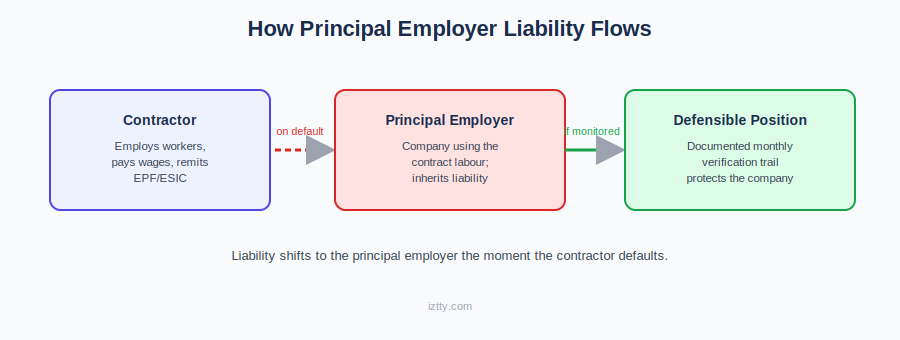
Principal employer (PE) liability is the legal exposure a company carries for a contractor’s statutory failures, wage defaults, missing EPF or ESIC remittance, or unmet welfare obligations, under the Contract Labour (Regulation and Abolition) Act, 1970. It exists whether or not the company actively monitors the contractor, which is precisely why “the vendor handles their own compliance” is not a defensible position once a labour inspection or an EPFO notice arrives.
The full legal basis, including which forms establish this liability and how it shifts back to the contractor, is covered in our CLRA compliance guide. This piece is about the operational side: how a company actually runs vendor oversight so that liability never becomes a live problem in the first place. Tracking this manually is exactly the gap Iztty’s dedicated CLRA compliance software is built to close, since it treats registration, licensing, and vendor documentation as one continuous obligation rather than a set of annual filings.
How Do You Structure a Vendor Onboarding Compliance Check?
Onboarding is the point where most vendor compliance programs either get built correctly or get skipped entirely under commercial pressure to start the engagement quickly. A functional onboarding check confirms four things before the first worker is deployed: the contractor holds a current CLRA licence valid for the relevant state and workforce size, the contractor has an active EPF and ESIC establishment code, the commercial contract explicitly names the wage rate against the current state minimum wage notification, and a named point of contact exists for monthly document submission.
Skipping this step doesn’t save meaningful time. It just moves the same verification work to a later date, usually the date an inspector or auditor asks for it, when the cost of catching a gap is far higher than the cost of preventing one.
What Should You Verify From a Contractor Every Month?
Annual or onboarding-only checks miss the failures that actually happen, which occur mid-contract, not at the start. A working monthly verification cycle covers:
The contractor’s EPF Electronic Challan cum Return (ECR) and payment challan for the month
An updated muster roll reflecting actual daily headcount, not a static figure carried over from the previous month
Wage register entries consistent with the current state minimum wage rate
A contractor who was fully compliant at onboarding can fall behind within two or three months if their own cash flow tightens, and this is exactly the pattern that goes unnoticed without a monthly check built into the relationship, rather than a courtesy request sent when someone remembers.
How Does a Vendor and Contractor Compliance Score Actually Get Calculated?
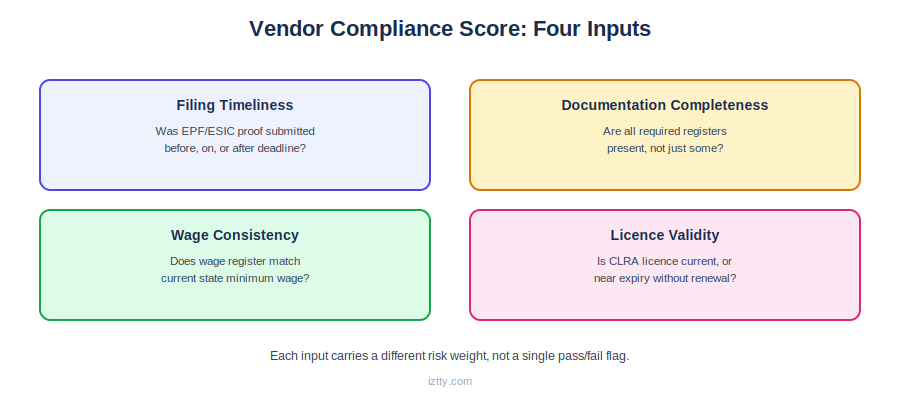
A useful vendor compliance health score isn’t a single pass/fail flag. It weighs distinct inputs that each carry different risk implications: filing timeliness (was this month’s EPF/ESIC proof submitted before, on, or after the internal deadline), documentation completeness (are all required registers present, not just the ones the vendor chose to send), wage consistency (does the wage register match the current minimum wage notification for that state), and licence validity (is the contractor’s CLRA licence current, or within 30 days of expiry without a renewal filed).
Weighting these separately matters because a vendor who is one day late on a filing carries a very different risk profile than a vendor whose licence lapsed two months ago without anyone noticing. Our Compliance Score Meter guide covers how this scoring model works at the company level; the same logic applies at the individual vendor level.
What Happens When a Vendor’s Compliance Score Drops?
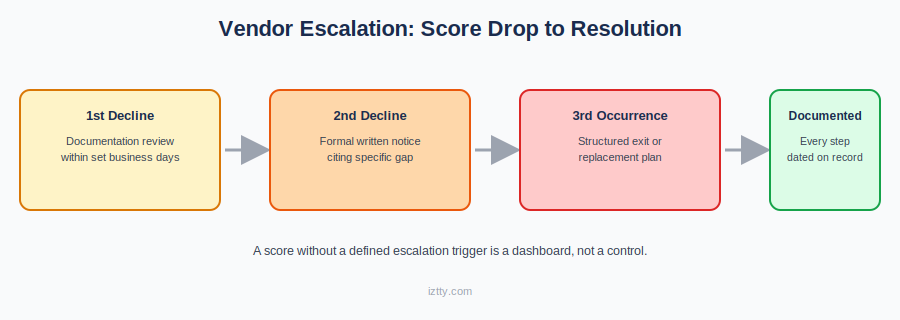
A scoring system is only useful if a low score triggers a defined action, not just a red indicator on a dashboard nobody checks. A working escalation path looks like this: a score drop below a set threshold flags the vendor for a documentation review within a set number of business days, a second consecutive month of decline triggers a formal notice to the contractor citing the specific gap, and a third occurrence without correction moves the relationship to a structured exit or replacement plan, initiated before the gap becomes a liability event, not after.
Without this defined escalation path, a compliance score becomes a reporting exercise rather than a risk control, which defeats the reason for tracking it at all.
How Do You Manage PE Liability Across Multiple Vendors and States?
Managing PE liability across several vendors and states is, at its core, a multi-state compliance management problem, not a vendor-relationship problem. A company running contract labour through six vendors across four states is managing 24 separate compliance relationships, each with its own state minimum wage notification, its own CLRA licensing authority, and its own monthly submission cadence. Treating this as one undifferentiated “vendor compliance” task is how gaps get missed; a Delhi-based security vendor’s minimum wage obligation has nothing to do with a Karnataka-based housekeeping vendor’s ESIC filing deadline, and a single shared spreadsheet rarely captures both accurately for long.
A consolidated view still matters at the leadership level, a CHRO or COO needs to see aggregate vendor risk without reviewing 24 individual files, but the underlying tracking has to stay state-specific and vendor-specific to be accurate. This mirrors the same structural challenge covered in our pillar guide’s section on multi-state compliance management.
Managing this across several vendors and states manually?Talk to our compliance team about consolidating it into one view.
What Documentation Actually Protects You If a Contractor Defaults?
If a contractor stops paying wages or EPF and the principal employer has to step in, the documentation that actually matters afterward isn’t the original commercial contract, it’s the monthly verification trail showing the company was actively checking compliance throughout the relationship, not discovering the default alongside everyone else. This includes dated copies of every monthly EPF/ESIC submission requested and received, a documented escalation history if the vendor’s score had already been declining, and a record of when the company first flagged the issue relative to when it was resolved.
This distinction, between a company that was monitoring and one that wasn’t, is frequently what separates a defensible liability position from an indefensible one during an inspection or a legal dispute.
Why Do Most Vendor Compliance Programs Fail in Practice?
Most vendor compliance programs are designed around collection, get the documents in a folder, rather than verification, confirm the documents are actually correct and current. A folder full of PDFs that nobody cross-checks against the current minimum wage notification or the actual on-site headcount provides no real protection; it only feels like protection until an inspector asks a specific question the folder can’t answer. This is precisely the gap Iztty’s statutory compliance automation India is meant to close, treating verification as an ongoing system function rather than a document-collection habit.
The second common failure is treating vendor compliance as an annual audit event rather than a monthly operating rhythm. By the time an annual audit surfaces a gap, it has typically existed for months, which is the exact period during which the principal employer’s liability was live and unmanaged.
How Does Automation Change the Vendor Audit Cycle?
The shift automation makes isn’t replacing human judgment on compliance decisions, it’s removing the dependency on someone remembering to chase 24 vendors individually every month. A platform-driven cycle sends the document request automatically on a fixed date, flags a non-submission within days rather than at the next scheduled review, cross-checks submitted wage data against the current state minimum wage rate without manual lookup, and rolls every vendor’s status into the same score used at the company level.
This is the core promise of Iztty’s AI compliance management India tools purpose-built as vendor and contract labour compliance software, rather than a generic HRMS retrofitted to do a job it wasn’t designed for. This is the specific gap our Vendor Compliance module is built to close, alongside the Maker-Checker-DSC review process for the internal sign-off before any escalation decision is finalized.
FAQs
1. Who qualifies as a “principal employer” under labour law? The company or establishment that engages contract labour through a contractor and benefits from that work, regardless of whether the workers are on the company’s own payroll.
2. Is the principal employer liable even if the contract states the vendor is solely responsible for compliance? Yes, a commercial contract clause allocating compliance responsibility to the vendor does not override the statutory liability the principal employer carries under CLRA.
3. How often should vendor compliance documents be collected? Monthly, at minimum, since contractor compliance can lapse mid-contract even when the vendor was fully compliant at onboarding.
4. What’s the difference between a vendor compliance score and a company compliance score? A company compliance score aggregates the organization’s own statutory filings and registers; a vendor compliance score tracks a specific contractor’s filing timeliness, documentation completeness, and licence validity, and typically feeds into the company-level score as one input.
5. Can a company terminate a vendor relationship for compliance failures without breaching the commercial contract? This depends on the termination clauses in the specific commercial agreement; compliance failures are commonly written in as grounds for termination, but confirm this against your actual contract language rather than assuming it by default.
6. Does PE liability apply to staffing agencies supplying white-collar contract staff, or only blue-collar labour? CLRA applies based on the numerical threshold of contract labour engaged, not the nature of the work, so white-collar contract staffing above the applicable threshold falls under the same obligations.
7. What’s the fastest way to check current vendor compliance exposure? Run a documentation completeness check against the last three months of EPF/ESIC proof, muster rolls, and licence validity for every active vendor, rather than waiting for the next scheduled audit.
8. Can multiple vendors be managed on one compliance dashboard? Yes, and doing so is generally more reliable than tracking vendors individually across separate files, provided the underlying data stays state-specific and vendor-specific rather than blended into a single aggregate figure.
9. What happens if a vendor’s CLRA licence expires mid-contract? Engaging contract labour through an unlicensed contractor exposes the principal employer to liability, so licence expiry should trigger an immediate hold on new deployments until renewal is confirmed.
10. Is vendor compliance different from statutory compliance for direct employees? Yes, direct employee compliance (EPF, ESIC, PT for your own payroll) is the company’s own statutory obligation, while vendor compliance is a verification obligation for a third party’s statutory compliance, with liability that shifts to the principal employer if the vendor fails.
What the Shop & Establishment Act Compliance Actually Regulates
The Shops and Establishments Act is a state subject, meaning every Indian state and union territory has its own version of the law, its own registration form, and its own renewal cycle. There is no single central “Shops Act.” What’s common across states is the subject matter: working hours, rest intervals, weekly holidays, opening and closing hours, employment of young persons and women, maintenance of registers for wages and leave, and the registration of the establishment itself with the local labour or municipal authority.
This is the compliance obligation that applies to almost every commercial establishment in India, retail stores, offices, IT companies, restaurants, and warehouses, regardless of whether they are also covered under the Factories Act 1948. If you run a shop, office, or commercial establishment (as opposed to a manufacturing unit that falls under the Factories Act), S&E registration is typically your first statutory obligation, not an optional one.
Not sure if your business falls under S&E or Factories Act, or both?Book a Free Compliance Audit and get a clear answer mapped to your specific operations.
Who Needs to Register: Applicability Thresholds by State
Applicability thresholds (the employee count above which registration becomes mandatory, or the point at which additional obligations like a welfare officer kick in) are not uniform. Some states require registration regardless of employee count once a commercial establishment is operational; others set a minimum headcount. Because these thresholds are amended by individual state governments from time to time, the safest approach is to confirm the current threshold with your state’s labour department or the relevant state Shops and Establishments Act notification before assuming a number from an old reference.
What is consistent across states: registration is triggered by opening the establishment for business, not by reaching a specific employee count in most states, which means many businesses register far earlier than they expect, often within 30 to 90 days of commencing operations depending on the state’s specified window.
State-wise Registration Process: Documents, Timelines, and Fees
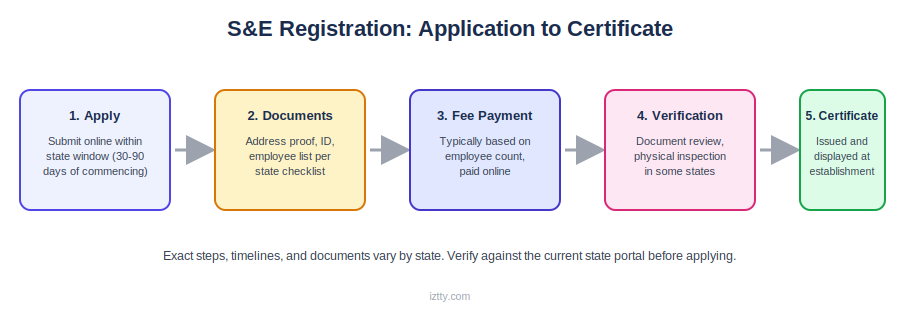
While the exact portal and form numbers vary, the registration process follows a broadly similar structure across most states:
Application submission, typically online through the state labour department’s portal, within the state-specified window from commencement of business (commonly 30 to 90 days).
Supporting documents, generally including proof of establishment address (rent agreement or property documents), identity proof of the employer, a list of employees with basic details, and in some states, a photograph of the establishment’s signboard.
Fee payment, calculated in most states based on the number of employees, payable online at the time of application.
Verification and approval, which can involve a physical inspection in some states and a purely document-based review in others.
Certificate issuance, after which the certificate must typically be displayed prominently at the establishment.
Because document requirements and portals change with state government IT modernisation drives, verify the exact current list from the relevant state labour department website before submitting, rather than relying on a document checklist from a previous filing cycle.
1, 3, 5, or 10 years (business’s choice at registration)
Karnataka
Karnataka Shops and Commercial Establishments Act, 1961
Commencement of business
Multi-year validity, state-notified
Delhi (NCT)
Delhi Shops and Establishments Act, 1954
Commencement of business
registration certificate is valid for 5 years and must be renewed before expiry
Tamil Nadu
Tamil Nadu Shops and Establishments Act, 1947
Commencement of business
Annual or multi-year, state-notified
Telangana
Telangana Shops and Establishments Act, 1988
Commencement of business
State-notified renewal cycle
Gujarat
Gujarat Shops and Establishments (Regulation of Employment and Conditions of Service) Act, 2019
Commencement of business
State-notified renewal cycle
Uttar Pradesh
Uttar Pradesh Shops and Commercial Establishments Act, 1962
Commencement of business
State-notified renewal cycle
West Bengal
West Bengal Shops and Establishments Act, 1963
Commencement of business
State-notified renewal cycle
Note: Several states have moved toward longer validity periods or one-time registration as part of ease-of-doing-business reforms in recent years. Renewal periodicity and fee slabs should always be verified against the current state notification, since these are exactly the kind of details that change without much national press coverage.
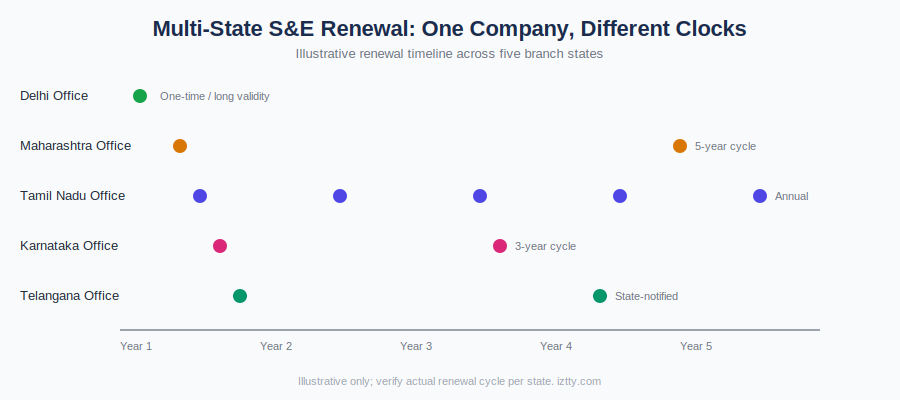
Unlike EPF or ESIC, where the compliance cycle is monthly and identical nationwide, S&E renewal cycles are set independently by each state, ranging from annual renewal to multi-year validity periods of 5 or 10 years in states that have modernised their registration frameworks. This is precisely why a multi-branch retailer or IT company operating in six states cannot manage S&E renewals on a single calendar reminder; each state licence has its own expiry date, and missing one doesn’t just risk a fine, it can affect the legal standing of the establishment to operate at that specific location.
A Plant HR Head or Admin & Legal Manager tracking this manually across multiple branches typically resorts to a shared spreadsheet with expiry dates, which works until a renewal date is entered incorrectly or a state amendment shifts a validity period retroactively, both of which happen more often than compliance teams expect.
Common Registration Mistakes That Delay Approval
Address mismatch. The registered address on the application doesn’t match the rent agreement or utility bill exactly, causing a rejection or a request for resubmission.
Wrong establishment category. Classifying an IT services office incorrectly as a “shop” versus “commercial establishment” (the categories carry different obligations in some states) leads to processing delays.
Missing employee declaration updates. Many states require the registered employee count to be kept current; failing to update it after headcount changes can flag the registration during a later inspection.
Applying under the wrong state Act for a remote or hybrid workforce. Companies with employees working from a registered office in one state but operating client-facing work in another sometimes register incorrectly, which surfaces later during a labour department query.
What Happens If You Operate Without S&E Registration
Operating a commercial establishment without valid S&E registration exposes the business to penalties under the relevant state Act, which can include fines and, in some states, the ability of the labour department to direct closure of operations until registration is completed. Beyond the direct penalty, an unregistered establishment typically cannot produce the S&E certificate that banks, landlords, government tenders, and increasingly, enterprise customers during vendor onboarding, ask for as a basic proof of legal operation.
This is also one of the first documents requested during funding due diligence for startups, since an investor’s legal team will check whether the company is operating from a properly registered establishment in every state it claims to have a presence in.
S&E Compliance for Multi-State and Multi-Branch Businesses
For a retail chain, IT services company, or logistics provider with branches across states, S&E compliance is not one registration but as many registrations as there are physical locations, each with its own renewal date, its own register format for leave and wages, and its own local labour department point of contact. A CHRO or COO overseeing this across, say, eight states needs visibility into all eight without relying on eight separate branch teams to self-report status accurately.
This is where a consolidated dashboard view, the same principle covered in our pillar guide’s section on multi-state compliance management, becomes operationally necessary rather than a nice-to-have.
How S&E Registration Connects to Your Other Statutory Obligations
S&E registration is often the first domino. Many states link Professional Tax registration and Labour Welfare Fund applicability to the existence of a valid S&E certificate, since it establishes the legal existence of the establishment at that address. If your S&E registration lapses or was never obtained for a specific branch, it can create downstream complications for Professional Tax filings and LWF contributions tied to that location.
This is why S&E compliance shouldn’t be tracked in isolation from your broader statutory calendar covering Professional Tax and Labour Welfare Fund obligations.
Manual Filing vs. a Compliance Platform: What Actually Saves Time
For a single-location business, manual S&E registration and renewal is entirely manageable with a calendar reminder and a folder of documents. The calculation changes once a business crosses three or four states, because at that point, tracking renewal dates, document formats, and category classifications correctly for each state becomes a dedicated task, not a five-minute admin job.
A dedicated platform’s value here isn’t “digitising a PDF,” it’s maintaining the correct, current register and renewal format per state (since these change with state amendments), sending tiered alerts before each state’s specific renewal date, and giving a CHRO or COO one dashboard instead of eight branch-level spreadsheets.
1. Is Shops and Establishment registration mandatory for all businesses in India? Yes, in most states, any commercial establishment, including shops, offices, and IT companies, is required to register under the applicable state Shops and Establishments Act, generally within a specified window after commencing business.
2. Is there a central Shops and Establishment Act for all of India? No, it is a state subject, so each state and union territory has its own Act, registration process, and renewal cycle, which is why requirements differ significantly between, for example, Maharashtra and Tamil Nadu.
3. How long does S&E registration take to process? This varies by state and depends on whether physical inspection is required; some states process purely online applications within a few working days, while others take longer if verification is needed.
4. Does S&E registration need to be renewed every year? Not always. Some states have moved to multi-year validity periods (3, 5, or even 10 years) as part of ease-of-doing-business reforms, while others retain annual renewal. Confirm the current cycle for your specific state.
5. What documents are needed for Shops and Establishment registration? Commonly required documents include proof of establishment address, employer identity proof, and employee details, though the exact list varies by state and should be confirmed against the current state labour department checklist.
6. What is the penalty for not registering under the Shops and Establishment Act? Penalties vary by state and can include fines and, in some cases, the labour department’s ability to restrict operations until registration is completed.
7. Does a company need separate S&E registration for each branch office? Yes, registration is typically required for each physical establishment location, since the Act applies at the establishment level, not at the company level.
8. Is S&E registration different from Factories Act registration? Yes, the Factories Act 1948 applies to manufacturing units meeting specific worker and power-usage thresholds, while the Shops and Establishments Act applies to commercial establishments like offices, shops, and retail outlets. A business could need one, the other, or neither, depending on its operations.
9. Can Shops and Establishment compliance be managed through an HRMS? Most HRMS platforms don’t natively generate state-specific S&E registers or track multi-state renewal dates; this is typically handled better by a dedicated statutory compliance platform, as covered in our complete statutory compliance guide.
10. How much does Shops and Establishment registration cost? Fees are typically calculated based on employee count and vary by state; confirm the current fee slab with your state’s labour department portal at the time of application.
Compliance and Risk Management in India: Why Your HRMS’s “Compliance Module” Isn’t Enough
Every HR platform sold in India today claims “compliance” as a feature. Payroll software calculates PF and ESI. HRMS suites add a “statutory compliance module” to the pricing page. And yet compliance managers at manufacturing companies, retail chains, and multi-state service businesses keep discovering the same thing during a labour inspection: the software they bought handles payroll deductions, but nobody actually maintains the Factories Act registers, the Shops & Establishment renewals, or the contractor compliance files the inspector is asking for.
The confusion is understandable – “compliance” is used as a catch-all word across a genuinely fragmented software market, and buyers rarely have time to reverse-engineer what a vendor’s “compliance module” line item actually includes before they’ve already signed a one-year HR platform contract. This is not a training gap. It is a category gap. “Compliance and risk management” for an Indian employer is not one thing – it is at least three distinct workstreams (payroll-statutory, factory/establishment registers, and contract-labour/vendor compliance), and most software on the market was built to solve only the first one.
This article exists to answer the question buyers actually have when they start evaluating tools: does an HRMS compliance module cover what I legally need, or do I need a specialist statutory compliance platform – and how do I tell the difference before an audit forces me to find out?
The regulatory backdrop: why this question matters more in 2026 than it did two years ago
India’s four Labour Codes – the Code on Wages 2019, the Industrial Relations Code 2020, the Code on Social Security 2020, and the Occupational Safety, Health and Working Conditions (OSH) Code 2020 – were notified as effective from 21 November 2025, consolidating 29 central labour statutes. The Ministry of Labour and Employment notified the Central Rules under all four Codes in May 2026. But labour is a Concurrent List subject, which means each state and union territory must separately frame and notify its own rules before the Codes are fully enforceable in that jurisdiction – and as of mid-2026, state-level notification remains a patchwork: some states have finalised their rules, many are still at the draft stage.
The practical consequence for a compliance manager is this: until a state notifies its own rules under the new Codes, the transitional position is that establishments continue to comply with the existing laws and registers – the Factories Act 1948, the state Shops & Establishment Act, the Contract Labour (Regulation & Abolition) Act 1970, the EPF & MP Act 1952, and the ESI Act 1948 – in parallel with early adjustments the Codes already require, such as the 50% wages rule under the Code on Wages (basic plus dearness allowance must equal at least 50% of total remuneration, which directly affects PF, gratuity, and bonus calculations).
That means any compliance tool bought in 2026 has to do two things at once: keep the legacy statutory registers current (because they are still the enforceable requirement in most states), and be ready to absorb the new Code-based obligations as each state notifies its rules. A payroll-only tool that only tracks EPF/ESIC challans was never built to track register-level obligations under the old Acts – which is exactly the gap this article walks through.
Regulatory position current as of August 2026. Central and state rules under the Labour Codes continue to be notified on a rolling basis – verify current status for your operating states at labour.gov.in and indiacode.nic.in before relying on any specific deadline in this article.
The four Labour Codes, in plain terms
Because the Codes are frequently referenced without being explained, here is what each one actually consolidates and why it matters to a compliance tool’s scope:
Code on Wages, 2019 – consolidates the Payment of Wages Act, Minimum Wages Act, Payment of Bonus Act, and the Equal Remuneration Act. Its most operationally significant change is the “50% rule”: basic pay plus dearness allowance must equal at least 50% of total remuneration, which directly changes how PF, gratuity, and bonus are calculated on a restructured salary – a payroll engine has to get this right, or every downstream statutory calculation is wrong.
Industrial Relations Code, 2020 – consolidates the Trade Unions Act, Industrial Employment (Standing Orders) Act, and Industrial Disputes Act. Introduces changes to fixed-term employment (parity of benefits with permanent employees, including pro-rata gratuity after one year) and revises standing order and layoff/retrenchment thresholds.
Code on Social Security, 2020 – consolidates the EPF Act, ESI Act, Maternity Benefit Act, Payment of Gratuity Act, and several others, and for the first time extends social security coverage frameworks toward gig and platform workers.
Occupational Safety, Health and Working Conditions (OSH) Code, 2020 – consolidates the Factories Act, the Contract Labour (R&A) Act, the Inter-State Migrant Workmen Act, and related safety legislation. This is the Code that will eventually absorb the Factories Act registers and CLRA obligations discussed throughout this article – once state rules are notified and the transition is complete.
Until a given state notifies its OSH Code rules, the practical reality is that the underlying Factories Act and CLRA registers described in this article remain the enforceable requirement – which is exactly why a compliance tool bought today has to handle the current register-level obligations, not just the eventual Code-based framework.
Common myths this article is written to correct
“Our HRMS handles compliance, so we’re covered.” It handles payroll-statutory compliance – EPF, ESIC, PT, LWF. It does not maintain Factories Act registers, S&E renewals, or CLRA contractor documentation.
“We don’t have a factory, so the Factories Act doesn’t apply to us.” Correct, in most cases – but the Shops & Establishment Act almost certainly does, and it carries its own state-specific registers and renewal obligations that are just as easy to miss.
“Our contractor is responsible for their own workers’ compliance, not us.” Under CLRA, the principal employer carries statutory obligations regardless of what the contractor agreement says internally – this is a common and costly misunderstanding.
“The Labour Codes replaced all the old laws, so the old registers don’t matter anymore.” The Codes are in effect, but until state rules are notified for each Code, the transitional position generally keeps the existing Acts and registers operative – treating them as obsolete before your state has actually transitioned is a real compliance gap, not a shortcut.
“A compliance score from any GRC dashboard tells us where we stand.” Only if the score is built from actual register and filing status – a score built from self-reported task completion tells you what your team said they did, not what a labour inspector would find.
“We’re too small for any of this to apply to us.” Thresholds vary by Act – EPF applies from 20 employees, ESIC typically from 10, and S&E registration is often required from the very first employee or the first commercial premises. “Small” is rarely a reason to be exempt; it’s usually a reason nobody has checked which thresholds have already been crossed.
What an “HRMS compliance module” actually does – and where it stops
When a founder or CHRO buys an HRMS (Keka, greytHR, Zoho People, Darwinbox, HROne, Zimyo, and similar platforms all fall in this category), the “statutory compliance” feature almost always means the payroll-statutory layer:
EPF calculation and Electronic Challan-cum-Return (ECR) generation, due by the 15th of the following month under the EPF & MP Act 1952
ESIC contribution calculation and challan generation, also due by the 15th of the following month, for establishments with 10+ employees (in most states) drawing wages up to the ESIC wage ceiling
Professional Tax (PT) deduction against state-wise slabs
Labour Welfare Fund (LWF) deduction where applicable, at the state-notified rate and periodicity
Form 16/24Q-style payroll tax outputs and payslip generation
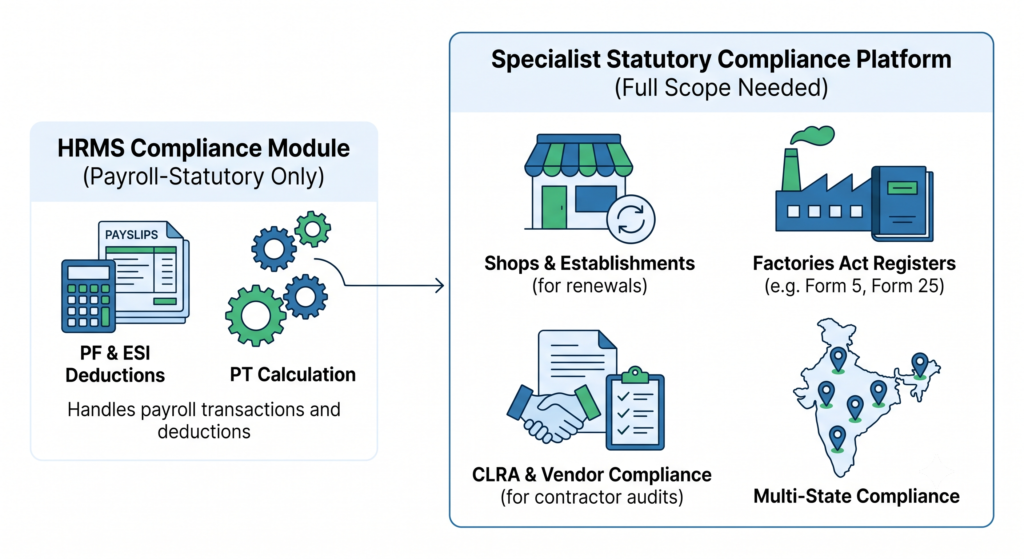
This is genuinely useful – it automates a real, recurring compliance obligation. The problem is what it implies to a buyer who isn’t already a compliance specialist: the module is labelled “statutory compliance,” so a founder reasonably assumes it means all statutory compliance. It doesn’t. An HRMS compliance module, by design, only ever sees the payroll transaction. It has no register for the Factories Act, no contractor license tracker for CLRA, no Shops & Establishment renewal calendar, and no workflow for a labour inspector’s notice. It was never architected to hold that data, because payroll software’s core object is “employee + salary,” not “establishment + register + inspector.”
This is precisely the confusion visible across the market’s own content. Round-ups like 10 HR Compliance Tools for Businesses in India mix outsourced HR compliance services with payroll software in the same “top 10” list – which is itself evidence that even content written for this exact audience doesn’t clearly separate the three different things a buyer might need: a payroll-statutory feature, an outsourced compliance service, and a full statutory-register platform.
What a specialist statutory compliance platform actually covers
A specialist platform – the category Iztty, Ricago, TeamLease RegTech, and Digiliance compete in – is built around the establishment and the register, not the payroll transaction. Concretely, that means:
1. Factory compliance under the Factories Act 1948
Factory registration and licence renewal with tiered expiry alerts, and the statutory registers a factory inspector will ask for on any visit – including Form 25 (register related to overtime), Form 5 (register of adult workers), and Form 17 (register of leave with wages) – along with half-yearly and annual returns to the Chief Inspector of Factories.
2. Shops & Establishment (S&E) Act compliance
Every state administers its own S&E Act, with its own register formats, its own renewal cycles, and its own thresholds for what triggers registration. A retail chain or office-based business operating in five states is not managing one compliance calendar – it is managing five, each with different forms and different renewal windows. This is the single most common blind spot for growing retail and services companies who assume “we’re not a factory, so we’re not covered” – S&E registration is usually mandatory from the first commercial premises.
3. CLRA – contract labour and vendor compliance
Under the Contract Labour (Regulation & Abolition) Act 1970, a principal employer using contract labour through a licensed contractor carries statutory obligations – registration of the establishment, contractor licensing checks, and returns including the half-yearly Form XXIV filed by the contractor (due within 30 days of the close of each half-year, i.e. broadly the end of January and end of July) and the principal employer’s annual return. This is covered in more depth further below, because it is the area where “we thought our vendor handled it” causes the most real legal exposure.
4. Payroll-statutory compliance (EPF/ESIC/PT/LWF)
Yes – a specialist platform still needs to do the same ECR/challan work an HRMS does. The difference is that it does this alongside the register-level work above, in the same system, with the same audit trail, rather than as an isolated payroll feature disconnected from the rest of the establishment’s compliance picture.
Every register above eventually needs to be signed – by an authorised signatory, often with a Digital Signature Certificate (DSC) – and needs to be defensible later as evidence that the process was followed, not just that a form exists. This is a workflow requirement, not a data-entry requirement, and it’s the layer most HRMS platforms and most horizontal GRC tools don’t build natively.
HRMS compliance module vs specialist statutory compliance platform vs enterprise GRC: a straight comparison
Factories Act registers (Form 25, Form 5, Form 17)
No
Yes
Often tracked as a task, not as a native register
State-specific Shops & Establishment registers
No
Yes
Yes, typically
CLRA contractor licence and return management
No
Yes
Yes, typically
Vendor/contractor compliance audit + auto-scoring
No
Yes
Varies by vendor
Maker-Checker-DSC digital signing on registers
Rare
Yes
Rare – most rely on manual signing outside the platform
AI-assisted notice/inspection response drafting
No
Yes
Varies by vendor
Breadth (number of Acts tracked)
Narrow – payroll-adjacent Acts only
Focused – labour, factory, S&E, CLRA, payroll
Very broad – 1,000+ Acts across sectors, including non-labour regulatory obligations
Buying motion
Bundled into an HR/payroll suite purchase
Standalone, compliance-team-led purchase
Standalone, often legal/company-secretarial-led enterprise purchase
Best fit
Small office-only businesses with no factory, no contract labour, single state
Manufacturers, multi-location retail, staffing firms, anyone with factories, contract labour, or multi-state establishments
Large enterprises needing compliance coverage well beyond labour law (environmental, sector-specific, corporate)
None of this makes the HRMS “wrong” – for a 40-person, single-office SaaS company with no factory and no contract labour, the payroll-statutory layer genuinely might be sufficient. The failure mode is buying an HRMS because its compliance module implies full coverage, then discovering the gap only when a factory inspector, a contract-labour audit, or a state S&E renewal notice arrives.
The blind spot in detail: what actually gets missed
To make this concrete rather than abstract, here is what a compliance manager at a multi-state manufacturer or retailer is actually responsible for, beyond payroll, in a given year:
Obligation
Governing Act
Typical frequency
Who usually owns it in an HRMS-only setup
Register of adult workers (Form 5)
Factories Act 1948
Maintained continuously, produced on inspection
Often a spreadsheet, or nobody
Overtime register (Form 25)
Factories Act 1948
Continuous
Often a spreadsheet
Leave with wages register (Form 17)
Factories Act 1948
Continuous, annual return
Often manual, reconciled only before inspection
Factory licence renewal
Factories Act 1948
Annual, state-specific
Manually tracked in a calendar reminder, frequently missed across multiple factories
S&E registration/licence renewal
State S&E Act
Annual or multi-year, state-specific
Often owned by whichever branch manager remembers
Contractor licence validity check
CLRA 1970
Continuous, before onboarding and periodically thereafter
Rarely checked systematically
Contractor half-yearly return (Form XXIV)
CLRA 1970
Within 30 days of close of half-year (Jun/Dec)
Assumed to be the contractor’s problem – it is also the principal employer’s exposure
Principal employer annual return
CLRA 1970
Annual, by mid-February
Frequently missed entirely
EPF ECR/challan
EPF & MP Act 1952
Monthly, by the 15th
Handled well – this is the HRMS’s strength
ESIC contribution + half-yearly return
ESI Act 1948
Monthly payment, half-yearly return
Payment handled well; return filing sometimes missed
The pattern is consistent: anything that resembles a payroll transaction is handled well by an HRMS. Anything that is a physical register, a licence, or a contractor relationship is not – because it was never designed into the product.
Contract labour and vendor compliance: where the real legal exposure sits
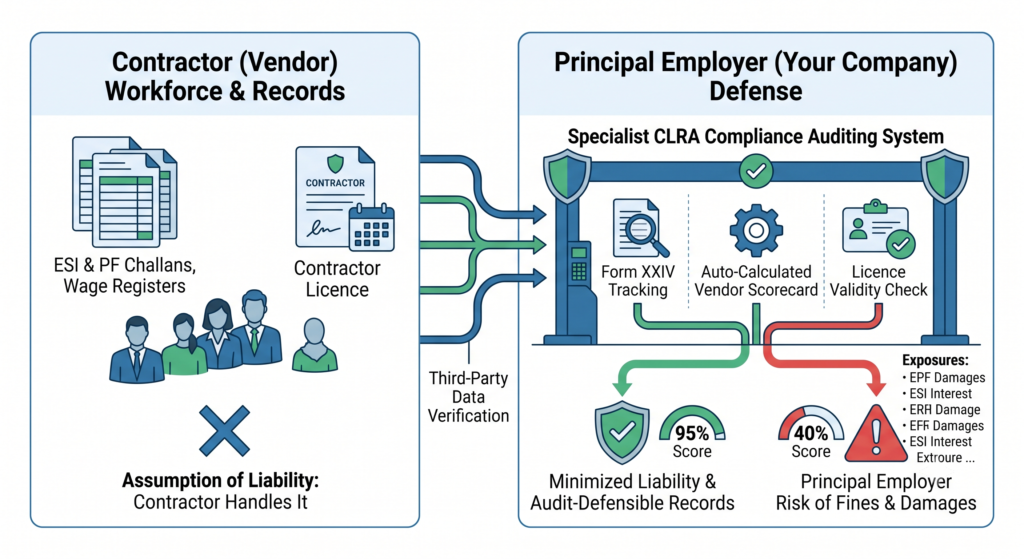
This is the risk area most founders and even many HR leaders underestimate. Under CLRA, the principal employer – the company that engages a contractor to supply labour, whether for housekeeping, security, packaging, or line staff – carries statutory obligations that do not disappear because a contractor is “responsible” for their own workforce. If a contractor fails to pay EPF, ESIC, or minimum wages to contract workers, the principal employer can carry liability, and in some circumstances can be required to pay wages directly and recover from the contractor.
Managing this well requires:
Verifying contractor licence validity before onboarding and at renewal
Collecting and auditing the contractor’s own EPF/ESIC/wage registers on a recurring basis, not just at contract signing
Auto-calculating a vendor compliance score so a security or housekeeping vendor with a lapsing licence or missed contribution is flagged before it becomes the principal employer’s problem
Maintaining the documentation trail that demonstrates the principal employer exercised due diligence – this is the evidence that matters if a labour officer or court later examines liability
No HRMS compliance module is built to manage a third-party vendor’s compliance posture – it has no data model for “vendor” at all. This is a genuinely different problem from payroll, which is why vendor compliance auditing is one of the clearest lines separating a specialist statutory compliance platform from an HRMS add-on.
Why Maker-Checker-DSC matters more than it sounds
A register that exists in a spreadsheet or a basic HRMS export is not, by itself, defensible evidence during an inspection or a dispute. What makes a compliance record defensible is a demonstrable process: someone uploaded and validated the data, someone else independently reviewed and approved (or rejected, with a documented reason), and the final version was digitally signed with a Digital Signature Certificate before being archived.
This four-stage workflow – upload/validate, review/approve-or-reject, DSC signing, auto-archive – is the practical difference between “we have a register” and “we have a register we can defend.” It is a workflow-engineering problem, not a data-storage problem, which is exactly why it tends to be missing from both HRMS compliance modules (built around payroll transactions, not document governance) and many horizontal GRC platforms (built around task/deadline tracking, not statutory document execution).
AI-assisted notice response: the real time cost of doing this manually
When a PF, ESIC, Labour, S&E, or Factories Act notice arrives, the manual process is: someone reads the notice, manually cross-references the allegation against internal records, drafts a formal reply, gathers supporting evidence, and routes it for sign-off – a process that commonly takes several working days when records are scattered across payroll exports, physical registers, and email threads. An AI-assisted approach that can read the notice, extract the allegation and deadline, and draft a structured reply with an evidence checklist compresses that into hours rather than days – the gap that matters most when a notice carries a short statutory response window.
Compliance score: a practical way to see risk before an inspector does
A single number – a live compliance score, broken down act-wise and state-wise, with a low/medium/high risk banding – gives a CFO or CEO a way to ask “where are we exposed?” without reading twenty registers. This is the kind of output a horizontal GRC dashboard can produce at a high level, but it is far more useful when it’s built on the actual underlying registers (Factories Act, S&E, CLRA, payroll-statutory) rather than on self-reported task completion, which is how many enterprise GRC tools currently calculate it.
What non-compliance actually costs: the numbers behind the risk
“Compliance and risk management” is often discussed in abstract terms – audit readiness, reputational risk, governance maturity. For an Indian employer, the risk is also concrete and quantified in the statute itself:
Act
Provision
Exposure
Factories Act 1948
Section 92 (general penalty)
Imprisonment up to 2 years, or fine up to ₹1 lakh, or both – for the occupier and the manager individually. A continuing contravention after conviction adds a further fine of up to ₹1,000 for each additional day.
Factories Act 1948
Section 92 proviso (safety-related contraventions causing death or injury)
Minimum fine of ₹25,000 for a fatality, ₹5,000 for serious bodily injury, in addition to imprisonment.
Factories Act 1948
Section 94 (repeat offence)
Imprisonment up to 3 years or a fine of not less than ₹10,000 (up to ₹2 lakh), or both.
EPF & MP Act 1952
Section 14B
Damages on delayed contribution ranging from 5% p.a. (delay up to 2 months) to 25% p.a. (delay over 6 months).
EPF & MP Act 1952
Section 7Q
Interest at 12% p.a. on the unpaid amount, in addition to Section 14B damages.
Contract Labour (R&A) Act 1970
General offence provisions
Fines and imprisonment apply to both the contractor and, in specific circumstances, the principal employer – alongside the separate civil exposure of being required to pay contract workers’ wages directly if the contractor defaults.
These figures are drawn directly from the bare Act text and are subject to state amendments and the ongoing Labour Codes transition – verify current figures for your state at indiacode.nic.in before using them in any internal risk assessment. The point isn’t the exact rupee figure; it’s that every one of these penalties attaches to a register or a filing an HRMS compliance module was never built to hold – the Factories Act registers, the CLRA return, the timely EPF challan. A tool gap becomes a personal liability gap for the occupier, manager, or principal employer named in the section.
A sector-by-sector view of where the gap actually bites
“Statutory compliance” isn’t experienced the same way in every industry. Here’s how the HRMS-vs-specialist-platform gap plays out by vertical:
Manufacturing & Factories
The most exposed vertical by definition – every registered factory carries Factories Act obligations (Form 25, Form 5, Form 17, licence renewal) that no payroll tool touches. Add contract labour for line staff or housekeeping, and CLRA principal-employer exposure stacks on top. Multi-factory manufacturers additionally face the multi-state register problem described above.
Retail & Shops
Rarely has Factories Act exposure, but almost always has Shops & Establishment Act exposure from the first outlet, multiplied by every state a chain expands into. Retailers frequently underestimate S&E as “just registration” when it also carries ongoing register and renewal obligations per location.
Staffing & Contractors
This vertical is the CLRA relationship – as either the licensed contractor supplying labour or the principal employer engaging it. Vendor compliance auditing and contractor licence tracking aren’t a nice-to-have here; they’re the core of the business’s own legal exposure.
Construction & Infrastructure
Typically layers CLRA (contract and migrant labour), Factories Act-adjacent building and safety obligations, and high workforce turnover that makes manual register-keeping especially error-prone – a strong candidate for automated, DSC-signed record-keeping precisely because the paper trail is what protects the principal contractor in a dispute or accident inquiry.
IT & Technology Services
Often the segment where an HRMS compliance module genuinely is closer to sufficient – office-only, no factory, limited contract labour – but multi-state expansion (opening a second or third city office) still triggers separate S&E registrations that are easy to miss when the compliance owner is a generalist HR function rather than a dedicated compliance manager.
Healthcare & Pharma
Frequently combines S&E obligations for clinics/hospitals with factory-level obligations for manufacturing units (pharma plants), plus significant contract labour for support staff – a combination that makes single-category tools (payroll-only or factory-only) inadequate on their own.
Mining & Logistics/Warehousing
Both carry factory-adjacent safety and register obligations, high reliance on contract labour, and multi-site operations spread across states – the same combination of factors that makes a consolidated, multi-branch platform materially more useful than a spreadsheet-plus-HRMS approach.
A quick glossary, for anyone brought into this conversation mid-way
ECR (Electronic Challan-cum-Return): The monthly online return and payment mechanism for EPF contributions, filed via the EPFO Unified Portal, due by the 15th of the following month.
DSC (Digital Signature Certificate): A legally recognised digital signature used to sign statutory filings and registers electronically, making the record verifiable and tamper-evident.
LWF (Labour Welfare Fund): A state-administered welfare fund that employers and employees contribute to, applicable in roughly 16 Indian states, each with its own rate and contribution periodicity (monthly, half-yearly, or annual depending on the state).
S&E (Shops & Establishment Act): State-specific legislation governing working conditions, registers, and licensing for shops, commercial establishments, and offices – distinct from the central Factories Act.
CLRA (Contract Labour, Regulation & Abolition Act 1970): Central legislation governing the engagement of contract labour through licensed contractors, and the corresponding obligations of the principal employer.
PT (Professional Tax): A state-levied tax on employment/professions, deducted from salary against state-specific slabs, distinct from income tax.
Principal employer: Under CLRA, the entity that engages a contractor to supply workers – carries statutory obligations even though the contractor is the direct employer of the contract workforce.
Maker-Checker: A two-stage internal control where one person prepares/enters a record and a second, different person independently reviews and approves it before it becomes final – a standard governance control, applied here to statutory registers and filings.
A 30-minute internal gap-check you can run before your next inspection
Before evaluating any software, it’s worth spending half an hour establishing your actual exposure. Walk through this with whoever currently owns “compliance” in your organisation – often an HR generalist, not a dedicated compliance manager:
List every physical location: factories, offices, retail outlets, warehouses. For each, confirm which state’s S&E Act or Factories Act registration applies, and pull the current licence/registration expiry date.
List every contractor or staffing vendor currently supplying labour to any location. For each, confirm licence validity under CLRA and the date you last collected their EPF/ESIC/wage registers.
For every factory location, confirm someone can physically produce Form 25, Form 5, and Form 17 (or your state’s equivalent) within one hour, and confirm who signed the most recent version and how.
Confirm your EPF ECR and ESIC contribution filing history for the last 6 months has no missed 15th-of-the-month deadlines, and that half-yearly ESI and CLRA returns were filed on time.
Ask directly: “If a labour inspector or EPFO/ESIC notice arrived today, who owns the response, and how long would it take them?” If the honest answer involves searching email threads and spreadsheets, that’s your real turnaround time – not the number you’d like it to be.
Most organisations that run this exercise discover their real gap is not in payroll – payroll is usually fine – but in exactly the register, licence, and vendor areas an HRMS was never built to cover.
Multi-state, multi-branch complexity: why point solutions break down
India does not have one labour compliance regime – it has one central framework layered with state-specific rules, forms, and renewal cycles that vary from Maharashtra to Tamil Nadu to Uttar Pradesh. A company with factories in three states and retail outlets in five more is not running one compliance calendar; it is running eight, each with its own S&E renewal date, its own LWF contribution schedule (LWF is applicable in roughly 16 states with different rates and periodicities), and its own state amendments layered on top of the Factories Act and CLRA central rules.
A tool that isn’t architected for role-based, multi-branch access – with Maker, Checker, and DSC-holder roles distinct from each other, and dashboards that consolidate up to an executive view while still letting a plant HR head see only their factory’s registers – either breaks down at scale or forces the compliance team back into spreadsheets to reconcile across locations. This is the practical reason “multi-state compliance management” is treated as a distinct buying criterion rather than a marketing phrase.
Why “we’ll just track it in a spreadsheet” stops working past a certain size
Almost every organisation that eventually buys a specialist compliance platform started with a spreadsheet – a compliance calendar maintained by one person, cross-referenced against a folder of scanned licences and registers. This works, until it doesn’t, and the failure point is predictable: it breaks the moment the person who built the spreadsheet goes on leave, changes roles, or leaves the company, and the tribal knowledge of “which state’s S&E renewal is due when, and where the last signed register is filed” leaves with them.
It also breaks at scale in a specific, measurable way: a single-state, single-factory company can genuinely track five or six recurring obligations manually. A five-state, three-factory company with two staffing vendors is tracking closer to sixty distinct obligations across different frequencies, different forms, and different signing authorities – at which point a spreadsheet’s real failure mode isn’t that it’s inconvenient, it’s that nobody can prove, after the fact, that a specific register was reviewed by a specific person on a specific date. That provability is exactly what a labour inspector, an EPFO officer, or opposing counsel in a dispute will ask for – and “it’s in the spreadsheet” is not, on its own, an answer.
Decision framework: how to tell if your HRMS’s compliance module is actually enough
Run through this before renewing or buying an HRMS on the strength of its “compliance module” line item:
Do you operate any factory, warehouse, or manufacturing unit registered under the Factories Act? If yes, you need Factories Act register management – an HRMS module does not provide this.
Do you operate in more than one state? If yes, you need a system that tracks state-specific S&E renewal cycles and forms individually, not a single generic “compliance” checklist.
Do you engage contract labour through a contractor or staffing vendor for any function – security, housekeeping, packaging, warehouse staff? If yes, you carry CLRA principal-employer obligations that require contractor licence tracking and vendor compliance audits.
Do you need a digitally signed, audit-defensible register – not just a stored PDF – for any of the above? If yes, you need a Maker-Checker-DSC workflow, which most HRMS platforms do not offer natively.
If a labour inspector visited tomorrow, could you produce Form 25, Form 5, Form 17, your current factory licence, your S&E registration, and your contractor’s Form XXIV within the hour? If the honest answer is no, the gap is real, not theoretical.
If you answered “yes” to any of the first three questions, an HRMS compliance module alone is very likely insufficient, regardless of how the vendor markets it – and the real evaluation should be between a specialist statutory compliance platform (if your primary exposure is labour, factory, S&E, and contract-labour compliance) and an enterprise GRC platform (if you also need coverage across non-labour regulatory domains at enterprise scale).
Where a specialist platform like Iztty fits against both camps
Against the HRMS-with-compliance-bolt-on camp (Keka, greytHR, Zimyo, and similarly reviewed platforms), the gap is breadth: those tools were not built to hold Factories Act registers, S&E state formats, or CLRA contractor data, because their core object is payroll, not the establishment register.
Against the enterprise GRC camp (Ricago, TeamLease RegTech, Digiliance), the differentiation is depth and workflow, not breadth: a specialist platform focused specifically on labour, factory, S&E, payroll, and CLRA compliance can build native Maker-Checker-DSC signing and AI-assisted notice response into the workflow itself, rather than tracking these as generic tasks inside a broader 1,000-plus-Act compliance dashboard. Iztty is built by Futurex Management Solutions, a compliance consulting firm with over a decade of hands-on labour, factory, and CLRA advisory experience – which shapes the platform around how a compliance manager actually works a register, not around a generic risk-management framework applied to labour law after the fact.
Twelve capabilities, mapped to the twelve things a compliance manager actually does
Rather than listing product features in isolation, here is how each capability of a specialist platform like Iztty maps to a real, recurring job a compliance manager, plant HR head, or compliance consultant does across the year:
Job to be done
Platform capability
Track LWF registration and contribution across every LWF-applicable state my company operates in
Labour Compliance Management – state-specific LWF rate automation, DSC-signed registers across all applicable states
Keep every factory’s licence and registers current without visiting each site
File CLRA returns on time and prove principal-employer due diligence
CLRA & Ease of Compliance – Forms XII/XIII/XIV/XIX, DSC-signed half-yearly returns
Prove any register was reviewed and approved, not just uploaded
Maker-Checker-DSC Workflow Engine – 4-stage review and sign-off with mandatory remarks on rejection
Respond to a labour or EPFO/ESIC notice within its statutory window
AI Notice Response Assistant – OCR notice reading, allegation/deadline extraction, drafted reply with evidence checklist
Know when a gazette notification or state amendment actually applies to my company
Regulatory Change Intelligence – monitors gazette notifications, EPFO/ESIC circulars, and state amendments, and generates matched action tasks for human review
Answer “where are we exposed?” for the board or a CFO in one number
Compliance Score Meter – live 0–100% score, act-wise and state-wise breakdown, risk banding
See every branch’s status in one consolidated view without chasing local HR teams
Let a plant HR head see only their factory while I see everything, without a spreadsheet-sharing workaround
Role-Based Access & Multi-Branch Architecture – Maker/Checker/DSC-holder roles, department-wise access across 28+ states
If you’re a compliance consultant managing multiple client companies
Everything above assumes a single company evaluating its own exposure. If you run a compliance consultancy or a statutory-compliance-as-a-service firm managing filings for multiple client companies, the calculus is different again: you’re not choosing between an HRMS module and a specialist platform for one establishment – you’re choosing infrastructure that has to scale across dozens of client mandates without every client requiring a separate spreadsheet system or a separate login you manage manually.
The requirements that matter most for this persona are role-based multi-tenant access (so each client’s data stays segregated while your team works across all of them), a consolidated dashboard that lets you triage which client’s compliance score just dropped without logging into each account individually, and – critically – the same AI Notice Response capability, because a consultancy managing 40 clients absorbs the multi-day manual notice-response cost 40 times over unless it’s automated. This is precisely the scenario reflected in Iztty’s own representative outcome data: a 40-client compliance consultancy cutting EPF/ESIC notice response from 5 days to 4 hours per notice compounds into a materially different service-delivery capacity across an entire client book, not just one company’s risk posture.
Questions worth asking any vendor before you sign – HRMS, specialist platform, or enterprise GRC
Regardless of which category you land in, these questions separate a platform that will hold up under an actual inspection from one that looks complete in a sales demo:
“Show me the Factories Act Form 25 register as it would look for my factory, populated with sample data – not a mockup.” Many platforms describe register coverage in marketing copy without a working, state-correct register format behind it.
“Who signs the final register, and how is that signature legally defensible?” A PDF export is not the same as a DSC-signed, Maker-Checker-reviewed record.
“If I add a fourth state next quarter, what changes on my end?” This tells you whether the platform’s state coverage is genuinely built-in or requires a custom build/consulting engagement each time you expand.
“What happens to my vendor’s compliance score if their EPF payment is late by three days – do I find out, and when?” This distinguishes real-time vendor monitoring from a static, point-in-time audit.
“Can I see an actual AI-drafted notice response, not a description of the feature?” Ask for the underlying draft quality, not just the time-savings claim.
“What’s included versus billed separately – is CLRA vendor auditing part of the core platform, or an add-on module?” This affects total cost of ownership more than the headline price.
What this means if you’re evaluating right now
If your organisation is office-only, single-state, with no contract labour and no factory registration, your HRMS’s compliance module may genuinely be sufficient – don’t buy a specialist platform you don’t need. If you operate any factory, any multi-state footprint, or engage any contract labour, treat “statutory compliance” as a distinct buying decision from your HRMS, evaluated on register coverage, contractor/vendor auditing, and signing workflow – not on whether the word “compliance” appears in the feature list.
The fastest way to find out where you actually stand is a compliance audit against your specific state and Act exposure, not a generic checklist. Book a free compliance audit or a platform demo to see your current register coverage mapped against what the Factories Act, your state S&E Act, CLRA, and the ongoing Labour Codes transition actually require.
Frequently Asked Questions
1. What is the difference between HRMS and compliance software?
An HRMS is built around payroll and employee records, and its “compliance” feature typically covers EPF, ESIC, Professional Tax, and Labour Welfare Fund calculations and challans. Statutory compliance software is built around the establishment and its legal registers – Factories Act registers, Shops & Establishment renewals, and CLRA contractor/vendor compliance – which an HRMS does not natively track.
2. Do labour codes 2026 change what compliance software needs to handle?
Yes, progressively. The four Labour Codes came into effect on 21 November 2025 and central rules were notified in May 2026, but state-level rules are still being notified on a rolling basis. Until a given state notifies its rules, the transitional position generally requires continued compliance with the existing Acts (Factories Act, S&E Act, CLRA, EPF Act, ESI Act) alongside early Code-based changes such as the 50% wages rule. Compliance software needs to track both the legacy register requirements and the incoming Code-based obligations as each state notifies.
3. How much does a compliance management system cost in India?
Pricing varies widely by vendor and is typically structured by number of establishments/branches, number of employees, and module scope (payroll-statutory only vs full register + vendor compliance coverage). Because pricing changes frequently and isn’t uniformly published, request a quote scoped to your actual state and Act exposure rather than relying on a generic published rate.
4. What is a Factories Act register, and which ones matter most?
Factories Act 1948 registers are physical or digital records a registered factory must maintain and produce on inspection – commonly including the register of adult workers (Form 5), the overtime register (Form 25), and the leave-with-wages register (Form 17), alongside half-yearly and annual returns. Exact form numbering and requirements can vary by state amendment, so verify current formats for your specific state.
5. Is Shops & Establishment Act registration required if I’m not a factory?
Yes, in almost all cases. The S&E Act applies to commercial establishments – offices, shops, and retail outlets – not just factories, and registration is typically required from the point a business opens its first commercial premises in a state. It is state-specific legislation, so requirements, forms, and renewal cycles differ from state to state.
6. Who is liable if a contractor doesn’t pay EPF or ESIC to contract workers?
Under CLRA, the principal employer engaging the contractor can carry liability alongside the contractor if the contractor fails to meet statutory obligations to contract labour, including in some circumstances an obligation to pay wages directly and recover the amount from the contractor. This is why vendor/contractor compliance auditing is a core requirement, not an optional add-on, for any company using contract labour.
7. What is a compliance score, and how is it calculated?
A compliance score is a consolidated metric – typically 0–100% – that reflects how current an organisation’s statutory obligations are across the Acts and states it operates in, usually broken down act-wise and state-wise with a risk banding (low/medium/high). It’s most useful when it’s derived from actual register and filing status rather than self-reported checklist completion.
8. What does “Maker-Checker-DSC” mean in compliance software?
It’s a governance workflow: one person (Maker) uploads and validates a register or filing, a second person (Checker) independently reviews and approves or rejects it with a documented reason, and the approved version is signed using a Digital Signature Certificate before being archived. This creates a defensible audit trail, which matters if a filing is later questioned by a regulator or in a dispute.
9. Can I use my HRMS for payroll and a separate platform for statutory registers?
Yes, and for many multi-state or multi-factory businesses this is the practical setup – the HRMS remains the system of record for employees and salary, while a specialist statutory compliance platform (often integrating with the HRMS via API or file import) handles Factories Act, S&E, and CLRA registers, contractor auditing, and DSC-based filing sign-off.
10. How long does it take to respond to a labour department or EPFO/ESIC notice?
Manually, gathering records across payroll exports, physical registers, and email correspondence to draft a formal reply commonly takes several working days. With AI-assisted notice reading that extracts the allegation and deadline and drafts a structured reply with an evidence checklist against existing digital registers, that turnaround can be reduced to a matter of hours – which matters because statutory response windows are often short.
11. What is the “50% wages rule” under the Code on Wages, and why does it matter for compliance software?
The Code on Wages, 2019 requires that basic pay plus dearness allowance make up at least 50% of an employee’s total remuneration. This changes the base on which PF, gratuity, and bonus are calculated for many salary structures that previously kept basic pay lower. Any payroll-statutory tool – whether inside an HRMS or a specialist platform – needs to apply this correctly, since an incorrect base cascades into incorrect EPF and gratuity calculations.
12. Should a compliance consultancy managing multiple client companies use the same tool as a single company?
Not necessarily the same setup – a consultancy needs multi-tenant, role-based access that segregates each client’s data while letting the consultancy’s team work across all mandates from one dashboard, plus the same AI-assisted notice response capability scaled across every client rather than one company. Platforms that offer a dedicated compliance-consultant account type are built for this explicitly, rather than requiring a separate login per client.
Compliance Automation Explained: Benefits, Tools and Process
Statutory compliance in India touches almost every function in a business: payroll, HR, factory operations, vendor management, and legal. Yet most companies still manage it the same way they did fifteen years ago, through spreadsheets, email reminders, and a compliance officer trying to remember which state’s Professional Tax return is due this week. Compliance automation replaces that guesswork with a structured, trackable system. Here is what it means, why it matters, and how it actually works.
What Is Compliance Automation?
Compliance automation is the use of software to manage the recurring, rule-based parts of statutory compliance, such as tracking due dates, validating data, routing approvals, maintaining registers, and generating filings, so that human effort is reserved for judgment calls rather than repetitive tracking.
For an Indian business, this typically covers obligations under the Factories Act 1948, Shops and Establishments Acts, EPF and ESI Acts, Professional Tax Acts, the Contract Labour (Regulation and Abolition) Act, and various state-specific Labour Welfare Fund rules. Each of these carries its own registers, return formats, and deadlines, and a compliance automation platform is built to apply the correct rule automatically based on a branch’s state, industry, and employee count.
Why Manual Compliance Tracking Breaks Down
A single-location business can often manage compliance through spreadsheets and calendar reminders. The problems start once a company grows across branches, states, or vendor networks.
Deadlines get missed silently. A missed EPF challan or an expired Shop & Establishment licence rarely gets flagged until an inspector shows up or a penalty notice arrives.
State-specific rules multiply the risk. Labour Welfare Fund rates, Professional Tax slabs, and S&E register formats differ by state, so a rule that is correct for one branch can be wrong for another.
Approval trails are incomplete. When registers and challans are approved over email or WhatsApp, there is no clean, timestamped audit trail to produce during an inspection.
Vendor and contractor compliance is hard to verify. Under the Contract Labour Act, a principal employer can carry liability for a contractor’s lapses, and email-based audits rarely catch this in time.
Regulatory changes go unnoticed. Gazette notifications and EPFO or ESIC circulars are issued continuously, and a manual process depends on someone finding and interpreting each one.
These aren’t edge cases. They are the normal failure points of manual compliance management once a business operates at any real scale.
Key Benefits of Compliance Automation
Fewer missed deadlines. Automated alerts escalate as a due date approaches, rather than relying on someone remembering to check a calendar.
Consistent application of state rules. Once a branch’s state, district, and industry are configured, the applicable acts, register formats, and contribution structures are applied automatically, reducing the chance of using the wrong state’s format.
A defensible audit trail. Every approval, signature, and document version is logged with a timestamp, which matters considerably during a government inspection or client audit.
Lower compliance headcount pressure. Structured workflows mean a smaller team can manage more branches or more clients, since the system handles tracking and validation rather than people doing it manually.
Faster response to regulatory notices. Instead of a compliance team spending days drafting a reply to a PF, ESIC, or Labour Department notice, automation tools can generate a structured first draft in hours by extracting the allegations, deadlines, and relevant sections directly from the notice.
Better visibility for leadership. A live compliance score or dashboard gives management an actual read on where the organisation stands, rather than a vague assurance that “things are under control.”
Core Tools Inside a Compliance Automation Platform
Not all compliance software does the same job. A genuinely useful platform for Indian statutory compliance combines several distinct tools:
Maker-Checker-DSC Workflow
This is the backbone of any credible compliance automation system. A Maker uploads payroll data or register entries, a Checker independently reviews and approves or rejects each item with a written remark, and a DSC holder digitally signs approved documents. This four-eyes structure is what makes the process defensible during an inspection, rather than just efficient.
Automated Data Validation
Good platforms check uploaded payroll and register data for duplicate EPFO numbers, PAN, Aadhaar, or Employee IDs before submission, catching errors that would otherwise surface only after a filing has already gone out.
Regulatory Change Monitoring
Rather than relying on someone to track every gazette notification or EPFO and ESIC circular, this tool monitors regulatory changes and matches them against a company’s actual profile, converting relevant updates into action items instead of leaving them buried in a notification.
AI-Assisted Notice Response
When a PF, ESIC, S&E, or Factories Act notice arrives, this tool reads the notice, extracts the allegations and referenced sections, and drafts a structured response with supporting document references, cutting drafting time from days to hours.
Compliance Score and Dashboard
A live score, typically broken down by act and by state, gives a single view of where compliance gaps exist, so the highest-risk issues can be addressed first instead of being discovered reactively.
Vendor and Contractor Audit Tools
For businesses that rely on contractors, digital audit checklists and auto-calculated vendor compliance scores help build the documentation trail needed to manage principal employer liability under the Contract Labour Act.
Document Vault
Signed registers, returns, and challans are archived automatically, organised by branch, act, and compliance period, so records are easy to retrieve without searching through email threads.
How the Compliance Automation Process Works
Implementing compliance automation generally follows four stages.
1. Register and configure your compliance profile. Each branch or establishment is added with its state, district, industry, and employee count. The applicable central and state laws are mapped automatically based on this profile.
2. Assign roles and connect your data. Team members are set up as Makers, Checkers, or DSC signers, and a Digital Signature Certificate is uploaded once for ongoing use. Many platforms also integrate directly with payroll or HR software, so data flows in without manual re-entry.
3. Track, validate, and approve. As due dates approach, the system sends tiered alerts. Data uploaded by a Maker is validated automatically, reviewed independently by a Checker, and signed by a DSC holder, with every step logged.
4. Monitor and respond. A live compliance score tracks the organisation’s overall standing, regulatory changes are surfaced as they become applicable, and any notice from an authority can be handled through the same structured workflow.
Because this cycle repeats every filing period, the effort required drops sharply after the initial setup, while the consistency and audit trail improve rather than degrade over time.
Choosing the Right Compliance Automation Platform
A few questions are worth asking before adopting any platform:
Does it apply state-specific rules automatically, or does it rely on someone configuring each state manually?
Does it support a genuine Maker-Checker-DSC approval structure, or just basic reminders?
Can it integrate with the payroll or HR software you already use?
Does it cover the specific acts relevant to your business, such as Factories Act, S&E, EPF, ESI, Professional Tax, Labour Welfare Fund, and Contract Labour compliance?
Is there human compliance expertise backing the platform for the situations software alone cannot resolve?
The platforms worth adopting are the ones built by people who understand Indian statutory compliance in practice, not just the ones with the most polished dashboard.
See how Iztty handles this for you Iztty is the AI statutory compliance platform from Futurex Management Solutions Limited, combining Maker-Checker-DSC workflows, AI notice response, regulatory change intelligence, and a live compliance score for businesses operating across India. Book a walkthrough
Using a Digital Signature Certificate (DSC) for Statutory Filings: What Indian Employers Need to Know in 2025
A Digital Signature Certificate (DSC) is the legal equivalent of a hand-written signature for electronic filings, recognised under the Information Technology Act, 2000. For most Indian employers it is now an everyday tool — required across EPFO, MCA, Income Tax, GST and several state portals.
Class 2 is gone; Class 3 is the standard
Historically DSCs came in Class 2 and Class 3. Following the office of the Controller of Certifying Authorities (CCA) guidelines, Class 2 certificates were discontinued and Class 3 became the single standard for statutory and tendering use. If you still reference “Class 2” in an internal policy, update it: new issuance is Class 3.
What a DSC signs
EPFO — employer KYC approval, transfer/withdrawal attestation, and authorised submissions.
MCA — company filings (forms, annual returns) by directors and authorised signatories.
Income Tax & TDS — return verification for entities required to e-verify by DSC.
GST — return and registration signing for companies and LLPs.
Tokens, validity and custody
A DSC is issued on a secure cryptographic USB token (FIPS-compliant) by a licensed Certifying Authority, after identity verification. Certificates are typically valid for one to three years and must be renewed before expiry to avoid filing disruption. Treat the token like a signing seal:
Map each token to a named, authorised signatory.
Track expiry centrally — an expired DSC discovered on a due date is an avoidable miss.
Control physical custody and PIN access; never share tokens informally.
DSC in the approval chain
The DSC step works best as the final, deliberate approval in a Maker–Checker–DSC chain — the conscious act that says “reviewed, verified, authorised.” Embedding signing into a structured workflow, rather than treating it as a stray administrative task, both strengthens control and produces a clean record of who signed what and when.
Note: DSC issuance rules, classes and validity are set by the CCA and the Certifying Authorities and may change. Confirm current requirements with a licensed CA before procuring or renewing.
See how Iztty handles this for you Iztty is the AI statutory-compliance platform from Futurex Management Solutions Limited — compliance calendars, registers, challans, notice handling and Maker–Checker–DSC approvals in one workflow for businesses across India.See document signing in Iztty