Compliance Management Tools: Trackers vs Calendars vs Platforms

“Compliance management tools” is a search phrase that returns three genuinely different kinds of products, and most comparisons never separate them. A Google Calendar reminder for the EPF due date is a compliance management tool. A shared spreadsheet tracking Shops & Establishment renewals across branches is a compliance management tool. So is a dedicated platform that generates state-specific Factories Act registers automatically. Comparing these by price or features misses the actual question, which tool does the specific job you need done, because a calendar reminder and a register-generation engine aren’t competing products, they’re solving different problems entirely.

This guide breaks Indian statutory compliance down into six concrete jobs and shows which category of tool, simple tracker, calendar/reminder system, or dedicated platform, actually gets each one done, so you’re matching the tool to the job rather than buying based on category hype. If you want a head-to-head comparison of specific software vendors instead, see our Compliance Management Software: A Buyer’s Guide. This piece works at the tool-category level, one step before you’re comparing named products.

The Three Tool Categories, Defined Honestly

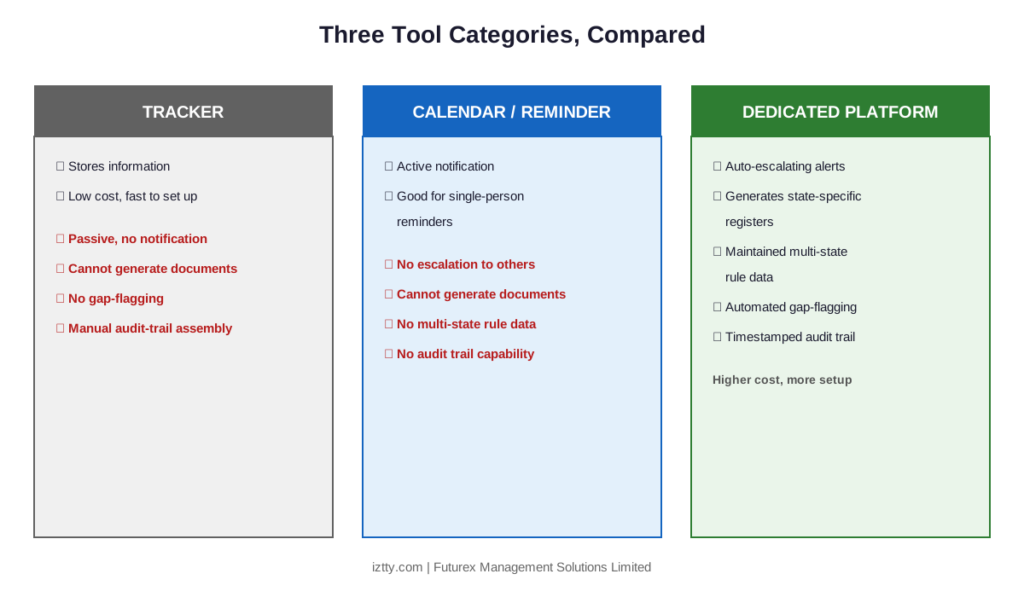
Trackers (spreadsheets, shared sheets, basic databases) store information: due dates, renewal status, documents collected. They don’t do anything on their own, they’re only as current as the last person who updated them, and they have no built-in way to flag that an update is overdue.

Calendars and reminder systems (Google Calendar, Outlook reminders, task management apps like Asana or Trello configured for compliance) add a notification layer on top of dates. They’re good at telling you something is due. They do nothing to help you actually prepare the filing, generate the correct register format, or verify a vendor’s documentation.

Dedicated compliance platforms combine data storage, automated alerts, document generation in the correct statutory format, and often a review/sign-off workflow. They cost more and take longer to set up than the first two categories, which is exactly why many companies default to trackers and calendars long after they’ve outgrown them.
Job 1: Tracking Filing Deadlines

A shared spreadsheet with due dates works for this job at small scale, provided someone checks it regularly, which is the actual failure point: a spreadsheet doesn’t notify anyone, it just sits there. A calendar app with recurring reminders closes that gap for a single person, but breaks down the moment the task needs to transfer to someone else, when the owner is on leave, or when a reminder gets dismissed without the EPF ECR filing actually being completed.

A dedicated platform wins this job once you have more than a handful of recurring filings, because it escalates to a second person automatically if the first doesn’t act, which neither a spreadsheet nor a personal calendar does on its own.

Job 2: Generating State-Specific Registers and Returns

This is where trackers and calendars both fail completely, neither one generates a document. A Factories Act Form 25 Muster Roll or Form 17 Overtime Register has to be produced in a specific, state-validated format, and a spreadsheet template someone built in-house drifts out of date the moment a state amends its format, often without anyone noticing until an inspector flags it. This job genuinely requires a platform with state-specific register templates built in and maintained, which is a structural requirement, not a nice-to-have.

Job 3: Managing Multi-State Rule Differences

A company operating in Maharashtra, Karnataka, and Tamil Nadu is managing three different Shops & Establishment renewal cycles, three different Professional Tax slabs, and potentially three different Labour Welfare Fund contribution rates. A spreadsheet can list all of this, but keeping it current across three states’ independent amendment schedules is a maintenance burden most internal teams underestimate until something slips. A platform with state-specific rule data built in and actively maintained is the only category that scales past two or three states without a dedicated full-time tracker.

Job 4: Vendor and Contractor Documentation

Collecting monthly EPF/ESIC proof from every active contractor, required under the Contract Labour (Regulation and Abolition) Act, 1970 to document that a company has been actively verifying contractor compliance, is a recurring collection-and-verification task. A spreadsheet can log what’s been collected, but it won’t flag a contractor who’s gone quiet for two months unless someone actively checks it weekly. A platform with automated contractor documentation tracking and a compliance score surfaces this gap without anyone having to remember to look. We cover the liability mechanism this job protects against in Vendor & Contractor Compliance: Managing Principal Employer (PE) Liability.

Job 5: Responding to a Regulatory Notice

None of the three tool categories can draft a legal response for you, this job always needs human judgment. But the tool matters for the preparation speed: with a spreadsheet, pulling together the relevant filing history and supporting documentation for a notice period typically takes 3 to 5 days of manual reconstruction. A platform that already has that history organized and retrievable, and that can extract the specific allegation from a scanned notice, can compress that preparation window to a few hours, leaving more of the actual response deadline for legal review rather than document hunting.

Job 6: Maintaining an Audit-Ready Trail

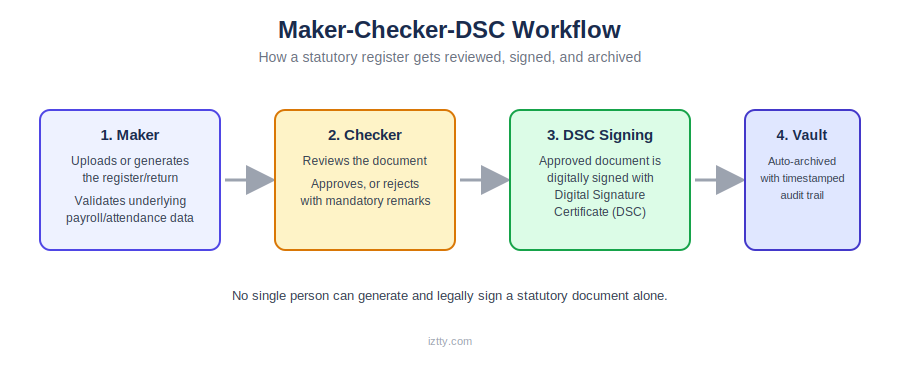
Due diligence requests and EPFO/ESIC reviews commonly ask for 12 to 24 months of organized filing history. A spreadsheet-and-folder system can technically hold this, but assembling it on request, confirming which version of which register was actually the one filed, is slow and error-prone without a system that timestamps and archives each filing automatically. A maker-checker-DSC workflow, where a document is prepared, reviewed, digitally signed, and archived as one linked process, is specifically what makes this job fast rather than a multi-day scramble.

Which Tool Wins for Each Job: The Comparison
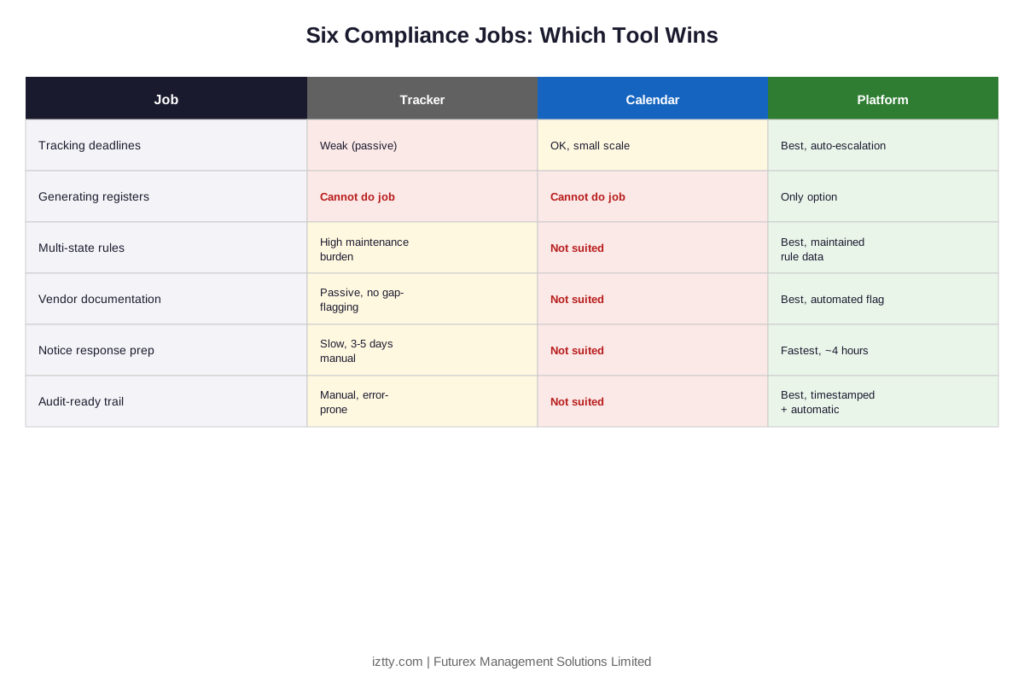
  • Tracking deadlines: Platform (at scale); Calendar (single person, low volume); Tracker (weakest, no active notification)
  • Generating state-specific registers: Platform only; Tracker and Calendar cannot do this job at all
  • Multi-state rule management: Platform (built-in, maintained rule data); Tracker (possible but high maintenance burden); Calendar (not suited to this job)
  • Vendor/contractor documentation: Platform (automated gap-flagging); Tracker (functional but passive); Calendar (not suited to this job)
  • Notice response preparation: Platform (fastest document retrieval); Tracker (slow manual reconstruction); Calendar (not suited to this job)
  • Audit-ready trail: Platform (automated, timestamped); Tracker (manual assembly, error-prone); Calendar (not suited to this job)

The pattern is consistent: trackers and calendars remain genuinely useful for the single job of personal reminders at very small scale, but every job involving document generation, multi-state consistency, or a defensible audit trail needs a dedicated platform, there’s no tracker-based workaround that holds up once a company crosses a handful of states, filings, or contractors.

Where Iztty Fits

Iztty is built around exactly this job breakdown rather than being a single generic “compliance software” feature set. Deadline tracking and escalation, state-specific register generation for Factories Act and Shops & Establishment obligations, multi-state rule data, CLRA vendor documentation tracking, and a maker-checker-DSC workflow for audit-ready sign-off are each a distinct module, built because each is a distinct job, not bundled as one undifferentiated feature. The AI Notice Response Assistant specifically targets Job 5, cutting notice preparation from the typical 3 to 5 days down to roughly 4 hours of review time by extracting the allegation and drafting a response directly from existing filing history.

A Practical Decision Framework
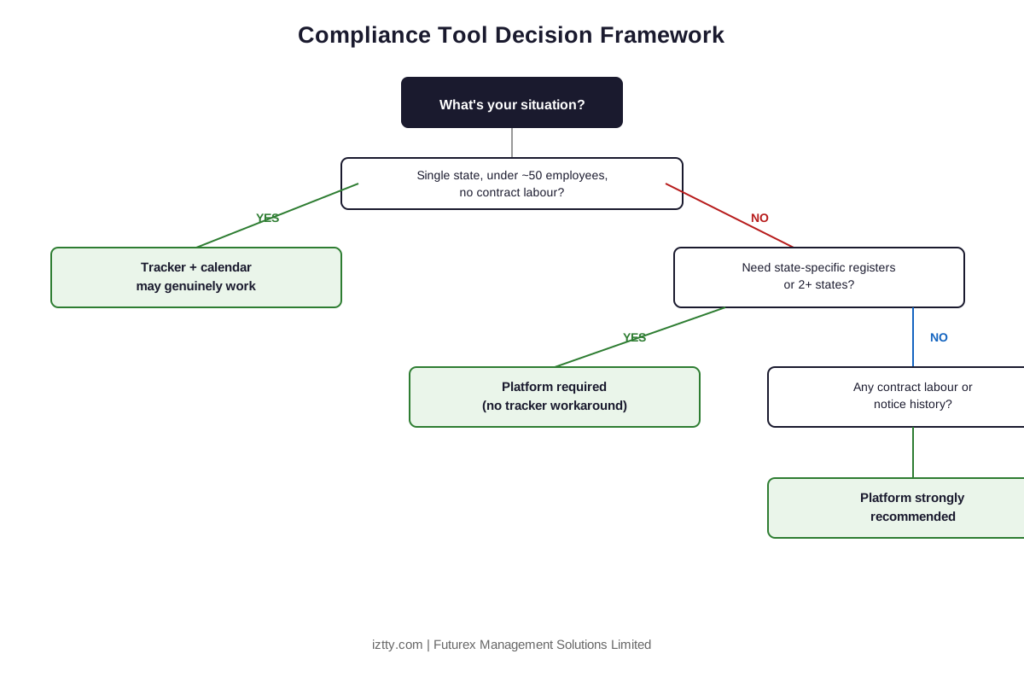
Match your situation to the right tool rather than defaulting to whatever you already have:

  • Single state, under roughly 50 employees, no contract labour: a well-maintained tracker with calendar reminders can genuinely work, provided someone owns checking it weekly.
  • Any state-specific register requirement (Factories Act, S&E): you need a platform, there is no tracker-based substitute for generating a compliant document.
  • Two or more states: a platform’s maintained rule data starts paying for itself once manual upkeep across states becomes a part-time job for someone.
  • Any contract labour engagement: a platform’s automated vendor documentation tracking closes a liability gap a spreadsheet structurally can’t catch proactively.
  • Have received a notice, or are preparing for funding-round due diligence: an organized, platform-based filing history is the difference between hours and days of preparation.

If you want this mapped to your specific states, acts, and current tool setup, book a free compliance audit with Iztty, which includes a review of what your current tools are and aren’t covering.

FAQs

Is a spreadsheet enough for compliance management?
For deadline tracking alone, at very small single-state scale, it can work if someone actively checks it. It cannot generate state-specific registers or flag vendor documentation gaps on its own, regardless of company size.

What’s the difference between a compliance calendar and compliance management software?
A calendar tells you something is due. Compliance management software additionally generates the required documents in the correct format, tracks multi-state rules, and often includes a review and sign-off workflow, a calendar does none of this.

Can Google Calendar or Outlook reminders replace dedicated compliance software?
Only for the single job of personal deadline reminders. They have no mechanism for document generation, multi-person escalation, or audit trail archiving, which are the jobs that actually cause compliance failures at scale.

When should a company move from a tracker to a dedicated platform?
Typically when any of these appear: a second state of operation, the first contract labour engagement, a Factories Act register requirement, or the first time assembling filing history for due diligence or a notice takes more than a day.

Do compliance management tools generate statutory registers automatically?
Dedicated platforms do, in state-specific formats for acts like the Factories Act 1948 and state Shops & Establishment Acts. Trackers and calendar tools cannot generate statutory documents.

How much does a dedicated compliance management platform cost compared to a spreadsheet?
A spreadsheet has no direct cost but carries hidden labour cost in manual upkeep and the risk cost of gaps going unnoticed. Platform pricing typically scales with employee count and states covered; request a quote mapped to your specific scale for an accurate comparison.

Does a compliance management tool help with CLRA contractor compliance?
A tracker can log what’s been collected from contractors, but only a platform with automated gap-flagging reliably surfaces a contractor who’s stopped submitting EPF/ESIC proof before it becomes a liability exposure.

What is a Maker-Checker-DSC workflow and why does it matter for tool selection?
It’s a review process where one person prepares a document, a second reviews and approves it, and the approved version is digitally signed before archiving. It matters for tool selection because it’s the mechanism that makes an audit trail defensible, something no spreadsheet or calendar tool provides.

Can I use a mix of tools, a spreadsheet for some things and a platform for others?
Yes, this is common during a transition, but it reintroduces the core risk a platform solves: inconsistent visibility, since a gap in the spreadsheet-tracked portion won’t surface in the platform’s dashboard. Most companies consolidate once the mixed-tool gap causes a visible problem.

How do I know which job is actually causing my current compliance pain?
Ask where the most recent near-miss happened: a missed deadline points to the tracking job, a wrong register format points to the generation job, a vendor liability surprise points to the documentation job. The job that’s failing tells you which tool category you’re actually missing.
Statutory Compliance Management in India: The Complete Guide (2026)

Statutory compliance management is a critical part of running any business in India, especially as organisations grow across multiple states, locations, and workforce categories. From EPF and ESIC filings to factory registers, labour licences, Professional Tax, and contract labour obligations, employers must manage multiple laws, deadlines, and documentation requirements simultaneously. A structured compliance management approach helps businesses stay ahead of these obligations, reduce regulatory risk, and maintain accurate records for audits, inspections, and due diligence.

What Statutory Compliance Actually Means for an Indian Employer

Statutory compliance, in practice, is not one obligation. It is a stack of overlapping obligations under separate central and state legislations, each with its own registers, forms, due dates, and penalty structure. A 200-employee manufacturing unit in Maharashtra with a warehouse in Karnataka is simultaneously subject to the Factories Act 1948, the Maharashtra Shops and Establishments Act, the Karnataka Shops and Commercial Establishments Act, the EPF & MP Act 1952, the ESI Act 1948, state Professional Tax rules, the Labour Welfare Fund Act (where applicable), and the Contract Labour (Regulation and Abolition) Act 1970 if any contractors are engaged on site.

Each of these carries its own filing calendar. EPF contributions and the Electronic Challan cum Return (ECR) are due by the 15th of every month. ESIC contributions follow a similar monthly cycle. CLRA half-yearly returns (Form XXIV) are due by 31 July and 31 January. Factory licence renewals typically run on an annual cycle but vary by state. Missing any one of these does not just risk a penalty; it creates a documented lapse that surfaces during audits, funding due diligence, or a labour department inspection.

This is the operational reality “compliance” refers to: dozens of acts, hundreds of registers and forms, and a filing calendar that never actually pauses. Our compliance calendar maps every one of these deadlines against your specific states so nothing gets tracked from memory.

See how this maps to your business: Book a Free Compliance Audit with Iztty and get a state-and-act-wise exposure report before your next filing deadline.


The Compliance Stack: Every Act, Register, and Filing You’re Responsible For

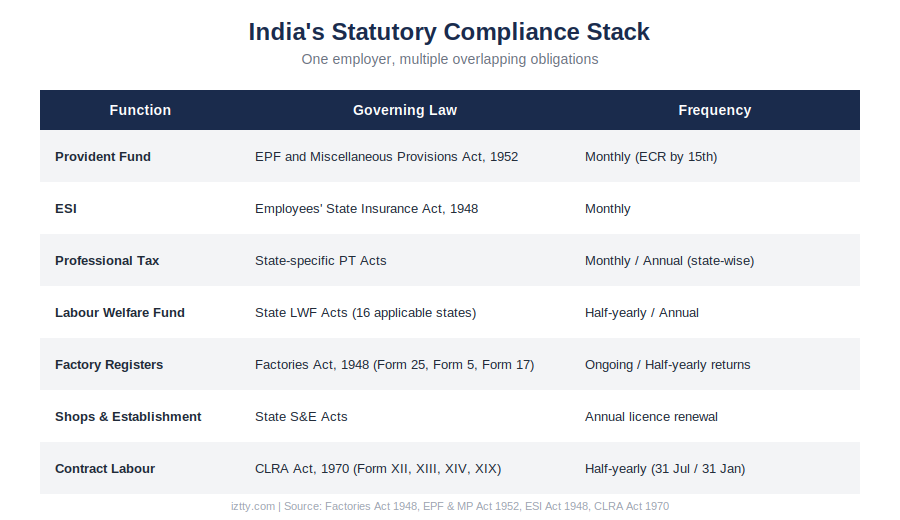
Here is what the stack actually looks like, broken down by function rather than by act name, since most compliance failures happen at the functional gaps.

FunctionGoverning LawKey Registers/FormsTypical Frequency
Provident FundEPF & MP Act, 1952ECR, Form 5A, Form 12AMonthly
ESIESI Act, 1948Monthly contribution, Form 6Monthly
Professional TaxState-specific PT ActsState PT returnMonthly/Annual (state-wise)
Labour Welfare FundState LWF Acts (16 applicable states)LWF contribution registerHalf-yearly/Annual (state-wise)
Factory RegistersFactories Act, 1948Form 25 (Muster Roll), Form 5 (Register of Accidents), Form 17 (Overtime)Ongoing/Half-yearly returns
Shops & EstablishmentState S&E ActsEmployee register, leave register, licence renewalAnnual renewal
Contract LabourCLRA Act, 1970Form XII, Form XIII, Form XIV, Form XIX; Form VI-B and Form XXIV returnsHalf-yearly (31 Jul/31 Jan)

A recurring failure point is treating this as a single “labour compliance” checklist rather than as separate, act-specific obligations that each need their own register format, since the Factories Act register format for a Karnataka unit is not the same as the S&E register format required for the same company’s Delhi office. Iztty’s platform generates each of these registers pre-mapped to the correct state format.

Get your own act-wise register mapping: See the full platform coverage.


Why Spreadsheets and Manual Tracking Break Down Past 50 Employees

Below roughly 50 employees and a single state of operation, a well-maintained spreadsheet and a diligent HR admin can genuinely keep up. The moment either of two things happens, that model breaks: a second state gets added, or contract labour gets engaged through a vendor.

A second state means a second set of S&E rules, a possibly different LWF applicability and rate, and a different Professional Tax slab. A vendor relationship means the principal employer now carries liability under CLRA for the contractor’s EPF, ESIC, and minimum wage compliance, even though the contractor’s payroll sits outside the company’s own HR system. Our vendor compliance module exists specifically to close this gap.

Three specific failure patterns show up repeatedly in manual setups:

  • Register format drift. Someone downloads a Form 25 template once and keeps reusing it, missing state amendments to the format.
  • Silent licence expiry. Factory and S&E licences renew annually, but there is no automatic 60/30/15-day alert, so renewal happens reactively, often after a lapse.
  • Vendor documentation gaps. Contractor EPF/ESIC challans are collected inconsistently, so when a labour inspector asks for proof of contractor compliance, the documentation trail has holes the principal employer is legally responsible for.

Run a live check on your own setup: Book a Demo and see where your current process has these exact gaps.


Statutory Compliance Management Software vs. HRMS Compliance Modules: The Real Difference

This is the comparison almost no vendor writes about honestly, because most vendors sit on one side of it.

HRMS platforms like greytHR, Keka, Zoho People, and similar tools bundle a compliance module alongside payroll, attendance, and leave. This works well for standard, single-state EPF/ESIC/PT payroll deductions. It generally does not extend to factory registers under the Factories Act, CLRA vendor audits, or DSC-based sign-off workflows, because those were never the HRMS’s core design problem.

On the other side, enterprise GRC and labour-law specialist platforms are built for the compliance function itself, often tracking obligations across a very wide act universe, but tend to be heavier and costlier to onboard for a mid-size manufacturer or a multi-branch retailer.

A genuinely useful way to decide: if your compliance need is “make sure EPF/ESIC/PT deduct correctly every payroll cycle,” an HRMS module may be sufficient. If your compliance need includes factory registers, CLRA vendor liability, DSC-signed statutory documents, or multi-state licence tracking, you need a dedicated statutory compliance platform, not a payroll add-on. Iztty is built to integrate with your existing payroll or HRMS tool (Tally, Zoho Payroll, Keka) rather than replace it, using our Provident Fund and Professional Tax modules alongside your current payroll data.

See where Iztty fits for your specific mix: Talk to a compliance specialist.


What Statutory Compliance Automation Should Actually Do

Compliance automation, done properly, should do four specific things, not just “digitise” a spreadsheet.

  1. Generate the correct register format automatically, matched to the applicable state and act, so a Form 25 for Gujarat and a Form 25 for Tamil Nadu are not the same static template.
  2. Track licence and filing due dates with tiered alerts, not a single reminder on the due date itself, using a live compliance calendar.
  3. Route every statutory document through review before it is legally signed, so a register or return does not go out the door without a second set of eyes.
  4. Surface risk in a single view, so a CFO or CHRO can see, state-by-state and act-by-act, where exposure currently sits, rather than assembling that picture manually before every audit.

This is the actual test for any “automation” claim in this space: can it generate the right form for the right state on its own, and can it show you your risk exposure without a manual pull-together exercise.

See this in a live environment: Explore Iztty’s AI Features.


Maker-Checker-DSC: The Workflow Most Platforms Skip

This is one of the most underdiscussed gaps in the Indian compliance software market. Most platforms let one person upload a register or generate a return and call it done. That is a single point of failure, both operationally and legally, since a statutory register with an error in it is still a legal document once filed.

A Maker-Checker-DSC workflow adds three checkpoints before anything is final:

  • Maker stage: The compliance executive uploads or generates the register/return and validates the underlying data (headcount, wages, attendance).
  • Checker stage: A second, more senior reviewer (often the Compliance Manager or CHRO) approves or rejects the document, with mandatory remarks on rejection so the maker knows exactly what to fix.
  • DSC stage: Once approved, the document is digitally signed using a Digital Signature Certificate, giving it the same legal standing as a wet-ink signature, then auto-archived to a document vault with a timestamped audit trail.

For a Compliance Manager or Company Secretary, this workflow is the difference between “we filed it” and “we can prove exactly who reviewed and signed it, and when,” which is precisely what a labour inspector or auditor asks for.

See the Maker-Checker-DSC workflow in action: Request a walkthrough.


Vendor and Contract Labour Compliance Under CLRA

If your organisation engages contract labour, either directly on-site or through a staffing vendor, the Contract Labour (Regulation and Abolition) Act 1970 makes the principal employer liable if the contractor fails to pay wages or remit EPF/ESIC for the contracted workforce. This liability does not disappear because the contractor’s payroll runs on a separate system.

Practically, this means the principal employer needs to collect, verify, and archive, on an ongoing basis:

  • The contractor’s EPF ECR and challan for the relevant month
  • ESIC contribution proof for the same period
  • Minimum wage compliance evidence for the contracted staff
  • Form XII (licence), Form XIII (register of workmen), Form XIV (employment card), and Form XIX (register of wages)
  • The half-yearly Form VI-B and Form XXIV returns, due 31 July and 31 January

A digital vendor compliance audit trail replaces the manual chase of emailing contractors for documents every month, auto-calculates a vendor compliance score based on documentation completeness and timeliness, and gives the principal employer a defensible liability record if a dispute or inspection arises. This is exactly what our Labour Compliance Services team at Futurex has handled for over a decade before it became a product feature.

Automate your contractor audit trail: See Vendor Compliance features or explore CLRA & Ease of Compliance.


Multi-State, Multi-Branch Compliance Management

Every state amendment to the S&E Act, every state’s differing LWF rate and periodicity, and every state’s Professional Tax slab structure means a company operating in five states is not running one compliance process five times. It is running five distinct, occasionally diverging processes that need to be visible in one consolidated view for leadership, while remaining accurate at the branch level for the person actually filing.

A functional multi-state compliance setup needs:

  • State-wise register formats that update automatically when a state amends its rules
  • Branch-level ownership (a Plant HR Head sees their factory’s obligations; the CHRO sees all locations)
  • A consolidated, real-time dashboard so a CFO or COO does not need a state-by-state status update meeting before every board review
  • Role-based access so the Maker at one branch cannot approve their own filing (see the Maker-Checker-DSC section above)

See multi-branch dashboards live: Book a Demo.


Handling an EPF/ESIC/Labour Department Notice

A notice from EPFO, ESIC, or a state Labour Department typically gives a narrow window, often 7 to 15 days, to respond with a formal reply and supporting evidence. The manual process (reading the notice, identifying the specific allegation and section cited, pulling the relevant registers and challans, and drafting a legally coherent reply) commonly takes a compliance team 3 to 5 days, which eats most of the response window before the reply is even reviewed internally.

An AI-assisted notice response workflow reads the notice (via OCR where it is a scanned document), extracts the specific allegation, the cited section, and the deadline, then drafts a formal reply along with a checklist of the exact evidence documents needed to support it. This compresses a 3-to-5-day manual process down to roughly 4 hours of review and sign-off time, which matters when the difference between an adequate reply and a rushed one can affect the outcome.

See the AI Notice Response Assistant: Explore AI Features.


How to Calculate Your Compliance Health Score

A useful compliance score is not a vague “green/yellow/red” label. It needs to be built from actual, weighted inputs:

  • Filing timeliness (were EPF/ESIC/PT/LWF filings made before the due date, on the due date, or late)
  • Register completeness (are all statutorily required registers present and current for each applicable act)
  • Licence validity (are factory and S&E licences current, or approaching/past expiry)
  • Vendor documentation completeness (for CLRA-covered contract labour)
  • Notice/inspection history (open notices or unresolved inspection findings weighted as higher risk)

A live score, broken down act-wise and state-wise with Low/Medium/High risk banding, gives a CHRO or CFO a genuine early-warning system rather than discovering exposure only during an audit or a funding round’s due diligence.

Check your current score: Get your Free Compliance Audit.


The Labour Codes 2026 Transition: What Changes for Compliance Software

India’s four Labour Codes (Wages, Industrial Relations, Social Security, and Occupational Safety, Health and Working Conditions) consolidate 29 existing central labour laws. As implementation rules are notified and states align their own rules, definitions such as “wages” for PF/gratuity calculation purposes, thresholds for applicability, and registration/licensing procedures are subject to change during the transition period.

For a compliance platform, this means the underlying rule engine and register templates need to be updated centrally as central and state rules are notified, rather than each company having to re-build its own templates. Because implementation timelines and specific provisions continue to be clarified by the Ministry of Labour & Employment, verify current applicability against the official Ministry of Labour & Employment portal and India Code before treating any single date as final, and treat platform vendor claims about “Labour Codes readiness” as something to verify against their actual update cadence, not just marketing copy.

Ask how Iztty handles Labour Code rule updates: Talk to us.


Choosing a Statutory Compliance Platform: A Practical Checklist

Use this before signing with any vendor, including Iztty:

  • Does it cover the specific acts relevant to you (Factories Act, S&E, CLRA), not just EPF/ESIC/PT payroll deductions?
  • Does it generate state-specific register formats automatically, and update them when states amend rules?
  • Does it support a Maker-Checker-DSC workflow, so no single person can generate and sign a statutory document alone?
  • Does it give you a real vendor/contractor compliance audit trail if you use contract labour?
  • Does it integrate with your existing payroll/HRMS (Tally, Zoho Payroll, Keka, etc.) rather than requiring a full system replacement?
  • Can you see a live, act-wise and state-wise compliance score, not just a document repository?
  • Who built it: a software company that added compliance as a feature, or a compliance consultancy that built the software to solve its own consulting practice’s problem?

Run this checklist against Iztty directly: Book a Free Compliance Audit.


Frequently Asked Questions

1. What is the difference between HRMS and compliance software?
An HRMS manages payroll, attendance, and leave, with EPF/ESIC/PT deduction as one feature. Dedicated compliance software like Iztty additionally manages factory registers, CLRA vendor audits, licence renewals, and DSC-signed statutory documents, which most HRMS platforms do not cover natively.

2. What is statutory compliance in HR?
It refers to an employer’s legal obligations under labour, factory, shops and establishment, social security (EPF/ESIC), and tax laws, including registration, contribution, record-keeping, and periodic filing requirements.

3. What is a statutory compliance checklist in India?
It typically covers EPF/ESIC registration and monthly contributions, Professional Tax and LWF filings, Factories Act or S&E Act registers and licence renewals, and CLRA compliance where contract labour is engaged, each tracked against its own due date.

4. What is the best HRMS for compliance in India?
The right choice depends on whether your need is payroll-linked deductions (where an HRMS module may suffice) or full statutory coverage including factory registers and CLRA (where a dedicated platform like Iztty is built for the requirement).

5. How much does compliance management software cost in India?
Pricing typically depends on employee count, number of states/branches, and whether vendor/CLRA compliance is included; most platforms price per employee per month with tiered enterprise plans for multi-state operations.

6. Are the Labour Codes 2026 already applicable?
Implementation is progressing in phases as central and state rules are notified. Confirm current applicability directly via the Ministry of Labour & Employment rather than relying on a fixed date, since timelines have shifted before.

7. What happens if a company misses an EPF or ESIC filing deadline?
Late EPF/ESIC filings attract interest and penalty under the respective Acts, in addition to creating a compliance gap that surfaces during inspections or audits.

8. Who is liable for a contractor’s EPF/ESIC compliance under CLRA?
The principal employer carries liability if a licensed contractor fails to remit EPF/ESIC or pay minimum wages to the contracted workforce, which is why documented vendor compliance audits matter.

9. What is a Maker-Checker-DSC workflow?
It is a three-stage review process where one person prepares a statutory document, a second person reviews and approves it, and the final version is digitally signed using a DSC before being archived, creating an auditable approval trail.

10. Can compliance software integrate with existing payroll tools like Tally or Keka?
Yes, platforms like Iztty are designed to integrate with existing payroll and HRMS tools such as Tally, Zoho Payroll, and Keka HR, so compliance sits alongside existing payroll data rather than replacing it.


Explore more on our compliance blogs or check our full FAQ library.

How the Maker–Checker–DSC Workflow Eliminates Compliance Errors for Indian Businesses

Most compliance errors are not failures of knowledge — they are failures of process. A wrong figure is keyed, no one independent checks it, and it is filed. The fix is structural: separate the person who prepares a submission from the person who approves it, and require a deliberate, signed final step. That is the Maker–Checker–DSC workflow.

The three roles

  • Maker — prepares the submission: the challan, the return, the register entry. They own accuracy of input.
  • Checker — an independent reviewer who verifies the figures and the supporting records before anything proceeds. They own the second pair of eyes.
  • DSC signatory — the authorised person who applies the Digital Signature Certificate as the final, accountable approval.

Why single-person review fails

When one person prepares and files, three things go unmanaged: there is no independent verification, no separation of duties, and no durable record of who approved what and when. Under pressure and volume, that is precisely when a transposed digit becomes an EPFO demand letter.

The audit trail is the real prize

A Maker–Checker–DSC chain produces, as a by-product, a complete record: who prepared the item, who reviewed it, what changed, who signed and at what time. When a query arrives months later, that trail answers it. Without the trail, you are reconstructing from memory and email.

Designing the chain so it is used, not bypassed

  • Make roles explicit and enforce separation — the maker cannot also be the checker.
  • Surface the queue: reviewers should see what is pending and what is overdue.
  • Keep the DSC step deliberate so signing is a conscious approval, not a reflex.
  • Log everything automatically; an audit trail that depends on people remembering to record steps will have gaps.

The pay-off is fewer errors reaching the government, faster detection of the ones that do, and an evidence trail that turns disputes into lookups.

See how Iztty handles this for you
Iztty is the AI statutory-compliance platform from Futurex Management Solutions Limited — compliance calendars, registers, challans, notice handling and Maker–Checker–DSC approvals in one workflow for businesses across India.See the approval workflow

What a 0–100% Compliance Health Score Tells Indian Businesses That a To-Do List Never Can

Most compliance tracking answers the wrong question. A checklist tells you what tasks were done. Leadership actually needs to know how compliant the business is right now — a forward-looking state, not a backward-looking log. That is the gap a compliance health score fills.

Checklist vs score

A to-do list is binary and local: a task is done or not, on one act, in one place. A compliance score is continuous and aggregate: it rolls up status across every applicable act, every operating state and every branch into a single, comparable number — and it moves as your real position changes.

What a good score actually measures

  • Coverage: are all applicable obligations identified for each entity and location?
  • Timeliness: are filings and payments made on or before due dates?
  • Completeness: are registers, challans and supporting records present and in order?
  • Open items: are notices and exceptions being resolved, or ageing?

Why a single number changes behaviour

A number that everyone can see creates accountability a buried checklist cannot. It makes branches comparable, surfaces the weakest location before an inspector does, and gives leadership a metric they can track over time and ask about in a review. The point is not the number for its own sake — it is that the number makes drift visible early, while it is still cheap to fix.

Reading the score honestly

A score is only as good as the data behind it. It should be transparent — you can drill from the headline number into exactly which obligation, in which state, is dragging it down. A score you cannot decompose is a vanity metric; a score you can act on is a management tool.

See how Iztty handles this for you
Iztty is the AI statutory-compliance platform from Futurex Management Solutions Limited — compliance calendars, registers, challans, notice handling and Maker–Checker–DSC approvals in one workflow for businesses across India.See the compliance score